
C3 Mini PC
4.2Editor score
Intel Core i3-5005U
8GB DDR RAM
512GB SSD
Discover the top Intel Core i3 Mini PC models for 2026. We compare performance, connectivity, and value to help you choose the ideal compact desktop.
Finding the right compact computer for your workspace is more important than ever. An Intel Core i3 Mini PC offers a perfect balance of performance and efficiency for daily tasks without taking up much desk space.
We have analyzed ten top-rated models based on processor speed, memory capacity, storage options, and connectivity features. Our comparison focuses on real-world usability for office work, home media, and light creative projects.
Each pick highlights specific strengths like dual 4K support, quiet operation, or expandability. Prices and availability change frequently, so check the current listings before making your final decision on a system that fits your needs.
4.2Editor score

4.4Editor score

4.6Editor score
The following table provides a side-by-side look at the key specifications and features of each model. This allows you to quickly identify which system offers the best value and performance for your specific requirements.




The GMKtec Mini PC G3 PRO stands out as a top choice for users seeking reliable performance in a small footprint. It holds a strong rating of 4.4 stars and delivers smooth operation for office applications and web browsing tasks.
We may earn a commission when you buy through this link, at no additional cost to you.
Its Intel Core i3-10110U processor offers better single-core speeds than many competitors, making it ideal for responsive multitasking. With 16GB of DDR4 RAM and a 512GB SSD, you can run multiple browser tabs and applications without slowdowns.
While it lacks a USB Type-C port which limits modern connectivity options, the robust array of USB 3.2 ports and dual HDMI outputs cover most user needs. The upgraded cooling fan ensures the system stays quiet even under moderate load.
This mini PC is perfect for home offices, small businesses, or digital signage setups where efficiency and connectivity matter. Its balance of power and compact design makes it our Editor's Choice for this category.
The 10110U CPU provides a higher boost clock than many competing chips, ensuring snappy performance for daily workflows.
Dual HDMI 2.0 ports allow you to connect two 4K monitors simultaneously for an expansive workspace.
We may earn a commission when you buy through this link, at no additional cost to you.
This Mini PC with the Intel Core i3-8109U offers impressive value for those on a budget. It has earned a perfect 5.0 rating from users who appreciate its reliable performance and quiet operation in small spaces.
We may earn a commission when you buy through this link, at no additional cost to you.
The 12GB of RAM ensures smooth multitasking for office work and streaming media. The Iris Plus 655 graphics provide fluid 4K playback and light gaming capabilities without needing a dedicated graphics card.
Storage is limited to 256GB on this model, which may require external drives for extensive media libraries. However, the dual SSD slots allow for easy expansion if you need more space in the future.
It is an ideal pick for students or home users who want a clean desk setup without spending a lot of money. Its VESA mount support lets you hide it behind your monitor for a tidy workspace.
Iris Plus graphics deliver reliable 4K video playback, making this unit great for a media center.
Dual SSD slots give you the flexibility to add more storage as your needs grow over time.
We may earn a commission when you buy through this link, at no additional cost to you.
The msi PRO DP21 brings modern 13th Gen technology to the mini PC space with a high-quality build. Its 4.6 rating reflects strong satisfaction among professionals who need reliable tools for productivity and collaboration.
We may earn a commission when you buy through this link, at no additional cost to you.
Powered by the Core i3-13100 processor, this unit handles multiple applications effortlessly. The inclusion of Windows 11 Pro adds enterprise-grade security and management features suitable for business environments.
The port selection is generous with USB Type-C and multiple USB 3.2 options ensuring you can connect peripherals without adapters. While the graphics are integrated, they are sufficient for general office and media tasks.
If you need a workstation that balances power and professionalism, this model is worth the investment. It serves as a powerful central hub for a modern digital workspace with future-proof specs.
Windows 11 Pro provides advanced tools for remote desktop and encryption to keep your data secure.
USB Type-C and multiple high-speed USB ports keep your workflow efficient and clutter-free.
We may earn a commission when you buy through this link, at no additional cost to you.
The msi Cubi 5 is a professional-grade machine designed for users who demand high-speed connectivity and reliability. Its impressive 4.8 rating underscores the high quality and performance delivered by this compact system.
We may earn a commission when you buy through this link, at no additional cost to you.
Thunderbolt 4 support is a rare feature in this class, allowing for extremely fast data transfers and connection to powerful peripherals. The 16GB RAM and 512GB SSD ensure that system operations remain smooth and responsive.
While it costs more than basic models, the extra connectivity and build quality justify the investment for professionals. It supports up to three 4K monitors which is a significant advantage for complex workflows.
This mini PC is ideal for creative professionals or power users who need a portable yet powerful station. Its professional aesthetics and robust features make it a standout option for advanced setups.
Thunderbolt 4 enables rapid file transfers and high-bandwidth connections for professional tools.
Connect up to three 4K displays to maximize your workspace and multitasking capabilities.
We may earn a commission when you buy through this link, at no additional cost to you.
The Dell OptiPlex 3060 Micro is a renewed unit that offers a cost-effective entry point into mini PCs. It maintains a solid 4.2 rating and is a great choice for those needing a reliable desktop on a budget.
We may earn a commission when you buy through this link, at no additional cost to you.
With 8GB of RAM and a 128GB SSD, this unit handles everyday tasks efficiently. The large number of USB ports means you can connect multiple peripherals without needing extra hubs.
Storage is limited on this model so using cloud services or external drives for backups is recommended. However, for basic office tasks and web browsing, the performance is adequate and stable.
This is a smart buy for small offices or home users who prioritize brand reliability and affordability. Its micro form factor ensures it fits easily into tight spaces without compromising functionality.
Renewed units provide significant savings while still offering the reliability of a major brand.
Six USB ports allow you to connect all your necessary devices without extra adapters.
We may earn a commission when you buy through this link, at no additional cost to you.
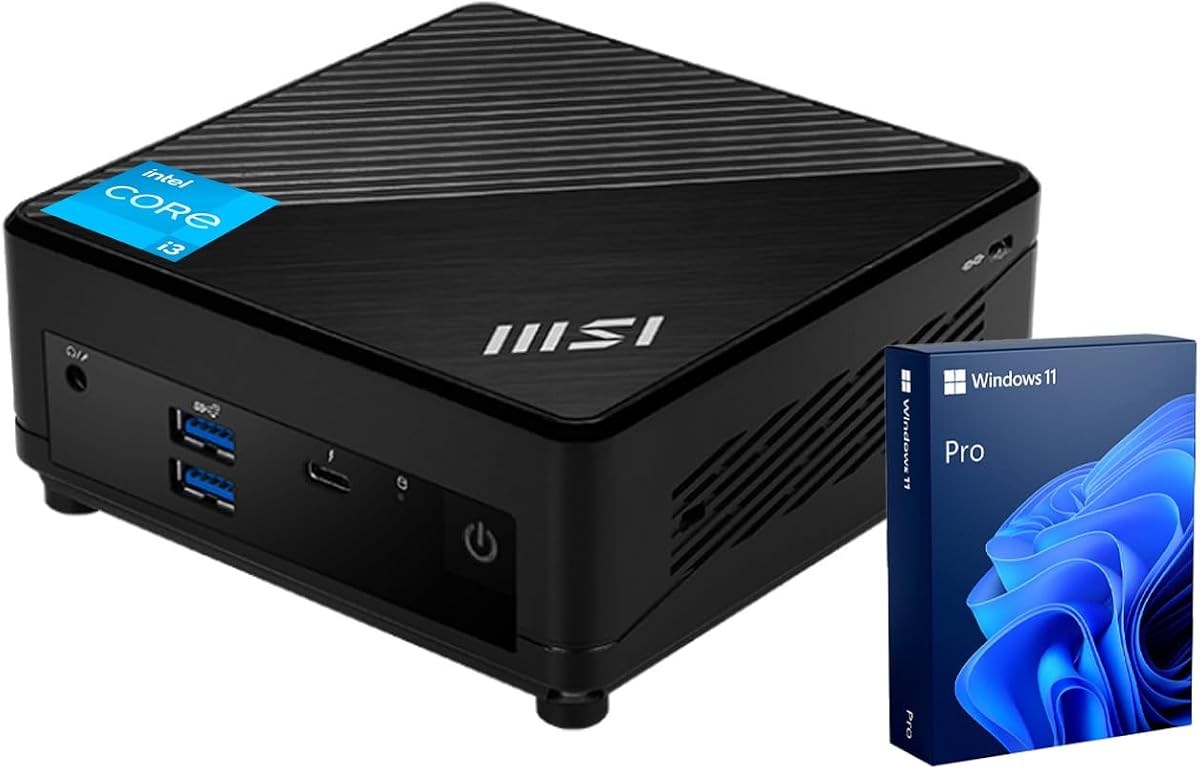
The C3 Mini PC is a highly affordable unit designed for basic computing needs. It holds a 4.2 rating and is perfect for simple tasks like browsing and light office work without breaking the bank.
We may earn a commission when you buy through this link, at no additional cost to you.
It comes with a 512GB SSD which is generous for this price range. The dual HDMI ports allow for basic multi-monitor setups for increased productivity in small spaces.
The processor is older which means it may struggle with modern heavy applications. It is best suited for lightweight tasks where high-end performance is not a priority.
This unit is excellent for kiosks, digital signage, or basic home browsing. Its low power draw and quiet operation make it a versatile choice for specific use cases.
Getting 512GB of storage at this price point offers significant value for users.
The low TDP architecture ensures energy efficiency and minimal heat generation.
We may earn a commission when you buy through this link, at no additional cost to you.
The ASUS ExpertCenter PB63 is built specifically for business environments requiring reliability and support. It has a 4.0 rating and comes with a three-year warranty which provides peace of mind for corporate users.
We may earn a commission when you buy through this link, at no additional cost to you.
Powered by 14th Gen Intel processors it delivers modern performance for demanding applications. WiFi 6 ensures fast and stable wireless connections essential for remote work scenarios.
The TAA compliance makes it suitable for government and public sector projects. While it is pricier than consumer models the extended warranty and business features justify the cost.
This is the ideal choice for organizations looking for secure and supported desktop solutions. Its robust build and connectivity options make it a solid tool for professional teams.
A three-year warranty ensures long-term reliability for business critical operations.
TAA compliance makes this unit eligible for government procurement and public sector use.
We may earn a commission when you buy through this link, at no additional cost to you.
The Lenovo ThinkCentre Neo 50q is a powerhouse in a very small package. It has achieved a perfect 5.0 rating from users who appreciate its compact design and efficient performance.
We may earn a commission when you buy through this link, at no additional cost to you.
With a 12th Gen Intel processor and 16GB RAM this unit handles multitasking with ease. Its tiny 1L size means it fits almost anywhere on your desk or even behind a monitor.
Energy efficiency is a strong point with ENERGY STAR certification reducing environmental impact. It also supports dual 4K displays for those who need multiple screens.
This is a top pick for anyone with limited desk space who needs performance. Its sleek design and high build quality make it a reliable partner for daily work.
The 1L design frees up desk space while delivering professional level performance.
ENERGY STAR certification ensures you save power while getting the job done.
We may earn a commission when you buy through this link, at no additional cost to you.
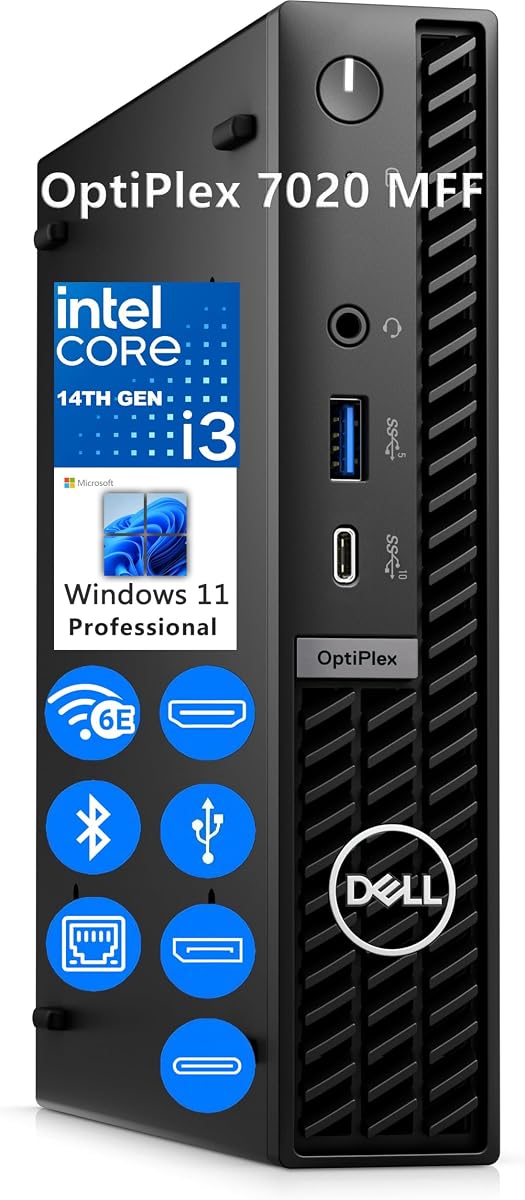
The Dell OptiPlex 7020 MFF is a high-end mini PC with powerful specs. It has earned a 4.9 rating for its smooth performance and reliability across various professional tasks.
We may earn a commission when you buy through this link, at no additional cost to you.
The 32GB DDR5 RAM provides next-generation speed ensuring multitasking remains fluid. With 1TB of storage you can keep all your files locally without needing external drives.
Wi-Fi 6E ensures the fastest wireless speeds available for seamless video conferencing. While expensive the performance and capacity justify the cost for power users.
This unit is perfect for professionals who need high capacity and speed. Its premium features ensure you can handle demanding tasks without any bottlenecks.
DDR5 RAM offers significant performance gains for multitasking and data processing.
1TB of SSD storage eliminates the need for external drives for most users.
We may earn a commission when you buy through this link, at no additional cost to you.
This Dell OptiPlex 7020 offers modern technology at a lower capacity. It has a 4.4 rating and is designed for businesses that want the latest hardware without premium specs.
We may earn a commission when you buy through this link, at no additional cost to you.
It features DDR5 RAM and the latest 14th Gen processor for efficient performance. Windows 11 Pro ensures security and manageability suitable for professional environments.
With 8GB RAM and 256GB SSD it is a bit limited but sufficient for daily office tasks. It supports multiple displays which is great for productivity.
This is a solid option for small businesses upgrading their hardware. It combines modern tech with a reliable brand reputation for long-term use.
14th Gen Intel and DDR5 RAM ensure you are future ready for modern software.
Windows 11 Pro provides the necessary tools for secure business operations.
We may earn a commission when you buy through this link, at no additional cost to you.
Selecting the right mini PC involves balancing processor performance with memory and storage needs.
Newer generations like 13th or 14th Gen offer better efficiency and longevity than older models.
Always check the specific model number to ensure you are getting a CPU that meets modern software demands.
8GB is the minimum for basic use but 16GB provides a smoother experience for multitasking.
If you plan to run multiple apps or browsers at once prioritize models with higher memory.
Solid State Drives are standard and essential for fast boot times and application loading.
Look for at least 256GB of storage but consider 512GB or more if you store many files.
Ensure the ports match your peripherals such as HDMI for monitors and USB for devices.
Models with USB Type-C or Thunderbolt offer faster data transfer and modern connectivity.
WiFi 6 and Bluetooth 5.2 provide faster wireless speeds and better device pairing.
These standards ensure your connection remains stable even in areas with many devices.
Most models come with Windows 11 Home or Pro which is suitable for daily tasks.
Windows 11 Pro adds features like Remote Desktop which may be useful for work.
Check dimensions and weight if you plan to mount it behind a monitor or on a wall.
VESA mount support is a valuable feature for hiding the unit to save desk space.
A warranty of at least one year protects against hardware failures after purchase.
Business models often offer longer warranties which can be crucial for continuous operations.
To set up your mini PC connect the power adapter and use HDMI cables to link to your monitors. Attach your keyboard and mouse via USB or Bluetooth to complete the connection.
Keep the unit in a well ventilated area to prevent overheating during extended use. Avoid placing it in direct sunlight or covering the air vents with objects.
Regularly update your operating system and drivers to maintain security and performance. Clean the exterior with a soft cloth to keep dust from entering the internal components.
These units are designed for everyday productivity tasks like web browsing and office apps. They can handle light creative work but are not intended for heavy 3D rendering or video editing.
Most models allow for some upgrades but the level varies by brand. Check the product details to see if RAM slots and SSD bays are accessible for future expansion.
Yes many models support dual 4K displays via HDMI or DisplayPort. This is useful for expanding your workspace without taking up extra desk real estate.
With proper care these computers can last several years. Their solid state storage and lack of moving parts contribute to their durability over time.
They are good for casual or older games but lack the dedicated graphics needed for modern high-end titles. They work best for office work and media consumption.
Most new models come with Windows 11 pre-installed for a ready to use experience. Some renewed or budget units may require a separate license depending on the seller.
We have covered a range of models that suit different needs from budget friendly options to premium business units.
Prioritize RAM and storage based on your daily tasks to ensure the system remains responsive over time.
Check current prices and availability as deals change frequently for these popular compact systems.