
SteelSeries Apex 3
4.6Editor score
Water resistant design
Whisper quiet switches
RGB illumination
Discover the top Mac gaming keyboards for 2026. We compare features, compatibility, and performance to help you choose the best mechanical board for your setup.
Finding the right gaming keyboard for your Mac setup can be challenging due to layout differences and compatibility issues. Many users struggle to find boards that work seamlessly with macOS while delivering the performance needed for competitive gaming. This guide explores the best options available to ensure smooth integration and responsive controls.
We evaluated each product based on its compatibility with macOS, build quality, switch types, and additional features like multimedia controls. Our analysis includes wireless and wired models to suit different preferences and desk setups. We focused on keyboards that offer reliable connectivity and robust construction for long-term use in gaming environments.
Each recommendation highlights key strengths and potential trade-offs to help you make an informed decision. We include detailed reviews and a comparison table to streamline your selection process. Keep in mind that product availability and pricing may fluctuate, so checking current listings is always recommended before purchasing.
4.6Editor score
4.3Editor score
4.0Editor score
This table provides a side-by-side comparison of the top ten keyboards evaluated for Mac compatibility and gaming performance. It highlights key specifications to help you quickly identify which model fits your needs.


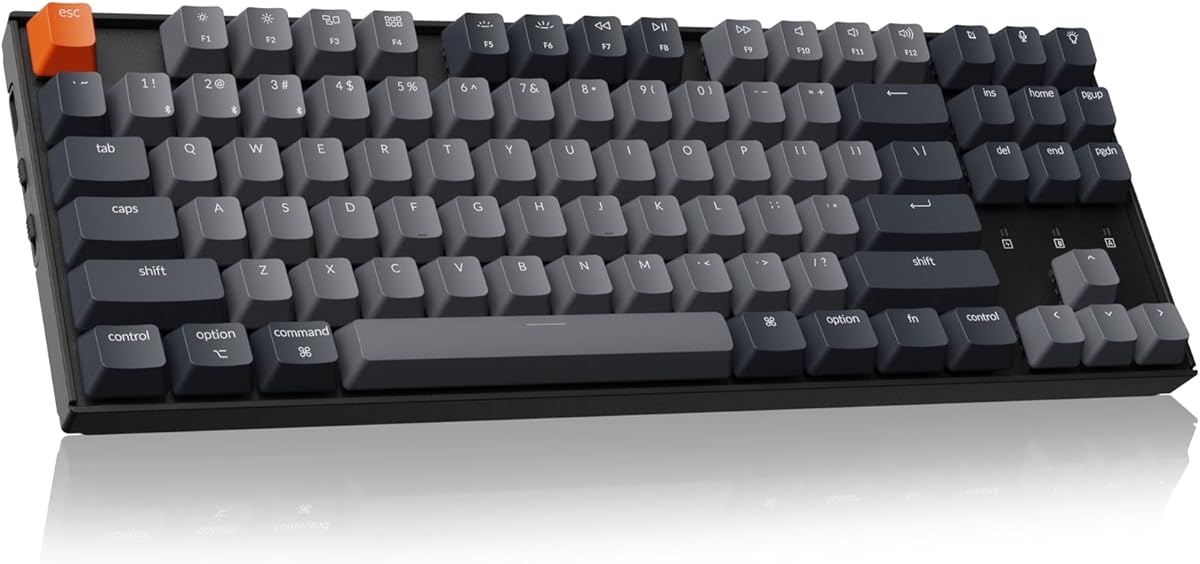
The Keychron K8 stands out as a top choice for Mac users seeking a mechanical keyboard that balances performance and compatibility. With a rating of 4.3, it offers a reliable wireless experience and tactile brown switches that suit both typing and gaming.
We may earn a commission when you buy through this link, at no additional cost to you.
Its TKL layout ensures a space efficient design while providing dedicated keys for essential navigation tasks. The inclusion of macOS function keys and extra keycaps means no need for complex remapping. Users appreciate the seamless switch between multiple devices via Bluetooth or wired connection.
While it lacks the extensive RGB customization found in some competitors, the white backlight provides adequate visibility in low light conditions. The battery life is impressive, lasting up to 200 hours with backlight off, making it ideal for users who prioritize uptime over flashy effects.
This keyboard is perfect for gamers and professionals who need a versatile input device that works seamlessly with macOS. Its sturdy construction and ergonomic design ensure comfort during extended sessions. If you value reliability and Mac specific features over high end gaming aesthetics, the K8 is a strong contender.
The K8 includes dedicated function keys and extra keycaps specifically for macOS, ensuring all essential shortcuts work out of the box without needing software adjustments.
Connect to up to three devices via Bluetooth 5.1 and switch between them instantly, allowing you to use the same keyboard across your Mac, Windows PC, and mobile devices.
We may earn a commission when you buy through this link, at no additional cost to you.
The SteelSeries Apex 3 offers an entry-level option for Mac gamers who want reliable performance without breaking the bank. Rated at 4.6, it features whisper quiet gaming switches that provide a smooth typing experience suitable for shared environments.
We may earn a commission when you buy through this link, at no additional cost to you.
Its IP32 water resistant coating protects against accidental spills, a common concern for gaming setups. The 10-zone RGB illumination adds a personalized touch to your desk while remaining simple to configure. A premium magnetic wrist rest ensures comfort during long gaming sessions.
Although it uses membrane switches rather than mechanical ones, the tactile feedback is sufficient for casual gaming and typing. The dedicated multimedia controls allow quick adjustments to volume and settings without interrupting your gameplay. It is a practical choice for those prioritizing durability and comfort.
This keyboard is ideal for students or home gamers looking for an affordable yet functional device. Its compatibility with Mac OS X ensures it works without issues. If you need a durable and quiet keyboard that handles spills well, the Apex 3 delivers excellent value for the price.
With IP32 water resistance, the Apex 3 is built to withstand minor accidents, making it a reliable choice for environments where drinks might be nearby during gaming.
The whisper quiet switches minimize noise during use, ensuring that your gaming sessions do not disturb others around you while maintaining responsive key presses.
We may earn a commission when you buy through this link, at no additional cost to you.
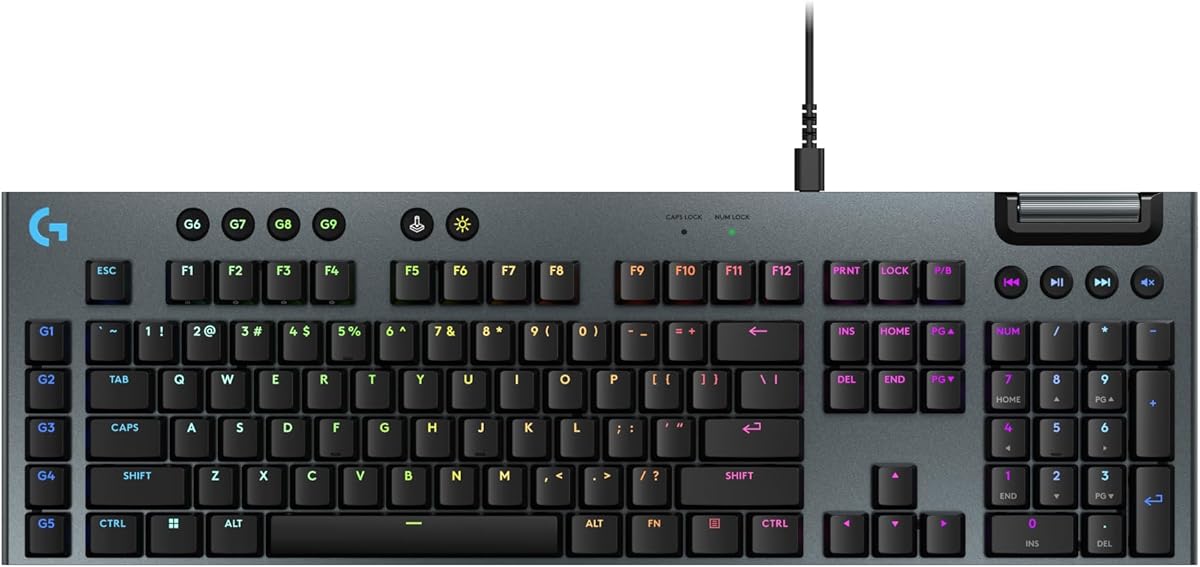
The Logitech G915 X represents the high end of gaming keyboard technology with its low-profile mechanical switches and premium materials. Rated at 4.0, it offers a full-size layout that includes a number pad for enhanced productivity alongside gaming performance.
We may earn a commission when you buy through this link, at no additional cost to you.
Its GL mechanical switches feature an actuation point of 1.3 mm, allowing for rapid input and increased actions per minute. The sand-blasted aluminum top plate and double-shot PBT keycaps provide a robust build that resists wear over time. LIGHTSYNC RGB enables deep customization of lighting effects.
While the price is higher than average, the build quality and performance justify the investment for serious gamers. The KEYCONTROL feature allows up to 15 functions per key, turning the keyboard into a powerful command center. However, it is wired, which may limit setup flexibility for some users.
This keyboard is best suited for enthusiasts who demand top-tier materials and performance from their peripherals. It is perfect for users who want a durable and aesthetically pleasing device. If you are willing to invest in a premium setup that prioritizes speed and customization, the G915 X is a top choice.
The low profile switches reduce travel distance, enabling faster keystrokes and providing a sleek aesthetic that modern desk setups favor.
With KEYCONTROL, you can remap keys and set complex macros, offering unparalleled control over your workflow and gaming strategies.
We may earn a commission when you buy through this link, at no additional cost to you.
The EPOMAKER X Aula F75 MAX introduces unique features like a customizable TFT screen and volume knob that enhance user interaction. Rated at 4.6, this wireless mechanical keyboard offers a 75% layout that balances functionality and desk space efficiently.
We may earn a commission when you buy through this link, at no additional cost to you.
Its gasket mount structure provides a softer and more flexible typing experience by separating the PCB from the shell. The hot-swappable design allows users to change switches easily without soldering, appealing to enthusiasts who enjoy modifying their gear. The creamy sound profile is achieved through foam padding and lubricated switches.
Compatibility with Mac ensures it works well for users across different ecosystems. The volume knob offers quick access to audio adjustments during gaming sessions. While the software offers extensive customization, it may require some time to master for new users. Overall, it provides a modern take on mechanical keyboards.
This keyboard is ideal for tech-savvy gamers who want a device that offers distinct visual and functional features. The TFT screen allows for personalized animations or info displays, making it stand out. If you value a unique aesthetic and the ability to tweak your keyboard's performance, the F75 MAX is a compelling option.
The customizable screen allows you to display GIFs, battery status, and other info, adding a layer of interactivity rarely found in standard keyboards.
The gasket mount design reduces bottom-out harshness, creating a softer and more satisfying typing experience for long sessions.
We may earn a commission when you buy through this link, at no additional cost to you.
The Logitech G413 TKL SE delivers a solid gaming experience with its tenkeyless design and durable mechanical construction. Rated at 4.6, it features tactile switches that provide clear feedback for both typing and gaming scenarios. The PBT keycaps ensure resistance to wear and shine over time.
We may earn a commission when you buy through this link, at no additional cost to you.
Its brushed aluminum top case gives the keyboard a premium feel and helps prevent flex during intense use. Dedicated media keys allow you to control volume and playback instantly using the FN key. The 6-key rollover anti-ghosting performance ensures accurate input during complex key combinations.
While it lacks wireless capabilities, the wired connection guarantees stability and low latency for gaming. The white LED lighting is simple but effective for visibility. This model is straightforward and focuses on core functionality rather than extra bells and whistles. It serves well as a dedicated gaming keyboard.
This keyboard is perfect for users who want a no-nonsense mechanical board with excellent build quality. The compact TKL layout saves desk space for mouse movement. If you prioritize durability and consistent performance in a smaller form factor, the G413 TKL SE is a dependable choice for your Mac setup.
PBT keycaps are heat and wear-resistant, ensuring the text remains crisp and the texture stays consistent even after prolonged use.
Removing the number pad saves significant desk space, which is beneficial for gamers who need more room for mouse movement.
We may earn a commission when you buy through this link, at no additional cost to you.
The Redragon K742 offers exceptional value with its gasket structure and tri-mode connectivity options. Rated at 4.6, it delivers a quiet and satisfying typing experience thanks to pre-lubed switches and sound-absorbing paddings. The 98% compact layout retains functionality while saving space.
We may earn a commission when you buy through this link, at no additional cost to you.
With support for QMK and VIA, users can remap keys and edit macros extensively for maximum control. The tri-mode connection allows switching between Bluetooth, 2.4GHz, and USB-C wired modes seamlessly. A dedicated volume knob enhances convenience for media control without leaving the game.
The hot-swappable PCB allows for easy switch changes, extending the lifespan of the keyboard. Its build quality feels robust with double-shot PBT keycaps that resist wear. While the software requires some learning, the flexibility it offers is rare at this price point. It bridges the gap between gaming and productivity.
This keyboard is suitable for those who want advanced customization without paying a premium price. The combination of a volume knob and strong connectivity makes it versatile for various setups. If you seek a highly adaptable mechanical keyboard that supports deep configuration, the K742 is an outstanding choice.
Support for QMK and VIA means you have unlimited control over keymaps and macros, allowing the keyboard to adapt perfectly to your workflow.
Five layers of sound-absorbing padding create a quieter and more pleasing acoustic experience, reducing click noise significantly.
We may earn a commission when you buy through this link, at no additional cost to you.
The Keychron K4 maximizes desk space with its 96% layout that includes a number pad in a compact frame. Rated at 4.4, it offers a tactile typing experience with Keychron Super Brown switches and strong connectivity. It connects to up to three devices via Bluetooth seamlessly.
We may earn a commission when you buy through this link, at no additional cost to you.
Its unique Mac layout ensures all necessary function keys are present for macOS users. The battery life is notable, lasting up to 240 hours with the backlight disabled. White LED backlighting provides a clean look that suits various setups without being distracting. It supports both wireless and wired modes.
The 96% layout may feel tight for users accustomed to full-size boards, but it retains all essential keys for productivity. The N-key rollover ensures accurate input during gaming. While it is primarily for general use, it handles gaming tasks well. It is a great option for users needing a full feature set in a small area.
This keyboard is ideal for users who need a number pad but lack desk space for a full keyboard. The wireless connectivity makes it easy to switch between work and gaming devices. If you want a compact board that does not sacrifice number pad functionality, the K4 is a strong contender for Mac users.
The 96% layout allows you to keep a number pad without sacrificing too much desk real estate, balancing functionality and space.
With up to 240 hours of battery life, the keyboard remains reliable for weeks without needing a recharge, even with moderate use.
We may earn a commission when you buy through this link, at no additional cost to you.
The Logitech MX Mechanical combines productivity and gaming with its low-profile mechanical switches and smart backlighting. Rated at 4.2, it offers a full-size form factor that supports ergonomic typing and precise feedback. It pairs with up to three devices across different operating systems seamlessly.
We may earn a commission when you buy through this link, at no additional cost to you.
Smart illumination detects hand movement and adjusts lighting levels based on ambient conditions, saving battery and enhancing usability. The tactile switches provide a satisfying bump without excessive noise, suitable for office environments or shared spaces. USB-C charging ensures long uptime for extended work and gaming sessions.
While it lacks dedicated gaming modes, its robust build and responsiveness make it capable for casual gaming. The Flow feature allows easy file transfer between devices, increasing productivity. This keyboard is tailored for users who switch frequently between work and play. It prioritizes comfort and usability over flashy gaming features.
This keyboard is perfect for professionals who also game occasionally and want a premium input device. The low-profile design reduces strain during long typing sessions. If you value a balanced keyboard that looks great and feels comfortable for all tasks, the MX Mechanical is a top choice.
The backlight automatically adjusts based on your hands and room light, ensuring visibility while conserving battery power efficiently.
Switching between macOS and Windows is seamless with easy pairing options, making it versatile for diverse computing environments.
We may earn a commission when you buy through this link, at no additional cost to you.
The GravaStar Mercury K1 features a distinctive aluminum alloy exoskeleton that makes it visually unique on any desk. Rated at 4.7, it delivers a smooth typing experience with custom linear switches and a gasket-mounted design. The 75% layout retains essential function keys while saving space.
We may earn a commission when you buy through this link, at no additional cost to you.
Its tri-mode connectivity allows seamless switching between wired and wireless connections. The sound-dampening foam ensures a comfortable acoustic profile during long sessions. RGB lighting offers 13 modes and 16.8 million colors for personalization. This keyboard is designed to be a centerpiece of your gaming setup.
While the design might be too bold for minimalist setups, it stands out for users who want a futuristic look. The switches are tuned for quick reactions and minimal accidental presses. It works well with macOS, offering versatility across different platforms. Durability is enhanced by the sturdy metal frame.
This keyboard is best for users who prioritize style and performance equally. The unique design ensures it stands out in any collection. If you want a mechanical keyboard that looks impressive and performs reliably, the Mercury K1 is a standout choice for Mac gamers.
The aluminum alloy exoskeleton provides strength and a futuristic look, distinguishing it from standard plastic keyboards on the market.
Multiple layers of foam reduce vibration and noise, creating a pleasing sound profile that feels premium during use.
We may earn a commission when you buy through this link, at no additional cost to you.
The Logitech G213 Prodigy offers a full-size experience with dedicated media controls and customizable lighting zones. Rated at 4.2, it provides durable construction that repels liquids and dirt. The integrated palm rest ensures comfort during long gaming sessions without needing extra accessories.
We may earn a commission when you buy through this link, at no additional cost to you.
Each key is tuned for a tactile feel, enhancing responsiveness during gameplay. The anti-ghosting matrix ensures multiple keys register correctly, which is vital for gaming. RGB lighting zones allow you to personalize your setup with over 16.8 million colors. It syncs with other Logitech devices for a unified look.
While it uses non-mechanical switches, they provide a satisfying click without the high cost of mechanical boards. The software allows macro programming for improved efficiency. This keyboard is practical for users who need a full layout on a budget. It serves both gaming and productivity tasks well.
This keyboard is ideal for casual gamers or users who want a full keyboard without spending much. The palm rest and spill resistance add to its practicality. If you need a versatile and affordable keyboard that handles gaming and daily use effectively, the G213 Prodigy is a great option.
The built-in palm rest reduces wrist strain, making long typing or gaming sessions more comfortable without adding extra items.
Spill-resistant design helps protect the keyboard from liquid damage, extending its lifespan in busy environments.
We may earn a commission when you buy through this link, at no additional cost to you.
Selecting the right keyboard involves evaluating compatibility, build, and features. This guide outlines key factors to consider for Mac gaming setups.
Mac OS differs from Windows in key mappings and shortcuts. Ensure the keyboard supports macOS function keys or includes a mode switch to adapt to Apple systems. Many boards like Keychron provide extra keycaps to resolve conflicts.
Choose a keyboard that supports macOS function keys or includes a mode switch to adapt to Apple systems.
Mechanical switches come in tactile, linear, and clicky varieties. Tactile switches offer feedback ideal for typing, while linear switches are smoother for gaming. Consider your preference for noise and resistance levels.
Select switches that match your preference for noise and tactile feedback during long use sessions.
Wireless keyboards provide flexibility and reduce cable clutter, but ensure they have low latency modes for gaming. Wired keyboards offer consistent performance. Check battery life if opting for wireless to avoid frequent charging.
Opt for wireless if you need a clean setup, but prioritize low latency modes and battery reliability.
Durable materials like aluminum cases and PBT keycaps increase longevity. A solid frame minimizes flex during intense gaming. Avoid lightweight plastic models if you plan heavy use.
Look for aluminum frames and PBT keycaps to ensure the keyboard withstands heavy usage.
TKL or 60% layouts save desk space for mouse movement, while full-size offers a number pad. Choose based on your gaming needs and available desk area. Compact layouts are preferred for competitive gaming.
Choose TKL or full-size based on whether you prioritize desk space or number pad functionality.
RGB lighting allows personalization and visibility in low light. Look for customizable zones and software control to match your setup. Some models offer smart lighting that adjusts to ambient conditions.
Prioritize customizable zones and software control to match your setup style and visibility needs.
Multi-device support allows switching between Mac and Windows easily. Bluetooth and USB-C options offer flexibility. Ensure the connection is stable for gaming without lag or disconnection issues.
Ensure the connection is stable for gaming without lag and supports multiple devices.
Budget keyboards offer basic features while premium models have advanced customization. Determine your spend limit and prioritize must-have features like durability or wireless. Balance cost with expected lifespan.
Balance cost with expected lifespan by prioritizing must-have features like durability or wireless connectivity.
Proper placement on your desk can improve typing ergonomics. Position the keyboard so your elbows are at a 90-degree angle to prevent strain. Adjust the feet to your preferred height and angle for long sessions.
Clean the keyboard regularly to remove dust and debris. Use compressed air to clean between keys and a soft cloth for the surface. Avoid harsh chemicals that might damage the keycaps or casing.
Update firmware and drivers as needed for optimal performance. For wireless models, charge the battery before it depletes completely to maintain health. Store it in a cool, dry place when not in use to extend lifespan.
Most Mac gaming keyboards are dual compatible with Windows. They often include extra keycaps or a switch mode to handle OS-specific functions. Check the product details for confirmation of multi-system support before buying.
Mechanical switches offer tactile feedback, durability, and faster response times compared to membrane switches. They last longer and provide a more satisfying typing experience, which is ideal for gaming and heavy use.
Modern wireless gaming keyboards use low-latency technologies that minimize lag. Look for models with dedicated gaming modes or 2.4GHz connectivity to ensure performance matches wired alternatives.
TKL keyboards are often preferred for competitive gaming as they free up desk space for mouse movement. They retain essential keys for gameplay while offering a compact form factor suitable for most setups.
Use compressed air to remove dust and debris from between keys. A soft cloth dampened with mild soap water can wipe the surface. Avoid soaking the keyboard or using abrasive materials.
High-quality mechanical keyboards can last millions of keystrokes, often exceeding five to ten years with proper care. Regular maintenance and avoiding spills can significantly extend the lifespan.
We have highlighted ten top keyboards that offer unique features and reliable performance for Mac users. From the versatile Keychron K8 to the premium Logitech G915 X, each model serves different needs and budgets effectively.
Prioritize your specific requirements such as wireless connectivity, layout preference, or budget constraints. A keyboard that matches your gaming style and workspace will enhance your overall experience significantly.
Remember that product availability and prices may change. Always verify current listings and check compatibility before making your final purchase to ensure the best fit.