
Square Reader for magstripe (USB-C)
4.6Editor score
Quick setup with free app
Accepts major credit cards
Compact USB-C design
This guide compares the top credit card swipers for businesses, covering magnetic stripe readers, mobile POS systems, and secure payment terminals to help you
Credit card swipers are essential tools for modern businesses that need to accept payments quickly and securely. Whether you run a small shop or a mobile service, finding the right reader ensures smooth transactions and satisfied customers.
We evaluated ten top-rated credit card swipers based on compatibility, ease of use, and transaction speed. Our analysis covers USB readers, mobile devices, and advanced terminals to help you find the best fit for your needs.
Each pick in this list highlights key features and real-world performance to guide your decision. Please note that product availability and pricing can change frequently, so always check current details before purchasing.
4.6Editor score

4.5Editor score

3.9Editor score
The following table provides a side-by-side comparison of all ten credit card swipers, highlighting their key specifications and capabilities to help you make an informed decision.



The Square Terminal stands out as a comprehensive payment solution for businesses of all sizes. With a strong rating of 4.5, it combines card reading, sales tracking, and receipt printing into one sleek device. Its ability to handle various payment types makes it a top choice for modern retailers.
We may earn a commission when you buy through this link, at no additional cost to you.
Key strengths include its speed and versatility. The device processes chip cards in just two seconds, reducing wait times for customers. Additionally, the built-in battery ensures you can work cordlessly throughout the day without hunting for power outlets. The integrated software simplifies inventory management and digital receipts.
While it offers great functionality, the initial investment is higher than basic USB readers. However, this cost is offset by the lack of long-term contracts and transparent pricing. The device is designed to integrate seamlessly with the Square ecosystem, which may limit flexibility for those using other platforms.
This terminal is ideal for merchants who want a reliable, all-in-one system without monthly fees. Whether you run a cafe or a retail store, it streamlines transactions effectively. For businesses prioritizing ease of use and speed, this device delivers exceptional value.
The integrated software allows for quick ring-ups and inventory tracking, reducing the need for separate systems.
With a long-lasting battery, you can move around your store or accept payments at events without being tethered to a counter.
We may earn a commission when you buy through this link, at no additional cost to you.
The Square Reader for magstripe offers an accessible entry point for businesses needing basic payment processing. With a high rating of 4.6, it is praised for its simplicity and low cost. It pairs easily with mobile devices to accept magstripe cards quickly and securely.
We may earn a commission when you buy through this link, at no additional cost to you.
Its main advantage is the straightforward setup. You can download the free app, create an account, and start taking payments almost immediately. The USB-C connector ensures compatibility with newer devices, and the compact size makes it easy to carry for mobile services.
However, it only supports magnetic stripe cards, which limits its use as chip technology becomes more prevalent. While this may suffice for low-volume sellers, larger businesses might need more robust options. The reliance on a smartphone also means you need a stable connection for transactions.
This reader is perfect for freelancers, food trucks, or small shops just starting out. It eliminates the need for complex hardware while providing essential tracking features. If you prioritize cost and convenience over advanced security, this is a solid choice.
With no long-term commitments and minimal upfront cost, it allows new businesses to start accepting cards without financial risk.
Designed to work with smartphones, it empowers sellers to accept payments anywhere, from markets to client sites.
We may earn a commission when you buy through this link, at no additional cost to you.
The PAX S300 v2 is a sophisticated payment terminal designed for multilane merchants requiring high security. With a rating of 3.9, it appeals to businesses that need robust features like EMV and contactless payments. Its build quality and security protocols set it apart from basic readers.
We may earn a commission when you buy through this link, at no additional cost to you.
Key strengths include PCI PTS 3.x certification and SRED encryption, ensuring transaction data is protected. The large color touch screen and loudspeaker provide a clear, user-friendly interface for customers. Connectivity options like Ethernet and USB make it versatile for fixed locations.
Despite its capabilities, the setup is more involved than simple plug-and-play devices. It requires a specific merchant account and may need technical knowledge to configure fully. The higher price point also reflects its enterprise-grade features, which may not be necessary for small vendors.
This terminal is best suited for retail environments with high transaction volumes and security concerns. If you need a reliable, secure system for a physical store, it delivers professional performance. For those willing to invest in security, it is a strong option.
With PCI compliance and end-to-end encryption, it offers peace of mind for businesses handling sensitive customer data.
The large screen and clear audio prompt customers through transactions smoothly, reducing confusion at the point of sale.
We may earn a commission when you buy through this link, at no additional cost to you.
The MSR90 USB Swipe is a dependable reader for businesses needing straightforward magnetic stripe processing. With a 4.2 rating, it is known for its plug-and-play functionality and durability. It reads multiple tracks and works across different operating systems without complex installation.
We may earn a commission when you buy through this link, at no additional cost to you.
Its standout quality is the bi-directional swipe reading, which handles worn or scratched cards reliably. The configuration software allows users to adjust settings easily, making it versatile for various applications like ID verification or loyalty programs. Threaded inserts help secure it to counters.
While effective, it is limited to magstripe cards, which may not meet current security standards for all users. The LED indicator is functional but basic, offering less feedback than advanced terminals. It is best used as a secondary reader or in low-security environments.
This device is ideal for offices or shops that need a simple way to capture card data quickly. It pairs well with POS systems or spreadsheets for record-keeping. If you need a robust USB reader without bells and whistles, this fits the bill.
Supporting Windows and Mac with no drivers simplifies integration into existing tech setups without IT overhead.
Built to withstand over a million swipes, it ensures longevity even in busy retail or administrative settings.
We may earn a commission when you buy through this link, at no additional cost to you.
This USB Magnetic Stripe Reader offers a standard solution for capturing card data efficiently. With a 4.2 rating, it is appreciated for its simplicity and compatibility with various software. It reads all three tracks and works seamlessly with text editors or POS systems.
We may earn a commission when you buy through this link, at no additional cost to you.
Key strengths include its ability to handle both high and low coercivity cards. The LED indicator provides clear feedback during swipes, reducing errors. Configuration software is available for users who need to customize settings for specific workflows or industries.
However, like other magstripe readers, it lacks chip card support, which limits its use for secure transactions. The cable length may be restrictive for some counter setups. It serves best as a supplementary tool for data entry rather than a primary payment processor.
Ideal for small businesses or admins needing to input card details quickly, it offers great value. It works well with Excel or Word for generating quotes or tracking info. If you need a basic reader for non-critical data, this is a practical choice.
It works with common apps like Word and Excel, making it easy to integrate into existing data workflows.
Adjustable settings allow users to tailor the reader to specific needs, such as different card formats or security levels.
We may earn a commission when you buy through this link, at no additional cost to you.
The ETEKJOY USB Reader is a compact option designed for businesses with limited space. With a 4.3 rating, it offers solid performance for magstripe card reading. Its longer cord and mounting options make it adaptable to various counter setups.
We may earn a commission when you buy through this link, at no additional cost to you.
Key strengths include the 145cm USB cord, which provides flexibility in placement. The screw holes allow for secure attachment, preventing accidental dislodging. It supports standard card formats, making it suitable for loyalty programs or basic POS integration without complex drivers.
However, it does not support chip cards, which limits its security capabilities. The build is functional but basic, relying on plastic housing. It is best used for low-risk transactions or as a backup device in busy environments where reliability is key.
This reader is a good fit for small shops or mobile teams needing a portable solution. It pairs easily with laptops for quick data entry. If you prioritize portability and ease of installation, this model delivers practical value.
The extended cord length allows you to position the reader comfortably without stretching cables or reaching across the counter.
Screw holes ensure the device stays fixed in place, reducing wear and tear from frequent movement.
We may earn a commission when you buy through this link, at no additional cost to you.
The 2xhome POSMATE Set offers a practical bundle for businesses needing multiple readers. With a 4.1 rating, it is valued for its cost-effective approach. The set includes two units, allowing for redundancy or multi-station use without extra cost.
We may earn a commission when you buy through this link, at no additional cost to you.
Key strengths include compatibility with ISO and ANSI standards, making it suitable for credit cards, licenses, and more. The 150cm cable ensures enough reach for different workstation layouts. It is simple to set up, requiring no specialized training for staff.
However, it lacks encryption features, so it is not suitable for secure payment processing. It is best used for loyalty programs, inventory tracking, or ID verification. Users should ensure their POS system aligns with its limitations before purchasing.
This bundle is ideal for small teams needing backup devices or multiple points of sale. It provides flexibility without breaking the bank. If you need simple data capture tools for non-financial use, this set is a convenient choice.
Buying two units together saves money and ensures you always have a backup ready when one is unavailable.
Beyond payments, it can handle license data and membership cards, expanding its utility across different business needs.
We may earn a commission when you buy through this link, at no additional cost to you.
The SumUp Plus Reader is a mobile option for accepting payments on the go. With a 3.8 rating, it offers Bluetooth and NFC support for contactless transactions. It is designed to work seamlessly with smartphones via a free app.
We may earn a commission when you buy through this link, at no additional cost to you.
Key strengths include its acceptance of contactless payments, which is increasingly popular. The low transaction rate and no long-term contracts make it attractive for small businesses. It is compact and easy to carry, suitable for markets or delivery services.
However, some users report occasional Bluetooth pairing issues that can delay transactions. The reporting features are basic compared to full POS systems. For reliable performance, a stable smartphone connection is necessary, which may vary by location.
This reader is best for freelancers or vendors who need quick, mobile payment options. It simplifies the checkout process without expensive hardware. If you prioritize flexibility and low fees, this device provides a decent solution for small transactions.
Supporting NFC and RFID allows customers to tap to pay, speeding up transactions and improving convenience.
No long-term commitments let you test the system without being locked into a contract, reducing risk for new users.
We may earn a commission when you buy through this link, at no additional cost to you.
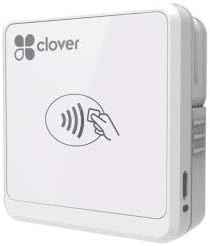
The Clover Go Reader is a versatile tool for mobile payments, supporting EMV and contactless options. With a 4.0 rating, it is recognized for its compatibility with iOS and Android devices. It is designed to work without needing a merchant account initially.
We may earn a commission when you buy through this link, at no additional cost to you.
Key strengths include its ability to accept chip cards and contactless payments, ensuring compliance with modern security standards. The flexibility in account setup makes it accessible for new businesses. It integrates well with mobile apps for efficient transaction management.
However, availability is limited, and users may need to open a new account for full functionality. The device is optimized for mobile use, which might lack some features of desktop POS systems. It is best for small teams needing portability.
This reader is ideal for businesses on the move that need reliable card processing. It balances security with convenience effectively. If you value mobile flexibility and EMV support, it is a worthwhile consideration for your payment setup.
Accepting chip cards ensures your business meets current security standards, reducing liability for fraudulent transactions.
Compatibility with both iOS and Android ensures most businesses can integrate it without changing their current devices.
We may earn a commission when you buy through this link, at no additional cost to you.
The Dejavoo QD2 Terminal is a wireless solution for secure payment processing. It supports chip and NFC cards, providing comprehensive payment options. The device includes a color LCD with backlight, enhancing visibility in various lighting conditions.
We may earn a commission when you buy through this link, at no additional cost to you.
Key strengths include its wireless capability, allowing for transactions anywhere. The terminal is designed for reliability and security, making it suitable for retail or service businesses. It comes with a power supply, ensuring it is ready to use upon arrival.
However, it requires a new merchant account with SwyftPAY before shipping, adding a step to the setup process. The cost is higher than basic readers, reflecting its advanced features. It is best for those needing a standalone terminal system.
This terminal is ideal for businesses needing mobility and security without relying on a smartphone. It offers a professional experience for customers. If you want a robust wireless system with clear display, it is a solid investment for growing businesses.
Being wireless allows you to accept payments without being tied to a fixed location, ideal for events or large stores.
The color LCD with backlight ensures clear visibility, making it easier for customers to interact with the device.
We may earn a commission when you buy through this link, at no additional cost to you.
Choosing the right credit card swiper involves understanding your business needs, security requirements, and budget constraints.
Determine if you need to accept magnetic stripe cards, chip cards, or contactless payments. Modern businesses should look for devices supporting EMV to reduce liability.
Prioritize readers that offer the most relevant payment methods for your customers to avoid missed sales.
Check whether the device connects via USB, Bluetooth, or Ethernet. USB readers are simple and reliable for fixed setups, while Bluetooth is better for mobile use.
Ensure the connection type matches your existing devices and workflow to prevent compatibility issues.
Look for encryption standards like PCI PTS compliance to protect customer data. Secure readers help prevent fraud and build trust with your clientele.
Investing in security now can save significant costs and reputation damage in the future.
Verify that the reader works with your current OS, such as Windows, Mac, iOS, or Android. Most USB readers are universal, but mobile apps may have specific requirements.
Choose a device that integrates smoothly with your existing software to avoid extra training costs.
Compare processing fees associated with the reader. Some devices charge per transaction, while others require monthly subscriptions.
Calculate the total cost of ownership to ensure it fits within your business budget over time.
If you operate on the go, prioritize compact, battery-powered devices. Fixed counters may benefit from stationary readers with stable connections.
Consider how much movement is required for your sales process when selecting hardware.
Ensure the manufacturer offers reliable support for technical issues. Responsive help can minimize downtime during critical business hours.
Check reviews for support experiences to gauge the quality of service provided.
Choose a system that can grow with your business. Some readers allow adding more units or features as your transaction volume increases.
Planning for expansion now can prevent the need for costly upgrades later.
Start by connecting the reader to your computer or mobile device. Ensure the USB or Bluetooth connection is active before processing any transactions.
Swipe or insert the card smoothly to avoid damaging the magnetic stripe or chip. Follow on-screen prompts to confirm the transaction amount.
Keep the device clean and dry to maintain performance. Regularly update the software or firmware to ensure security features remain current.
Magstripe readers read data from the magnetic strip on the back of cards, while chip readers interact with the embedded chip for better security. Chip technology reduces fraud risk and is now widely required by regulations.
Some basic readers allow direct processing through payment providers without a separate merchant account. However, others may require one to handle funds securely. Check the specific provider's terms.
Yes, many modern readers connect via Bluetooth or USB-C to work with smartphones. Ensure your device is compatible with the specific reader model and accompanying app.
Magstripe readers are less secure than chip readers because the data is static. For better protection, use devices that support encryption and EMV chip technology to safeguard customer info.
Check the connection and power source first. Restart the device and ensure the software is up to date. If issues persist, contact the manufacturer's support team for assistance.
Some models have monthly service fees or transaction costs. Review the pricing details carefully before buying to understand all potential charges associated with the device.
Most readers accept major international brands like Visa and Mastercard. Ensure your payment processor supports the regions where your customers are located to avoid transaction declines.
It is recommended to update software immediately when new patches are released. Regular updates protect against security vulnerabilities and ensure the system functions correctly.
We explored ten top credit card swipers, highlighting options from budget-friendly USB readers to advanced wireless terminals. Each device offers unique benefits depending on your business size and security needs.
Consider your primary use case when choosing. For mobile sellers, compact Bluetooth readers work well, while established retail stores may benefit from full POS systems with robust security features.
Always verify current availability and compatibility before purchasing. Prices and features can change, so staying informed helps you make the best investment for your business growth.