
Upgraded Watt Power Meter Plug
4.6Editor score
Tracks power watts and kilowatt hours
Clear backlight LCD display
Overload protection features
This guide compares the top energy consumption monitors for PC to help you track power usage, reduce bills, and optimize your setup efficiently.
Choosing the right energy consumption monitor for PC can significantly impact your electricity bills and environmental footprint. These devices provide real-time insights into how much power your computer and peripherals draw during daily operations. By understanding your energy profile, you can make informed decisions about hardware upgrades and usage habits.
We evaluated ten leading energy monitors based on accuracy, ease of installation, data features, and overall value. Our analysis focuses on plug-in meters for individual PCs and whole-home systems for comprehensive tracking. Each product offers unique capabilities tailored to different needs, from simple cost tracking to advanced smart home integration.
Every pick highlights specific strengths like wireless connectivity, detailed reporting, or budget-friendly pricing. Note that prices and availability fluctuate frequently so verify current details before purchasing. This guide aims to streamline your search by presenting verified specifications and user feedback in one comprehensive resource.
4.6Editor score

4.6Editor score

4.3Editor score
This table provides a quick side-by-side comparison of all ten energy monitors to help you identify key differences at a glance.


The Emporia Vue 3 is a comprehensive solution for whole-home energy monitoring with real-time insights. It features sixteen branch sensors that track individual circuits including PCs and high-draw appliances. Its UL certification ensures safe operation while the app provides detailed analytics.
We may earn a commission when you buy through this link, at no additional cost to you.
Its standout strength is the granularity of data allowing you to see exactly which circuits consume power. The solar net metering capability makes it ideal for homes with renewable energy sources. Real-time reporting helps identify energy hogs instantly.
Installation requires access to your circuit panel which may need professional help for some users. The system depends on a stable 2.4GHz WiFi connection for full functionality though data is retained locally for short periods.
This monitor is perfect for homeowners seeking deep energy insights and solar integration. Its robust feature set justifies the investment for those aiming to optimize usage and reduce bills significantly.
Monitor specific devices like gaming rigs separately from lighting to identify high-consumption hardware.
Track solar production and net metering usage to maximize renewable energy savings.
We may earn a commission when you buy through this link, at no additional cost to you.
This plug-in meter offers essential energy tracking at a budget-friendly cost. It measures watts kilowatt hours volts and amps with a clear backlit LCD. Seven display modes allow you to toggle between metrics easily without complex setup.
We may earn a commission when you buy through this link, at no additional cost to you.
It features adjustable backlight times and overload protection to alert you of dangerous power spikes. The data memory function retains consumption history even when unplugged so you do not lose progress between tests.
Lack of smart connectivity limits remote access and automation possibilities. It is strictly a local device meant for periodic checks rather than continuous remote monitoring.
Ideal for casual users wanting to check PC power draw without smart features. Its simplicity and low cost make it accessible for anyone starting their energy monitoring journey.
Get basic tracking data without investing in expensive whole-home systems.
Overload protection warnings prevent potential hazards from power spikes.
We may earn a commission when you buy through this link, at no additional cost to you.
The Meross monitor stands out for its privacy-centric approach with local data storage. It integrates seamlessly with Home Assistant for advanced automation without cloud dependencies. Clear charts help visualize usage patterns across minutes hours days and years.
We may earn a commission when you buy through this link, at no additional cost to you.
Users save significantly by spotting energy hogs through accurate insights. The system supports solar detection and automatically manages EV chargers or water heaters to maximize renewable use. No subscriptions or cloud lock-in ensure full control.
Technical knowledge is required to set up local automation via Home Assistant. The initial cost is higher than plug meters but justifies the premium features for tech-savvy users.
Best for smart home enthusiasts valuing privacy and automation. It offers a professional-grade solution that aligns with advanced home energy strategies.
Keep energy data on your local network to prevent external access.
Automatically shift load to solar surplus times reducing grid dependency.
We may earn a commission when you buy through this link, at no additional cost to you.
This outlet meter measures watts volts amps and energy with high accuracy. Its compact design leaves the lower outlet accessible when plugged in. The wide voltage range makes it versatile for various devices globally.
We may earn a commission when you buy through this link, at no additional cost to you.
A built-in rechargeable battery retains data for up to ninety days during power outages. The clear LCD with backlight ensures readability in any lighting condition. It automatically calculates costs based on your set electricity rate.
It lacks remote connectivity requiring physical checks to review data. The single outlet limitation means multiple units are needed for whole-house tracking.
Perfect for users needing reliable local tracking for specific devices. Its reliability and battery backup ensure data persistence even during grid failures.
Rechargeable battery keeps data safe during unexpected power interruptions.
Compact design allows access to the outlet below without obstruction.
We may earn a commission when you buy through this link, at no additional cost to you.
This system provides detailed circuit tracking with sixteen sensors ideal for shared spaces. It supports custom electricity rate templates allowing transparent billing for landlords. Private mode allows operation via MQTT without cloud apps for total privacy.
We may earn a commission when you buy through this link, at no additional cost to you.
Real-time data helps identify high usage patterns across different rooms. Solar net metering support tracks production alongside consumption. The system offers great flexibility for complex setups like apartments.
Installation in circuit panels can be complex and may require professional electricians. Beginners might find the configuration of private modes and MQTT challenging without prior knowledge.
Excellent for landlords managing shared energy costs and smart home enthusiasts. Its billing transparency tools make it uniquely suited for rental properties.
Allocate costs transparently across multiple tenants with custom rate templates.
Run locally without cloud apps to protect sensitive usage data.
We may earn a commission when you buy through this link, at no additional cost to you.
This plug-in meter displays nine types of data including apparent power and power factor. The wide viewing angle LCD is readable from any position. It saves data during power outages ensuring no loss of usage history.
We may earn a commission when you buy through this link, at no additional cost to you.
Users can toggle through modes to view voltage current or cost instantly. The design prioritizes simplicity and reliability for daily checks. It is priced competitively offering more parameters than basic meters.
Backlight automatically turns off after fifteen seconds to save energy which may hinder quick checks in dark rooms. It lacks app connectivity so data remains local.
Great for users seeking detailed local data without cloud complexity. Its balance of features and price makes it a strong contender for PC monitoring.
Access detailed electrical parameters like power factor and apparent power.
Stored data survives power outages so you never lose track.
We may earn a commission when you buy through this link, at no additional cost to you.
This device features a simple interface for quick access to different parameters. It offers alarm settings for overload kWh limits and cost thresholds. The upgraded LCD provides clear visibility for recording data anytime.
We may earn a commission when you buy through this link, at no additional cost to you.
One-click switching makes navigation intuitive for non-technical users. It supports data retention and parameter settings for switching between multiple appliances easily. Overload protection adds a safety layer for connected devices.
It does not support remote monitoring or automation apps limiting its utility for smart homes. The single outlet focus means it works best for checking specific devices.
Ideal for straightforward monitoring without complex setup. Its user-friendly design makes it accessible for anyone needing basic energy stats.
Navigate between watts volts and cost with simple button presses.
Get alerts when power cost or energy limits are exceeded.
We may earn a commission when you buy through this link, at no additional cost to you.
This two-pack offers value for comparing multiple devices like a PC and its monitor. It tracks watts kWh voltage and unit price with eight display modes. Overload protection triggers a visual warning when thresholds are breached.
We may earn a commission when you buy through this link, at no additional cost to you.
The units save settings and cumulative data for future use. Resetting is straightforward with a simple button press. They are made of durable ABS material for long-term reliability.
Like other plug meters it requires manual checks to review data. It lacks cloud sync which limits long-term trend analysis without note-taking.
Perfect for households needing to monitor multiple devices simultaneously. The two-pack price point makes it an economical choice for multiple outlets.
Monitor a desktop and peripherals or compare multiple systems efficiently.
High-quality materials ensure safety and longevity for daily use.
We may earn a commission when you buy through this link, at no additional cost to you.
A classic device that has been a standard for monitoring efficiency for years. It offers four settings to view daily weekly monthly and yearly stats. The large LCD counts kilowatt-hours clearly making it easy to read.
We may earn a commission when you buy through this link, at no additional cost to you.
It calculates expenses and tracks usage over long periods. Designed for AC 115-volt appliances it is versatile for home and small office use. The lack of smart features keeps it straightforward and simple.
It lacks modern connectivity which limits automation and remote alerts. The interface is dated compared to newer models with more modes.
Best for users preferring simplicity and proven hardware. Its reliability makes it a solid choice for basic efficiency checks.
A trusted device known for accurate tracking over many years.
View usage from daily to yearly with just a few button presses.
We may earn a commission when you buy through this link, at no additional cost to you.
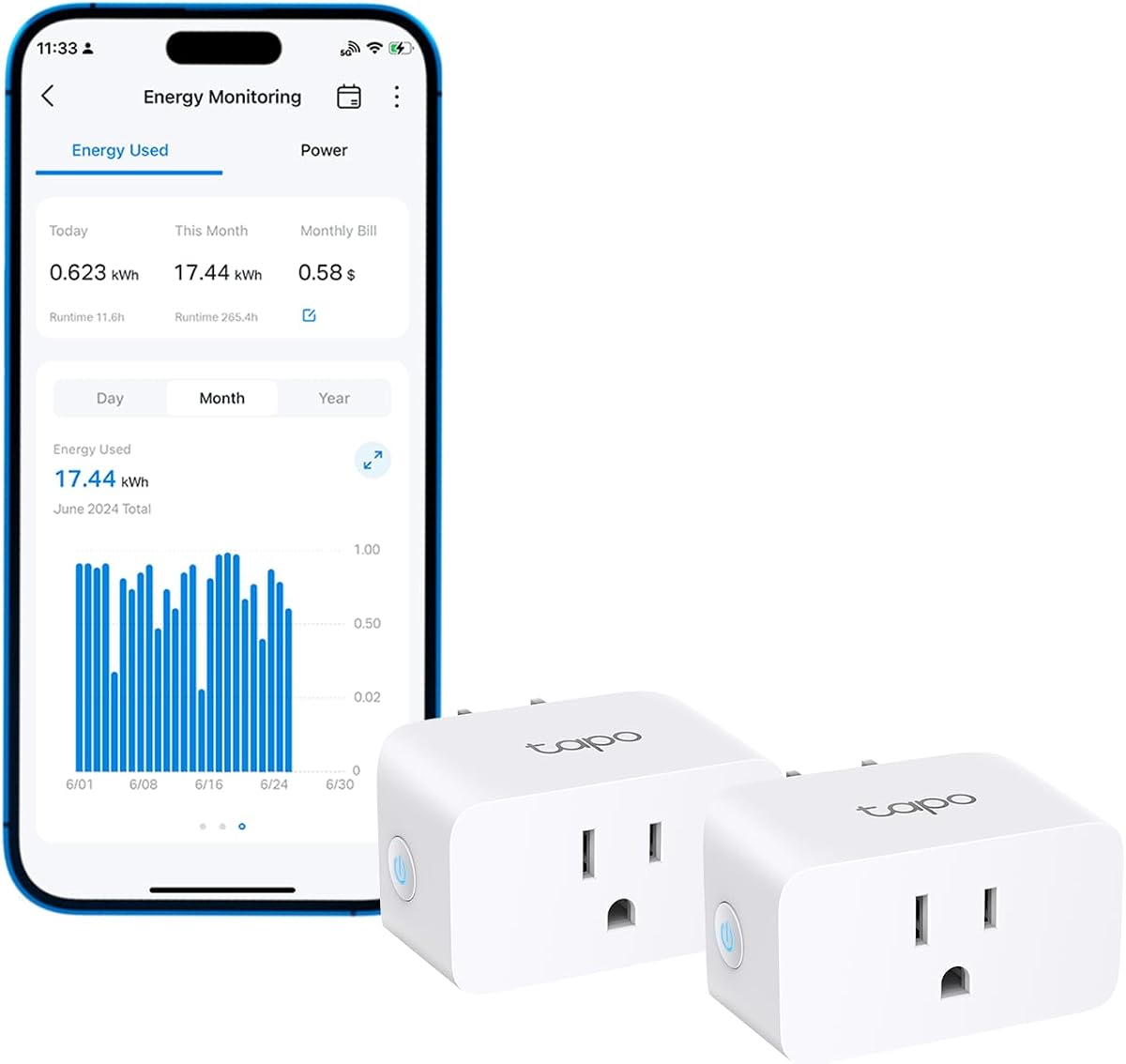
This smart plug offers energy monitoring with convenient remote control via app. It tracks power usage with clear charts and integrates with Alexa and Google Assistant. Programmable scheduling helps save money by running devices during off-peak hours.
We may earn a commission when you buy through this link, at no additional cost to you.
Auto-shutoff prevents electrical overload for enhanced safety. The interface is user-friendly and allows access from anywhere. A two-pack offers good value for monitoring multiple PCs.
Dependence on WiFi means connectivity issues may interrupt tracking. Its reporting is less detailed than dedicated whole-home monitors.
Excellent for smart home users needing remote control and scheduling. It balances energy data with convenience and voice commands effectively.
Turn devices on or off and view stats from anywhere.
Use Alexa or Google Assistant to manage connected devices easily.
We may earn a commission when you buy through this link, at no additional cost to you.
Selecting the right monitor depends on whether you need local tracking or smart home integration.
Look for monitors with accuracy within 1% to 2% for reliable billing estimates. High-end systems often use calibrated sensors while basic plugs may vary slightly.
Prioritize models with stated accuracy ratings to ensure trustworthy data.
Decide between plug meters that store data locally or smart plugs that sync to apps. WiFi-enabled devices allow remote checks but depend on network stability.
Choose based on whether you need real-time alerts or periodic reviews.
Plug meters are easy to use by simply inserting into an outlet. Whole-home systems require access to your electrical panel and professional installation.
Consider your comfort level with electrical wiring when choosing.
Some units keep data locally while others rely on cloud servers. Local storage ensures privacy and access even during internet outages.
Review retention periods to ensure you have enough history for analysis.
If you use Home Assistant or similar platforms check compatibility. Advanced systems offer automation rules based on energy thresholds.
Ensure the device supports your existing ecosystem before purchasing.
Monitors with cost calculators help you understand bill impacts. Set your rate to see real-time spending estimates.
Look for units that support peak and off-peak rate inputs for accuracy.
Choose devices with UL or ETL certification for safety assurance. This ensures the unit meets rigorous testing standards for electrical products.
Always verify certifications to protect your home and devices.
Whole-home systems can be expanded with more sensors. Plug meters are limited to one device per unit so buy multiple if needed.
Plan ahead to see if the system can grow with your needs.
Start by plugging your PC or peripheral into the outlet meter and resetting the data. Let it run for a full day to capture usage across idle active and sleep states.
For whole-home systems install the sensors according to the manual ensuring clamps are secure. Pair the hub with your home WiFi and open the app to view live data.
Regularly reset data for comparison tests or export logs for long-term analysis. Keep the device dry and clean to ensure accurate readings over time.
Yes most modern monitors use standby power when plugged in even if off. This idle consumption can add up over months so unplugging or using smart plugs helps reduce waste.
They are typically within 1% to 5% accuracy which is sufficient for billing estimates. Whole-home systems often have higher accuracy due to professional-grade sensors.
Plug meters need no installation while whole-home units require access to your circuit panel. Hire an electrician if you are uncomfortable working with electrical panels.
You can buy multiple plug units for different devices or use a whole-home system with many sensors. This allows you to track specific energy usage patterns.
WiFi is needed for remote viewing and smart features but local storage works without internet. Network outages may delay cloud updates but local data stays intact.
Look for UL ETL or CE marks which indicate the device meets electrical safety standards. These ratings ensure the product is tested for overheating and short-circuit risks.
We reviewed ten monitors ranging from simple plug meters to comprehensive whole-home systems. Each offers distinct advantages depending on your budget and technical needs.
Prioritize accuracy and smart features if you want deep insights and automation. Simpler options work well for occasional checks without complexity.
Always verify current prices and stock before purchasing as deals change regularly.