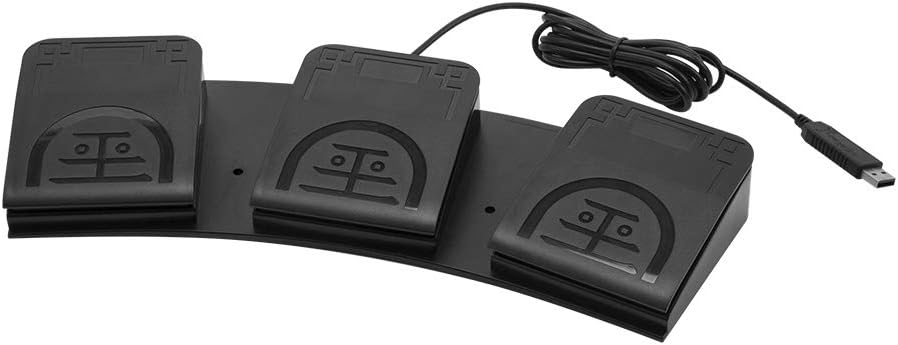
iKKEGOL USB Triple Pedal
4.4Editor score
Quiet optical switches
Programmable key mapping
Non-slip TPU rubber feet
This guide compares the top foot pedals for transcriptionists to help you find the right hands-free control for speed accuracy and comfort during long work
Transcriptionists rely heavily on efficient workflows to meet deadlines and maintain accuracy during long listening sessions. A dedicated foot pedal allows hands-free control of audio playback, letting you focus entirely on typing without interrupting your flow. Choosing the right device can significantly boost productivity and reduce physical strain over time.
We evaluated ten leading models based on build quality, software compatibility, ergonomic design, and user feedback. Each product offers unique features tailored to different transcription needs, from basic plug-and-play units to advanced programmable switches. Our analysis highlights the strengths and limitations of every option to help you make an informed decision.
Every pick includes detailed specifications, pros, cons, and real-world usage insights to guide your selection process. Remember that pricing and availability fluctuate regularly so check current offers before purchasing. We aim to provide clear, unbiased information to support both new and experienced transcription professionals in their tool choices.
4.4Editor score

4.5Editor score

4.1Editor score
The following table provides a side-by-side look at all ten products reviewed in this guide. Compare key specifications, ratings, and unique features to quickly identify which model aligns best with your specific transcription software and workflow requirements.


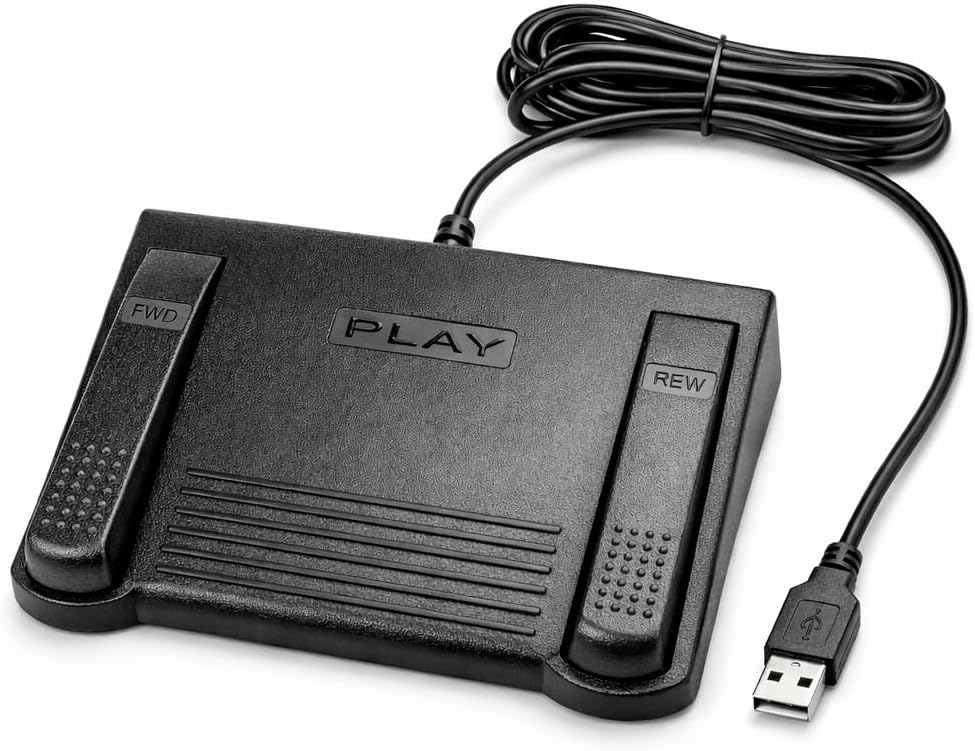


The Infinity 3 USB Foot Pedal stands out as a top choice for transcriptionists seeking reliability. It earns a strong rating for its ultra-heavy-duty micro switches designed to handle countless hours of use without failure. This unit focuses on core functionality with a sturdy design that supports professional workloads effectively.
We may earn a commission when you buy through this link, at no additional cost to you.
Its ergonomic design features a wide, central, sloping Play pedal that makes switching between Play, Fast Forward, and Rewind seamless. The large size enables you to easily move your foot from one key to another without missing a beat. This layout reduces physical strain during long transcription sessions.
While highly durable, this pedal lacks advanced programmability found in some newer models. Users must ensure their transcription software supports standard USB foot pedals before purchasing. However, for those needing a straightforward, robust tool for daily audio control, these trade-offs are often acceptable.
We recommend this pedal for transcriptionists who prioritize durability and comfort over complex features. It is ideal for professionals using standard dictation software that requires reliable physical controls. Its proven track record makes it a safe investment for long-term use.
The wide central pedal allows natural foot movement reducing fatigue during extended transcription work sessions.
Precision micro switches ensure consistent response even after millions of press cycles over years of daily use.
We may earn a commission when you buy through this link, at no additional cost to you.
The VEC in-USB-2 Infinity Digital Foot Control offers a modern twist with its rechargeable battery power. This feature eliminates the need for constant battery replacements making it cost-effective for heavy users. Its design ensures long-lasting performance with up to 1000 hours of digital recording time.
We may earn a commission when you buy through this link, at no additional cost to you.
A key strength is the accidental trigger prevention system using a mechanical stop to protect the center pedal. This maintains control during use when stepping on side pedals and prevents unwanted playback interruptions. The ergonomic design allows comfortable rest while dictating or transcribing for hours.
While the rechargeable feature is convenient it means eventual battery degradation may occur after years of use. The price is higher than basic models but justified by the added functionality and durability. Most leading dictation brands are supported ensuring broad utility across different work environments.
Choose this pedal if you value convenience and long battery life in your transcription workflow. It suits professionals who need reliable control across various systems without frequent maintenance. The balance of features and build quality makes it a premium option worth considering.
Internal rechargeable battery provides extended use without the hassle of replacing disposable batteries regularly.
Mechanical stop design ensures center pedal is not accidentally activated when using side controls during work.
We may earn a commission when you buy through this link, at no additional cost to you.
The Philips ACC2330 4-Pedal Foot Control introduces a distinctive toe touch feature for advanced users. This model allows you to feel the control area with your toe when changing settings adding a layer of precision. It is designed specifically for professional digital dictation systems requiring high-level integration.
We may earn a commission when you buy through this link, at no additional cost to you.
Its increased width of the center pedal avoids unintended presses of other pedals during intensive work. You can swing the foot using the heel for easy relaxation during pause times which reduces physical fatigue. The toe touch control provides a tactile way to manage functions without looking down.
However this pedal requires compatible digital systems and may not work with all standard software out of the box. The learning curve for toe control can be steep for those new to such interfaces. These limitations are acceptable for professionals already invested in Philips-compatible ecosystems.
Recommend this for transcriptionists using specific digital dictation platforms needing advanced foot control options. It offers unique ergonomic benefits for those willing to adapt to its specialized features. The build quality supports demanding professional environments with reliable performance over time.
Feel the control area with your toe for precise switching without needing to look at the pedal directly.
Swing foot using heel during pauses to reduce strain and maintain comfort during long transcription sessions.
We may earn a commission when you buy through this link, at no additional cost to you.
The DAC 3 Function Foot Pedal achieves a perfect rating for its specialized job management features. It includes specific buttons like Next Job and Record which streamline workflow for transcriptionists handling multiple files. The large labeled buttons ensure you always know which function you are activating at any time.
We may earn a commission when you buy through this link, at no additional cost to you.
Compatibility is restricted to certain computer software designed for foot control so verify before buying. Despite this limitation the USB connector provides reliable plug-and-play functionality on supported systems. Users appreciate the robust build quality that withstands daily professional use without issues.
The perfect rating suggests users are highly satisfied with its performance within its niche. However it lacks programmable options found in other models which limits flexibility for varied workflows. For those needing a straightforward tool with job-specific keys this pedal delivers excellent reliability.
We suggest this model for transcriptionists working within compatible software environments needing job navigation. Its focus on essential functions ensures efficiency without unnecessary complexity. The high satisfaction rate indicates it meets user expectations for durability and ease of use effectively.
Dedicated Next Job and Record keys help manage multiple files and recording sessions more efficiently.
Oversized buttons prevent missteps and provide clear tactile feedback during fast-paced transcription work.
We may earn a commission when you buy through this link, at no additional cost to you.
The Infinity USB Digital Foot Control offers a low profile design ideal for limited desk space. It provides a greater non slip surface area ensuring the unit stays in place during active use. This model maintains the reliable Infinity brand reputation for consistent digital control over time.
We may earn a commission when you buy through this link, at no additional cost to you.
Its compact footprint makes it easy to integrate into tight workstation setups without clutter. The USB plug-in connection ensures compatibility with most PCs and laptops running standard transcription software. Users appreciate the balance of simplicity and performance in daily transcription tasks.
While it lacks advanced customization features it excels in providing basic reliable control without complications. The lower price point compared to premium models makes it accessible for budget-conscious buyers. However those needing job keys or programmability may find it too basic for their needs.
Recommend this pedal for transcriptionists prioritizing space efficiency and straightforward operation. It is suitable for home offices or shared workspaces where desk real estate is limited. The durability and non-slip design ensure stable performance during long hours of typing and listening.
Low profile structure fits comfortably under desks or crowded workstations without obstructing other tools.
Enhanced grip ensures the pedal stays firmly in place even during vigorous use throughout the day.
We may earn a commission when you buy through this link, at no additional cost to you.
The Express Scribe ECS-FPAE Pedal is designed exclusively for use with Express Scribe transcription software. It ensures seamless operation with custom hardware engineered for precise playback control without extra setup. This plug-and-play nature means you can start transcribing immediately after connecting via USB.
We may earn a commission when you buy through this link, at no additional cost to you.
Its large ergonomic pedal layout supports comfortable movement between play fast-forward and rewind functions. Users report low-fatigue operation due to the oversized design allowing natural foot positioning during long shifts. A 1 year mail-in warranty adds confidence for professional environments requiring reliability.
The primary limitation is its incompatibility with other transcription programs like Case Catalyst. If you switch software this pedal becomes useless limiting its long-term flexibility. For dedicated Express Scribe users however it offers reliable performance and dedicated support for their workflow.
Choose this model only if you exclusively use Express Scribe on Windows or Mac systems. It removes configuration hassle and provides a tailored experience for that specific software. The warranty coverage ensures peace of mind against hardware failures during critical work periods.
Engineered specifically for Express Scribe ensuring precise control without needing complex configuration or drivers.
Oversized pedals allow easy movement between functions reducing fatigue during extended transcription work sessions.
We may earn a commission when you buy through this link, at no additional cost to you.
The ECS-IN-USB-1 Foot Pedal delivers reliable hands-free audio playback control for transcriptionists. Its ergonomic and fatigue-reducing design supports natural foot positioning to minimize strain during use. The broad software compatibility makes it a dependable choice for various professional environments.
We may earn a commission when you buy through this link, at no additional cost to you.
Ideal for medical legal and insurance applications it provides consistent responsiveness for daily workloads. The pedal includes a 1-year mail-in warranty for confidence in long-term reliability. Users appreciate the simple plug-and-play setup that requires no advanced configuration.
However it holds a lower rating compared to other models which may indicate mixed user experiences. The feature set is basic offering standard play and navigation keys without advanced functions. For those prioritizing comfort and basic functionality over extra features it remains a viable option.
We recommend this pedal for beginners or those needing a simple hands-free tool. Its ergonomic focus helps reduce physical discomfort during long transcription sessions. The warranty provides added support ensuring you are covered if hardware issues arise.
Operate audio playback without lifting hands from the keyboard allowing faster and more efficient transcription.
Thoughtfully contoured layout supports natural foot positioning helping to minimize strain during long work hours.
We may earn a commission when you buy through this link, at no additional cost to you.
The iKKEGOL Upgraded USB Triple Foot Pedal stands out for its quiet optical switches and affordability. As a standard HID device it allows you to program keys for transcription macros without using hands. This versatility makes it a top value option for budget-conscious professionals.
We may earn a commission when you buy through this link, at no additional cost to you.
Its wide pedal design and TPU rubber feet ensure it stays in place on hard floors during use. The optical switches provide sensitive responses with minimal resistance for long-lasting comfort. You can customize it for transcription key settings or other actions like Zoom controls.
While not exclusively built for transcription it requires software setup to map functions correctly. Some users may find the learning curve steeper than plug-and-play models. However the low cost and flexibility often justify this extra step for those needing custom macros.
Choose this pedal if you want customization and quiet performance without high cost. It suits transcriptionists who prefer tailoring controls to their specific workflow needs. The build quality ensures it can bear weight and withstand daily use over extended periods.
Optical switches operate silently reducing noise during transcription and creating a more professional atmosphere.
Program keys to execute complex macros or shortcuts that automate repetitive transcription tasks efficiently.
We may earn a commission when you buy through this link, at no additional cost to you.
The Philips LFH-2330 Configurable USB Foot Control offers four pedals that can be tailored to suit you. Its slim ergonomic design minimizes foot movement and physical strain during long transcription sessions. An anti-slip bottom surface keeps it securely in place on any desk.
We may earn a commission when you buy through this link, at no additional cost to you.
A user-friendly wizard allows complete configuration to match your personal workflow preferences. This flexibility ensures the pedal works exactly how you need it without rigid presets. The build quality reflects professional standards expected from Philips digital dictation equipment.
While the setup process is more involved than plug-and-play units the customization rewards the effort. The cost is higher than basic models but justified by the adaptability and ergonomic benefits. This suits transcriptionists who prefer controls tailored to their specific habits.
Recommend this model for professionals needing a high degree of control and customization. The wizard tool simplifies the process making advanced configuration accessible. Its ergonomic focus ensures comfort even during hours of continuous transcription work.
Four pedals can be completely configured via wizard to suit your unique transcription workflow needs.
Slim design minimizes foot movement reducing physical strain during extended transcription work sessions.
We may earn a commission when you buy through this link, at no additional cost to you.
The iKKEGOL Mechanical Switch Triple offers tactile feedback through spring-loaded levers for precise actuation. It is a mechanical standard HID device allowing you to command separate functions with feet. This pedal excels in executing macros and key combinations to speed up complex workflows.
We may earn a commission when you buy through this link, at no additional cost to you.
It supports Windows Linux and Mac with the ElfKey configuration software for advanced mapping. You can set up commands on one system and use it on another as a plug-and-play unit. Its durability ensures it can bear weight and withstand rigorous daily use without failure.
While the software download is required once setup is complete it provides immense flexibility. The mechanical switches offer more tactile feedback than optical ones which many users prefer. However the higher cost may not justify this for those needing basic play and pause controls only.
Choose this pedal if you value tactile feedback and cross-platform customization. It suits transcriptionists who need to execute complex macros quickly without lifting hands. The build quality and software support make it a robust option for advanced workflows.
Spring-loaded lever actuation provides tactile feedback confirming each press without needing to look.
Setup commands on Windows or Mac then use seamlessly on Linux as a plug-and-play device.
We may earn a commission when you buy through this link, at no additional cost to you.
Selecting the right foot pedal involves considering software compatibility build quality and ergonomic features. This guide outlines the key factors to evaluate before making a purchase to ensure the tool fits your workflow.
Ensure the pedal works with your specific transcription software. Some models are exclusive like Express Scribe while others support multiple platforms. Verify system requirements before buying.
Check the manufacturer website for lists of supported applications to avoid incompatibility.
Look for wide pedals and sloping layouts that allow natural foot movement. Comfort is critical during long hours of transcription to prevent strain or fatigue.
Prioritize pedals with anti-slip bottoms to keep them stable on your desk.
Micro switches and optical switches offer different tactile experiences. Mechanical switches provide feedback while optical ones tend to be quieter during use.
Consider noise levels in shared environments when choosing a switch type.
Opt for heavy-duty construction with durable materials. Transcriptionists rely on these devices daily so durability ensures longevity.
Look for warranties covering parts and labor for added peace of mind.
Some pedals allow custom key mapping for macros or complex functions. This flexibility is useful for advanced workflows but requires setup effort.
Basic units are better for those who only need standard playback controls.
USB power simplifies setup while rechargeable batteries offer portability. Consider whether your workstation stays stationary or moves frequently.
Rechargeable options reduce ongoing costs of disposable batteries over time.
Standard units have three pedals but some offer four for extra functions. More pedals provide flexibility but require more desk space.
Assess your screen real estate and workflow complexity before deciding on pedal count.
Plug the pedal into a USB port on your computer and install any required drivers or configuration software. Restart your system if prompted to ensure detection.
Map the pedals to playback keys within your transcription software. Test each pedal to confirm they trigger the correct functions accurately.
Keep the pedal clean from dust and debris. Store it in a safe location when not in use to prevent damage.
Not all pedals work with every software. Some are built for specific platforms like Express Scribe while others support multiple brands. Always check compatibility lists before purchasing.
Download the manufacturer's configuration tool like ElfKey or the built-in wizard. Assign desired keys to pedals and save the settings. The pedal will then execute those commands when pressed.
Most basic pedals function as standard HID devices requiring no extra software. However programmable units need setup tools to map custom functions correctly.
Ergonomic designs reduce physical strain by allowing natural foot positioning. This prevents fatigue and discomfort during long transcription sessions.
Three pedals are standard for play fast-forward and rewind. A fourth pedal can add functions like record or job navigation depending on your workflow.
Optical switches are generally quieter than mechanical ones. In shared spaces choose a pedal with silent switch technology to avoid distractions.
We reviewed ten top models ranging from basic units to advanced programmable pedals. The Infinity 3 USB Foot Pedal offers durability while the iKKEGOL Triple provides value for custom workflows.
Prioritize comfort compatibility and durability when selecting your tool. A well-chosen pedal enhances productivity and reduces physical strain over time.
Prices fluctuate so verify current deals before purchasing. Your ideal pedal should align with your software and daily work demands.