
Corded Landline Phones for Seniors – Dementia/Alzheimers Phone for Seniors
4.2Editor score
Large picture buttons for dialing
110dB loud ringer alert
No battery power required
This guide compares the top captioned telephone models for seniors and hearing impaired users, highlighting features like real-time captions, amplification
Finding the right captioned telephone can transform how you stay connected with loved ones. These devices combine voice calls with real-time text captions, ensuring you never miss a word. Whether you need amplified sound or large buttons, the right model supports your specific needs effectively.
We analyzed ten leading captioned telephone options available this month. Our evaluation focused on clarity, ease of use, and essential accessibility features. Each product was reviewed based on user feedback and technical specifications to ensure you make an informed decision for your home.
Each pick below highlights unique strengths tailored to different situations. You will find options for budget-conscious buyers and those needing premium features. Keep in mind that product availability and pricing can shift, so verify details before purchasing to ensure you get the best value today.
4.2Editor score

4.3Editor score
4.5Editor score
This side-by-side comparison helps you quickly identify which captioned telephone fits your needs. We list key specs for every model so you can compare volume, buttons, and connectivity at a glance.


This Hamilton CapTel model leads the category with its real-time captioning technology. It carries a solid 4.3 rating from users who value clarity. The large touchscreen allows you to read captions while listening to the call simultaneously.
We may earn a commission when you buy through this link, at no additional cost to you.
The device offers both auto captions and assisted captions with live operator support. This ensures you never miss critical words during conversations. The built-in answering machine also displays voicemail captions on the screen for easy review later.
It requires a high-speed internet connection and standard telephone service to function properly. Registration is mandatory for US residents with hearing loss to access the captioning service. This setup ensures compliance and service quality for all users.
Anyone seeking maximum clarity and reliable captioning should consider this phone. The combination of amplified sound and visual text makes it ideal for hearing impaired users. It turns everyday calls into confident conversations with family members effortlessly.
The system converts speech to text instantly on the large screen.
Review missed messages visually by reading captions on the display.
We may earn a commission when you buy through this link, at no additional cost to you.
This corded phone offers exceptional value for those needing simple and loud communication. With a 4.2 rating, it focuses on accessibility through photo dialing and big buttons. The design helps seniors with memory loss connect with family easily.
We may earn a commission when you buy through this link, at no additional cost to you.
The phone features nine customizable picture buttons for one-click dialing. Visual indicators flash when a call comes in to ensure you never miss a ring. Adjustable volume settings let you customize both receiver and ringer loudness.
It operates purely on the phone line without needing batteries or Wi-Fi. This ensures reliability during power outages. Note that it lacks text captioning features but excels in audio clarity and ease of use.
Budget-conscious buyers needing a simple, loud phone will love this model. The visual cues and photo memory make calling effortless for those with cognitive challenges. It is a practical solution for keeping lines of communication open.
Insert photos of family members to dial instantly with a touch.
Flashing lights notify you of incoming calls even if volume is low.
We may earn a commission when you buy through this link, at no additional cost to you.
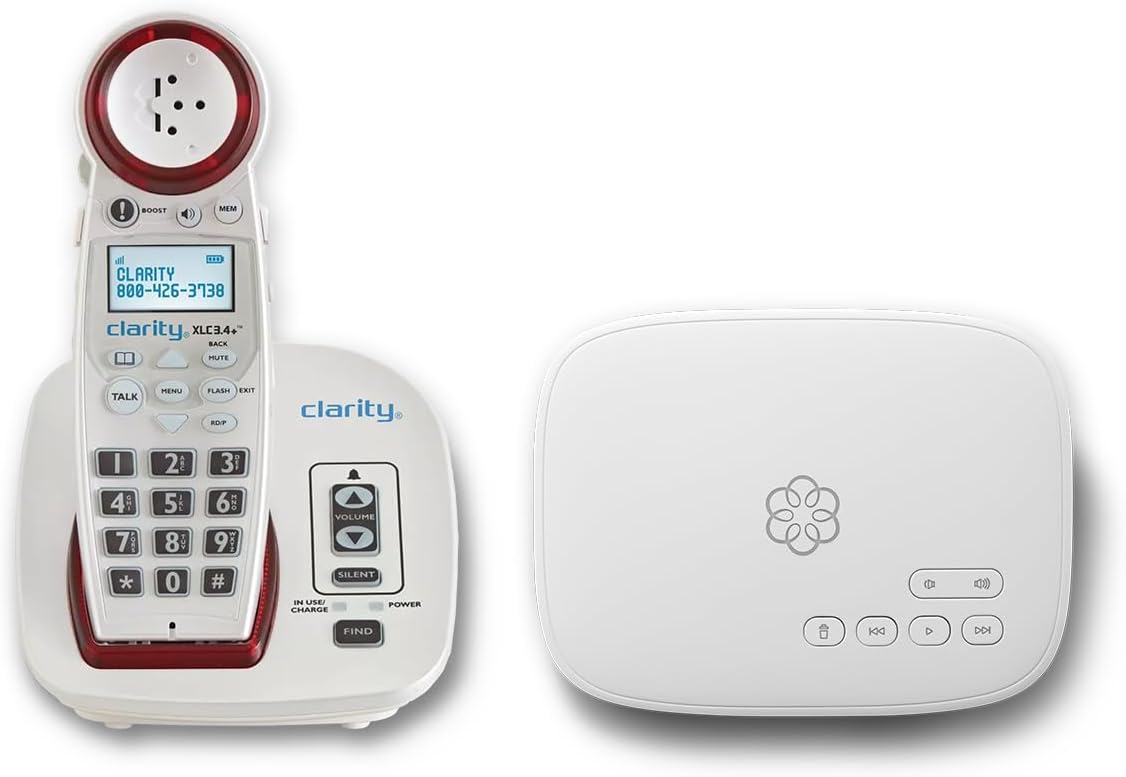
This bundle combines a premium phone with an unlimited calling service. It boasts a high 4.5 rating from users who appreciate convenience and clarity. The kit includes a Clarity XLC3.4+ amplified cordless phone tailored for seniors.
We may earn a commission when you buy through this link, at no additional cost to you.
The phone offers hearing aid compatibility and talking keypad features for ease of use. Visual ringer alerts ensure you see calls even in noisy rooms. The service includes robocall blocking and text alerts for safety.
While it requires a monthly subscription fee, the value of unlimited calling and support is high. Setup assistance is available to get you started quickly. This option is best for those wanting a complete communication solution.
Those wanting top-tier service and hardware should choose this premium bundle. The combination of accessibility features and unlimited calling makes it a standout choice. It delivers peace of mind with professional support and safety features.
Get phone hardware and unlimited calling service in one package.
Text alerts notify loved ones when emergency calls are made.
We may earn a commission when you buy through this link, at no additional cost to you.
The VTech SN5147 offers a hybrid system with both corded and cordless options. Rated at 4.0, it provides flexibility and volume control for seniors. The base unit works during power outages to ensure you stay connected always.
We may earn a commission when you buy through this link, at no additional cost to you.
It features a 50dB audio assist boost for clearer voice reception. Big buttons and large displays help users with vision impairments dial confidently. Photo dial slots allow you to set up favorite contacts easily.
While it lacks live captioning text, the amplified sound helps those with hearing loss. The system can expand with more handsets if needed in a household. Visual indicators help you stay informed about incoming activity.
Families needing multiple handsets will find this system versatile and reliable. The ability to expand makes it a smart long-term choice for households. It balances mobility with the reliability of a traditional landline connection.
Use cordless handsets for mobility with a corded base for reliability.
Press one touch to boost volume up to 50dB instantly.
We may earn a commission when you buy through this link, at no additional cost to you.
This telephone allows you to answer and hang up using voice commands. It is designed for those with mobility issues who find pressing buttons hard. The device uses your home phone line and stays ready for commands.
We may earn a commission when you buy through this link, at no additional cost to you.
It listens actively for commands like dial, answer, or end call. This hands-free approach helps those with tremors or weakness dial easily. Quality is noted for allowing you to use voice without touching the device.
The device does not show a screen for reading captions but focuses on access. Users rely on voice feedback rather than visual text. It is a unique alternative to traditional button-based dialing for accessibility.
Anyone with significant mobility challenges will benefit from this voice control. It removes the physical strain of dialing and answering. While basic, it solves the problem of reaching or pressing buttons for calls.
Simply speak commands to initiate calls without touching the phone.
The phone stays on and listens for your command at any time.
We may earn a commission when you buy through this link, at no additional cost to you.
This big button phone offers amplified volume and memory protection. With a 4.2 rating, it is a solid choice for those needing louder sound. It includes three replaceable picture buttons for quick access to favorites.
We may earn a commission when you buy through this link, at no additional cost to you.
Volume can be adjusted up to 40dB to meet hearing needs. The device stores numbers even if the phone line is unplugged temporarily. You can mount it on a wall or leave it on the desktop easily.
It lacks a text screen for captions but focuses on audio and buttons. This makes it simple for seniors who prefer not to navigate menus. The design prevents data loss if power or line goes out unexpectedly.
Users needing simple dialing and loud sound will appreciate this device. The memory protection adds reliability for those worried about losing contacts. It is a practical tool for maintaining connection without technical stress.
Stored numbers remain safe even if power or line is disconnected.
Use photos on buttons to speed up dialing favorite contacts.
We may earn a commission when you buy through this link, at no additional cost to you.
This VoIP phone offers customizable image keys for easy dialing. Rated 5.0, it brings a thoughtful design for those with dementia. The keys open to reveal space for family photos to simplify connections.
We may earn a commission when you buy through this link, at no additional cost to you.
The phone includes a dedicated help key for emergency access instantly. It offers massive 110dB speakerphone volume for clear listening. A red light alert ensures you see incoming calls even if you do not hear them.
Note that this device requires an active internet VoIP service to work. It cannot connect to a standard phone wall jack directly. This makes it ideal for homes with modern internet telephony setups ready.
Those with internet phone service will find this highly rated device useful. The visual cues and photo keys make it friendly for cognitive challenges. The emergency key adds a layer of safety for daily use.
Insert photos inside buttons to identify who you are calling.
Press one dedicated key to reach help instantly without dialing.
We may earn a commission when you buy through this link, at no additional cost to you.
This phone focuses on high definition audio for better call quality. With a 3.5 rating, it offers amplified reception for hearing impaired users. The design aims to deliver a cleaner listening experience for calls.
We may earn a commission when you buy through this link, at no additional cost to you.
It provides enhanced clarity that helps distinguish speech in noisy rooms. The amplification supports users who struggle with standard volume levels. The product is designed specifically for senior usage patterns and needs.
While it does not provide text captions, the sound quality is its main strength. This makes it suitable for those who prefer audio over reading. It is a straightforward solution for improving phone audio performance.
Listeners wanting better sound quality without complex features should consider this. The high definition audio helps with understanding conversations better. It offers a no-fuss way to upgrade voice clarity at home.
Enjoy improved audio fidelity for clearer conversations every time.
Built with features that match common needs of older adults.
We may earn a commission when you buy through this link, at no additional cost to you.
This phone allows voice dialing to make and end calls hands-free. It includes 17 programmable voice memories for favorite numbers. Visual LED alerts and talking caller ID help users stay informed of calls.
We may earn a commission when you buy through this link, at no additional cost to you.
You can use voice commands like dial, end, or answer to operate it. The speakerphone supports hands-free volume control for better comfort. A visual LED ring indicator ensures calls are noticed even if muted.
It has mixed user feedback with a lower rating than top picks. Programming may take time but offers unique voice features once set. The combination of audio and visual cues helps with accessibility needs.
Users who want voice operation plus standard functions may find it useful. The talking ID and LED ring help ensure no call is missed. It is a unique mix of features for specific accessibility goals.
Store 17 contacts with voice activated access for easy calling.
A bright LED flashes to show when you have a call.
We may earn a commission when you buy through this link, at no additional cost to you.
This landline phone includes nine photo memory keys for one-touch dialing. With a 4.2 rating, it helps seniors with memory loss call family fast. The ringer is extremely loud to ensure alerts are never missed.
We may earn a commission when you buy through this link, at no additional cost to you.
It allows hands-free calling for those with limited mobility. The redial key simplifies redialing if a call is disconnected. Setup is simple with basic steps to store numbers into memory.
The device does not need batteries or power and works on the line. It is designed to be a bridge for family bonds. However, it does not support caller ID or voicemail features.
Caregivers looking for simple contact access will find it practical. The loud alerts and photo memory solve common issues with dialing. It keeps lines open for daily communication without technical barriers.
Store numbers in photo keys for instant one-touch dialing.
Works on phone line power without needing batteries or outlet.
We may earn a commission when you buy through this link, at no additional cost to you.
Selecting the right phone involves considering your hearing needs, vision, and home setup. This guide breaks down the key factors to help you find the most suitable model.
Many captioned phones require a specific service plan and internet connection. Check if the device supports real-time text captions and whether registration is needed for US residents. Some models rely on live operators to generate captions accurately.
Look for phones with adjustable volume controls and amplified gain. Options range from 40dB to over 110dB depending on the model. Ensure the device offers both receiver volume and ringer volume adjustments for flexibility.
Large buttons are essential for seniors with low vision or arthritis. Photo dial buttons add convenience for memory loss by using images instead of numbers. Ensure keys are spaced well to prevent accidental pressing.
Decide between corded landline options and internet based VoIP phones. Corded phones work during power outages while VoIP phones offer advanced features. Check if your home setup matches the device's power requirements.
Emergency keys and SOS buttons provide safety for those living alone. Some models send text alerts to family when 911 is called. Look for built-in help features to ensure quick access to assistance.
Visual caller ID helps identify who is calling without relying on sound. Voicemail captions can add clarity to missed messages. Some devices have basic answering machines while others integrate with services.
Hearing aid compatibility reduces feedback and interference. Check if the phone meets specific standards for compatibility with your devices. This feature ensures clear audio when using hearing aids directly.
Simple setup and customer support make the experience smoother. Some providers offer white glove installation to help with configuration. Consider models with detailed instructions or assistance for troubleshooting.
Start by reading the user manual to understand button functions. Plug the phone into your wall jack and power outlet if required. For captioning models, register with the service to activate text features.
Adjust volume settings to your comfort level by pressing volume buttons. Customize picture buttons by inserting photos or assigning numbers in settings. This helps you dial loved ones quickly without memorizing digits.
Keep the device clean by wiping it with a dry cloth regularly. Avoid exposing it to moisture or extreme heat to protect internal components. Check the phone cord occasionally for wear to ensure safe use.
Yes, many captioned phones need a high-speed internet connection to transmit text captions. However, some amplified models work on standard landlines without internet. Check the specs before buying to ensure compatibility with your home.
Registration is usually done through the phone manufacturer or service provider. You may need proof of hearing loss to qualify for the service. Follow the on-screen or phone instructions provided with the device.
Yes, many models feature photo dial buttons and large keys. These simplify dialing so those with memory loss can call family easily. The visual cues reduce confusion when using the phone.
Amplified phones boost sound volume while captioned phones add text on a screen. Some models combine both features for maximum clarity. Choose based on whether you need sound help or text support.
Captioning services are often free after registration but internet is required. Some bundles like Ooma include phone service fees in the cost. Check the terms to understand ongoing costs before buying.
Corded landline phones typically work during power outages. VoIP and internet based models may stop functioning until power returns. Consider keeping a battery backup if you rely on internet services.
Many models have hearing aid compatibility to reduce interference. Check for T-Coil or M3/T3 ratings in the product specs. This ensures you get clear audio without feedback when using your device.
Ringers can go up to 110dB on amplified models. This ensures you hear the phone even in noisy rooms. Adjustable ringer volume helps customize alerts to your preference.
We reviewed ten captioned telephone models offering various features for seniors. Top picks include the Hamilton CapTel for real-time text and simple landline phones for budget needs. Each option balances audio clarity with ease of use.
Prioritize features that match your hearing and vision needs. If you need text, ensure internet support. For simple access, choose photo buttons and loud ringers. Safety features like help keys add value too.
Check current availability and pricing before deciding. Product offerings can change as providers update their services. Use the links in this guide to explore the models further today.