
ASRock DeskMeet X300 Mini PC
4.8Editor score
AM4 Socket for wide CPU support
Eight liter compact form factor
PCIe 3.0 x16 slot included
This guide compares the top barebone PCs with AMD processors for performance and value to help you build the perfect compact custom desktop system today.
Barebone PCs with AMD processors offer enthusiasts a flexible way to build compact systems tailored to specific needs without paying for preinstalled components you might not use. These kits provide the chassis motherboard and cooling while you choose the memory storage and operating system that fit your workflow and budget precisely.
To compile this list we evaluated models based on CPU architecture thermal design port connectivity and expansion capabilities. We focused on units that support modern AMD Ryzen chips and offer robust features like OCuLink or multiple M.2 slots for storage scaling and external GPU connectivity for advanced users.
Each pick below highlights key strengths and ideal use cases so you can match a kit to your goals whether you need a media server a gaming station or a silent office workstation. Remember that availability and compatibility can change so always verify specs before purchasing to ensure a smooth build experience.
4.8Editor score

4.0Editor score

3.1Editor score
The following table provides a side by side look at the core specifications of each kit so you can quickly compare CPU platforms memory slots and interface options across the entire selection of AMD based barebone systems.





The AOOSTAR MACO kit features the Ryzen 7 PRO 8845HS delivering eight cores and sixteen threads with integrated Radeon 780M graphics. It scores well for builders who need raw CPU power and advanced external GPU connectivity through OCuLink without sacrificing compact size.
We may earn a commission when you buy through this link, at no additional cost to you.
Its dual USB4 ports support 8K displays and high speed data transfer making it ideal for multi monitor workstations. The cooling system uses a VC heat spreader to keep thermals stable even during sustained heavy loads which is essential for productivity or gaming sessions.
While the barebone nature means you must supply RAM and storage the flexibility allows you to choose high end components that suit your specific tasks. The chassis design prioritizes airflow and uses recycled aluminum to reduce environmental impact during manufacturing.
Buy this kit if you want a versatile AMD based platform for high performance desktops or servers. Its blend of modern connectivity and robust cooling makes it a strong foundation for long term use without needing frequent upgrades.
The OCuLink port provides lower latency and higher bandwidth than USB4 enabling near native performance when connecting external graphics cards.
Smart frequency control combined with turbo fans ensures the system stays cool and quiet even when running intensive tasks like video rendering.
We may earn a commission when you buy through this link, at no additional cost to you.
This AOOSTAR GEM12+ model is a robust barebone solution featuring the Ryzen 7 PRO 8845HS CPU and Radeon 780M graphics. It stands out for its support of OCuLink and quad 4K display output making it suitable for multi screen setups and gaming.
We may earn a commission when you buy through this link, at no additional cost to you.
The three BIOS adjustable modes let you fine tune power consumption between silent balanced and performance settings. This control is useful for offices where noise matters or for workloads that need maximum throughput without throttling.
It includes a vapor chamber cooling system that spreads heat efficiently across the sink keeping the CPU stable during extended use. The dual 2.5G LAN ports offer redundant high speed connections beneficial for network intensive applications or server tasks.
Choose this kit if you need a balanced mini PC that grows with your needs. Its connectivity and thermal design provide a reliable platform for building a custom AMD desktop that can handle demanding graphical or data processing work.
Switch between silent balanced and performance BIOS modes to match your usage scenario while maintaining optimal thermal headroom.
The rich interface suite allows up to four 4K displays to run simultaneously for enhanced productivity in creative or trading environments.
We may earn a commission when you buy through this link, at no additional cost to you.
The AOOSTAR GEM12+ PRO variant adds fingerprint recognition and a customizable built-in display to the standard GEM12+ platform. It keeps the same Ryzen 7 PRO 8845HS CPU and OCuLink support for a secure and flexible build environment.
We may earn a commission when you buy through this link, at no additional cost to you.
Fingerprint login simplifies access without typing passwords which is convenient for shared workspaces or quick sessions. The built-in display can show system metrics or custom backgrounds adding a touch of personalization to the hardware interface.
Like its sibling it uses vapor chamber cooling to manage thermals during heavy loads. The dual M.2 slots support up to eight terabytes total storage allowing ample room for game libraries or media files.
Select this model if you value security and visual customization in a compact AMD system. Its feature set bridges the gap between office workstation and gaming rig while remaining adaptable to your specific component choices.
Fingerprint recognition enables quick and secure logins without relying on traditional password entry for everyday use.
Use dedicated software to customize the built-in display with system metrics or images for a unique desktop aesthetic.
We may earn a commission when you buy through this link, at no additional cost to you.
ASRock DeskMeet X300 is an affordable barebone kit supporting AM4 socket CPUs including Ryzen 5000 and 3000G series. It stands out for including a PCIe 3.0 x16 slot allowing expansion beyond typical mini PC limits.
We may earn a commission when you buy through this link, at no additional cost to you.
The inclusion of four DDR4 slots and dual M.2 plus SATA options offers flexibility for memory and storage scaling. This makes it a strong choice for those who want to reuse existing components or keep costs low while maintaining capability.
Its compact eight liter case fits easily on desks and includes a 500W PSU to handle various CPU TDPs. USB 3.2 Gen2 Type-C provides modern connectivity for external drives or docks without needing adapters.
Pick this kit if you need a low cost and expandable AMD platform. Its compatibility with older Ryzen parts and added expansion slots provide excellent value for budget builds that may need more power later.
Support for multiple Ryzen generations means you can choose CPU power and features without being locked into one specific processor.
The PCIe x16 slot allows additional cards such as capture or storage controllers to be added to the compact system.
We may earn a commission when you buy through this link, at no additional cost to you.
The MINISFORUM X1 Lite-255 uses the Ryzen 7 255 processor with Radeon 780M graphics and supports DDR5 memory for faster data throughput. Its OCuLink port enables external GPU connections for expanded graphical performance when needed.
We may earn a commission when you buy through this link, at no additional cost to you.
Triple display output via HDMI and DP and USB4 allows versatile workspace layouts. Wi-Fi 6e ensures stable wireless connections for streaming or conferencing without needing ethernet cables for every device.
PCM phase-change material in the cooling system helps dissipate heat while the chassis vents ensure airflow. This keeps the mini PC quiet even during multitasking which is key for quiet office environments.
Opt for this kit if you want modern DDR5 performance in a compact AMD system. Its connectivity and thermal balance make it suitable for media centers or light workstations where space is limited.
DDR5 5600MHz slots provide faster bandwidth for demanding applications and smoother multitasking compared to DDR4 based kits.
PCM materials and airflow channels keep the system cool and quiet during extended daily usage without loud fans.
We may earn a commission when you buy through this link, at no additional cost to you.
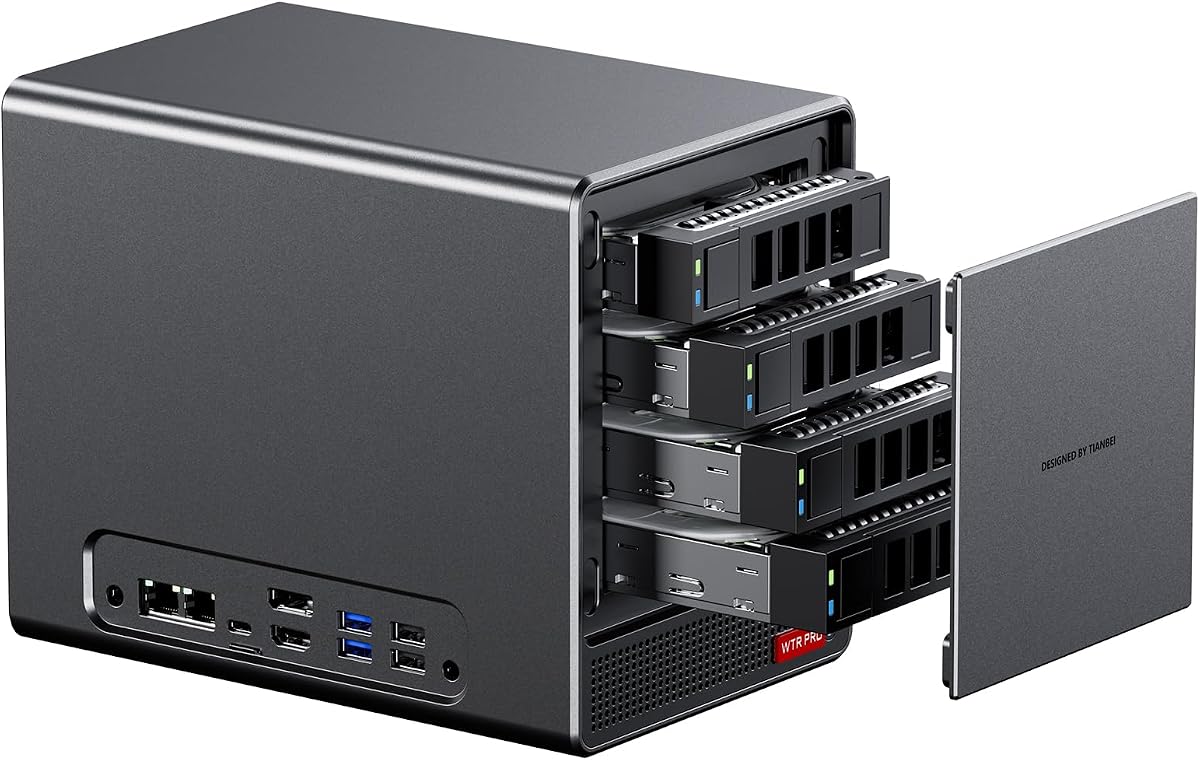
AOOSTAR WTR PRO is a NAS oriented barebone kit powered by Ryzen 7 5825U with four SATA bays and two M.2 slots. It is designed for continuous operation with efficient cooling to handle 24 7 workloads reliably.
We may earn a commission when you buy through this link, at no additional cost to you.
Its dual 2.5G LAN ports support redundant networking ideal for servers or routers. The low power design keeps electricity use minimal while still delivering sufficient CPU power for media transcoding or file serving tasks.
Triple 4K display output allows it to double as an office workstation when not running as a server. The through-the-wall fan design improves heat transfer while maintaining quieter operation in living spaces.
Choose this kit for building a home server or router with AMD performance. Its storage flexibility and power efficiency make it a practical choice for users needing persistent data services in a small form factor.
Two 2.5G LAN ports provide bandwidth redundancy and load balancing for robust network performance in server roles.
Optimized cooling and power usage allow the unit to run continuously without overheating or consuming excessive electricity.
We may earn a commission when you buy through this link, at no additional cost to you.
ASRock DeskMini X300 2.5G is an ultra compact barebone kit with a 1.92L volume ideal for space constrained setups. It supports AM4 CPUs and includes a 2.5G LAN port for fast networking without external adapters.
We may earn a commission when you buy through this link, at no additional cost to you.
Triple display support via HDMI DisplayPort and D-Sub enables versatile setups for monitoring or productivity. The small size hides easily behind displays or on shelves making it invisible in tight offices or homes.
Dual M.2 and 2.5 drive bays offer flexible storage options despite the slim footprint. DDR4 support ensures compatibility with widely available memory modules which helps keep build costs reasonable.
Pick this model if you need a tiny AMD PC with modern networking. Its size and display options suit office workers or home users who value discretion and connectivity over raw expansion power.
At just 1.92L this kit fits almost anywhere and reduces cable clutter compared to larger desktop chassis.
The 2.5G LAN port ensures fast wired connections for file transfers and streaming without needing additional network cards.
We may earn a commission when you buy through this link, at no additional cost to you.
The ASUS ExpertCenter PN54 targets advanced users with Ryzen AI 300 series support and Wi-Fi 7. Its ultra-thin design and toolless upgrades simplify maintenance and customization in professional environments.
We may earn a commission when you buy through this link, at no additional cost to you.
Dual 2.5G LAN and multiple USB ports ensure robust connectivity for data heavy tasks. The three year warranty reflects confidence in build quality and long term reliability for business deployments.
Its eco-conscious chassis and reliable 24 7 operation suit offices needing persistent uptime. The compact zero point six liter size saves desk space while still delivering high performance computing power.
Invest in this kit if you need premium features and future-proofed connectivity. Its AI capabilities and modern wireless options make it a top choice for forward-looking deployments in enterprise settings.
Wi-Fi 7 support ensures fast wireless speeds and low latency for future networks without hardware replacement.
Ryzen AI 300 series includes dedicated hardware for faster machine learning tasks and intelligent computing features.
We may earn a commission when you buy through this link, at no additional cost to you.
AOOSTAR WTR PRO 4+2 Bay expands storage with four SATA and two M.2 slots for up to ninety six terabytes total. Powered by Ryzen 7 5825U it handles virtualization and media serving with ease.
We may earn a commission when you buy through this link, at no additional cost to you.
Dual 2.5G LAN ports enable redundant networking and virtualization support lets it act as soft routers or lab machines. Full metal shell provides durability and efficient heat dissipation for always-on service roles.
Triple 4K output adds flexibility to use it as a workstation when not in server mode. Low power consumption reduces running costs making it economical for 24 7 deployments.
Select this model for large scale storage and networking tasks. Its expandability and dual LAN setup offer the reliability needed for home labs or small business servers needing high capacity.
Support for up to ninety six terabytes allows extensive media libraries or data archives without external enclosures.
Full support for virtualization tech allows multiple OSes to run simultaneously on one compact physical machine.
We may earn a commission when you buy through this link, at no additional cost to you.
ASUS ExpertCenter PN54-S1 is a tool-free barebone kit designed for quick upgrades and minimal downtime. It supports Ryzen 200 series CPUs and includes Wi-Fi 7 connectivity for future network standards.
We may earn a commission when you buy through this link, at no additional cost to you.
The ultra-thin chassis saves space while remaining durable for continuous operation. Toolless design lets you swap components without screwdrivers which is useful for IT maintenance or rapid reconfiguration.
With dual 2.5G LAN and multiple display ports it handles multi-tasking and networking efficiently. The three year warranty adds peace of mind for deployments where reliability matters more than raw specs.
Opt for this kit if you need easy maintenance and enterprise reliability. Its balance of compact size and serviceability makes it ideal for offices that require quick hardware updates.
Component access without tools reduces maintenance time and simplifies hardware changes for IT professionals.
Built for 24/7 operation with robust cooling and power management to ensure continuous service availability.
We may earn a commission when you buy through this link, at no additional cost to you.
Selecting the right AMD barebone PC depends on your performance needs storage requirements and future expansion plans. This section outlines key factors to evaluate before committing to a specific model.
AMD barebone kits vary between AM4 and newer AM5 platforms. Ensure the chassis supports the CPU generation you intend to use whether it is a budget Ryzen 5000 series or a high end 8845HS.
Always verify the CPU socket and power limits before purchasing to avoid thermal throttling or physical fit issues.
Look for dual or quad memory slots that match your budget and performance needs. Some kits support DDR5 while others rely on DDR4 for cost savings.
Check M.2 and SATA bay counts to ensure you can install enough drives for your OS and data without needing external enclosures.
USB4 and OCuLink ports are critical for external GPU and high speed data needs. Ensure the model you pick offers the interfaces required by your peripherals.
Gigabit or 2.5G LAN ports matter for streaming or networked storage. Verify WiFi versions if wireless connectivity is essential.
Compact chassis rely on efficient cooling. Vapor chambers and intelligent fan controls prevent throttling during long workloads and keep noise levels down.
Review case construction and airflow design to ensure heat is effectively expelled even in tight office or home environments.
Barebone units often ship with specific PSUs. Confirm wattage and connector types match the CPU TDP you plan to install.
Consider power efficiency if the device will run 24 7 as a server or router to reduce long term energy costs.
Quality support can ease build issues or part failures. Three year warranties provide confidence especially for business or critical home use.
Check if the manufacturer offers driver updates and compatibility lists before buying to avoid software mismatches.
Begin by installing compatible memory and storage drives following the manufacturer manual for correct orientation and slot priority. Secure all components before closing the chassis to prevent short circuits or vibration damage.
Install the operating system of choice and update drivers immediately for optimal performance and security. Use manufacturer utilities to manage power modes and monitor temperatures during regular use.
Keep the unit in a ventilated area to avoid dust buildup and overheating. Periodically clean intake vents and run diagnostics to ensure long term stability without interrupting your workflow.
A barebone PC with AMD includes the motherboard chassis cooling and power supply but excludes CPU memory and storage. This allows buyers to choose components that match their budget and performance needs while keeping costs low and flexibility high.
Yes RAM is not included in barebone kits. You must purchase compatible DDR4 or DDR5 memory modules separately and install them according to the motherboard specifications before powering on the system.
Yes these kits support both Windows and Linux. Since no OS is included you can install whichever operating system you prefer to suit your workflow and software requirements.
OCuLink provides higher bandwidth and lower latency than USB4 making it superior for external GPUs. It preserves more GPU performance for gaming or graphics workloads without USB protocol overhead.
Most kits support multiple M.2 NVMe slots and some include SATA bays. Depending on the model you can install up to several terabytes of internal storage for data and applications.
Many modern kits use vapor chambers and smart fans to reduce noise. While performance modes may increase fan speed, optimized cooling often keeps the system quiet during typical office or home use.
It depends on the socket and BIOS support. AM4 models allow multiple Ryzen CPU upgrades while AM5 or newer platforms may have limited options. Check compatibility lists before swapping.
Most kits ship with a power adapter or PSU. Always check the package contents to confirm power supply is included before beginning your build to avoid delays.
The top picks in this guide highlight versatile AMD barebone kits ranging from compact AM4 builds to modern 8845HS systems. Each option balances performance connectivity and price to suit different use cases.
Focus on CPU compatibility thermal performance and port availability when deciding which model fits your workflow. Expandable storage and external GPU support add value for long term usage.
Prices and availability may vary so check current listings for the latest details before purchasing. Verify compatibility with your chosen components to ensure a smooth and successful build experience.