
Epson Workforce Pro WF-7310
3.8Editor score
Fast wide-format printing
500-sheet paper capacity
Heat-free technology
This guide compares the top A3 printers for business and creative use, evaluating speed, quality, and reliability to help you choose the right model for your
Finding the right A3 printer can transform your workflow by allowing you to produce large documents without sacrificing quality. Whether you need crisp graphics for presentations or detailed blueprints, these machines offer versatility that standard printers cannot match. Selecting the best option depends on your specific volume requirements and budget constraints.
We have analyzed ten leading models to determine which ones deliver the best performance for wide-format printing tasks. Our evaluation focuses on print speed, ink efficiency, connectivity options, and overall reliability based on user feedback and technical specifications. This list covers a range of devices from budget-friendly options to premium business solutions.
Each pick in this guide highlights key strengths and potential limitations to help you make an informed decision. We include detailed breakdowns of features and real-world performance metrics to ensure you understand what you are getting. Please note that prices and availability can change frequently so always verify current details before purchasing.
3.8Editor score

4.0Editor score

3.9Editor score
The following table provides a side-by-side comparison of all ten A3 printers reviewed in this guide to help you quickly identify the model that best fits your specific printing requirements and operational needs.



The Epson EcoTank Photo ET-8550 stands out as a top choice for users who need high-quality wide-format printing without the ongoing cost of traditional cartridges. It holds a solid rating from users who appreciate its ability to produce lab-quality photos and creative projects directly from their office or home setup.
We may earn a commission when you buy through this link, at no additional cost to you.
Its standout quality lies in the cartridge-free printing system that uses high-yield ink bottles instead of expensive disposable units. This design allows for vibrant colors and sharp text thanks to Epson high high-accuracy printhead and Claria ET Premium six-color inks. You can print standard four by six inch photos for a fraction of the cost compared to traditional inkjet models.
While the upfront cost is higher than standard printers the long-term savings are substantial for anyone printing frequently. The only real trade-off is the physical size of the unit which requires a dedicated space in your workspace. This is acceptable given the volume it can handle and the reduction in waste it offers to the environment.
You should buy this printer if you value cost efficiency and environmental sustainability alongside professional print quality. It is ideal for small businesses or photographers who need consistent output without worrying about running out of ink during critical jobs. The included ink supply ensures you can start printing immediately without additional purchases.
The EcoTank system uses refillable ink bottles that provide up to two years of ink in the box reducing the frequency of replacements and lowering the overall cost per page significantly compared to cartridge-based printers.
By eliminating disposable cartridges this printer helps reduce the amount of plastic waste ending up in landfills making it a more sustainable choice for eco-conscious users who care about their carbon footprint.
We may earn a commission when you buy through this link, at no additional cost to you.
The Epson Workforce Pro WF-7820 is designed for offices that need to produce large documents quickly without sacrificing quality. It earns a decent rating from users who value its ability to handle heavy workloads with reliable performance over time. This model excels at printing up to thirteen by nineteen inch pages for professional presentations.
We may earn a commission when you buy through this link, at no additional cost to you.
Its key strength is the PrecisionCore Heat-Free Technology which delivers high-speed prints with minimal warmup time. The printer features accurate dot placement and DURABrite Ultra instant-dry pigment inks that ensure professional-quality prints that are resistant to smudging. It also includes a fifty-sheet automatic document feeder for efficient multi-page scanning.
One limitation is the requirement to use only genuine Epson cartridges which can increase long-term operating costs if you do not manage usage carefully. Additionally the overall rating suggests there are mixed experiences among users regarding connectivity or setup issues. These trade-offs are acceptable if you prioritize speed and reliability for your daily tasks.
Consider buying this printer if you need a robust machine for a busy office environment with high-volume printing needs. It is best suited for businesses that require fast turnaround on wide-format documents and do not mind adhering to specific ink requirements for optimal performance.
With speeds up to twenty-five pages per minute in black and twelve in color this printer streamlines workflows for heavy workloads ensuring you spend less time waiting and more time working on other tasks.
The complete duplex solution allows you to automatically print copy scan and fax on two sides of the paper which saves paper and reduces costs for large-scale office operations.
We may earn a commission when you buy through this link, at no additional cost to you.
The Epson Workforce Pro WF-7310 offers an excellent balance of performance and affordability for users seeking wide-format capabilities. It receives a solid rating from those who appreciate its high-volume reliability and efficiency in handling diverse print tasks. This model is engineered for durability and can manage heavy workloads effectively.
We may earn a commission when you buy through this link, at no additional cost to you.
Its main benefit is the ability to accomplish more with fast wide-format printing up to thirteen by nineteen inches. The PrecisionCore Heat-Free Technology streamlines workflow with twenty-five pages per minute in black and twelve in color ensuring you get results quickly. It also features a substantial five hundred-sheet paper capacity to reduce interruptions during large jobs.
A drawback is the smaller two point four inch color display compared to some premium models which might make navigation slightly less intuitive. The requirement for genuine cartridges also limits flexibility in ink choices. These factors are acceptable given the price point and the productivity gains it offers to small businesses.
You should choose this printer if you need a reliable workhorse for everyday office documents without breaking the bank. It is a great option for teams that prioritize speed and paper capacity over advanced interface features or premium build quality.
The five hundred-sheet paper capacity with two trays and a rear feed lets you easily tackle high-volume print tasks without frequent paper reloading improving overall office efficiency.
Thanks to Heat-Free Technology this printer has zero warmup time and low energy consumption making it a cost-effective and environmentally friendly choice for daily use.
We may earn a commission when you buy through this link, at no additional cost to you.
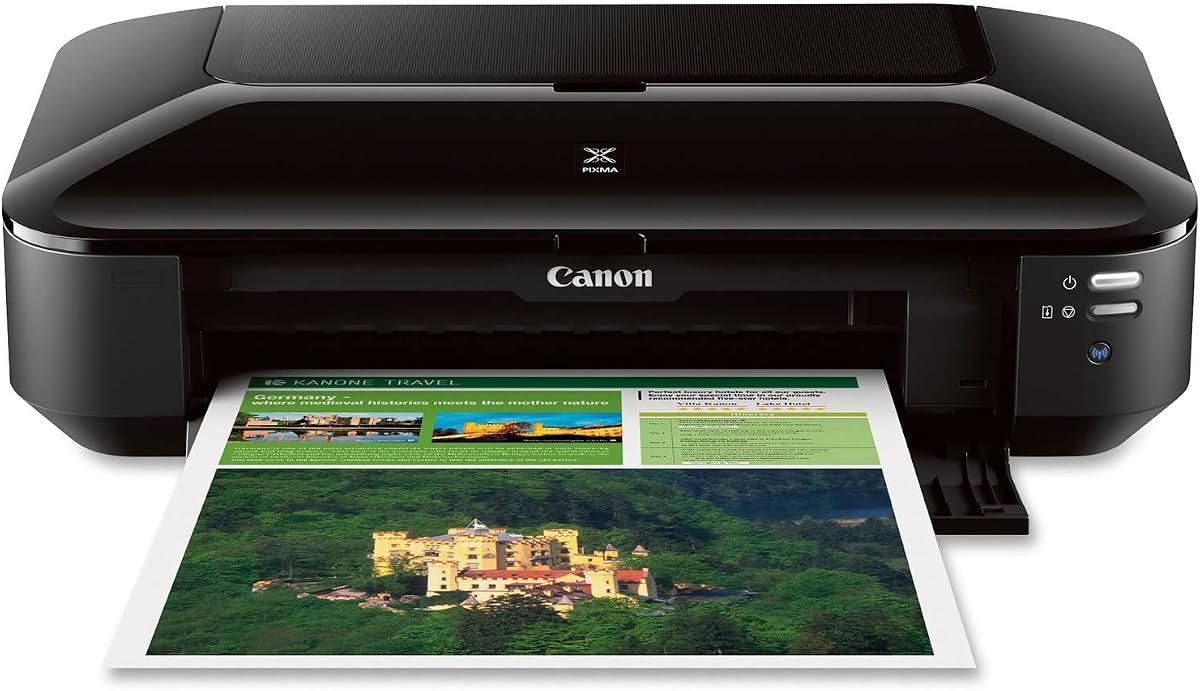
The Canon Pixma iX6820 is a reliable business printer that supports cloud printing and AirPrint for versatile connectivity options. It maintains a strong rating among users who need consistent output for presentations and flyers. This model utilizes Fine print head technology to deliver sharp and detailed graphics.
We may earn a commission when you buy through this link, at no additional cost to you.
Its standout feature is the five individual ink tank system which allows you to replace only the colors you run out of instead of a full cartridge. The print resolution reaches up to nine thousand six hundred by two thousand four hundred dpi ensuring high-quality text and images. It also supports Google Cloud Print for remote access.
However as an older model it lacks some of the modern connectivity options found in newer devices such as advanced mobile apps or high-speed wireless standards. This might limit flexibility if you rely heavily on smart device integration. These limitations are acceptable if you prioritize print quality and simplicity.
Buy this printer if you need a straightforward machine for a small office with basic cloud printing needs. It is suitable for users who want to maintain high-resolution output without dealing with complex setup processes.
The individual ink tanks and Fine print head technology ensure you get sharp text and vivid colors while minimizing waste by allowing selective ink replacements.
With AirPrint and Google Cloud Print support you can print from various devices seamlessly making it convenient for mixed-technology environments.
We may earn a commission when you buy through this link, at no additional cost to you.
The Epson EcoTank ET-15000 is a powerful Supertank printer designed for high-volume printing environments that need versatility. It holds an impressive rating from users who rely on its ability to handle large workloads efficiently. This model provides printing faxing copying and scanning in one robust unit.
We may earn a commission when you buy through this link, at no additional cost to you.
Its primary advantage is the Supertank ink system which supports a monthly duty cycle of thirty-three thousand pages. The resolution goes up to four thousand eight hundred by two thousand four hundred dpi ensuring excellent readability for documents and graphics. It connects via USB LAN and Wi-Fi to enhance productivity in office settings.
One trade-off is the slower color print speed of nine pages per minute compared to black which might delay color-heavy jobs. The initial cost is also higher than standard inkjet models but the ink savings offset this over time. This is acceptable for businesses where uptime and volume matter more than instant speed.
Choose this printer if you need a reliable all-in-one solution for a busy office with high document turnover. It is best for teams that want to reduce ink costs while maintaining consistent output quality over extended periods.
With a monthly duty cycle of thirty-three thousand pages this printer is built to withstand heavy workloads without overheating or slowing down.
The Supertank design reduces the need for frequent cartridge replacements lowering operational costs and minimizing waste in your printing workflow.
We may earn a commission when you buy through this link, at no additional cost to you.
The Epson Workforce Pro WF-7840 combines wide-format printing with comprehensive office functions in a single machine. It has a solid rating from professionals who appreciate its versatility and reliability. This model is capable of delivering prints up to thirteen by nineteen inches efficiently.
We may earn a commission when you buy through this link, at no additional cost to you.
Its key feature is the ability to print copy scan and fax from one device which saves space and simplifies workflow. The PrecisionCore Heat-Free technology ensures quick output while DURABrite Ultra ink dries quickly to prevent smudges. With five hundred sheets of paper capacity it meets high demands without constant reloading.
The main limitation is the reliance on genuine Epson cartridges which can limit ink sourcing options for some users. Also speed is moderate compared to high-end production printers. These factors are acceptable for general office use where multi-functionality is valued over raw speed.
You should buy this printer if you want a compact yet powerful solution for an office that handles various document types. It fits well in environments where space is limited but functionality is not compromised.
Combining printing scanning copying and faxing in one unit reduces clutter and streamlines office processes effectively.
The DURABrite Ultra ink provides durable results that are smudge-free and quick to dry ensuring professional looking documents every time.
We may earn a commission when you buy through this link, at no additional cost to you.
The HP OfficeJet Pro 9135 is a trusted office printer that leverages AI to improve print formatting and efficiency. It holds a strong rating from users who value speed and connectivity. This model is perfect for printing professional-quality color documents like brochures and presentations.
We may earn a commission when you buy through this link, at no additional cost to you.
Its standout quality is the HP AI feature which optimizes print formatting to remove unwanted content and avoid awkward layouts. It also prints fast color documents at speeds up to twenty-five pages per minute in black and twenty in color. The four point three inch touchscreen makes navigation intuitive and efficient.
One drawback is the reliance on HP chips for cartridges which blocks non-HP inks and may increase costs over time. The Instant Ink trial can be useful but requires a subscription decision afterward. These trade-offs are acceptable for users who prioritize smart features and reliable wireless performance.
Choose this printer if you want a smart office solution that enhances productivity with AI tools. It is ideal for teams that handle frequent emails and web printing tasks requiring precise formatting.
HP AI analyzes content to remove unnecessary elements before printing ensuring your documents look professional without wasting pages.
With dual-band Wi-Fi and a large touchscreen you can connect and control your printer easily from anywhere in the office.
We may earn a commission when you buy through this link, at no additional cost to you.
The Brother INKvestment 6960 is a productivity-focused printer designed for small businesses that need speed and flexibility. It earns a high rating from users who appreciate its ease of use and robust features. This model supports printing up to eleven by seventeen inches for expanded document options.
We may earn a commission when you buy through this link, at no additional cost to you.
Its key strength is MAXIDRIVE Technology which delivers print speeds of up to thirty-one pages per minute in black and thirty in color. The five hundred-sheet capacity with two trays keeps workflows smooth without interruptions. You can connect via Wi-Fi Direct Ethernet or USB for versatile access.
A limitation is the size limit of eleven by seventeen inches which restricts larger wide-format printing compared to some rivals. The subscription trial may also require management to avoid unexpected fees. These are minor trade-offs for a reliable and fast office workhorse.
Buy this printer if you run a small business that needs high-speed color printing and easy mobile access. It is a strong choice for teams that value efficiency and reliable performance.
With thirty-one pages per minute and five hundred sheets of paper you can handle large jobs quickly without waiting for refills.
The Brother Mobile Connect app provides easy menu navigation for printing and scanning directly from your smartphone improving remote productivity.
We may earn a commission when you buy through this link, at no additional cost to you.
The Epson Workforce WF-7710 is a well-regarded wide-format printer known for its borderless printing capabilities. It holds an excellent rating from users who need large creative prints with precision. This model utilizes PrecisionCore technology to create borderless prints up to thirteen by nineteen inches.
We may earn a commission when you buy through this link, at no additional cost to you.
Its standout feature is the ability to produce professional borderless prints that are ideal for marketing materials and posters. The two hundred fifty-sheet tray supports photo paper and envelopes for varied media. It also offers Wi-Fi Direct and Ethernet connectivity for seamless network integration.
A trade-off is the slower automatic duplex print speeds which may delay double-sided jobs compared to other models. The tray capacity is also smaller than high-volume units requiring more frequent refills. These factors are acceptable for creative projects that prioritize edge-to-edge printing quality.
Choose this printer if you need to produce large borderless documents for presentations or promotional content. It is best for creative professionals who value print quality over raw speed.
PrecisionCore technology ensures that your prints go edge-to-edge without white borders creating a professional look for every document.
The tray can hold photo paper and envelopes allowing you to print on various media types without needing a separate device.
We may earn a commission when you buy through this link, at no additional cost to you.
The HP OfficeJet Pro 9730 is a premium wide-format printer that offers screen-accurate prints for professional color work. It receives a solid rating from businesses that need high-quality outputs like mood boards and floorplans. This model supports wide-format printing up to eleven by seventeen inches efficiently.
We may earn a commission when you buy through this link, at no additional cost to you.
Its main benefit is the P3 wide color gamut which ensures vibrant and screen-accurate prints for creative projects. HP AI optimizes formatting to avoid wasted pages and awkward layouts while the large touchscreen makes navigation easy. It also features sustainable design with more than thirty percent recycled plastic.
A limitation is the requirement for HP chips in cartridges which may restrict ink choices and increase costs over time. The initial price is also higher than standard office printers. These trade-offs are acceptable for users who prioritize color accuracy and modern AI features.
Choose this printer if you need professional color accuracy and advanced formatting tools for your office. It is ideal for creative teams that demand precise output and sustainability in their tech choices.
With the P3 wide color gamut you can expect true-to-screen colors that enhance the visual quality of your creative documents.
HP AI optimizes print layouts automatically ensuring your prints look professional and use less paper by removing unnecessary content.
We may earn a commission when you buy through this link, at no additional cost to you.
Choosing the right A3 printer involves evaluating several key factors to ensure it meets your specific business or creative needs. Consider these aspects before making a final decision.
Ensure the printer supports the maximum paper size you need such as thirteen by nineteen inches or eleven by seventeen inches. Higher resolution like four thousand eight hundred dpi ensures sharp details for photos and fine text.
Look for models with higher pages per minute ratings especially if you handle large batches daily. Faster speeds reduce waiting time and increase overall workflow efficiency.
Decide between cartridge-based or tank systems based on your volume. Tank systems offer lower cost per page but higher upfront cost while cartridges may suit lower volume users.
Choose printers with Wi-Fi Ethernet and USB ports for flexible access. Mobile compatibility like AirPrint ensures you can print from devices anywhere in the office.
Multi-function printers offer scanning copying and faxing which saves space. If you only need printing a single function unit might be more cost-effective and compact.
Check the input tray capacity to avoid frequent refills during large jobs. A higher capacity like five hundred sheets is ideal for busy office environments.
Business printers should include secure wireless and data erase features to protect sensitive documents. Look for models with advanced security protocols if you handle confidential files.
Consider the long-term cost of ink and maintenance. Some models require genuine cartridges which can be expensive but ensure quality while others offer more flexibility.
Clean the printhead and paper trays monthly to prevent clogs and jams. Use genuine inks recommended by the manufacturer to maintain warranty coverage and reliability.
An A3 printer is designed to print on larger paper sizes such as thirteen by nineteen inches. These printers are ideal for presentations blueprints and creative projects that exceed standard paper limits.
Yes if you regularly need to produce large documents or high-quality graphics. The upfront investment often pays off through better print quality and professional results compared to upscaled standard prints.
Yes most A3 printers accept smaller paper sizes like A4. This allows you to use the same machine for both large and standard documents without changing hardware.
A3 printers use traditional cartridges or ink tank systems. Tank systems reduce cost per page while cartridges offer simpler setup for lower volume printing needs.
Clean the printhead and paper trays regularly and keep firmware updated. Avoid letting ink dry out by printing occasionally and use genuine inks to ensure best results.
Most modern A3 printers support wireless printing via Wi-Fi and mobile apps. This allows you to send documents directly from phones or tablets for quick and convenient output.
Brands like Epson HP and Canon offer reliable A3 models. The best choice depends on your specific needs for speed color accuracy or cost efficiency.
Yes many A3 printers include flatbed scanners that handle full-size A3 documents. This allows you to digitize large plans or artwork efficiently without extra equipment.
Remember that prices and availability change frequently so always check current listings before making a purchase. Selecting the right A3 printer will enhance your productivity and ensure high-quality results for all your large format projects.