
SABRENT 74 in 1 Internal Reader
4.0Editor score
Supports 74 memory card types
Includes extra USB 2.0 port
Internal power connector included
This guide compares the top internal media card reader models for desktop PCs, evaluating speed, compatibility, and build quality to help you choose the right
Internal media card readers provide seamless access to memory cards without external clutter. They fit directly into your PC case, offering stable power and faster data transfer rates than many USB alternatives. Choosing the right model ensures compatibility with your specific card formats and enhances workflow efficiency for photographers and creators.
We evaluated ten distinct internal card reader options based on connection types, supported formats, and build quality. Our analysis focused on real-world performance metrics, installation ease, and long-term reliability. Each product was scrutinized for its ability to handle high-capacity cards and maintain consistent transfer speeds during heavy usage scenarios.
Each pick highlights key strengths, weaknesses, and ideal use cases to guide your decision. Please note that prices fluctuate frequently due to market demand and availability. Always check the current listing details before purchasing to ensure you receive the most up-to-date specifications and warranty information for your specific region.
4.0Editor score

4.5Editor score

5.0Editor score
The following table provides a side-by-side comparison of all ten models. It highlights key specifications like supported card types, interface speeds, and bay sizes to help you quickly identify the best fit for your desktop setup.


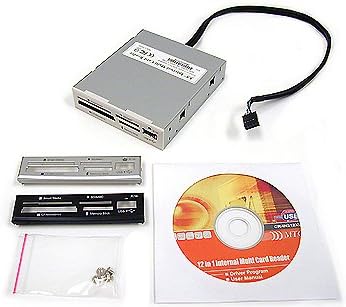
The SABRENT 74 in 1 is a versatile internal card reader designed for users needing broad format support. With a 4.0 rating, it offers access to an extensive array of memory cards directly from your 3.5-inch drive bay. This unit stands out for including an internal power connector to ensure stable performance for attached USB devices.
We may earn a commission when you buy through this link, at no additional cost to you.
Its primary strength lies in supporting 74 different memory card types, covering everything from M2 to SDXC and CF. The included USB port adds extra connectivity for peripherals. It works across Windows and Linux systems making it a flexible choice for older or budget builds where high speed is less critical than compatibility.
However, the lack of USB 3.0 means transfer speeds are limited compared to newer models. The build quality is functional but not premium. For users who need to read obscure card formats occasionally without spending much, the trade-off in speed is acceptable for the price.
Buy this if you need a low-cost solution for diverse card types in an older system. It is ideal for general home users or hobbyists who prioritize format support over maximum transfer throughput. Always ensure your case has an available 3.5-inch bay before installation.
The 74 different supported formats ensure you can read legacy and modern cards without needing external dongles.
The extra USB 2.0 port on the front panel provides convenient access for flash drives or mobile devices.
We may earn a commission when you buy through this link, at no additional cost to you.
The StarTech internal card reader is a professional-grade solution built for IT environments and power users. It features USB 3.0 with UHS-II support for maximum speed and allows simultaneous access to four different card slots. A TAA compliant design makes it suitable for government and enterprise procurement needs.
We may earn a commission when you buy through this link, at no additional cost to you.
Its key strengths include high throughput for videographers and photographers who need to move large files quickly. The ability to copy between different card types simultaneously saves significant time. It supports a massive range of formats including CompactFlash and Memory Stick variants ensuring broad utility.
The main drawback is the cost relative to consumer options. Installing it requires connecting to a 20-pin motherboard header which might confuse novice builders. However, the 2-year warranty and lifetime support justify the investment for those needing reliability and performance.
Choose this if you require high-speed transfers and robust build quality for professional work. It is the top pick for creators managing multiple card types daily. Ensure your motherboard has the necessary header and your case fits a 3.5-inch bay.
USB 3.0 with UHS-II support delivers rapid transfer rates essential for handling high-resolution video footage efficiently.
Accessing four slots at once lets you offload data from multiple cards simultaneously without switching them manually.
We may earn a commission when you buy through this link, at no additional cost to you.
The Vantec Link USB 3.0 is a top-tier internal reader that supports massive storage capacities and advanced modes. With a flawless 5.0 rating it handles CompactFlash cards up to 144PB and SD cards up to 2TB. It is designed for professionals who need to manage enterprise-level storage media reliably.
We may earn a commission when you buy through this link, at no additional cost to you.
Its standout features include support for Ultra High Speed SD modes and quad data access for Memory Stick PRO-HG. This ensures fast throughput even with the most demanding media formats. The Multi-LUN support allows multiple cards to be recognized and accessed without conflict.
The complexity of specifications might be overkill for casual users. It requires a 20-pin header connection which limits installation to desktop motherboards with that specific slot. However for those needing peak performance and capacity support there are few better internal options available.
Buy this if you work with high-end storage media like large CF or SDXC cards regularly. It is perfect for video editing stations where speed and capacity are critical. Verify your motherboard connections match the required header before purchasing.
Support for cards up to 144PB ensures this reader remains future-proof for professional storage needs.
Quad data access for MS PRO-HG enhances transmission rates for compatible Sony memory stick media.
We may earn a commission when you buy through this link, at no additional cost to you.
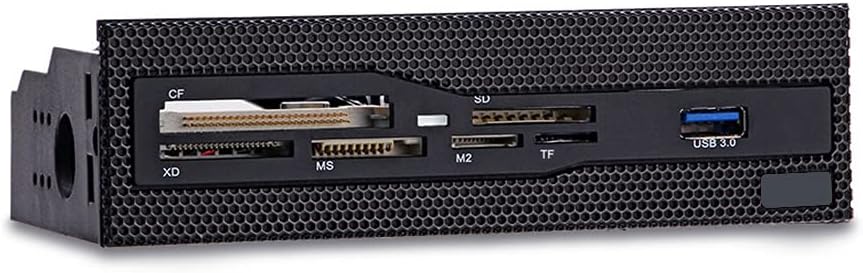
This dashboard is designed for desktop cases with a 5.25-inch drive bay offering convenient front panel access. It features a USB 3.0 interface for high-speed data transmission and six card slots covering popular formats like CF and SD. The copper-plated slots add a layer of durability to the connections.
We may earn a commission when you buy through this link, at no additional cost to you.
The main benefit is the integration into cases with mesh front panels making it look professional while providing quick access. The USB 3.0 port allows for efficient transfers which is crucial for modern high capacity media. Its simple installation makes it a great upgrade for older towers.
It is limited to 5.25-inch bays which are becoming rarer in smaller modern cases. The card variety is narrower than the SABRENT model but covers the most common needs. For users with larger cases it offers a solid balance of speed and convenience.
Choose this if you have a 5.25-inch bay and want easy access to common card types. It suits users who value front panel USB connectivity alongside card reading. Ensure your case has the right space before buying to avoid modification needs.
Front-facing access allows you to insert cards quickly without opening the case or reaching around the back.
Copper plating ensures stable electrical contact during transmission reducing the risk of connection errors.
We may earn a commission when you buy through this link, at no additional cost to you.
This media dashboard combines a card reader with a full I/O hub including audio and eSATA ports. It is designed for 5.25-inch bays and offers a USB 3.0 hub to expand connectivity. The audio jacks for speakers and microphone provide convenience for front-panel access.
We may earn a commission when you buy through this link, at no additional cost to you.
Its versatility is the main selling point as it replaces multiple separate adapters or ports. The card reader supports simultaneous multi-card access which is useful for bulk transfers. LED indicators help monitor power and drive activity status especially in low-light environments.
The 3.8 rating suggests some users find the setup complex or the build quality inconsistent. Managing cables for audio data and power can be tricky in tight cases. However for PC builders wanting a comprehensive front panel solution it offers significant value.
Buy this if you want an all-in-one front panel for audio data and cards. It fits well in custom builds that need extra ports. Check that your case and motherboard support the specific connectors required for full functionality.
Integrated audio jacks and eSATA ports save space by consolidating multiple connection needs into one panel.
Built-in LEDs provide visual feedback on power status and drive activity which helps troubleshoot connection issues.
We may earn a commission when you buy through this link, at no additional cost to you.
This dashboard offers a mix of storage and connectivity with USB SATA and audio ports. It supports a wide range of media cards through its five-in-one reader and includes high-speed transfer options. The LED indicators provide visual feedback for power and hard disk read write status.
We may earn a commission when you buy through this link, at no additional cost to you.
Its strength lies in the combination of eSATA and USB 3.0 speeds which helps improve overall workflow efficiency. The front speakers and microphone ports solve the inconvenience of reaching behind the chassis for audio. It is a robust choice for media centers or older desktop setups.
The lack of rating data makes it harder to verify reliability compared to others. The installation requires several cables which might clutter the case. However the sheer number of ports makes it a versatile option for users who need to expand a system quickly.
Choose this if you need extra USB and SATA ports along with card reading in one unit. It is ideal for older systems needing a hardware upgrade. Ensure your motherboard has the available slots for the required data and power connections.
Multiple USB 2.0 and eSATA ports allow for connecting various peripherals without needing additional hubs.
Front audio ports eliminate the need to plug devices into the back of the tower during normal use.
We may earn a commission when you buy through this link, at no additional cost to you.
The Sony MRW620 is a reliable internal reader designed to handle 17 different memory card types. With a 4.0 rating it includes drive letter recognition software to simplify file management. It is compatible with Windows Vista and XP which makes it suitable for legacy systems.
We may earn a commission when you buy through this link, at no additional cost to you.
Its strength is in supporting a broad range of formats with a focus on Sony's own media series. The inclusion of black and ivory faceplates allows you to match the reader with your PC case aesthetics. The internal design ensures a clean look with no external cables.
Modern systems might not need this level of legacy support. The speed is USB 2.0 which is slower than modern alternatives. For users with older cameras or specific card types this reader provides a dedicated solution without extra adapters.
Buy this if you have older Sony cameras or need specific card support in an older PC. The dual bezels add a nice custom touch. Check your system compatibility before purchasing as it focuses on Windows Vista and XP era support.
Native support for Sony Memory Stick variants ensures compatibility with older camera equipment easily.
Included software helps assign consistent drive letters for easier file organization across multiple cards.
We may earn a commission when you buy through this link, at no additional cost to you.
This All-In-One internal reader is a simple unit designed for reliable flash card reading. With a 5.0 rating it offers a clean build with black silver and white bezel options. It fits into a 2.5-inch internal slot which is more common than the larger bays.
We may earn a commission when you buy through this link, at no additional cost to you.
Its reliability and compact size make it a good choice for smaller cases or laptops with internal slots. The high quality construction suggests long-term durability. It supports standard flash cards making it a basic yet effective tool for transferring media.
The lack of detailed specifications means you should verify format support before buying. It is less feature-rich than the 5.25-inch panels but works well for basic needs. The color options allow you to match the unit with your drive bays.
Choose this if you need a compact reliable reader for a 2.5-inch bay. It is perfect for simple transfers without extra ports or features. Ensure your case has the required 2.5-inch internal space for installation.
The 2.5-inch form factor allows installation in smaller drive bays where larger readers do not fit.
Included bezels let you choose between black silver or white to match your computer case style.
We may earn a commission when you buy through this link, at no additional cost to you.
The Akasa internal reader provides six ports for reading popular memory cards with dedicated ports for adapters. It fits into a standard 3.5-inch bay and includes LED indicators for power and data transfer status. This design eliminates the need to constantly swap adapters for microSD cards.
We may earn a commission when you buy through this link, at no additional cost to you.
Its primary strength is the convenience of having dedicated slots for common formats. The additional USB port adds a bit of extra flexibility for flash drives. The LEDs help users confirm activity which is helpful in dark setups.
Transfer speeds are not highlighted so it may not suit high-volume data work. The build quality is decent but not premium. For general users who want a straightforward way to read cards this unit provides reliable function.
Buy this if you need a simple adapter-free solution for common card types. It suits home users who value convenience over speed. Ensure your PC has a 3.5-inch bay and the proper internal connectors for installation.
Having dedicated ports for adapters removes the hassle of manually inserting small cards into larger adapters.
LEDs show power and data activity which helps you confirm transfers are progressing correctly.
We may earn a commission when you buy through this link, at no additional cost to you.
This MTG card reader features a metal case which offers better durability than plastic units. It supports 22-in-1 card formats and includes beige black and silver bezels for customization. It is hot swappable and plug and play which makes it easy to use without driver installations.
We may earn a commission when you buy through this link, at no additional cost to you.
Its strength lies in the metal construction that helps dissipate heat during data transfers. The 4.5 MB/s speed is suitable for standard SD cards and flash drives. The swappable bezels allow you to customize the look to match your PC style.
The lack of rating data means reliability may vary between batches. It is a solid choice for budget users who want a metal unit. For those who need high-speed transfers there are better options but for general tasks it works well.
Choose this if you need a durable metal internal reader at a budget price. It is good for basic media transfers. Verify that your system supports USB 2.0 and has the necessary 3.5-inch bay space.
The metal housing provides robust protection and helps manage heat better than standard plastic cases.
Multiple bezel colors allow you to match the card reader to your existing hardware aesthetic easily.
We may earn a commission when you buy through this link, at no additional cost to you.
Selecting the right internal card reader depends on your specific needs and system capabilities. Below are the key factors to consider before making a purchase.
The interface speed determines how fast you can transfer data from your cards. USB 3.0 and newer protocols offer significantly faster speeds than USB 2.0 which is crucial for handling large video files. Always check your motherboard headers to ensure compatibility with the chosen interface speed.
Prioritize USB 3.0 if you work with high-resolution media.
Different readers support different arrays of card types. Some support only SD and CF while others include M2 and xD formats. Ensure the reader covers the specific cards you use daily to avoid buying adapters.
Choose a model with broad support for future-proofing.
Internal readers must fit into specific drive bays such as 3.5-inch or 5.25-inch. Check your PC case to see which bay sizes are available before buying. Some modern cases lack these bays entirely requiring alternative installation methods.
Verify your case bay size matches the product requirements.
Build quality affects durability and heat dissipation. Metal cases are generally more robust than plastic ones which can warp under heat. Higher-end models often include better materials for the card slots to ensure stable connections.
Look for metal casings for better long-term reliability.
Some models include extra features like audio jacks or USB hubs. These can add value if you need additional front panel ports. However they may also complicate the installation process with more cables to manage.
Consider if extra ports justify the added complexity.
Ensure the reader supports your operating system natively. Most modern units work on Windows but support for Linux or macOS can vary. Check the product page for specific OS compatibility details to avoid driver issues.
Confirm OS compatibility before installation.
To install the reader shut down your PC and unplug it from power. Open the case and locate an empty 3.5 or 5.25-inch bay. Mount the device using the provided screws and connect the USB or SATA headers to the motherboard.
Insert memory cards into the designated slots carefully. If using a USB model wait for the system to recognize the device before transferring files. Most internal readers are plug-and-play and do not require additional drivers.
Keep the slots clean from dust to maintain reliable connections. Use a can of compressed air to gently clear debris if needed. Handle cards by the edges to avoid static damage and store them in a dry environment when not in use.
Most internal card readers work with macOS without drivers because the system supports card formats natively. However you should check the product page to confirm compatibility before purchase. Some older models may only support Windows specifically so always verify the supported systems.
Using an internal reader without a case is possible but not recommended as it leaves exposed parts vulnerable to damage. You would need to connect it securely and ensure safety. A case helps protect the unit and manages cables more effectively.
USB 3.0 offers much faster transfer speeds compared to USB 2.0 which is vital for large files. The 3.0 standard is backward compatible with 2.0 ports but speed limits apply. For media work always choose a 3.0 reader to save time.
Refer to your motherboard manual to find the correct USB or SATA header. Headers are usually labeled on the motherboard board. Connect the cable carefully to match the pin layout to avoid damage to the system.
Internal readers are better for permanent setups offering stable power and cleaner desk space. External units are more portable and easier to install without opening the case. Choose based on whether you prioritize convenience or stability.
Check that the card is fully inserted into the correct slot. Ensure the reader is connected to a working header and that the drivers are installed. Try a different card to rule out a hardware issue with the slot itself.
Many internal readers draw power from the USB header on the motherboard which means no extra power supply is needed. Some models might require an additional power cable for stability. Check the product specifications to confirm power requirements.
The top picks include the StarTech reader for professional needs and the SABRENT model for budget flexibility. Each option offers distinct benefits depending on your system and workflow requirements. Selecting the right one ensures efficient data management for your media.
Prioritize speed and card compatibility to match your usage habits. If you handle large files regularly invest in a USB 3.0 model with robust build quality. For casual use a simple model with broad support may suffice.
Always check current prices and availability before finalizing your purchase. Prices fluctuate based on demand and stock levels. Ensure you verify the latest specifications and warranty details for the best value.