
HP 14 inch Laptop 2027 Edition
4.5Editor score
Intel N150 Processor
4GB DDR5 RAM
128GB SSD and 1TB Cloud Storage
14 inch Anti-glare display
Finding the right device for virtual meetings is essential for productivity and professionalism. A good laptop for Zoom calls needs a clear camera, reliable microphone, and stable connectivity to ensure smooth communication without interruptions during important meetings.
We compared ten top-rated products including laptops and lighting accessories to help you choose. Our analysis covers performance specs, video quality, portability, and user feedback to ensure you get the best value for your specific work or school environment.
Each pick highlights key strengths and potential trade-offs so you can decide quickly. Prices and availability change frequently so check current listings before purchasing to confirm compatibility with your existing setup and budget requirements for remote work.
4.5Editor score

5.0Editor score
4.6Editor score
As an Amazon Associate we earn from qualifying purchases.
This side-by-side comparison table helps you evaluate key specifications across all ten products to find the perfect match for your video conferencing needs and budget constraints.





The NIMO 15.6" FHD Copilot AI-Laptop stands out as a top choice for remote work. With a perfect 5.0 rating from users, it delivers reliable performance for video conferencing and daily tasks.
We may earn a commission when you buy through this link, at no additional cost to you.
Its Intel N150 processor paired with 16GB RAM ensures zero lag even with multiple browser tabs and Zoom running. The 15.6 inch Full HD screen provides clear visuals for shared documents.
Trade-offs include standard brightness levels that may struggle in very bright rooms. The storage is ample but not expandable beyond the included slots.
This model is ideal for students and professionals needing a balance of performance and portability without a high price tag.
The 16GB RAM allows you to run Zoom alongside email, browsers, and notes without slowing down or freezing.
Get up to 8.5 hours of video calls on a single charge so you can work through the day without hunting for an outlet.
We may earn a commission when you buy through this link, at no additional cost to you.
The HP 14 inch Laptop offers an affordable entry point for remote workers. It scores a solid 4.5 rating and includes Microsoft 365 for immediate productivity upon unboxing.
We may earn a commission when you buy through this link, at no additional cost to you.
Its Intel N150 processor handles basic Zoom calls well, while the 1TB cloud storage compensates for smaller local SSD space. The anti-glare display reduces eye strain.
However, 4GB RAM may limit simultaneous apps during heavy multitasking. Users should rely on cloud storage for larger file management needs.
This laptop suits students or casual users who prioritize cost and cloud integration over raw processing power.
Microsoft 365 is included for one year giving you instant access to Word Excel and Teams without extra subscriptions.
Weighing only 3.24 lbs this laptop is easy to carry between home office or school for flexible work environments.
We may earn a commission when you buy through this link, at no additional cost to you.
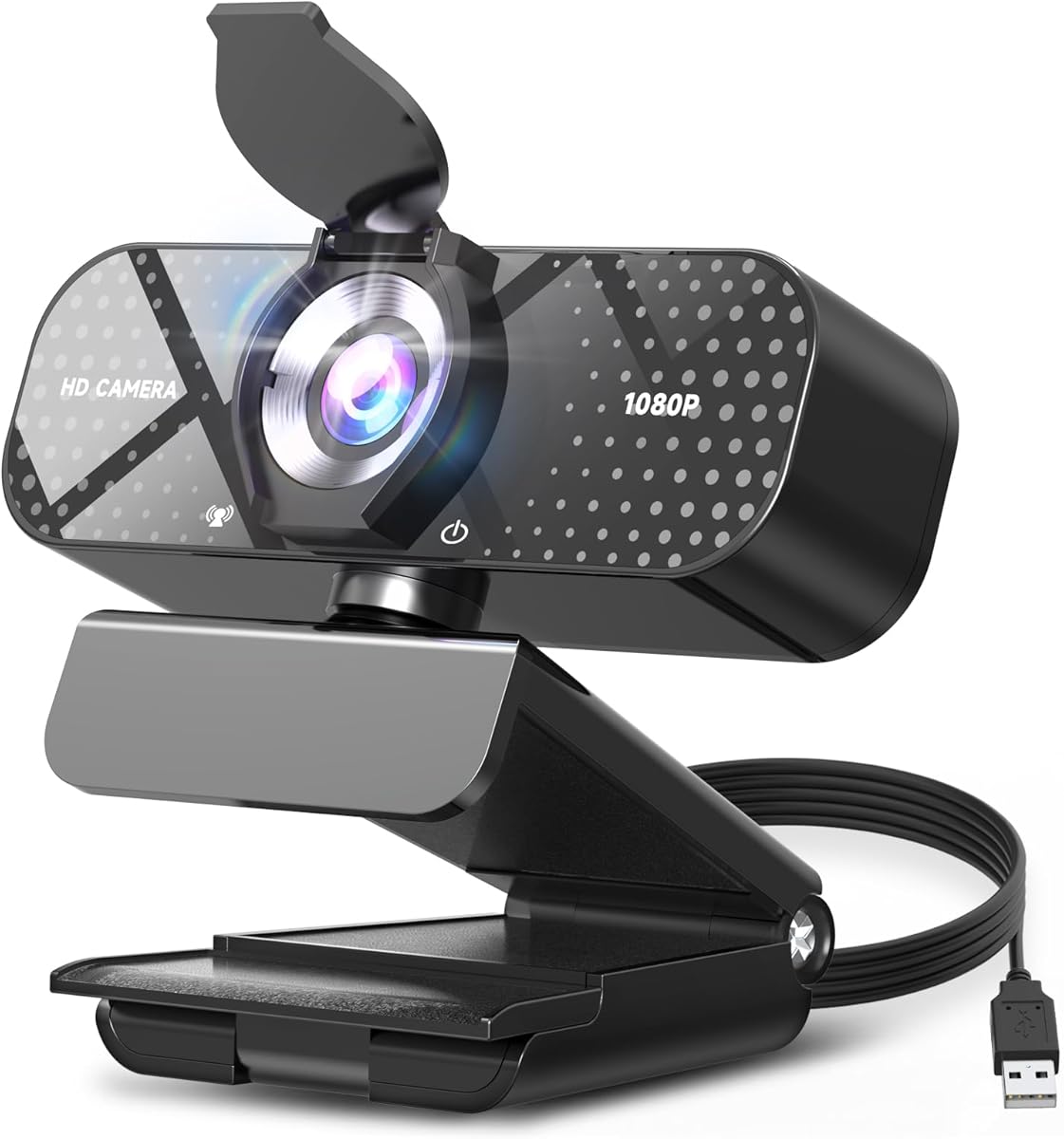
The TRAUSI 1080P FHD Webcam is a premium upgrade for existing laptops. Its 4.6 rating reflects high satisfaction with video clarity and ease of use.
We may earn a commission when you buy through this link, at no additional cost to you.
Auto light correction ensures you look good in dim or bright rooms while the noise-canceling mic keeps audio crisp. The wide-angle lens captures more detail.
External webcams need a USB port and extra desk space but the quality jump is worth it for professional meetings.
Ideal for anyone with a laptop that has a poor built-in camera but still wants high-definition video presence.
The camera adjusts brightness and color dynamically so you look natural even in low light or bright sunlight.
A physical privacy cover slides over the lens when not in use to protect your privacy from unauthorized access.
We may earn a commission when you buy through this link, at no additional cost to you.
This lighting kit enhances video call quality by illuminating your face evenly. With a 4.3 rating it is a practical add-on for home office setups.
We may earn a commission when you buy through this link, at no additional cost to you.
USB powered design means you can run it directly from your laptop or phone charger. The ring shape prevents harsh shadows on your face.
Some users note the clip might not fit ultra-thin screens securely. But for standard monitors it offers excellent value.
Buy this if your workspace lighting is dim and you want to look more professional on camera.
The circular design spreads light evenly to eliminate shadows under eyes and nose during meetings.
Powered by any USB port it needs no extra wall adapters keeping your desk clutter free.
We may earn a commission when you buy through this link, at no additional cost to you.
This HP Everyday Slim Laptop earns a perfect 5.0 rating for its video call features. The HP True Vision camera includes temporal noise reduction for clearer meetings.
We may earn a commission when you buy through this link, at no additional cost to you.
Its slim profile and long battery life make it easy to carry for remote work or study. The keyboard includes a Copilot key for quick AI access.
Limited RAM might slow you down if you run many apps at once but it suffices for Zoom and browsing.
Choose this for a trusted HP brand with optimized video hardware at an affordable price.
Temporal noise reduction in the camera helps remove visual grain in low light video calls.
The dedicated Copilot key on the keyboard gives instant access to AI tools for productivity.
We may earn a commission when you buy through this link, at no additional cost to you.
This lighting option serves as both a video light and a desk lamp. A 4.4 rating shows users appreciate its versatility for home offices.
We may earn a commission when you buy through this link, at no additional cost to you.
The metal base ensures stability and the height adjusts to reduce glare on your face. High CRI ensures colors look natural on camera.
It occupies more space than a clip-on but offers better durability and dual utility as a reading light.
Suitable for permanent home office setups where desk real estate is available for extra gear.
CRI of 97.8 ensures your skin tones and colors appear true and vibrant on video.
Use it as a video call light or a regular desk lamp for reading and tasks.
We may earn a commission when you buy through this link, at no additional cost to you.
This ring light offers a budget-friendly way to boost your video quality. A 4.4 rating indicates consistent performance for casual users.
We may earn a commission when you buy through this link, at no additional cost to you.
The circular design is softer on the eyes compared to flat lamps. It adjusts brightness to suit different room environments easily.
Construction is lighter than desk models but sufficient for occasional Zoom use and streaming.
Great for beginners who want professional lighting without investing in heavy equipment.
The curved lampshade protects your eyes from glare while providing bright even illumination.
Cycle through warm mixed and cold light modes to match your room ambiance.
We may earn a commission when you buy through this link, at no additional cost to you.
This HP business laptop provides a professional look with useful included accessories. It holds a 4.1 rating and is designed for standard office tasks.
We may earn a commission when you buy through this link, at no additional cost to you.
The 14 inch screen offers clear text and the included earphones help during calls in noisy environments. Office 365 is ready to use.
Display resolution is standard 1366×768 which is fine for documents but not ideal for high-detail media work.
Choose this if you want an all-in-one business solution without buying extra software or audio gear.
Get a full year of Office 365 to manage documents spreadsheets and emails immediately.
PLUSERA Earphones are included to ensure clear audio during calls in noisy places.
We may earn a commission when you buy through this link, at no additional cost to you.
This latest edition brings Copilot AI and generous cloud storage to the everyday user. However it holds a lower 3.3 rating suggesting potential performance caveats.
We may earn a commission when you buy through this link, at no additional cost to you.
The True Vision camera ensures decent call quality and cloud storage reduces need for large local SSD. Microsoft 365 supports immediate productivity.
Some users report battery life varies based on usage and local storage is limited to 128GB.
Opt for this if you rely heavily on cloud storage and AI tools rather than local file management.
Dedicated Copilot key on keyboard lets you access AI assistance instantly for work tasks.
1TB of cloud storage means you can keep files accessible anywhere without filling your drive.
We may earn a commission when you buy through this link, at no additional cost to you.
This dual-lamp system offers professional lighting coverage. A 4.2 rating confirms its utility for streaming and high-quality video calls.
We may earn a commission when you buy through this link, at no additional cost to you.
You can control it via touch or remote. The two bars allow even lighting without harsh shadows on your face.
Setup is slightly more complex than single ring lights but the result is more balanced lighting.
Ideal for content creators or professionals who need broadcast-level lighting quality for meetings.
Control brightness and modes remotely without touching the monitor or keyboard during calls.
Two light bars create a more even illumination than single-ring designs for smoother video.
We may earn a commission when you buy through this link, at no additional cost to you.
Selecting the right device for video conferencing requires attention to several key hardware and software features that impact call quality and comfort.
The built-in camera resolution determines how clear you appear on screen. Look for at least 720p HD but 1080p is preferred for sharp details.
Prioritize models with noise reduction technology to ensure video clarity in various lighting conditions.
A good microphone ensures your voice is heard without background noise. Dual array microphones are better at isolating your voice.
If the laptop microphone is weak, consider an external headset or webcam with superior audio capture.
Video calls require processing power and memory. At least 8GB RAM is recommended for smooth multitasking with Zoom and browser tabs.
Processors like Intel N150 are sufficient for basic calls but higher-end chips help with recording or heavy multitasking.
Long meetings drain battery quickly. Look for devices that promise at least 8 hours of usage to avoid unplugging during calls.
Portable chargers help extend work hours when power outlets are unavailable during travel.
Bright screens help you see participants clearly in well-lit rooms. Aim for at least 250 nits of brightness for comfortable viewing.
Anti-glare coatings reduce reflections and eye strain during long work sessions.
Ensure the laptop has enough USB ports for peripherals like webcams or headsets. USB-C and HDMI ports allow versatile connections.
Strong Wi-Fi and Bluetooth support are essential for stable internet and wireless audio devices.
Lightweight devices under 4 lbs make commuting easier. Thin profiles fit easily into backpacks for remote work on the go.
Consider the weight alongside durability if you frequently move between locations.
Windows 11 provides the latest security and meeting integration. Check for pre-installed apps like Office 365 that save costs.
Ensure drivers are available for any specific webcam or audio software you plan to use.
Update your drivers and software regularly to ensure compatibility with Zoom features and security patches.
Keep your camera lens clean with a microfiber cloth to avoid smudges that degrade video quality.
Position your light source in front of you rather than behind to prevent backlighting issues.
Focus on at least 8GB RAM for smooth multitasking and a processor that supports HD video. A 720p or 1080p camera ensures clear visuals. Battery life of 8+ hours keeps you going through long meetings.
Yes, most modern laptops work well with Zoom. If the built-in camera or microphone is poor, consider adding an external webcam or headset for better quality.
Lighting is crucial. A ring light or desk lamp in front of you prevents shadows and makes you look clearer. Poor lighting can make even a great camera look grainy.
4GB RAM can handle basic Zoom calls but 8GB or more is better if you run other apps like browsers or email simultaneously without lag.
Yes, budget laptops like the HP 14 inch models work well for standard meetings. Just ensure they have decent connectivity and battery life for all-day use.
Use a headset with a microphone or choose a laptop with noise-canceling mic features. Closing doors and windows also helps minimize external sounds.
Our top picks include the NIMO 15.6 for performance and the HP 14 inch for budget efficiency. Accessories like TRAUSI webcams enhance quality significantly.
Prioritize camera clarity, microphone performance, and battery life when choosing your next device for remote work needs.
Always verify current pricing and availability before purchasing to ensure you get the best deal for your setup.