
Samsung Galaxy Tab A7 Lite
4.5Editor score
Compact 8.7 inch design
Metal frame durability
Expandable storage up to 1TB
Finding the right entry level tablet can be challenging with so many options available today. You need a device that balances performance, screen quality, and battery life without breaking the bank. Whether for streaming, reading, or light productivity, the right choice makes a big difference.
We evaluated ten top models based on real-world usage, hardware specs, and user feedback. Each tablet was assessed for display clarity, processing power, storage options, and build quality. Our goal is to help you find a reliable device that meets your daily needs efficiently.
Each pick highlights key strengths and ideal use cases so you can compare easily. Note that prices and availability change frequently, so check current listings before buying. This guide remains updated to reflect the latest models and market trends for accurate shopping decisions.
4.5Editor score

4.5Editor score

4.6Editor score
As an Amazon Associate we earn from qualifying purchases.
This side by side comparison highlights the key specifications and features of each model. Use it to quickly identify which device matches your budget and usage requirements for an informed purchase decision.


The Amazon Fire HD 10 stands out as a top choice for entry level tablets with its balanced performance and screen quality. It holds a strong rating and delivers seamless streaming and reading experiences thanks to its 10.1 inch Full HD display. The device is built for relaxation with fast performance and a lightweight frame.
We may earn a commission when you buy through this link, at no additional cost to you.
Its standout qualities include a robust octa-core processor that handles multitasking smoothly. The 13-hour battery life ensures you can binge-watch shows or read for hours without interruption. Alexa integration adds smart home control and voice assistance making it versatile for daily tasks.
Trade-offs include the lack of native Google Play support requiring apps via Amazon Appstore. However, most popular streaming services are available. The plastic build feels durable in tumble tests but lacks premium metal feel. These limitations are acceptable given the competitive price point.
Ideal for families and casual users wanting a reliable media consumption device. It is especially great for kids with Amazon Kids parental controls. If you prioritize screen quality and battery life on a budget this tablet is a recommended purchase.
The 10.1 inch 1080p Full HD display brings brilliant color to all your shows and games. Low blue light technology reduces eye strain during long viewing sessions making it comfortable for daily use.
Ask Alexa to help with anything from recipes to jokes to reading. This feature turns your tablet into a smart hub for home control and quick information access without typing.
We may earn a commission when you buy through this link, at no additional cost to you.
This tablet offers exceptional storage and RAM configurations for its price range. It runs on Android 16 with direct access to Play Store apps. The 24GB RAM setup ensures smooth multitasking while the 1TB expandable storage supports large media libraries.
We may earn a commission when you buy through this link, at no additional cost to you.
Key strengths include the Wi-Fi 6 and Bluetooth 5.4 connectivity for fast stable transfers. The 10-inch HD IPS screen delivers vibrant true-to-life colors for immersive viewing. Low-blue-light tech helps reduce eye strain during extended reading or gaming sessions.
Trade-offs involve the virtual RAM component which may not perform as well as physical RAM. The display resolution is standard but lacks Full HD sharpness. These are minor compromises for users prioritizing memory and storage capacity over screen detail.
Perfect for students and light workers needing ample space for apps and files. The battery supports up to 3 days of standby. If you value memory and storage over premium build this tablet delivers practical performance.
Equipped with Wi-Fi 6 and Bluetooth 5.4 for stable high-speed transfers. This ensures seamless compatibility with all your favorite accessories like headphones and smartwatches.
Packed with a 6000mAh battery offering up to 8 hours of mixed usage. Charging is convenient via the USB-C port making it ideal for daily entertainment and work tasks.
We may earn a commission when you buy through this link, at no additional cost to you.
The Samsung Galaxy Tab A11+ delivers a premium family-sized experience with its large screen and powerful audio. It features an 11-inch display with up to 90Hz refresh rate for fluid motion. The quad speakers powered by Dolby Atmos provide a cinema-like audio experience.
We may earn a commission when you buy through this link, at no additional cost to you.
Key strengths include the upgraded chipset that keeps tasks responsive for daily activities. Fast charging gets you back to 100% quickly after use. Google Gemini and Circle to Search offer intelligent features for easier everyday tasks.
Trade-offs include a higher price compared to other entry models. The size may be cumbersome for one-handed use. These are acceptable for users who value a larger screen and rich sound for media consumption.
Best for families sharing a device for streaming and education. The 5MP front camera ensures sharp video calls. If you prioritize display fluidity and audio quality this tablet is a solid choice.
A bright engaging 11-inch screen with a refresh rate up to 90Hz delivers natural fluid motion. This makes it easy for every family member to stream play and do what they love.
Immerse yourself in a cinema-like audio experience with quad speakers powered by Dolby Atmos. Whether watching movies or listening to playlists the sound quality enhances the viewing experience.
We may earn a commission when you buy through this link, at no additional cost to you.
The Samsung Galaxy Tab A11 WiFi Model offers a compact size ideal for on-the-go use. It features an 8.7-inch 90Hz display for smooth visuals and a slim lightweight design. The Mediatek Helio G99 processor provides reliable performance for everyday tasks.
We may earn a commission when you buy through this link, at no additional cost to you.
Strengths include the MicroSD slot supporting up to 2TB expanded memory for flexible storage. The 5100 mAh battery offers good stamina for browsing and streaming. Android 15 with One UI 7 ensures a modern software experience with updates coming.
Trade-offs involve the international model status which means no warranty in some regions. The Wi-Fi only limitation restricts cellular data use. These are acceptable for users seeking a portable and affordable device for home use.
Great for students and travelers needing a small media device. The 3.5mm headphone jack adds versatility. If portability and budget are priorities this tablet delivers reliable functionality.
With 8.7 inches and a slim lightweight design it is easy to carry in a bag. The TFT display with 90Hz refresh rate ensures fluid motion for smooth interactions.
The MicroSD card slot supports up to 2TB of expanded memory allowing you to store more photos and apps. This flexibility ensures you never run out of space.
We may earn a commission when you buy through this link, at no additional cost to you.
The Lenovo Idea Tab Plus is a standout for users needing a lightweight yet powerful tablet. Its 12.1-inch 2.5K IPS touchscreen delivers rich color and sharp detail. The device includes a tab pen and folio case making it ready for writing and sketching.
We may earn a commission when you buy through this link, at no additional cost to you.
Key strengths include Circle to Search powered by Google for instant search results without switching apps. Lenovo Notepad and Squid help organize notes efficiently. The MediaTek Dimensity 6400 processor ensures smooth performance for learning and productivity tasks.
Trade-offs include a higher price than basic entry models. Some features require a learning curve to master. These are acceptable for users who need a versatile tool for work and study.
Best for students and professionals needing a large screen and pen support. The 13-hour battery life supports all-day use. If you prioritize display quality and productivity tools this tablet is an excellent choice.
Four learning apps built to match your flow help you write organize sketch and calculate. Lenovo Notepad Squid Nebo and MyScript Calculator keep you clear focused and ready for study sessions.
The 12.1-inch 2.5K display delivers rich color and sharp detail with up to 800 nits brightness. TÜV Rheinland Low Blue Light ensures every frame stays clear in any light.
We may earn a commission when you buy through this link, at no additional cost to you.
The TCL TAB 10 Gen 4 offers an immersive visual and audio entertainment experience. It features a 10.1-inch IPS FHD display with 16:10 aspect ratio for clear comfortable viewing. TCL NXTVISION enhances the display while dual speakers with Sound Booster provide richer audio.
We may earn a commission when you buy through this link, at no additional cost to you.
Strengths include the slim unibody metal construction that feels premium and durable. The 4GB physical RAM plus 8GB expandable RAM supports multitasking efficiently. Android 15 ensures smooth everyday tasks with quick app responses.
Trade-offs involve the charger not being included in the box. The processor is optimized for efficiency rather than high-end gaming. These are acceptable for users focusing on media consumption and browsing.
Ideal for families and casual users seeking a portable device. The Kids Space feature helps manage content and screen time. If you value design and sound quality this tablet is a reliable option.
With 1920×1200 resolution and a 16:10 aspect ratio it offers clear comfortable viewing for movies shows and reading. Dual speakers with Sound Booster make content feel more engaging.
The slim 0.30-inch profile and 0.87 lb weight make it comfortable to hold. The unibody metal construction provides a premium feel while remaining durable for daily use.
We may earn a commission when you buy through this link, at no additional cost to you.
The Amazon Fire HD 8 is a reliable portable entertainment device with fast responsive performance. It has an 8-inch HD display for seamless streaming and gaming. The hexa-core processor and 4GB RAM ensure quick app launches and smooth navigation.
We may earn a commission when you buy through this link, at no additional cost to you.
Key strengths include the 13-hour battery life supporting reading browsing and gaming on the go. Alexa integration lets you make video calls ask questions and control smart home devices. The thin light durable design fits easily in bags.
Trade-offs include the lack of Google Play support limiting some apps. The display is HD not Full HD which may lack sharpness. These are acceptable for users prioritizing portability and value over high-end specs.
Best for travelers and kids needing a lightweight device. It handles games like Minecraft and Roblox well. If you want a compact affordable tablet for daily fun this is a great choice.
Ask Alexa to make video calls to friends and family or download apps like Zoom. This turns your tablet into a hub for staying connected and managing daily tasks.
Stream or download your favorite shows movies and games through Amazon’s Appstore. The 5MP rear camera allows photos while the long battery life keeps you going for hours.
We may earn a commission when you buy through this link, at no additional cost to you.
The Samsung Galaxy Tab A11 2026 includes a 20W fast charger cube making it ready to use out of the box. It features an 8.7-inch 90Hz display for fluid visuals and an octa-core processor for reliable performance. The 5100 mAh battery supports all-day usage.
We may earn a commission when you buy through this link, at no additional cost to you.
Strengths include the dual speakers for richer audio during media consumption. Android 15 and One UI 7 provide up to 5 major upgrades ensuring longevity. The compact design makes it easy to handle with one hand.
Trade-offs involve the international model status limiting warranty support in some regions. The Wi-Fi only restriction may not suit mobile users. These are acceptable for users seeking a reliable home media device.
Ideal for budget-conscious buyers wanting a Samsung experience. The fast charging helps power up quickly when needed. If you value convenience and smooth display this tablet is a solid pick.
Includes 20W UL Fast Charging Cube so you can get back to activities quickly. This avoids the hassle of buying a separate charger for your tablet.
With 1340 x 800 resolution and 90Hz refresh rate you get fluid motion for smooth interactions. The TFT display ensures vibrant colors for a good viewing experience.
We may earn a commission when you buy through this link, at no additional cost to you.
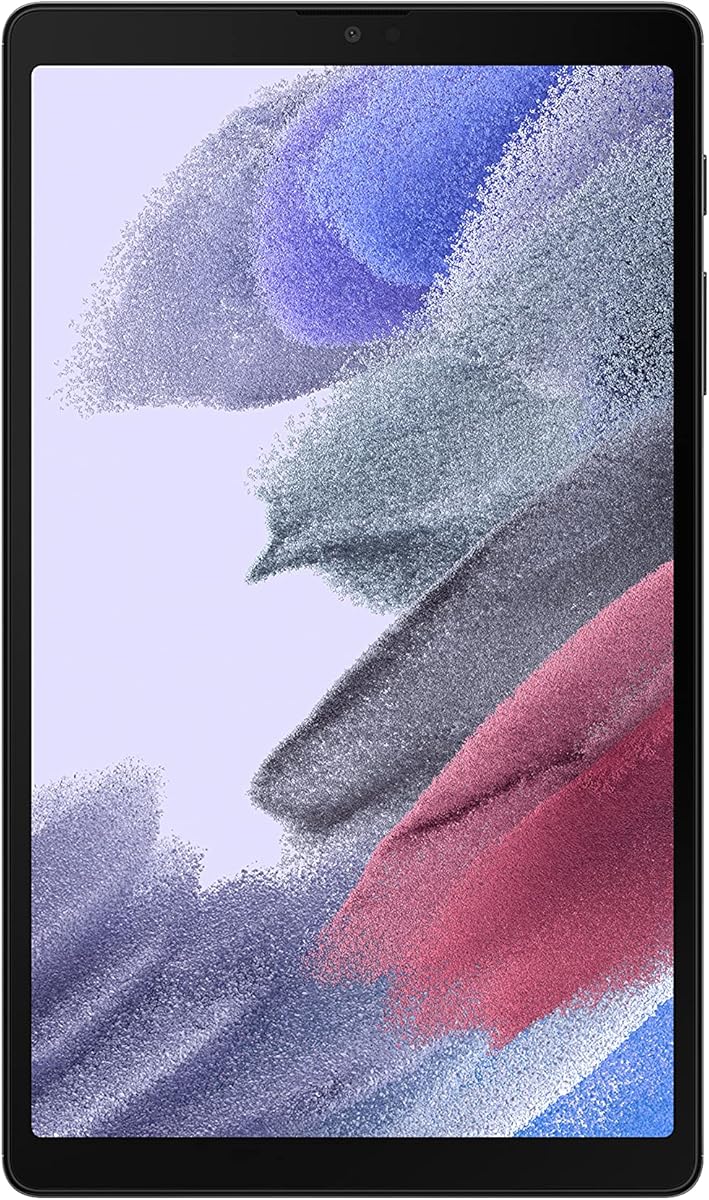
The Samsung Galaxy Tab A7 Lite is a compact portable tablet perfect for entertainment on the go. It features a sturdy metal frame that protects against everyday hiccups and accidents. The 8.7-inch screen is well-sized for kids and travel.
We may earn a commission when you buy through this link, at no additional cost to you.
Strengths include the upgraded expandable storage up to 1TB for photos and apps. Fast charging helps juice up quickly when you need more power. One UI allows seamless connectivity across your Samsung Galaxy devices.
Trade-offs include the 32GB internal storage which may fill up quickly. The TFT display offers good viewing but not premium colors. These are acceptable given the durable build and kid-friendly features.
Best for parents looking for a safe portable device for children. Samsung Kids provides a controlled learning environment. If durability and size are your top priorities this tablet is a great pick.
This device features an upgraded metal frame that helps protect against everyday hiccups. It is made to be durable so your tablet keeps working even when handled by children’s accident-prone hands.
Enjoy connectivity across all your Samsung Galaxy devices with One UI technology. Start watching a show on your smart phone then send it to your tablet to finish later.
We may earn a commission when you buy through this link, at no additional cost to you.
The Samsung Galaxy Tab A7 Lite in Gray is an affordable compact tablet for daily use. It offers the same durable metal frame and 8.7-inch screen as the silver variant. This makes it easy to carry and travel with especially for kids.
We may earn a commission when you buy through this link, at no additional cost to you.
Key strengths include the Samsung Kids app that puts you in total control over content and learning. The fast charging helps juice up quickly and the expandable storage supports more media files. Multi-device experience ensures seamless syncing.
Trade-offs involve limited 32GB internal storage. The display is functional but not high-resolution. These are acceptable for users seeking a durable kid-friendly option at a lower cost.
Best for households needing a secondary or kid-specific device. Its compact size fits easily in bags. If you want Samsung reliability on a budget this tablet is a strong contender.
Help your child discover a world of learning and fun with Samsung Kids. This safe app-friendly app puts you in total control ensuring a secure browsing environment.
Its slim design and sturdy metal frame make it perfectly sized for entertainment on the go. Easy for everyone to carry and travel with especially kids on a daily routine.
We may earn a commission when you buy through this link, at no additional cost to you.
Selecting the right entry level tablet depends on your specific needs and budget. Consider the following factors to ensure the device matches your daily tasks effectively.
The screen size impacts portability and viewing comfort. For media consumption larger screens above 10 inches are preferable while 8 inch models suit reading. Look for Full HD resolution and low blue light technology to reduce eye strain.
Choose a display that balances sharpness with comfortable portability for your use case.
RAM determines multitasking efficiency while internal storage holds apps and files. For smooth performance at least 4GB RAM is recommended. Ensure there is an SD card slot for expandable storage to future-proof your device.
Prioritize devices with expandable storage to avoid running out of space quickly.
Long battery life ensures your tablet lasts through long days of use. Look for models promising 10 or more hours of reading or video playback. Fast charging support is a valuable bonus for reducing downtime.
Check real-world battery reviews to confirm performance matches the claims.
Android tablets offer broad app compatibility while Fire tablets integrate deeply with Amazon services. Consider whether you need Google Play access or are comfortable with alternative app stores. OS updates ensure security and longevity.
Select an OS that aligns with your existing ecosystem and app needs.
The processor affects app speed and gaming capabilities. Mid-range chipsets like MediaTek Dimensity or Snapdragon are reliable for entry-level models. Ensure it handles your typical tasks smoothly without lag.
Balance processor speed with price to find efficient performance.
Modern tablets should support Wi-Fi 6 for faster downloads and Bluetooth 5.0+ for accessories. A headphone jack adds audio versatility without dongles. Some models offer cellular data for mobile use.
Verify connectivity ports match your peripheral and internet requirements.
Metal frames offer better protection against drops than plastic. Lightweight builds enhance portability for travel. Look for reinforced glass and tumble test ratings if kids will use the device.
Choose a build that matches your daily environment and handling habits.
Tools like voice assistants smart notes apps and parental controls add value. Features like Circle to Search or Eye Comfort modes enhance usability. Ensure the tablet supports the apps you need regularly.
Look for software features that simplify your specific tasks and workflow.
Start by setting up your user profile and installing essential apps like browsers and streaming services. Use the settings menu to adjust display brightness and notification preferences for a comfortable experience.
Maintain battery health by avoiding extreme temperatures and unplugging once fully charged. Update software regularly to patch security vulnerabilities and access new features that improve performance over time.
Protect your device with a case and screen protector especially for travel or kids. Clean the screen with a microfiber cloth to remove smudges without scratching the display surface.
The Amazon Fire HD 10 and Samsung Galaxy Tab A7 Lite are ideal due to robust parental controls and durable builds. They offer content filtering and kid-safe apps to ensure a secure environment for children while remaining affordable.
Fire tablets use Amazon Appstore by default but you can sideload Google Play manually if desired. This process involves enabling third-party app installs and downloading necessary services from external sources.
At least 4GB of physical RAM is recommended for smooth multitasking. Virtual RAM helps but physical memory ensures faster app switching and better overall performance during active usage.
An 8 inch display offers the best balance for portability and reading comfort. Larger screens are great for split views but may be too heavy for prolonged single-handed use.
Some models like Lenovo and Samsung support specific stylus pens for writing and sketching. Check the device compatibility before purchasing accessories to ensure the pen functions correctly with your model.
Reduce screen brightness turn off unused connectivity features and use battery saver mode during long tasks. Regular software updates also optimize power management to prevent unexpected shutdowns.
Internal storage is fixed while expandable storage uses SD cards to increase capacity. You can install apps on internal memory but media files can often be moved to external cards to free up space.
Choose Wi-Fi tablets if you mainly use them at home or with available hotspots. Cellular models add mobile data support but usually come with higher costs and data plan requirements.
The Amazon Fire HD 10 Samsung Galaxy Tab A7 Lite and Lenovo Idea Tab Plus stand out for their balance of performance value and usability. Each serves distinct needs from media consumption to productivity and educational use.
Prioritize display size RAM and battery life based on your daily usage. A larger screen benefits streaming while robust memory supports multitasking. Ensure the device integrates well with your apps and accessories.
Prices and availability change often so check current listings before buying. Use this guide to narrow down options that fit your budget and requirements for a confident purchase decision.