
YATINEY Desktop Printer Stand Rustic Brown PS01BR
4.6Editor score
Hidden non-woven drawer storage
Rustic brown metal frame
Easy ten minute assembly
A desktop printer stand transforms cluttered workspaces into efficient zones by elevating devices and freeing up valuable surface area. Choosing the right model ensures stability for heavy equipment while providing storage for supplies.
We evaluated ten top-rated stands based on material durability, load capacity, assembly ease, and overall design. Our analysis covers diverse options from compact metal frames to multi-tier wooden units with drawers.
Each pick highlights specific strengths like charging stations or locking wheels to match your unique needs. Keep in mind that product availability and pricing may shift, so verify details before purchasing.
4.6Editor score

4.6Editor score

4.7Editor score
As an Amazon Associate we earn from qualifying purchases.
This side-by-side comparison highlights key specifications across all ten models including dimensions, material quality, and unique features to help you decide quickly.


This desktop printer stand holds a 4.6 rating and serves as an excellent choice for users needing robust support. Its high weight capacity and rounded safety corners make it ideal for heavy laser printers.
We may earn a commission when you buy through this link, at no additional cost to you.
The large surface area fits models like the HP DeskJet and Canon Pixma securely. It also functions as a versatile organizer for plants, books, or kitchen spices beyond just office use.
While it lacks built-in drawers, the open design maximizes accessibility. The trade-off is acceptable given the superior load bearing and price point compared to more complex units.
Anyone needing a stable place to elevate a printer should consider this option. It balances durability and simplicity perfectly for home or professional office environments.
With support up to 100 pounds, this stand handles heavy machines without wobbling.
You can repurpose this stand as a plant shelf or kitchen organizer easily.
We may earn a commission when you buy through this link, at no additional cost to you.
Rated 4.6 stars, this metal stand offers incredible value by integrating small storage items directly into the structure. It keeps pens and files organized right at your workspace.
We may earn a commission when you buy through this link, at no additional cost to you.
The drawer and pen holders help tidy your desk immediately. The paper tray is perfect for A4 documents, keeping paperwork within arm's reach without cluttering the main surface.
Assembly takes just twelve minutes and requires no specialized skills. The lightweight metal mesh allows for easy moving but remains sturdy enough for standard printers.
If you need a compact solution with organizational features, this is the best budget pick. It solves the clutter issue without costing a fortune.
Built-in accessories like trays and holders mean you need fewer extra organizers.
Most users can set up the unit in under fifteen minutes comfortably.
We may earn a commission when you buy through this link, at no additional cost to you.
With a 4.8 rating, this stand stands out for its durable construction and practical design. It supports heavy loads and includes a waterproof top for easy maintenance.
We may earn a commission when you buy through this link, at no additional cost to you.
The two-tier design allows you to stack printers or separate a scanner from your main printer. The fabric drawer keeps items hidden while maintaining a clean aesthetic.
Waterproofing ensures spills won't damage the surface. This is a significant upgrade over wood finishes that may warp with humidity changes.
Buyers seeking reliability and style should choose this model. It combines premium features with a design that fits modern office decor.
The waterproof MDF and metal frame ensure long-term resistance to wear and tear.
Having two shelves lets you manage multiple devices or storage areas efficiently.
We may earn a commission when you buy through this link, at no additional cost to you.
This under desk cart earns a 4.5 rating for its mobility and low profile. The locking wheels make it easy to move and secure in place when needed.
We may earn a commission when you buy through this link, at no additional cost to you.
Designed to fit under counters or desks, it frees up floor space while keeping essentials accessible. The storage drawer helps organize small supplies effectively.
Stackable design means you can adjust the height during assembly. This flexibility is useful for matching specific desk heights or storage needs.
If you need mobility or under-desk storage, this is a smart pick. It offers practical utility without taking up visual space.
Smooth wheels with locks allow you to roll the cart anywhere securely.
You can modify the height during setup to fit your specific area.
We may earn a commission when you buy through this link, at no additional cost to you.
Rated 4.7 stars, this stand features a unique foldable drawer that adapts to your storage needs. The dual rod design adds significant stability for heavy devices.
We may earn a commission when you buy through this link, at no additional cost to you.
The three tier layout allows for two printers simultaneously if needed. The vintage finish blends well with rustic or industrial home office styles.
The foldable drawer is a smart space saver for those who sometimes want open space. Just fold it back when you need more room on the bottom.
For style and functionality, this model delivers. It is a great choice for those who value design flexibility.
The drawer can be folded away entirely for a clean open look.
Dual rods prevent tipping and ensure the stand stays solid under load.
We may earn a commission when you buy through this link, at no additional cost to you.
This YATINEY model holds a 4.6 rating for its practical two-tier design. It includes a non-woven drawer that keeps private items hidden from view.
We may earn a commission when you buy through this link, at no additional cost to you.
The open shelves make file access quick and easy. The chipboard surface is smooth and resistant to dust accumulation.
Assembly takes around ten minutes with provided tools. It is simple enough for anyone to handle without help.
If you need privacy for documents, this model is strong. It combines open access with closed storage efficiently.
The drawer keeps clutter out of sight while keeping supplies handy.
Dusting off the smooth surface takes only a few seconds.
We may earn a commission when you buy through this link, at no additional cost to you.
With a 4.7 rating, this large stand offers serious storage power. Its stackable feature lets you expand vertically for growing office needs.
We may earn a commission when you buy through this link, at no additional cost to you.
The three compartments fit files, books, and large printers. Non-slip feet protect your desk while keeping the unit secure.
This model takes up more space but rewards you with extra room. It is ideal for those with many supplies to organize.
If vertical expansion is a priority, choose this unit. It supports heavy loads and offers great value for storage.
You can stack units to double your storage space without buying new furniture.
The wide top supports large machines and plenty of open workspace.
We may earn a commission when you buy through this link, at no additional cost to you.
Rated 4.6 stars, this unit adds a charging station to your workspace setup. It keeps your phone and tablet powered while printing.
We may earn a commission when you buy through this link, at no additional cost to you.
The storage hook helps with cables or bags. The compact design fits into tight corners without overwhelming your desk.
Its industrial look pairs well with modern decor. The metal frame ensures it remains sturdy despite its small size.
If you need charging near your printer, this is a great choice. It merges utility with design seamlessly.
Built-in outlets allow you to charge devices while using the printer.
The small size fits easily in corners or small offices.
We may earn a commission when you buy through this link, at no additional cost to you.
This Z-shaped stand earns a 4.7 rating for its unique and modern look. The design optimizes vertical space while providing easy access to files.
We may earn a commission when you buy through this link, at no additional cost to you.
Two tiers allow for organizing ink cartridges and paper. The open design keeps items visible and within reach.
Assembly is straightforward with clear instructions. The particleboard is smooth and durable for everyday office use.
For a modern aesthetic and practical storage, this model works well. It offers a stylish alternative to traditional units.
The Z-shape adds a visual modern touch to your home office.
Each tier holds 44 pounds ensuring your equipment stays secure.
We may earn a commission when you buy through this link, at no additional cost to you.
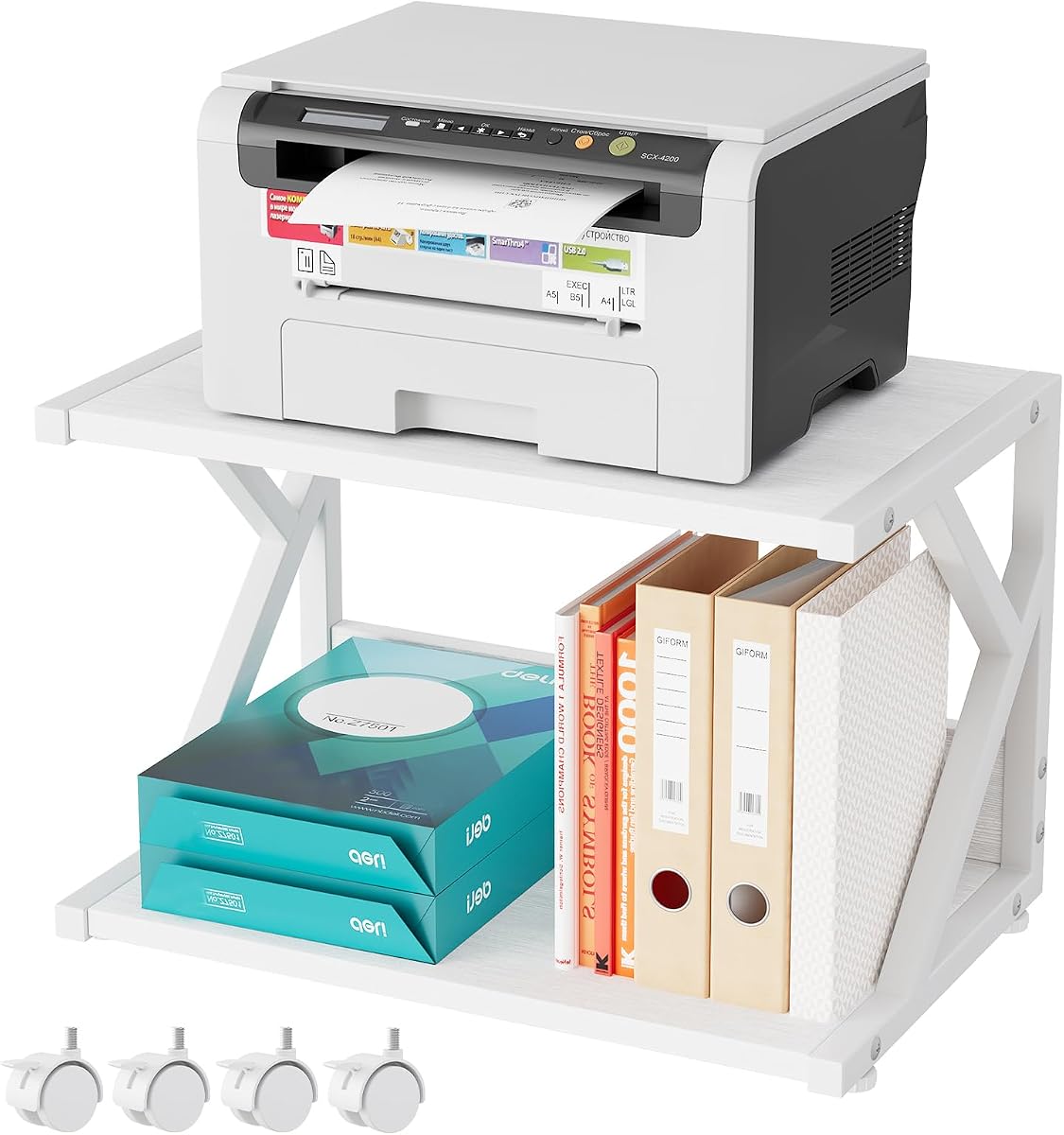
Rated 4.6 stars, this white stand offers a clean aesthetic for bright spaces. The MDF wood is waterproof and scratch-resistant for daily use.
We may earn a commission when you buy through this link, at no additional cost to you.
You can choose between wheels or foot pads for stability. This flexibility helps tailor the unit to your specific floor type.
It fits standard printers and supplies comfortably. The design is versatile enough for use as a plant stand or bookshelf too.
If you want a bright look with practical features, this fits. It offers durability and mobility options in one package.
Choose feet for stability or wheels for easy repositioning.
Spills are easy to clean off the MDF wood surface.
We may earn a commission when you buy through this link, at no additional cost to you.
Selecting the right stand requires considering dimensions, weight, and storage needs to ensure it fits your specific workspace.
Measure your desk surface carefully to ensure the stand fits without obstructing other tools. Consider the height of your printer to ensure clearance for paper trays.
Check the depth and width of the stand to accommodate your specific model comfortably.
Metal frames offer the highest stability while wood provides a warmer look. Particleboard is common and cost-effective but may require careful handling.
Look for reinforced frames to prevent wobbling under heavy loads.
Always verify the weight limit against your printer's weight. Heavy laser printers need stands rated for higher loads than lightweight inkjets.
Choose a stand with a 15 percent higher capacity than your printer weighs for safety.
Decide if you need closed drawers or open shelves. Closed drawers hide clutter while open shelves allow quick access to paper.
Consider multi-tier options if you own multiple devices like scanners and printers.
Some stands come with tools while others require your own. Check if the instructions are clear and if parts are numbered.
Select models that take under 20 minutes to build for convenience.
Wheels are useful if you need to move your printer regularly. Locking wheels prevent sliding on smooth surfaces.
Check if wheels are optional or fixed before you buy the stand.
Match the stand to your office decor. Rustic wood finishes suit traditional offices while metal fits modern industrial styles.
Color consistency with your furniture is key for a polished look.
Compare price against features like drawers or charging ports. Sometimes a slightly higher cost buys better stability.
Balance your budget with long-term durability needs for the best value.
Place the stand on a level surface to prevent wobbling. Tighten all bolts securely after assembly to ensure stability.
Dust the surfaces weekly with a dry cloth to maintain the finish. Avoid harsh chemicals on metal or wood.
Check the weight limit regularly. Avoid overloading shelves with heavy items that could warp the material.
Measure your printer's width and depth. Compare these numbers to the stand's top surface dimensions in the product details.
Some models include hooks or open designs that help route cables. Check the features list for specific cable management tools.
Yes, most units are designed for one person. The tools are included and instructions are simple for solo assembly.
Most printers run cool enough for standard surfaces. Metal or waterproof tops handle heat better than unfinished wood.
Some models are stackable for extra height. Verify the product description for stacking compatibility before buying.
Hard plastic wheels work better on hardwood. Some stands offer larger wheels for carpeted surfaces to ensure mobility.
We found the YAOHUOO 2-Tier Stand leads in durability and value for most users seeking reliability.
Prioritize weight capacity and dimensions to ensure your printer fits securely without risk of damage.
Always check current pricing and availability on Amazon to secure the best deal for your needs.