
TP-Link Nano AC600 USB WiFi Adapter
4.5Editor score
Compact nano size design
Dual band 2.4 and 5GHz
Easy plug and play
This guide compares the top 5GHz WiFi Dongle adapters for desktops and laptops, analyzing speed, range, and compatibility to help you choose the right wireless
Finding a reliable 5GHz WiFi Dongle is essential for modern computing needs. Whether you stream, game, or work from home, a strong wireless connection keeps you productive. This guide explores the best options available today.
We evaluated ten top-rated adapters based on speed, range, and ease of use. Our analysis includes detailed specs and real-world performance insights. We focus on dual-band models that offer stable connections across various environments.
Each pick highlights unique strengths to match different user requirements. Note that prices and availability may change over time. Always verify current details before purchasing to ensure you get the best value for your setup.
4.5Editor score

4.4Editor score

4.1Editor score
This side-by-side comparison highlights key specifications across all ten selected adapters. Review each product's speed capabilities, antenna design, and operating system compatibility to find the perfect match for your network needs.


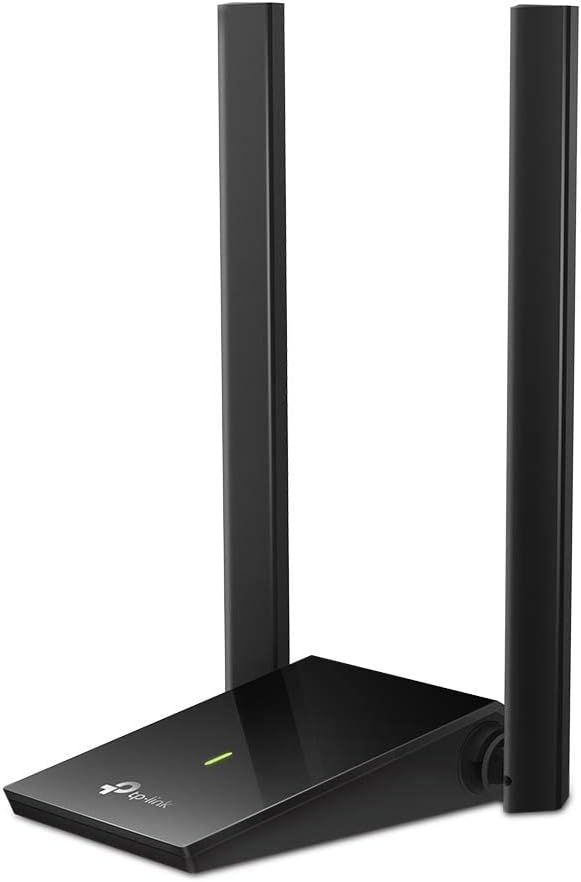


This adapter is a top choice for users needing reliable wireless connectivity. It delivers strong AC1300 speeds with dual band support. The compact design fits easily on any desktop setup.
We may earn a commission when you buy through this link, at no additional cost to you.
MU-MIMO technology ensures efficient connections even in crowded networks. USB 3.0 provides fast data transfer rates. The adapter supports Windows and Mac systems seamlessly.
While it lacks an external antenna, the built-in performance is robust. Most users find the signal strong enough for typical home environments. Driver setup is straightforward on supported systems.
Ideal for streamers and gamers who need consistent speeds. It balances price and performance well. Consider this for general use or light gaming tasks.
MU-MIMO allows multiple devices to connect simultaneously without lag. This improves overall network efficiency during peak usage times.
The mini size makes it perfect for laptops on the go. You can leave it plugged in without obstruction.
We may earn a commission when you buy through this link, at no additional cost to you.
This nano adapter is perfect for basic internet needs. It offers dual band connectivity in a tiny package. The design stays out of the way on laptops.
We may earn a commission when you buy through this link, at no additional cost to you.
Speeds are sufficient for browsing and streaming. It supports both Windows and Mac operating systems. Setup is simple for most users.
While range is limited, it works well near routers. The price makes it accessible for many buyers. Support is available for any issues.
Best for users needing a quick wireless fix. It is great for travel or small offices. Prioritize convenience and cost with this pick.
The nano form factor allows it to remain plugged in permanently. This prevents accidental disconnection during transport.
Switching between 2.4GHz and 5GHz optimizes performance. This flexibility helps avoid signal interference.
We may earn a commission when you buy through this link, at no additional cost to you.
This premium adapter offers next-gen WiFi 6 technology. It delivers impressive speeds up to 1800Mbps. The dual antennas ensure strong signal reception.
We may earn a commission when you buy through this link, at no additional cost to you.
Features like OFDMA improve performance in crowded areas. The included cable helps place the device optimally. It handles heavy streaming and gaming tasks well.
It does not support Mac or Linux. The higher cost reflects its advanced capabilities. Range is notably better than standard adapters.
Best for power users needing top performance. Choose this if you have a modern WiFi 6 router. It is worth the investment for demanding setups.
WiFi 6 brings significant speed and latency improvements. This future-proofs your network infrastructure effectively.
High gain antennas penetrate walls better than built-ins. The cable allows flexible positioning for better signal.
We may earn a commission when you buy through this link, at no additional cost to you.
This adapter focuses on reliable long-range connectivity. The adjustable antenna helps target specific router signals. It supports Windows versions widely.
We may earn a commission when you buy through this link, at no additional cost to you.
Performance is steady for streaming and browsing. The high gain antenna improves reception significantly. Installation guides make setup simple.
Mac users cannot use this model. The design is slightly bulkier than nano options. It remains a solid choice for desktops.
Suitable for home offices and entertainment PCs. Look for this if you need stability over speed. Check your OS compatibility before buying.
Rotating the antenna helps align with your router. This improves signal quality without software changes.
We may earn a commission when you buy through this link, at no additional cost to you.
This adapter offers high-speed dual band performance. Dual antennas enhance range and reliability. It works well with Windows systems.
We may earn a commission when you buy through this link, at no additional cost to you.
USB 3.0 ensures fast data throughput. The support team helps with setup. It is useful for gaming and streaming.
Mac and Chrome users cannot use it. Driver installation may take time. Ensure your system meets requirements.
Great for users prioritizing speed and range. Consider this for desktop setups. Check driver availability before purchasing.
Two antennas capture signals more effectively. This reduces dropouts and improves stability.
We may earn a commission when you buy through this link, at no additional cost to you.
This adapter brings WiFi 6 to your PC. It supports Windows 10 and 11 easily. The driver is built-in for quick setup.
We may earn a commission when you buy through this link, at no additional cost to you.
Performance is efficient for modern tasks. Encryption keeps your data secure. Latency is low for gaming.
Only works with new Windows versions. You need a WiFi 6 router for full speed. Older systems are not supported.
Ideal for updated Windows machines. Choose this for efficient, modern connectivity. Check your router compatibility first.
Built-in drivers remove the need for manual steps. This saves time during initial configuration.
We may earn a commission when you buy through this link, at no additional cost to you.
This adapter delivers robust WiFi 6 performance. The antenna improves signal reception significantly. Drivers come preloaded for convenience.
We may earn a commission when you buy through this link, at no additional cost to you.
AP mode allows hotspot creation on PCs. It handles multiple devices well. Speeds are solid for most tasks.
Support is limited to Windows. You need compatible hardware for full benefits. Range is better than average.
Good for users needing strong signal and range. Consider AP mode for sharing connections. Verify Windows version before buying.
Turn your PC into a hotspot with AP mode. This connects other devices to your internet easily.
We may earn a commission when you buy through this link, at no additional cost to you.
This model offers dual high gain antennas. It works on Mac and Windows easily. Performance is strong for all tasks.
We may earn a commission when you buy through this link, at no additional cost to you.
Adjustable antennas optimize reception angles. USB 3.0 ensures fast data transfer. The design fits desktops well.
It is slightly pricier than basic models. The bulk fits desktop setups best. Mac compatibility is a key plus.
Best for users needing Mac support and range. Consider this for home entertainment. Verify your OS requirements first.
Dual antennas provide better signal coverage. This improves range in larger spaces effectively.
We may earn a commission when you buy through this link, at no additional cost to you.
This adapter offers blazing fast AX1800 speeds. Security is enhanced with WPA3 encryption. It supports Windows 10 and 11.
We may earn a commission when you buy through this link, at no additional cost to you.
AP mode allows flexible sharing options. Cooling vents keep it stable during use. Drivers are built-in for quick install.
Older Windows versions are not supported. Mac users cannot use it. The speed justifies the cost.
Great for high-performance needs. Choose this for gaming and streaming. Check your OS version before purchasing.
WPA3 provides better protection for your data. This keeps your network safer against threats.
We may earn a commission when you buy through this link, at no additional cost to you.
This mini adapter offers great portability. It brings WiFi 6 speeds to your PC. Setup is easy with preloaded drivers.
We may earn a commission when you buy through this link, at no additional cost to you.
OFDMA improves performance in busy networks. The design fits tight spaces well. It supports Windows 11 and 10.
USB 2.0 limits transfer speed. Mac users cannot use this adapter. Range is typical for mini models.
Ideal for travelers needing modern speeds. Consider this if size is a priority. Ensure your OS is compatible.
Its small size makes it easy to carry. You can use it anywhere with USB access.
We may earn a commission when you buy through this link, at no additional cost to you.
Selecting the right adapter requires balancing several technical factors. We break down key elements to help you make an informed decision.
Check if the adapter supports WiFi 6 or AC standards. Newer standards offer better speed and efficiency.
Prioritize WiFi 6 for future-proofing.
Ensure the device works with your specific OS. Some models are Windows-only while others support Mac.
Verify OS details before purchasing.
External antennas generally provide better range. Internal antennas are more compact but weaker.
Choose external for larger spaces.
USB 3.0 provides faster data rates than 2.0. This impacts overall throughput and speed.
Look for USB 3.0 support.
Dual-band adapters switch between 2.4GHz and 5GHz. This helps avoid interference and congestion.
Select dual-band for flexibility.
Modern encryption like WPA3 keeps your data safe. Older standards may be vulnerable.
Check for WPA3 support.
Reliable technical support ensures smooth setup. Warranty terms add peace of mind.
Review support options carefully.
Nano designs stay hidden on laptops. Larger desktop models may have better performance.
Pick based on your usage.
Insert the adapter into a USB 3.0 port for best performance. If drivers are needed, install them from the manufacturer's website.
Place the dongle in a clear spot near your router. Avoid metal objects that might block signals.
Update your adapter's firmware regularly. This ensures security patches and improved stability.
Many modern adapters support macOS, but not all. Check the product specs to confirm compatibility with your version of macOS before buying.
AX adapters use WiFi 6 technology which offers higher speeds and better efficiency. AC adapters are older but still effective for basic use.
USB 3.0 ports are recommended for faster speeds. You can use 2.0 ports but performance might be limited.
Range depends on the model and environment. External antennas typically reach farther than internal ones.
Yes, adapters with WiFi 6 or high AC speeds are great for gaming. Low latency models help reduce lag.
Some models have built-in drivers while others require manual installation. Windows often installs them automatically.
5GHz offers faster speeds but shorter range. Use it for devices close to the router.
AP mode lets you turn your PC into a hotspot. This shares your internet connection with other devices.
We reviewed ten top adapters ranging from budget to premium. Each offers unique strengths for different setups.
Prioritize OS compatibility and speed needs. Consider antenna type for range requirements.
Prices and stock change often. Check current listings to ensure you get the best deal.