
NIMO 15.6'' AI Ready Laptop
4.8Editor score
Silent efficient N150 processor
15.6 inch FHD display
Full stack I/O connectivity
Finding the right laptop for karaoke gear can transform your home entertainment setup into a professional stage. You need reliable hardware that handles audio processing, video display, and streaming without lagging during performance.
We evaluated ten top products based on performance, connectivity, audio quality, and ease of use. This list includes powerful laptops for running software and essential mixers or microphones for capturing your voice clearly.
Each pick shows key specs and real world strengths for singers and hosts. Prices change frequently so check current listings before buying to ensure you get the best value for your specific karaoke needs today.
4.8Editor score

4.5Editor score

4.5Editor score
As an Amazon Associate we earn from qualifying purchases.
This side by side comparison highlights the key specs and strengths of each laptop and karaoke gear item to help you choose the right fit for your setup.






The HP 17 inch Business Laptop Computer stands out as the top choice for running karaoke software smoothly. Its powerful AMD Ryzen 5 CPU and 16GB RAM ensure that you can manage multiple tracks, video feeds, and mixing apps without lag.
We may earn a commission when you buy through this link, at no additional cost to you.
A 17.3 inch FHD display provides plenty of space to view lyrics and song lists clearly. The numeric keypad is a practical touch for controlling volume or pausing tracks quickly during a party or performance session.
While the laptop is durable, its weight may not be ideal for frequent transport to events. However, the long battery life and fast charge features mitigate this, allowing you to stay powered for hours without constant outlet access.
This laptop is perfect for home karaoke hosts who need a reliable machine for streaming and mixing. Its large screen and strong performance make it an excellent investment for anyone serious about their karaoke setup.
The 17.3 inch display ensures lyrics are easy to read from across the room, enhancing the guest experience during performances.
With 16GB RAM and a Ryzen 5 CPU, this laptop handles audio processing and video playback without stuttering or freezing.
We may earn a commission when you buy through this link, at no additional cost to you.
The Dell Pro 15.6" Laptop 2026 offers premium performance with its Intel Core 3 100U processor and 16GB DDR5 memory. This combination ensures that karaoke apps run smoothly and transitions between tracks are seamless.
We may earn a commission when you buy through this link, at no additional cost to you.
A standout feature is the 120Hz refresh rate display, which provides fluid visuals for music videos or slideshows. The multiple connectivity ports allow you to connect external speakers or mixers directly for enhanced audio quality.
Storage is limited to 256GB which might require external drives for large song libraries. Also, the lack of a backlit keyboard can make typing harder in low light party environments.
This laptop is ideal for those who want a polished setup with reliable hardware. Its durable design and smooth performance make it a great choice for consistent karaoke nights.
The 120Hz screen makes videos look smoother, which is great for music clips or visual effects during karaoke shows.
With USB-A, USB-C, and HDMI ports, you can easily plug in external audio gear or projectors for a bigger setup.
We may earn a commission when you buy through this link, at no additional cost to you.
The NIMO 15.6'' AI Ready Laptop delivers excellent value with its silent N150 processor and lightweight design. It is perfect for casual users who want a clean and simple karaoke experience without breaking the bank.
We may earn a commission when you buy through this link, at no additional cost to you.
Its full stack I/O suite means you do not need dongles to connect microphones or speakers. The backlit keyboard and fingerprint reader add convenience and security, making it easy to start your session quickly.
The 8GB RAM is sufficient for basic apps but might struggle with heavy audio processing. Storage is also limited to 256GB which you may need to manage carefully for your media files.
This laptop is best for students or home users looking for a reliable and affordable setup. Its warranty and ease of use make it a smart pick for everyday entertainment needs.
The efficient processor keeps fan noise low so your singing remains the focus during quiet or small gatherings.
A two-year warranty gives peace of mind that your device is covered against common issues for a long time.
We may earn a commission when you buy through this link, at no additional cost to you.
The HP OmniBook 3 17.3 inch Laptop PC provides a large display and solid battery life for karaoke. The AMD Ryzen 3 30 processor handles daily tasks and light media streaming without issue.
We may earn a commission when you buy through this link, at no additional cost to you.
Its 14 hour battery life means you can host a party without worrying about power. The advanced AI noise reduction helps in calls or recording, ensuring clear communication during breaks or introductions.
While the RAM is limited, the ample storage and long battery make it a strong contender. The HDR auto-switch camera is a nice touch if you plan to stream your karaoke sessions online.
This laptop is great for users who prioritize screen size and battery over raw performance. It is a reliable machine for home entertainment that balances cost and usability well.
With up to 14 hours of power, you can move your karaoke setup anywhere without needing a charger nearby.
This feature filters background noise during calls so you can host virtual karaoke or manage sessions easily.
We may earn a commission when you buy through this link, at no additional cost to you.
The HP Ultrabook 14 Laptop Computer comes with a bundle of accessories including an external drive and mouse. This makes it a convenient choice for users who want an all in one solution without buying extras separately.
We may earn a commission when you buy through this link, at no additional cost to you.
The anti-glare display is useful for viewing in bright rooms during the day. With 16GB RAM, you can manage playlists and browser tabs without slowdowns. The external drive adds storage for more songs and videos.
However the 14 inch screen might be too small for group lyrics viewing. The processor is also basic, which limits its ability to handle heavy mixing software or high resolution video.
This laptop is best for users who need a complete kit for general use with some karaoke capability. The bundle saves money and the included office suite adds extra value.
You get a mouse and external drive in the box which helps you start using the laptop for media right away.
The anti-glare coating reduces reflections so you can see lyrics clearly even in bright indoor lighting.
We may earn a commission when you buy through this link, at no additional cost to you.
The HP 255 G10 Laptop offers 16GB RAM which is excellent for running multiple apps at once. You can have your karaoke software, chat apps, and web browser open simultaneously without performance drops.
We may earn a commission when you buy through this link, at no additional cost to you.
Its lightweight design makes it easy to carry to different spots for performances. The AMD Radeon graphics provide decent visuals for music videos or slideshows. Boot times are fast thanks to the SSD.
The storage space is modest at 256GB so you may need cloud storage for large media. Also the connectivity options are standard and might require dongles for specific audio gear.
This laptop is great for users who prioritize RAM and portability over storage. It is a solid machine for general use that can handle light karaoke and streaming tasks.
With 16GB RAM you can switch between apps quickly which is handy when managing tracks and guest requests.
Its lightweight frame makes it easy to pack up and take to friends houses or small events with minimal effort.
We may earn a commission when you buy through this link, at no additional cost to you.
The HP OmniBook 3 16 inch Laptop PC features a 2K touchscreen that makes interacting with songs and apps simple. The high resolution screen ensures lyrics and images look sharp and detailed.
We may earn a commission when you buy through this link, at no additional cost to you.
Battery life is strong with up to 14 hours of use. The advanced AI noise reduction is useful for clear audio during calls or voice inputs. This model is well suited for interactive entertainment.
The storage is limited to 256GB which might be tight for media libraries. Also the 8GB RAM could limit multitasking compared to higher spec models.
This laptop is best for users who want a touchscreen experience with good battery life. It is a versatile choice for home entertainment that offers modern features at a fair price.
The touchscreen lets you scroll through songs and menus with a tap making it easy to find tracks quickly.
A 2K screen provides more detail so images and videos look crisp during your karaoke events.
We may earn a commission when you buy through this link, at no additional cost to you.
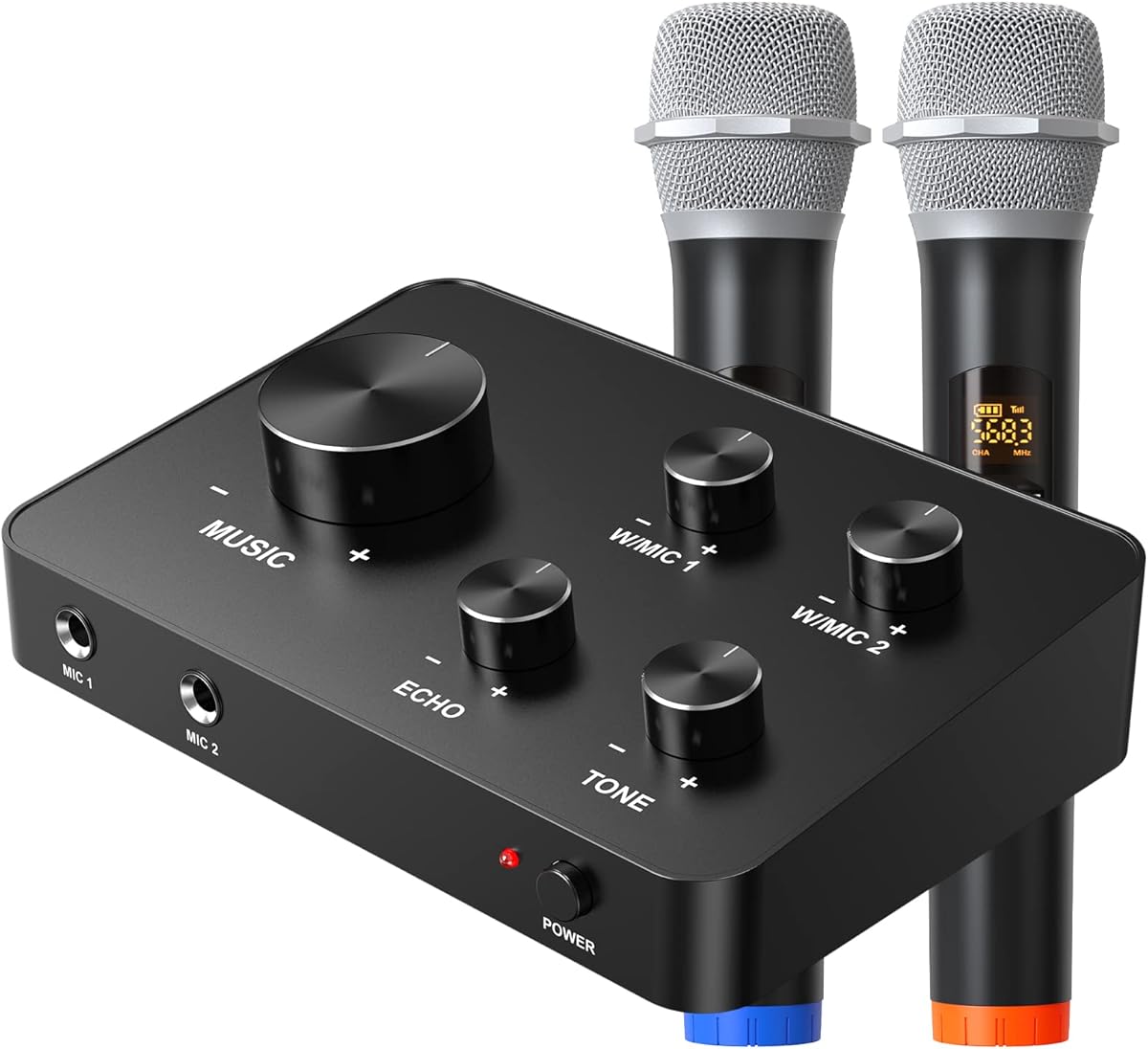
The Rybozen Wireless Microphone Karaoke Mixer System offers freedom with its dual wireless microphones. You can move around the room while singing without being tied to a cable which adds energy to performances.
We may earn a commission when you buy through this link, at no additional cost to you.
With HDMI and AUX inputs it connects easily to TVs or speakers. The separate volume controls for each mic let you balance duets or group performances. The wireless range allows movement across large spaces.
The build is basic and works best with external amps for loud rooms. Without an amplifier it may not be suitable for big gatherings. Still it is a great starter set for home use.
This system is ideal for users who want wireless convenience without high cost. It is a practical addition to any laptop setup to enhance singing experiences at home.
Wireless mics let you dance and move around while singing making the experience more fun and engaging.
You can adjust volume for each mic independently so duets sound balanced and clear during play.
We may earn a commission when you buy through this link, at no additional cost to you.
The Sound Town 16 Channels Wireless Microphone Karaoke Mixer System provides professional control with multiple audio inputs. It supports HD ARC and optical which allows for clean audio connections from modern TVs.
We may earn a commission when you buy through this link, at no additional cost to you.
Independent volume controls and echo effects let you tailor sound to your room. The ability to add instruments makes it versatile for bands or duet singers. Bluetooth input is great for streaming backing tracks.
Setup may take time to configure all channels correctly. Also the mics are not included so you need to buy them separately. This adds to the cost but gives more control.
This mixer is best for users who want to fine tune their audio setup. It is a strong tool for home studios or serious karaoke hosts who need flexibility.
HD ARC support pulls audio from your TV to the mixer so you do not need extra cables for sound.
Echo and reverb effects can be adjusted to enhance your voice and make singing sound more professional.
We may earn a commission when you buy through this link, at no additional cost to you.
The Wireless Bluetooth Karaoke Microphone with Dynamic Lights is perfect for portable fun at parties. It has a built-in speaker so you do not need extra gear. Just connect to your phone and start singing.
We may earn a commission when you buy through this link, at no additional cost to you.
Dynamic lights and voice effects add a playful touch to gatherings. The battery lasts up to 10 hours which is enough for long events. Voice cancellation helps you hear your own voice clearly.
It is not ideal for loud venues due to limited power. The effects are basic but fun for casual use. This mic is great for quick sessions without a full setup.
This microphone is best for casual users and kids who want simple fun. It is a great gift for family parties where portability and ease of use are key.
With a built-in speaker you can use this mic without extra speakers so setup takes seconds.
Lights and sound effects make this mic a hit at casual parties especially with kids or friends.
We may earn a commission when you buy through this link, at no additional cost to you.
Choosing the right setup involves balancing performance connectivity and audio quality. This guide breaks down the key factors to consider for your needs.
Larger screens make it easier to read lyrics and view song lists during performance. A 17 inch laptop offers more space for visuals than a 14 inch model.
Prioritize a display that fits your space and viewing distance.
RAM handles multitasking so 16GB ensures smooth operation when running karaoke software and video apps. Storage should be at least 512GB to hold large libraries.
More RAM prevents lag during peak use.
USB-A USB-C and HDMI ports allow you to connect external speakers mixers and projectors directly. Look for models with full I/O suites.
Check that your laptop has the ports you need for gear.
Long battery life means you can host a party without relying on outlets. Aim for at least 10 hours of runtime for flexibility.
Fast charge features are also valuable for quick top-ups.
Good audio output is key for karaoke quality. Dual speakers with clear audio help without external gear.
Consider models with high quality audio jacks.
If you plan to use wired mics ensure the laptop has a microphone jack. For wireless systems this is less critical.
Check compatibility with your mic system.
Weight matters if you move your setup often. Laptops under 4 pounds are easier to transport.
Balance portability with screen size needs.
Price ranges vary widely. Set a budget that covers both a laptop and any necessary gear.
Focus on value and long term durability.
Connect your karaoke software to the laptop and plug in external speakers if needed. Ensure all drivers are updated for smooth audio performance.
Keep the laptop in a cool place during use to prevent overheating. Clean the screen and keyboard regularly to maintain quality.
Update your software monthly for bug fixes and new features. Store your setup in a protective case when not in use.
The HP 17 inch Business Laptop Computer is ideal due to its large screen and strong performance. It handles tracks and videos smoothly.
If using a mic system yes an external speaker is often required for good volume. Most mixers support external audio output.
Yes most modern laptops support streaming apps. Ensure you have enough RAM and a fast internet connection for stability.
USB-C or HDMI is best for modern mixers. Check your mixer manual for required inputs to ensure compatibility.
16GB is recommended for multitasking with software and video. 8GB can work for basic tasks but may limit performance.
Yes a larger screen like 17 inches makes lyrics easier to read. This improves the experience for guests during singing.
The HP 17 inch Business Laptop Computer stands out as the top choice for performance and display size. It offers the best balance for serious hosts.
Prioritize connectivity and RAM to ensure smooth operation. If you need portability consider the NIMO or Dell Pro models.
Always check current prices before buying as deals can change quickly. This guide helps you make a smart choice for your setup.