
TECKNET Mouse Jiggler
4.6Editor score
Three smart jiggle modes
Color LED indicator feedback
Compact and portable design
This guide compares the best laptop jiggler devices to keep your PC awake during remote work, meetings, and downloads without detection by IT systems.
Remote work and extended computer sessions often trigger idle timers that put systems to sleep. A laptop jiggler prevents this by simulating mouse activity without requiring software. These devices keep your status active on platforms like Teams and Zoom while you focus on other tasks.
We evaluated ten top-rated mouse movers based on undetectability, design, and ease of use. Our comparison covers hardware-based solutions that mimic natural movement. Each product offers unique features like silent motors, adjustable modes, or optical discs to suit different desk setups and needs.
Each pick highlights key specs, pros, and cons to help you choose wisely. Whether you need a budget option or a premium model, this list covers reliable choices. Prices and availability change frequently, so check current listings before purchasing to ensure you get the best deal today.
4.6Editor score

4.7Editor score

4.5Editor score
This side-by-side comparison highlights the key specifications of all ten products. It helps you quickly identify differences in connectivity, design, and control options to find the right device for your workflow.


The TECH8 USA Undetectable Mouse Mover stands out with its 3D hologram disc design that combines function with style. Rated highly by users, it prevents computer sleep without any software installation. Its ambient glow ring adds a modern touch to any desk setup while keeping your system active.
We may earn a commission when you buy through this link, at no additional cost to you.
Key strengths include its ability to support a wide range of mouse sizes on the large disc. You can choose from three motion levels and set an auto shut-off timer for convenience. The no software requirement ensures IT departments will not flag this device during scans.
Trade-offs involve needing a flat surface for the disc and ensuring the mouse sensor is properly aligned. These are minor issues compared to the benefits of reliable status keeping. The included power options ensure continuous operation without interruptions.
This device is ideal for professionals who want a sleek, undetectable solution for remote work. Its patented design and responsive customer support make it a top choice. We recommend it for those seeking both performance and aesthetic appeal in a laptop jiggler.
The hologram disc and ambient glow ring offer a unique look that sets it apart from generic movers.
Plug and play functionality means you can start using it immediately without technical setup or downloads.
We may earn a commission when you buy through this link, at no additional cost to you.
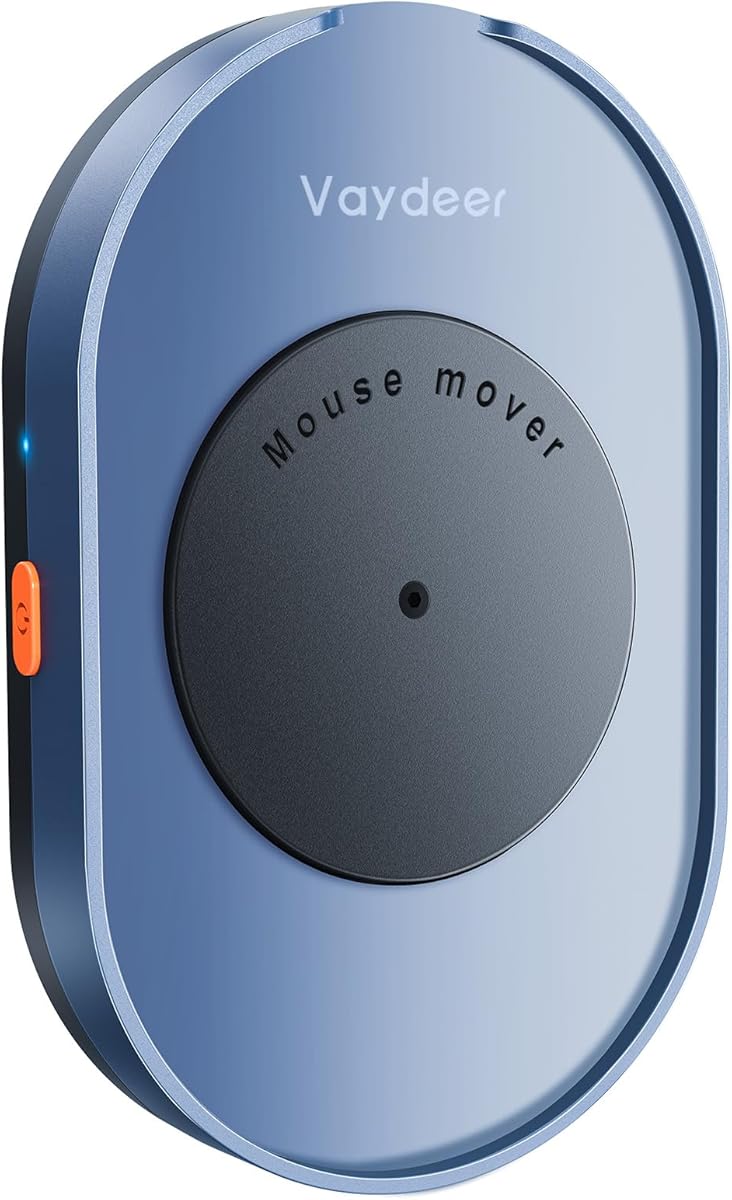
The Vaydeer M4 model is upgraded for 2024 with a hardcore ultra-silent motor that operates below 45 decibels. This makes it perfect for quiet environments where noise could be distracting. It also passes ISO security certification, giving you peace of mind about data safety.
We may earn a commission when you buy through this link, at no additional cost to you.
Strengths lie in its flexibility; you can power it via USB or an external adapter to suit different setups. The on-off switch simplifies operation so you do not need to plug and unplug frequently. Its driver-free nature ensures compatibility across systems without installation.
However, it lacks an auto timer feature found in some competitors, requiring manual control. The need for an external adapter might add slight clutter to your desk. Despite this, the silent operation remains a major advantage for professional settings.
Buyers looking for a quiet, secure solution for long work sessions should consider this model. Its thoughtful design and customer service support add value. We suggest it for those prioritizing silence and security in their laptop jiggler choice.
The ultra-silent motor ensures your workspace stays quiet while the device keeps your computer active.
ISO certification indicates that this device meets high standards for information security management.
We may earn a commission when you buy through this link, at no additional cost to you.
This two-pack from WFB offers excellent value for users who need backup devices or multiple setups. Each unit simulates slight shaking movements that keep your PC awake without disrupting your work. It is recognized as a standard mouse, ensuring IT-friendly use across platforms.
We may earn a commission when you buy through this link, at no additional cost to you.
Key advantages include compatibility with Windows, Mac, and Android systems without requiring drivers. The subtle movement keeps you active in meetings without noticeable cursor shifts. Its plug-and-play nature makes setup immediate for any laptop user.
The basic design lacks visual indicators or advanced settings, which might be a downside for power users. Plastic construction is functional but not as premium as metal options. Still, the price point justifies these simpler features for general use.
Ideal for budget-conscious buyers or teams needing multiple units, this pack covers all bases. We recommend it for students or remote workers seeking affordability and reliability. It serves well as a backup or primary device for keeping systems awake.
Having two units allows you to keep one at home and another at the office for consistent use.
The shaker moves the cursor only slightly so your work remains uninterrupted during sessions.
We may earn a commission when you buy through this link, at no additional cost to you.
The AUEDROT device is designed for modern laptops with USB-C ports, eliminating the need for adapters. It is recognized as a trusted USB composite device, ensuring safe use without flags from security systems. Two jiggle modes allow you to choose between slight or random movement.
We may earn a commission when you buy through this link, at no additional cost to you.
Strengths include the convenient switch button that lets you toggle modes without unplugging. Its plug-and-play nature means immediate use upon connection. The compact design makes it easy to carry in a laptop bag for travel or mobile work.
However, it only works with USB-C ports which may limit older machine compatibility. The small form factor might require careful placement to ensure reliable operation. These constraints are minor given the port specificity of modern devices.
Buyers with new laptops will appreciate the direct USB-C connection and simple controls. We suggest it for professionals needing a portable, modern solution. It offers a reliable way to keep active status on the latest hardware without hassle.
The USB-C connector ensures compatibility with current laptops that lack traditional USB-A ports.
Short press changes modes while long press turns it off for straightforward management.
We may earn a commission when you buy through this link, at no additional cost to you.
Yonktoo delivers a mechanical jiggler with an ultra-slim profile that fits neatly under most laptops. It starts automatically upon connection and runs quietly to avoid distractions. The included long cable provides flexibility in positioning the mouse on the rotating platform.
We may earn a commission when you buy through this link, at no additional cost to you.
Key strengths include its hardware-based design that works without software or drivers. This ensures it stays under the radar of IT monitoring tools. The one-touch control allows quick pausing or resuming of movement as needed.
Trade-offs involve the need to place an optical mouse on the platform which adds slight bulk. The basic functionality means no advanced settings like timers. However, its simplicity ensures reliability and ease of use for daily tasks.
This model suits those wanting a discreet and quiet solution without clutter. We recommend it for home offices where space is limited. Its reliable auto-start feature makes it a convenient choice for consistent use.
The slim design ensures it tucks away easily without taking up valuable desk space.
The long cable allows you to route connections neatly around other equipment.
We may earn a commission when you buy through this link, at no additional cost to you.
Meatanty offers a premium mechanical mover with adjustable frequency and visual LED display. It simulates true random movement making it undetectable by hardware scans. The large turntable supports even bigger mice and includes edge protection to prevent falls.
We may earn a commission when you buy through this link, at no additional cost to you.
Strengths include the ability to set intervals from 5 to 60 seconds for varied activity patterns. Its silent motor ensures noise levels stay minimal during operation. The device supports multiple operating systems including Windows and Mac without drivers.
The higher price reflects the advanced features compared to basic shakers. Its size may not be ideal for travel compared to smaller units. However, for a stationary desk setup, the control options are unmatched in the category.
We recommend this for users who want precise control over movement patterns. It serves well for professional environments needing realistic simulation. Its durable build and silent performance justify the investment for power users.
The LED display shows the current interval so you always know the device is running correctly.
Real random movement mimics human behavior to avoid detection by monitoring software.
We may earn a commission when you buy through this link, at no additional cost to you.
This device features an aluminum alloy body for a more upscale feel than plastic models. It comes with a USB-C adapter for modern connectivity and offers two jiggle modes for flexibility. Recognized as a trusted device, it remains undetectable by IT systems.
We may earn a commission when you buy through this link, at no additional cost to you.
Strengths include durable construction that withstands daily use and a switch button for easy control. The random or slight movement modes ensure you can adapt to different workflows. It works plug-and-play across Windows, Mac, and Android.
While it lacks advanced settings like timers, its sturdy build offers reliability. The button interface is simple but sufficient for basic needs. It is a solid choice for those prioritizing durability and compatibility.
We suggest this for users wanting a more robust physical design. It works well in offices where build quality matters. Its reliable performance and included adapter make it a versatile option for most laptops.
The aluminum alloy construction provides a sturdy and durable feel compared to standard plastic units.
Included USB-C adapter ensures this works with newer devices without extra purchases.
We may earn a commission when you buy through this link, at no additional cost to you.
TECKNET offers three movement modes with color LED indicators to show which mode is active. It is compact and portable allowing you to slip it into a bag easily. The device is recognized as a standard mouse ensuring undetectability during use.
We may earn a commission when you buy through this link, at no additional cost to you.
Key advantages include its single-button control for switching modes without unplugging. The color feedback adds a layer of confidence knowing your settings are correct. Its affordable price makes it accessible for anyone needing a basic solution.
Some users may find the button interface minimal compared to complex controls. The single USB-A port limits connection options slightly. However, the versatility of modes and portability outweigh these for most users.
This model is ideal for budget-conscious buyers who do not want to sacrifice features. We recommend it for students or casual users needing reliability. Its compact design and clear feedback make it a top value choice.
Three distinct modes allow you to customize how your mouse moves based on your needs.
Color LED indicators provide clear feedback on which mode is currently active.
We may earn a commission when you buy through this link, at no additional cost to you.
This tiny shaker is recognized as a regular mouse by your computer system. It operates without drivers or software keeping your communication apps online. Its small size makes it easy to carry and place anywhere on your desk.
We may earn a commission when you buy through this link, at no additional cost to you.
Strengths include its simplicity and the included 12-month warranty for peace of mind. The drive-free nature ensures it works immediately upon connection across Windows, Mac, and Linux. It effectively prevents sleep modes during meetings or downloads.
It lacks advanced features or settings, serving strictly as a basic helper. The plastic build is functional but not robust for heavy travel. However, for simple tasks it performs its job effectively without complexity.
We suggest this for users who want the most straightforward solution available. It is perfect for temporary setups or light daily use. Its reliability and warranty make it a solid choice for basic needs.
No setup required means you can plug it in and get active status immediately.
Its tiny footprint ensures it does not take up space on your desk or bag.
We may earn a commission when you buy through this link, at no additional cost to you.
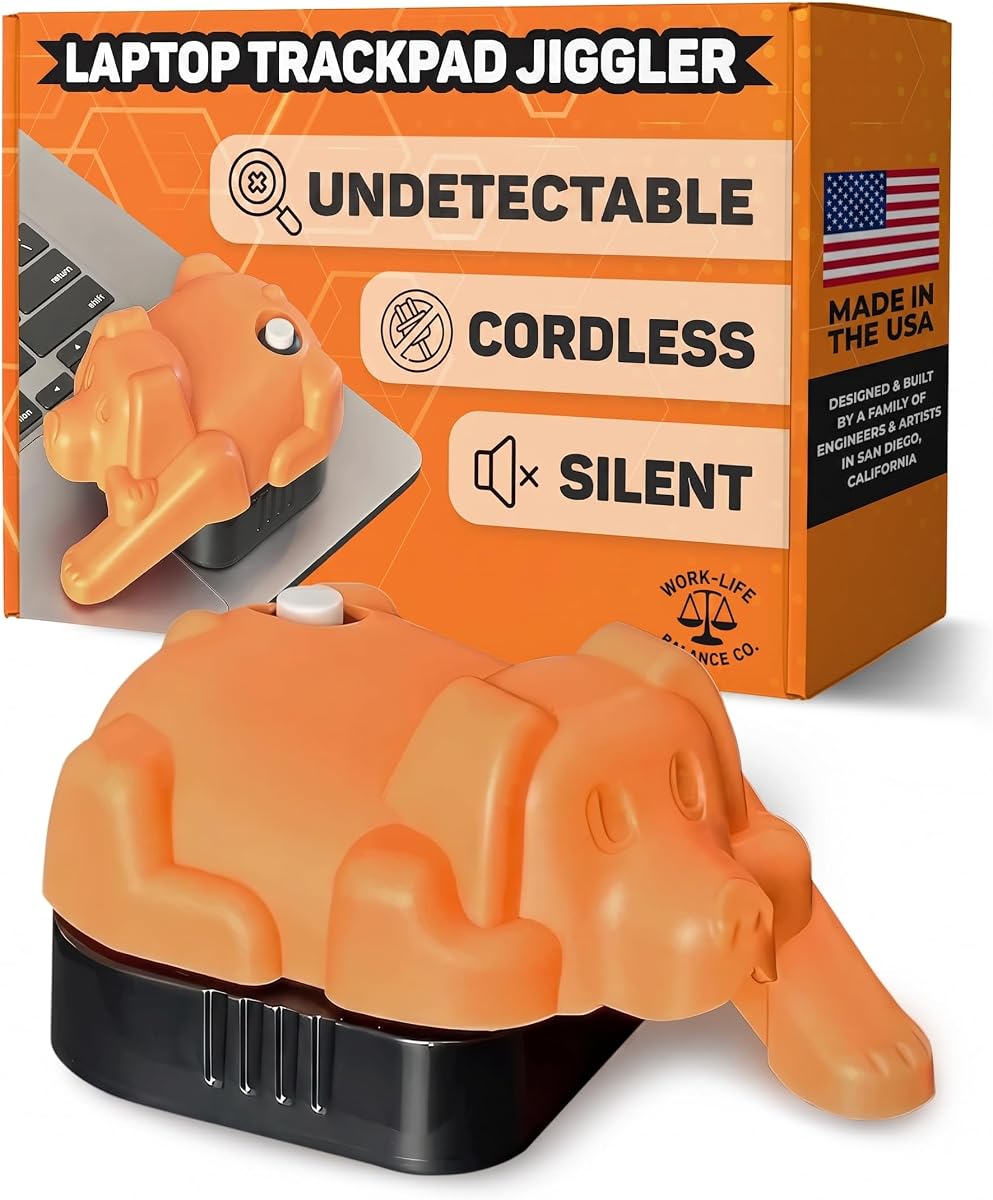
This unique device works directly on laptop touchpads without cables or Bluetooth. It simulates realistic fingertip movement to keep your screen active while you are away. The AA battery lasts up to six months for long-term use.
We may earn a commission when you buy through this link, at no additional cost to you.
Key strengths include its cordless design that reduces clutter on your workspace. It is completely invisible to IT scans as it relies on mechanical movement. The silent motor ensures it does not disturb your work environment.
Users may need to adjust touchpad sensitivity settings for optimal performance. It is not suitable for those who prefer an external mouse over touchpad use. However, for laptop-only setups it offers distinct convenience.
We recommend this for mobile users who do not want to carry cables. It serves as a great solution for staying active without wires. Its long battery life ensures consistent performance over months of daily use.
The cordless design allows for a clean workspace without wires or connections.
This device is built specifically to work with laptop trackpads instead of external mice.
We may earn a commission when you buy through this link, at no additional cost to you.
Choosing the right laptop jiggler involves considering connectivity, design, and control features that fit your workflow. This section outlines key factors to help you make an informed decision.
Check whether your laptop has USB-A or USB-C ports. Most devices use USB-A while some newer models support USB-C. Ensure the device matches your port or comes with an adapter.
Confirming the connection type beforehand prevents compatibility issues upon purchase.
Some devices draw power from the USB port while others use external adapters or batteries. USB power ensures continuous operation while battery options offer portability. Consider your desk setup needs when choosing.
Decide between constant power and mobility based on your work environment.
Look for models with switches or timers to customize activity levels. Devices with modes allow you to switch between slight and random movement. These features add flexibility to your usage.
Additional controls can enhance comfort by adapting movement to your specific needs.
Consider the physical footprint of the device on your desk. Some movers are ultra-slim while others have larger platforms. A compact design is better for travel and limited spaces.
Choosing a size that fits your workspace ensures it remains out of the way.
Ensure the device works with your operating system such as Windows, Mac, or Linux. Most hardware-based movers are universally compatible without drivers. Verify this to avoid software conflicts.
Universal compatibility guarantees the device will function across different environments.
Select devices recognized as standard mice by your system to stay under IT radar. Avoid software solutions that might be flagged by security scans. Hardware movers are generally safer for workplace use.
True undetectability ensures you can use the device without risking policy violations.
Look for metal builds or reinforced plastics for longer lifespan. Devices with warranties provide extra peace of mind for investment. Quality materials prevent early wear from frequent use.
Investing in a durable unit ensures consistent performance over time.
Compare prices against features to find the best value. Basic models are affordable while premium ones offer more control. Set a budget that matches your needs without overspending.
Balancing cost and features ensures you get the most for your money.
Plug the device into your USB port and place your mouse on the platform if required. Ensure the mouse sensor is aligned with the movement area for effective operation. Power it on using the switch button.
Adjust settings or modes as needed to suit your workflow. For battery-operated units, replace batteries when movement slows. Clean the device regularly with a dry cloth to maintain performance.
Store it in a safe place when not in use to prevent damage. Avoid placing heavy items on top to protect internal components. Following these steps ensures long-lasting functionality and reliability.
Hardware-based devices recognized as standard mice are generally undetectable by software scans. They mimic physical mouse movement without requiring drivers. Avoid software-based solutions to stay under the radar. Always check your company policy before use.
Most hardware movers are compatible with Mac OS, Windows, and Linux. They require no drivers to function. However, trackpad models may need specific settings tweaks for optimal results.
No, the listed devices are hardware-based and plug-and-play. They work immediately upon connection without any downloads. This ensures easy setup across all systems.
Yes, these devices keep your status active on platforms like Zoom and Teams. They prevent your profile from showing as away. Just ensure the movement is subtle enough not to affect your work.
Hardware units typically last several years with regular use. Battery-operated models depend on battery life. Quality materials help extend the lifespan of the internal motor.
Try repositioning the mouse on the platform to ensure proper alignment. Some optical mice may need more sensitivity. Check that the device is receiving power from the USB port.
Generally, there are no physical risks to your computer. However, using these tools may violate company policies. Always consider your organization's guidelines before implementing them.
We have reviewed ten top options ranging from budget to premium models. Devices like TECH8 USA and TECKNET offer strong value with reliable features. Your choice depends on whether you prioritize design, control, or portability.
Prioritize undetectability and ease of use when making your decision. Hardware-based solutions provide the safest way to stay active. Consider your budget and workspace size to find the perfect fit.
Prices and availability change frequently so verify current listings before purchasing. Check the latest offers to ensure you get the best deal. We hope this guide helps you find a reliable solution for your needs.