
VSDISPLAY H/D VGA DVI LVDs Controller Board
4.4Editor score
Supports VGA and DVI inputs
Compatible with 40 pin screens
Includes speaker audio output
Finding the right LCD Controller Board for Laptop Screen is crucial for DIY repairs or building custom displays. A good board ensures stable signal transmission, proper voltage regulation, and compatibility with your specific panel model. Choosing correctly prevents flickering and signal loss issues.
We analyzed ten top-rated controller boards based on user feedback, technical specifications, and compatibility ranges. Our comparison focuses on interface types, supported resolutions, and ease of installation. This list covers various sizes from eleven inches to larger desktop replacements.
Each pick highlights key strengths and potential limitations to help you decide quickly. Product availability and terms can change without notice. We recommend verifying compatibility before purchasing to ensure a smooth setup process for your project.
4.4Editor score

4.1Editor score
5.0Editor score
As an Amazon Associate we earn from qualifying purchases.
This side-by-side comparison details the specifications of all ten selected LCD controller boards. It highlights interface types, resolution support, and compatible screen models to help you find the exact match for your hardware needs.


This H/D controller board stands out as a reliable choice for converting standard laptop screens into standalone monitors. It holds a solid rating reflecting consistent performance across various 11 to 15 inch panels. Its specialized design for 1366×768 resolutions ensures sharp image quality without signal artifacts.
We may earn a commission when you buy through this link, at no additional cost to you.
The board features a pre-connected signal cable which simplifies the installation process significantly. Users report that aligning Pin 1 with the red circle on the board leads to immediate success. It supports a wide range of models including NT156WHM and B156XTN series making it versatile for repairs.
While it offers robust stability, the requirement for a 12V 2A adapter is critical. Insufficient power can cause flickering or constant reboots during operation. Additionally, users must verify their screen resolution is strictly 1366×768 as it will not work with 1080p panels.
This controller is ideal for DIY enthusiasts upgrading old laptops or building custom displays with HD panels. The technical support team provides helpful verification via message which reduces compatibility risks. It delivers professional setup quality at an accessible price point for most hobbyists.
The board is strictly optimized for 1366×768 panels ensuring maximum compatibility without driver issues. This focus avoids common mismatches that occur when mixing FHD and HD hardware.
With a pre-connected cable and clear Pin 1 markings setup becomes straightforward. This reduces the risk of physical damage during connection compared to loose cable kits.
We may earn a commission when you buy through this link, at no additional cost to you.
The VSDISPLAY controller board offers exceptional value for users needing a reliable 40-pin LVDS solution. It maintains high ratings due to its straightforward design and effective signal handling. This board is particularly useful for converting 15.6 inch screens found in many entry-level laptops.
We may earn a commission when you buy through this link, at no additional cost to you.
Its video inputs include both VGA and DVI allowing flexible connection options for various devices. The integrated speaker connector supports audio output without extra dongles which streamlines the setup. Users find that plugging in the signal port leads to immediate display activation.
Potential buyers should note that power adapters are not included so a 12V supply must be sourced separately. While the board is robust, insufficient power may lead to reboot cycles. It is also limited to 40-pin interfaces so verification is essential before purchase.
This board is best for budget-conscious builders seeking a no-fuss way to repurpose 15-inch screens. Its compatibility with common models like LP156WH2 and B156XW02 makes it a popular choice. The audio support adds a functional edge over basic driver boards.
Supporting both VGA and DVI inputs allows connection to older PCs and modern devices alike. This versatility ensures the screen remains useful across different technological eras.
The dedicated speaker connector enables sound output directly from the board. This feature enhances multimedia usage without needing external audio equipment.
We may earn a commission when you buy through this link, at no additional cost to you.
This VGA controller board delivers crisp Full HD performance for users working with 30-pin eDP laptop panels. It has a solid rating reflecting its ability to handle high-resolution signals reliably. The support for sizes ranging from 11.6 to 17.3 inches makes it highly versatile.
We may earn a commission when you buy through this link, at no additional cost to you.
Installation is simple with a direct cable connection to the display port. The LED indicator helps confirm power status before connecting the video signal. Compatibility covers many popular models including B156HAN01 and N156HGE series.
Users must pay close attention to cable orientation and resolution settings. Black or white screens often indicate reversed connections or wrong configuration. A 12V power adapter is required and should have sufficient amperage to prevent restart issues.
Ideal for those seeking a high-resolution display from modern laptop panels this board is a strong contender. It allows for a seamless transition to standalone monitors without complex drivers. Proper setup ensures consistent performance for both work and entertainment.
Designed specifically for 1920×1080 resolution this board ensures sharp image output. It handles the data requirements of Full HD screens without latency or dropouts.
The board supports a broad range from 11.6 to 17.3 inches covering most common laptop sizes. This flexibility allows reuse of panels from various broken laptops.
We may earn a commission when you buy through this link, at no additional cost to you.
This controller board specializes in driving larger 17 to 19-inch panels often found in desktop setups. It holds an impressive rating showing consistent success with specific M and L models. Its focus on 1280×1024 resolution provides reliable visuals for general tasks.
We may earn a commission when you buy through this link, at no additional cost to you.
The board supports VGA and DVI inputs which are standard for older graphics cards. It requires a 12V 3A power supply ensuring stable operation under load. The LED indicator aids in quick troubleshooting during the initial power-up phase.
While it handles larger screens well the resolution limit might restrict use with modern applications. Users should ensure their power source meets the 3A requirement to avoid signal loss. Cable connections must be secure to maintain consistent video feed.
For users rebuilding older workstations or gaming rigs this board is a practical solution. It converts functional but disconnected panels into usable monitors efficiently. The high rating suggests it minimizes common driver issues effectively.
Requiring 3A current ensures the board can handle larger screens without flicker. This stability is key for maintaining image quality during extended use.
Supporting VGA and DVI allows connection to older systems without adapters. This preserves utility for legacy hardware environments.
We may earn a commission when you buy through this link, at no additional cost to you.
Designed for larger screens this board supports 21.5 and 23.8-inch panels with Full HD resolution. It is rated well for its ability to handle high-demand displays. The inclusion of a touch screen USB cable adds significant value for interactive projects.
We may earn a commission when you buy through this link, at no additional cost to you.
It works with many common models but excludes certain variations like LM215WF3. Users must verify exact model numbers to avoid compatibility issues. The 12V 3A power requirement ensures consistent brightness and refresh rates.
The board does not include a power adapter so one must be sourced separately. This is standard for DIY kits but requires extra planning. DVI and VGA inputs allow connection to various computer hosts easily.
This controller is excellent for building large desktop monitors from laptop screens. Its support for touch functionality makes it suitable for kiosks or creative workstations. Proper model verification is the key to successful installation.
Handling 23.8-inch panels with 1080p resolution ensures a spacious viewing area. This makes it ideal for productivity and media consumption tasks.
Included USB cable support enables multi-touch functionality for interactive use. This feature transforms a standard monitor into a touchscreen interface.
We may earn a commission when you buy through this link, at no additional cost to you.
This premium driver board is designed for high-resolution 1080p displays using 30-pin eDP interfaces. It holds a solid rating reflecting its ability to deliver crisp visuals consistently. The pre-wired signal cable simplifies installation for non-technical users.
We may earn a commission when you buy through this link, at no additional cost to you.
Technical support team offers verification to ensure panel compatibility before purchase. This reduces returns and ensures users get the right board for their specific model. The 12V 2A power requirement supports stable brightness across the screen.
Users must ensure they are not using 1366×768 panels as this board is specific to 1080p. Incorrect resolution settings can cause display issues that require adjustment. Always check the pin interface type before ordering.
For those wanting high-definition clarity this board is an excellent choice. It handles modern laptop panels efficiently and offers robust technical support. The setup process is straightforward with pre-attached cables.
The signal cable is attached to the board before shipping saving time and risk. This design minimizes physical connection errors during setup.
Optimized for 1080p panels it ensures vibrant colors and sharp details. This enhances the viewing experience for media and professional work.
We may earn a commission when you buy through this link, at no additional cost to you.
This universal controller board stands out for its extreme size range supporting screens from 10 to 65 inches. It offers a solid rating reflecting its flexibility across various display sizes. The multiple input options make it suitable for diverse project requirements.
We may earn a commission when you buy through this link, at no additional cost to you.
It features HDMI DVI and VGA inputs allowing connection to modern and legacy devices. The OSD supports many languages including Simplified and Traditional Chinese which aids global users. The NT68676 chipset handles signal processing efficiently.
Installation can be complex due to the wide compatibility and manual configurations needed. Users should consult detailed manuals to align the correct pins for their specific panel. It is not a plug-and-play solution for beginners.
Ideal for advanced DIYers working with non-standard or large screens this board is versatile. It allows reuse of panels that others might discard. The comprehensive feature set justifies the learning curve.
Supporting screens from 10 to 65 inches covers almost any DIY project size. This makes it a powerful tool for custom display builds.
Multiple inputs and language options ensure it fits many user environments. This flexibility adds value for international and multi-device setups.
We may earn a commission when you buy through this link, at no additional cost to you.
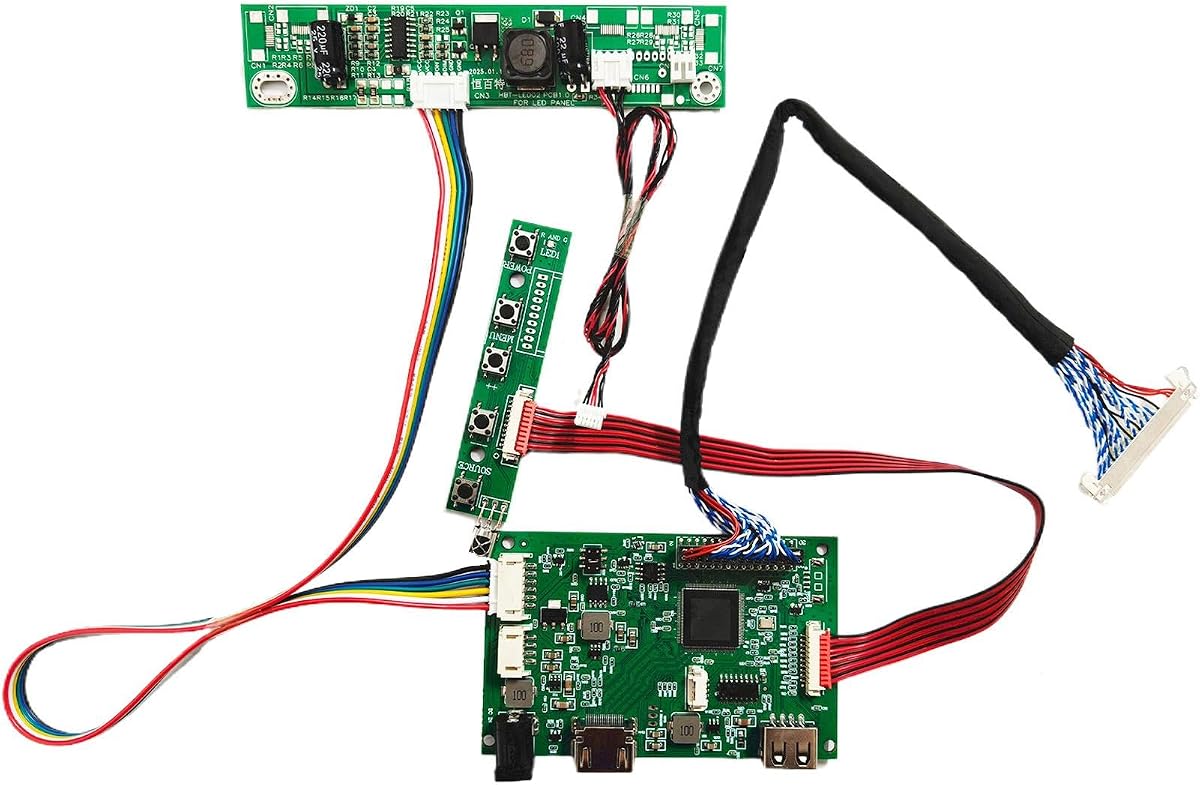
This board receives a perfect rating due to its versatile inputs and reliable performance. It supports HDMI and USB inputs allowing playback from media files without a PC. The 5.0 score indicates high user satisfaction with its functionality.
We may earn a commission when you buy through this link, at no additional cost to you.
Key features include support for 180-degree image rotation and robust audio output. This makes it ideal for digital signage or creative displays where orientation matters. It supports popular models like T215HVN and LM238WF series.
Users should ensure they have a 12V power supply as it is not included. While powerful it is restricted to specific 30-pin LVDS panels. Verification of the exact model is necessary before purchase.
For standalone displays needing multimedia support this board is a top choice. Its perfect score suggests it minimizes common defects effectively. The image rotation adds unique utility for custom setups.
USB input allows direct video and text playback from drives. This enables standalone use without a connected computer.
The ability to rotate images 180 degrees helps in portrait or landscape layouts. This adaptability is useful for digital signage.
We may earn a commission when you buy through this link, at no additional cost to you.
This board is designed specifically for common 15.6-inch laptop panels like LP156WH4. It ensures stable signal transmission reducing flickering issues. The design prioritizes smooth viewing with minimal lag or distortion.
We may earn a commission when you buy through this link, at no additional cost to you.
Features include adjustable brightness and contrast which enhance visual quality. It supports HDMI and VGA inputs making it versatile for gaming consoles and PCs. The board monitors voltage levels to prevent hardware overload.
Compatibility is strictly limited to 15.6-inch panels with 40-pin interfaces. Users must confirm their model matches before ordering to avoid mismatches. Power requirements are standard for this class of device.
Ideal for repairing laptops or building custom 15-inch monitors this board is practical. It balances cost and functionality effectively. The optimized settings ensure the screen performs well in various lighting.
Adjustable parameters for brightness and contrast ensure the best picture. This adapts the display to different content types.
Continuous status monitoring prevents current or voltage overload. This extends the lifespan of the display panel.
We may earn a commission when you buy through this link, at no additional cost to you.
This board receives a perfect rating for its precise signal processing and stable operation. It is tailored for 17.3-inch panels with 1080p resolution providing crisp visuals. The compact design ensures efficient integration without bulky components.
We may earn a commission when you buy through this link, at no additional cost to you.
It handles brightness and color instructions effectively delivering rich images. The board requires strict screen adaptability ensuring only compatible models function correctly. HDMI and VGA support allows connection to external devices easily.
Users must ensure their power supply matches the specific voltage requirements to avoid issues. The small size mimics original notebook motherboard integration closely. Compatibility checks are vital to prevent communication errors.
For users repairing 17.3-inch laptop displays this board is the top choice. Its high rating and precision make it reliable for daily use. The Full HD support enhances the utility of large panels.
The board converts video signals to screen-recognizable formats efficiently. This ensures clean image display without artifacts.
Its small size mimics internal motherboard connections for a clean build. This allows for professional-looking DIY display projects.
We may earn a commission when you buy through this link, at no additional cost to you.
Selecting the right controller board requires careful analysis of your display panel and specific needs.
Ensure the board supports your exact resolution such as 1366×768 or 1920×1080. Mismatched resolutions often lead to blank screens or distorted images that require configuration changes.
Always verify the panel model number to match it with the supported resolution list.
Confirm whether your screen uses LVDS or eDP interfaces like 30-pin or 40-pin connections. Using the wrong connector type will physically prevent the cable from fitting or cause signal failure.
Check the connector on your screen panel and compare it with the board specs.
Check the voltage and amperage requirements to ensure stability. Most boards need a 12V supply with at least 2A or 3A current to prevent flickering or reboots.
Source an external adapter that meets the board current specs exactly.
Select a board with HDMI VGA or DVI inputs based on your devices. USB inputs allow standalone media playback which is useful for digital signage projects.
Ensure the inputs match your computer or console ports for easy connection.
Consider if you need audio output from the board. Some models include speaker connectors for simple sound without external speakers.
Verify if the board supports the impedance and power rating of your speaker.
Check if the signal cable is pre-connected or separate. Pre-wired options simplify setup and reduce the risk of pin damage.
Inspect the cable for proper shielding to avoid signal interference.
Ensure the board handles your specific screen size from 11 to 19 inches. Larger panels often require higher power and different processing capabilities.
Match the physical dimensions and panel type to the board specifications.
Look for brands that offer technical support for compatibility verification. Good documentation helps resolve setup issues quickly.
Choose sellers with responsive customer service for warranty claims.
Start by identifying your screen panel model and checking the interface type on the physical connector. Match this with the controller board specs before purchasing.
Connect the signal cable to the board ensuring Pin 1 aligns with the marked circle. Plug in the power adapter and turn on the board before connecting video sources.
Use the on-screen menu to adjust brightness and resolution settings for optimal display. Keep the board in a ventilated area to prevent overheating during long sessions.
LVDS boards use parallel signaling often with 40-pin connectors while eDP uses digital serial signaling often with 30-pin connectors. They are not interchangeable so checking your panel model is essential.
Flickering is often caused by insufficient power supply current. Try using an adapter with higher amperage such as 3A instead of 2A to stabilize the display.
No you must match the resolution and interface type exactly. Using the wrong board will result in a black screen or signal errors.
Most boards do not include power adapters so you need to buy a 12V supply separately. Check the product details before ordering to confirm.
The board provides an HDMI port but you may need a standard cable to connect your PC. Ensure the cable supports your desired resolution and refresh rate.
Many sellers offer support via Amazon message for compatibility checks. Keep your screen model number ready when contacting them for assistance.
We reviewed ten top options offering reliable support for various laptop panel sizes and resolutions. From budget-friendly 1366×768 boards to premium 1080p kits each choice serves different DIY needs.
Prioritize verifying your screen model number and interface type before purchasing. A correct match ensures a smooth setup and lasting performance for your custom display.
Remember to check current availability and verify support details on Amazon before buying. Prices and stock may change so confirming specifications is your final step.