
Coral M.2 Accelerator B+M Key
5.0Editor score
4 TOPS inference speed
Compatible with Debian Linux
High energy efficiency
This comprehensive guide compares the top M2 accelerator cards for edge AI and machine learning, detailing performance, compatibility, and features.
M2 accelerator cards are essential for deploying artificial intelligence at the edge. They bring powerful processing capabilities to compact systems. A good accelerator balances speed, power efficiency, and software support. Choosing the right one depends on your specific workload and hardware constraints.
We compared ten leading M2 accelerator cards based on real-world performance metrics. Our analysis covers inference speed, power consumption, and ecosystem compatibility. We looked at how each card integrates with existing systems like Raspberry Pi and standard Linux servers. This list helps you find the perfect match for your AI projects.
Each pick shows the unique strengths of different accelerator technologies available today. Some focus on raw throughput while others prioritize energy efficiency. Prices and availability change frequently so always check current listings before buying. Use this guide to make an informed decision for your next deployment.
5.0Editor score

4.6Editor score

4.4Editor score
This side-by-side comparison highlights the key specifications and use cases for each of the top ten M2 accelerator cards on the market today.



The waveshare Hailo-8 M.2 AI Accelerator Module stands out as a top performer in the edge AI market. With a rating of 4.6 stars it delivers reliable performance for demanding tasks. This module brings 26 TOPS to compact systems enabling complex models to run smoothly.
We may earn a commission when you buy through this link, at no additional cost to you.
Its ability to support multiple frameworks like TensorFlow and PyTorch makes it versatile for developers. The 2.5W typical power consumption ensures it fits into energy sensitive deployments without overheating. It works seamlessly with Linux and Windows systems broadening its application scope significantly.
While powerful it requires a proper adapter for some platforms which might add to the setup complexity. The software ecosystem is rich but requires time to master fully for optimal results. These trade-offs are acceptable given the high throughput and efficiency it provides to users.
Developers working on Raspberry Pi 5 projects will find this module particularly valuable for AI. If you need high performance on the edge with flexible software support this is the top recommendation. Check current availability to ensure you get the latest module version for your build.
Supporting TensorFlow, PyTorch, and ONNX allows developers to deploy models without extensive retraining or conversion.
At only 2.5W typical consumption it reduces thermal load enabling silent or passive cooling solutions in edge devices.
We may earn a commission when you buy through this link, at no additional cost to you.
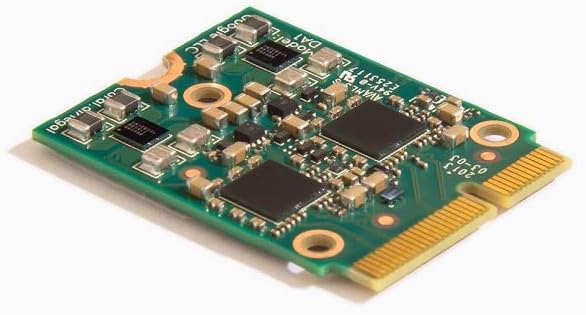
The Coral M.2 Accelerator with B+M Key offers incredible value for budget-conscious developers. It holds a perfect 5.0 rating from users who appreciate its reliability and ease of use. This accelerator excels in mobile vision tasks while consuming minimal power for its class.
We may earn a commission when you buy through this link, at no additional cost to you.
It integrates seamlessly with Debian-based systems requiring no complex setup for basic inference tasks. Support for TensorFlow Lite means you can deploy compiled models directly without rebuilding from scratch. This streamlined workflow saves time and resources during development cycles.
While it has lower raw throughput compared to newer chips its efficiency remains unmatched in its price range. The limited ecosystem means you must use compatible frameworks which restricts some advanced use cases. However for standard object detection and classification it performs admirably.
If you are building educational projects or small scale edge devices this is the ideal choice. Its proven reliability and low cost make it accessible for hobbyists and startups alike. Verify your system slot matches the B+M Key requirement before purchasing.
The card integrates directly with Debian Linux allowing quick setup without complex driver compilation or configuration steps.
Delivering 2 TOPS per watt ensures long runtimes on battery powered or thermally constrained edge hardware deployments.
We may earn a commission when you buy through this link, at no additional cost to you.
The QNAP QM2-2P10G1TB is a robust expansion card designed for high performance environments. Rated at 4.4 stars it combines storage acceleration with high speed networking in one card. It is perfect for users needing rapid data transfer alongside compute tasks.
We may earn a commission when you buy through this link, at no additional cost to you.
Its 10GbE port enables ultra-fast connectivity for network attached storage systems. The dual NVMe slots allow caching or local storage for AI datasets. It supports Windows Linux and QNAP OS providing flexibility across different server environments.
While expensive compared to pure accelerator cards it offers comprehensive hardware integration. The specialized focus might be overkill for simple edge devices but essential for enterprise NAS setups. The build quality ensures long term reliability under heavy load conditions.
Enterprises looking to upgrade their NAS infrastructure with faster access and networking should consider this. It streamlines the hardware setup for high bandwidth workloads significantly. Ensure your chassis supports the required PCIe height before installation.
The 10GbE port allows gigabit throughput enabling rapid data movement for large scale AI training sets.
Two NVMe slots provide local caching or dedicated storage to keep AI data close to the compute unit.
We may earn a commission when you buy through this link, at no additional cost to you.
The MX3 M.2 AI Accelerator is designed specifically for Linux based computer vision workloads. With a 4.3 rating it shows strong performance in optimized environments. Its M-key form factor makes it easy to integrate into existing Raspberry Pi systems.
We may earn a commission when you buy through this link, at no additional cost to you.
The comprehensive SDK simplifies development allowing you to deploy models quickly. It handles demanding AI tasks efficiently while keeping power consumption low for long sessions. Support for Linux ensures compatibility with many open source AI tools readily.
Windows users will need to look elsewhere as this card is Linux only. The niche market might make finding drivers or documentation slightly harder than mainstream products. However for Linux servers these features deliver solid value for specific use cases.
If you run Linux workloads and need reliable vision processing this is a strong candidate. It balances performance with ease of use effectively for developers. Check the developer website for the latest SDK updates before buying.
The M-key 2280 interface allows seamless drop-in installation on boards like Raspberry Pi 5 with HATs.
A comprehensive SDK reduces development time by providing prebuilt tools for model deployment and optimization.
We may earn a commission when you buy through this link, at no additional cost to you.
The Rocket 1604L offers massive storage expansion for systems needing multiple NVMe drives. It supports PCIe 5.0 ensuring the fastest possible data transfer speeds. The four dedicated ports allow you to connect multiple M.2 NVMe devices easily.
We may earn a commission when you buy through this link, at no additional cost to you.
It works with mainstream operating systems providing native support without extra drivers. This makes it ideal for servers that need both storage and AI processing capabilities. The high bandwidth ensures data feeds to the AI accelerator without bottlenecks.
As a storage card it does not contain a dedicated AI processor itself. You must pair it with a compute unit for inference tasks. While not an accelerator chip it supports the data flow for large AI workloads efficiently.
Systems needing high capacity storage alongside AI should pair this with a compute card. It is a robust solution for data intensive applications requiring speed. Confirm motherboard support for Gen5 before purchasing.
PCIe 5.0 x16 provides enough bandwidth to keep NVMe drives fully utilized for streaming datasets.
Supports both X86 and ARM platforms making it versatile for different server architectures and edge nodes.
We may earn a commission when you buy through this link, at no additional cost to you.
This adapter transforms your system into a dual TPU machine learning workstation. It is designed for TensorFlow Lite models and computer vision applications. The heatsink ensures thermal stability for the Coral M.2 cards installed.
We may earn a commission when you buy through this link, at no additional cost to you.
It allows you to maximize existing hardware investments without buying a whole new system. Future proof design ensures room to grow as your projects scale. The lane splitter distributes bandwidth correctly for both accelerator modules.
Without standalone compute it requires you to buy the Coral cards separately. The physical size might be large for small cases compared to single slot cards. Still it is a cost effective way to double inference capacity.
Developers who already have Coral modules can easily double throughput with this adapter. It is perfect for building scalable edge servers on a budget. Verify your PCIe slot has enough physical space for the adapter.
Designed with future AI demands in mind to allow easy expansion as your project requirements grow.
Includes a dedicated heatsink to manage heat from two active AI accelerators in one slot.
We may earn a commission when you buy through this link, at no additional cost to you.
The ASUS Hyper M.2 x16 Gen5 Card supports four NVMe devices with server grade reliability. Its massive 512 Gbps bandwidth ensures data moves quickly without throttling. This makes it an ideal storage backbone for AI workflows.
We may earn a commission when you buy through this link, at no additional cost to you.
Active cooling and power connectors keep drives running at peak speeds under load. RAID support allows you to create bootable arrays for data redundancy and speed. It works across AMD and Intel platforms providing broad compatibility.
It does not process AI data itself so pairing with a compute module is key. The fan control adds complexity but helps maintain low temperatures in dense systems. The noise may be noticeable in silent environments without care.
Workstations needing fast storage for training data should consider this card strongly. It ensures your accelerator has enough data to keep busy. Check your motherboard support for PCIe 5.0 before buying.
Includes a fan and thermal pads to prevent throttling during sustained high speed transfers.
Support for bootable RAID arrays helps create redundant storage systems for robust data safety.
We may earn a commission when you buy through this link, at no additional cost to you.
This Coral M.2 Accelerator offers wide OS support for both Linux and Windows users. Its A+E key interface allows easy integration into existing systems. With 4 TOPS int8 performance it handles inference tasks efficiently.
We may earn a commission when you buy through this link, at no additional cost to you.
Industrial grade reliability ensures it works in harsh environments with wide temperature ranges. This makes it suitable for ruggedized or industrial edge deployments where standard cards fail. The low power design keeps energy costs down.
It has lower TOPS than newer competitors but remains a solid choice for basic vision tasks. If you need Windows specific support for AI development this is one of the few viable options. The form factor matches standard WiFi slots.
Businesses requiring robust and compatible solutions for mixed OS fleets will find this valuable. Ensure your BIOS supports A+E key M.2 slots before installation. It is a balanced option for general purpose inference.
Supports both Debian and Windows 10 making it easier for teams using different OS environments.
Operating from -20C to 85C ensures reliability in industrial or outdoor edge deployments.
We may earn a commission when you buy through this link, at no additional cost to you.
This compact module provides dual Edge TPU compute in a single 2230 card. Rated 4.1 stars it offers a convenient way to double inference speed. It delivers 8 TOPS total peak performance for lightweight vision tasks.
We may earn a commission when you buy through this link, at no additional cost to you.
The 2 TOPS per watt efficiency makes it ideal for power constrained projects. It integrates with Linux systems via a standard M.2 slot. This solution is great for embedded devices needing extra compute power without bulk.
Bandwidth is limited to Gen2 which may bottleneck large model streams. However for typical object detection this is usually sufficient. The single card format saves space compared to dual adapter solutions.
If you need compact dual TPU performance in small devices this is excellent. It reduces physical footprint while maintaining strong compute. Ensure your slot supports E-key before installation.
Integrates dual TPUs into one card saving PCIe slots and internal space.
Two TOPS per watt ensures it runs cool even with sustained inference loads.
We may earn a commission when you buy through this link, at no additional cost to you.
This adapter is designed exclusively for Coral M.2 Accelerator with Dual Edge TPU modules. It holds a perfect 5.0 rating for reliability and ease of use. The included screw ensures a secure vibration resistant installation.
We may earn a commission when you buy through this link, at no additional cost to you.
It fits standard M.2 2280 slots allowing easy expansion of existing systems. The PCIe Gen2 bandwidth is sufficient for many inference tasks. It is a simple and effective way to use dual Coral cards.
It is explicitly incompatible with Raspberry Pi CM4 avoiding buyer errors. This specificity ensures you get the right hardware for your project. While simple it solves the physical mounting challenge well.
If you are building a Coral based dual TPU system this adapter simplifies setup. Check that your system supports the required slot type. It is an essential accessory for specific Coral builds.
Includes a stainless steel mounting screw to prevent vibration issues in industrial settings.
Designed for Coral M.2 modules only to ensure proper electrical and mechanical fit.
We may earn a commission when you buy through this link, at no additional cost to you.
Selecting the right M2 accelerator card requires careful evaluation of performance, compatibility, and budget. This guide covers the key factors to help you choose wisely.
Look for TOPS ratings which indicate how many trillions of operations the card can perform per second. Higher TOPS generally means faster inference for complex models like CNNs. Consider if you need int8 or FP16 precision for your specific algorithms.
Prioritize cards with high TOPS relative to your workload to ensure smooth real-time performance.
Power efficiency is critical for edge deployments where power sources are limited. Check the wattage per TOPS metric to compare efficiency across different chips. Lower power draw reduces thermal load and cooling requirements.
Choose models that balance performance with low wattage to suit your power budget.
Ensure the card fits your physical slot. Common types include M.2 2280, 2230, and specific key configurations like M-key or E-key. Verify your motherboard or board supports the required key and length.
Measure your available slot and check the datasheet to avoid physical fit issues.
Confirm the accelerator works with your OS. Some cards are Linux only while others support Windows or macOS. Check for official SDKs and drivers to ensure smooth software integration.
Select a card that has native support for your target OS to avoid driver headaches.
A rich software ecosystem matters. Check if the card supports frameworks you use like TensorFlow Lite, PyTorch, or ONNX. Good documentation and active developer communities are valuable for troubleshooting.
Choose a platform with strong community support to accelerate your development process.
Budget plays a major role. Entry level cards like Coral offer great value while premium options provide higher throughput. Check availability as some specialized hardware can have longer lead times.
Balance your needs against cost to find a card that delivers value without overspending.
High performance generates heat. Look for cards with passive or active cooling solutions. Ensure your case has airflow to prevent thermal throttling during extended operation.
Select cards with good thermal management to maintain consistent performance over time.
Consider future needs. If you plan to expand, choose adapters or cards that support multiple modules. Some designs allow adding more TPUs as your data grows.
Pick a solution that allows easy upgrades to protect your long term investment.
Install the card into an available M.2 slot on your motherboard or board. Secure it with the provided screw to prevent movement. Ensure the slot key matches the card type before insertion.
Download the official SDK and drivers from the manufacturer's website. Follow the setup instructions to configure the environment for inference. Test the card with a simple model to verify it is detected.
Monitor temperatures during operation. Keep vents clear to allow airflow and prevent overheating. If the card gets hot, consider adding a fan or heat sink for better cooling.
M.2 Key refers to the notches on the connector that define compatibility. M-key supports SATA and PCIe storage while E-key is typically for wireless cards or AI accelerators. Check your board slot to ensure the card keys match correctly.
Some cards like Coral support Windows 10 64-bit for inference. However many high-performance models are optimized for Linux. Check the product specs before buying to confirm OS compatibility for your system.
Your Pi 5 needs a M-key 2280 HAT to support M.2 cards. Not all cards work directly without an adapter. Verify the adapter requirements on the manufacturer website before purchasing.
Most low-power cards draw power from the motherboard slot. High-performance cards might need external power connectors. Review the power specs to ensure your supply can handle the load.
Edge TPU is Google's specialized processor for machine learning inference on the edge. It delivers high performance with low power. Many Coral cards use this technology for object detection tasks.
These cards are designed for inference not training. Training usually requires GPUs with higher memory bandwidth. Use these to run trained models efficiently on edge devices.
Accelerator cards do not have storage for OS or models. They rely on external storage for datasets and model files. Ensure your system has enough SSD space for your workload.
If the card overheats, add active cooling or reduce the workload. Ensure the chassis has airflow. Use fans or better thermal paste if allowed by the warranty.
Choosing the right M2 accelerator card depends on your specific needs and constraints. The waveshare Hailo-8 offers top performance while Coral provides great value for budget users.
Prioritize compatibility with your OS and form factor to ensure smooth integration. Look for strong community support to help with development challenges.
Always verify current availability and prices before finalizing your decision. Technology evolves quickly so check for new releases before buying.