
QUI Presentation Clicker with Volume Control
4.3Editor score
328ft wireless range
Built-in volume control
Compact pocketable design
This guide compares the top laser pointer for presentations devices for teachers and professionals, evaluating brightness, range, battery life, and compatibilit
Finding the right laser pointer for presentations can transform how you engage your audience. A good device offers reliable connectivity, clear visibility, and intuitive controls.
We evaluated ten top-rated models based on laser color, wireless range, battery options, and software compatibility. Our goal was to find tools that work seamlessly in classrooms and boardrooms.
Each pick highlights specific strengths like green visibility or USB-C charging. Prices and availability change frequently, so verify details before purchasing to ensure the best fit.
4.3Editor score

4.6Editor score

4.6Editor score
The following table provides a side-by-side overview of key specifications for each ranked model. This helps you quickly identify which features align with your specific presentation needs and environment.




This USB-C rechargeable clicker delivers a bright green laser that stands out against bright screens and projectors. With a 4.6 rating, it is a trusted choice for educators and professionals who need reliability.
We may earn a commission when you buy through this link, at no additional cost to you.
The green light at 532nm provides superior visibility compared to standard red lasers. This ensures your audience can follow your points clearly even in well-lit lecture halls or meeting rooms.
While it requires a USB-C charge, it eliminates the hassle of constantly replacing AAA batteries. The magnetic receiver storage is a thoughtful design feature that prevents losing the dongle during setup.
If you need a dependable tool for daily presentations, this model balances performance and convenience well. It simplifies your workflow with instant plug-and-play compatibility across all major operating systems.
The 532nm green laser cuts through ambient light better than red alternatives ensuring clear visibility for every audience member.
Rechargeable power reduces waste from disposable batteries saving money and environmental impact over the long term.
We may earn a commission when you buy through this link, at no additional cost to you.
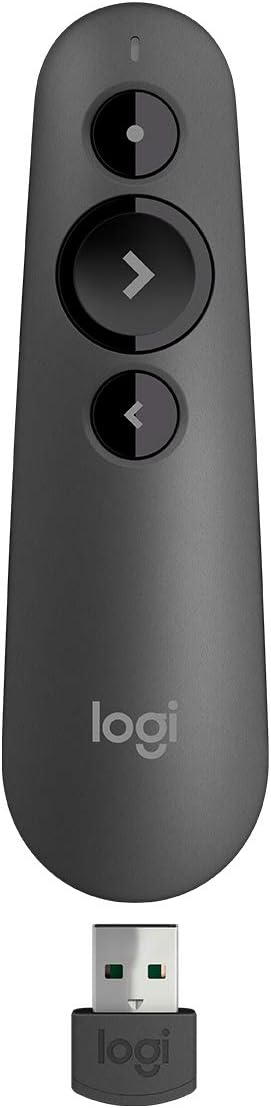
The R400 is a classic model known for its ease of use and dependable performance. With a 4.6 rating, it remains a solid choice for standard classroom or office presentations.
We may earn a commission when you buy through this link, at no additional cost to you.
Its intuitive touch keys allow you to control slides without looking at the device. This helps you maintain eye contact with your audience while navigating your content smoothly.
While it uses AAA batteries which need replacement, they are widely available and easy to swap. The range is sufficient for most small to medium-sized meeting spaces.
If you prefer a simple device without extra software requirements this clicker delivers exactly what you need. It is an excellent backup or everyday tool for basic presentation needs.
The touch key layout allows for easy slide navigation ensuring you can focus on your message instead of device operation.
This model offers a traditional feel that many presenters find comfortable during long speaking sessions.
We may earn a commission when you buy through this link, at no additional cost to you.
This budget-friendly option offers a wide range of features including volume control and a long wireless range. It scores a 4.4 rating from users who appreciate its versatility and value.
We may earn a commission when you buy through this link, at no additional cost to you.
The ability to control volume directly from the clicker is a unique feature for its price. It also offers a 100ft range which gives you freedom to move around the room.
The receiver is stored magnetically inside the clicker so it stays with the device. This prevents losing the USB dongle when you are packing up after a meeting.
If you want a feature-rich device without spending much this model is a great candidate. It works well for daily teaching or corporate training sessions where flexibility is key.
Beyond basic navigation it includes volume and hyperlink controls adding utility for multimedia presentations.
The 100 foot range ensures you can roam the stage or conference room without signal dropouts.
We may earn a commission when you buy through this link, at no additional cost to you.
The R800 combines a green laser with a useful LCD timer to help you manage your speaking time. It is a top choice for professionals who need precise control during long events.
We may earn a commission when you buy through this link, at no additional cost to you.
The vibrating alerts ensure you know when time is up without disrupting your presentation flow. This feature is particularly valuable for conference speakers who must adhere to strict time limits.
While it runs on AAA batteries the build quality is excellent and it feels comfortable in the hand. The green laser stands out even on bright screens making your points easy to follow.
If you need a premium tool that helps you keep track of time this model is worth the investment. It provides advanced features that standard clickers lack for a more professional experience.
The built-in timer with vibrating alerts helps speakers stay on schedule without distracting the audience.
The green laser offers clear visibility on various display types ensuring your pointer is never lost.
We may earn a commission when you buy through this link, at no additional cost to you.
This versatile clicker supports both USB and Bluetooth connections making it ideal for modern laptops without USB ports. It has a 4.4 rating for its flexibility across different devices and operating systems.
We may earn a commission when you buy through this link, at no additional cost to you.
You can connect via Bluetooth to avoid dongles or use the USB receiver for a direct link. The battery life is impressive lasting up to 12 months on a single AAA battery.
The Logitech Presentation app allows you to customize buttons and monitor battery levels. This adds a layer of control for users who want to tailor the device to their workflow.
If you use Apple devices or want Bluetooth connectivity this is a strong option. It is reliable for standard presentations and offers great battery efficiency for travel and on-the-go use.
Connect via Bluetooth or USB receiver providing flexibility for modern laptops with limited ports.
With up to 12 months of use per battery you can present confidently without frequent changes.
We may earn a commission when you buy through this link, at no additional cost to you.
This clicker is designed for large venues with a range that can reach up to 328 feet. It is a popular budget option for teachers and speakers who need to roam a wide area.
We may earn a commission when you buy through this link, at no additional cost to you.
The volume control feature allows you to adjust audio levels without touching your computer. This is particularly useful when you are moving away from the podium during a speech.
It comes with a clip to attach to your notebook or pocket ensuring you can carry it easily. The device is lightweight and works with most standard presentation software.
If you are looking for an economical solution that covers long distances this is a great choice. It is simple to use and offers essential features that fit any presentation budget.
The massive wireless range allows presenters to move freely across large stages or lecture halls.
A built-in clip makes it easy to carry your clicker along with your notes.
We may earn a commission when you buy through this link, at no additional cost to you.
The Norwii N95 is a versatile device that includes both USB-A and USB-C receivers in one package. It uses a green laser and offers a rechargeable battery for continuous use without battery changes.
We may earn a commission when you buy through this link, at no additional cost to you.
You can reprogram the buttons using the Norwii Presenter app to suit your specific needs. This level of customization is rare in this price range and adds significant value for frequent users.
The USB-C port ensures you can charge it with modern cables. The range is substantial allowing you to move freely in large auditoriums or teaching environments.
If you want green laser visibility with a flexible power source this is a top contender. It balances modern connectivity options with essential presentation features for a competitive price.
With USB-C and USB-A options it connects seamlessly to both new and older devices.
Remapping buttons allows you to tailor the clicker to your unique presentation style.
We may earn a commission when you buy through this link, at no additional cost to you.
This model is designed to be extremely compact and fits easily in a pocket. It is a great choice for speakers who want a discreet tool that does not get in the way.
We may earn a commission when you buy through this link, at no additional cost to you.
The ergonomic design ensures a comfortable grip during extended use. It includes a USB receiver slot that keeps everything together when you are finished presenting.
It supports a wide range of operating systems including Linux and Android. This compatibility makes it a versatile option for technical presentations involving multiple platforms.
If you need a small device for quick meetings or lectures this model is practical. It offers the essential features you need without extra bulk or complex settings.
The small size ensures it fits in any pocket for easy transport and storage.
Compatible with various operating systems it fits diverse technical environments.
We may earn a commission when you buy through this link, at no additional cost to you.
This clicker features a receiver with both USB-A and USB-C connectors eliminating the need for adapters. It offers a strong wireless range and volume control for a complete presentation package.
We may earn a commission when you buy through this link, at no additional cost to you.
The ergonomic design feels comfortable in the hand with soft touch oil coating. This ensures a secure grip even if you are presenting for a long time without breaks.
It uses two AAA batteries which provide long standby time due to auto sleep technology. The magnetic slot securely holds the receiver so you never lose it.
If you want a single solution that works across different laptop types this is an excellent pick. It balances essential features with a comfortable design for everyday professional use.
A dual connector receiver ensures compatibility with both legacy and modern laptop ports.
Ergonomic contours and soft touch materials prevent hand fatigue during long sessions.
We may earn a commission when you buy through this link, at no additional cost to you.
This remote is designed for simplicity and ease of use in standard presentations. It offers a solid range and ergonomic feel that makes it comfortable for daily use.
We may earn a commission when you buy through this link, at no additional cost to you.
The USB dongle stores conveniently inside the battery compartment. This simple design ensures you have everything you need in one device without extra attachments.
It is lightweight and easy to carry in a pocket or bag. The red pointer works well for most standard backgrounds and indoor environments.
If you want a straightforward and reliable tool for PowerPoint and similar apps this is a great choice. It is effective for classroom or meeting presentations without unnecessary complexity.
Simple button layout allows anyone to start presenting immediately without learning curves.
Lightweight and compact it fits easily in any pocket or bag.
We may earn a commission when you buy through this link, at no additional cost to you.
Choosing the right presentation pointer depends on your specific environment and needs. This section explains the key factors to consider before making a decision.
Green lasers are generally more visible than red ones especially on bright screens or in well-lit rooms. If you often present in large halls or use high-end projectors a green pointer is a superior choice.
For standard dark rooms red lasers are usually sufficient and more affordable. Consider your typical environment when deciding between these two options.
Range determines how far you can move from your computer during a talk. Most devices offer between 50 to 100 feet which covers most meeting rooms. Larger venues may require models with extended ranges.
Always check the effective range in open spaces rather than just the theoretical maximum. Obstacles like walls can reduce connectivity so account for your room layout.
Some clickers use disposable AAA batteries while others are rechargeable via USB-C. Rechargeable models save money over time and reduce waste making them ideal for frequent presenters.
AAA batteries are easy to replace if you run out in the middle of a presentation. Weigh your need for convenience against the long-term cost of purchasing batteries.
Ensure the device works with your operating system and presentation software. Most modern clickers support Mac and Windows but some may require specific drivers or apps for full functionality.
Check for support for tools like Google Slides Keynote or Prezi if you use them regularly. Compatibility ensures smooth transitions without technical hiccups.
Some models include volume control timer displays or hyperlink buttons. These features can streamline your presentation flow especially if you manage audio or multiple windows.
Focus on the features you actually need to avoid overpaying for extra complexity. A simple clicker is often better than a complex one if you do not use the advanced functions.
The device should feel comfortable in your hand during long use. Look for ergonomic shapes and soft-touch buttons to prevent hand fatigue.
A pocketable size ensures you can carry it with your notes. Portability is essential for speakers who travel or move between different meeting rooms.
If using disposable batteries check how long they typically last. Some models offer months of standby time which reduces the frequency of replacements.
Rechargeable models often provide weeks of use on a single charge. Consider how often you present to determine which power option is most practical for you.
Prices vary significantly based on brand and features. Budget options are great for occasional use while premium models offer better durability and advanced tools.
Invest in a model that fits your usage frequency. A reliable device is an investment in your professional image and presentation success.
Before your presentation insert the USB receiver or pair via Bluetooth if needed. Ensure your device is charged or has fresh batteries to avoid interruptions during your talk.
Practice using the buttons beforehand to build muscle memory. This allows you to focus on your audience rather than fumbling with the remote when you are live.
Keep the device clean and store it in a safe place. Avoid dropping it or exposing it to extreme heat which can damage the internal components and battery life.
Both green and red lasers used in presentation clickers are typically Class 2 which are safe for brief exposure. They are designed to be low power for public use. However avoid pointing them directly into eyes for extended periods as a general safety precaution.
Most wireless clickers work between 50 and 100 feet. Some models offer extended ranges up to 300 feet for large auditoriums. Always check the specifications to ensure it fits your venue size.
Some models support iOS and Android via Bluetooth but many rely on USB receivers. Check compatibility details if you plan to use the clicker with a tablet or smartphone instead of a laptop.
While primarily designed for slides most clickers send keystroke signals like arrows or space. You can use them for simple navigation in games but they are not optimized for complex gaming inputs.
Most models use AAA batteries located in the bottom compartment. Remove the cover and slide out the old battery before inserting a new one. Some rechargeable models use a USB-C port instead.
If you lose the receiver you may need a compatible replacement. Some brands sell replacement dongles while others require purchasing a new unit. Store the receiver in the device when not in use to prevent this.
Most models are plug and play and require no software. Some premium models offer customization apps but they are optional. Check the product details if you prefer a setup-free experience.
Most clickers work with older Windows and Mac systems via USB 2.0. Ensure your computer has a USB port or an adapter for the receiver. Bluetooth models may require Bluetooth 4.0 or higher for compatibility.
Choosing the right laser pointer for presentations depends on your specific needs and environment. The top picks like the Green Light Clicker and Logitech models offer excellent reliability for everyday use.
Prioritize factors such as laser color for visibility and power source for convenience. A device that fits your presentation style will help you deliver your message more effectively and confidently.
Always check current prices and availability before making your final decision. With the right tool you can ensure your audience stays engaged throughout your entire presentation.