
PC Power Button External Switch
4.6Editor score
Affordable price point
Simple adhesive installation
1.7-meter cable included
Finding the right external PC power button can transform how you interact with your desktop computer setup. Whether you have a hidden case or a hard-to-reach tower, these switches offer convenience and flexibility. Choosing a high-quality switch ensures reliable operation and long-term durability for your daily computing needs.
We evaluated ten top-rated external power buttons based on user reviews, installation ease, and build quality. Our comparison focuses on cable length, connector types, and additional features like USB hubs or wireless capabilities. This list helps you find the perfect switch to match your specific desktop configuration and personal preferences.
Each product selected offers unique benefits ranging from simple wired extensions to advanced wireless remote options. You will see detailed specifications, pros, and cons to help you make an informed decision. Please note that prices and availability may change frequently, so verify current details before purchasing online.
4.6Editor score
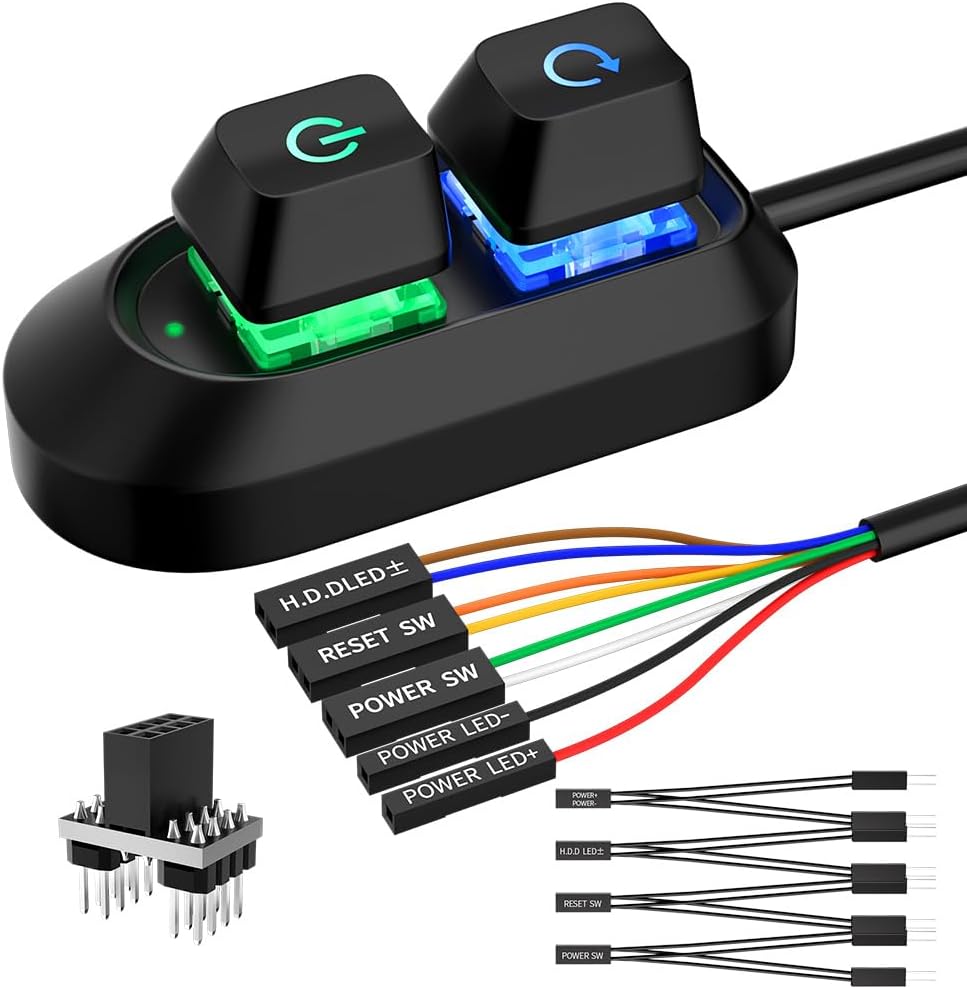
4.5Editor score

4.5Editor score
As an Amazon Associate we earn from qualifying purchases.
The following table provides a side-by-side comparison of all ten selected external PC power buttons. It highlights key specifications such as cable length, connector types, and unique features to help you quickly identify the best option for your desktop setup needs.


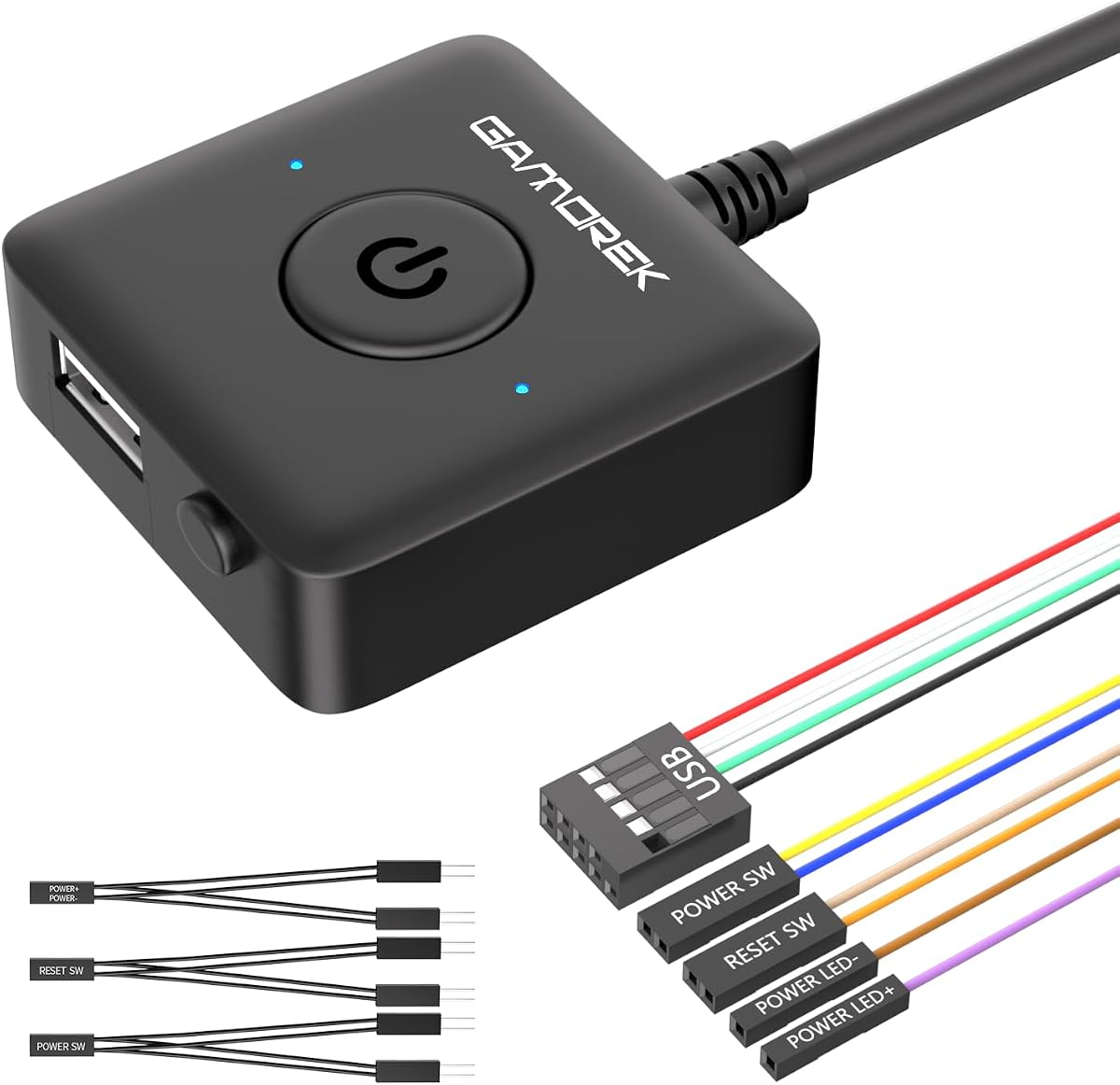


This external PC power button stands out as a top choice for users seeking versatility and ease of use. With a 4.5-star rating from verified buyers, it offers a reliable solution for relocating your power switch to a more accessible position. The package includes both a splitter board and cable, providing flexibility in how you integrate it with your existing setup.
We may earn a commission when you buy through this link, at no additional cost to you.
The 2-meter cable ensures you can place the switch wherever it is most convenient, whether on your desk or a nearby shelf. It supports both power on/off and reset functions, making it a comprehensive replacement for damaged chassis buttons. The adhesive sticker mounting method avoids the need for drilling, preserving the aesthetic of your workspace.
While the adhesive mounting is convenient, users should be aware that long-term stability may vary depending on surface texture. Additionally, routing the cable through tight cases can sometimes be challenging. However, these minor trade-offs are generally acceptable given the product's overall functionality and price point.
Ideal for home users and custom builders, this switch is a strong recommendation for anyone needing a reliable external power solution. It balances functionality, ease of installation, and cost effectively. We recommend it for those who want a straightforward upgrade without complex modifications to their current PC case.
The extra-long 2-meter cable allows you to position the switch exactly where you need it without worrying about reach limitations.
Beyond standard power control, the included reset function provides added convenience for troubleshooting system issues directly from your desk.
We may earn a commission when you buy through this link, at no additional cost to you.
For those seeking a cost-effective solution, this external power button delivers excellent value. It has earned a 4.6-star rating, reflecting high user satisfaction regarding its performance and simplicity. The package includes a splitter, allowing you to keep your original button functional while adding the external one.
We may earn a commission when you buy through this link, at no additional cost to you.
Installation is straightforward, requiring only basic connections to the motherboard headers and a sticky adhesive pad for mounting. The 1.7-meter cable is sufficient for most standard desk setups, providing enough reach to place the switch within easy hand access. It works well with both home users and custom DIY builds.
The lightweight plastic build is functional but may not feel as premium as metal alternatives. Users with very large desks might find the cable length limiting for optimal placement. Despite these minor drawbacks, it remains one of the most affordable ways to improve PC accessibility.
We recommend this switch for budget-conscious buyers who need a reliable external power solution. It is perfect for temporary setups or secondary computers where cost is a primary concern. The inclusion of a splitter adds significant value, ensuring compatibility with existing hardware configurations.
This option provides all essential features at a price point that makes it accessible for almost any user looking to upgrade their setup.
Designed to work with 90% of ATX motherboards, ensuring broad compatibility across various desktop systems without needing special adapters.
We may earn a commission when you buy through this link, at no additional cost to you.
This wireless remote PC power button offers a premium experience by eliminating the need for physical switches on your desk. With a 4.5-star rating, it provides reliable wireless control up to 50 feet away, perfect for users who want maximum convenience. The package includes a PCIe receiver board for seamless integration with standard motherboards.
We may earn a commission when you buy through this link, at no additional cost to you.
Setup is simple, requiring connection to the POWER SW header and installation of the PCIe card. Short press powers on your PC while long press initiates a safe shutdown. This solution is ideal for setups where the PC is hidden or located far from the primary workspace, reducing clutter and cable management issues.
The main trade-off is the higher cost compared to wired switches, and it requires an available PCIe slot. Some users may also need to adjust BIOS settings to ensure proper function. Despite this, the convenience of wireless operation makes it a standout choice for high-end setups.
We recommend this for users seeking a sleek, modern solution to power control. It suits environments where aesthetics and convenience are prioritized. For those with available PCIe slots and budget flexibility, this remote option delivers a superior user experience compared to traditional wired buttons.
Control your PC from anywhere in the room without needing to reach behind the case or manage physical buttons on the desk surface.
Universal motherboard compatibility and plug-and-play setup ensure you can start using it immediately without complex configuration steps.
We may earn a commission when you buy through this link, at no additional cost to you.
This switch excels in providing exceptional reach with its 118-inch cable, making it ideal for large spaces or unique setups. It maintains a 4.6-star rating based on user feedback regarding reliability and ease of use. The splitter included allows simultaneous use with your original chassis button without conflict.
We may earn a commission when you buy through this link, at no additional cost to you.
Installation involves connecting the 4-pin standard connector to the motherboard and securing the switch with an adhesive sticker. This setup is perfect for control from desks, racks, or floors where distance is a challenge. The LED indicator provides clear visual feedback on system status at a glance.
The extended length can sometimes result in excess cable slack that requires organization to keep the workspace tidy. While not a major issue, careful planning is needed to route it safely. Overall, the reach capability makes this a top choice for specific scenarios.
We recommend this for users with large desks or remote PC placements where standard cables fall short. It ensures convenient control regardless of distance. For those needing maximum flexibility in switch placement, this product delivers the longest reach among standard wired options.
The 118-inch cable allows placement in locations far from the PC case, ensuring accessibility in spacious or unconventional room layouts.
Integrated LED indicators keep you informed about the power status without needing to look at the PC tower itself.
We may earn a commission when you buy through this link, at no additional cost to you.
This external button stands out for its acrylic construction, offering a visually appealing option for custom setups. With a 4.8-star rating, users appreciate its design and functionality. The package includes indicators for both power and hard disk activity, adding useful visual cues to your workspace.
We may earn a commission when you buy through this link, at no additional cost to you.
It connects to the motherboard using standard headers and mounts easily with an adhesive sticker. The 1.6-meter cable is suitable for most desk setups. Its compact and sleek design makes it a great choice for those who prioritize aesthetics alongside utility in their builds.
While acrylic looks great, it may be prone to scratches compared to metal or plastic alternatives. Users should handle it with care to maintain its appearance. However, for many custom builders, the aesthetic value outweighs this minor concern.
We recommend this for users looking to enhance the look of their setup. It suits gaming rigs and home office environments where design matters. If you want a functional switch that also looks premium, this option is an excellent choice.
The acrylic material provides a modern, clean look that complements high-end PC builds and desk setups.
Built-in LEDs for power and HDD activity give you quick visual insights into system status and data transfer processes.
We may earn a commission when you buy through this link, at no additional cost to you.
This switch offers a unique RGB lighting feature that adds a clean glow to your setup. It has a 4.5-star rating based on user feedback about its build and function. The RGB effect requires no software, making it plug-and-play for immediate visual enhancement.
We may earn a commission when you buy through this link, at no additional cost to you.
It connects via standard ATX power switch pins and comes with a 2-meter cable for flexible routing. The low-voltage design ensures safe operation without risking damage to your system. It is perfect for those who want to add a touch of style to their desk.
The RGB lighting may not appeal to everyone, particularly those preferring minimalistic setups. Additionally, the adhesive mount means moving the switch later may require fresh tape. However, for gamers or enthusiasts, this feature is a significant plus.
We recommend this for users who value visual flair in their desk accessories. It complements RGB keyboards and mice effectively. If you want a power button that also adds ambiance, this is a solid choice to consider.
The 7-color breathing LED effect creates a dynamic visual experience that syncs well with gaming setups without needing extra control software.
Low-voltage design ensures stable operation that protects your motherboard and system from electrical risks during daily use.
We may earn a commission when you buy through this link, at no additional cost to you.
This switch is unique for its built-in USB support, extending easy-access functionality directly to your desk. It holds a 4.7-star rating, reflecting its reliability and versatility. The package includes a PCI bracket, which helps keep desktop builds organized by providing a secure mounting option.
We may earn a commission when you buy through this link, at no additional cost to you.
It connects to the motherboard power/reset pins and USB header for dual functionality. You can connect flash drives or keyboards directly to the button unit. This is ideal for users who need extra front USB access without modifying their PC case further.
Using the USB function requires an available 9-pin header on your motherboard. If your board is full, this feature may remain unused. However, the power and reset functions still work independently. It remains a strong choice for those needing integrated connectivity.
We recommend this for users who want to consolidate controls and USB access. It suits workstations where plugging devices frequently is necessary. For those needing extra convenience ports in reach, this product delivers a practical and efficient solution.
Built-in USB support allows you to connect peripherals like flash drives or mice directly to the button unit for easier access.
The included PCI bracket provides a clean way to mount the switch in ATX cases, reducing clutter and improving cable management.
We may earn a commission when you buy through this link, at no additional cost to you.
This product merges a power switch with a 4-port USB 3.0 hub, offering high-speed connectivity. It has a 4.3-star rating from users who value its dual functionality. The USB ports support 5.0Gbps data transfer, making it suitable for fast storage devices or peripherals.
We may earn a commission when you buy through this link, at no additional cost to you.
Installation involves connecting the power pins and USB headers to the motherboard. The adhesive sticker allows easy placement on a desk. This is ideal for users needing both power control and expanded USB access in one compact unit.
The hub functionality depends on having an available USB 3.0 header on your board. Additionally, the 1.2-meter cable may limit placement options compared to longer models. Despite these constraints, it serves as an effective all-in-one solution.
We recommend this for users with limited USB ports on their desk. It fits well in home office setups requiring multiple peripheral connections. For those needing high-speed USB access with power control, this switch offers a practical combination of features.
The USB 3.0 hub provides 5.0Gbps speeds, ensuring fast data transfers for external drives and peripherals.
Combining a power switch and hub reduces desk clutter by consolidating two essential functions into one device.
We may earn a commission when you buy through this link, at no additional cost to you.
This option is perfect for users seeking a lightweight and compact power solution. It holds a 4.7-star rating, reflecting its reliability and portability. The design is small and lightweight, making it easy to place anywhere without taking up significant desk space.
We may earn a commission when you buy through this link, at no additional cost to you.
It includes a 2-meter cable and adhesive stickers for mounting. The package comes with clear installation instructions to help you connect it to your motherboard. This simplicity ensures you can get it up and running quickly without technical difficulty.
While the minimalist design is a benefit for space saving, it lacks additional features like USB or RGB. Users looking for more than just a power switch may want more options. However, for pure functionality, it remains highly effective.
We recommend this for users with tight desk spaces or temporary setups. It suits those who need a simple power solution without extra clutter. If portability and minimalism are priorities, this switch delivers on those needs perfectly.
The compact footprint ensures the switch takes up minimal desk space, leaving room for other workspace essentials.
Weighing only 1 ounce, it is easy to move or transport without adding significant weight to your setup.
We may earn a commission when you buy through this link, at no additional cost to you.
This switch features a durable aluminum body, offering a premium build quality that resists wear. It has a 4.6-star rating from users who value its robust construction. The package includes a splitter board and cable, providing flexibility for both power and reset control.
We may earn a commission when you buy through this link, at no additional cost to you.
It connects to the motherboard with standard headers and uses adhesive stickers for mounting. The 2-meter cable ensures broad reach for various setups. The metal casing gives a solid feel that complements high-end desktop cases effectively.
While the metal build is strong, it adds a bit of weight and cost compared to plastic options. Users with textured surfaces may need to ensure the adhesive sticks properly. However, for long-term durability, this trade-off is well worth the investment.
We recommend this for users seeking a durable and stylish switch. It suits professional setups where build quality is paramount. If you want a switch that feels solid and looks professional, this aluminum option is an excellent choice.
The aluminum construction ensures durability and longevity, resisting damage from daily use better than plastic alternatives.
The included splitter allows simultaneous power and reset control, offering comprehensive system management from a single unit.
We may earn a commission when you buy through this link, at no additional cost to you.
Selecting the right external PC power button depends on several key factors that match your specific desktop setup needs. This guide outlines important considerations to help you make an informed decision.
Cable length is crucial for placement flexibility. Measure the distance from your motherboard to the desired switch location. Most options range from 1.6 meters to over 2 meters, with some specialized models offering even longer reach for large desks or remote setups.
Choose a cable long enough to reach comfortably without stretching. If you plan to place the switch far from the PC, opt for models with longer extensions to avoid tension on the wires.
Ensure the switch connector matches your motherboard headers. Most use standard 4-pin connectors for power and reset functions. Check your motherboard manual for JFP1 or F_PANEL pin configurations to guarantee a reliable connection.
If your board has unique headers, verify compatibility before purchasing. Adapters may be required for older systems, so confirm the switch specifications align with your hardware.
Mounting methods vary from adhesive stickers to brackets. Adhesive stickers are quick but may lose stick over time. Brackets offer more stability but require more installation effort. Consider your desk material and long-term usage when choosing.
For permanent installations, brackets or drilling may be better. For temporary setups, adhesive options provide flexibility and ease of use.
Some switches offer extras like USB hubs, RGB lighting, or wireless control. These features add functionality but may increase cost. Decide if you need standard power control or enhanced capabilities like data transfer or remote operation.
Prioritize features that match your workflow. USB hubs are great for frequent peripheral users, while RGB suits aesthetic-focused builds.
Materials range from plastic to aluminum. Aluminum offers durability and a premium look but is heavier. Plastic is lightweight and affordable but may wear faster. Consider the environment and frequency of use when selecting.
For high-traffic areas, metal builds provide better resistance. For personal desks, plastic may be sufficient and cost-effective.
Some models include a reset button in addition to power on/off. This is useful for troubleshooting without opening the case. Check if your workflow benefits from having a reset option readily available.
If you deal with system freezes often, a combined switch saves time. Otherwise, a standard power-only unit works well.
LED indicators show power status and sometimes HDD activity. This adds visual feedback for system states. Ensure the LED color and brightness suit your environment.
Clear indicators help you quickly know if the PC is on without touching the switch. Consider brightness if working in dark environments.
Price varies based on features and build quality. Basic models are affordable, while premium options cost more. Check warranty terms to ensure product reliability and support.
Invest in a model that balances cost with durability. A slightly higher upfront cost can save money on replacements later.
To install your external power button, first connect the power switch pins to the motherboard headers. Then, use the included adhesive sticker to secure the switch in your desired location. Ensure the cable is routed safely to avoid tripping hazards.
Regularly check the adhesive mount to ensure the switch remains stable. If the switch moves, apply fresh adhesive or consider using a bracket for better hold. Keep the button clean by wiping it with a dry cloth to maintain functionality.
Avoid pulling on the cable when pressing the switch. Gentle pressure is sufficient to trigger the power signal. For models with USB functions, ensure all connections are secure to prevent data transfer issues.
Most external power buttons work with standard ATX motherboards that have 4-pin power headers. Check your motherboard manual to confirm compatible pins before purchasing. Some custom or proprietary boards may require adapters.
No, these switches draw power from the motherboard connection. They do not need an external power adapter. Simply connect to the motherboard headers for operation.
An external power button serves as an ideal replacement for damaged case buttons. You can disable the original switch in BIOS if needed and rely on the external one for control.
Yes, most packages include a splitter to allow both original and external buttons to function. This ensures you have two access points for system control.
Adhesive stickers generally last several months depending on surface texture. If the switch becomes loose, reapply fresh adhesive or use a bracket for permanent mounting.
Wireless options use PCIe receivers and connect to standard power headers. Ensure your PC has an available PCIe slot for the receiver board to function correctly.
Most support standard power functions including sleep and shutdown via BIOS settings. Check your motherboard compatibility for specific power management features.
You can route cables through expansion slots, rear vents, or optical drive bays. Measure the path to ensure the cable length is sufficient for tight spaces.
We reviewed ten top external power buttons offering a range of features from simple extensions to advanced wireless controls. Each option provides unique benefits for different user needs and desk setups.
Prioritize cable length and build quality based on your specific setup. For basic needs, budget-friendly plastic models work well. For advanced features, consider metal or wireless options.
Always check current prices and availability before purchasing. Our guide helps you compare features to find the perfect fit. Make an informed choice to enhance your daily computing experience.