
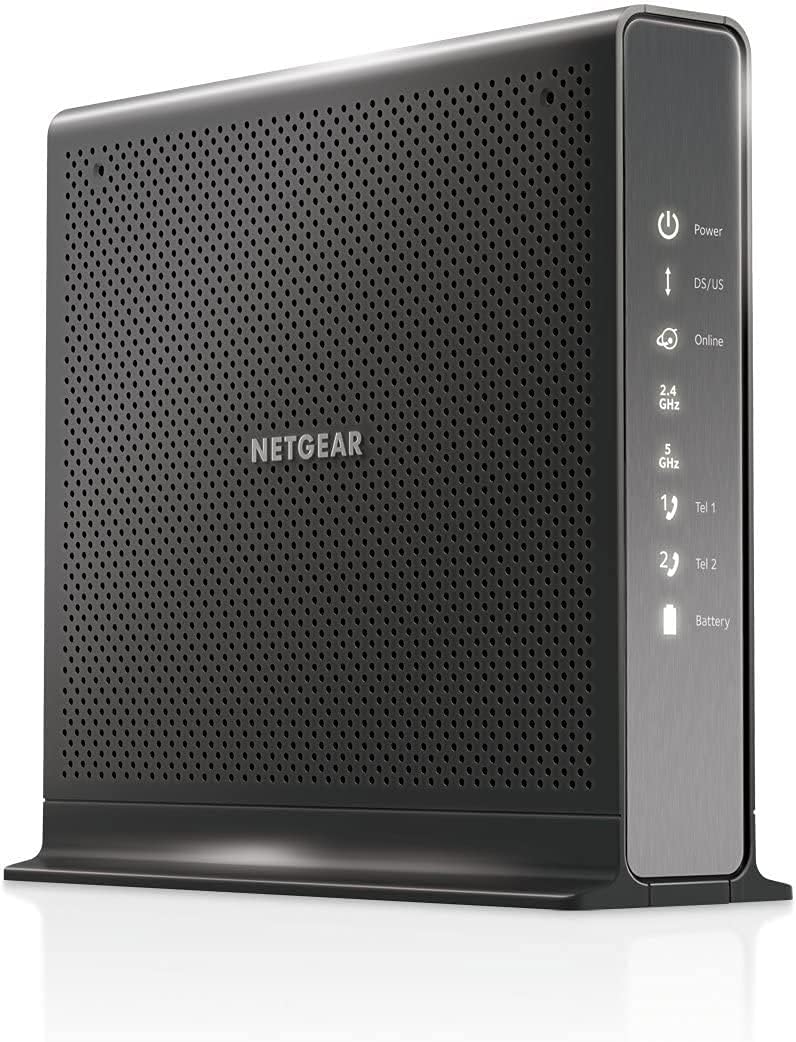
NETGEAR Nighthawk C7000
4.2Editor score
AC1900 WiFi 5 speed
DOCSIS 3.0 technology
Great for plans up to 800Mbps
This guide compares the top 10 cable modem wifi router combo units for speed coverage and reliability to help you choose the best device for your home network
Finding a reliable cable modem wifi router combo can simplify your home network setup significantly. These devices combine two essential pieces of hardware into one sleek unit reducing clutter and often saving you monthly rental fees from your internet service provider.
We compared ten top rated models based on their DOCSIS standards wifi generation support and coverage area. Our analysis focuses on real world performance factors like device capacity compatibility with major providers and the ease of initial setup for average users.
Each pick below highlights specific strengths such as budget friendliness or premium gigabit speeds. Remember that pricing fluctuates frequently so always check the current deal before purchasing to ensure you get the best value for your specific internet plan requirements.
4.2Editor score

4.1Editor score

3.9Editor score
The following table provides a side by side overview of the technical specifications and key capabilities for all ten selected cable modem wifi router combo units to help you quickly identify the model that best fits your bandwidth and coverage requirements.





This model stands out as the top choice for most users seeking a balance between modern features and reliable performance. It combines the latest DOCSIS 3.1 standard with WiFi 6 technology to ensure your network can handle high bandwidth demands without slowing down.
We may earn a commission when you buy through this link, at no additional cost to you.
The AX2700 dual band wireless system provides robust coverage for medium sized homes while the four Gigabit Ethernet ports allow for stable wired connections for gaming consoles or desktop computers. This combination ensures that critical devices get the bandwidth they need without interference.
While the initial cost is higher than entry level options the long term benefits of owning your own hardware and avoiding rental fees make it a smart investment. The included security features and app based management further enhance the user experience for typical home networks.
If you need a reliable device that supports current gigabit plans and prepares you for future speed upgrades this unit is the strongest recommendation available. It offers the best mix of speed compatibility and ease of use for a wide range of home internet plans.
The DOCSIS 3.1 modem component ensures your device can support upcoming internet plan upgrades without needing replacement.
The Nighthawk app allows you to pause internet access or run speed tests directly from your smartphone easily.
We may earn a commission when you buy through this link, at no additional cost to you.
For those on a tighter budget this model offers exceptional value by delivering solid performance at a fraction of the cost of newer WiFi 6 units. It remains a popular choice for households that do not require the absolute maximum wireless speeds available today.
We may earn a commission when you buy through this link, at no additional cost to you.
The AC1900 wireless speed is sufficient for streaming 4K video and gaming on most standard internet plans. The DOCSIS 3.0 modem supports plans up to 800Mbps which covers the majority of cable internet tiers currently offered by major providers across the country.
Users appreciate the simple setup and the ability to manage the network remotely via the Nighthawk app. While it lacks the latest wireless standard the device has a reputation for stability and longevity which makes it a safe bet for basic to intermediate usage needs.
This is the ideal pick for renters or first time owners who want to avoid monthly equipment fees without spending a fortune upfront. It provides all the essential features needed to run a smooth home network without unnecessary premium additions.
Purchasing this unit helps you eliminate monthly rental fees which can add up to over a hundred dollars annually.
The included USB 2.0 port allows you to connect a storage drive for simple file sharing across devices.
We may earn a commission when you buy through this link, at no additional cost to you.
This high end unit is designed for users who need every ounce of speed and coverage available from a single device. It supports internet plans up to 2Gbps making it one of the few combos ready for the fastest tiers of home cable internet currently available.
We may earn a commission when you buy through this link, at no additional cost to you.
The AX6000 WiFi 6 technology ensures that wireless connections remain fast and stable even when dozens of devices are connected simultaneously. The dedicated 2.5G Multi-Gig port allows wired devices to exceed standard Gigabit limits which is crucial for NAS systems or workstations.
While the cost is high the performance per dollar is excellent for power users who demand zero latency and maximum throughput. It is particularly suitable for large homes where coverage needs to reach distant rooms without signal degradation or mesh systems.
If your home internet plan is at the top tier or you plan to upgrade soon this device ensures you will not bottleneck your connection. It represents the pinnacle of combo technology with features tailored for heavy usage scenarios.
The 2.5G Ethernet port allows for wired speeds that exceed standard Gigabit limits for high speed storage or gaming.
Designed to cover up to 2500 square feet it is ideal for larger homes that typically struggle with signal reach.
We may earn a commission when you buy through this link, at no additional cost to you.
This renewed option allows you to access the same high performance hardware as the new model at a reduced cost. It undergoes a rigorous inspection process to ensure that it meets the same functional standards as a brand new unit straight from the box.
We may earn a commission when you buy through this link, at no additional cost to you.
The benefits include all the speed and connectivity features of the standard CAX30 such as WiFi 6 support and DOCSIS 3.1 modems. This makes it an attractive choice for budget conscious buyers who still want modern standards without paying premium retail prices.
Buying refurbished is a sustainable choice that reduces electronic waste while providing significant savings. The included warranty offers peace of mind regarding functionality and reliability so you can buy with confidence knowing you are protected against defects.
If you are comfortable with refurbished electronics this unit provides the best balance of modern technology and affordability. It is an excellent way to upgrade your network setup without overspending while still getting top tier performance capabilities.
Each device is tested for functionality and cosmetic condition to ensure it works like new before shipping to you.
You receive a warranty that covers defects in workmanship ensuring your purchase is protected after the transaction.
We may earn a commission when you buy through this link, at no additional cost to you.
This variant offers the same core performance as the top rated model with specific optimizations for certain plans or bundles. It maintains the high speed DOCSIS 3.1 modem and WiFi 6 router which ensures it remains relevant as internet speeds increase over time.
We may earn a commission when you buy through this link, at no additional cost to you.
The inclusion of a USB 3.0 port is a notable improvement over older models allowing for faster data transfer to external drives. This feature is particularly useful for users who want to share files across their network or back up devices locally without cloud costs.
Security is a strong point with built-in firewall protection and compatibility with NETGEAR Armor for advanced threat detection. This ensures that your connected devices remain protected from common online threats without needing additional software installations on every device.
It serves as a strong alternative if your preferred provider supports this specific model and you need slightly better storage connectivity. The feature set is comprehensive enough to handle gaming streaming and home office needs with ease and reliability.
The USB 3.0 port allows you to connect hard drives for much faster file transfers compared to older USB standards.
This unit works with major providers like Xfinity Spectrum and Cox making it a versatile choice for most users.
We may earn a commission when you buy through this link, at no additional cost to you.
ARRIS is a trusted name in connectivity and this model brings modern tech in a compact and attractive form factor. The design saves space on your desk or shelf while providing robust wireless coverage through the latest WiFi 6 technology standards.
We may earn a commission when you buy through this link, at no additional cost to you.
It supports cable plans up to 2.5Gbps which positions it well for users with high speed tiers who want future proofing. The LED indicators are straightforward making it easy to troubleshoot connection issues without needing to open an app or check logs.
The user experience is streamlined with simple activation steps via your provider and a clean interface for daily management. This focus on simplicity makes it a great choice for those who want reliable performance without complex settings or advanced configurations.
If you prefer a brand with a long history in modem manufacturing this unit delivers high quality construction and consistent performance. It is a solid contender for anyone looking to upgrade from older equipment without sacrificing ease of use or aesthetic appeal.
The compact footprint ensures the device fits easily on shelves or desks without cluttering your living space.
Supporting plans up to 2.5Gbps ensures this modem will remain relevant as your internet provider increases speeds.
We may earn a commission when you buy through this link, at no additional cost to you.
This renewed version of the popular C7000 provides a cost effective way to own a reliable combo device without paying full price. It is perfect for households that need dependable internet but do not require the absolute latest speed upgrades available on the market.
We may earn a commission when you buy through this link, at no additional cost to you.
The AC1900 wireless speed covers most standard home plans and supports enough devices for typical family usage without lag. By choosing refurbished you get the same functional capabilities as a new unit while significantly reducing the upfront investment required for your network.
The certification process ensures that the device is fully operational and free from major cosmetic defects before it reaches you. This level of quality control gives you confidence that the device will perform reliably for the duration of its life.
For those looking to start their ownership journey without high costs this is a highly recommended option. It balances reliability affordability and modern features well enough to serve most users for several years without needing an upgrade.
Despite being renewed the device performs exactly like a new unit ensuring your internet connection stays stable.
Choosing this model allows you to save significantly on hardware costs while still getting essential modern features.
We may earn a commission when you buy through this link, at no additional cost to you.
This specialized unit is designed for households that require both internet and home phone service from a single provider. It integrates voice support directly into the modem router combo simplifying the setup process and reducing the number of boxes needed.
We may earn a commission when you buy through this link, at no additional cost to you.
The voice performance is optimized for clarity and reliability ensuring that calls remain clear even when the network is active. This is particularly useful for families who rely on home phones for work or emergency communication during internet heavy activities.
While the internet speed is standard for its era the voice functionality makes it a unique option for Xfinity subscribers who want to save on rental fees. It provides a seamless experience for managing both data and voice traffic without additional hardware.
If you have a bundle that includes voice this device is the most convenient way to manage your connection at home. It removes the complexity of separate modems and adapters while ensuring your phone lines work correctly with your internet service.
The dedicated VoIP ports allow you to connect standard phones directly to the modem for reliable calling.
This model is specifically optimized for Xfinity voice plans ensuring maximum compatibility and service stability.
We may earn a commission when you buy through this link, at no additional cost to you.
This unit is an excellent entry point for users who are just starting to own their modem and want to save money. It supports plans up to 300Mbps which is sufficient for standard streaming and browsing in smaller households without needing advanced features.
We may earn a commission when you buy through this link, at no additional cost to you.
The compact design fits well in apartments or small offices where space is at a premium. The included parental controls allow parents to manage screen time and block inappropriate content without needing extra software or subscriptions.
Compatibility with major providers ensures that you can use it with your existing service without technical hurdles. It is a straightforward solution for those who want a reliable connection without the complexity or cost of high end networking gear.
For budget conscious families or small homes this model offers the essential features needed to get online securely and efficiently. It provides a solid foundation for your home network without requiring technical expertise to install or maintain.
The small footprint makes it ideal for smaller spaces where a large router might be out of place.
Built in parental controls let you manage internet access times for devices without extra costs.
We may earn a commission when you buy through this link, at no additional cost to you.
ARRIS has been a leader in connectivity for decades and this model reflects that experience with reliable performance and stability. It offers a strong combination of speed and features that make it a great choice for general home use without breaking the budget.
We may earn a commission when you buy through this link, at no additional cost to you.
The AC2350 wireless speed provides enough bandwidth for multiple users to stream and browse simultaneously without significant slowdowns. The central app simplifies network management allowing you to check connection status and manage devices easily from your phone.
With four Gigabit Ethernet ports it offers excellent wired connectivity options for multiple devices that need stable connections. This makes it versatile for homes that have desktop computers or game consoles that benefit from being hardwired to the network.
If you want a reliable unit from a brand with a strong track record this is a solid option that balances features and cost well. It is a practical choice for families who need dependable internet service without the need for the latest premium technologies.
ARRIS has sold millions of modems worldwide ensuring a proven track record of reliability and support.
The Central app gives you easy access to manage your network settings and view connected devices anytime.
We may earn a commission when you buy through this link, at no additional cost to you.
Selecting the right combo requires understanding your current internet plan your home size and the number of devices you typically connect. This guide breaks down the key technical factors to help you make an informed decision.
The DOCSIS standard determines how fast your modem can communicate with your internet service provider. Current DOCSIS 3.1 is recommended for gigabit speeds while older DOCSIS 3.0 is sufficient for slower plans up to 800Mbps. Choosing a unit with DOCSIS 3.1 ensures you are ready for future speed upgrades.
Check your current plan and your providers supported devices list to match the DOCSIS version correctly.
Wi-Fi 6 offers significant improvements over Wi-Fi 5 in terms of capacity and efficiency in crowded networks. It handles more devices simultaneously without lag which is essential for smart homes with many connected gadgets. While Wi-Fi 5 is cheaper Wi-Fi 6 provides better longevity for your investment.
For homes with more than twenty devices Wi-Fi 6 is highly recommended to prevent network congestion.
Every router has a specified square footage coverage which depends on your home layout and building materials. Thicker walls or multiple floors can reduce signal strength meaning you may need a higher rated unit than your room count suggests. Always estimate based on total usable space rather than just room count.
Look for models that cover at least 1000 to 1500 square feet for standard apartments and single story homes.
Wired connections provide the fastest and most stable speeds for devices like gaming consoles or desktops. Ensure the unit has enough Gigabit ports for all your wired needs since some models may only offer two or three ports. This avoids the need for an external switch which adds cost and complexity.
Four Gigabit Ethernet ports are the standard minimum for a well equipped home network setup.
Not all combo units work with every internet provider so you must verify the specific model with your ISP. Major brands usually certify with companies like Xfinity Spectrum and Cox but voice plans or bundled services may require specific models. Checking the compatibility list prevents issues during activation.
Always confirm with your providers website before purchasing to ensure the device is approved for your plan.
USB ports allow you to connect external storage drives or printers for sharing across your network. This feature is useful if you want to access files from different devices without using cloud storage. Not all models include this so decide if it is a necessary feature for your workflow.
If you plan to share files locally ensure the model includes at least one USB 2.0 or higher port.
Combo units range from affordable entry level models to high end premium devices. Calculate how long it will take for the savings on rental fees to offset the purchase price to determine the value. Usually owning your own hardware pays for itself within a year or less compared to rental costs.
Focus on models that meet your speed needs without paying for features you will not use.
Modern combos often come with companion apps that guide you through the installation process step by step. This simplifies activation and configuration compared to traditional web based interfaces which can be complex for new users. Look for brands with highly rated support apps for a smoother experience.
Prioritize models with good mobile apps to reduce the time needed for initial setup and configuration.
Start by connecting the coaxial cable from your wall outlet to the modem input on the device. Then use an Ethernet cable to connect the modem port to the router port if your model has them separated. This ensures a stable physical connection before powering on the device.
Plug the power adapter into the unit and wait for the indicator lights to stabilize. This usually takes a few minutes as the modem negotiates a connection with your internet service provider. Once the online light is solid you can connect your devices to the wireless network.
To maintain performance place the device in a central location away from obstructions or heat sources. Regularly reboot the modem to clear any memory issues or connection glitches that may occur over time. This simple maintenance step keeps your network running smoothly without extra costs.
No you must ensure the device is approved by your specific provider. Major brands often have lists of compatible models on their websites. Always check if your plan supports the device before buying to avoid activation issues.
Yes owning your own modem router eliminates the monthly rental charge from your ISP. This fee often ranges from ten to fifteen dollars a month which adds up to significant savings over time. The initial purchase cost is usually recovered within the first year.
DOCSIS 3.1 supports higher speeds and is more efficient at handling congestion compared to 3.0. It is necessary for gigabit plans while 3.0 is sufficient for speeds up to 800Mbps. Using 3.1 ensures your hardware is future proof for speed upgrades.
Most combos cover between 1500 and 2500 square feet depending on the model and layout. Concrete walls or metal structures can reduce this range significantly. Consider a mesh system if your home is larger than the single unit coverage.
Only specific combo units like the C7100V support voice lines directly. Most standard combos are for data only so you will need a separate adapter if you have voice service. Check your providers compatibility list before purchasing.
No setup is straightforward with modern companion apps that guide you through each step. You simply plug in the cables and follow the on screen instructions. Most users finish setup within fifteen minutes without calling support.
We reviewed ten excellent options ranging from budget friendly entry models to high speed premium units. The CAX30 stands out as the top choice for most users due to its balance of speed and features.
Prioritize a model that matches your internet plan speed and home size to ensure optimal performance. Avoid paying for technology you do not need but also avoid hardware that bottlenecks your connection.
Prices and stock availability change frequently so always verify the current price and compatibility before buying. This ensures you get the best deal and a device that works with your specific service.