
Memory Card Reader BENFEI
4.5Editor score
USB-C and USB 3.0 ports
Reads four cards simultaneously
Universal compatibility across devices
This guide compares the top ten Compact Flash Card Reader models for speed, durability, and compatibility to help you choose the right memory card adapter for
Finding the right Compact Flash Card Reader is essential for photographers and content creators who need quick access to their data. A good reader supports multiple card types, offers fast transfer speeds, and connects reliably to your devices without hassle.
We compared ten popular models based on their portability, data transfer rates, and compatibility with modern and legacy systems. Each product was evaluated on its ability to handle simultaneous reads and its build quality for daily professional use.
Each pick below highlights key strengths and potential limitations to help you make an informed decision. Remember that prices and availability can change quickly, so check the latest details before you commit to a purchase.
4.5Editor score

4.7Editor score

4.4Editor score
The following table provides a side-by-side view of the key specifications for each of the top ten Compact Flash Card Reader models evaluated in this guide.



The Lexar Multi-Card 3-in-1 is a top-tier choice for professionals who need reliable and fast data access. With a rating of 4.7, this reader stands out for its ability to handle high-capacity cards with ease.
We may earn a commission when you buy through this link, at no additional cost to you.
Its standout feature is the impressive transfer speed of up to 312MB/s for SD and MicroSD cards, which drastically reduces wait times when moving large files. The USB 3.1 connectivity ensures it remains relevant for modern devices while maintaining backward compatibility.
While it lacks support for some niche formats like Memory Stick or XD cards, the focus on the three most common types ensures optimized performance. The build quality reflects Lexar's reputation for durability, making it suitable for frequent travel and professional workflows.
If you need a reader that balances speed and reliability without compromising on core features, this model is an excellent investment. It is ideal for photographers and videographers who prioritize performance in their daily operations.
The ability to transfer files at up to 312MB/s means you can move entire project folders in seconds rather than minutes.
Supporting SD, MicroSD, and CF cards covers the vast majority of consumer and professional camera formats available today.
We may earn a commission when you buy through this link, at no additional cost to you.
The BENFEI 4in1 Card Reader offers exceptional value for those looking for versatility without breaking the bank. Rated 4.5, it is a popular choice for users who need to read multiple card types frequently.
We may earn a commission when you buy through this link, at no additional cost to you.
Its integrated design allows for simultaneous reading of SD, Micro SD, MS, and CF cards, which is rare at this price point. The inclusion of both USB-C and USB 3.0 ports ensures it works with older laptops and newer smartphones alike.
While it does not match the raw speed of high-end models like the Lexar, the transfer rates are sufficient for most general tasks. The build is functional but relies on plastic rather than metal, which might affect longevity under heavy use.
For budget-conscious buyers who need a reliable and versatile tool for everyday transfers, this reader is a smart pick. It is especially useful for travel or casual photography where portability and cost are key factors.
With both USB-C and USB 3.0 connectors, this reader bridges the gap between legacy ports and modern devices effortlessly.
Reading four cards at once eliminates the need to constantly swap cards, saving time and reducing wear on your slots.
We may earn a commission when you buy through this link, at no additional cost to you.
This CFast 2.0 Card Reader is designed for professionals who need to handle high-end memory formats like CFast and legacy XD cards. With a solid 4.4 rating, it delivers reliability and speed for demanding environments.
We may earn a commission when you buy through this link, at no additional cost to you.
The dedicated slot for CFast 2.0 cards is a standout feature for videographers using high-frame-rate cameras. Additionally, the aluminum alloy housing dissipates heat effectively, ensuring stable performance during large file transfers.
The only downside is its higher price compared to basic readers, but the specialized features justify the cost for those who need them. It also supports five cards simultaneously, which is ideal for multi-camera setups or archiving projects.
If you require a rugged, high-performance reader that handles both modern and legacy formats, this is the top choice. It is particularly recommended for studio work or on-location shoots where equipment durability is paramount.
Dedicated support for CFast 2.0 ensures seamless integration with high-end video production equipment.
The aluminum housing helps prevent overheating during extended use, maintaining consistent transfer speeds.
We may earn a commission when you buy through this link, at no additional cost to you.
This 6-in-1 adapter is a powerhouse for users who need to access a wide variety of legacy and modern cards. Rated 4.3, it supports CF, SD, TF, MS, XD, and CFast cards all at once.
We may earn a commission when you buy through this link, at no additional cost to you.
The aluminum chassis not only looks professional but also aids in heat dissipation during heavy data transfer. Its USB-C and USB-A connectors make it versatile for connecting to modern laptops and older desktop PCs.
The main trade-off is that it may not support the very latest SD cards in every case, but for most users, the compatibility is more than enough. The 5Gbps speed ensures that you do not wait long for large videos to transfer.
Ideal for archive enthusiasts or those with mixed camera gear, this reader simplifies workflow significantly. It is a strong contender for anyone who needs a one-stop solution for different memory card formats.
Supporting six different card types makes this a universal hub for various storage media.
The dual connector design allows you to use the same device with different types of computers.
We may earn a commission when you buy through this link, at no additional cost to you.
The ZIYUETEK reader is built for reliability with its slim aluminum cover and multiple protection features. With a rating of 4.5, it offers a balanced experience for general users needing quick access to their cards.
We may earn a commission when you buy through this link, at no additional cost to you.
Its aluminum cover not only adds a premium feel but also helps in cooling during data transfer. The device can read five cards simultaneously, which is useful for those managing multiple memory sources.
The intelligent protection against over-current and short circuits adds a layer of safety for your devices. While it does not stand out for unique features, it provides solid performance and durability for the price.
This is a great option for someone who needs a reliable and safe reader for occasional use. It is well-suited for home users or students who need to transfer files from different cameras.
Built-in intelligent protection safeguards your connected devices from electrical surges.
The compact form factor makes it easy to carry in a pocket or camera bag.
We may earn a commission when you buy through this link, at no additional cost to you.
This UGREEN reader is optimized for modern devices with USB-C ports, making it perfect for recent laptops and phones. It holds a 4.5 rating due to its reliable performance and broad compatibility.
We may earn a commission when you buy through this link, at no additional cost to you.
The 4-in-1 design covers SD, MicroSD, CF, and MS cards, allowing simultaneous access without needing to switch slots. The 5Gbps speed ensures that transferring large media files is quick and efficient.
While it focuses on USB-C devices, which is a limitation for older hardware, it is ideal for anyone investing in the latest tech. The plug-and-play nature means you do not need to install any drivers.
If you use an iPhone 15 or a MacBook Pro, this reader is a practical choice for managing your storage. It is particularly good for professionals who need to offload data directly to their mobile devices.
Tailored for the latest USB-C devices, ensuring seamless connection with your current hardware.
Transfer files at speeds up to 5Gbps for quick access to your media files.
We may earn a commission when you buy through this link, at no additional cost to you.
The SmartQ C368 is a straightforward solution for those who want a quick and reliable reader. With a strong 4.6 rating, it is praised for its ease of use and clear status indicators.
We may earn a commission when you buy through this link, at no additional cost to you.
The blue LED light lets you know when the device is powered on, which is helpful for visual confirmation. It supports SD, MicroSD, MS, and CF cards, covering most common formats without issues.
The main drawback is that it does not come with a cable, so you must ensure you have the right one for your computer. However, the speed is solid for most users and the design is compact.
This is a good budget-friendly option for general users who need a simple tool for file management. It is especially helpful for those who work with both Mac and Windows systems regularly.
The blue LED indicator light provides clear visual feedback when the device is active.
No drivers are required for setup, allowing you to start using it immediately after plugging in.
We may earn a commission when you buy through this link, at no additional cost to you.
This specialized reader is built for professionals who work with high-performance memory cards like CFast. With a rating of 4.4, it offers robust performance and reliability for demanding workflows.
We may earn a commission when you buy through this link, at no additional cost to you.
The aluminum housing not only looks premium but also helps dissipate heat during long transfers. It supports five card types at once, allowing for efficient multitasking without the need to swap slots constantly.
While it is slightly more expensive than basic readers, the specialized features justify the cost for those who need them. The 5Gbps speed ensures you can handle large video files without frustrating delays.
Ideal for cinematographers and professionals working with legacy and modern cards, this device bridges the gap in compatibility. It is a reliable choice for those who need a dedicated tool for their camera gear.
Designed to handle high-speed data transfer required for professional video production.
Supports older card types like XD-Picture alongside modern CFast formats.
We may earn a commission when you buy through this link, at no additional cost to you.
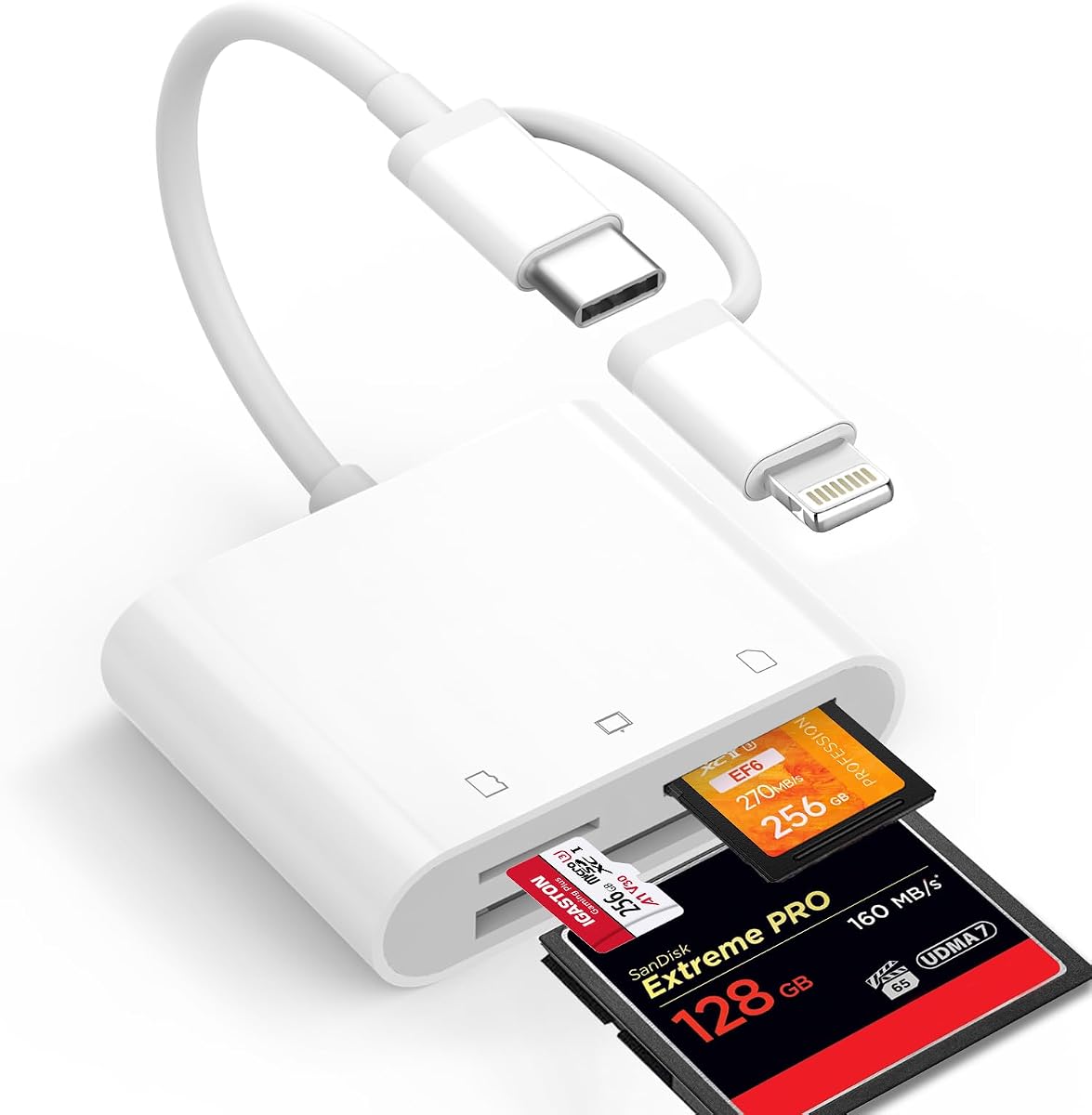
The Denlane reader is designed for mobile users who need to view images directly on their smartphones or tablets. With a 4.3 rating, it offers convenience for photographers who need quick access to their files on the go.
We may earn a commission when you buy through this link, at no additional cost to you.
Its dual connector design supports both Lightning and USB-C devices, making it compatible with a wide range of iPhones and Android phones. This versatility is excellent for content creators who manage multiple devices.
The bi-directional transfer allows you to move photos from your phone to the card as well, which is useful for backing up mobile data. However, note that the connectors cannot be used simultaneously, requiring you to choose one at a time.
This is a great tool for travelers and social media managers who need to transfer photos to their devices instantly. It is a practical choice for anyone who wants to stay connected without relying on cloud storage.
Optimized for smartphones and tablets, allowing direct file access without a computer.
Supports both Lightning and USB-C ports, expanding its compatibility across different devices.
We may earn a commission when you buy through this link, at no additional cost to you.
The ChiaoPio reader is designed for simplicity and ease of use with its built-in USB-C cord. With a solid 4.5 rating, it is a reliable option for modern users who want a straightforward solution.
We may earn a commission when you buy through this link, at no additional cost to you.
Its design does not block other ports on your laptop, which is a significant advantage for thin devices like the MacBook Air. It supports CF, SD, and MicroSD cards, covering most essential formats.
The main limitation is that it only works with USB-C devices, so older iPhones or laptops with different ports are excluded. However, for those with modern hardware, the lack of extra power requirements makes it convenient.
This is an excellent choice for professionals who need a minimalistic and efficient tool. It is particularly suitable for those who frequently transfer photos from their camera to their laptop for editing.
The built-in cord allows you to access other ports while the reader is in use.
Draws power directly from the USB-C port, eliminating the need for an extra adapter.
We may earn a commission when you buy through this link, at no additional cost to you.
Choosing the right Compact Flash Card Reader involves considering factors like speed, compatibility, and build quality to ensure it meets your specific needs.
Ensure the reader supports the specific card types you use. While most readers support SD and MicroSD, you may need a model that also supports CF, CFast, or older formats like XD or Memory Stick for legacy gear.
Check the product description for a list of supported formats to confirm it covers your collection.
Look for readers with USB 3.0 or higher for faster data transfer. This is crucial for handling large files like 4K video or high-resolution photos that take time to move.
Higher speeds like 5Gbps can significantly reduce the time you spend waiting for files to offload.
Readers made with aluminum alloy tend to dissipate heat better and are more durable than plastic models. This is especially important if you use the device frequently or in varying temperatures.
A sturdy build ensures the reader withstands the rigors of travel and daily use.
Decide between USB-C, USB-A, or dual connectors based on your devices. Modern laptops and phones often use USB-C, while older computers may still rely on USB-A ports.
Dual connector models offer the most flexibility for mixed environments.
Readers that allow you to read multiple cards at once can save time if you work with several cameras or memory sources simultaneously.
This feature is ideal for photographers who need to back up footage from multiple cards during a shoot.
Consider the physical size and weight of the reader. A compact design makes it easier to carry in a camera bag without adding bulk to your kit.
Lightweight readers are convenient for travel and on-the-go workflows.
Check the warranty period and customer support options. A longer warranty, such as 18 months or two years, indicates confidence in the product's quality.
Reliable support can help resolve issues quickly if you encounter any compatibility or hardware problems.
While budget models offer good value, higher-priced readers often provide better performance and durability. Balance the cost against your usage frequency and data needs.
Investing in a reliable reader can prevent data loss and save time in the long run.
To use your Compact Flash Card Reader, insert the memory card into the designated slot until it clicks into place. Then plug the connector into your computer or mobile device and wait for the system to recognize the new drive.
For best practices, always eject the drive safely from your operating system before unplugging the reader to prevent data corruption. If you are using multiple cards, you can read them simultaneously depending on the model's capabilities.
To maintain the longevity of your reader, store it in a dry and cool place when not in use. Avoid exposing it to extreme temperatures or moisture, and clean the contacts gently if you notice any dirt or debris.
USB 3.0 refers to the speed standard, which is usually a rectangular port on older devices. USB-C refers to the physical shape of the connector used in newer devices. Many readers now offer both to ensure compatibility across different computers and phones.
Many Compact Flash readers include slots for MicroSD cards as well. However, you should check the product specifications to confirm it supports the specific formats you need. Some models are designed for multiple card types.
Most modern card readers are plug-and-play devices that do not require drivers. Your operating system will automatically detect the device and install necessary software. This makes them easy to use on Mac and Windows systems.
Slow speeds can be caused by using USB 2.0 ports, low-quality cards, or a reader that does not support high-speed modes. Ensure you are using USB 3.0 ports and that the memory card is also rated for high-speed transfer.
Aluminum readers generally dissipate heat better and are more durable than plastic models. This can be important for prolonged data transfers. However, plastic models are often lighter and more affordable for casual use.
Yes, but you need to ensure the reader has the correct connector. Modern iPhones use USB-C, while older models use Lightning. Check the product details to confirm compatibility with your specific mobile device model.
In this guide, we have explored the top Compact Flash Card Reader options available in November 2026, highlighting their unique strengths and ideal use cases.
When choosing a reader, prioritize compatibility with your specific card types and the speed requirements of your workflow. Investing in a reliable model can save time and protect your data.
Remember to check the latest prices and availability before making a purchase to ensure you get the best deal for your needs.