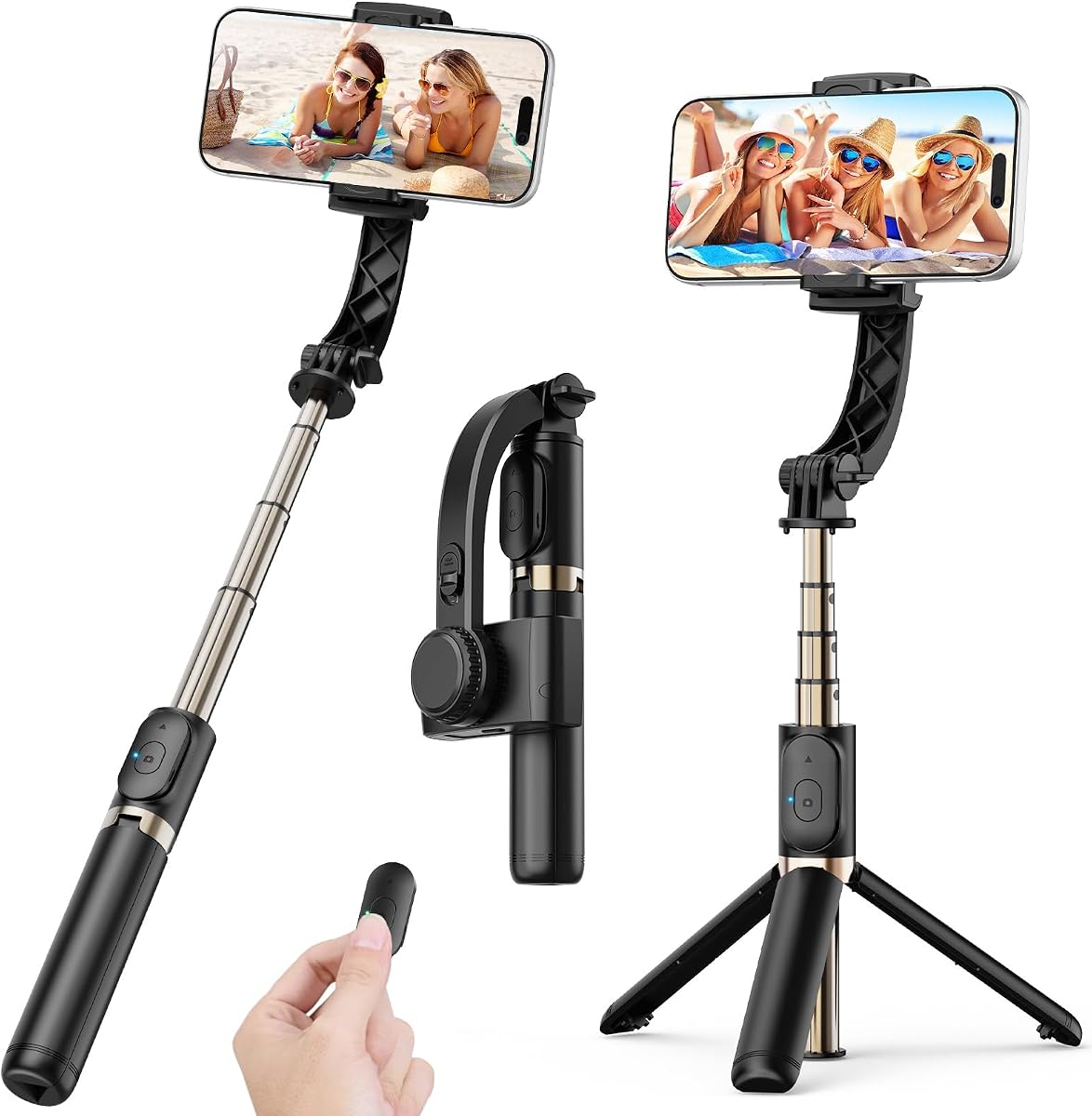
Gimbal Stabilizer for Smartphone
4.7Editor score
1-Axis Auto Balance Stabilization
Wireless Remote Control Included
Extendable Selfie Stick Tripod
This guide compares the top 10 best gimbal for beginners in 2026, evaluating stabilization, features, battery life, and ease of use for new creators seeking
Finding the right gimbal for beginners can transform your mobile filmmaking journey from shaky to smooth. A good stabilizer ensures your footage stays steady during movement, allowing you to focus on creativity rather than technical adjustments. This guide explores options that balance performance with user-friendly controls.
We compared leading models based on stabilization quality, battery longevity, app support, and ease of setup. Each product was evaluated for its ability to handle everyday shooting scenarios like vlogging, travel, and social media content. Our analysis highlights tools that offer professional results without steep learning curves.
Each pick showcases unique strengths tailored to different beginner needs, from budget-friendly starters to feature-rich advanced units. Prices and availability may change over time, so verify current listings before purchasing. Use this resource to identify the perfect tool for your specific filming goals and budget constraints.
4.7Editor score

4.4Editor score

4.4Editor score
This side-by-side comparison highlights key specifications across all ten reviewed stabilizers, helping you quickly identify the best match for your smartphone and shooting style based on weight, battery, and unique features.



The DJI Osmo Mobile 8 Gimbal Stabilizer stands out as a top contender for beginners seeking comprehensive features. With a 4.4 rating, this device offers robust stabilization and intelligent tracking that enhances your shots instantly.
We may earn a commission when you buy through this link, at no additional cost to you.
Its native tracking with audio and lighting capabilities allow you to stay focused and well-lit without extra gear. The seamless 360-degree pan rotation enables immersive shots while the built-in tripod supports low-angle creativity.
While the app availability can vary by region, the core hardware delivers professional results effortlessly. The inclusion of an extension rod and long battery life ensures uninterrupted shooting sessions for various events.
Beginners looking for a versatile tool that simplifies filming will find this gimbal ideal. It balances advanced capabilities with user-friendly controls, making it perfect for daily recording and vlogging.
Active tracking keeps subjects sharply in focus even during movement, reducing post-production effort significantly.
With up to ten hours of battery life and phone charging support, you can film all day without power worries.
We may earn a commission when you buy through this link, at no additional cost to you.
The hohem iSteady X3 SE is an excellent entry-level choice for those seeking affordability without sacrificing stability. Its 4.2 rating reflects reliable performance for travel and daily vlogging needs.
We may earn a commission when you buy through this link, at no additional cost to you.
Featuring a detachable remote controller, this gimbal allows flexible shooting from up to thirty feet away. The advanced iSteady 8.0 technology ensures ultra-smooth footage even during jogging or dynamic moves.
While it lacks some premium features, its portability and battery life make it a strong contender for casual creators. The foldable design fits easily into bags, ensuring you can capture moments anywhere.
For budget-conscious beginners, this stabilizer offers the essential tools to create professional-grade content. Its simplicity encourages exploration without overwhelming complexity, making it ideal for first-time users.
The magnetic remote enables hands-free control, perfect for solo travel shots or capturing events from a distance.
With eleven hours of continuous operation, you can record entire events without worrying about frequent recharging.
We may earn a commission when you buy through this link, at no additional cost to you.
The DJI Osmo Mobile 7 Gimbal Stabilizer delivers cinematic quality with ease, earning a solid 4.4 rating among creators. It combines robust stabilization with intelligent tracking to help beginners craft stunning masterpieces.
We may earn a commission when you buy through this link, at no additional cost to you.
ActiveTrack 7.0 ensures your subject stays in focus even with bold moves, while the foldable design with built-in tripod simplifies solo creation. The ergonomic grip supports extended use without discomfort.
While app availability can be a hurdle in some regions, the hardware remains top-tier for smooth footage. One-Tap editing features allow you to save time and enhance storytelling instantly after filming.
This model is perfect for beginners ready to invest in professional tools without the highest cost. Its blend of features and performance makes it a standout choice for serious hobbyists.
Dual-lens enhanced tracking keeps subjects in sharp focus even during fast, close-up action sequences.
Integrated ShotGuides and One-Tap Edit features turn raw clips into polished videos with minimal effort.
We may earn a commission when you buy through this link, at no additional cost to you.
The DJI Osmo Mobile 7P Gimbal Stabilizer offers a comprehensive kit for content creators seeking all-in-one convenience. With a high 4.5 rating, it integrates tracking, lighting, and mic support seamlessly.
We may earn a commission when you buy through this link, at no additional cost to you.
The Multifunctional Module enables intelligent tracking and audio reception in a compact unit. Combined with the built-in extension rod, it supports wide selfies and steady vlogs effortlessly.
While the price is higher than basic options, the inclusion of extra gear like lighting and audio support adds significant value. The magnetic design simplifies setup, letting you start filming instantly.
This gimbal is ideal for creators who want advanced features without managing multiple accessories. Its all-in-one design ensures professional-quality output with minimal technical setup time.
The module supports DJI Mic reception and provides lighting, reducing the need for separate external gear.
Dual-lens enhanced tracking ensures subjects move freely while staying in sharp focus throughout the shot.
We may earn a commission when you buy through this link, at no additional cost to you.
The Gimbal Stabilizer for Smartphone is an accessible entry point for beginners seeking affordable stabilization. With a high 4.7 rating, it offers reliable performance for TikTok and YouTube content.
We may earn a commission when you buy through this link, at no additional cost to you.
Its built-in sports gyroscope ensures smooth footage without needing complex apps. The lightweight design folds into a pocket-sized tool, making it perfect for travel and casual vlogging.
While it lacks multi-axis stabilization and longer battery life, its simplicity and remote control make it highly practical for quick shots. The tripod mode adds versatility for hands-free recording.
This option is perfect for users prioritizing portability and ease of use over advanced features. It delivers stable footage at an unbeatable price, making it a strong starter tool.
One-button control switches between horizontal and vertical shooting, saving time on manual adjustments.
Convert the gimbal into a tripod for hands-free video calls or group photography instantly.
We may earn a commission when you buy through this link, at no additional cost to you.
The AOCHUAN Smart XE offers a compact 3-axis solution for beginners needing reliable stability. With a 4.1 rating, it balances portability with features like AI tracking and long battery life.
We may earn a commission when you buy through this link, at no additional cost to you.
Its palm-size design weighs just 0.78 pounds, yet it carries payloads up to 250 grams effectively. The Smart 7.0 anti-shake algorithm ensures smooth output for professional videography.
While ratings are slightly lower than premium brands, the inclusion of AI tracking and a 10-hour battery makes it a strong contender. The one-click video button simplifies switching between modes.
For beginners seeking a lightweight tool that handles big-screen smartphones, this gimbal is a solid choice. It delivers steady footage without overwhelming complexity or bulk.
Guestual control in the AOCHUAN app optimizes settings and enables face tracking seamlessly.
A 2600mAh battery supports up to ten hours of continuous shooting for extended sessions.
We may earn a commission when you buy through this link, at no additional cost to you.
The DJI RS 3 Mini elevates stabilization to camera-level quality, ideal for beginners with mirrorless setups. With a 4.3 rating, it combines compact design with high payload capacity for professional use.
We may earn a commission when you buy through this link, at no additional cost to you.
Weighing only 795 grams, it handles up to 2 kilograms of camera gear easily. The Bluetooth shutter control and native vertical shooting simplify social media content creation.
While it requires an app workaround due to platform issues, the hardware supports a wide range of cameras seamlessly. The full-color touchscreen provides intuitive access to settings.
This gimbal is best for beginners transitioning from phones to cameras who need reliable stabilization. Its lightweight design ensures comfort during extended shooting sessions without sacrificing power.
High-torque motors support a wide range of camera and lens combinations up to 2 kg.
The 1.4-inch touchscreen displays frequently used settings for quick adjustments during filming.
We may earn a commission when you buy through this link, at no additional cost to you.
The hohem iSteady Mobile Plus Phone Gimbal excels in capturing wide views without motor obstruction. With a 4.2 rating, it delivers cinematic-grade video for travel and daily recording.
We may earn a commission when you buy through this link, at no additional cost to you.
Activating ultra-wide-angle mode via the four-trigger press expands your creative horizons significantly. The iSteady 7.0 stabilization ensures uninterrupted footage even with large smartphones like iPhone 15 Pro Max.
While some devices may require manual balancing, the 13-hour battery life supports extended outdoor shoots easily. The 3D Fantasy mode adds unique rotation effects to storytelling.
This gimbal is perfect for creators who prioritize wide shots and long battery life. Its ability to handle big phones while offering creative modes makes it a versatile choice.
The ultra-wide-angle mode addresses motor interference issues for broader views.
Up to thirteen hours of battery life ensures longer shooting sessions outdoors.
We may earn a commission when you buy through this link, at no additional cost to you.
The FeiyuTech SCORP Mini 2 Kit Gimbal is ideal for beginners using various cameras or smartphones. With a 4.2 rating, it supports payloads up to 1.2 kg for diverse shooting needs.
We may earn a commission when you buy through this link, at no additional cost to you.
The independent AI tracker allows face and object tracking without app connection, simplifying workflows. The 1.3-inch touch screen enables easy control even at low angles.
While the kit adds bulk with carrying cases and rods, the versatility supports mirrorless and smartphone use effectively. Bluetooth and cable control enhance focus adjustment and shutter control.
This stabilizer is best for creators needing flexibility across different camera types. Its robust build and AI features ensure smooth footage without constant app reliance.
Built-in AI tracking functions track faces and objects without needing app connectivity.
Accommodates mirrorless cameras, smartphones, and action cameras within its payload range.
We may earn a commission when you buy through this link, at no additional cost to you.
The Hohem iSteady M6 Kit Gimbal offers advanced tracking and lighting in one package. With a 4.3 rating, it delivers flawless stabilization and creative lighting options for social media.
We may earn a commission when you buy through this link, at no additional cost to you.
Its enhanced magnetic AI tracker works with native camera apps, while the RGB fill light supports various shooting conditions. The OLED display keeps you informed of battery and mode status.
While the price is higher and magnetic attachment may vary by phone, the lighting integration adds significant value for creators. The 7.0 stabilization algorithm ensures shake-free creations on the move.
This gimbal suits beginners seeking creative lighting and advanced tracking capabilities. Its all-around features help elevate content quality for platforms like TikTok and Instagram.
Track any subject using your phone's native camera with enhanced magnetic AI features.
Use cold, warm, and RGB lights to adjust color temperature and enhance shots.
We may earn a commission when you buy through this link, at no additional cost to you.
Selecting the right gimbal requires understanding your specific needs, from device compatibility to desired features. This guide outlines key factors to help beginners make an informed decision.
Gimbals typically offer 1-axis or 3-axis stabilization. For beginners seeking smooth video in all directions, 3-axis models provide superior control by compensating for roll, pitch, and yaw. While 1-axis units are lighter and cheaper, they may not handle complex movements effectively.
Prioritize 3-axis stabilization for versatile shooting scenarios unless portability is your absolute priority.
Ensure the gimbal supports your phone's size and weight. Most modern units handle phones up to 6.2 inches and specific payload limits. Check if cases are allowed or removed during balancing for optimal performance.
Verify device dimensions and weight limits before purchasing to avoid mounting issues.
Long battery life is crucial for extended shooting sessions. Aim for at least ten hours if you plan full-day travel or event coverage. Some models offer power bank functionality to charge your phone during use.
Choose a gimbal with sufficient battery life to match your typical recording duration.
Companion apps offer creative modes like time-lapse, gesture control, and editing templates. However, some brands face regional app availability issues. Ensure the app supports essential functions and is accessible in your location.
Review app capabilities and availability to confirm it meets your creative needs.
Foldable and lightweight designs enhance portability for travel. Look for ergonomic grips to reduce hand fatigue during long shoots. Materials should balance durability with weight to prevent strain.
Opt for foldable designs and ergonomic grips for comfortable handling and transport.
Features like built-in tripods, extension rods, or lighting modules add versatility. These reduce the need for extra gear and simplify setups. Consider whether integrated accessories align with your typical shooting style.
Value integrated accessories like tripods or lights if they streamline your workflow.
Prices vary widely from under $50 to over $200 depending on features. Beginners should balance cost with necessary capabilities. Avoid overspending on advanced tools you won't use, but don't compromise on stabilization quality.
Set a budget that reflects your needs without sacrificing core stabilization performance.
Beginner-friendly setups with quick balancing and intuitive controls save time. Look for models with one-tap editing or magnetic clamps that simplify mounting. Tutorials within the app can accelerate your learning curve.
Select a gimbal with simple setup and user-friendly controls to get started quickly.
To start using your gimbal, first balance your phone by adjusting the axes until the device remains stationary without motor assistance. This ensures the motors work efficiently and reduces wear. Always calibrate the gimbal before each use for optimal performance.
Explore the companion app to unlock creative modes like panorama or time-lapse. Familiarize yourself with buttons for zoom and recording to control shots hands-free. Practice smooth movements like walking or panning to enhance footage quality.
Maintain your gimbal by keeping it clean and dry. Store it in a padded case to prevent dust or impact damage. Regularly check motors and firmware updates to ensure longevity and reliable operation over time.
Balancing is recommended before each use to ensure smooth operation and prevent motor strain. Some models with auto-balance features reduce this need. However, checking the balance when switching phones or cases is essential for consistent results.
It depends on the case thickness and weight. Thin cases may work, but thick ones can exceed payload limits or disrupt balance. Check your gimbal's weight capacity and consider removing the case for better stability.
Charging times vary by model, usually ranging from one to three hours. Many gimbals support USB-C for faster charging. Always refer to the user manual for exact charging specifications of your device.
A 1-axis gimbal stabilizes only one direction, typically yaw, while a 3-axis stabilizes roll, pitch, and yaw. For beginners wanting professional video quality, a 3-axis model is preferable as it handles complex movements better.
Most gimbals are not water-resistant and should be used in dry conditions to avoid damage. Using it in rain may harm electronics. Invest in waterproof cases if you need to shoot in unpredictable weather.
Basic functions like stabilization work without an app, but advanced features like tracking or editing require one. Ensure the app is available for your device and region before purchasing. Some models offer physical controls for essential tasks.
This guide highlights the top 10 best gimbal for beginners in 2026, offering options from budget-friendly to premium feature-rich models. Each selection balances stability, portability, and ease of use to suit different filming needs.
Prioritize factors like battery life, compatibility, and app support when choosing your tool. Consider whether advanced tracking or lighting features align with your goals before investing. The right gimbal should empower your creativity without technical barriers.
Always check current prices and availability before purchasing as listings may change. Review user feedback for your specific phone model to ensure compatibility. Use this guide to find the perfect partner for your next creative adventure.