
Lian Li O11D Mini V2 Compact ATX Mid-Tower PC Case, Black, No Fans
4.7Editor score
Optimized slanted bottom for intake
Supports ATX back-connect boards
Pillar-less tempered glass panels
This guide compares the top compact E ATX cases for 2026, analyzing airflow, motherboard support, and build quality to help you choose the right chassis.
Choosing the right chassis is crucial for any PC build, especially when space is limited. A compact E ATX case offers the perfect balance between performance and footprint, allowing high-end components to fit in smaller environments without sacrificing cooling or expandability.
We evaluated ten leading models based on airflow efficiency, motherboard compatibility, build quality, and user feedback. Our analysis focuses on how each case handles heat dissipation, cable management, and overall ease of assembly to ensure a smooth building experience for enthusiasts.
Each pick highlights specific strengths such as portability, premium materials, or exceptional ventilation. While these selections represent the current market leaders, availability and specific configurations can change. Always verify the latest details before making your final purchase decision.
4.7Editor score

4.4Editor score

3.9Editor score
This table provides a side-by-side comparison of all ten selected cases. It highlights key specifications including motherboard support, cooling options, and unique design features to help you quickly identify which model meets your specific requirements.


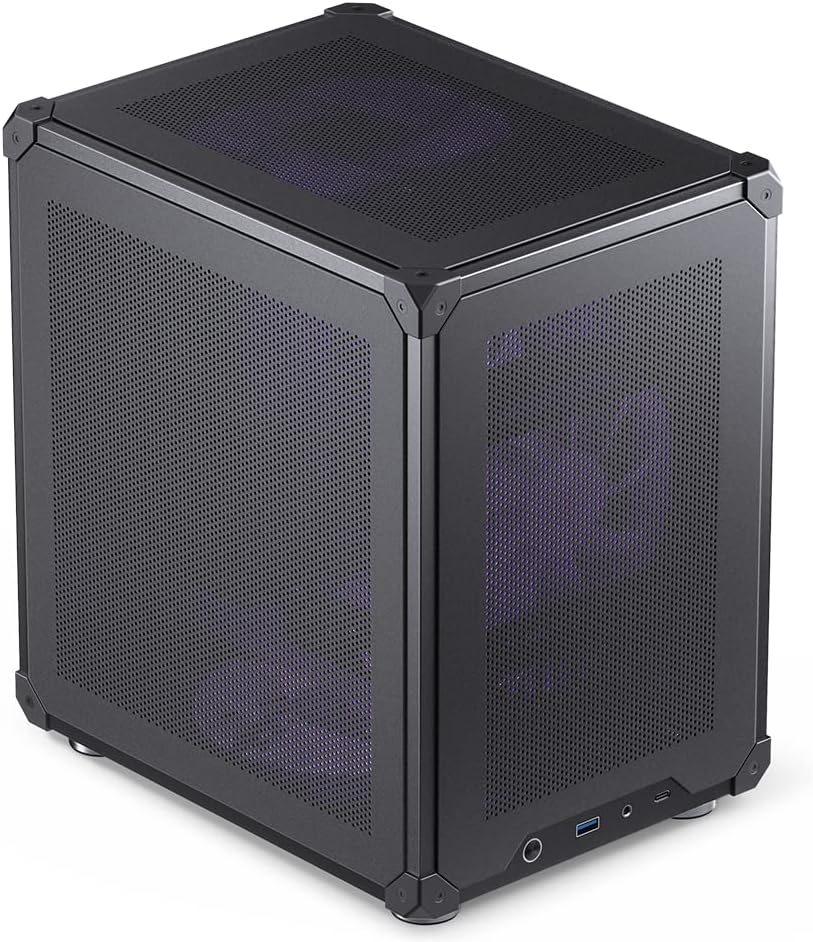

The Cooler Master QUBE 540 stands out as a top choice for builders seeking flexibility in a compact chassis. Its unique design allows for both horizontal and vertical orientation, providing versatility that few other cases offer in this category.
We may earn a commission when you buy through this link, at no additional cost to you.
This case supports motherboards up to 11 inches wide, accommodating large E ATX formats without compromising on space. The full front mesh panel ensures that air reaches your components efficiently, which is critical for maintaining low temperatures during intense workloads.
While the flexibility is a major plus, it does require some planning to ensure components fit correctly in your preferred orientation. Additionally, achieving maximum GPU clearance might mean removing the front fan, which could slightly impact airflow dynamics.
For enthusiasts who value layout customization and robust cooling, the QUBE 540 is an excellent investment. It balances form and function effectively, making it a strong recommendation for anyone looking to build a powerful PC in a smaller footprint.
The reversible I/O panel and movable handles let you customize the layout to fit your desk or shelf perfectly.
A pre-installed SickleFlow 120mm fan paired with a mesh front panel maximizes ventilation under heavy load.
We may earn a commission when you buy through this link, at no additional cost to you.
The Lian Li O11D Mini V2 is a premium chassis designed for those who prioritize aesthetics and cooling efficiency. Its slanted bottom design is a standout feature that significantly enhances direct cold air intake for better GPU performance.
We may earn a commission when you buy through this link, at no additional cost to you.
This case supports a variety of motherboards including standard ATX and M-ATX, with specific optimization for ATX back-connect boards. The pillar-less tempered glass panels provide an unobstructed view of your build, allowing your components to shine.
One consideration is that the case does not come with fans, meaning you will need to purchase them separately to complete your airflow setup. However, the robust anti-sag brackets and cable management tools ensure a tidy and stable build.
If you want a sleek, high-performance case that showcases your hardware beautifully, the O11D Mini V2 is a top contender. Its attention to detail and advanced cooling design make it worth the investment for serious builders.
The 10 degree slanted bottom design not only enhances intake but also improves GPU cooling performance.
Special brackets for the 24-pin motherboard cable help maintain a tidy layout inside the chassis.
We may earn a commission when you buy through this link, at no additional cost to you.
The Mechanic Master C34Pro offers a compelling option for budget-conscious builders who need portability and performance. It supports ATX and E-ATX motherboards along with large GPUs and PSUs, making it a versatile choice for gaming rigs.
We may earn a commission when you buy through this link, at no additional cost to you.
Built with a 2mm aluminum shell and steel frame, this case provides a robust build quality that stands out for its price range. The integrated carry handle allows for easy transportation, which is ideal for LAN parties or moving setups.
While it is a strong contender, user ratings suggest that build quality may vary compared to higher-end models. Assembly might require some patience, and the finishing touches could be more refined for a seamless experience.
For those seeking a portable and capable case without breaking the bank, the C34Pro is a solid choice. It delivers essential features like flexible PSU mounting and strong cooling support at an accessible price point.
Integrated carry handle allows for easy transportation and mobility of your desktop PC setup.
Multiple power supply mounting positions including front bottom and side configurations to accommodate various build preferences.
We may earn a commission when you buy through this link, at no additional cost to you.
The Cooler Master Q300L V1 is a budget-friendly Micro-ATX case that emphasizes airflow and flexibility. It accommodates a wide range of cooling options including 240mm liquid coolers and up to five fans for robust thermal performance.
We may earn a commission when you buy through this link, at no additional cost to you.
A unique feature of this case is the modular I/O panel which can be adjusted to the front top or bottom on both sides. This flexibility allows you to position ports exactly where you need them for your desk setup.
Since it only supports Micro-ATX or Mini-ITX motherboards, it is not suitable for larger ATX or E-ATX builds. However, for smaller setups, it offers ample interior space and easy expansion potential.
This case is ideal for users looking for a simple yet efficient build environment. Its open thermal design and magnetic dust filters ensure that your system stays cool and clean over time.
You have the flexibility to adjust its position at the front top or bottom on both sides.
The perforated design on all sides promotes optimal airflow and heat dissipation.
We may earn a commission when you buy through this link, at no additional cost to you.
The Mechanic Master C34 Ultra is designed to save space without sacrificing performance, making it a great choice for compact desktop setups. It supports standard ATX motherboards and graphics cards up to 335mm in length.
We may earn a commission when you buy through this link, at no additional cost to you.
An integrated carry handle makes it easy to transport your desktop to LAN events or between workstations. The internal layout is designed to simplify installation, though using an SFX/L power supply is recommended for the cleanest cable management.
While it supports full ATX components, the compact nature means you may need to balance cooling choices carefully. It accommodates high-performance builds with support for a 240mm liquid cooling radiator and large air coolers.
This case is perfect for users who need portability and compact size while maintaining compatibility with powerful hardware. The metal front I/O panel adds a premium feel to the build while ensuring durability.
The integrated handle makes it easy to transport your powerful desktop PC to LAN events or simply to rearrange your space.
The case features a metal front I/O panel which includes modern ports like a USB 3.0 and a USB Type-C interface.
We may earn a commission when you buy through this link, at no additional cost to you.
The ASUS Prime AP201 is engineered for spatial efficiency and cooling, featuring a quasi-filter mesh with over 57000 holes. This design increases airflow significantly while providing a compelling view of components within your build.
We may earn a commission when you buy through this link, at no additional cost to you.
Despite a footprint of just 33 liters, this case supports ATX PSUs up to 180mm long and graphics cards up to 338mm long. It also supports 360mm radiators and up to six fans ensuring robust thermal management.
Tool-free side panels make assembly and maintenance easier, as they stay secure with a simple clip mechanism. The extended motherboard tray offers ample space for cable management with a 32mm gap to tuck cables out of sight.
This case is an ideal choice for those seeking high performance in a compact form. Its industry-leading spatial efficiency and cooling capabilities make it a top pick for efficient small form factor builds.
A mesh design comprised of over 57000 precision-machined holes increases airflow and provides a compelling view.
A simple yet secure clip mechanism allows chassis side panels to be easily removed and resistant to accidental dislodging.
We may earn a commission when you buy through this link, at no additional cost to you.
The Cooler Master Q300L V3 delivers premium performance without compromising on quality. It supports high-performance GPUs up to 366mm and allows for flexible cooling with options for six fans or radiators.
We may earn a commission when you buy through this link, at no additional cost to you.
A movable I/O panel and magnetic dust filters simplify the build process ensuring a tidy setup. The tempered glass side panel showcases your build with pride while the open design promotes optimal airflow.
While it is restricted to Micro-ATX motherboards, the interior space is ample for a wide range of hardware. It supports ATX power supplies up to 200mm making it versatile for various configurations.
For users seeking a reliable and builder-friendly case, the Q300L V3 is a strong contender. Its high-airflow focus and clean design make it a top choice for productivity and gaming builds.
Supports graphics cards up to 366mm making it easy to build with today's NVIDIA GeForce RTX and AMD Radeon gaming graphics cards.
Supports ATX power supplies up to 200mm and features a movable I/O panel magnetic dust filters and clean cable management.
We may earn a commission when you buy through this link, at no additional cost to you.
The Zalman CUBIX M-ATX offers a sleek design with a total volume of just 17.1 liters. Despite its charming appearance it is built with durable 0.8T steel for a robust and sturdy structure.
We may earn a commission when you buy through this link, at no additional cost to you.
It supports standard ATX PSUs and GPUs up to 260mm in length making it suitable for many compact builds. The perforated front panel ensures optimal cooling while a pre-installed 80mm fan aids in airflow.
While it may not support the largest GPUs, it is a practical choice for office or home setups where space is at a premium. Connectivity includes USB 3.0 and 2.0 ports for essential device connections.
For users looking for a simple durable and compact case, the CUBIX is a reliable option. It balances size and function well for smaller desktop requirements without sacrificing durability.
Sleek design with sturdy 0.8T steel construction and a 17.1-liter total volume.
Perforated front panel and pre-installed 80mm fan for optimal cooling.
We may earn a commission when you buy through this link, at no additional cost to you.
The JONSBO C6 is a simple compact desktop Micro ATX PC case designed for quick and easy disassembly. Its tool-free upper cover and side panels make building your PC easier and more convenient.
We may earn a commission when you buy through this link, at no additional cost to you.
Heat-free design with mesh on all sides ensures efficient cooling without restricting airflow. It supports ITX or M-ATX boards and allows for a maximum CPU cooler height of 75mm with a GPU range of 200-255mm.
The compact footprint makes it ideal for small desk setups or portable builds. Front interfaces include Type-C USB 3.0 and audio ports providing essential connectivity for modern devices.
For those who prioritize simplicity and tool-free access, the C6 is a great choice. It offers a straightforward build experience with adequate ventilation for entry-level to mid-range components.
Easy and quick disassembly design with upper cover and side panel tool-free open.
All sides in mesh with front upper and lower 3 fan positions for heat free performance.
We may earn a commission when you buy through this link, at no additional cost to you.
The NZXT H5 Flow is designed with exceptional GPU cooling in mind. The PSU shroud is perforated on the side and bottom enabling optimal air intake from two 120mm fans.
We may earn a commission when you buy through this link, at no additional cost to you.
It supports up to a 360mm radiator in front and a 240mm radiator up top providing powerful liquid cooling potential. Ultra-fine mesh on the top front and side panels creates maximum airflow while filtering dust.
Equipped with two 120mm Quiet Airflow fans it offers solid out-of-the-box performance. Effortlessly route and conceal cables using the wide channels hooks and straps for a clean look.
For users who want a balance of style and cooling efficiency, the H5 Flow is a strong option. Its attention to detail ensures your system remains cool and quiet during operation.
Ultra-fine mesh on the top front and side panels creates maximum airflow and filters dust.
Equipped with two 120mm Quiet Airflow fans for solid out-of-the-box performance.
We may earn a commission when you buy through this link, at no additional cost to you.
Selecting the right compact case involves balancing size, compatibility, and cooling. Here are the key factors to consider before making your decision.
Ensure the case supports your desired motherboard form factor. Many compact cases only support Micro-ATX or Mini-ITX, so verify if E-ATX or ATX is required for your build.
Check the maximum width and height supported to avoid fit issues with large boards or specialized features.
Graphics cards have grown larger over the years. Measure the length of your GPU and compare it to the case's maximum clearance specification to ensure it fits.
Some cases may require removing front fans to accommodate longer cards, so consider how this affects your cooling strategy.
Look for mesh panels or perforated designs that allow unrestricted air intake. Efficient cooling is essential in compact enclosures to prevent thermal throttling.
Verify the number of supported fans and radiator sizes if you plan to use liquid cooling for optimal performance.
Proper cable management is crucial for maintaining airflow and aesthetics. Look for ample routing space behind the motherboard tray to keep cables hidden and organized.
Wide channels and hooks make it easier to route power and data cables neatly without strain.
Materials like aluminum or steel determine the durability and rigidity of the case. Thicker panels reduce vibration and provide a more premium feel.
Tool-free designs simplify assembly and maintenance, allowing you to access components quickly without struggling with screws.
Check the front panel ports to ensure they meet your needs. USB 3.0 and Type-C ports provide faster data transfer speeds for external devices.
Positioning matters too. A modular or adjustable I/O panel allows you to place ports exactly where you need them.
If you plan to move your PC frequently, look for integrated handles or lightweight designs. This can significantly reduce the effort required for transport.
Robust construction is still key to ensure the case withstands movement without damaging internal components.
Consider how the case will look in your space. Tempered glass panels showcase components, while mesh designs prioritize airflow over visual transparency.
Color options and finish quality can also impact how well the case fits into your existing setup.
When assembling your system, ensure all standoffs align with the motherboard screw holes. This prevents electrical shorts and secures the board properly.
Use dust filters regularly to maintain airflow. Clean them every few months to prevent clogging and ensure your system remains cool.
If your case supports both vertical and horizontal orientations, secure it properly to avoid tipping. Use a stable surface to ensure long-term reliability.
Yes, many modern compact cases support E-ATX boards. Check the specific width and depth limits in the product description to ensure your board fits within the chassis dimensions.
Some do. Look for models with 400mm or more clearance. However, you may need to remove fans or adjust mounting to accommodate longer cards.
Vertical orientation often helps with GPU cooling. However, horizontal setups can improve CPU airflow depending on fan placement. Choose what suits your room layout.
Tempered glass is more durable and resistant to scratches. It provides better clarity and looks premium. Acrylic is lighter but can scratch easily over time.
Aim for at least 30mm of gap behind the motherboard tray. This allows sufficient room to tuck cables neatly without blocking airflow or components.
Yes, most cases support standard fan sizes like 120mm or 140mm. Check the mounting points listed in the specs to ensure compatibility with your preferred fans.
We reviewed ten outstanding options ranging from versatile designs like the Cooler Master QUBE 540 to premium models like the Lian Li O11D Mini V2. Each offers unique features to suit different build needs.
Prioritize airflow and motherboard support when making your decision. These two factors directly impact performance and compatibility ensuring your components run smoothly within a smaller footprint.
Always verify the current specifications and availability before purchasing. Prices and stock fluctuate, so checking the latest details ensures you get the best value for your investment.