
NexiGo N60 1080P Webcam
4.3Editor score
Full HD 1080P Resolution
Built-in Noise Cancelling Mic
Privacy Protection Cover Included
Finding the right external webcam for your Mac is essential for clear video calls and professional streaming. Modern options offer high resolution and smart features that enhance your digital presence significantly during remote work.
We evaluated ten leading webcams based on image clarity audio quality and seamless macOS compatibility. Each product was assessed for build quality ease of setup and performance in real world video conferencing scenarios.
Every pick includes detailed pros and cons along with specific use cases to guide your decision. Please note that prices and availability may change so verify current listings before purchasing your new camera.
4.3Editor score

4.6Editor score

4.6Editor score
As an Amazon Associate we earn from qualifying purchases.
This side-by-side comparison highlights the key specifications and features of each top rated external webcam to help you quickly identify the model that best fits your specific Mac setup and workflow needs.




The Acer 4K Webcam stands out as the top choice for Mac users seeking professional grade video quality. With a stunning 4.6 rating it delivers true-to-life visuals powered by a genuine Sony sensor that ensures exceptional clarity in every call.
We may earn a commission when you buy through this link, at no additional cost to you.
Its all-metal unibody design not only looks premium but also provides excellent heat dissipation for reliable 24/7 performance. The Phase Detection Autofocus keeps your image sharp even when you move, while dual high-sensitivity microphones filter out ambient noise effectively.
While the price is higher than standard HD webcams the image quality justifies the investment for professionals. The magnetic privacy cover is a thoughtful touch that secures your lens instantly without any mechanical wear and tear over time.
If you value crisp video and premium build quality this webcam is the ideal pick for your Mac. It seamlessly integrates with platforms like Zoom and Teams making it a versatile tool for remote work and content creation alike.
The large Sony sensor captures balanced and detailed visuals that make you look your best during important meetings.
Crafted from aerospace-grade aluminum this webcam is built to last while maintaining a sleek look on your desk.
We may earn a commission when you buy through this link, at no additional cost to you.
The NexiGo N60 is an excellent entry-level option for Mac users needing clear video without breaking the bank. It offers Full HD 1080P resolution that ensures you appear sharp and professional during daily virtual meetings.
We may earn a commission when you buy through this link, at no additional cost to you.
Setting it up is incredibly easy with true plug and play functionality requiring no additional drivers or software. The included privacy cover provides peace of mind when the camera is not in use protecting your privacy effectively.
While it lacks advanced autofocus features the fixed lens is optimized for typical desk distances. The built-in microphone reduces ambient noise enough for casual calls though dedicated microphones are better for critical audio needs.
For those on a tight budget this webcam delivers solid performance and essential features. It is a reliable choice for students or professionals who need a straightforward camera for Zoom Skype or Teams calls.
Get reliable 1080P video quality at a price that fits any budget while maintaining professional appearance.
No drivers needed and a included privacy cover make this a hassle free and secure choice for home offices.
We may earn a commission when you buy through this link, at no additional cost to you.
The Logitech C922x HD Pro remains a gold standard for content creators and streamers needing high performance video. It delivers crisp 1080P video with HD light correction that ensures you look good even in dimly lit environments.
We may earn a commission when you buy through this link, at no additional cost to you.
Stereo audio via dual microphones captures natural sound during calls and recorded videos. Advanced capture software included with the webcam allows you to create and share video content easily on desktops or monitors.
Although it lacks a built-in privacy shutter the image quality and software support make it a top premium choice. The 60fps option for 720p video is great for gaming or smoother streaming experiences on compatible platforms.
Invest in this model if you need a robust tool for streaming or professional video calls. Its compatibility with major conferencing apps and Mac systems ensures it fits seamlessly into your existing workflow.
The included software license and high frame rate options make this ideal for creating engaging online content.
Logitech’s reputation for quality and light correction ensures you look professional in every video.
We may earn a commission when you buy through this link, at no additional cost to you.
The Anker PowerConf C200 offers a great balance of price and performance with its 2K resolution. It ensures sharp detailed video suitable for professional conferences and enhances your PC setup significantly.
We may earn a commission when you buy through this link, at no additional cost to you.
Advanced audio clarity is provided through dual mics with AI noise cancellation keeping voices clear even in noisy environments. Superior low-light performance means you look crisp without needing extra lighting in dim offices.
Customizable viewing angles via software let you choose between 65 78 or 95 degrees to frame your shot perfectly. The integrated privacy cover slides easily over the lens for security and peace of mind between calls.
Choose this webcam if you want high resolution without paying 4K prices. It works smoothly with macOS and Windows making it a versatile option for hybrid workers who need reliable connectivity.
AI noise cancellation and 2K resolution ensure both your voice and image stand out in every meeting.
Adjustable angles allow you to tailor the field of view to your specific desk setup needs.
We may earn a commission when you buy through this link, at no additional cost to you.
The EMEET C960 brings true 4K resolution to a budget friendly price point making it accessible for more users. It uses a genuine CMOS sensor to deliver ultra-clear visuals without false upscaling artifacts.
We may earn a commission when you buy through this link, at no additional cost to you.
PDAF focus technology ensures clear and stable focusing in various scenarios like business conferences and educational lectures. Online meetings can be conducted in both over-exposed and low-light settings with auto light adjustment built in.
Dual omnidirectional mics capture voices clearly for crisp natural audio perfect for conference calls and remote teaching. The webcam includes a privacy cover for security and flexible mounting options with a tripod thread.
This model is ideal for remote business meetings where every detail matters. With EMEETLINK software you can personalize video settings to maximize performance across Windows Mac and Android platforms.
Experience ultra-clear video conferencing with a genuine sensor that ensures every detail is visible.
Privacy cover and tripod mount options provide both security and adaptability for various environments.
We may earn a commission when you buy through this link, at no additional cost to you.
The Logitech C920e is designed specifically for workplace integration with certifications for Zoom and Microsoft Teams. It displays individual users in a well-balanced frame thanks to a 78 degree fixed field of view.
We may earn a commission when you buy through this link, at no additional cost to you.
Two integrated omnidirectional microphones capture your audio clearly from up to one meter away ensuring natural sound. Built-in HD autofocus and automatic light correction help you look good in all video meetings.
An attachable privacy screen flips up and down to cover or expose the lens easily. The sturdy adjustable clip makes it easy to mount on laptops or external monitors with versatility for tripods.
Ideal for office environments this webcam ensures seamless integration with device management software. It is fully compatible with Windows 11 and works with all popular video calling applications.
Certified for major platforms ensures this camera works seamlessly in professional business workflows.
The fixed field of view is tuned to keep you centered while allowing enough room for sharing items.
We may earn a commission when you buy through this link, at no additional cost to you.
The Logitech C920S HD Pro brings classic reliability to your setup with Full HD 1080P video. This model includes a privacy shutter that puts you in control of what you show and protects the lens.
We may earn a commission when you buy through this link, at no additional cost to you.
Full HD video calls mean premium video quality that makes you look like a Pro. The glass lens and Full HD mean your recorded videos are crisp and vibrantly colored for professional presentations.
HD autofocus and light correction let you enjoy razor-sharp high def in every environment. Stereo audio with dual mics capture natural sound on calls and recorded videos effectively.
Choose this if you want a trusted camera that just works without fuss. It is a solid investment for daily use and ensures you maintain a professional appearance on all platforms.
Full HD resolution ensures sharp images for calls and recording without unnecessary complexity.
The built-in privacy shutter offers simple physical security for your privacy during idle times.
We may earn a commission when you buy through this link, at no additional cost to you.
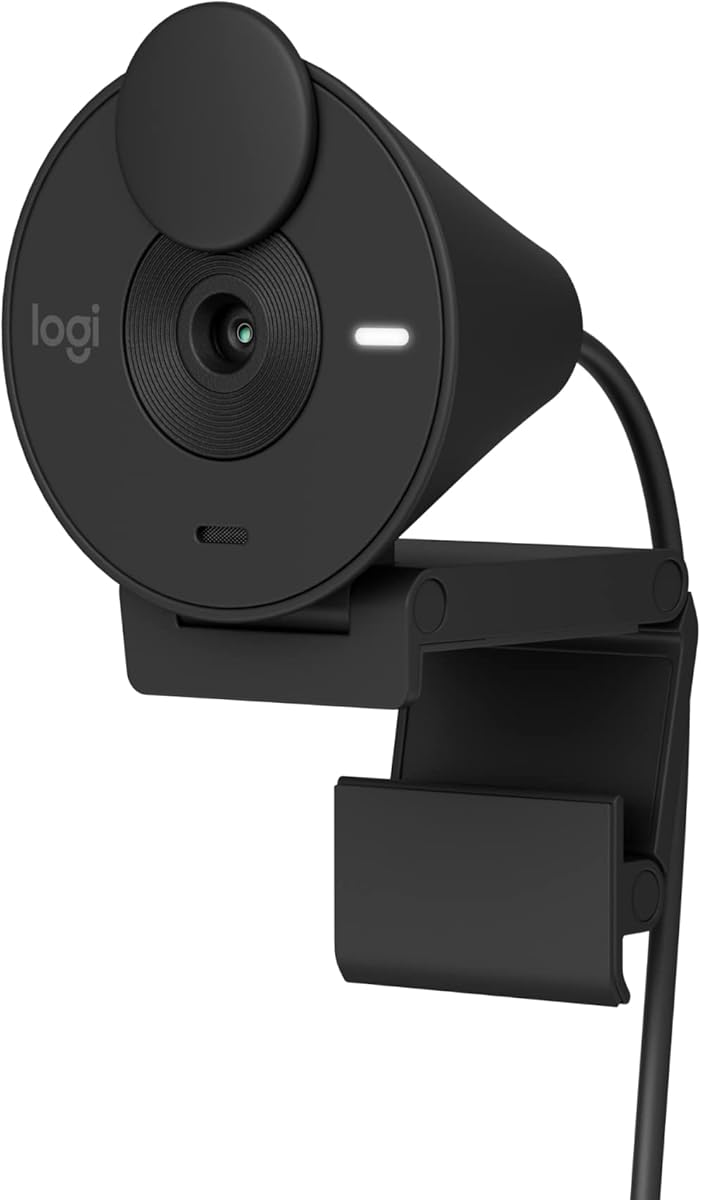
The Logitech Brio 100 offers Full HD 1080p resolution designed to make you look clearer in video calls. Its Auto-Light Balance boosts brightness by up to 50 percent reducing shadows so you look your best.
We may earn a commission when you buy through this link, at no additional cost to you.
A simple integrated webcam cover makes it easy to get total reliable privacy when you are not on a video call. The built-in microphone lets others hear you clearly during video calls on major platforms.
Available in sophisticated colors it helps you coordinate and express yourself when working from home. Made with recycled plastic it supports a better future while delivering reliable video performance.
This model is perfect for casual users needing a simple and effective webcam. It works with most video calling platforms including Microsoft Teams Zoom and Google Meet.
Boosts brightness significantly to reduce shadows and ensure you look clear in poor lighting.
Constructed with recycled plastic materials to reduce environmental impact without compromising quality.
We may earn a commission when you buy through this link, at no additional cost to you.
The Logitech Brio 301 provides natural image quality so you look like the real you on all meeting apps. Full HD 1080p resolution ensures you are seen clearly during virtual interactions with friends or colleagues.
We may earn a commission when you buy through this link, at no additional cost to you.
RightLight 2 technology automatically compensates for poor video lighting conditions so you can be seen clearly. The mono noise reduction mic suppresses background sound so everyone on the call can hear you easily.
Spin the webcam privacy shutter to block the camera lens when you do not need to be on screen. Use Logi Tune app to customize your video experiences such as adjusting color and image quality.
Certified for Zoom Microsoft Teams and Google Meet it meets official compatibility standards. Made with recycled plastic it is a sustainable choice for your office setup.
Certification for major meeting apps ensures seamless integration without technical glitches.
Logi Tune app lets you tweak settings to optimize your video presence effectively.
We may earn a commission when you buy through this link, at no additional cost to you.
The Acer 4K Unibody Webcam delivers exceptional 4K resolution with a lightweight design perfect for mobile workers. Its Sony 1/2 CMOS sensor ensures balanced true-to-life visuals and superior light capture.
We may earn a commission when you buy through this link, at no additional cost to you.
Crafted from aerospace-grade aluminum with precision CNC machining it offers a seamless unibody design that is durable and elegant. The all-aluminum body ensures fast heat dissipation for reliable 24/7 video performance.
Advanced Phase Detection Autofocus keeps your audience engaged with faster and more accurate focusing than standard autofocus. Dual high-sensitivity digital microphones capture your voice clearly while filtering out ambient noise.
Ideal for streamers gamers and creators this webcam is compatible with Windows Mac and ChromeOS. Its compact size allows you to take HD video calls and recordings anywhere from cafés to co-working spaces.
Compact and lightweight design makes it perfect for professionals who work on the go.
4K resolution and advanced autofocus ensure high quality streams for live content.
We may earn a commission when you buy through this link, at no additional cost to you.
Selecting the right webcam involves evaluating resolution build quality and compatibility with your macOS system.
Resolution determines the sharpness and detail of your video. For professional needs 4K offers the best clarity but 1080P remains sufficient for most standard video calls.
Look for models with genuine sensors rather than upscaling to ensure true image quality.
Lighting affects how you appear on camera. Look for features like automatic light correction to compensate for poor room lighting and keep your image clear.
Webcams with larger sensors typically handle low light better by capturing more light naturally.
The field of view determines how much of your background is visible. A wider angle shows more space while a narrower angle focuses attention on you.
Choose an angle that suits your room size and whether you plan to share physical items in the background.
Built-in microphones save you from needing external ones. Noise cancelling and dual mics ensure your voice is captured clearly even in busy environments.
If audio is critical consider webcams with high sensitivity mics that filter out background noise effectively.
Mac users should ensure the webcam supports macOS and connects via USB or USB-C. Plug and play models reduce the need for drivers and setup software.
Verify that the webcam works with your preferred conferencing apps like Zoom Teams or Facetime for smooth operation.
Privacy shutters or covers provide physical security against unauthorized access. These features give you peace of mind when the camera is not in use.
Look for models with magnetic covers or sliding shutters for easy and reliable privacy protection.
A durable webcam lasts longer and maintains its appearance. Metal bodies provide better heat dissipation and a premium feel compared to plastic alternatives.
Consider lightweight options if you travel frequently or need to move your webcam between different setups.
Some webcams come with proprietary software for customization of image settings. This can enhance performance or provide special effects like virtual backgrounds.
Ensure any software included is compatible with macOS and offers intuitive controls for your workflow.
Start by plugging the webcam into a USB port on your Mac. Most modern webcams use plug and play technology so they will be recognized automatically without needing extra drivers.
Open your preferred video conferencing application and navigate to the settings. Select your external webcam from the video input list to ensure it is active for calls.
Keep the lens clean with a soft microfiber cloth to avoid smudges that can blur the image. Store the webcam in a safe place when not in use to prevent physical damage.
Most modern webcams are plug and play and do not require additional drivers on Mac. They connect via USB and are recognized automatically by macOS. However some models may offer optional software for enhanced features.
Yes most external webcams are cross compatible and work on both Mac and Windows systems. Always check the product specifications to confirm compatibility before purchasing.
For standard video calls 1080P is usually sufficient and clear. Higher 4K resolution offers more detail but requires more bandwidth and storage if you record.
Look for a webcam with a built-in privacy shutter or cover. This provides physical protection by blocking the lens when the camera is not in use.
Yes most external webcams are compatible with FaceTime on Mac. Just select the external camera in the FaceTime settings before starting your call.
Low lighting or poor auto exposure settings may cause dark video. Adjust room lighting or check if your webcam has an auto light correction feature enabled.
The Acer 4K Webcam stands out as the best overall choice for its superior image quality and premium build. It delivers exceptional clarity and features that elevate your professional presence.
Budget conscious buyers can opt for the NexiGo N60 which offers reliable Full HD performance at an affordable price. It provides essential features like a privacy cover and plug and play setup.
Remember to check current pricing and availability before buying as these can change frequently. Selecting the right webcam ensures you look and sound your best on every virtual call.