
Weilisi 10.2 Inch Desk Ring Light
4.5Editor score
C-clamp desk mount
180 degree tilt
360 degree rotation
Creating professional content requires proper illumination to ensure your audience sees you clearly. A dedicated key light for streaming transforms a dim room into a polished studio environment instantly.
We evaluated ten top rated products based on brightness output, color rendering, and mounting flexibility. Our analysis focuses on features that matter most to broadcasters, gamers, and video call professionals.
Each pick highlights specific strengths like remote control or edge-lit design to match your needs. Please note that product details and availability may change, so verify current specs before purchasing.
4.5Editor score

4.5Editor score

3.8Editor score
As an Amazon Associate we earn from qualifying purchases.
This side-by-side comparison highlights the core specifications of all ten selected products to help you quickly identify which lighting solution fits your desk setup and budget requirements.



The Elgato Key Light stands out as a top choice for streamers needing reliable and bright illumination. It delivers 2800 lumens with excellent color temperature control ranging from 2900K to 7000K.
We may earn a commission when you buy through this link, at no additional cost to you.
Its Wi-Fi enabled design allows precise tuning via a desktop app, making it easy to adjust settings without interrupting your broadcast. The Opal glass face ensures even light distribution without harsh glare on camera.
While it offers professional grade performance, the price is higher than many alternatives. Additionally, reliance on a stable Wi-Fi connection for full feature access might be a minor inconvenience for some setups.
Ideal for serious content creators who prioritize quality lighting, this unit sets a high standard for streaming environments. Its durability and consistent output make it a worthwhile investment for long-term use.
With 2800 lumens, this light illuminates your workspace effectively, ensuring you are visible and vibrant on screen.
The desktop app lets you fine-tune brightness and color temperature to match your room's ambient lighting conditions perfectly.
We may earn a commission when you buy through this link, at no additional cost to you.
Logitech's Litra Glow is designed specifically for webcam users who want professional results without bulky equipment. It uses TrueSoft technology to deliver balanced full spectrum LED light.
We may earn a commission when you buy through this link, at no additional cost to you.
Its frameless diffuser radiates wide soft light that flatters subjects and eliminates harsh shadows. The 3-way monitor mount offers flexible placement for precise positioning on laptops or desktops.
Though it lacks the raw brightness of larger panels, its ease of use and reliable UL safety testing make it a great choice for daily conferencing or casual streaming.
This light is perfect for streamers looking for a simple portable solution. It integrates smoothly with the G HUB app for quick access to favorite brightness settings.
Advanced LED logic ensures your skin looks natural and radiant under the light, avoiding over-saturation or washed-out tones.
The adjustable height and tilt mount allow you to position the light exactly where needed for the best camera angle.
We may earn a commission when you buy through this link, at no additional cost to you.
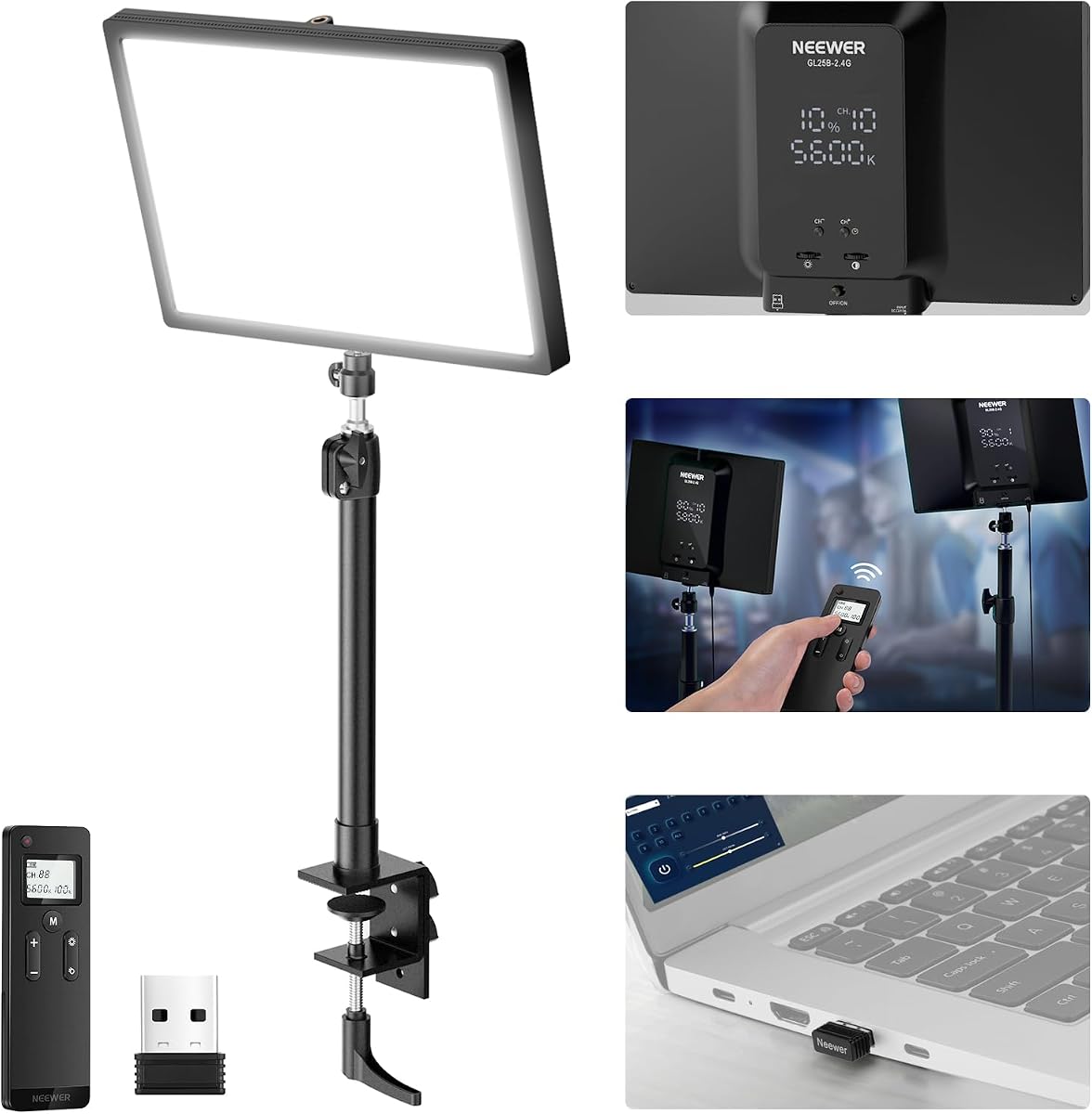
The NEEWER GL25B is a powerful panel light that delivers 2300lux at 0.5m with a high CRI of 98+. This makes colors appear accurate and vibrant on camera.
We may earn a commission when you buy through this link, at no additional cost to you.
It features edge emitting soft glow technology that avoids harsh shadows. The included RT100 remote and PC/Mac control options provide versatile ways to manage your lighting setup.
The fanless cooling system ensures zero noise during streams. However, while the included stand is useful, some users might prefer purchasing a separate arm for more positioning flexibility.
This light is ideal for streamers who demand high fidelity visuals without noise interference. Its high CRI ensures skin tones and products look exactly as intended.
The fanless design uses heat vents and conductive materials to dissipate heat quietly, keeping your audio clean during recording.
Control via panel buttons, remote, or USB connected software for maximum convenience depending on your setup needs.
We may earn a commission when you buy through this link, at no additional cost to you.
The Key Light Air MK.2 improves on its predecessor with 50% brighter output and edge-lit anti-glare illumination. It offers full spectrum color control from warm to cool white.
We may earn a commission when you buy through this link, at no additional cost to you.
Flexible power options include USB-C from a laptop or a battery bank via the MagSafe ring. This portability makes it great for creators who move locations frequently.
However, the panel can detach easily from the mount, which requires caution. Despite this, the touch and app control provide intuitive management of your lighting settings.
This is the best pick for premium portable setups. Streamers who value mobility without sacrificing control will find the MagSafe and USB-C options incredibly useful.
Attach a battery bank to the MagSafe ring for truly untethered operation when you need to stream off the grid.
Automate your lighting with a single keypress using Elgato Stream Deck, allowing seamless integration into your workflow.
We may earn a commission when you buy through this link, at no additional cost to you.
Weilisi offers a full-screen desk light that provides uniform diffused light to restore natural tones and minimize shadows. The telescoping stand extends to provide optimal coverage for various heights.
We may earn a commission when you buy through this link, at no additional cost to you.
Its 360-degree rotation and 180-degree light head allow for versatile positioning. The big metal C-clamp saves desk space and keeps cables organized.
While it uses basic controls rather than advanced app features, it delivers solid performance for the price. It is ideal for entry-level creators or office work.
This unit is an excellent starting point for those on a tight budget. It improves video quality significantly without requiring a large financial investment upfront.
The C-clamp design attaches securely to the desk edge, freeing up valuable surface area for your keyboard and accessories.
Adjust the angle and height freely to ensure your face is well-lit from above or the side as needed.
We may earn a commission when you buy through this link, at no additional cost to you.
This kit includes two LED panels with tripods, providing a complete lighting solution for both key and fill light needs. Each panel has 356 LED beads for stable output.
We may earn a commission when you buy through this link, at no additional cost to you.
The thickened light shell offers diffusion to soften the light. Both panels support USB power which makes them easy to run from power banks or wall chargers.
While not as bright as larger panels, the two-light setup creates a balanced and professional look. The included storage bag enhances portability significantly.
Great for creators who want a two-light setup at a low cost. The included accessories make it ready for immediate use in various recording scenarios.
Using two lights allows you to create depth and dimension in your footage by balancing front and side lighting.
The compact panels and included bag mean you can easily take this kit on the go for outdoor or remote shoots.
We may earn a commission when you buy through this link, at no additional cost to you.
This kit offers unique gooseneck tubes that allow for precise angle adjustments. The LCD display on the panel helps monitor brightness and color temperature settings accurately.
We may earn a commission when you buy through this link, at no additional cost to you.
Built-in memory function remembers your last settings, saving time on setup. The stable C-clamp structure keeps the light fixed securely on your desktop.
With 118 LEDs and 16W power, it provides soft and flicker-free lighting. However, it is less bright than professional studio panels.
Perfect for podcasters and streamers needing flexible desk lighting without complex rigs. The memory feature adds convenience for daily use routines.
The light remembers your last brightness and color settings, turning back on exactly where you left it every time.
The flexible tubes bend easily to direct light exactly where you need it without needing complex arms or mounts.
We may earn a commission when you buy through this link, at no additional cost to you.
The Godox ES45 uses an edge-lit OLED panel to deliver glare-free and evenly diffused illumination. It is designed specifically to reduce eye fatigue during long streaming sessions.
We may earn a commission when you buy through this link, at no additional cost to you.
The included remote attaches magnetically to the back of the panel and recharges automatically. This convenient design ensures the remote is always ready when you need it.
While it is on the higher end of the price spectrum, the comfort features and magnetic remote justify the cost for daily users.
Ideal for gamers and streamers who spend hours in front of the camera. The soft light helps maintain a polished look without discomfort.
The remote snaps on the back and recharges automatically, eliminating the need to find batteries or worry about dead power.
Optimized for long sessions, the soft diffused light reduces glare and strain so you can stream for longer without fatigue.
We may earn a commission when you buy through this link, at no additional cost to you.
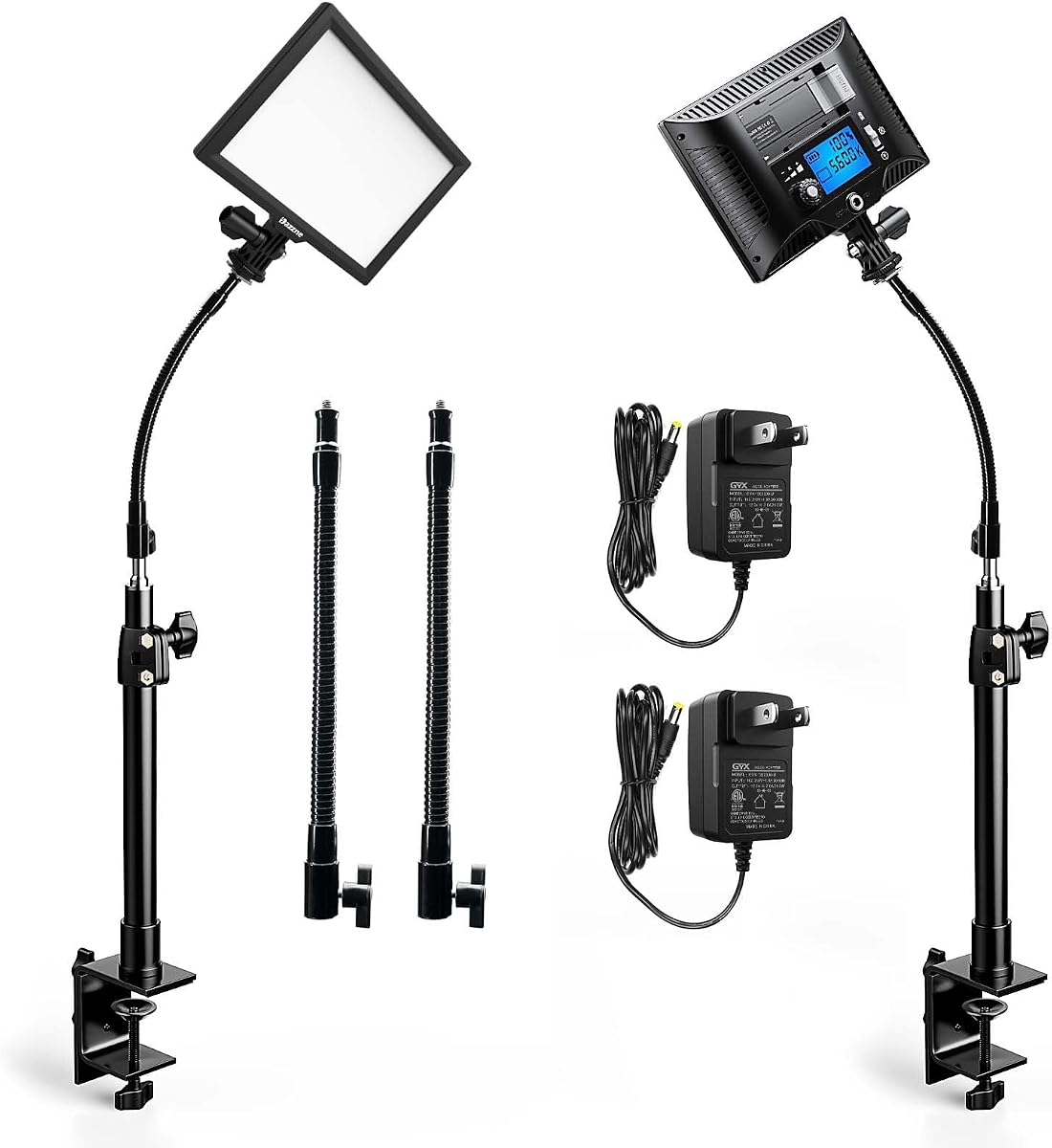
This kit provides two Dazzne D20 panel lights with gooseneck tubes for flexible positioning. Each unit offers 1080 Lux brightness suitable for close up shots.
We may earn a commission when you buy through this link, at no additional cost to you.
The LCD display allows precise control of settings. The C-clamp stand provides stability and saves space on your desk.
While it shares similarities with other dual kits, it focuses on reliable performance for video conferencing. The brand emphasizes user experience and support.
Great for those needing two lights without complex cabling. The gooseneck design allows for custom angles quickly and easily.
Getting two lights in one package allows you to light both yourself and your background or product equally.
The brand focuses on usability, offering helpful support and intuitive designs for easy setup and control.
We may earn a commission when you buy through this link, at no additional cost to you.
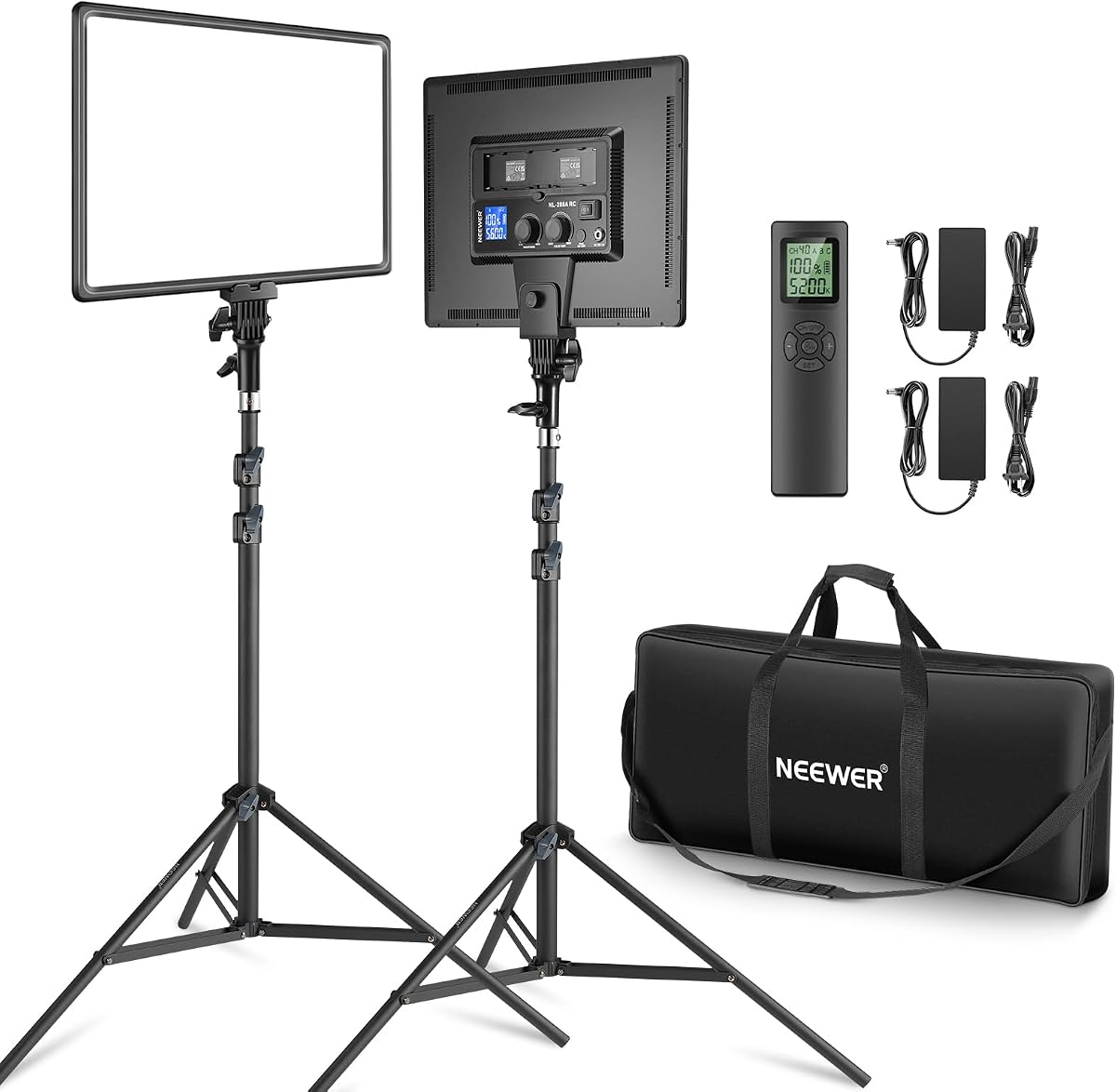
This kit features two 18-inch panels with 4800 Lux output and high CRI for professional photography. The 45W power delivers intense brightness for any room.
We may earn a commission when you buy through this link, at no additional cost to you.
It supports Sony NP-F batteries for portable shooting. The remote allows control of multiple channels and groups, ideal for multi-light setups.
While the panels are larger and require tripods rather than clamps, they offer unmatched brightness for the price. The carrying bag makes transport manageable.
Best for users needing powerful studio lighting at home. The battery option ensures you can keep recording even during power outages.
With 4800 Lux, these panels overpower ambient light ensuring your subject is the brightest part of the frame.
Set different channels on multiple lights to control them independently, creating complex lighting scenes effortlessly.
We may earn a commission when you buy through this link, at no additional cost to you.
Selecting the right light involves evaluating brightness, color accuracy, and mounting options to match your specific streaming needs.
Higher lumens ensure you remain visible even if your room is bright. Look for at least 1000 lux at your distance for clear video.
Choose higher output for larger spaces or lower for tight desk setups.
CRI measures how accurately colors appear under the light. High CRI above 90 ensures skin tones look natural.
Prioritize CRI to avoid washed-out or unnatural colors on camera.
Consider if the light uses USB, AC, or battery power. Battery power adds flexibility for outdoor or mobile streaming.
USB offers convenience near a computer while AC ensures continuous power.
Desk clamps save space while tripods offer height. Choose a mount that fits your desk thickness.
Ensure the clamp holds securely to avoid light wobbling during streams.
Apps and remotes allow adjustment without interrupting the stream. Manual knobs are simple but less flexible.
Select control methods that match your ability to adjust settings on the fly.
Larger panels diffuse light better but require more space. Compact lights are easier to hide behind monitors.
Balance size with available desk real estate for optimal placement.
Fans can be noisy and interfere with audio. Fanless or passive cooling designs are better for quiet streams.
Check reviews for heat buildup to avoid discomfort during long sessions.
Entry-level lights are cheaper but may lack advanced features. Premium lights offer reliability but cost more.
Determine if the extra features justify the higher cost for your usage.
Position your light at a 45-degree angle to your face to create depth and reduce shadows. Ensure the light is above your eye level for a flattering look.
Use soft diffusion panels or adjust the brightness to avoid glare. Check your video feed before going live to confirm the color balance is accurate.
Keep the light surface clean to maintain consistent brightness. Use a soft cloth to remove dust and ensure all fans are clear of debris.
Not all smart lights require Wi-Fi. Some work via Bluetooth or USB connection. However, full control often relies on network connectivity.
Yes, desk lights with high CRI can work for still photography. Ensure they provide sufficient brightness and color consistency for your shots.
A CRI of 90 or higher is recommended for streaming. This ensures colors appear true to life and skin tones look natural on camera.
Desk lights often include clamps that attach to the table. Tripods are useful if you need height adjustment beyond the desk edge.
Avoid touching the light directly and ensure airflow is clear. Use models with fanless cooling to reduce noise and overheating risks.
Some models support NP-F or USB battery banks. This is useful for portable setups or locations without easy AC power access.
The Elgato Key Light stands out for professional features, while the Weilisi option is perfect for budget conscious users. Each pick offers unique strengths depending on your setup.
Prioritize brightness and mounting options to ensure the light fits your desk comfortably. Reliable performance is key to consistent video quality over time.
Prices and availability change frequently so verify current details before ordering. Choosing the right light enhances your stream and keeps viewers engaged with quality visuals.