As an Amazon Associate we earn from qualifying purchases. We may earn a commission when you buy through links on this page, at no additional cost to you. Read our affiliate disclosure.As an Amazon Associate we earn from qualifying purchases.Purchases through our links may earn us a commission, at no extra cost to you. Read our affiliate disclosure.
Finding the right joystick for Windows 11 can transform your gaming experience. Whether you seek flight simulation accuracy or general control, quality hardware matters for performance and comfort during extended sessions.
We evaluated ten real products based on compatibility, build quality, and feature sets. Each entry offers unique advantages for different play styles and budgets across various simulation and arcade genres.
Every pick highlights key strengths and potential trade-offs for informed decisions. Prices fluctuate frequently so verify current listings before purchasing to ensure you get the best value available.
Top 3 Picks for Best Joysticks for Windows 11
Best Budget
V-one Wired USB Gaming Controller Gamepad Joystick for PC (Windows XP/7/8/10/11) & Steam & Android & PS3 – Red
Logitech G X56 H.O.T.A.S Throttle and Joystick Flight Simulator Game Controller, 4 Spring Options, +189 Programmable Controls, RGB Lighting, 2x USB, PC – Black
Top 10 Best Joysticks for Windows 11 in 2026 Compared
Below is a side-by-side comparison of all ten products considered in this guide. Each row details key specifications to help you identify the best fit for your specific gaming needs.
PXN 2113PRO PC Joystick USB Gaming Flight Simulator Controller Flight Stick
Vibration switch at bottom
Eight way hat switch
Twelve programmable buttons
Four axis controlling
This PXN joystick targets PC users seeking immersive flight simulation. It holds a solid rating and features vibration alongside twelve programmable buttons for flexible control mapping.
Pros
Easy setup process
Comfortable ergonomic grip
Solid build quality
Supports multiple games
Good value option
Cons
Vibration requires calibration
Not for consoles
We may earn a commission when you buy through this link, at no additional cost to you.
Its eight way hat switch and four axis controls provide accurate input. The software allows custom adjustments and keyboard mapping for tailored gameplay experiences.
Some users find vibration weak unless configured properly. Ensure driver settings are adjusted for optimal feedback during play sessions.
Ideal for beginners entering flight sims without breaking the bank. Its ease of use and compatibility make it a reliable entry level choice.
Immersive Flight Experience
The realistic fly experience aims to fulfill flying dreams with rapid fire triggers and smooth axis movement.
Customizable Controls
Advanced software supports various custom adjustments and keyboard mappings to suit individual preferences and game requirements.
Thrustmaster T-Flight Hotas One Flight Stick & Throttle – XBOX & PC
Detachable throttle module
Adjustable joystick resistance
Hat switch included
Multiple buttons
The Thrustmaster T-Flight Hotas One delivers realistic control for simulation enthusiasts. Its detachable throttle adds versatility for desk or lap setups during extended gaming sessions.
Pros
Plug and play setup
Modular design flexibility
Ergonomic comfort
Wide compatibility
Expandable ecosystem
Cons
No force feedback
Basic button layout
We may earn a commission when you buy through this link, at no additional cost to you.
Ergonomics are prioritized with adjustable resistance and smooth trigger response. This ensures comfort across different aircraft categories from commercial aviation to combat jets.
While lacking force feedback, the precise control compensates well. The expandable ecosystem allows adding rudder pedals for enhanced realism.
Perfect for those wanting a full hotas experience without complex assembly. Its plug and play nature makes it accessible for all skill levels.
Versatile Configuration
Modular design allows the flight stick and throttle to be used together or separately depending on available space.
Universal Compatibility
Designed for PC and Xbox series with seamless integration into most popular flight sim software right out of the box.
V-one Wired USB Gaming Controller Gamepad Joystick for PC (Windows XP/7/8/10/11) & Steam & Android & PS3 – Red
Xinput and Dinput modes
Vibration feedback support
Compatible with Android
Turbo function
This V-one controller offers versatile multi-mode functionality for diverse devices. It supports Windows XP through 11 alongside Android and PS3 ensuring broad accessibility for many users.
Pros
Multi-platform support
Plug and play on PC
Budget friendly price
Turbo functionality
Vibration feedback
Cons
Not for Xbox consoles
Cable not detachable
We may earn a commission when you buy through this link, at no additional cost to you.
Key strengths include vibration feedback and turbo modes that enhance gameplay responsiveness. The plug and play feature simplifies setup without requiring driver installation on most systems.
Compatibility limitations exist for Xbox 360 and Mac OS which may affect some users. The design focuses on utility rather than premium materials.
Ideal for budget conscious gamers needing a reliable pad across platforms. Its robust feature set at a low cost makes it highly recommended.
Cross Platform Utility
Supports PC, Steam, Android, and PS3 allowing seamless transitions between different gaming environments without hardware changes.
Enhanced Responsiveness
Vibration feedback and turbo functions provide immediate tactile responses and rapid action capabilities during intense gameplay moments.
Thrustmaster USB Joystick offers a straightforward solution for casual flight gaming. Its POV button enhances immersion by allowing quick camera control without complex key combos during play.
Pros
Simple design
POV button included
Comfortable rest
Quick plug and play
Cons
Fewer programmable inputs
Basic axis resolution
We may earn a commission when you buy through this link, at no additional cost to you.
Ergonomic handle design ensures optimal comfort during extended sessions. The layout provides essential controls needed for basic simulation tasks.
The lack of advanced programmability limits customization for power users. It serves well as a secondary controller or for less demanding titles.
Recommended for those needing a simple reliable stick without clutter. Its focused feature set delivers core functionality effectively.
Instant Immersion
The POV button offers easy camera control for perfect immersion in games without requiring keyboard input.
Microsoft Sidewinder Precision 2 brings advanced programmability to your desktop. Sixteen programmable functions allow detailed command mapping for complex simulation environments.
Pros
High programmability
Precise rudder control
Profile saving features
Solid ergonomics
Cons
Older technology design
Driver dependency for features
We may earn a commission when you buy through this link, at no additional cost to you.
Rotating handle design gives precise rudder control essential for accurate flight dynamics. Downloadable game commands into controller profiles streamline switching between different aircraft.
While effective, the design reflects older tech standards which might feel dated to some. It remains a robust choice for specific legacy or classic gaming preferences.
Best for users valuing deep customization over modern aesthetics. Its reliable USB connection ensures compatibility with current systems.
Custom Command Mapping
Save and download programmed game commands into game-specific controller profiles for quick access and tailored setups.
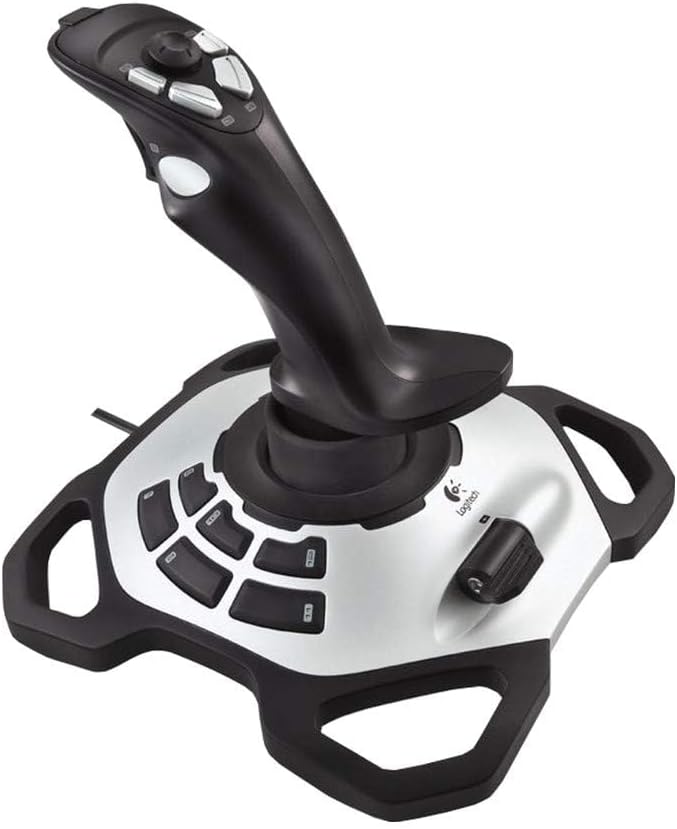
Logitech Extreme 3D Pro offers precision for serious pilots. Its design emphasizes accuracy with features that enhance control during detailed maneuvers.
Pros
Accurate input
Dedicated rudder
Sturdy build
Good software support
Cons
Fixed size design
Limited to PC
We may earn a commission when you buy through this link, at no additional cost to you.
Programmable buttons allow quick access to critical functions. The stick feels solid and resists unwanted movement during intense sessions.
Users should note it is designed primarily for PC usage. This ensures compatibility but restricts cross console flexibility.
An excellent choice for those prioritizing accuracy and build quality. Its reputation for reliability makes it a trusted pick.
Precision Control
Engineered to deliver exacting levels of control necessary for complex flight scenarios and rapid adjustments.
Logitech G X56 H.O.T.A.S Throttle and Joystick Flight Simulator Game Controller, 4 Spring Options, +189 Programmable Controls, RGB Lighting, 2x USB, PC – Black
Over one hundred eighty controls
Hall effect sensors
RGB backlighting support
Adjustable spring system
Logitech G X56 H.O.T.A.S delivers military-grade precision for aspiring pilots. Over one hundred eighty programmable controls cover every possible surface needed for performance.
Pros
Military grade precision
Ideal for VR
Fully featured hotas
Adjustable force
Cons
Complex setup process
Requires multiple USB ports
We may earn a commission when you buy through this link, at no additional cost to you.
Hall effect sensors ensure accurate input. Adjustable stick force and twin throttles provide detailed control across various aircraft types.
Complexity may challenge casual users. Requires two USB ports and careful configuration to realize full potential.
Top choice for serious enthusiasts. Its quality and features justify the investment for demanding users.
VR Optimized Layout
Controls are positioned to allow easy navigation in virtual reality without visual distractions.
Fully Featured HOTAS
Accurate axes and friction adjusters offer precise control for complex flight maneuvers.
We may earn a commission when you buy through this link, at no additional cost to you.
Buying Guide – How to Choose the Best Joysticks for Windows 11
Selecting the right joystick involves considering compatibility, features, and intended use cases.
Compatibility
Ensure the device explicitly supports Windows 11 to avoid driver conflicts. Most modern options offer plug-and-play functionality but verifying system requirements is critical.
Look for official Windows certification to guarantee smooth operation across different applications.
Compatibility Modes
Many devices offer multiple modes like Xinput or Dinput. Xinput is generally preferred for modern Windows games to ensure proper button recognition.
Confirm the mode matches your preferred gaming platform for optimal functionality.
Number of Controls
More buttons and axes provide greater flexibility for complex simulations. Flight enthusiasts often need numerous programmable inputs for detailed maneuvers.
Choose a model with enough programmable inputs to match your needs.
Ergonomics
Comfort is crucial for extended sessions. Look for ergonomic grips and adjustable resistance to reduce fatigue during use.
Test the feel if possible or check reviews for comfort feedback.
Build Quality
Durable construction ensures longevity especially under frequent use. Materials and hinge quality impact overall durability.
Invest in models known for robust construction to avoid early failures.
Software Support
Quality software allows customization of buttons and axes. This is essential for mapping specific commands across various games.
Check if the manufacturer provides easy-to-use configuration tools.
Feedback Features
Vibration or force feedback adds immersion. While not always necessary, it enhances the realism of simulations.
Consider whether feedback is important for your specific gameplay preferences.
Connectivity Options
USB wired connections typically offer lowest latency. Wireless options provide flexibility but may introduce delays.
Prioritize wired connections for competitive or precision-focused gaming.
How to Use and Care for Your Joysticks for Windows 11
Connect your joystick directly to a USB port on your computer before launching games. This ensures immediate recognition by the operating system and game client.
Install any recommended software from the manufacturer to configure button mappings. Customizing controls improves efficiency and comfort during extended play.
Keep the device clean by wiping it with a dry cloth after use. Avoid excessive force on sticks and buttons to prolong lifespan.
Frequently Asked Questions
Do these joysticks work with Windows 11?
Yes all products listed support Windows 11 explicitly. Most utilize plug-and-play USB connections that are recognized automatically by the operating system.
Can I use these on other platforms?
Some models like the V-one and Thrustmaster T-Flight offer limited support for Android or Xbox. Verify compatibility details before purchase.
What is the difference between Xinput and Dinput?
Xinput is the modern standard used by most current Windows games. Dinput is an older protocol mainly used for legacy titles.
Do flight sticks require additional drivers?
Most function without drivers but installing manufacturer software unlocks full customization. It ensures access to advanced features and calibration tools.
Are these suitable for beginners?
Yes many options feature intuitive layouts and plug-and-play setups. These are ideal for those new to flight simulation or gaming controllers.
Can I pair multiple devices together?
Some setups allow combining rudder pedals or throttles for a full cockpit experience. Check product specifications for expandable ecosystem compatibility.
Final Thoughts on Choosing the Best Joysticks for Windows 11
Choosing a joystick for Windows 11 depends on your gaming goals and budget. Options like the Logitech G X56 offer premium precision while the V-one provides essential functionality affordably.
Prioritize compatibility and comfort when making your decision. Ensure the device supports your preferred games and offers enough controls for detailed interaction.
Always verify current listings for the best availability and pricing. This guide helps you navigate the options to find your ideal controller.
Discover the top ball machine for pickleball practice options. We compare features, capacity, and controls to help you choose the perfect training tool.