
msi Gaming GeForce GT 1030 4GB DDR4
4.5Editor score
Low Profile Design
4GB DDR4 Memory
Single Fan Cooling
This guide compares the top 10 GPUs for Optiplex systems, focusing on low profile designs, performance metrics, and compatibility for gaming and professional
Finding the right graphics card for an Optiplex system requires careful consideration of size and power limits. These compact workstations often need low profile cards to fit inside their small cases while still delivering solid performance for everyday tasks or light gaming.
We evaluated ten distinct GPU models based on their physical dimensions, power requirements, and architectural capabilities. Each product was selected to ensure it fits within the constraints of Dell Optiplex desktops without needing external power connectors or excessive cooling solutions.
Each pick highlights specific strengths like ray tracing support, professional ISV certification, or budget-friendly pricing. Keep in mind that availability and pricing fluctuate frequently, so verify current stock and costs before making your final purchasing decision for your specific build.
4.5Editor score

4.7Editor score

4.3Editor score
The following table provides a side-by-side overview of all ten graphics cards selected for Optiplex compatibility. We have summarized key specifications such as memory size, interface type, and physical design to help you quickly identify which model suits your specific hardware constraints and performance needs.
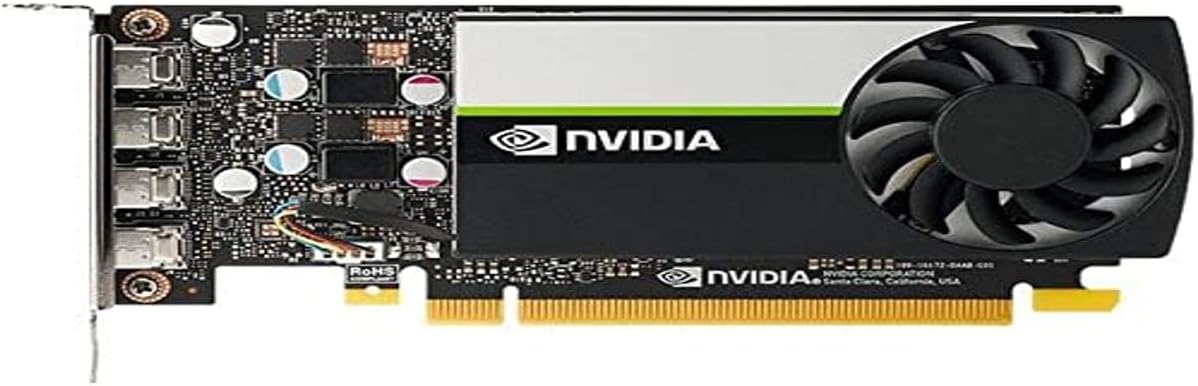


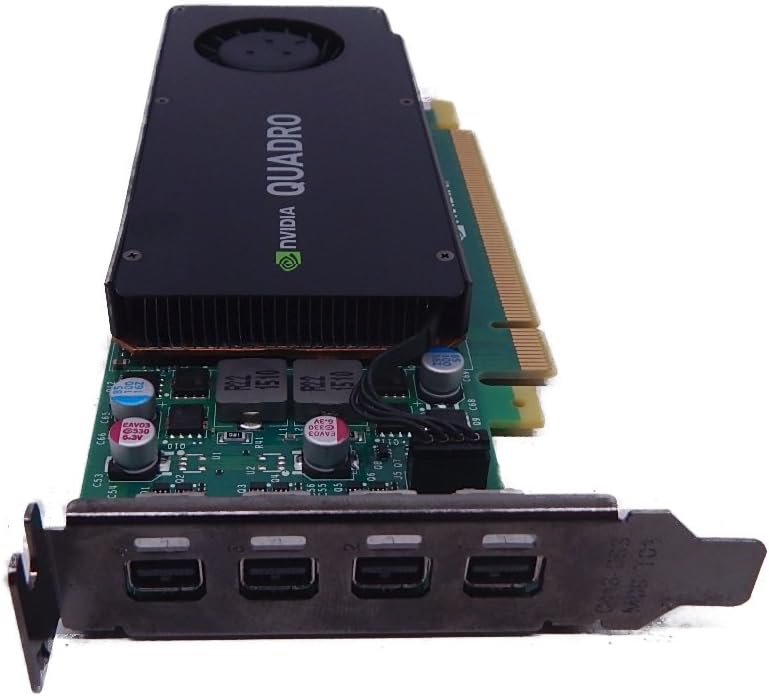
The PNY Nvidia RTX A400 stands out as a top choice for professionals needing reliable performance in a compact Optiplex chassis. With a 4.7 rating, users appreciate its single slot design and powerful Ampere architecture that handles demanding workloads efficiently.
We may earn a commission when you buy through this link, at no additional cost to you.
Its 768 CUDA cores provide exceptional compute power for AI and ray-tracing tasks, while the 4GB GDDR6 memory ensures smooth multitasking. The four Mini DisplayPort outputs allow for extensive multi-monitor setups ideal for design visualization or financial trading floors.
While it is optimized for professional software, some gamers might find the lack of consumer gaming optimizations a trade-off. However, for business environments requiring stability and certification, these limitations are acceptable given the robust performance.
This card is perfect for users upgrading older Optiplex units to support modern software applications without changing the entire workstation. It balances performance and physical constraints better than most alternatives in this price range.
ISV certifications ensure the card runs industry-standard software like AutoCAD and SolidWorks without crashes or display glitches.
At just 50 watts, it runs cooler and draws less power from the Optiplex power supply, reducing heat output in small cases.
We may earn a commission when you buy through this link, at no additional cost to you.
The maxsun GeForce RTX 3050 offers a premium balance of modern gaming features and physical compactness suitable for Optiplex desktops. It features the latest Ampere architecture and supports DLSS for better performance in supported titles without compromising image quality.
We may earn a commission when you buy through this link, at no additional cost to you.
With 6GB of GDDR6 memory and a 96-bit interface, this card handles demanding applications well. The inclusion of HDMI 2.1 and DisplayPort 1.4a ensures compatibility with high-resolution monitors, making it versatile for both gaming and media consumption.
Its slim low profile design allows it to fit into Mini Small Form Factor cases easily. However, the higher price compared to other low-profile options might be a barrier for budget-conscious buyers looking for basic graphical improvements.
If you need a powerful GPU for a small Optiplex system and value modern features like ray tracing and AI upscaling, this model delivers excellent performance per watt while fitting inside the chassis constraints.
DLSS technology uses AI to upscale lower resolutions, allowing for higher frame rates without sacrificing visual fidelity in supported games.
HDMI 2.1 and DisplayPort 1.4a provide the bandwidth needed for future 4K displays and high refresh rate setups.
We may earn a commission when you buy through this link, at no additional cost to you.
The msi Gaming GeForce GT 1030 is an affordable entry point for anyone looking to upgrade their Optiplex system on a tight budget. It provides basic graphical acceleration that is significantly better than integrated graphics found in most standard desktop configurations.
We may earn a commission when you buy through this link, at no additional cost to you.
Its single fan design and low profile bracket make installation incredibly easy for non-technical users. The card runs quietly and consumes very little power, ensuring it will not trip overloading issues in older power supplies.
While it is not designed for modern gaming, it handles video playback and casual applications smoothly. The use of DDR4 memory is a cost-saving measure but does limit bandwidth compared to GDDR5 variants found in higher-end models.
For users needing a simple graphics upgrade for media viewing or office work, this card offers reliable performance at a very attractive price point. It is ideal for extending the lifespan of an older Optiplex unit.
Perfect for decoding high-definition video streams and running multiple monitors for productivity without system lag.
The low power consumption means the fan rarely spins up, keeping noise levels minimal in quiet office environments.
We may earn a commission when you buy through this link, at no additional cost to you.
The PNY NVIDIA T600 is engineered to deliver over double the performance of previous generations for 3D graphics workloads. It is a robust option for users who need to handle larger models and scenes with high interactivity during design and visualization tasks.
We may earn a commission when you buy through this link, at no additional cost to you.
Ensuring hardware compatibility and stability through support for the latest OpenGL, DirectX, and Vulkan standards, this card is certified with over 100 professional software applications. It also includes dedicated decode and encode engines for video content creation.
The display capabilities are impressive, with support for up to four 5K displays or two 8K displays per card. This makes it a strong contender for immersive environments and complex multi-monitor setups in professional settings.
Although it may require more power than entry-level cards, its performance stability and professional certification make it worth the investment. For workstations focused on design and engineering, the T600 is a reliable upgrade choice.
Dedicated engines for H.264 and HEVC allow for smooth playback and encoding without taxing the main CPU.
Deep ISV engagements ensure that professional applications run smoothly without glitches common with consumer gaming cards.
We may earn a commission when you buy through this link, at no additional cost to you.
The ASUS Dual GeForce RTX 3050 brings the all-new Ampere SM technology with double the FP32 throughput and improved power efficiency. It is designed to provide a whole new level of ray-tracing performance with concurrent RT and shading capabilities.
We may earn a commission when you buy through this link, at no additional cost to you.
Axial-tech fan design features a smaller fan hub that facilitates longer blades and a barrier ring that increases downward air pressure. This design maximizes cooling efficiency for superior performance even in constrained chassis environments.
With an OC Mode boost clock of 1500 MHz, users can expect a slight performance edge over standard versions. The stainless steel bracket adds durability, while IP5X dust resistance offers protection from particle ingress to extend the card's lifespan.
For those who need a bit more cooling headroom in their Optiplex case, this dual-slot option is a solid choice. It delivers robust gaming performance while maintaining reliable operation under load.
Axial-tech fan design ensures better airflow through the card, keeping temperatures lower during extended gaming sessions.
IP5X dust resistance and a robust steel bracket protect the card against environmental factors and physical damage.
We may earn a commission when you buy through this link, at no additional cost to you.
This variant of the msi Gaming GeForce GT 1030 emphasizes simplicity and low power consumption for entry-level upgrades. It is designed to fit into small form factor Optiplex cases without requiring extra power connectors or significant airflow improvements.
We may earn a commission when you buy through this link, at no additional cost to you.
With a boost clock of 1430 MHz and support for DirectX 12, it handles modern software requirements efficiently. The single fan design keeps noise levels low, making it ideal for quiet office environments where acoustics matter.
While the memory interface is 64-bit and uses DDR4, it provides sufficient bandwidth for media playback and basic 3D tasks. This makes it a safe upgrade for systems needing better video decoding or multi-monitor support.
If your priority is minimal cost and physical fit rather than raw gaming performance, this card is a practical solution. It ensures your Optiplex remains functional for basic tasks with improved graphical support.
Designed to run entirely on bus power, eliminating the need for external connectors in small power supply units.
DirectX 12 support ensures compatibility with a wide range of modern applications and games at lower settings.
We may earn a commission when you buy through this link, at no additional cost to you.
The GIGABYTE GeForce RTX 3050 WINDFORCE OC V2 offers a balanced mix of cooling performance and graphical power. Powered by the Ampere architecture, it features 6GB of GDDR6 memory and benefits from the second generation of RT cores and third generation Tensor cores.
We may earn a commission when you buy through this link, at no additional cost to you.
The WINDFORCE cooling system uses two fans to maintain optimal temperatures during operation. This helps sustain high performance for longer periods compared to single fan solutions, ensuring stability during complex workloads.
Its design ensures compatibility with most standard cases while maintaining a compact footprint suitable for small builds. The build quality is reliable, making it a safe option for users seeking consistent performance without overheating issues.
For users who need a bit more thermal headroom and performance stability, this card is a great middle-ground choice. It fits well in various Optiplex configurations while providing modern features like ray tracing support.
Dual fan cooling ensures consistent performance even under load by maintaining lower operating temperatures.
Latest generation RT and Tensor cores improve rendering and AI performance compared to older GPU generations.
We may earn a commission when you buy through this link, at no additional cost to you.
The msi Gaming RTX 3050 LP 6G is designed specifically to fit into smaller cases without sacrificing modern GPU performance. It uses Ampere architecture to deliver a boost clock of 1492 MHz and supports 6GB of GDDR6 memory for efficient data processing.
We may earn a commission when you buy through this link, at no additional cost to you.
Its low profile bracket makes it ideal for tight spaces, while the HDMI and DisplayPort outputs ensure connectivity with modern monitors. This balance of size and capability makes it a strong candidate for compact Optiplex gaming builds.
Users appreciate the overclocked version for slightly better performance out of the box. The compact size allows for use in desktops where larger cards simply will not fit, expanding upgrade possibilities for small form factor systems.
For anyone looking to build a powerful small PC without changing the chassis, this card is a reliable option. It provides sufficient power for light gaming and creative tasks within strict physical limits.
Low profile design ensures it fits into Slim Small Form Factor cases without modification or extra space.
HDMI and DisplayPort support allows connection to modern high resolution displays with minimal adapter needs.
We may earn a commission when you buy through this link, at no additional cost to you.
The PNY NVidia Quadro K1200 offers incredible 3D application performance in a compact footprint. While it uses PCIe 2.0, its low profile design and stable drivers make it a dependable option for basic professional tasks.
We may earn a commission when you buy through this link, at no additional cost to you.
It features four Mini DisplayPort 1.2 connectors allowing for multiple display setups suitable for trading desks or design workstations. The hardware is certified for professional applications, ensuring smooth performance and stability in daily workflows.
Its 3-year warranty adds peace of mind for business deployments where reliability is key. Although older in architecture, it remains useful for systems that do not require the latest high-bandwidth connectivity or advanced gaming features.
This card is a solid choice for organizations needing certified hardware at a low cost. It fits easily into older Optiplex units to provide stable graphics output without requiring system-wide upgrades.
Four Mini DP outputs allow for expanded workspace setups ideal for multi-screen productivity environments.
A 3-year warranty provides business users with confidence in long-term hardware reliability and support.
We may earn a commission when you buy through this link, at no additional cost to you.
The NVIDIA Quadro P1000 combines the latest GPU architecture and display technologies to deliver significantly better performance than previous generations. It is widely considered the most powerful low-profile professional graphics solution available for small form factor workstations.
We may earn a commission when you buy through this link, at no additional cost to you.
Powered by Quadro Pascal GPU technology, it supports 4K and 5K displays, offering an expansive visual workspace of up to four 4K screens. This capability is essential for professionals who need to view designs or projects in stunning detail.
Its energy-efficient design ensures reliable performance for extended professional use without excessive heat generation. The card is ISV certified, guaranteeing compatibility with a wide range of professional applications used in engineering and design.
If you need to drive high-resolution displays in a compact Optiplex system, this card is a powerful tool. It bridges the gap between legacy hardware and modern visual requirements with professional-grade stability.
Support for 4K and 5K displays ensures crisp visuals for professional design and data visualization tasks.
Extensive ISV certification provides confidence that industry software will run reliably on this hardware.
We may earn a commission when you buy through this link, at no additional cost to you.
Choosing the right GPU for an Optiplex system involves balancing physical constraints with performance needs. This guide outlines the critical factors you should evaluate to ensure your new graphics card fits and performs as expected.
Optiplex desktops often use Small Form Factor (SFF) or Micro chassis that are too narrow for standard graphics cards. You must look for Low Profile or Slim designs that are typically around 2.7 inches wide to fit without modifications. Standard dual-slot cards will not fit in these cases, so verifying the exact height and length is crucial before purchasing.
Always check the card's physical dimensions against your specific Optiplex model's manual to ensure a proper fit. A card that is too wide or tall will physically block installation or prevent the side panel from closing.
Many Optiplex systems come with limited power supplies that cannot support GPUs with dedicated external power connectors. Look for cards that draw all their power from the PCIe slot, typically under 75 watts. High-wattage cards may cause system instability or fail to boot if the power supply is insufficient.
Choosing a card with low power draw ensures your existing power supply can handle the load without requiring an upgrade. This is often the most critical factor for older or lower-end Optiplex models.
Determine what you will use the GPU for. For general office work and video playback, a basic entry-level card like the GT 1030 is sufficient. For professional design, 3D modeling, or light gaming, you need a card with CUDA cores and higher memory bandwidth like the RTX 3050 or Quadro series.
Match the GPU's capabilities to your workflow to avoid overspending or underperforming. If you need multi-monitor setups, ensure the card supports enough video outputs to connect all your displays.
Different cards come with different combinations of HDMI, DisplayPort, or Mini DisplayPort connectors. Verify that the card has enough ports to match your monitors and that the ports support the resolution and refresh rate you need. Modern cards often include DisplayPort 1.4 or HDMI 2.1 for high-resolution support.
If your monitors use specific connectors like DVI or VGA, you may need adapters. Check the card's supported resolutions to ensure it can drive your displays at their native settings.
Consumer gaming cards like the GeForce series focus on frame rates and game features. Professional cards like the Quadro or RTX A-series offer better stability and certified drivers for industry applications like CAD. If you rely on professional software, a certified card prevents crashes and ensures accuracy.
Consumer cards can sometimes work for professional tasks but might lack specific optimizations or driver stability. Consider your primary use case to decide which category offers better long-term value.
Graphics memory helps the GPU store textures and data for quick access. Look for at least 4GB of VRAM for smooth multitasking and handling high-resolution content. Memory type also matters; GDDR6 is faster and more efficient than DDR4 or DDR5 for modern workloads.
Adequate memory prevents bottlenecks when running multiple applications or working with large files. Prioritize memory specifications that match the complexity of your typical tasks.
Ensure your Optiplex motherboard has a free PCIe slot that matches the card's version, such as PCIe 3.0 or 4.0. While PCIe cards are generally backward compatible, using a newer card in an older slot might limit bandwidth slightly. Check if the BIOS needs an update to support newer GPUs.
Some older Optiplex models might have BIOS limitations that prevent modern GPUs from initializing. Verify compatibility on community forums or with the manufacturer to avoid return hassles.
Professional cards often come with longer warranties and better support options than consumer models. This is vital for business environments where downtime is costly. Check the manufacturer's reputation for handling warranty claims and driver updates.
A solid warranty gives you protection against hardware defects. Look for cards that offer reliable support channels in case you encounter issues during installation or daily use.
Before installing the GPU, ensure the Optiplex desktop is powered off and unplugged from the wall. Ground yourself by touching the metal case to discharge static electricity, then remove the side panel to access the internal components. Locate the open PCIe slot and remove the rear panel cover corresponding to the slot you are using.
Insert the graphics card firmly into the slot until it clicks into place, then secure it with the screw provided. If your power supply supports it, connect any necessary power cables. Close the side panel and reconnect all cables, then power on the system to see if the card is detected.
Once the system is running, visit the manufacturer's website to download the latest drivers. Proper care involves keeping the vents clear of dust and monitoring temperatures during heavy use. If you notice overheating, consider cleaning the fans or improving case airflow with additional small fans if compatible.
Most Dell Optiplex models, especially SFF and Micro versions, are designed to accommodate low profile graphics cards. However, you should verify your specific chassis dimensions to ensure a standard low profile card will physically fit without interference. Check the manual for exact width and clearance requirements.
Ideally, choose a card that draws no more than 75 watts from the PCIe slot to avoid needing extra power connectors. Most Optiplex power supplies are limited, so cards exceeding this wattage might not boot or could cause instability unless you upgrade the PSU.
Yes, GeForce cards can handle professional tasks, but Quadro or RTX A-series cards offer better driver stability and certification for enterprise software. If your work depends on reliability and specific ISV certifications, a professional card is usually a safer investment.
Manufacturers use Mini DisplayPort to save physical space on low profile cards while maintaining high bandwidth. You may need adapters to connect HDMI or standard DisplayPort monitors to Mini DisplayPort outputs depending on your screen types.
For basic video editing, integrated graphics might suffice, but a dedicated GPU accelerates rendering and playback significantly. Look for cards with dedicated video encoding engines for smoother performance when working with HD or 4K footage.
Most Optiplex Micro cases are too small for standard gaming GPUs, so you must find a Low Profile card with very slim dimensions. Verify the length and width restrictions of your specific Micro model to ensure the card fits inside.
Sometimes, older BIOS versions may not support newer graphics cards, so updating your BIOS is a recommended step before installation. Check your system documentation for available updates to ensure compatibility with modern hardware components.
We explored ten distinct GPUs ranging from budget-friendly entry-level cards to powerful professional solutions. Each option was chosen to fit the physical and power constraints of Dell Optiplex systems while offering varying degrees of performance.
Prioritize your specific needs such as multi-monitor support, 3D rendering capability, or simple media playback when making your decision. The right GPU can extend the life of your Optiplex by enabling it to handle modern software efficiently.
Remember to verify compatibility with your specific Optiplex model and monitor the current availability of these cards. Prices and stock levels change regularly, so checking the latest data before purchasing will ensure you get the best deal available.