
NETGEAR GS348
4.8Editor score
Plug and Play Setup
Energy Efficient Design
Compact Metal Chassis
This guide compares the top 48 Port Gigabit Managed Switch models for performance security and scalability to help you choose the right network hardware.
Choosing the right network hardware is critical for modern businesses. A reliable 48 Port Gigabit Managed Switch ensures high-speed connectivity and robust security for your growing infrastructure needs.
We evaluated ten leading models based on management features, port configurations, and reliability. Our analysis covers smart managed options, PoE capabilities, and enterprise-grade security protocols for diverse environments.
Each pick highlights key strengths like fanless design or cloud integration. Prices and availability may vary so always check current listings before purchasing to ensure you get the best value.
4.8Editor score

4.7Editor score

5.0Editor score
The following table provides a side-by-side overview of the top ten models. Review key specifications like port count, management type, and power options to find the ideal fit.




The TP-Link SG2452LP stands out as a top choice for businesses needing robust management. It holds a high rating and integrates seamlessly with the Omada platform for centralized control.
We may earn a commission when you buy through this link, at no additional cost to you.
Its standout feature is the Omada Cloud Management Platform which allows remote configuration and monitoring. The fanless design ensures it runs silently even under full load which is ideal for office spaces.
While it offers powerful security features like 802.1X and ACLs setup can be complex for non-experts. However the long-term benefits of centralized management outweigh the initial learning curve.
This switch is perfect for organizations planning to expand their network infrastructure. Its reliability and security make it a solid investment for maintaining a stable and protected network environment.
Omada Cloud Management simplifies remote network configuration and monitoring across multiple sites effectively.
The passive cooling fanless design ensures noise levels remain minimal even when PoE is fully loaded.
We may earn a commission when you buy through this link, at no additional cost to you.
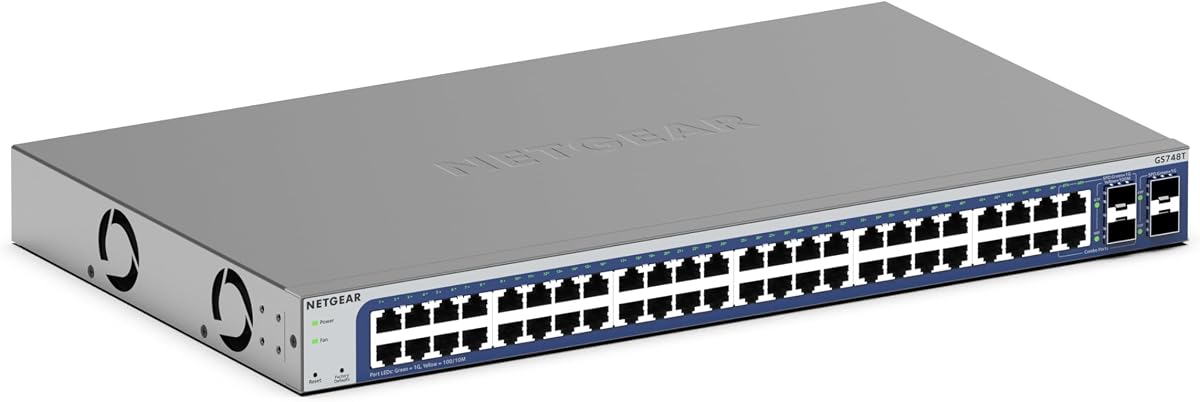
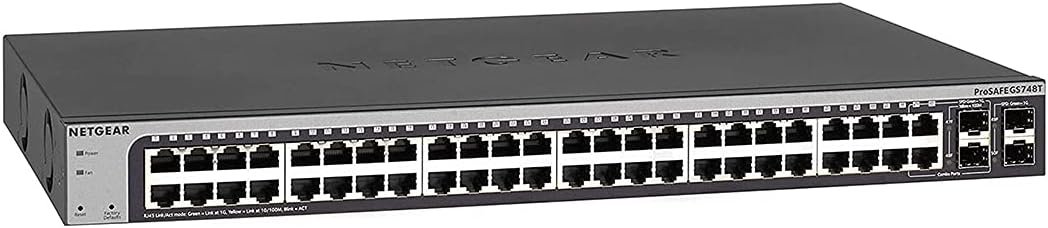
The NETGEAR GS748T offers a balanced approach to managed switching with a user-friendly interface. It scores well for businesses needing basic management without excessive complexity.
We may earn a commission when you buy through this link, at no additional cost to you.
Key strengths include the four SFP ports for fiber connectivity and the included one-year NETGEAR Insight subscription. This allows remote management from anywhere which is useful for distributed teams.
Compared to higher-end models the smart software has fewer advanced routing features. However for standard VLAN and access control needs it performs reliably and efficiently in most scenarios.
Choose this model if you need a straightforward managed switch with fiber uplinks. It fits well in environments where ease of use and basic security are top priorities.
Four 1G SFP ports provide essential flexibility for high-speed fiber optic connections.
Compliance with IEEE 802.3az reduces power consumption without sacrificing network performance speed.
We may earn a commission when you buy through this link, at no additional cost to you.
The Omada SG3452 brings L2 Plus capabilities to a 48 port form factor effectively. It is rated well for users needing internal routing features beyond standard Layer 2 switching.
We may earn a commission when you buy through this link, at no additional cost to you.
Its integration into the Omada SDN platform allows for centralized control across devices. Static routing helps optimize traffic flow making it efficient for larger internal networks.
Users should note that full SDN features require compatible firmware and devices. Standalone management works well but limits some of the advanced automation potential available in a full ecosystem.
This switch is ideal for growing businesses that might upgrade to a full SDN setup later. It provides a solid foundation for scalable network architecture with room to expand.
L2 Plus features include static routing for more efficient use of internal network resources.
Remote cloud access enables centralized management of network sites from a single interface.
We may earn a commission when you buy through this link, at no additional cost to you.
This version of the NETGEAR GS748T distinguishes itself with a limited lifetime hardware warranty. It is a reliable choice for those seeking long-term security on their hardware investment.
We may earn a commission when you buy through this link, at no additional cost to you.
Support is excellent with next business day replacement and 24/7 chat access to experts. The compact design fits easily into racks or on desktops depending on your office layout.
While the management features are standard the peace of mind from the warranty is valuable. It reduces the risk associated with hardware failure in critical network setups.
Select this model if you prioritize long-term support and warranty coverage. It is suitable for businesses needing a dependable managed switch without complex advanced features.
Limited lifetime hardware warranty ensures long-term protection for your network investment.
24/7 chat access to NETGEAR experts helps resolve technical issues quickly.
We may earn a commission when you buy through this link, at no additional cost to you.
The TL-SG3452P is a powerhouse for PoE deployments with a massive 384W budget. It is ideal for environments with many cameras or access points needing consistent power.
We may earn a commission when you buy through this link, at no additional cost to you.
PoE auto recovery ensures devices reboot automatically if they malfunction which adds reliability. The integration with Omada SDN allows for seamless management alongside other network gear.
The high power budget supports up to 30W per port enabling use with high-demand devices. However the higher cost and setup complexity require a bit more expertise to manage.
This switch is best for medium to large businesses needing extensive PoE coverage. It ensures your power-hungry devices stay online without requiring separate power injectors.
A total PoE power budget of 384W supports many high-power devices simultaneously.
PoE auto recovery features automatically restart devices to maintain uptime.
We may earn a commission when you buy through this link, at no additional cost to you.
The NETGEAR GS348 offers the simplest solution for high-port count needs. It is an unmanaged switch that requires no configuration making it extremely easy to deploy.
We may earn a commission when you buy through this link, at no additional cost to you.
Its plug-and-play nature means you can connect devices and start working immediately. The fanless design ensures it runs silently which is perfect for quiet office environments.
Lack of management features means you cannot segment traffic or configure security remotely. However for basic connectivity it is highly rated and delivers reliable performance without complications.
Choose this model if you only need simple connectivity for many devices. It is a cost-effective way to expand your network port count without adding complexity.
No software installation or configuration is required to start using this switch.
Fanless design ensures silent performance ideal for quiet office or home settings.
We may earn a commission when you buy through this link, at no additional cost to you.
This renewed model offers a cost-effective way to get a managed switch with SFP ports. It provides the same core functionality as new units but at a lower cost.
We may earn a commission when you buy through this link, at no additional cost to you.
ProSAFE lifetime protection ensures you have continued support even if the hardware was refurbished. The smart managed interface allows for essential security and traffic control features.
Availability for renewed items can be limited so check listings carefully for stock status. It is a great choice if you need reliable managed features without paying full retail.
Select this option if budget is a primary concern. It delivers professional-grade management capabilities in a 48-port package for a fraction of the standard price.
Renewed options provide significant savings while maintaining essential managed features.
ProSAFE lifetime protection ensures continued hardware support for your device.
We may earn a commission when you buy through this link, at no additional cost to you.
The EdgeSwitch Lite delivers high throughput with 70 Gbps switching capacity effectively. It is ideal for demanding workgroups needing fast non-blocking data transfer speeds.
We may earn a commission when you buy through this link, at no additional cost to you.
Features include SFP Plus ports for high-speed fiber connections and DC input options for flexibility. Its high user rating reflects strong reliability and performance in real-world scenarios.
This switch is less focused on PoE and more on raw performance. You will need a Unifi controller to unlock full management features which may add to setup steps.
Choose this model if raw speed and reliability are your main priorities. It is a robust choice for environments where network performance cannot be compromised.
70 Gbps switching capacity ensures fast non-blocking performance for all connected devices.
DC input option allows redundant or standalone power configurations for critical setups.
We may earn a commission when you buy through this link, at no additional cost to you.
This YuanLey switch offers a unique mix of L3 management and high-speed SFP Plus ports. It is designed for growing businesses needing flexibility at the edge of the network.
We may earn a commission when you buy through this link, at no additional cost to you.
With a 460W PoE budget it supports high-power devices efficiently. The six SFP Plus slots provide exceptional flexibility for uplinks and fiber connections to servers.
Web-based management makes it accessible for IT administrators without needing command line tools. While it is a newer brand the specs suggest robust capabilities for its price point.
Ideal for those needing high-speed fiber uplinks and PoE in one device. It delivers advanced features like VLANs and QoS that are critical for modern network traffic management.
Six 10Gbps SFP Plus slots allow for fast fiber uplinks to core servers.
L3 managed features include routing and advanced security protocols for better control.
We may earn a commission when you buy through this link, at no additional cost to you.
The GS348TPv2 holds a perfect rating for users needing a premium managed PoE solution. It offers a balance of power budget and management features that few competitors match.
We may earn a commission when you buy through this link, at no additional cost to you.
Smart software provides an easy-to-use interface for secure setup and access control. The 380W power budget ensures reliable power for many PoE+ devices without overloading.
While it is on the higher end for pricing the reliability and support from NETGEAR justify it. It simplifies the process of managing a complex network with many powered devices.
Best for organizations prioritizing reliability and ease of use over budget. This model ensures your network stays secure and functional with minimal administrative overhead.
380W total power budget supports power-hungry devices reliably across the network.
Smart software offers an intuitive interface for secure setup and network access.
We may earn a commission when you buy through this link, at no additional cost to you.
Selecting the right switch involves evaluating power, management, and scalability features to match your network needs.
Ensure the switch provides 48 ports with Gigabit speeds to handle high-volume traffic efficiently. Having enough ports allows you to connect all devices without needing extra hardware later.
Look for 48 Gigabit ports that support auto-negotiation for flexible connection speeds.
Decide between unmanaged, smart managed, or fully managed based on your control needs. Fully managed switches offer deep configuration options while smart managed provide a balance of ease and control.
Choose smart managed for essential security features without excessive complexity.
If you power IP cameras or access points check the total PoE budget per port. A higher budget ensures your devices get enough power even when all ports are in use simultaneously.
Select a model with at least 30W per port for most PoE+ devices.
SFP ports allow fiber optic uplinks which are essential for high-speed backbone connections. These ports enable you to connect to servers or other switches over longer distances without signal loss.
Ensure the switch includes at least four SFP ports for future growth.
Advanced security features like VLANs, ACLs, and 802.1X protect your data from unauthorized access. These tools help you isolate traffic and enforce access policies effectively.
Prioritize switches with 802.1X and ACL support for better security.
Cloud management platforms allow you to control devices remotely without being on-site. This is ideal for distributed teams or multi-location businesses needing centralized oversight.
Opt for models compatible with cloud platforms like Omada or Insight.
Consider fanless designs for silent operation in office spaces or rack-mountable units for server rooms. Physical dimensions matter for fitting into existing cabinets or desks.
Choose a fanless design if noise levels are a priority in your workspace.
Look for lifetime warranties or extended coverage to protect your investment from hardware failure. Good support means faster resolution times if issues arise with your network.
Ensure the manufacturer offers 24/7 technical support for critical issues.
Place the switch in a well-ventilated area to prevent overheating. Avoid stacking other equipment on top of it to ensure airflow remains unobstructed around the ports.
Connect your network cables securely to ensure stable data transmission. Check that all cables are undamaged and properly seated to maintain signal integrity across all ports.
Regularly update the switch firmware to patch security vulnerabilities. Access the web interface or management software to check for new updates periodically.
A managed switch allows you to configure settings like VLANs and security protocols while an unmanaged one works out of the box with no configuration. Managed switches offer more control over traffic and security.
Yes, if your cameras do not have their own power adapters you will need a PoE switch. It sends power and data over the same cable making installation much simpler.
You need SFP ports on the switch to accept fiber optic transceivers. Insert the module into the SFP slot then connect the fiber cable to it for uplinks.
Many models support cloud management platforms that allow remote access via a web portal or app. This enables you to configure settings and monitor status from anywhere with internet.
Fanless designs operate silently which makes them ideal for quiet offices or classrooms. They rely on passive cooling which is efficient enough for most standard workloads.
If power is lost all connected devices will lose power unless you have a backup source. Consider using a UPS to keep the switch running during brief power interruptions.
We reviewed ten top models including the TP-Link SG2452LP and NETGEAR GS348TPv2 for their robust features. Each offers unique strengths in security power and management suitable for various business needs.
Prioritize your specific requirements like PoE budget or cloud management before buying. A switch that fits your current setup will save you time and money in the long run.
Always check the current pricing and availability before making your final decision. Prices fluctuate so ensuring you get the best value at the time of purchase is important.