
ARCTIC P12 Pro A-RGB
4.7Editor score
High static pressure design
PWM speed up to 3000 RPM
Smooth fluid dynamic bearing
This guide compares the top addressable RGB fans for PC builds, focusing on cooling performance, noise levels, lighting sync, and value for money.
Addressable RGB fans have transformed how builders approach PC cooling and aesthetics. These fans offer precise lighting control synchronized with motherboards, allowing for stunning visual effects alongside efficient thermal management.
We evaluated ten top-rated models based on airflow, static pressure, noise output, and lighting quality. Our analysis ensures you find reliable fans that balance performance with visual appeal for any build.
Each pick highlights key strengths and ideal use cases. Prices fluctuate frequently, so verify current deals before purchasing. This guide helps you make an informed decision for your next PC upgrade.
4.7Editor score

4.7Editor score
4.8Editor score
The following table provides a side-by-side comparison of all ten featured addressable RGB fans. Use this overview to quickly assess key specifications and find the right fit for your system.




This five-pack from Thermalright stands out as a top choice for builders seeking balance. It holds a 4.7 rating and delivers consistent airflow with minimal noise thanks to its S-FDB bearing design.
We may earn a commission when you buy through this link, at no additional cost to you.
The fans support automatic speed control via 4PIN PWM, reaching up to 1550RPM. Their LED atomizing blades create a soft ARGB effect that integrates well with motherboard sync features.
While effective, the lighting modes are fixed at 17 options without custom software support. However, for the price point, the cooling and quiet performance outweigh these minor limitations.
Ideal for standard case cooling or CPU radiators, this pack offers reliable thermal management. We recommend it for users prioritizing function without sacrificing aesthetics.
The high air flow of 66.17CFM ensures heat is removed quickly from components, maintaining stable system temperatures even under load.
S-FDB bearings reduce vibration and noise significantly, extending fan life while keeping the system silent during idle or light tasks.
We may earn a commission when you buy through this link, at no additional cost to you.
CORSAIR delivers strong performance with this triple pack featuring magnetic dome bearings. With 72.8 CFM airflow and speeds up to 2100 RPM, it excels in demanding thermal scenarios.
We may earn a commission when you buy through this link, at no additional cost to you.
The daisy-chain connection simplifies wiring by using one PWM and one ARGB connector per chain. Anti-vortex vanes direct airflow effectively to radiators and heatsinks.
Lighting customization depends heavily on motherboard compatibility, which may limit users without specific control software. Despite this, the airflow and noise balance remain impressive.
This fan is best for radiators or high-airflow cases where precision matters. It suits builders who value robust performance and cleaner internal cabling.
AirGuide technology uses Anti-vortex vanes to push air precisely where needed, maximizing cooling efficiency on heat-generating components.
Daisy-chain design reduces cable clutter significantly, allowing for easier installation and a tidier build interior compared to traditional connections.
We may earn a commission when you buy through this link, at no additional cost to you.
Priced competitively, this fan offers exceptional value with high static pressure for radiators. Its fluid dynamic bearing ensures smooth, quiet operation even at top speeds up to 3000 RPM.
We may earn a commission when you buy through this link, at no additional cost to you.
The wide PWM range allows for precise speed adjustments, stopping completely below 5% duty cycle. Rigid blades reduce vibration for a smoother feel during operation.
While the LEDs are functional, they lack the brightness of premium alternatives. However, the cooling performance per dollar remains unmatched in this category.
Choose this if budget is a priority but you still need high pressure for liquid cooling. It balances cost and efficiency perfectly for cost-conscious builders.
Designed to push air through dense radiators or mesh panels, ensuring reliable cooling even when airflow resistance is high.
Minimal gaps and automatic balancing reduce vibration noise, making it suitable for quiet office or gaming environments.
We may earn a commission when you buy through this link, at no additional cost to you.
This three-pack introduces MagForce 2.0 magnetic connections for simplified daisy-chaining. Each fan features nine addressable LEDs for vibrant sync lighting through motherboard software.
We may earn a commission when you buy through this link, at no additional cost to you.
Hydraulic bearings ensure silent operation while anti-vibration mounting reduces noise from resonance. It balances build quality with visual appeal for standard cases.
The magnetic connector may limit compatibility with older cases or specific mounts. Still, it offers a unique installation experience for modern system integrations.
Best for users wanting simplified wiring with colorful displays. It serves both aesthetic and functional roles in contemporary PC builds.
Magnetic connections allow for quick stacking of fans, reducing clutter and installation time compared to screw-in cables.
Embedded anti-vibration mounts dampen resonance, ensuring a smoother experience even at higher RPMs.
We may earn a commission when you buy through this link, at no additional cost to you.
This set includes four forward and two reverse fans for complete chassis optimization. The prism design ensures lighting is visible from multiple angles, enhancing aesthetics.
We may earn a commission when you buy through this link, at no additional cost to you.
A combined ARGB and PWM hub simplifies control without motherboard dependency. It supports 28 LEDs per fan for vivid illumination effects.
Reverse blades help maintain visual consistency when mounted as side intakes. However, the cable management may require planning to avoid clutter.
Choose this for full case upgrades needing diverse airflow directions. It is ideal for users wanting maximum lighting and control options.
Reverse fans allow side intake without obstructing blade visibility, keeping airflow efficient while maintaining a clean look.
The 2-in-1 controller manages both lighting and speed, reducing motherboard load and centralizing system control.
We may earn a commission when you buy through this link, at no additional cost to you.
A smaller three-pack version of the top model, this offers reliable cooling for compact setups. It features S-FDB bearings and 17 ARGB light modes.
We may earn a commission when you buy through this link, at no additional cost to you.
The 1550RPM speed ensures adequate airflow without excessive noise. With up to 55cm of cable, series control remains easy even in large cases.
Lighting is managed via motherboard sync, but customization options remain limited. Still, the value per fan remains competitive among similar choices.
It works well for simple case upgrades or CPU cooling needs. We recommend it for budget-conscious builders seeking performance.
S-FDB bearings maintain silence by reducing friction and vibration, making it suitable for quiet workspaces.
Long cables simplify daisy-chaining across large chassis without requiring extra extension wires.
We may earn a commission when you buy through this link, at no additional cost to you.
This variant adds DC mode for fixed-speed operation, offering flexibility beyond standard PWM curves. It maintains the 66.17CFM airflow and low noise profile of the X5 series.
We may earn a commission when you buy through this link, at no additional cost to you.
The S-FDB bearing continues to provide long life with minimal noise. Lighting effects remain consistent across 17 modes for motherboard sync.
While DC control adds utility, customization remains limited compared to smart controllers. Nevertheless, the thermal performance is solid for its category.
It is a solid choice for users who want control over speed curves. Ideal for standard cooling needs in home systems.
Adjusting fan speed via DC mode offers stability for static loads without requiring complex BIOS setups.
The optimized blades move air effectively through standard cases, ensuring consistent cooling across components.
We may earn a commission when you buy through this link, at no additional cost to you.
This dual-pack offers high speed up to 2000 RPM and solid hydraulic bearings for stability. Daisy-chain design helps reduce cable clutter during installation.
We may earn a commission when you buy through this link, at no additional cost to you.
Anti-vibration mounting ensures quiet operation under load. The frame structure supports durability over extended use in demanding environments.
The connector spacing might challenge tight case layouts. However, for general cooling, it provides reliable performance and visual appeal.
Ideal for small upgrades needing quick installation. It works well for standard cases with moderate thermal requirements.
With speeds up to 2000 RPM, the fan can provide aggressive cooling when heat spikes occur.
A solid frame reduces flex, ensuring the blades maintain alignment for consistent performance.
We may earn a commission when you buy through this link, at no additional cost to you.
A highly rated option featuring hydraulic bearings and a convenient 3-way splitter. It supports daisy-chaining and provides standard sync lighting effects.
We may earn a commission when you buy through this link, at no additional cost to you.
With speeds between 500 and 1500 RPM, it focuses on noise control while maintaining airflow. The 66.1 CFM rating suits most standard cases.
The lack of higher RPM limits extreme cooling needs. Still, its simplicity and rating make it reliable for general builds.
Best for users seeking straightforward installation with consistent results. It offers a safe choice for standard cooling.
The included 3-way splitter simplifies connections, reducing the need for additional cables.
A range starting at 500 RPM ensures quiet idle operation while still handling moderate loads.
We may earn a commission when you buy through this link, at no additional cost to you.
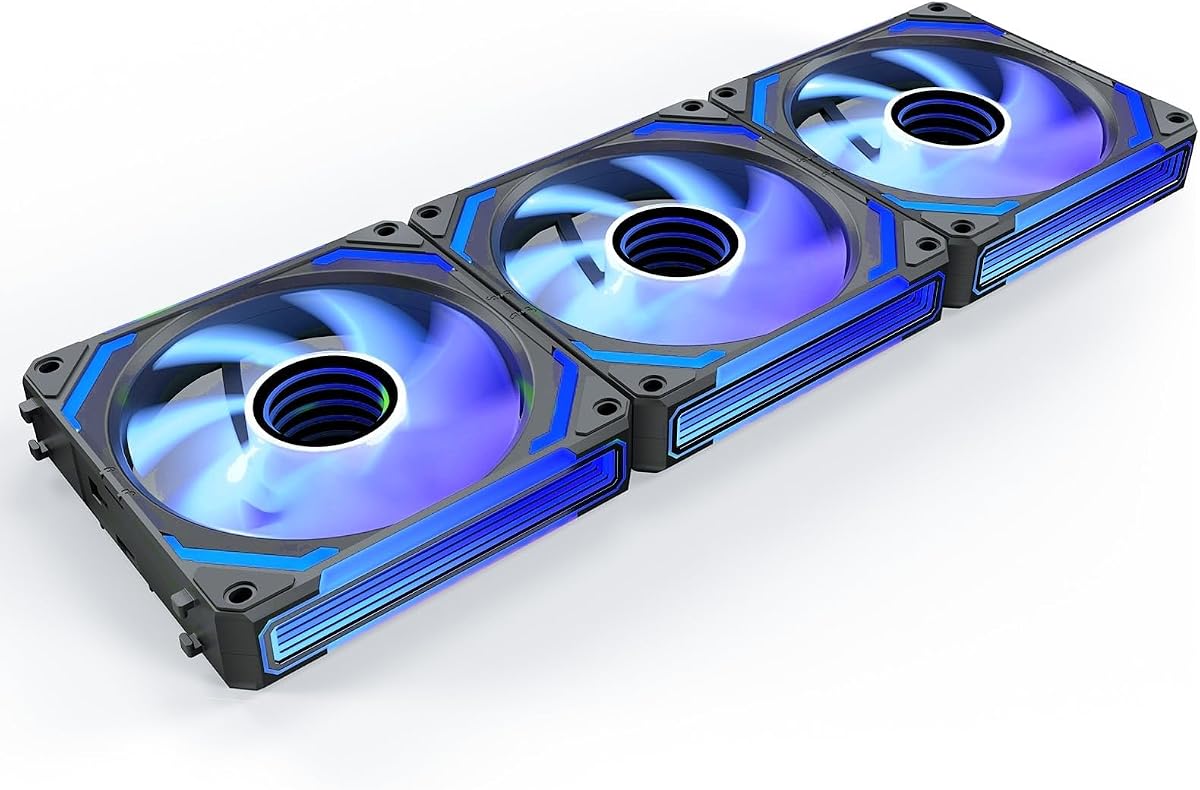
This pack offers unique infinity mirror lighting that creates deep visual layers. It includes reverse fans and a dedicated controller for advanced sync and music modes.
We may earn a commission when you buy through this link, at no additional cost to you.
The hydrodynamic bearing ensures smooth operation even at 2000 RPM. Music sync adds dynamic interactivity with system sounds and gameplay audio.
Higher cost reflects premium lighting features. If aesthetics are a priority, these fans deliver a standout look.
Best for enthusiasts wanting high-end visual flair. It combines performance with advanced lighting technology seamlessly.
The layered lighting effect adds depth, transforming the case into a dynamic visual display.
Built-in pickup captures ambient sounds, changing light patterns dynamically to match audio.
We may earn a commission when you buy through this link, at no additional cost to you.
Selecting the right fans involves balancing airflow, noise, lighting, and connectivity. Consider these factors to ensure optimal performance for your specific build needs.
Airflow (CFM) determines how much air a fan moves, while static pressure helps push it through tight spots like radiators. High CFM suits case fans; high pressure is needed for radiators.
Check CFM and mm-H2O ratings. Aim for high airflow if using as intake, and high pressure for restricted cooling loops.
Noise is measured in dBA. Lower ratings ensure a quiet system during gaming or work. Fans with fluid bearings typically operate quieter than sleeve types.
Look for fans under 26 dBA for quiet builds. Consider bearing type to minimize vibration noise over time.
Most modern fans use 5V 3-pin ARGB. Older systems may require 12V 4-pin RGB adapters. Ensure compatibility with your motherboard headers before purchasing.
Verify your motherboard supports 5V ARGB. Using the wrong connector can damage hardware.
Some fans rely on motherboard software like Aura Sync or iCUE for customization. Others include standalone controllers. Decide based on your preference for centralized control.
If you lack compatible software, consider fans with included controllers for simpler color changes without BIOS access.
Higher RPM means more cooling but also more noise. Look for PWM control to adjust speeds based on temperature for a balance.
Select fans with PWM headers if you need variable speed. Fixed DC fans may run too fast at idle.
Fans that support daisy-chaining allow multiple units to connect via one cable. This reduces clutter inside the case significantly.
Check if the package includes shared connectors. It simplifies installation and improves airflow paths inside the case.
Sleeve, fluid dynamic, and magnetic bearings differ in longevity and noise. Fluid dynamic bearings (FDB) typically offer the best balance for performance.
Choose FDB or Magnetic bearings for long-term reliability. Avoid sleeve types for high-RPM continuous use.
Multi-packs often offer better value per fan than single units. Compare total costs against features like LED count and controller inclusion.
Calculate price per fan. A slightly higher upfront cost may be worth it for better cooling or lighting.
First, connect the fan's PWM cable to a motherboard header and the ARGB cable to a 5V 3-pin header. Ensure polarity is correct to avoid hardware damage or non-functional LEDs.
Second, configure speed and lighting via BIOS or dedicated software like iCUE or Mystic Light. Set PWM curves to adjust speed automatically based on system temperature.
Third, clean fans regularly using compressed air to remove dust buildup. Dust reduces efficiency and increases noise, so schedule maintenance every three to six months.
RGB uses 12V and has a single color mode per fan. ARGB uses 5V and allows individual LED control for complex effects. Ensure your motherboard supports the correct header type.
Not always. If your motherboard has 5V ARGB headers, you can plug in directly. However, a controller helps if you lack headers or need standalone color changes without software.
It depends on power limits. Most chains support 3 to 6 fans safely. Check your motherboard's current rating to avoid overloading the ARGB header with too many fans.
Front and bottom fans usually work best as intake. Ensure filters are clean. If using reverse fans, the rear or side intake can improve visibility while maintaining airflow.
Generally, no. Lighting has little impact on noise. Noise depends more on RPM and bearing quality. Some ARGB fans even include optimized bearings for quieter operation.
It is possible but difficult. Different brands use proprietary software. For best results, stick to one ecosystem or rely on motherboard universal sync features if available.
From Thermalright's value pack to AsiaHorse's premium mirror design, these ten options cover most user needs. The Thermalright TL-C12C-S X5 remains our top pick for overall performance and price balance.
Prioritize airflow and noise levels if you run demanding workloads. For aesthetics, focus on brightness and controller compatibility. Ensure your motherboard supports the ARGB standard before purchasing.
Prices change frequently so check current listings on retailer sites. Verify warranty terms and return policies to protect your investment against defects or shipping issues.