
HP OmniBook 3 14 inch Next Gen AI PC
4.4Editor score
Snapdragon X X1-26-100 Processor
Up to 41 hours battery life
2K OLED Display
AI laptops are reshaping how we work and create by integrating advanced neural processing units directly into the hardware. These devices offer faster localized AI tasks and improved efficiency for modern workflows across various industries.
We evaluated ten leading models based on processor power display quality and battery longevity to find the most capable machines. Each product was analyzed for its specific AI features and overall value proposition for different user needs.
Every selection below highlights unique strengths whether you need premium editing power or all-day portability for remote tasks. Please note that pricing and availability fluctuate so verify current details before making your final purchase decision.
4.4Editor score
4.8Editor score

5.0Editor score
As an Amazon Associate we earn from qualifying purchases.
The following table provides a side-by-side comparison of key specifications and features across all ten selected AI laptops to help you quickly identify the model that fits your requirements.


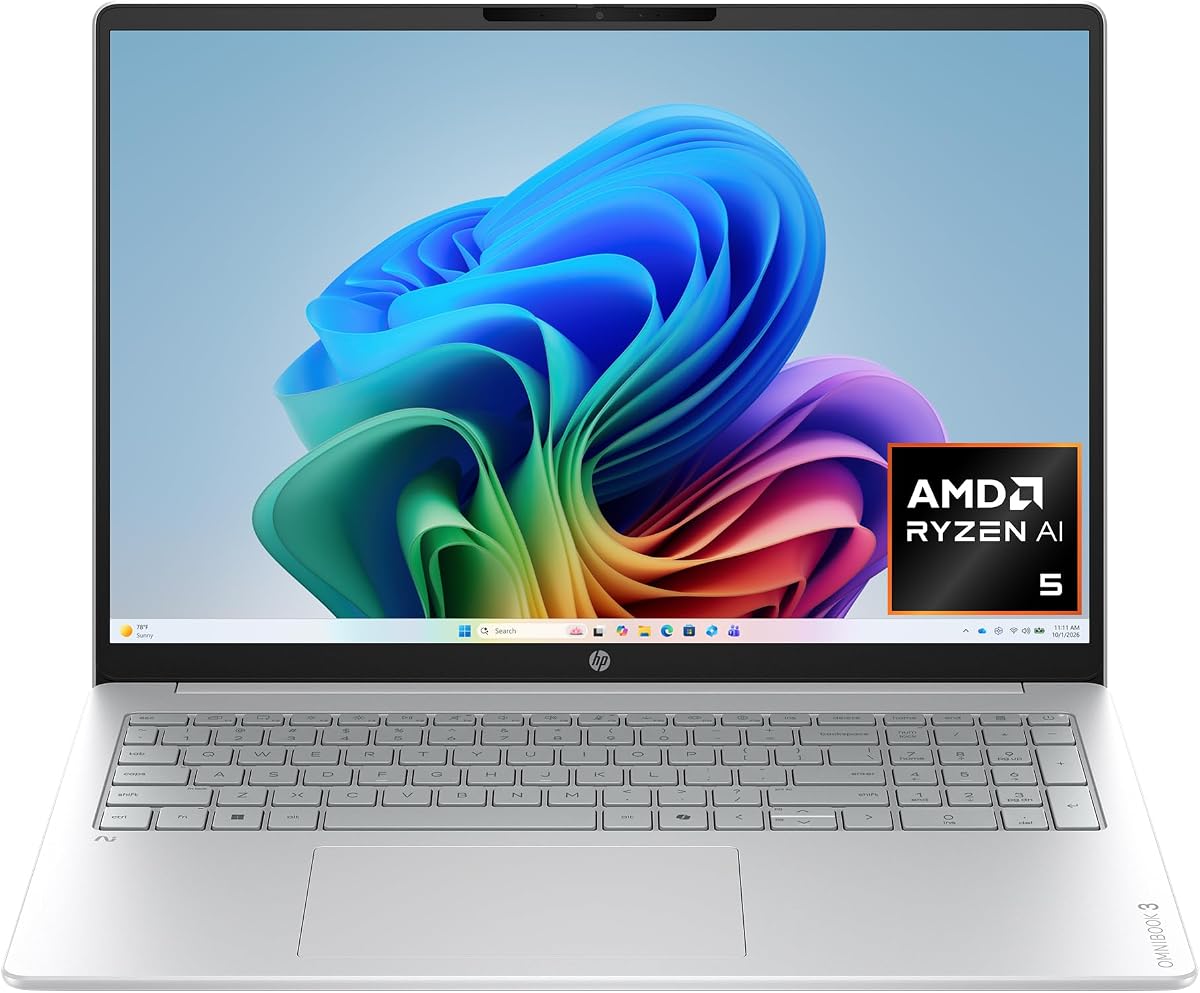
The HP OmniBook 3 stands out as a top contender in the modern AI laptop market with its impressive balance of power and portability. Rated highly for its efficient processing and user-friendly design it delivers seamless performance for both everyday tasks and creative workflows.
We may earn a commission when you buy through this link, at no additional cost to you.
Its AMD Ryzen AI 5 430 processor unlocks powerful AI-driven experiences that enhance creativity and streamline daily activities. The integrated Advanced AI Noise Reduction ensures clearer team conversations by filtering out background noise automatically during calls.
While the storage is solid at 512 GB users who handle massive media libraries might find it slightly limiting compared to higher end models. However the fast speed and efficient storage provided by the PCIe Gen4 NVMe SSD mitigate this concern for most professional use cases.
This device is ideal for professionals and students seeking a reliable machine that offers genuine AI benefits without breaking the budget. We recommend it for anyone prioritizing battery longevity and smart collaboration features in a versatile 16-inch form factor.
The Advanced AI Noise Reduction tracks your voice to filter out distractions ensuring distinctively focused communications during meetings.
With up to 19 hours of battery life and fast charge capabilities this laptop keeps you productive throughout the longest workdays.
We may earn a commission when you buy through this link, at no additional cost to you.
The Lenovo ThinkBook 16 Gen 8 is engineered for business professionals who require robust security and consistent performance for complex spreadsheets and enterprise applications. It combines business-ready performance with professional productivity tools to eliminate lag when running multiple apps simultaneously.
We may earn a commission when you buy through this link, at no additional cost to you.
Its 16-Core Intel Ultra 7 processor handles AI acceleration effortlessly while the fingerprint reader protects sensitive business data with advanced security features. The mobile workstation design provides ample screen real estate for presentations and data analysis on the go.
While it excels in enterprise environments it may lack some of the consumer-focused generative AI features found in other models on this list. This is a deliberate choice to prioritize stability and data protection over experimental AI tools for general users.
Organizations and corporate users should strongly consider this model for its reliable connectivity and professional polish. It remains a top choice for those needing a secure powerful machine that supports critical business workflows without compromise.
Windows 11 Professional and a fingerprint reader ensure sensitive business data remains protected with advanced security features.
WiFi 6E and Bluetooth 5.3 ensure stable connections for video conferencing and file sharing across all devices.
We may earn a commission when you buy through this link, at no additional cost to you.
The HP OmniBook X 14 inch offers a premium experience driven by its stunning 3K OLED touchscreen and powerful Intel Core Ultra 7 processor. This device is designed to revolutionize how you create and work anywhere with incredible battery life and built-in AI capabilities.
We may earn a commission when you buy through this link, at no additional cost to you.
Its OLED display lights each pixel separately to bring deeper blacks and richer contrast than traditional LED screens. The Smart Sense AI-driven optimizer switches modes to adapt temperature and fan noise automatically ensuring your comfort during intense sessions.
Although the premium price point may deter budget-conscious buyers the investment pays off in visual fidelity and efficiency. The combination of 1TB storage and high-bandwidth RAM ensures that heavy project files load quickly without slowing down your creative workflow.
This laptop is perfect for creators who demand color accuracy and visual richness in their daily tools. If you prioritize a top-tier display and long battery life over raw gaming performance this model delivers an unmatched mobile experience.
The 3K OLED touchscreen provides deeper blacks and enhanced color depth for a truly immersive viewing experience.
Smart Sense technology adapts temperature and fan noise automatically to manage warmth and noise levels for your comfort.
We may earn a commission when you buy through this link, at no additional cost to you.
The HP OmniBook 5 16 inch combines powerful Intel Core Ultra 7 AI performance with a large touchscreen display for smooth multitasking and creative workloads. It runs Windows 11 with Copilot AI support to help you work smarter with intelligent suggestions and enhanced security features.
We may earn a commission when you buy through this link, at no additional cost to you.
Equipped with 16GB high-speed RAM and a massive 1TB SSD this laptop ensures ultra-fast boot times and plenty of storage for files and applications. The sleek silver aluminum design feels premium while the backlit keyboard adds convenience for working in low light conditions.
While 16GB RAM is standard for most tasks power users might eventually need more headroom for extremely heavy virtualization or rendering. However for general productivity and media consumption this configuration strikes a reliable balance between performance and value.
We recommend this model for business professionals and home users who want a modern and reliable tool for daily tasks. Its combination of AI support and physical build quality makes it a standout choice for versatile everyday use.
Runs Windows 11 with Copilot AI support helping you work smarter with intelligent suggestions and enhanced security features.
A massive 1TB SSD ensures ultra-fast boot times and plenty of storage for files photos and applications.
We may earn a commission when you buy through this link, at no additional cost to you.
The HP OmniBook 5 16 inch with Snapdragon X processor is designed for on-the-go productivity with essential performance and long-lasting battery life. It delivers up to 34 hours of battery life which is a significant advantage for users who travel frequently without easy access to power.
We may earn a commission when you buy through this link, at no additional cost to you.
Its Snapdragon X X1-26-100 processor ensures you stay efficient and connected all day every day with high-performance graphics capabilities. The integrated Otter.ai assistant helps you record audio write notes and generate meeting summaries to save time and stay organized.
One consideration is that ARM-based Windows devices can have occasional compatibility nuances with specific legacy software though most modern apps run smoothly. This trade-off is acceptable given the substantial gains in portability and battery efficiency that this architecture provides.
Frequent travelers and digital nomads will find this device particularly valuable for its ability to last through long flights or work sessions. The 2K OLED display ensures that productivity is visually pleasant even when working away from a traditional desk setup.
Otter.ai allows you to record audio write notes and generate meeting summaries so that you can save time and stay organized.
Enjoy up to 34 hours of battery life ensuring you stay efficient and connected all day every day.
We may earn a commission when you buy through this link, at no additional cost to you.
The HP OmniBook 3 14 inch offers an affordable entry into the world of next-gen AI PCs with impressive battery life and display quality. It features a 2K OLED display and Snapdragon X processor which deliver essential performance and long-lasting battery life for everyday tasks.
We may earn a commission when you buy through this link, at no additional cost to you.
Users can enjoy up to 41 hours of battery life which is unmatched by many competitors in this price range. The Otter.ai integration helps you record audio and generate meeting summaries so that you can save time and stay organized effectively.
The primary limitation is the 256 GB storage capacity which may require external drives for users with large media libraries. However for most students and professionals who store files in the cloud this capacity is sufficient for daily operations and software needs.
This is the best choice for budget-conscious buyers who still want access to modern AI features and portable design. It provides a reliable and efficient tool for students and remote workers who prioritize longevity over raw storage capacity.
Enjoy up to 41 hours of battery life ensuring you stay efficient and connected all day every day.
Otter.ai helps you record audio write notes and generate meeting summaries so that you can save time and stay organized.
We may earn a commission when you buy through this link, at no additional cost to you.
The Dell 16 Plus stands out with its Intel Core Ultra 9 processor and 32GB of LPDDR5X memory making it a powerhouse for digital content creation and video editing. Its Copilot+ PC with on-Device AI and Wi-Fi 7 connectivity ensure you have the fastest tools available for professional workflows.
We may earn a commission when you buy through this link, at no additional cost to you.
The 16-inch FHD+ touchscreen provides a roomier and more detailed screen for productivity with a 300nits WVA Display. It includes a full suite of ports including Thunderbolt 4 and HDMI 2.1 allowing you to connect multiple 4K displays without external hubs.
The high performance of the Ultra 9 processor may lead to slightly higher energy consumption compared to mid-range chips. However this trade-off is acceptable for users who need maximum processing power for heavy AI and graphic workloads daily.
This machine is recommended for professionals and power users who require the absolute best performance in a modern design. Its combination of speed and connectivity makes it an ideal workstation for complex project development and rendering tasks.
Wi-Fi 7 (2×2/160) Gig+ ensures unprecedented wireless performance with faster speeds and enhanced connectivity for large files.
32GB LPDDR5X memory running at 8533MT/s ensures smooth multitasking and ultra-fast boot times for demanding applications.
We may earn a commission when you buy through this link, at no additional cost to you.
The ASUS Vivobook S16 is a premium choice delivering smooth intelligent performance powered by the AMD Ryzen AI 9 465 processor. With up to 50 NPU TOPS of performance it keeps tasks running seamlessly for writing organizing searching and creative work without lag.
We may earn a commission when you buy through this link, at no additional cost to you.
Its 16-inch WUXGA OLED display delivers deep contrast and vivid detail for a visually rich experience that enhances study and entertainment. The ultra-portable design weighs just 3.75 lbs making it effortless to carry while still providing powerful on-device AI assistance.
The main trade-off is the inclusion of WiFi 6 instead of the newer WiFi 7 standard found in some competitors. However for most users the wireless performance remains excellent and the superior NPU performance compensates for this minor spec difference effectively.
Creators and students looking for a sleek stylish laptop with top-tier visual quality should prioritize this model. The combination of 32GB RAM and OLED display ensures it handles demanding creative workflows with elegance and confidence.
Enjoy stunning visuals on the 16-inch WUXGA OLED display delivering deep contrast vivid detail and smooth immersive viewing.
Copilot+ PC performance delivers fast on-device AI with up to 50 NPU TOPS keeping your tasks running seamlessly.
We may earn a commission when you buy through this link, at no additional cost to you.
The acer Aspire 16 AI redefines the laptop experience with a vibrant 16-inch 120Hz WUXGA touchscreen display and industry-leading Qualcomm AI Engine. The integrated Qualcomm Hexagon NPU delivers transformative experiences for creativity video conferencing security and productivity assistants.
We may earn a commission when you buy through this link, at no additional cost to you.
With an NPU of 45 TOPS and a GPU up to 1.7 TFLOPs it optimizes processing across CPU GPU and NPU workloads efficiently. Discover the power of Recall improved Windows search and Click to Do on Copilot+ PCs to interact with text and images effortlessly.
While some features like Recall are currently in preview they indicate strong future potential for productivity enhancements. Users should be aware that full software maturity may take time though the hardware is fully ready for these advanced AI capabilities.
This model is perfect for users who want a fast responsive screen for gaming and media alongside robust AI hardware. The combination of high refresh rate and advanced connectivity ensures smooth performance for all types of digital interactions.
Discover the power of Recall improved Windows search and Click to Do on Copilot+ PCs to interact with text and images effortlessly.
Enjoy stunning clarity rich 100% sRGB colors and sharp detail on the 16-inch 120Hz WUXGA ultra-high-resolution touchscreen display.
We may earn a commission when you buy through this link, at no additional cost to you.
The HP Omnibook 16 inch is a premium workstation built on the latest 4nm Zen 5 architecture with a 50 TOPS NPU for seamless AI workloads. It features a 2K IPS Touch Display with AMD FreeSync for fluid visuals making it ideal for high-end creative work and immersive navigation.
We may earn a commission when you buy through this link, at no additional cost to you.
With 32GB of DDR5 RAM and a 1TB PCIe Gen4 SSD this laptop handles large project files and media libraries with ease. Windows 11 Pro includes enterprise-grade security and AI-powered Windows Studio Effects for premium collaboration and professional workflows.
The device is relatively robust which can add to its weight compared to thinner ultrabooks on this list. However this adds to its stability and durability making it a reliable choice for stationary workstations that need to handle heavy processing loads daily.
This laptop is a perfect fit for enterprise users who need Pro features and high memory capacity without sacrificing AI speed. The advanced hardware support ensures it remains a future-ready option for elite performance and secure data management.
Windows 11 Pro features enterprise-grade security and AI-powered Windows Studio Effects for premium collaboration and productivity.
Integrated AMD FreeSync ensures fluid visuals on the 2K IPS Touch Display for high-end creative work and immersive navigation.
We may earn a commission when you buy through this link, at no additional cost to you.
Selecting the right AI laptop requires understanding several key factors that impact performance and longevity for your specific needs.
Modern AI laptops rely on specialized Neural Processing Units (NPUs) alongside traditional CPU and GPU cores to handle on-device AI tasks efficiently. Look for models with dedicated AI accelerators like Intel Core Ultra or AMD Ryzen AI processors which allow features like voice processing and image editing to run smoothly without needing cloud connections.
Ensure the processor you choose supports the latest Windows AI features such as Copilot+ to fully utilize the hardware investments made in this generation.
AI applications often require significant memory to store models and run multiple tasks simultaneously without lag. A minimum of 16GB RAM is recommended for standard users but professionals working with large datasets should opt for 32GB or more to ensure future-proofing and stability.
Storage speed is also critical for quick model loading and boot times so prioritize laptops with PCIe Gen4 NVMe SSDs over older SATA options to maintain system responsiveness.
The screen is your primary interface and AI tools often rely on visual clarity for precise editing and content creation. High-resolution OLED or IPS panels with good color accuracy allow you to work confidently while larger screens offer more space for multitasking across different apps.
Consider your portability needs when choosing between 14-inch and 16-inch models to ensure the laptop fits comfortably in your workspace and travel bag.
AI tasks can drain battery life quickly so checking real-world usage ratings is essential for users who work remotely or travel frequently. Many newer Snapdragon based models offer exceptional battery longevity but check performance consistency under load to avoid unexpected shutdowns during meetings.
A lightweight chassis paired with fast charging capabilities ensures you can work for longer periods without being tethered to a power outlet.
Windows 11 is currently the leading platform for AI PC features with deep integration of Copilot and Studio Effects. Ensure your chosen device comes with the specific OS version you need whether it is Home for personal use or Pro for advanced security features.
Compatibility with your existing software stack is vital so verify that essential applications support AI acceleration on your selected hardware before purchasing.
Modern AI workflows often require connecting multiple peripherals such as external monitors and high-speed storage drives. Look for laptops offering a variety of ports including USB-C Thunderbolt 4 and HDMI to avoid needing excessive dongles for daily tasks.
Wireless connectivity like Wi-Fi 7 or 6E ensures stable and fast connections for downloading large AI models and collaborating in real time.
AI devices often process sensitive personal or business data making advanced security features critical for protecting your information. Features like fingerprint readers facial recognition and hardware-based encryption add layers of protection against unauthorized access to your laptop.
Business users should prioritize models that include enterprise management tools to maintain security standards across all connected devices.
AI laptops vary widely in price depending on component quality and design so define your budget based on the specific features you require most. Evaluate whether premium displays or higher capacity storage offer tangible benefits for your daily tasks before paying extra for unnecessary specs.
Focus on finding a balance between current performance and future capabilities to ensure your investment remains relevant for several years of use.
To maximize the benefits of your AI laptop always keep the system software updated to receive the latest feature enhancements and performance patches. Regularly restart your device to clear temporary cache and maintain smooth operation for complex AI tasks.
Protect the hardware by avoiding extreme temperatures and keeping the laptop on stable surfaces during use to prevent overheating. Use a high-quality USB-C charger specifically recommended by the manufacturer to ensure safe and efficient power delivery to the battery.
Clean the screen and keyboard regularly with a microfiber cloth to maintain optical clarity and input accuracy. Store the laptop in a protective case when transporting to guard against scratches and physical impacts that could compromise the internal AI components.
An AI laptop includes specialized hardware components like a Neural Processing Unit (NPU) alongside the standard CPU and GPU. These dedicated chips allow the device to perform AI tasks such as voice recognition and image editing locally on the device without needing an internet connection.
Yes many core AI features on these devices are designed to run locally without requiring an internet connection. This ensures you can still use tools like voice transcription or basic creative assistance even when you are not connected to Wi-Fi.
Yes currently Windows 11 is the primary operating system that supports advanced AI features like Copilot and Studio Effects. While other systems may have AI capabilities Windows 11 offers the deepest integration with the hardware accelerators found in these laptops.
Check the software developer's documentation to see if they have optimized their app for hardware acceleration or specific AI processors. Many popular creative tools now have updates that leverage local NPUs to speed up workflows and reduce processing time significantly.
AI laptops often come with a premium price tag because they include specialized processors and advanced cooling systems. However the long-term value of having local AI capabilities and future-proofing can outweigh the initial cost for professional users.
Battery life varies by model but newer AI laptops generally last longer than traditional devices thanks to efficient power management. You can expect 10 to 15 hours of general use but intensive AI processing may reduce that duration slightly.
Choosing the right AI laptop depends largely on your specific workflow whether you need maximum battery life or premium display quality. Our top picks like the HP OmniBook 3 and ASUS Vivobook S16 offer excellent starting points for most users seeking modern intelligence and performance.
Prioritize components like NPU power and memory capacity to ensure the device can handle future software updates and evolving AI tools. Investing in a machine with robust hardware now will keep your workflow efficient and smooth for years to come.
Remember that technology and pricing evolve rapidly so verify current specifications and availability before making your final decision. Use this guide as a reference to find a device that aligns with your professional needs and budget constraints.