
MATX Case, Micro ATX Case B2Pro
5.0Editor score
Full aluminum construction
Compact Micro ATX size
Integrated carry handle
Discover the top aluminum PC cases for 2026. We compare build quality, airflow, and compatibility to help you choose the perfect chassis for your next build.
Aluminum PC cases offer a unique blend of premium aesthetics and robust durability. Builders seeking a chassis that stands out often turn to these metallic enclosures for their sleek finishes and superior heat dissipation properties.
Our team analyzed ten leading models based on material thickness, thermal performance, and component compatibility. We evaluated airflow designs, modularity options, and overall value to curate this definitive list for discerning enthusiasts.
Each pick highlights specific strengths whether for portability, silent operation, or massive expansion. Note that product availability and pricing fluctuate frequently so always verify current stock before making your final purchase decision today.
5.0Editor score
4.4Editor score

4.6Editor score
This side-by-side comparison highlights the key specifications of our top ten aluminum PC cases. Use this table to quickly assess size, cooling support, and compatibility before diving into the detailed reviews below.




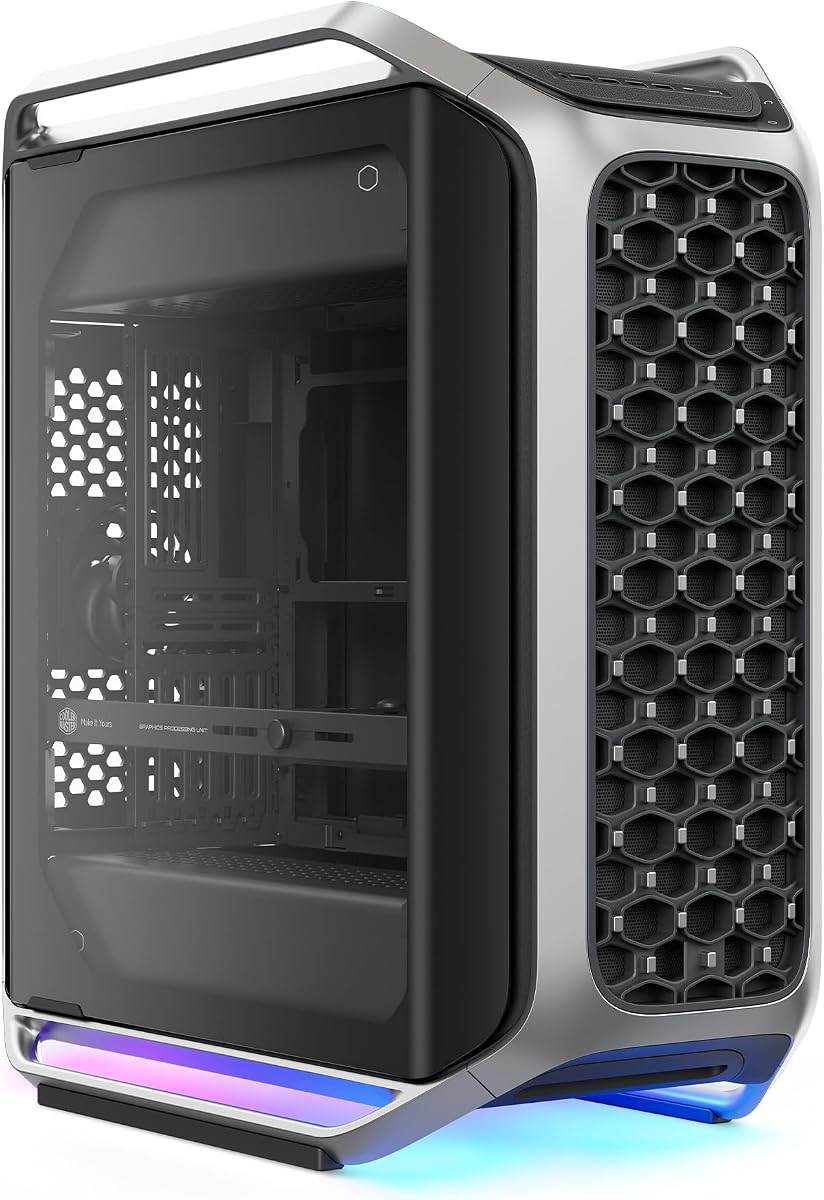
The Cooler Master Cosmos Alpha stands out as a flagship chassis combining iconic design with modern functionality. Its curved aluminum frame and integrated ARGB underglow create a true showcase for high-end components while maintaining excellent build quality.
We may earn a commission when you buy through this link, at no additional cost to you.
This case supports E-ATX motherboards and GPUs up to 400mm making it ideal for massive custom loops. The FreeForm 2.0 rotatable layout allows you to orient components for optimal airflow or visual presentation on your desk.
While the size requires significant desk space the modular sliding motherboard tray simplifies cable management and cooling adjustments. You may find the price steep but the premium materials and innovative features justify the investment for enthusiasts.
Buy this if you want a statement piece that balances industrial durability with cutting-edge design. It is perfect for users prioritizing aesthetics and expandability over compact form factors in a high-performance workstation.
The premium curved aluminum frame preserves the legacy COSMOS look while adding modern glass panels and underglow for a stunning visual experience.
FreeForm 2.0 allows left or right rotation of internal components enabling custom orientations for better airflow or unique desk placements.
We may earn a commission when you buy through this link, at no additional cost to you.
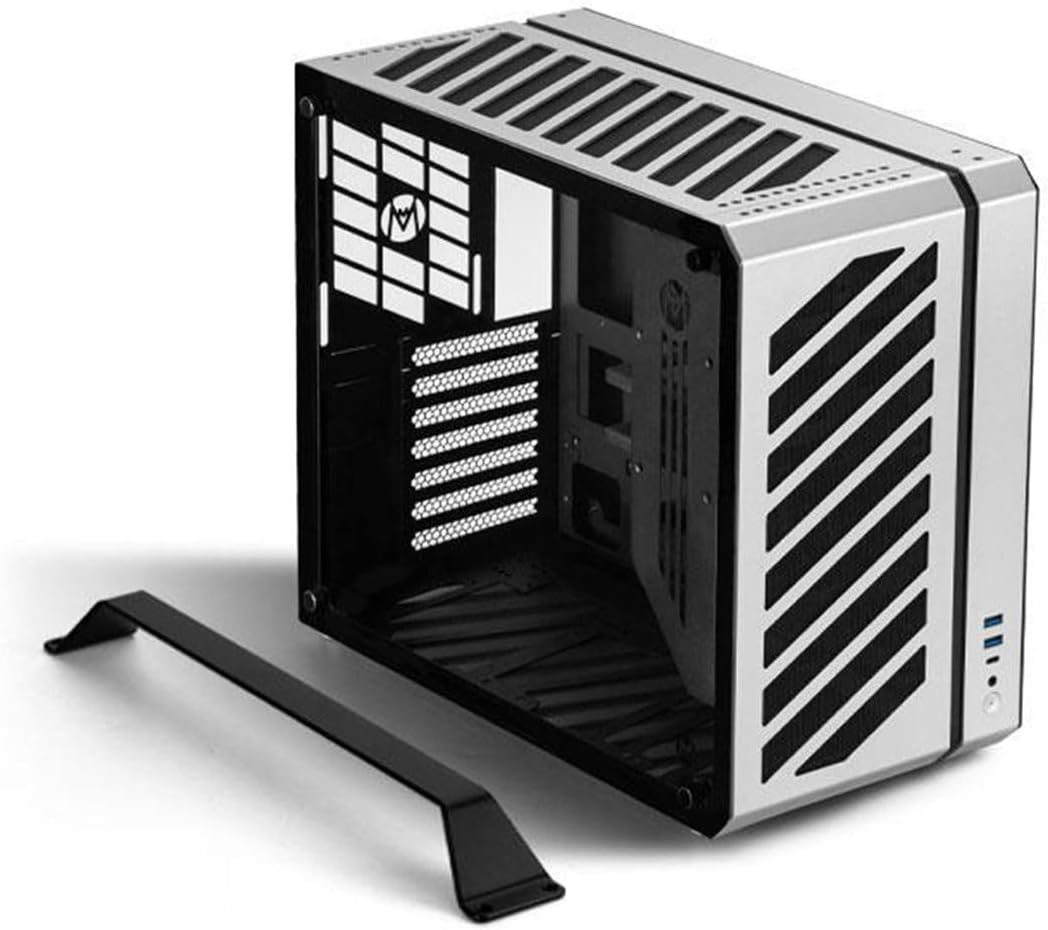
The MATX Case B2Pro offers incredible value with its full aluminum construction at an accessible price. This 17.8L chassis features silver anodized surfaces and solid 3mm thickness ensuring durability without breaking the budget.
We may earn a commission when you buy through this link, at no additional cost to you.
Its unique mesh side panels provide excellent heat dissipation while the foot stand and handle design make it easy to move around. It supports standard MATX boards and SFX power supplies fitting neatly on any desktop.
Although it cannot house E-ATX boards or massive GPUs the 340mm GPU clearance covers most mid-range cards. The 240mm water cooling support ensures you can still achieve quiet thermal performance for gaming workloads.
Choose this case if you need a portable sturdy and affordable aluminum solution for a small office or gaming setup. It is the top pick for builders seeking premium materials without the premium price tag.
Constructed with 3mm aluminum thickness the frame provides robust protection and superior heat conductivity compared to standard steel alternatives.
Exquisite foot stands and a convenient handle allow you to easily move the case for LAN parties or desk reconfiguration.
We may earn a commission when you buy through this link, at no additional cost to you.
This Open Air Frame case uses aerospace magnesium aluminum alloy with an impressive 8mm thickness for superior structural integrity. It supports standard MATX boards and allows installation of massive water cooling radiators up to 360mm.
We may earn a commission when you buy through this link, at no additional cost to you.
The design focuses on unrestricted airflow making it perfect for extreme overclocking scenarios where heat dissipation is critical. Metal support rods and anti-slip pads ensure stability during intense testing sessions or benchmarking runs.
Note that this is a shell requiring assembly according to instructions before use. It offers no dust filtration so it is best suited for clean indoor environments rather than dusty industrial workshops.
Ideal for engineers and overclockers who need direct access to components and maximum cooling potential. This bench provides a professional platform for testing new hardware without the constraints of a traditional chassis.
Made from magnesium aluminum alloy with 8mm thickness this shell resists corrosion and ensures long-term reliability under heavy loads.
Accommodates integrated water-cooling devices with radiators up to 360mm ensuring optimal thermal performance for demanding custom loops.
We may earn a commission when you buy through this link, at no additional cost to you.
The Mechanic Master C34 Ultra saves space without sacrificing performance by supporting standard ATX motherboards and full-size power supplies. Its small form factor is ideal for workstations needing power but limited desk real estate.
We may earn a commission when you buy through this link, at no additional cost to you.
An integrated carry handle makes transporting your PC to LAN events easy. The internal layout simplifies building and supports high-performance liquid cooling radiators up to 240mm along with tall air coolers up to 162mm.
While using an SFX power supply is recommended for cleaner routing the case still accepts standard ATX units. The metal front I/O panel includes modern USB 3.0 and USB Type-C ports for functional connectivity.
Buy this if you need a portable high-performance build in a sleek silver finish. It bridges the gap between compact design and full desktop capability for enthusiasts on the go.
This small form factor design supports standard ATX motherboards and full-size power supplies without compromising on raw performance or expansion options.
A built-in carry handle allows easy transportation to LAN events or between workstations ensuring your rig moves with you securely.
We may earn a commission when you buy through this link, at no additional cost to you.
The MasterFrame 500 Mesh features a FreeForm 2.0 Aluminum Exo-structure enabling flexible configurations for various installation scenarios. It accommodates motherboards from Mini-ITX to E-ATX making it a versatile choice for any build type.
We may earn a commission when you buy through this link, at no additional cost to you.
Pre-installed dual 200mm fans deliver powerful out-of-box cooling right out of the box. The interchangeable panels and open-frame layout offer extensive freedom for personalized builds and modding projects.
You can install up to seven fans and 360mm radiators ensuring strong thermal performance even under heavy loads. However the open design means less dust protection so regular cleaning will be necessary.
This case is perfect for modders who want total control over their build layout and cooling strategy. It prioritizes airflow and flexibility over traditional enclosure security for maximum performance potential.
Compatible with boards from Mini-ITX to E-ATX this case supports a wide range of system builds and component combinations effortlessly.
Dual 200mm pre-installed fans ensure powerful intake airflow delivering effective cooling right out of the box for your components.
We may earn a commission when you buy through this link, at no additional cost to you.
The Mechanic Master C34Pro offers modular flexibility supporting ATX and E-ATX motherboards in a compact 30.6L chassis. It fits massive 420mm GPUs and 360mm radiators making it a powerhouse for gaming rigs.
We may earn a commission when you buy through this link, at no additional cost to you.
Efficient thermal design includes multi-zone fan mounts and dust filters to maintain stable cooling under load. The 2mm aluminum shell combined with a 1mm steel frame ensures robust build quality during transport.
Multiple power supply mounting positions allow you to configure the layout to your preference. While assembly requires care the magnetic screwdriver kit included helps simplify the process significantly.
Buy this if you need a portable case that still accepts flagship components like E-ATX boards. It balances high-performance compatibility with convenience for gamers who move their rigs often.
Supports E-ATX motherboards and fits GPUs up to 420mm ensuring flagship components fit in this compact high-performance gaming chassis easily.
Constructed with a 2mm aluminum shell and 1mm steel frame this case provides durability and protection for your expensive internal components.
We may earn a commission when you buy through this link, at no additional cost to you.
The Fractal Design Define 7 XL provides an expansive internal layout accommodating large motherboards and massive storage arrays. Its brushed aluminum encases a refined front door design offering both aesthetic appeal and functional access.
We may earn a commission when you buy through this link, at no additional cost to you.
Install up to 18 HDDs alongside 5 SSDs in the default storage layout making it perfect for media servers. You can convert to an open layout to create room for custom water loops and large radiators.
Multi-brackets convert any unused fan position to an HDD SSD or pump mount increasing versatility. The reversible dual-handed hinges and magnetic latching add a touch of premium refinement to daily use.
Choose this if you need a silent high-capacity workstation with durable materials. It is the ultimate choice for creators and professionals requiring extensive storage and quiet operation.
Accommodates up to 18 HDDs and 5 SSDs making it ideal for data centers or personal media servers requiring high drive counts.
Brushed aluminum front door and solid steel construction deliver excellent sound dampening for a quiet and professional workstation environment.
We may earn a commission when you buy through this link, at no additional cost to you.
This Lian Li V100-ATX comes with 4x pre-installed PWM-controlled ARGB fans ensuring adaptable airflow right out of the box. Each side panel features a tool-less mounting mechanism for easy and fast access to internal components.
We may earn a commission when you buy through this link, at no additional cost to you.
It supports ATX and back-connect motherboards for cleaner routing and flexible builds. The integrated ARGB strip enhances visibility and aesthetics with synchronization capabilities using standard motherboard software.
You can fit GPUs up to 420mm and top radiators up to 360mm for strong cooling performance. The hydraulic bearing fans operate quietly keeping noise levels low during intense gaming sessions.
Perfect for users wanting a complete package with fans included and easy maintenance. It offers a strong balance of value and build quality for mid-range systems seeking a reliable home.
Includes 4x PWM-controlled 120mm ARGB fans providing adaptable airflow and vibrant lighting without needing additional purchases.
Tool-less mounting mechanisms on side panels streamline your build process allowing quick maintenance and component swaps with ease.
We may earn a commission when you buy through this link, at no additional cost to you.
The O11D EVO RGB allows a completely uninterrupted view by removing the front support pillar without affecting structural integrity. This chassis facilitates large graphics cards with 455.7mm clearance and seven expansion slots.
We may earn a commission when you buy through this link, at no additional cost to you.
Cable management is friendly with Velcro straps and dual-layered clips keeping bundles tidy. The PSU mounting bracket protrudes providing additional space for routing cables cleanly behind the motherboard tray.
Two L-shaped RGB strips sit at the top and bottom of the tempered glass panels for beautiful lighting options. For starters the internal layout can be adjusted offering different ways to set up fans and CPU coolers.
Ideal for those prioritizing visual impact and massive hardware clearance in a single chassis. It remains a top choice for show builds where aesthetics and space for components are paramount.
Removal of the front support pillar provides a completely uninterrupted view of everything inside the chassis for optimal visual impact.
Comes with Velcro straps and dual-layered clips to tidy up both large and small cables together into an easily managed bundle.
We may earn a commission when you buy through this link, at no additional cost to you.
This JOYJOM Mini ITX case holds only 4.3L capacity making it one of the smallest aluminum chassis available. The body uses 2.0mm aluminum alloy which offers good heatsink performance and a durable aesthetic.
We may earn a commission when you buy through this link, at no additional cost to you.
It supports standard ITX motherboards and FLEX power supplies with a PCIe 3.0 riser cable included. The GPU support is limited to compact cards fitting within the 17x10x4cm internal constraints.
Thermal performance relies on the aluminum body acting as a heatsink to dissipate heat effectively. Be aware that CPU coolers must be under 36mm to fit within this tight thermal envelope.
Choose this if you need a desktop replacement with minimal footprint for office or media use. It is a practical solution for those needing a quiet portable PC without full gaming specs.
With only 4.3L capacity this case offers an ultra compact form factor perfect for tight spaces and portable gaming setups.
The body uses 2.0mm aluminum alloy providing good heatsink performance and a robust durable appearance for your internal components.
We may earn a commission when you buy through this link, at no additional cost to you.
Selecting the right aluminum PC case involves balancing thermal performance material thickness and motherboard compatibility. This guide helps you evaluate critical factors to ensure your chassis meets your specific build requirements.
Thickness determines durability and heat conductivity. High-quality cases often use 2mm to 3mm aluminum panels which feel robust and transfer heat away from components effectively.
Look for a case with thicker gauge metal to avoid bending during installation or transport for long-term reliability.
Aluminum dissipates heat faster than steel but you need airflow holes or mesh panels to prevent internal heat trapping. An open-frame design aids this process significantly for overclockers.
Ensure the case supports high airflow fans or radiators to utilize the metal conductive properties properly.
Check if your case supports ATX Micro-ATX or E-ATX boards. Some aluminum cases prioritize compact designs limiting expansion slots and rear I/O options.
Always verify motherboard dimensions before purchase to avoid compatibility issues during assembly.
Graphics cards are getting longer requiring cases with 350mm or 420mm clearance. Some compact aluminum cases may limit this to 300mm.
Measure your GPU length to ensure it fits comfortably within the internal chassis limits.
Aluminum cases often feature anodized or brushed finishes that resist corrosion and scratching. These treatments can enhance the professional look of your setup significantly.
Consider the color and texture to match your desk environment and hardware color scheme.
Some aluminum cases include integrated handles or lightweight designs for easy transport to LAN events. This is a key feature for builders who move their rigs often.
Look for ergonomic features if you plan to move your PC frequently.
Modular panels and adjustable trays allow you to swap between air and liquid cooling configurations easily. This future-proofs your investment against changing hardware needs.
Prioritize cases with flexible layouts if you plan to upgrade cooling or components later.
Aluminum cases generally cost more than standard steel options due to material quality. Weigh the durability benefits against your budget to find the best value.
Invest in a premium model if you need high heat resistance and long-term durability.
Always handle the panels with care to avoid scratching the anodized finish. Clean dust from aluminum surfaces using a soft microfiber cloth to prevent buildup in mesh filters.
Install components following the provided manual to ensure compatibility with mounting points. Use included screws and brackets to maintain structural integrity during assembly.
Check dust filters regularly and clean them to maintain optimal airflow. Aluminum surfaces may tarnish over time so periodic polishing will keep the chassis looking new.
Aluminum offers superior heat conductivity and is lighter than steel. It also provides a more premium look but costs more. If you prioritize thermal dissipation and aesthetics aluminum is often the better choice.
Not all aluminum cases support E-ATX motherboards. Always check the product specifications for motherboard compatibility. Many compact models are limited to ATX or Micro-ATX boards only.
Use a soft microfiber cloth to wipe down exterior surfaces. For mesh panels use compressed air to remove dust. Avoid chemical cleaners that might strip the protective finish.
Yes aluminum dissipates heat better than many metals helping keep temperatures low. Open-frame aluminum models are particularly effective for extreme overclocking scenarios.
Look for at least 2mm thickness for durability. Premium models often use 3mm or more for enhanced rigidity and resistance to bending.
Some models include pre-installed fans while others do not. Check the product details before purchasing to see if cooling fans are included in the box.
Most aluminum cases support water cooling radiators. Ensure the chassis supports your desired radiator size before buying to guarantee fit.
Aluminum materials cost more than standard steel and machining requires more precision. This results in a higher price point but offers better durability and heat performance.
We reviewed ten exceptional aluminum PC cases ranging from compact Mini ITX shells to massive full towers. Each offers unique benefits like thermal efficiency portability or aesthetic appeal for diverse user needs.
Prioritize motherboard and GPU compatibility to ensure your components fit properly. Material thickness and thermal design should also factor into your final decision for long-term reliability.
Prices and availability change often so double-check current listings before purchasing. Choose the model that best fits your performance goals and budget today.