
Arduino Uno REV3
4.8Editor score
ATmega328P Microcontroller
14 Digital I/O Pins
Compatible with Arduino IDE
This guide compares the top Arduino Uno Q boards and kits for AI and robotics projects in October 2026 to help you choose the best model.
The Arduino Uno Q represents a major leap in embedded development by combining traditional microcontroller capabilities with powerful AI processing. This hybrid approach allows makers to build complex projects involving vision, voice, and advanced robotics without needing multiple boards. Understanding the differences between these models is essential for selecting the right tool.
We analyzed ten distinct options ranging from the core board to comprehensive starter kits. Our comparison focuses on processing power, connectivity features, storage capacity, and ecosystem compatibility. We evaluated how each product supports Linux, Python, and Arduino Sketches to ensure they meet modern development demands.
Each pick highlights specific strengths for different user needs from beginners to professional engineers. You will find detailed reviews, pros and cons, and technical specifications for every item. Please note that availability and pricing can change frequently so verify details before purchasing.
4.8Editor score

4.4Editor score
3.7Editor score
This side-by-side comparison highlights the key specifications and capabilities of the top ten Arduino Uno Q related products available today.


The Arduino® UNO™ Q 4GB stands out as the premier hybrid board for advanced developers seeking AI capabilities. It earns a strong 4.4 rating from users who appreciate its dual processing power. This board uniquely combines a Qualcomm Dragonwing QRB2210 microprocessor with a STM32U585 microcontroller to handle both high-level tasks and real-time control. Its standout quality is the ability to run Linux Debian OS alongside the standard Arduino ecosystem. This opens the door to complex machine learning models and multi-process applications previously impossible on a single microcontroller. The integration of Wi-Fi 5 and Bluetooth 5.1 ensures seamless connectivity for IoT deployments.
We may earn a commission when you buy through this link, at no additional cost to you.
Its key strengths lie in its dual-brain hybrid power system. The Qualcomm quad-core Arm Cortex-A53 CPU running at 2.0 GHz provides significant processing muscle for AI vision and voice recognition. Simultaneously the STM32U585 MCU handles low-power real-time operations efficiently. This architecture is ideal for robotics projects requiring object recognition and motion detection. The board comes equipped with 4 GB of LPDDR4 RAM and 32 GB of built-in eMMC storage. This generous memory allows for extensive logs complex AI models and simultaneous high-level processes. Users can code in Python or use the Arduino App Lab to mix containerized AI models with traditional Arduino Sketches. The classic UNO form factor ensures compatibility with existing shields while the Qwiic connector simplifies expansion with Modulino nodes.
Honest trade-offs include a higher price point compared to standard microcontrollers and a more complex setup for beginners. The dual processing system requires familiarity with both embedded systems and Linux environments which may overwhelm casual hobbyists. These drawbacks are acceptable given the board's unique position as a bridge between edge computing and traditional Arduino development. The investment pays off for projects needing substantial computational power on a single board. Users needing simple blink LED projects might find it overkill but serious developers will find it indispensable.
This platform is perfect for engineers and innovators building scalable robotics or IoT systems. It empowers users to create sophisticated applications involving natural language processing and computer vision without external computers. If you require a unified development experience that mixes high-level AI with real-time control this is the definitive choice. The seamless expansion options and robust connectivity make it ready for professional deployment immediately.
The dual processing system allows AI models to run locally on the board ensuring low latency and privacy for smart devices.
With dual-band Wi-Fi 5 and Bluetooth 5.1 this board supports the latest wireless standards for reliable communication in crowded environments.
We may earn a commission when you buy through this link, at no additional cost to you.
This kit offers the core power of the UNO Q with a crucial addition: a dedicated 45W USB-C power supply. It is designed specifically for developers who need stable power for edge AI applications and heavy workloads. While it lacks a specific rating on this listing the hardware specifications match the top-tier performance of the standard UNO Q. The inclusion of a high-wattage power supply ensures the board runs reliably even when connected to multiple high-draw peripherals. This makes it an excellent choice for industrial settings where power stability is critical for continuous operation.
We may earn a commission when you buy through this link, at no additional cost to you.
The high-performance AI board features 4GB RAM which enables advanced multitasking and high-performance computing. The hybrid processing power combines the Qualcomm MPU for AI acceleration with the STM32 MCU for real-time control. This architecture allows for complex robotics and automation tasks without external controllers. The built-in connectivity includes Wi-Fi 5 and Bluetooth 5.1 for robust wireless communication with smart devices. The setup is optimized for Linux which facilitates easy access to modern Python libraries and tools. Developers can focus on logic rather than debugging power issues thanks to the included regulated supply.
A potential downside is the lack of a user rating on this specific bundle which makes it harder to gauge real-world reliability. The power supply adds some bulk to the setup compared to USB-only options though this is often necessary for stable operation. These factors are acceptable for professionals who prioritize system stability over portability. The bundle is ready to deploy immediately upon unboxing which saves valuable setup time.
Engineers building scalable industrial IoT systems will find this kit highly practical. The stable power and high RAM capacity ensure that edge computing tasks run smoothly without interruption. It is particularly suited for automation projects where consistent power delivery is non-negotiable. If you need a ready-to-go solution for heavy AI workloads this kit is a reliable starting point.
The included 45W USB-C supply ensures consistent voltage even when driving external displays or sensors simultaneously.
Pre-configured software environments allow for quick deployment of Python scripts and AI models right out of the box.
We may earn a commission when you buy through this link, at no additional cost to you.
The GeeekPi Starter Kit is a robust solution for developers who need a complete workstation for embedded projects. It holds an impressive 4.6 rating due to its extensive inclusion of accessories and protective casing. This kit includes the official UNO Q with 2GB RAM and 16GB eMMC storage which provides sufficient memory for most AI and embedded tasks. The standout feature is the inclusion of an aluminum case that protects the board from dust and static electricity. This rugged housing ensures efficient heat dissipation which is vital for long-term reliability in active projects.
We may earn a commission when you buy through this link, at no additional cost to you.
Its dual operating modes allow the board to function as a standalone single-board computer when connected to a monitor and keyboard. Alternatively users can connect it to a PC via USB-C for a familiar development environment. This flexibility makes it versatile for both learning and professional prototyping. The USB-C hub with Ethernet significantly expands connectivity options for professional applications requiring wired network access. The included HDMI cable and power supply further reduce the need for additional purchases.
Honest trade-offs include lower RAM and storage compared to the full 4GB version of the UNO Q. There is also no Wi-Fi module included in this specific bundle requiring reliance on the USB hub for wireless connectivity. These are acceptable trade-offs for users who prioritize a complete physical setup over maximum computational power. The aluminum case offers physical protection that the standard board does not provide.
This kit is ideal for educators and professionals needing a complete setup for embedded development. It is perfect for those who want a ready-to-use workstation without hunting for individual components. The high rating reflects its quality and convenience. If you need a rugged and complete system for embedded Linux projects this kit delivers excellent value.
Having all necessary cables and a protective case means you can start building immediately without waiting for extra orders.
Switching between standalone PC mode and USB connected mode allows for flexible development workflows in different settings.
We may earn a commission when you buy through this link, at no additional cost to you.
The Arduino Uno REV3 is the gold standard for microcontroller development and holds a 4.8 rating from users worldwide. It is powered by the reliable ATmega328P microcontroller which runs at 16 MHz. This board is perfect for those who need a simple robust platform for learning electronics and programming. It has been a staple in education and prototyping for years making it the best budget option available. The design ensures easy access to a vast array of libraries and examples which accelerates the learning curve for beginners.
We may earn a commission when you buy through this link, at no additional cost to you.
Its key strengths lie in its extensive connectivity options and compatibility. With 14 digital I/O pins and 6 analog inputs it provides flexible options for sensors and motors. The USB connectivity allows for easy programming and serial communication directly from your computer. It is fully compatible with the Arduino IDE ensuring that thousands of existing projects and code snippets will work seamlessly. This makes it a great choice for both beginners and experienced makers looking for a stable base.
Honest trade-offs include limited processing power and memory compared to modern AI boards. It cannot run complex models or Linux OS which limits its use for advanced projects. These drawbacks are acceptable because the board is not intended for heavy computing tasks. Its simplicity and reliability make it perfect for core tasks like reading sensors and controlling motors.
This board is perfect for students and hobbyists entering the world of electronics. It offers a user-friendly environment to learn the fundamentals without worrying about complex setups. If you need a versatile reliable controller for DIY projects this board is the definitive choice. Its low price and high reliability ensure it will be a long-term companion for your development efforts.
The wide community support means finding solutions to common problems is quick and easy for any user.
Focused on core features it eliminates unnecessary complexity allowing learners to master the basics effectively.
We may earn a commission when you buy through this link, at no additional cost to you.
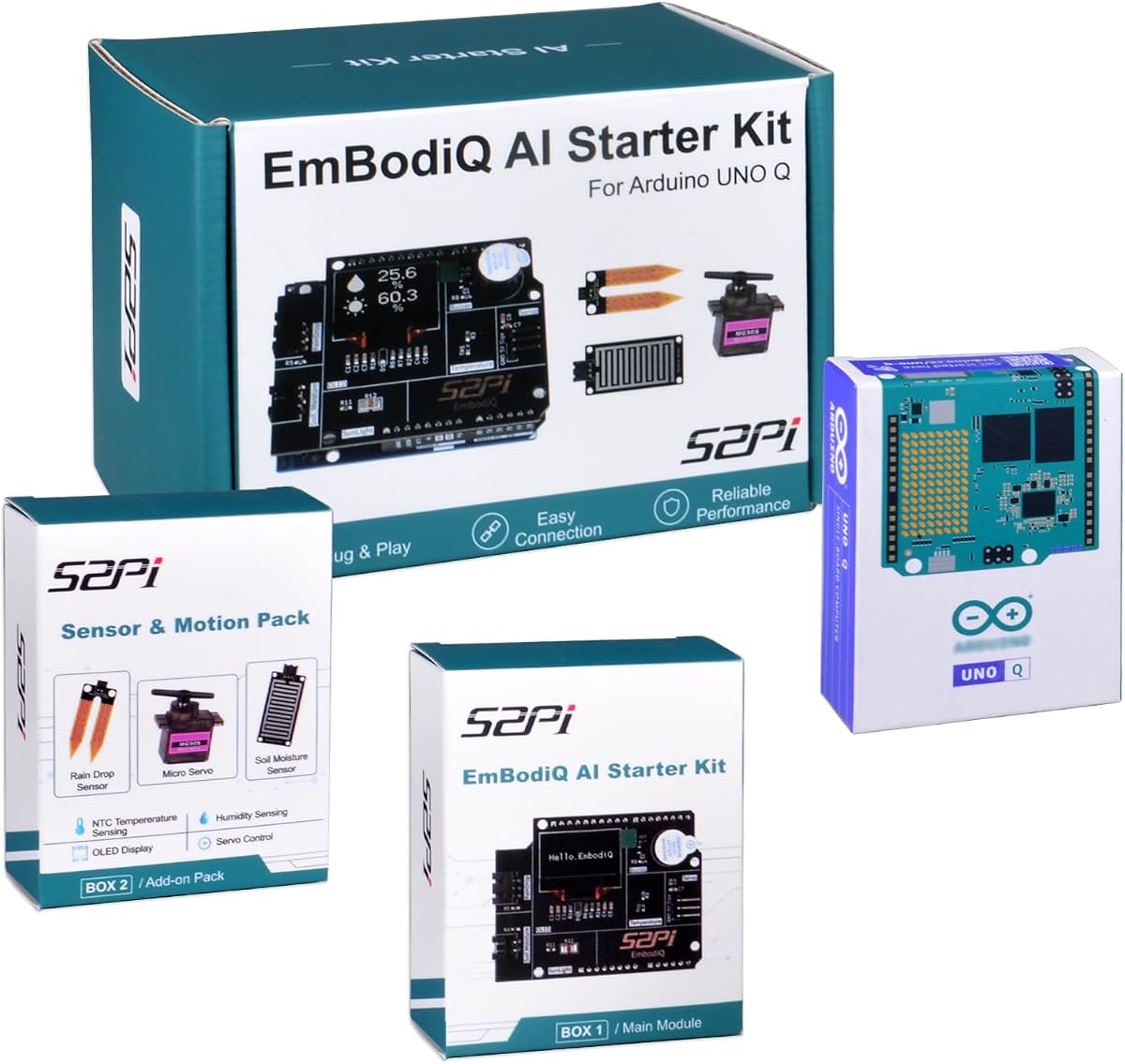
The GeeekPi EmbodiQ AI Starter Kit is a unique bundle that lets you interact with hardware using natural language. It earns a 3.7 rating from users who find the interface innovative despite some connectivity constraints. This kit includes the UNO Q with 4GB RAM and 32GB eMMC storage ensuring enough power for complex tasks. The standout feature is the EmbodiQ AI Agent HAT which enables real-time reasoning and multi-step task execution. You can simply tell the AI what you want to do without writing complex code to control servos or sensors.
We may earn a commission when you buy through this link, at no additional cost to you.
Its key strengths lie in its natural language control capabilities and flexible API support. The kit works with OpenAI OpenRouter and MiniMax allowing you to choose your preferred model via a web interface. This flexibility is rare in embedded systems and allows for rapid prototyping of smart devices. The versatile sensor suite includes soil moisture raindrop sensors and a servo motor making it perfect for gardening or weather stations. The Python plus Arduino co-processing ensures responsive performance during interactions.
Honest trade-offs include a lower user rating which suggests that users find it somewhat reliant on stable internet connections. Some users may also find the natural language interface less precise than code for specific tasks. These drawbacks are acceptable for those prioritizing accessibility and ease of use over raw control. The acrylic mounting bracket helps tidy assembly making it easier to display projects professionally.
This kit is ideal for makers educators and AI enthusiasts who want to demonstrate advanced control interfaces. It is perfect for projects where intuitive interaction is more important than rigid automation. If you want to control sensors and displays just by speaking this is the best option. It represents a forward-thinking approach to human-machine interaction in embedded systems.
Interacting via voice or text makes complex robotics projects accessible to users without extensive programming backgrounds.
The ability to switch AI models easily ensures you are not locked into a single provider for your logic.
We may earn a commission when you buy through this link, at no additional cost to you.
The Arduino UNO R4 WiFi is a strong contender for IoT projects requiring robust wireless connectivity. It holds a 4.7 rating from users who appreciate its dual processing capabilities and modern connectivity features. This board combines the Renesas RA4M1 microcontroller with an ESP32-S3 Wi-Fi Bluetooth chip. This architecture offers flexibility for high-speed communications and real-time data processing. It is designed for advanced IoT and embedded projects that need both control and connectivity in one board.
We may earn a commission when you buy through this link, at no additional cost to you.
Its key strengths lie in its comprehensive wireless connectivity and precision analog features. Wi-Fi and Bluetooth 5.0 ensure robust communication for smart devices and sensor networks. The USB-C port enables efficient power delivery and fast programming compared to older USB types. The 12-bit DAC and integrated OP-AMP provide precise analog signal generation which is ideal for audio or sensor interfacing. The included 12×8 LED matrix allows for dynamic visual feedback directly on the board without external screens.
Honest trade-offs include the lack of a full Linux OS which limits it to microcontroller tasks. It also has less RAM than the UNO Q which means it cannot run complex operating systems. These are acceptable trade-offs for users who need a simpler more focused IoT controller. The CAN bus support adds industrial value by enabling reliable communication in automotive or robotic systems.
This board is perfect for engineers and hobbyists building smart devices and sensor networks. It is ideal for projects requiring precise analog output or integrated display capabilities. If you need a reliable board with built-in wireless features the UNO R4 WiFi is a top choice. Its balance of power and simplicity makes it suitable for a wide range of applications.
Support for CAN bus allows this board to be used in automotive and industrial robotic applications.
The 12-bit DAC ensures high-quality signal generation for audio projects or sensitive control loops.
We may earn a commission when you buy through this link, at no additional cost to you.
The ELEGOO UNO R3 Project Super Starter Kit is a fantastic bundle for beginners learning electronics. It holds a 4.7 rating from users who value its organized approach to learning. This kit includes the UNO R3 controller along with an extensive array of components. You will find LCDs sensors motors resistors and jumper wires all in one package. It is designed to help users turn code into real-world results through guided lessons that range from blinking LEDs to complex motor control.
We may earn a commission when you buy through this link, at no additional cost to you.
Its key strengths lie in its organized structure and comprehensive component variety. The PDF tutorials guide you through 22+ lessons that help you understand digital input and output. It includes an LCD1602 with pre-soldered header and a solderless breadboard so you do not need to solder anything. This makes it ideal for family weekend builds or homeschool units. You can learn the logic of coding and then create your own projects without needing extra parts.
Honest trade-offs include a focus on basic components which means it does not include advanced boards like the UNO Q. It is not designed for AI or heavy processing tasks. These limitations are acceptable because the kit targets education and foundational learning. It provides everything needed to understand the basics without overwhelming the user with unnecessary parts.
This kit is perfect for students teachers and families starting their journey into electronics. It offers a clear setup support path for first-time builders. If you want to learn the logic of Arduino before building complex projects this kit is the best resource. The variety of sensors and modules ensures you can build many different types of interactive projects.
The structured lessons build skills progressively so you are prepared for more complex projects later.
Breadboards and pre-soldered headers reduce frustration and allow you to focus on programming immediately.
We may earn a commission when you buy through this link, at no additional cost to you.
The ELEGOO UNO R3 Microcontroller Board is a reliable standalone option for those who already have accessories. It holds a 4.7 rating from users who appreciate its compatibility and ease of use. This board is powered by the ATmega328P core which is the standard for many basic projects. It includes a USB cable for easy connection to your computer for programming. The clear labelled headers simplify connections to jumper wires shields and modules making wiring intuitive and error-free.
We may earn a commission when you buy through this link, at no additional cost to you.
Its key strengths lie in its classic design and reliable performance. The USB interface supports sketch uploads and serial communication effectively ensuring stable uploads. It is fully compatible with shields and modules allowing you to expand your projects easily. The board can be run from USB or a recommended 7-12V external supply. This flexibility makes it a practical controller for maker desks classrooms and coding labs.
Honest trade-offs include the fact that it is a board-only kit without extra sensors or cables. You will need to purchase your own breadboard and power adapter. These limitations are acceptable for users who just need a replacement or second board. It ensures you have a trusted standard compatible with the Arduino IDE.
This board is perfect for hobbyists who need a reliable controller for custom electronics projects. It is ideal for those who want to expand existing projects without buying a full kit. If you need a standard board that works with the vast Arduino ecosystem this is a great choice. It serves as a foundational element for almost any DIY electronics project.
The included USB cable and clear headers mean you can start programming within minutes of unboxing.
Flexible power input allows you to use batteries or wall adapters depending on your project location.
We may earn a commission when you buy through this link, at no additional cost to you.
The Arduino UNO R3 Board is a foundational development board that provides the essential tools for prototyping. It holds a 4.0 rating from users who value its simplicity and core features. This board features the ATmega328P microcontroller running at 16MHz. It comes equipped with 32KB of flash memory which is standard for most basic to advanced electronics projects. The USB cable included allows for immediate connection to your computer to start coding.
We may earn a commission when you buy through this link, at no additional cost to you.
Its key strengths lie in its extensive I/O options and broad compatibility. It provides 14 digital input/output pins and 6 analog input pins for versatile connectivity. The integrated communication interfaces including UART SPI and I2C allow for seamless connection with peripherals. It works with standard Arduino Shields and is compatible with Arduino UNO R4 Mega and Raspberry Pi. This broad compatibility ensures that code written for one board will often work on another.
Honest trade-offs include a lower rating compared to the full kits which may indicate simpler packaging or fewer included tools. It is a basic board without tutorials or extra components which might be frustrating for absolute beginners. These drawbacks are acceptable for users who just need the hardware. The documentation support ensures you can get up and running quickly.
This board is perfect for developers who need a simple controller for smart home technology. It is ideal for projects requiring standard communication protocols. If you need a reliable standard board without extra accessories this is a solid choice. Its design ensures it remains a viable option for prototyping and educational use.
The USB interface provides a direct path for uploading code and debugging with the IDE easily.
The standard microcontroller means thousands of existing libraries can be used without modification.
We may earn a commission when you buy through this link, at no additional cost to you.
The UNO R3 Board ATmega328P is a versatile development board that offers a user-friendly Arduino environment. It holds a 4.5 rating from users who value its broad compatibility with other systems. This board boasts a high-performance ATmega328P microcontroller with 32KB flash memory and 2KB SRAM. It features 14 digital I/O pins and 6 analog input pins providing ample connectivity options. It is compatible with Raspberry Pi models which allows for hybrid projects using both platforms.
We may earn a commission when you buy through this link, at no additional cost to you.
Its key strengths lie in its robust communication interfaces and reliable performance. It supports UART SPI and I2C allowing you to connect a wide range of devices. This makes it a must-have for creating innovative electronic systems. The open-source design allows for customization and the wide range of community code helps accelerate development. You can easily prototype and realize your electronic dreams with this powerful development board.
Honest trade-offs include the fact that it is a board-only kit without extra sensors or modules. It is not ready for complex automation tasks without additional components. These are acceptable trade-offs for users who prefer to build their own kits. The broad compatibility ensures it works well in mixed environments.
This board is perfect for hobbyists and professionals creating interactive systems. It is ideal for home automation projects requiring standard connectivity. If you need a controller that integrates with Raspberry Pi setups this is an excellent choice. Its reliability and performance make it a strong contender for any development project.
Compatibility with Raspberry Pi enables more powerful setups combining microcontroller logic with a full OS.
PWM support on digital pins ensures precise control of motors and LEDs for dynamic projects.
We may earn a commission when you buy through this link, at no additional cost to you.
Selecting the right board depends on your specific project requirements and experience level. This guide breaks down the key factors to help you decide.
The Arduino UNO Q offers a hybrid approach combining a Qualcomm MPU with an STM32 MCU. This dual-brain architecture allows for complex tasks like AI vision and voice commands while maintaining real-time control. If your project involves machine learning or heavy image processing you need this level of power. Standard microcontrollers like the UNO R3 are sufficient for basic tasks but lack the headroom for modern AI.
For projects requiring object recognition and motion detection the hybrid board is essential.
Memory and storage are critical when running operating systems or complex models. The UNO Q comes with 4GB RAM and 32GB eMMC storage which supports multiple processes and extensive logs. In contrast standard boards have limited flash and RAM meant for small sketches. Ensure you choose a board that matches your data storage needs.
High RAM capacity is vital for running Linux and Python scripts locally.
Connectivity determines how your device interacts with other systems. The UNO Q includes dual-band Wi-Fi 5 and Bluetooth 5.1 for robust wireless communication. Standard boards may rely on add-on shields for wireless features. Look for Ethernet options if you need stable wired connections for industrial use.
Wireless capabilities are crucial for IoT and remote monitoring applications.
Modern development often requires Linux support for tools like Docker or Python. The UNO Q runs Debian OS allowing you to mix containerized AI models with Arduino Sketches. Standard boards run on bare metal firmware without an OS. Check if your workflow requires Linux for libraries and tools.
Linux support enables complex workflows and standard development tools.
Decide between a bare board and a starter kit. Kits include accessories like power supplies cases and cables which save time and ensure compatibility. Bare boards are cheaper but require separate purchases for cables and shields. Beginners often benefit from the comprehensive packages provided by kits.
Kits provide immediate usability with all necessary components included.
The classic UNO form factor ensures compatibility with existing shields and prototypes. Look for boards with Qwiic connectors for easy expansion without soldering. A rugged case can protect the board from static and physical damage. These factors ensure your project remains modular and protected.
Shields compatibility and Qwiic connectors simplify project expansion.
A strong community ensures you have access to libraries and troubleshooting. The Arduino ecosystem is vast and the UNO Q maintains this compatibility while adding new features. Newer boards may have fewer resources initially so check for available documentation. Familiarity with the IDE helps reduce the learning curve.
Rich community support accelerates development through shared code and tutorials.
Power stability is key for high-performance boards running heavy workloads. The UNO Q requires a reliable USB-C supply to handle high-power tasks without crashing. Standard boards are less demanding but still benefit from regulated power. Ensure you have a power adapter that meets the board's wattage needs.
Regulated power supplies prevent instability during complex operations.
Start by connecting your board to a computer using the USB-C cable. Install the latest Arduino IDE to recognize the board. Upload a simple sketch to verify the connection. This ensures your drivers are installed and the board is functioning correctly before starting complex projects.
Keep the board in a protective case when not in use to prevent dust accumulation. Ensure adequate ventilation if running high-power tasks to prevent overheating. Use the provided power supply to maintain stable voltage and avoid power spikes that could damage components.
Regularly update your firmware to access the latest security patches and features. Use the Qwiic connector for adding sensors without soldering to keep wiring tidy. Clean the contacts occasionally with a soft dry cloth to ensure good connectivity with shields and modules.
Yes the Arduino UNO Q maintains the classic UNO form factor which means it is compatible with standard shields. You can plug existing modules directly into the headers just like on previous boards. This compatibility allows you to use legacy hardware without modification.
Yes the UNO Q is the first board to run a Linux OS directly. It uses Debian to support Python and other tools alongside Arduino code. This feature opens up possibilities for complex applications like vision and data logging.
The UNO Q features a hybrid dual-brain architecture with Linux support and more RAM. The UNO R4 WiFi is a high-performance microcontroller with integrated Wi-Fi but no Linux OS. UNO Q is better for AI and heavy computing while R4 is great for standard IoT.
The board is designed to be powered via USB-C. It supports high-power delivery to run complex processes. Ensure you use a quality adapter that meets the wattage requirements for stability.
The UNO Q is more complex due to its Linux features but the Arduino App Lab simplifies entry. Beginners might find standard boards easier to start with. However advanced students will appreciate the added capabilities for learning modern tech.
Yes the UNO Q allows for Python coding via Linux Debian. This capability lets you write complex logic and run machine learning models directly on the board. It bridges the gap between microcontroller and computer development.
Yes it is ideal for robotics because it combines real-time control with AI vision. The hybrid architecture allows for motion detection and navigation decisions. This makes it a perfect choice for autonomous robots.
The UNO Q comes with 32GB of eMMC storage. This allows you to store extensive logs and models locally without needing an SD card. The storage is built-in which ensures durability and speed.
Choosing the best board depends on whether you need simple control or advanced AI. The Arduino UNO Q leads in hybrid power and Linux support for developers. The UNO R3 remains a reliable choice for basic tasks and education.
Prioritize your needs based on processing requirements and connectivity features. If you need natural language interaction consider the EmbodiQ kit. For general IoT the UNO R4 WiFi is a strong contender.
Always check current pricing and availability before purchasing as bundles vary. Selecting the right platform ensures your projects are scalable and efficient.