
ASUS ROG Raikiri II Pro PC Controller
4.0Editor score
8K Sampling Rate
Hot-swappable TMR Joysticks
Full Color Display
Finding the right ASUS ROG Ally Controller can transform your handheld gaming experience into a full console-like session. Whether you prioritize precision, battery life, or advanced customization, the market offers diverse options to suit every play style and budget.
We evaluated ten top models based on connectivity, build quality, button mapping, and sensor accuracy. Each product was assessed for compatibility with PC and Xbox ecosystems, ensuring seamless integration with your existing library of games and accessories.
Every pick highlights key strengths and trade-offs to help you make an informed decision. Please note that specifications and availability may change, so always verify current details before purchasing to ensure you get the latest version.
4.0Editor score

3.9Editor score

4.1Editor score
As an Amazon Associate we earn from qualifying purchases.
This side-by-side comparison outlines the core specifications and unique selling points of each controller. Use this table to quickly identify which model aligns best with your specific gaming needs and device compatibility requirements.


The ASUS ROG Raikiri II Xbox Wireless Gaming Controller stands out as the most versatile option for PC and Xbox players. With a solid 3.9 rating, it delivers reliable performance through low-latency connections and high-quality inputs suitable for intense gaming sessions.
We may earn a commission when you buy through this link, at no additional cost to you.
Its standout feature is the tri-mode connectivity, allowing seamless switching between 2.4GHz RF, Bluetooth, and wired USB-C. The 1000Hz polling rate ensures ultra-low latency, while the anti-drift TMR joysticks provide long-term accuracy compared to traditional Hall Effect sensors.
While the battery life is decent at 30 hours, it falls short of some competitors offering extended playtime. However, the inclusion of a protective case and charging stand adds value, making it a robust choice for travelers and console enthusiasts alike.
This controller is ideal for gamers who prioritize versatility and precision. Whether you are playing on a PC rig or an Xbox, the Raikiri II offers the adaptability needed for a consistent and responsive gaming experience without compromise.
The ability to switch between wired and wireless modes ensures you can always find the best connection for your setup, minimizing input lag during critical moments.
TMR joysticks are designed to resist drift over time, ensuring that your aim remains precise throughout the lifespan of the controller without needing frequent maintenance.
We may earn a commission when you buy through this link, at no additional cost to you.
The ASUS ROG Raikiri II Pro PC Controller is designed for serious gamers who demand the highest level of performance. With a 4.0 rating, it delivers competition-grade responsiveness and customization that caters to professional play styles.
We may earn a commission when you buy through this link, at no additional cost to you.
Its 8K sampling rate provides a level of control responsiveness that is unmatched in the current market. The hot-swappable TMR joysticks allow you to replace worn parts quickly, while the full color display enables instant profile management without accessing software.
The main drawback is its price, which places it in the premium tier compared to standard controllers. However, the extended 79-hour battery life and advanced customization options justify the investment for users who game for many hours daily.
If you are a competitive player or a power user, this controller offers the tools you need to optimize your setup. The ability to fine-tune every aspect of the input ensures that your hardware never holds you back from achieving peak performance.
The 8K sampling rate ensures that every movement is registered instantly, giving you a distinct advantage in fast-paced competitive shooters and action games.
The full color display allows you to switch profiles on the fly, meaning you can adapt your control scheme to different games without stopping your session.
We may earn a commission when you buy through this link, at no additional cost to you.
The ASUS ROG Tessen Mobile Gaming Controller brings console-quality controls to mobile gaming at a budget-friendly price. Rated 4.1, it is specifically designed for Android users who want a tactile, responsive experience on their smartphones.
We may earn a commission when you buy through this link, at no additional cost to you.
Its foldable design makes it highly portable, fitting easily into a pocket without bulk. The 500Hz polling rate over wired USB-C ensures zero latency, while the mechanical switches on face buttons provide crisp feedback that is often missing on mobile setups.
The primary limitation is that it does not support wireless connections, requiring a wired setup. However, this ensures consistent performance and allows for pass-through charging so your phone battery never runs out during long sessions.
For Android gamers looking to elevate their mobile experience without spending a fortune, the Tessen is an excellent choice. It proves that you do not need to compromise on quality even when working with a smaller form factor.
The foldable design ensures you can carry it anywhere, making it perfect for travel or commuting while still delivering high-quality gaming performance.
By using a wired connection, the controller eliminates potential Bluetooth interference, ensuring that your input is registered instantly and accurately every time.
We may earn a commission when you buy through this link, at no additional cost to you.
The ASUS ROG Raikiri Pro OLED display offers a unique blend of visual flair and functional customization for PC and Xbox gamers. With a 3.9 rating, it is a strong contender for those who value detailed control over their gaming environment.
We may earn a commission when you buy through this link, at no additional cost to you.
The built-in OLED display is a standout feature that allows for animations and profile switching. The selectable step triggers and adjustable joystick sensitivity provide precise control, while the ESS DAC ensures high-quality audio directly through the controller.
While the extensive customization is a major plus, it can be overwhelming for casual users. However, for those who enjoy tinkering with settings, the Armoury Crate software unlocks a world of personalization that enhances the overall experience.
This controller is perfect for players who want to tailor every aspect of their setup. The combination of OLED visuals, high-fidelity audio, and granular control options makes it a versatile tool for a variety of gaming genres.
The OLED display adds a layer of interaction to your controller, letting you see status indicators and switch profiles without looking away from your game.
The ESS DAC ensures that your game audio is crisp and immersive, providing a competitive edge by allowing you to hear subtle sound cues clearly.
We may earn a commission when you buy through this link, at no additional cost to you.
The ASUS ROG Raikiri Pro Gaming Controller continues the legacy of premium customization with its built-in OLED display. While it has a 3.4 rating, it remains a solid choice for users who prioritize specific features like long battery life and OLED visuals.
We may earn a commission when you buy through this link, at no additional cost to you.
The OLED display allows for customizable animations and quick profile switching, which adds a layer of personalization. The 48-hour battery life ensures that you can play for days without needing to recharge, making it great for long trips.
Some users may find the extensive features complex to set up initially, and the lower rating suggests mixed experiences. However, if you need the specific combination of OLED display and long battery, it is a reliable option worth considering.
For gamers who value visual customization and endurance, this controller delivers. The ability to manage settings on the fly and the promise of multi-day usage make it a practical choice for dedicated users who need reliability.
The OLED display allows you to create a unique look for your controller, making it a personalized accessory that reflects your gaming style and preferences.
With 48 hours of battery life, you can focus on your game without constantly worrying about the battery level, ensuring uninterrupted sessions.
We may earn a commission when you buy through this link, at no additional cost to you.
The ASUS ROG Raikiri Pro Gaming Controller Renewed offers a cost-effective way to access premium features. Although it lacks a numeric rating due to its renewed status, it undergoes rigorous testing to ensure it looks and works like new.
We may earn a commission when you buy through this link, at no additional cost to you.
The 1.3 OLED display and 48-hour battery life are preserved from the original model, providing the same level of customization and endurance. This makes it an attractive option for those who want high-end features without the full retail price.
As a renewed product, there may be minor cosmetic signs of use, but the warranty provides peace of mind. It is a smart choice for budget-conscious gamers who still demand top-tier performance and specific features like OLED visibility.
If you are looking to save money without sacrificing performance, this renewed model is a strong contender. It allows you to experience the benefits of the Raikiri Pro line with added financial security through the warranty coverage.
Buying renewed allows you to access high-end features like OLED displays and advanced triggers at a significantly lower price point than new units.
The certification process ensures that all features function correctly, giving you confidence that your investment will perform as expected during gameplay.
We may earn a commission when you buy through this link, at no additional cost to you.
The ASUS ROG Xbox Ally is a handheld console that brings the full Xbox experience to the palm of your hand. With a 4.3 rating, it offers a seamless integration of Xbox game bar and Windows power for on-the-go gaming.
We may earn a commission when you buy through this link, at no additional cost to you.
Its 7-inch 120Hz display ensures smooth visuals, while the AMD Ryzen Z2 A processor handles demanding games efficiently. The 16GB RAM and 512GB SSD provide ample storage and memory for a large library of titles without lag.
While the device itself is powerful, it does not include a separate controller for all setups, though it supports multiple external ones. This makes it ideal for those who already own controllers or want to purchase dedicated ones for specific preferences.
This handheld is perfect for gamers who want a console-like experience outside the living room. The included Game Pass Premium and robust hardware make it a complete package for serious players ready to invest in portable gaming.
The 120Hz display with FreeSync ensures that every frame is rendered smoothly, reducing tearing and enhancing the visual experience during fast-paced action.
Powered by Windows 11 and high-end specs, this device allows you to play PC games natively, expanding your library beyond what typical handhelds offer.
We may earn a commission when you buy through this link, at no additional cost to you.
The ASUS ROG Raikiri II Xbox Wireless Gaming Controller Renewed provides an accessible entry point for TMR joystick technology. While it lacks a current rating due to being renewed, it promises to work like new with minimal signs of wear.
We may earn a commission when you buy through this link, at no additional cost to you.
Features like the travel case and web-based configuration are retained from the original model, ensuring convenience and customization. The TMR joysticks offer superior accuracy, and the anti-slip grip ensures comfort during extended play sessions.
Buying a renewed unit can be a gamble regarding cosmetic condition, but the functionality is guaranteed. This is a smart choice for those who want specific features like web-based configuration without paying the full price for a new device.
For budget-focused gamers, this renewed controller offers significant value. It allows you to enjoy high-end features and a durable design while keeping costs down, making it a practical option for the savvy buyer.
Web-based configuration simplifies the setup process, allowing you to customize your controller without installing additional software on your PC.
The included travel case protects your controller during transport, ensuring that your investment remains safe and ready for use on the go.
We may earn a commission when you buy through this link, at no additional cost to you.
The CRKD NEO S is a versatile controller that combines high-performance features with a collectible design. With a 4.3 rating, it is an excellent choice for those who want Hall Effect sticks and unique aesthetics for their ROG Ally or other devices.
We may earn a commission when you buy through this link, at no additional cost to you.
Its Hall Effect thumbsticks and triggers ensure precise control without drift, while the re-mappable back buttons allow for complex commands. The collectible design adds a personal touch, making it stand out among standard controllers.
The swappable stick tops provide further customization, allowing you to change the look and feel over time. While it is not an ASUS branded product, its compatibility and performance make it a worthy addition to any gaming setup.
If you value both performance and style, this controller is a great option. The combination of Hall Effect technology and collectible appeal ensures that you get a reliable tool that also reflects your personal gaming identity.
The retro gold design and collectible nature make this controller a standout accessory that adds character to your gaming setup.
Hall Effect sensors ensure that your inputs are always accurate, providing a level of precision that is essential for competitive gaming.
We may earn a commission when you buy through this link, at no additional cost to you.
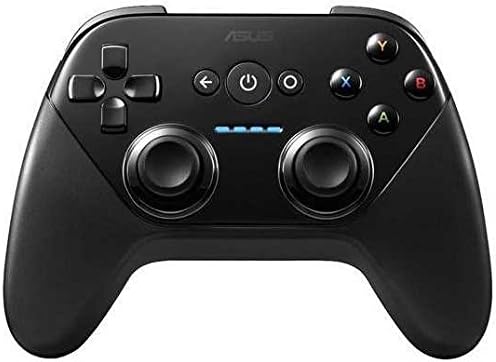
The ASUS TV500BG Gamepad Wireless Gaming Controller is a classic option for Android and Windows users. With a 4.2 rating, it is designed for accurate control in Android TV and PC games, offering simplicity and reliability.
We may earn a commission when you buy through this link, at no additional cost to you.
It supports Google Play Games, allowing you to track progress and earn achievements across multiple devices. The wireless connectivity makes it easy to use with an HDTV, and the controller is engineered to work with Android Lollipop and later.
While it lacks modern advanced features like OLED displays or high polling rates, it remains a solid choice for casual gaming. Its primary strength is its broad compatibility and ease of use for those who prefer a straightforward setup.
For users looking for a basic wireless controller for TV or PC gaming, this model delivers. It proves that simple, reliable hardware can still be effective for enjoying your favorite games without complexity or high costs.
This controller brings stunning visuals to life on your HDTV, making it perfect for couch gaming sessions where comfort and reach are key.
By supporting Google Play Games, you can track your achievements across your phone, tablet, and TV, ensuring your gaming progress is always saved.
We may earn a commission when you buy through this link, at no additional cost to you.
Selecting the right controller requires understanding your specific needs and platform preferences. This guide outlines the essential factors to consider when evaluating features and build quality.
Modern controllers offer tri-mode connectivity including wired USB-C, Bluetooth, and 2.4GHz RF. Wired USB-C provides zero latency and pass-through charging for mobile gaming. 2.4GHz RF offers the lowest wireless latency for PC. Bluetooth allows for easy pairing with mobile devices or consoles. Consider which modes you need most to ensure your controller fits your hardware ecosystem.
Look for a model that supports at least two modes if you game on multiple devices. Ensure the wireless technology used is optimized for low latency to prevent input lag during competitive play.
Stick drift is a common issue with traditional potentiometers. Magnetic Hall Effect or TMR joysticks use magnets to detect position, eliminating physical contact and wear. This significantly improves longevity and accuracy. Models with hot-swappable sticks are even better as they allow you to replace worn modules without buying a whole new controller.
Always check if the controller uses Hall Effect or TMR sticks. If possible, choose one with hot-swappable modules for easier maintenance and repair over the lifespan of the device.
Triggers can be linear for driving games or stepped for shooters requiring rapid firing. Mechanical buttons provide a tactile click that enhances feedback. Rear paddles or buttons allow for complex commands without lifting your thumb from the sticks. Ensure the buttons and triggers feel comfortable and responsive to your touch.
Prioritize a model that matches your game genre. Shooters need stepped triggers while racers need long linear travel. Mechanical switches ensure you know exactly when an input has registered.
Wireless controllers require battery power. Look for models with 40+ hours of life to minimize charging interruptions. Built-in batteries are rechargeable via USB-C. Pass-through charging allows you to play while plugged in without battery anxiety. Consider how long you typically game to estimate if the battery capacity suits you.
Aim for at least 30 hours of battery life if you game wirelessly. For mobile gaming, ensure pass-through charging is supported so you can stay powered up during long sessions.
Software like Armoury Crate allows you to remap buttons, adjust sensitivity, and save profiles directly to the controller. OLED displays on some models let you switch profiles without software. Look for intuitive interfaces that make it easy to tweak settings to your liking.
Ensure the software is user-friendly and supports profile storage on the device. This makes switching between games faster and ensures your settings are always ready.
The controller must fit your hand comfortably. Contoured grips prevent fatigue during long sessions. Textured surfaces provide a non-slip grip. Adjustable thumbsticks allow for different grip sizes. If you play for hours, comfort is as important as performance.
Test the controller if possible or look for ergonomic descriptions. Contoured grips and textured handles are essential for preventing hand fatigue and maintaining control.
Ensure the controller works with your specific system. Some models are optimized for PC and Xbox, while others are for Android only. Check certification to avoid driver issues. Multi-platform compatibility is valuable if you switch between devices frequently.
Verify the supported platforms in the product description. If you play on ROG Ally, ensure it is explicitly listed as supported for the best experience.
Look for durable materials like aluminum bridges and reinforced joints. Accessories like travel cases and charging stands add value and protection. A sturdy build ensures the controller withstands daily use. Warranty and certification also indicate a manufacturer's confidence in the product.
Check for reviews or features that mention reinforced construction. Accessories like protective cases show a manufacturer is thinking about the long-term care of the device.
To set up your controller, connect it via USB-C, 2.4GHz, or Bluetooth. For PC and Xbox, use the Armoury Crate software to customize buttons and triggers. Follow the on-screen prompts to map keys to your liking and ensure your firmware is up to date.
Maintain your controller by cleaning the sticks and buttons with a soft brush. Avoid exposing it to extreme heat or humidity. If you have TMR sticks, ensure they are handled with care during hot-swapping to avoid damage. Store it in a dry place when not in use.
Update your firmware regularly for performance improvements. Keep the charging port clean to ensure fast charging. If you experience connectivity issues, reset the controller by holding the pairing button. Proper care will extend the life and accuracy of your controller significantly.
The ASUS ROG Raikiri II Pro PC Controller is the best for competitive gaming due to its 8K sampling rate and hot-swappable joysticks. It offers the lowest latency and most precise inputs for competitive play. The standard Raikiri II also performs well with a 1000Hz polling rate for most users.
Most models specifically designed for ROG Ally will work seamlessly. The Raikiri series is optimized for it. However, models like the Tessen are designed for Android phones only. Always check the compatibility list before purchasing to ensure it supports your specific device.
OLED displays on controllers allow you to view status indicators, switch profiles, and display custom animations directly on the device. This eliminates the need to access software on your PC or phone to make quick changes. It adds convenience and a personalized look to your controller.
Yes, many controllers in this list support multiple platforms including PC and Xbox. However, some models like the Tessen are Android-only. The Raikiri Pro series is versatile for PC and Xbox, while the TV500BG is focused on Android TV. Check the product specifications for details.
Stick drift is minimized by using Hall Effect or TMR joysticks found in most ROG controllers. These magnetic sensors avoid physical contact that causes wear. Choosing models with hot-swappable sticks also allows you to replace sticks if they eventually degrade without buying a new unit.
Most modern ROG controllers are designed for customization via software like Armoury Crate. They allow remapping of buttons and triggers and save settings to the device. Some models even offer on-device profile switching with OLED displays for quick changes without software.
We reviewed ten top options ranging from the versatile Raikiri II to the specialized Tessen and TV500BG. Each model offers distinct features like OLED displays or TMR joysticks to suit different needs. Whether you prioritize customization or durability there is a match here.
Prioritize connectivity and joystick technology based on your gaming style. Competitive players should choose models with high sampling rates while casual users may prefer ergonomic designs. Ensure the controller supports your platform and desired customization level.
Always check current prices and availability before purchasing to get the best deal. Specifications and stock change frequently so verify the details on the official page. Enjoy your enhanced gaming experience with the perfect controller for your setup.