
TONGVEO 3-in-1 4K Webcam
4.0Editor score
Built in microphone and speaker
Voice tracking technology
Privacy cover included
This guide compares the top auto tracking conference camera systems for video meetings featuring AI framing, optical zoom, and professional audio performance.
Modern hybrid work demands high quality video solutions that keep every participant in focus. Auto tracking conference cameras use artificial intelligence to follow speakers automatically ensuring clear visibility during meetings.
We evaluated ten top rated systems based on resolution zoom capabilities audio quality and ease of setup. Our analysis covers options from compact webcams to professional PTZ units for diverse room sizes.
Each pick highlights unique strengths like gesture control or multi output streaming. Prices and availability change frequently so check current listings before buying to secure the best deal for your needs.
4.0Editor score

4.8Editor score

4.6Editor score
The following table provides a side by side overview of key specifications for each model. Use this comparison to quickly identify which camera fits your specific room size and connectivity needs.




The TONGVEO 4K Conference Room Camera System stands out as the top choice for organizations needing a complete video conferencing solution. It earned a strong 4.8 rating from users who appreciate its reliability and professional performance in diverse settings.
We may earn a commission when you buy through this link, at no additional cost to you.
This system pairs a powerful 4K PTZ camera with a dedicated wireless Bluetooth speakerphone. The camera uses advanced AI algorithms to detect human faces and track speakers automatically with precision. The 3X optical zoom and 93 degree wide angle lens capture clear details without losing image quality during movement.
While the tracking performance is excellent, the speakerphone battery can last six to eight hours which might need recharging for all day events. Some users report setup requires ensuring proper HDMI or USB connections to maximize 4K output capabilities.
It is ideal for small to medium conference rooms or churches needing hands free operation. The universal compatibility with Zoom and Teams makes it a versatile choice for hybrid work environments.
The included wireless speakerphone features omnidirectional microphones that pick up sound from up to 16.4 feet ensuring remote attendees hear everyone clearly.
Unlike basic models this system uses improved algorithms that maintain perfect framing even when subjects move quickly across the room.
We may earn a commission when you buy through this link, at no additional cost to you.
Designed specifically for small conference rooms this 4K AI-Powered Webcam ensures every participant is clearly visible. With a 4.1 rating it offers a reliable plug and play experience for teams needing quick setup.
We may earn a commission when you buy through this link, at no additional cost to you.
The AI auto framing feature detects and frames all attendees automatically making it ideal for team meetings. The 120 degree wide angle lens captures the entire room without repositioning. Dual AI noise canceling microphones reduce background noise for clear voice capture.
The audio range is limited to about 5 meters which might not suit larger tables. Zoom users appreciate the certified compatibility but some find the lack of optical zoom limits flexibility for detailed viewing.
This webcam is perfect for tight office spaces where simplicity and privacy are priorities. The physical lens cover provides security in shared environments.
Being Zoom certified ensures seamless integration with the platform offering optimized settings for a smoother user experience.
A physical lens cover adds a layer of security preventing accidental exposure in sensitive meetings.
We may earn a commission when you buy through this link, at no additional cost to you.
This system brings professional video conferencing to any meeting space with a focus on smooth motion. Rated 4.4 it offers a balanced combination of HD clarity and fluid frame rates.
We may earn a commission when you buy through this link, at no additional cost to you.
The camera supports 1080p at 60 frames per second providing smoother video than standard 30fps models. It includes a full duplex microphone array with echo cancellation for clear sound. The 114 degree wide field of view covers more of the room effectively.
While 1080p is lower than 4K it delivers sharp visuals for most calls. Users note that the wired camera requires careful cable management compared to all wireless setups.
It is suitable for small to medium rooms needing high motion clarity like training sessions. The Bluetooth speakerphone supports flexible connectivity.
The 60fps output ensures that fast movements during presentations appear smooth without stuttering.
Simultaneous HDMI and USB outputs allow connecting to displays and computers at the same time.
We may earn a commission when you buy through this link, at no additional cost to you.
This model offers unique gesture control features that make operating the camera engaging and hands free. With a 4.3 rating it appeals to users who value interactive functionality in their setups.
We may earn a commission when you buy through this link, at no additional cost to you.
Six specific gestures allow you to toggle AI tracking zoom in or out without touching the device. The 4K PTZ camera provides high resolution visuals with a 120 degree wide angle. It supports preset positions via remote control for quick scene changes.
The digital zoom is convenient but can reduce image sharpness compared to optical options. Users must keep the remote control charged for the full gesture experience.
It is great for dynamic meeting rooms or presentations where quick adjustments are needed. The included speakerphone ensures audio is handled separately and clearly.
Simple hand signals like an OK sign or V sign instantly change tracking modes adding interactivity to meetings.
The remote allows setting up to nine preset positions for recurring meeting layouts.
We may earn a commission when you buy through this link, at no additional cost to you.
This system is built for large spaces like churches where capturing distant speakers is crucial. It holds a 4.4 rating for its ability to deliver clear close-ups from the back of a room.
We may earn a commission when you buy through this link, at no additional cost to you.
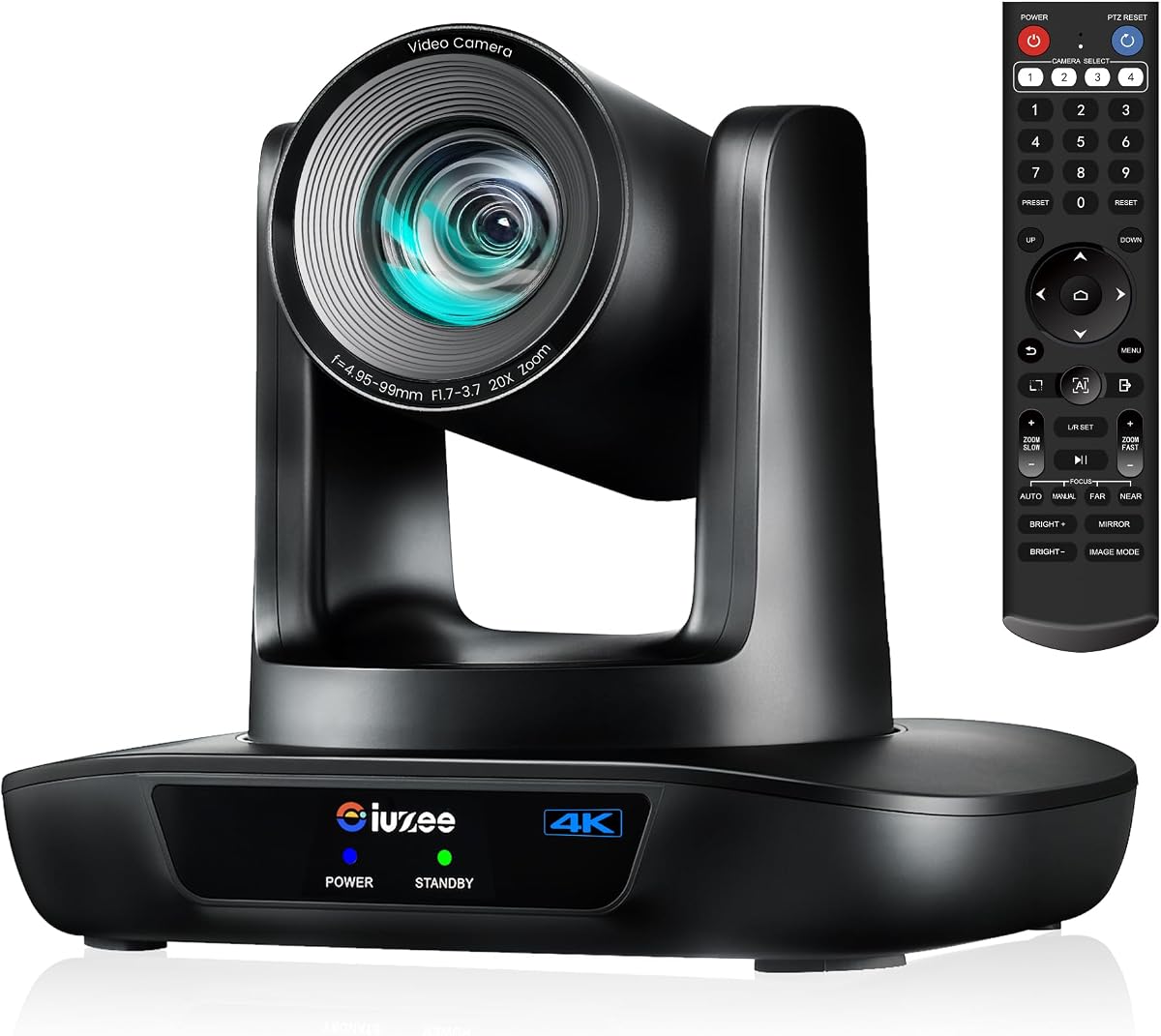
The 20X optical zoom allows you to capture presenters without losing image quality. It supports PoE power which simplifies installation by reducing cable clutter. The included speakerphone provides full duplex audio with noise reduction.
Setting up PoE requires a compatible switch which may be an extra cost. The high zoom range is excellent but requires stable mounting to avoid shake.
It is ideal for worship services or large conference halls needing professional broadcast quality. The system offers reliable streaming compatibility.
Power over Ethernet allows single cable operation reducing the need for separate power outlets near the mount.
The 20X optical zoom ensures subjects at the far end of the room remain clear and detailed.
We may earn a commission when you buy through this link, at no additional cost to you.
This camera is designed for professional broadcast applications requiring robust connectivity options. With a 4.6 rating it is favored by those needing advanced streaming capabilities.
We may earn a commission when you buy through this link, at no additional cost to you.
It offers simultaneous outputs via USB 3.0 HDMI and LAN which provides flexibility for complex setups. The 20X optical zoom with advanced tracking ensures smooth motion. 2D/3D noise reduction enhances image clarity in various lighting conditions.
The lack of a built in microphone means you must source external audio which adds to the setup cost. Accessing the web interface requires initial configuration via browser.
It is perfect for churches or education events where multi camera setups are used. The PoE support simplifies power delivery.
Multiple simultaneous outputs allow sending video to computers and displays at the same time.
Advanced 2D and 3D noise reduction ensures clean images even in low light environments.
We may earn a commission when you buy through this link, at no additional cost to you.
This camera elevates production quality for broadcast studios and professional venues. Its 4.6 rating reflects the value of its official NDI integration and robust SDI output.
We may earn a commission when you buy through this link, at no additional cost to you.
NDI support simplifies live streaming workflows with software like OBS and vMix. It offers HDMI and SDI outputs compatible with professional switchers. The advanced AI tracking uses facial recognition to maintain perfect framing even if obscured.
This is a professional tool requiring specific network switches for full functionality. It might be overkill for simple meetings where standard USB suffices.
It is ideal for events needing high fidelity streaming like conferences or concerts. The NDI license ensures seamless integration.
Official NDI integration allows for plug and play compatibility with major production software.
SDI output enables long cable runs without extra hardware ideal for fixed installations.
We may earn a commission when you buy through this link, at no additional cost to you.
This camera delivers professional features like 20X optical zoom without the highest price tag. It has a 4.2 rating for its reliability and straightforward setup process.
We may earn a commission when you buy through this link, at no additional cost to you.
The 4K video quality is sharp and the remote control makes adjustments easy. It supports HDMI USB and PoE for flexible installation. It works well with major platforms like Zoom and Teams.
Users should check monitor compatibility as default 4K output might need adjustment. Audio must be sourced separately since this model focuses on video.
It is a solid choice for classrooms needing clear zoom capabilities. The remote provides preset views for different session types.
The 20X optical zoom brings distant subjects clearly into view without sacrificing image integrity.
An included IR remote allows easy control of zoom and pan without accessing menus.
We may earn a commission when you buy through this link, at no additional cost to you.
This all-in-one system simplifies setup by combining camera and audio into one unit. It earned a 4.6 rating for its ease of use in medium to large rooms.
We may earn a commission when you buy through this link, at no additional cost to you.
The AI auto framing detects participants and adjusts the frame automatically. It features built in speakers so you do not need external audio devices. The 120 degree wide angle captures the entire meeting space.
Its larger size might not fit smaller desks easily. Some users find it less portable than standalone webcams.
It is perfect for hybrid work setups where quick deployment is needed. The integrated speakers ensure clear audio playback.
Combining camera and speakers reduces cable clutter and simplifies the meeting environment.
The AI automatically keeps everyone centered during discussions without manual intervention.
We may earn a commission when you buy through this link, at no additional cost to you.
This webcam offers a convenient all-in-one solution for personal or small office use. With a 4.0 rating it provides essential features like built in audio and AI framing at a budget price.
We may earn a commission when you buy through this link, at no additional cost to you.
The AI auto framing detects attendees and centers them automatically. It features a built in speaker and dual microphones for clear two way audio. The adjustable field of view allows switching between wide and narrow views.
The digital zoom may reduce image sharpness compared to optical lenses. It is best suited for smaller desk setups rather than large rooms.
It is ideal for individual remote workers needing a simple high quality webcam. The privacy cover protects the lens when not in use.
Integrated speakers and microphones remove the need for external audio peripherals.
Adjustable field of view keys allow switching between wide and narrow perspectives easily.
We may earn a commission when you buy through this link, at no additional cost to you.
Selecting the right camera involves balancing resolution connectivity and audio needs. Understanding these factors ensures you choose a system that fits your specific room environment.
Higher resolution like 4K ensures clearer video but may require better internet bandwidth. Optical zoom is superior to digital zoom for capturing distant subjects without losing image quality.
Look for optical zoom options if you have a large room. Ensure the resolution matches your display capabilities for the best visual experience.
AI tracking helps keep speakers in focus without manual control. Look for models that combine facial and humanoid tracking to handle movement smoothly.
Check if the tracking adjusts quickly when multiple people are speaking. Advanced models prevent jitter by smoothing transitions between subjects.
Audio is as important as video for meetings. Decide if you need a built-in speakerphone or separate units to avoid echo issues.
Ensure the microphone has noise cancellation to filter out background sounds. Full duplex audio allows talking while listening simultaneously.
USB is common for plug and play but HDMI provides uncompressed video. LAN and PoE options simplify cabling in professional installations.
Verify which outputs your conferencing software supports. Multiple outputs allow connecting to multiple devices at once.
A wider field of view covers more people without moving the camera. Adjustable views allow narrowing the frame for individual presentations.
Calculate your room dimensions to determine the needed angle. A 120 degree angle is often best for small to medium rooms.
Consider how the camera will be installed on a desk wall or ceiling. Wall mounts and tripod options provide flexibility for permanent setups.
Ensure the mount is stable to prevent shake during zooming. Check if the device supports overhead mounting if needed.
Ensure the camera works with your preferred platforms like Zoom or Teams. Drivers should be optional for easy setup.
Check if the camera supports private streaming tools like OBS. Certification from major providers guarantees optimized performance.
Physical lens covers protect against unauthorized viewing during sensitive meetings. Look for cameras with firmware that supports secure updates.
Verify the camera supports secure connections. Privacy features prevent accidental recording when the device is idle.
Begin by connecting the camera via USB or HDMI and install any necessary drivers. Test the tracking by walking across the room to ensure smooth framing adjustments.
Adjust the field of view manually using the remote or software menu to match your meeting size. Regularly update firmware to maintain optimal AI performance.
Clean the lens with a microfiber cloth to avoid smudges affecting clarity. Keep the camera firmware updated to access new features and security patches.
Most modern AI cameras include light correction but very dark rooms may cause performance issues. Use additional ambient lighting to ensure accurate facial tracking and clear video quality.
These cameras output video to a computer but local recording depends on the software you use. Applications like OBS or built-in conferencing tools handle the actual recording storage.
Optical zoom uses lenses to magnify the image without losing detail. Digital zoom crops and enlarges the image which often reduces clarity significantly.
Most models offer a button or menu option to toggle AI tracking on or off. Use manual control for specific framing or presentations.
Most USB cameras support UVC drivers on Mac OS requiring no extra software. Check the product page for specific version requirements.
Power over Ethernet sends both power and data through one cable. This simplifies installation by reducing the need for separate power outlets.
The top picks provide a range of options from compact webcams to professional broadcast systems. TONGVEO leads with robust features like 20X optical zoom and advanced AI framing.
Prioritize optical zoom for large spaces and integrated audio for simplicity. Ensure connectivity matches your existing hardware to avoid extra adapters.
Prices and stock vary so verify current listings before purchasing. Check warranty details to ensure long term reliability for your business needs.