
4K Vlogging Camera
4.4Editor score
4K video recording
330 degree rotating lens
Built-in WiFi transfer
This guide compares the top cameras for social media content creation including vlogging kits and webcams to help you choose the right tool for your needs.
Creating engaging content requires reliable equipment that captures clear visuals and smooth footage without overwhelming your budget or technical skills.
We evaluated ten diverse options ranging from pocket camcorders to advanced gimbals based on resolution stabilization ease of use and connectivity features.
Each pick highlights specific strengths for creators while noting that prices and availability may change so always verify current details before buying.
4.4Editor score

4.5Editor score
5.0Editor score
The following table provides a side-by-side overview of key specifications and capabilities across all ten selected models to simplify your decision process.


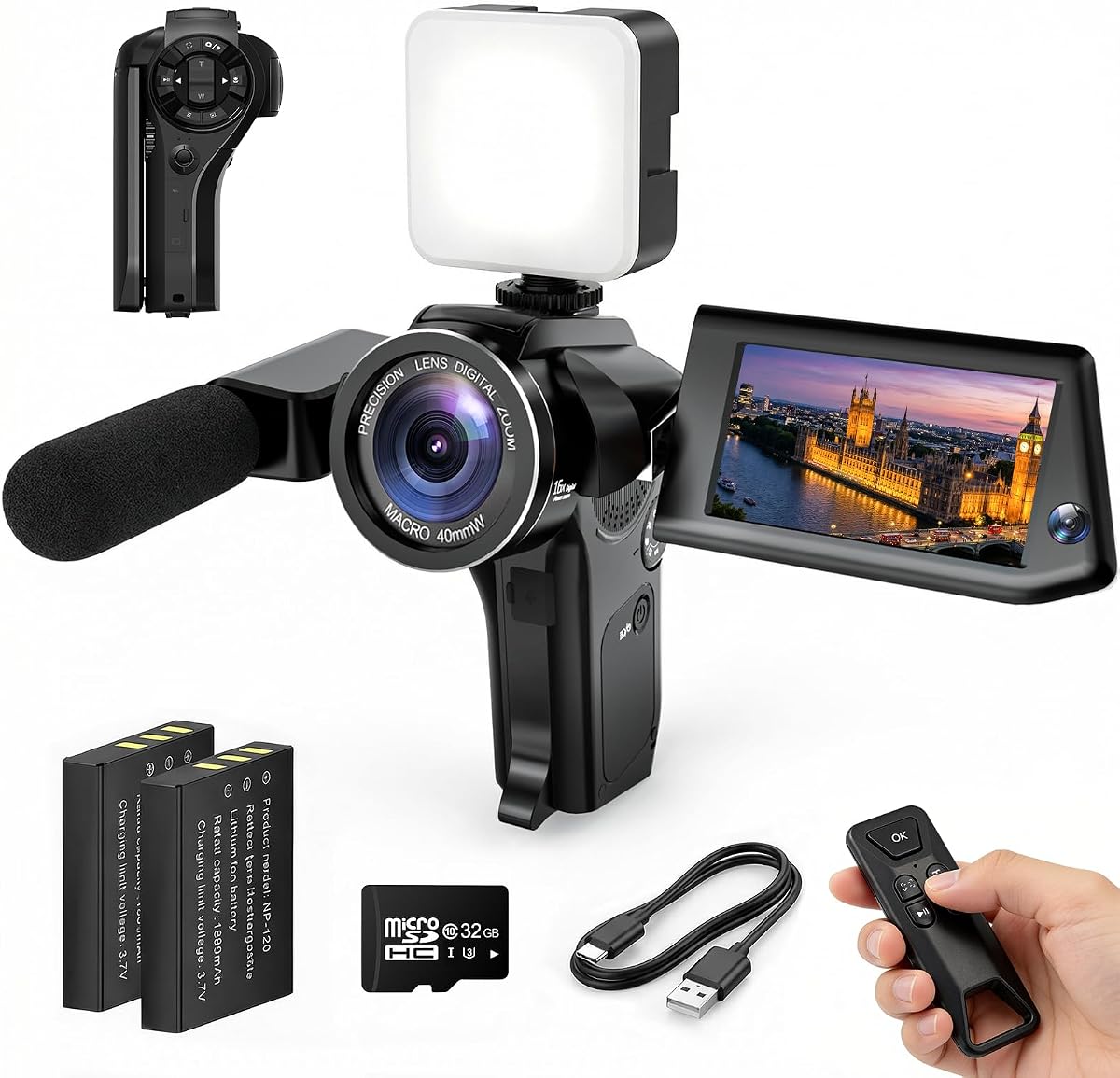
This compact digital camera delivers solid 4K video quality at an accessible price point making it ideal for new creators starting their journey.
We may earn a commission when you buy through this link, at no additional cost to you.
The unique 330 degree rotating lens allows you to frame yourself easily without needing a second person while the built-in WiFi simplifies file sharing.
While it lacks advanced stabilization found in higher-end models the included mini tripod helps keep shots steady for static scenes or travel vlogs.
Beginners will appreciate the straightforward setup and included accessories that let you start recording immediately without extra purchases or complex settings.
The rotating lens design makes solo vlogging significantly easier by allowing natural framing adjustments without external mounts or help.
Built-in WiFi enables direct transfer to smartphones for rapid editing and posting to social platforms without needing cables.
We may earn a commission when you buy through this link, at no additional cost to you.
The DJI Osmo Pocket 3 stands out with a large one-inch sensor that captures exceptional detail and color even in challenging lighting conditions.
We may earn a commission when you buy through this link, at no additional cost to you.
Its three-axis mechanical gimbal ensures incredibly smooth footage whether you are walking running or chasing pets while ActiveTrack keeps you centered automatically.
The rotating touch screen allows for quick switching between horizontal and vertical compositions which is essential for modern social media formats.
Although it commands a premium price the combination of stabilization image quality and ease of use makes it the top choice for serious content creators.
The large sensor and 10-bit color depth provide cinematic results that hold up well during post-processing and color grading workflows.
ActiveTrack 6.0 maintains focus on your subject hands free allowing you to perform complex movements while staying perfectly framed.
We may earn a commission when you buy through this link, at no additional cost to you.
This camera offers a distinctive Picture-in-Picture feature that captures both the event and your reaction simultaneously adding a personal touch to videos.
We may earn a commission when you buy through this link, at no additional cost to you.
Ideal for documenting family milestones or tutorials it allows viewers to see what you see while experiencing your genuine emotional responses in real time.
The flip screen simplifies self-framing ensuring you always look your best without needing external monitors or assistance during recording sessions.
While the specialized mode may not suit every scenario it creates highly engaging content that resonates deeply with audiences seeking authentic storytelling.
Showing your reactions alongside the event creates a more immersive experience for viewers compared to traditional single-angle recordings.
Recording childrens milestones or parties with your face visible ensures the memory includes both the event and your joy.
We may earn a commission when you buy through this link, at no additional cost to you.
This camcorder pushes resolution boundaries with 8K recording capabilities and an 88MP sensor that delivers sharp detailed images for large screens.
We may earn a commission when you buy through this link, at no additional cost to you.
The inclusion of IR night vision allows you to capture clear footage in dimly lit environments without needing additional lighting equipment.
It supports external microphones to improve audio quality and functions as a high quality webcam for live streaming or video calls seamlessly.
Creators who need maximum versatility for different lighting and recording scenarios will find this all-in-one kit offers excellent value and performance.
IR night vision ensures you can film in low light conditions where standard cameras would struggle to produce usable footage.
The webcam function allows direct connection to a computer for professional looking live streams without buying a separate device.
We may earn a commission when you buy through this link, at no additional cost to you.
This model excels at both photography and videography offering 96MP stills and 8K video with HDR capabilities for balanced exposure in bright scenes.
We may earn a commission when you buy through this link, at no additional cost to you.
The large 20X digital zoom lets you capture distant subjects clearly while the 180 degree flip screen makes selfies and vlogging intuitive and easy.
Users get two batteries in the box ensuring longer recording sessions without worrying about running out of power during travel or events.
For those who want a single device that handles high resolution photos and videos efficiently this camera provides a robust feature set for beginners.
HDR support helps retain detail in both shadows and highlights so your images look natural even in high contrast lighting.
The extensive zoom range allows you to capture far away details without moving closer which is useful for wildlife or architecture.
We may earn a commission when you buy through this link, at no additional cost to you.
Designed for effortless capture this mini camcorder fits in your pocket and starts recording with a single button press making it perfect for travel.
We may earn a commission when you buy through this link, at no additional cost to you.
The long battery life supports up to seven hours of continuous use which is rare in such a small form factor and reduces interruption.
It is designed for casual moments rather than professional production so it sacrifices advanced features for simplicity and extreme portability.
Anyone seeking a lightweight backup camera that requires zero setup will find this device reliable for capturing quick clips on the go.
No app or QR code setup is needed allowing you to begin recording within seconds of taking it out of your pocket.
Its tiny size ensures it never becomes a burden during long trips while still capturing memories effectively.
We may earn a commission when you buy through this link, at no additional cost to you.
This kit provides everything a beginner needs to start creating content with a camera tripod and carrying bag included in the purchase.
We may earn a commission when you buy through this link, at no additional cost to you.
The rotating lens simplifies solo filming and the 4K resolution ensures your footage meets modern platform standards for sharp visuals.
Having the travel bag and accessories upfront saves money and hassle compared to buying items separately for a new setup.
It is an excellent entry point for students or hobbyists who want a ready to use solution without technical complexity.
The inclusion of a tripod and bag means you have the essential gear for stable shots and protection right out of the box.
Simple operation and helpful features make this an ideal first camera for those intimidated by complex menus.
We may earn a commission when you buy through this link, at no additional cost to you.
This comprehensive kit transforms your smartphone into a powerful recording station by adding professional audio and lighting tools.
We may earn a commission when you buy through this link, at no additional cost to you.
The wireless microphone ensures your voice is clear while the RGB fill light lets you adjust skin tones and mood for better visuals.
Flexible tripods allow you to mount your phone in creative locations like wrapped around branches or on uneven surfaces easily.
Smartphone users looking to elevate their content quality without buying a new camera will find this accessory set incredibly valuable.
Wireless audio removes background noise and ensures your speech remains clear regardless of distance from the phone.
Bendable tripod legs allow for unique angles that standard stands cannot achieve expanding your visual options.
We may earn a commission when you buy through this link, at no additional cost to you.
This setup features intelligent face tracking that follows your movements automatically removing the need for manual camera adjustments during recording.
We may earn a commission when you buy through this link, at no additional cost to you.
Gesture controls let you start or pause tracking easily using simple hand signs which adds convenience during solo sessions or live streams.
Dual wireless microphones provide balanced audio capture while built-in LED lights ensure proper illumination without external equipment.
Creators who want a hands-free solution that moves with them will appreciate the smart tracking features and integrated design of this kit.
Face tracking keeps you centered in the frame even as you move around the room making it ideal for dynamic presentations.
Using hand gestures to control settings means you never have to touch the device during recording for smoother operation.
We may earn a commission when you buy through this link, at no additional cost to you.
This webcam delivers reliable 1080p video quality perfect for streaming meetings or content creation from a fixed desk location.
We may earn a commission when you buy through this link, at no additional cost to you.
Auto-light balance adjusts brightness to reduce shadows so you appear clear even in rooms with uneven lighting conditions.
The built-in privacy slide offers peace of mind when you are not on calls and the microphone handles clear audio transmission.
Desktop streamers or remote workers seeking a plug and play solution without complex configuration will find this camera highly practical.
The integrated privacy cover ensures your camera is physically off when not in use without software settings or hacking risks.
Auto light balance boosts brightness to eliminate shadows making your face clearly visible in various lighting environments.
We may earn a commission when you buy through this link, at no additional cost to you.
Choosing the right camera depends on your specific content needs and environment and understanding key factors ensures a better investment.
Higher resolution like 4K or 8K provides sharpness and allows for cropping without losing quality but may require more storage and processing power.
Choose a resolution that matches your platform needs and computer capabilities to avoid unnecessary performance strain.
Optical or mechanical stabilization helps keep footage smooth during movement which is critical for walking shots or action content.
Look for built-in stabilization or a gimbal if you plan to move frequently while recording.
Clear audio is essential for engagement so consider models with external microphone inputs or included wireless mics for better sound.
Avoid relying solely on built-in microphones if you plan to record in noisy environments.
Beginner friendly interfaces with touchscreens or simple menus reduce learning time and let you focus on creating instead of settings.
Test menu logic or read reviews to ensure the device feels intuitive for your workflow.
WiFi or Bluetooth transfer options allow you to send files to your phone quickly for instant editing and posting to social platforms.
Choose a model with wireless transfer if you want to edit on the go without cables.
Long battery life ensures you do not miss moments during travel or long sessions so consider models with replaceable or spare batteries.
Check battery specs and ensure you have enough power for your typical recording duration.
Cameras with larger sensors or night vision capabilities handle indoor or evening filming better than smaller budget models.
If you often shoot indoors or at night prioritize models with good low light specs.
Kits that include tripods cases or memory cards save money and simplify setup which is helpful for first-time buyers.
Check what comes in the box to avoid unexpected extra costs after purchase.
Always charge your batteries fully before recording sessions and keep spare batteries handy for long shoots or travel days.
Clean lenses gently with a microfiber cloth to avoid scratches and store the camera in a protective case when not in use.
Update firmware regularly to access new features and fixes while backing up your files to cloud storage to prevent data loss.
Most platforms support 1080p and 4K so choosing a camera that records at least 4K gives you flexibility for cropping and future proofing your work.
Not always but if you walk a lot while filming a gimbal or camera with strong stabilization will prevent shakiness and improve viewer experience.
Use an external microphone if possible because built-in mics often capture background noise which can distract viewers from your message.
Yes a flip screen allows you to see yourself while recording so you can frame shots correctly without needing a second person.
Yes but pairing it with accessories like tripods and wireless mics will significantly improve stability and sound quality for professional results.
Video files are large so consider cards with high capacity like 128GB or 256GB and backup footage to cloud storage regularly.
Look for cameras with larger sensors or infrared night vision since these handle dark environments better than small compact models.
Kits often include essential accessories like tripods and cases that save money and time compared to buying each item separately.
The DJI Osmo Pocket 3 stands out for premium quality while the 4K Vlogging Camera offers excellent value for beginners on a budget.
Prioritize features that match your content style such as stabilization for active shooting or flip screens for solo vlogging.
Always verify current pricing and availability since details may change before you finalize your purchase decision.