
Learning Resources Code & Go Robot Mouse Activity Set
4.5Editor score
Screen-free coding basics
Built for young coders
Critical thinking support
Discover the top coding toys for kids in 2026. This guide compares screen-free and app-based robotics to help you find the perfect STEM learning tool.
Coding toys have transformed how children learn technology by turning abstract concepts into tangible play. These devices introduce logic, sequencing, and problem-solving without requiring a computer screen. Parents seeking educational value look for tools that balance engagement with genuine skill development for young minds.
We evaluated ten leading products based on build quality, educational depth, and ease of use. Our analysis considers age appropriateness, coding complexity, and the variety of activities included. This list highlights options ranging from simple button-driven robots to advanced programmable kits for older learners.
Each pick demonstrates unique strengths in teaching computational thinking through hands-on interaction. While some focus on immediate fun, others offer long-term growth through expandable parts and coding languages. Prices and availability may change, so checking current listings ensures you get the best deal for your needs.
4.5Editor score

4.1Editor score

4.6Editor score
This side-by-side comparison highlights key differences across all ten selected products. We examine their core capabilities, age ranges, and unique selling points to help you identify the right fit for your child's learning style and technical comfort level.






The Thames & Kosmos My Robotic Pet stands out as a unique coding toy that combines building with programming. Rated 4.1 stars by users, this chameleon kit offers a screen-free way to teach coding basics through physical action cards. Its standout quality is the realistic robotic movement that captivates children while they learn.
We may earn a commission when you buy through this link, at no additional cost to you.
This product excels in teaching engineering principles. The 15-inch model includes articulated joints for realistic eye and leg movements. Kids program the chameleon using color-sensing action cards which control movement and reaction modes. The three play modes offer variety from coding sequences to wild camouflage reactions.
While the build quality is sturdy, the assembly process requires patience. Children ages 8 need adult help whereas 12+ can manage independently. The 48-page manual guides this process but adds time to initial setup. These trade-offs are acceptable given the educational value provided.
This kit is ideal for children interested in robotics and biology. Parents seeking screen-free STEM education should consider this for its hands-on approach. The award-winning design ensures quality making it a strong recommendation for ages 8 and up learning coding concepts.
Uses color cards for programming allowing kids to learn logic without digital distractions.
Explains how nature inspires design through comprehensive learning guide and building process.
We may earn a commission when you buy through this link, at no additional cost to you.
The Makeblock mBot offers an excellent entry-level robotics kit designed for ages 8 to 12. With a high rating of 4.6 stars it provides interactive software for learning programming step by step. Its strength lies in bridging simple coding concepts with more advanced Arduino skills for growth.
We may earn a commission when you buy through this link, at no additional cost to you.
This kit allows children to build electronics and machinery from scratch. The instructions are clear enabling assembly in about 15 minutes. Kids can use coding cards or apps like mBlock to program functions like line-following or obstacle avoidance. It supports remote control play as well.
One consideration is the need for separate batteries which are not included. Also it requires compatible apps for full functionality. These minor hurdles are balanced by the rich tutorial library and expandability. The metal construction ensures it withstands regular play effectively.
Ideal for budding engineers this robot grows with the child. The open-source system allows connection to hundreds of modules. Parents wanting a durable and educational STEM toy will find this mBot kit a fantastic gift for young developers.
Guides kids from simple block coding to more complex text-based programming.
Compatible with extensive add-on packs for endless configuration possibilities.
We may earn a commission when you buy through this link, at no additional cost to you.
The Sphero Mini packs a surprising amount of functionality into a tiny ball the size of a ping pong ball. Rated 4.6 stars it connects via Bluetooth to a free app for programming. Its standout quality is the variety of control modes and gaming integration available.
We may earn a commission when you buy through this link, at no additional cost to you.
Kids can code by drawing paths or using drag and drop blocks. The Sphero Play app adds arcade style games that use the robot as a controller. It features a gyroscope and accelerometer that respond to device tilting and shaking for interactive play.
While fun the battery provides about one hour of play time which may require frequent recharging. It also requires a mobile device which limits screen-free play. These constraints are typical for Bluetooth robots but are offset by the engaging software experience.
This robot is perfect for tech savvy kids who enjoy games. It serves as a great entry into robotics and coding basics. For those wanting portable STEM fun the Sphero Mini offers a compelling blend of learning and entertainment.
Supports drawing paths drag and drop blocks or JavaScript writing.
Uses obstacle course and arcade games to make coding engaging.
We may earn a commission when you buy through this link, at no additional cost to you.
The Learning Resources Code & Go Robot Mouse Activity Set is an excellent affordable option for early learners. Rated 4.5 stars it allows children as young as 4 to practice sequencing and logic without screens. Its standout quality is the simplicity and durability for young hands.
We may earn a commission when you buy through this link, at no additional cost to you.
This kit includes a robot mouse maze grids and coding cards for building challenges. Kids press buttons to program direction and movement. It is designed for classroom STEM centers or home small group work. The activity cards help children practice problem-solving skills effectively.
It is straightforward but does not offer complex coding or app connectivity. Batteries are required but not included in the box. These limitations are minor given the age range and price point. It effectively teaches foundational coding concepts through play.
Parents and teachers seeking a first coding toy will love this set. It builds confidence through trial and error. For ages 4 and up this mouse is the best budget choice for introducing robotics logic at home or school.
Focuses on sequencing and directional understanding for early programmers.
Includes tunnels walls and grids for custom maze building.
We may earn a commission when you buy through this link, at no additional cost to you.
TEACH TECH Mech-5 is designed as a deep mechanical coding robot for ages 10 and up. With a 4.5 rating it emphasizes building real machines that can throw lift and kick. Its standout quality is the hands-on approach to mechanical engineering principles.
We may earn a commission when you buy through this link, at no additional cost to you.
Unlike pre assembled toys this kit requires children to build the robot from parts. They attach coding buttons to a wheel to program missions. The step-by-step assembly instructions ensure proper construction but require patience. It offers an authentic engineering challenge.
The build time can span multiple hours which may test patience. Younger children might find the steps too complex. However for older kids seeking a project this is highly rewarding. The focus on principles over play makes it a solid educational investment.
This kit suits kids who enjoy taking things apart and putting them together. It bridges coding with mechanical functions. Parents wanting a serious STEM project for teens should consider Mech-5 for its depth and challenge.
Uses physical buttons snapped onto a wheel to program actions.
Includes tasks to build lift throw or draw with the robot.
We may earn a commission when you buy through this link, at no additional cost to you.
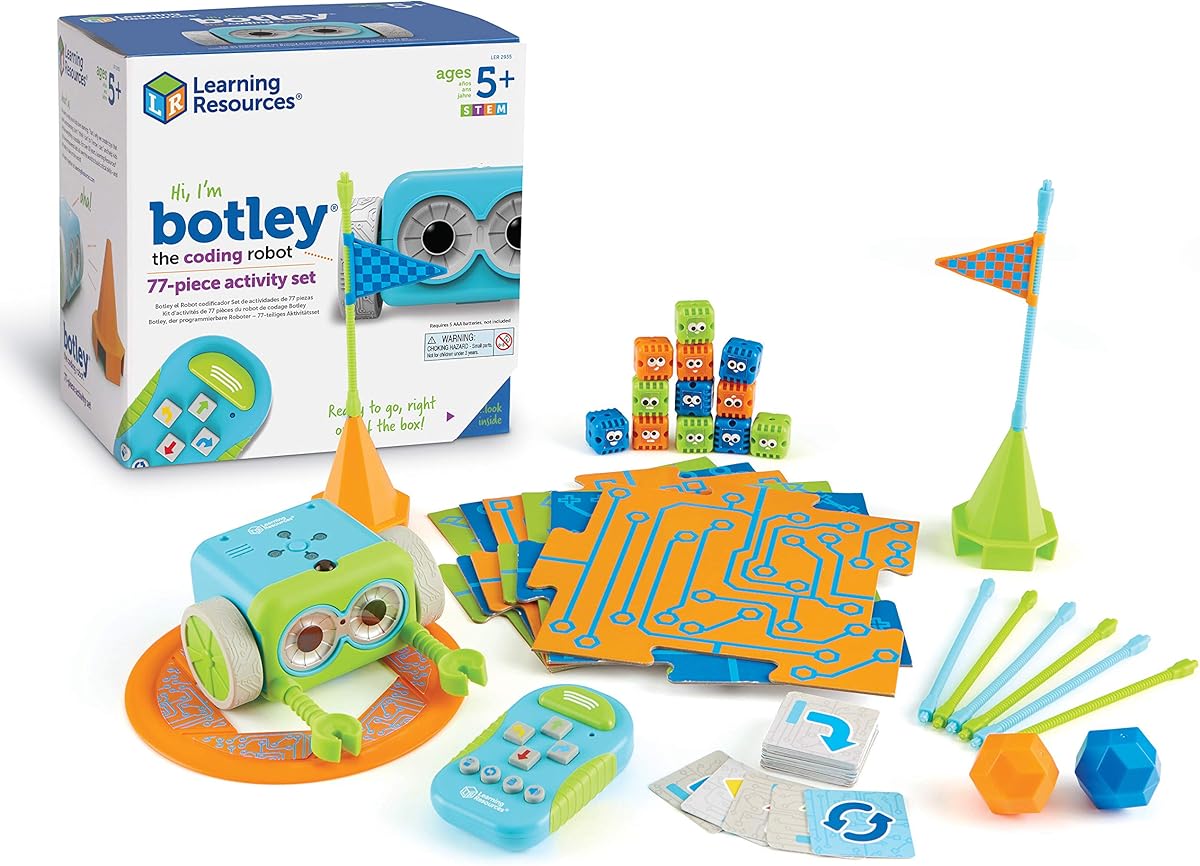
Learning Resources Botley is a classic screen-free robot designed for ages 5 and up. Rated 4.6 stars it teaches STEM skills through active play with a remote programmer. Its standout quality is the ability to detect objects and follow black-line paths independently.
We may earn a commission when you buy through this link, at no additional cost to you.
Botley comes ready to code with a detachable remote and coding cards. Children can program looping commands and obstacle courses without a tablet. It includes a remote programmer and 77 pieces for extensive play. The object detection adds an extra layer of fun.
It does not have app connectivity which limits advanced features but ensures focus on logic. Batteries are needed for operation. The learning curve is manageable for 5 year olds. This simplicity makes it a favorite for early coders and classroom use.
Ideal for parents avoiding screens during learning this robot is excellent. It builds critical thinking and problem solving skills. For ages 5 Botley offers a robust and rewarding introduction to robotics without digital dependency.
Senses objects to avoid obstacles and navigate environments smartly.
Allows children to create repeating sequences for complex tasks.
We may earn a commission when you buy through this link, at no additional cost to you.
The Ozobot Evo Coding Robot Kit offers an innovative blend of physical and online learning. Rated 4.6 stars it suits grades K-12 with five skill levels ranging from beginner to master. Its standout quality is the comprehensive resource library for educators and parents.
We may earn a commission when you buy through this link, at no additional cost to you.
Kids code with color codes on paper or via Blockly apps. The Evo robot follows these color-coded lines to execute commands. It includes markers and a durable case for organization. The lesson library covers STEAM and CS subjects effectively.
This kit is pricier than others but offers significant value. The markers are essential for full experience. It is built for classroom rigors. The adaptability ensures long-term use as skills grow. It is a robust educational investment.
Perfect for schools or homeschool environments this kit excels in structure. It balances fun with curriculum needs. For those wanting a complete educational tool the Evo provides both play and learning depth.
Combines screen-free color coding with online block programming.
Over 700 free lessons cover core subjects and coding.
We may earn a commission when you buy through this link, at no additional cost to you.
Botley 2.0 builds on the original with added features for older kids. Rated 4.5 stars it offers object-sensing reactions and 45-degree turns. It retains the screen-free experience while adding depth to coding paths. Its standout quality is the multisensory feedback of lights and sounds.
We may earn a commission when you buy through this link, at no additional cost to you.
The kit includes a remote programmer coding cards and obstacles for building routes. Kids can design multi-step coding paths to refine strategies. It features 16 secret code combinations for open-ended play. This versatility keeps children engaged for extended periods.
While it improves on the original it still relies on physical coding. The price is higher than the basic model. However the new challenges justify the cost. It grows with the child offering fresh tasks as skills advance.
Ideal for those who loved the first Botley this update is perfect. It adds complexity without screens. Parents wanting to extend learning will find this 2.0 version a worthwhile addition to their collection.
Supports complex routing with turns and obstacle avoidance.
Unlocks hidden features through specific command sequences.
We may earn a commission when you buy through this link, at no additional cost to you.
The Wonder Workshop Dash Robot offers a premium experience for kids aged 6 and older. Rated 4.6 stars it is ready to use right out of the box. Its standout quality is the robust app ecosystem and personality features like singing and dancing.
We may earn a commission when you buy through this link, at no additional cost to you.
Dash connects to five apps including Blockly for coding challenges. It responds to voice commands and navigates obstacles autonomously. It includes a USB charging cable and brick connectors. Battery life supports up to five hours of play sessions.
This robot is more expensive than others but justifies with reliability. It uses Bluetooth which requires apps. The lack of assembly is convenient. It is used in thousands of schools for its proven educational value.
Ideal for families wanting a polished product Dash is the top choice. It balances fun and learning seamlessly. For ages 6 to 11 this robot delivers a premium premium STEM experience worth the investment.
Can sing dance and react to voice commands for interactive play.
Five different apps offer diverse challenges and learning modes.
We may earn a commission when you buy through this link, at no additional cost to you.
TaleBot Pro is designed specifically for toddlers ages 3 to 5 to learn early coding concepts. Rated 4.7 stars it provides instant voice feedback through an interactive map. Its standout quality is the combination of storytelling and basic sequencing skills.
We may earn a commission when you buy through this link, at no additional cost to you.
Children press buttons to make the robot walk draw or sing. It supports 10 languages and has a recording function for storytelling. This helps develop language and creativity alongside logic. It is compatible with Lego blocks for extra building fun.
The coding is very basic which fits this age group well. Additional materials are recommended for deeper learning. It is also noted as ideal for autistic children due to tactile feedback. It is a safe engaging tool for very young learners.
Parents of toddlers seeking screen-free logic tools will find this perfect. It prioritizes language and motor skills. For ages 3 to 5 TaleBot Pro offers a gentle introduction to coding concepts.
Encourages creativity by letting kids record their own stories.
Combines visuals sounds and touch for inclusive learning.
We may earn a commission when you buy through this link, at no additional cost to you.
Selecting the right coding toy depends on age skill level and learning goals. We outline key factors to consider ensuring you find a tool that engages and educates effectively.
Choose toys that match your child's developmental stage. Toddlers benefit from simple button presses and voice feedback while older kids handle complex coding logic and apps. Ensure the difficulty matches their current ability.
Select age ranges that align with your child's cognitive and motor skills.
Decide if you want screen-free play or an app experience. Screen-free toys reduce distractions and focus on logic. App-based ones offer deeper coding possibilities but require a mobile device. Consider your household screen time policies.
Balance screen use with physical interaction based on your preferences.
Look at the programming method. Simple coding cards work for early learners while drag-and-drop blocks suit intermediate kids. Advanced kits might introduce text-based coding like JavaScript. Ensure the toy grows with your child's skills.
Match coding depth to current learning levels for optimal engagement.
Check materials and construction. Metal or sturdy plastic ensures longevity especially for active play. Expandable systems offer better value if they support add-ons. Read reviews for reliability over time.
Prioritize durable builds to withstand repeated use and building.
Assess the skills taught such as sequencing logic and engineering. Educational kits should include guides or challenges. Consider if the toy aligns with school standards or personal goals for skill development.
Choose toys that teach core computational thinking skills clearly.
Consider hidden costs like batteries or accessories. Some kits need extra batteries markers or activity boxes. Check if the robot requires subscriptions for full features. Factor these into your budget.
Account for any extra purchases needed for full functionality.
Check if the robot works with other sets like LEGO. Open-source systems allow more creativity and growth. Compatibility extends the toy's life and play options significantly.
Look for systems that support add-ons for long-term use.
Ensure assembly and setup are manageable for you and your child. Clear instructions save time and frustration. User-friendly interfaces encourage independent play and learning confidence.
Select toys that offer intuitive setup and simple controls.
Start by reading the instruction manual carefully to understand assembly and button functions. Set up any required apps or tools before inviting your child to play. This preparation ensures a smooth first experience.
Charge batteries or replace them regularly to avoid interruptions during play. Store small parts like cards or markers in a secure container. Keep the robot away from water to protect electronic components.
Encourage creative projects beyond the provided challenges to deepen learning. Regularly update apps to access new features or bug fixes. Share your child's progress online or with friends to maintain engagement.
Yes coding toys introduce fundamental concepts like sequencing and logic that form the basis of programming. While they are simplified they build confidence for later text-based learning. Many educational systems use these toys to teach core computational thinking.
Many toys offer screen-free options using physical cards or buttons. However some require apps for full features. Check product details if screen-free play is a priority for your family.
Most experts recommend starting around age 4 or 5 when children can understand basic sequences. Some toys are designed for toddlers with simple buttons. The right age depends on the complexity of the robot and the child's readiness.
Absolutely these toys require children to plan steps and troubleshoot errors. This process strengthens logical thinking and patience. It is a great way to build critical thinking in a fun context.
Many models are classroom-ready with durability and lesson plans. Teachers find them useful for STEM centers. Some kits are specifically designed for schools with comprehensive educational resources.
Try adding new challenges or combining it with other toys like LEGO. Many kits have expansion packs to keep things fresh. Changing the environment or setting new goals can reignite interest in these tools.
We highlighted ten top coding toys ranging from screen-free mouse sets to advanced programmable robots. Each option offers unique benefits for different ages and learning styles. Choosing the right one depends on your child's interests and your educational goals.
Prioritize safety durability and age appropriateness when making your decision. Consider whether screen-free play or app integration fits your household. The best toy is one that keeps your child engaged while teaching valuable skills.
Remember to check current pricing and availability before purchasing. Many products include accessories that may vary. Staying informed ensures you get the best value for your investment in STEM learning.