
Computer Fan Stand Mount
4.4Editor score
Fits 120mm and 140mm fans
Heavy duty metal build
360 degree rotation
Finding the right computer fan stand can transform your workspace by improving airflow and reducing heat buildup. Whether you use a laptop for work or a desktop PC for gaming, having proper ventilation is essential for longevity and performance. A good stand elevates your device, allowing air to circulate freely and preventing overheating during intense sessions.
We evaluated ten top-rated products based on cooling efficiency, build materials, adjustability, and overall value. Our comparison includes dedicated laptop coolers with built-in fans as well as adjustable mounts for standard PC case fans. Each option was scrutinized for stability, noise levels, and compatibility with various device sizes to ensure you find the perfect fit for your setup.
Every pick in this guide highlights specific strengths, from ergonomic design to robust metal construction. While prices and availability may shift over time, these selections represent the best balance of quality and functionality available today. Use this guide to identify which computer fan stand aligns with your specific needs and budget requirements.
4.4Editor score

4.4Editor score

5.0Editor score
As an Amazon Associate we earn from qualifying purchases.
This side-by-side comparison details the core specifications and capabilities of each selected computer fan stand. Review the features below to see how each model handles airflow, adjustability, and device compatibility to make an informed decision.



The Kootek Laptop Cooling Pad stands out as a top choice for users needing robust thermal management for devices ranging from 12 to 17 inches. With a strong rating, this product delivers reliable performance through its five built-in fans. It combines cooling power with ergonomic benefits to create a comfortable workspace environment.
We may earn a commission when you buy through this link, at no additional cost to you.
Its standout quality lies in the dual USB hub and switchable fan control. You can activate one, four, or all five fans depending on your heat needs, ensuring energy efficiency. The six height settings allow you to tilt the screen to eye level, reducing neck strain during long work sessions.
While highly effective, the stand lacks a foldable design which might limit portability for travelers. Additionally, the USB cable can be a bit stiff, requiring careful routing to keep your desk tidy. These minor issues do not significantly detract from its overall cooling and comfort performance.
This cooling pad is ideal for students, office workers, and gamers who need consistent airflow and an ergonomic setup. If you want a balance of cooling efficiency and comfort features, this model is the best pick for your daily computing needs.
The ability to switch between fan modes lets you balance noise and cooling power effectively for any task.
Six height levels help you achieve a healthier posture by raising your laptop screen to a comfortable viewing angle.
We may earn a commission when you buy through this link, at no additional cost to you.
The YICOSUN Adjustable Stand brings a stylish twist to computer cooling with its aluminum construction and customizable RGB lighting. Rated highly for its design and function, it appeals to users who value aesthetics alongside practical cooling. It is perfect for smaller laptops between 10 and 16 inches.
We may earn a commission when you buy through this link, at no additional cost to you.
Its primary strength is the combination of portability and durability. The foldable design makes it easy to slip into a bag for travel, while the metal build ensures stability. The three-speed fan control offers decent airflow for light to medium tasks without generating excessive noise.
However, the limited number of fans means it may not handle extreme heat loads as well as larger pads. The height adjustment is also less versatile than other models on this list. These constraints make it better suited for occasional use rather than heavy gaming sessions.
Choose this stand if you prioritize a compact, stylish solution for your laptop. It works well for office tasks, light gaming, and on-the-go scenarios where carrying a heavy pad is not feasible.
The foldable design and modern look make it a great choice for users who move their workspace frequently.
Two ultra-quiet fans provide enough airflow to keep laptops cool without disrupting your environment.
We may earn a commission when you buy through this link, at no additional cost to you.
This Laptop Stand with Active Fan offers a unique approach to cooling by combining a sturdy riser with targeted airflow. With a strong rating, it is built to support heavier devices up to 18 inches and handle loads up to 5kg. The open-frame design maximizes natural convection even without the fan active.
We may earn a commission when you buy through this link, at no additional cost to you.
The key strength lies in its versatility and extra features like the phone mount and USB ports. You can adjust the load capacity with included screws, making it adaptable for various laptop weights. This flexibility is rare in standard cooling stands that often sacrifice stability for features.
One drawback is the reliance on a single fan which might not cool thick chassis as effectively as multi-fan units. The screw adjustment for load capacity also requires patience during setup. These factors mean it is best for users who value structural adaptability over sheer fan volume.
This stand is perfect for professionals with larger laptops who need a stable and functional workspace. It is also a great choice if you want to integrate your phone into your workflow while keeping your laptop cool and secure.
Adjustable screws let you tune the stand to support heavier gaming laptops or lighter ultrabooks equally well.
Keeping your phone at hand reduces distraction and keeps your desk organized while you work on your laptop.
We may earn a commission when you buy through this link, at no additional cost to you.
The Family Laptop Cooling Pad is designed with household versatility in mind. It features three large silent fans that operate at a low 40dB, ensuring they do not disturb sleep or video calls. This makes it suitable for shared spaces where noise is a concern during work or study sessions.
We may earn a commission when you buy through this link, at no additional cost to you.
Its main advantage is the ergonomic metal support bar with five height levels. This allows users of different heights to find a comfortable angle quickly. The included phone holder is a practical touch for parents or students needing to reference a phone while typing on their laptop.
While it is durable, the body uses ABS plastic which feels less premium than metal alternatives. The USB cable length might also require an extension for some setups. These compromises keep the price down, making it accessible for budget-conscious buyers.
Ideal for families with multiple users, this pad offers essential cooling and ergonomic features without breaking the bank. It is a practical gift for students or colleagues who need reliable daily performance.
The low decibel level ensures that your work or study sessions remain peaceful and uninterrupted by fan noise.
A sturdy metal bar provides stable height adjustments that reduce shoulder and neck strain effectively.
We may earn a commission when you buy through this link, at no additional cost to you.
The Computer Fan Stand Mount is the ideal solution for users who already own PC case fans and need a standalone holder. With a strong rating, it is built from heavy-duty metal to support 120mm and 140mm fans securely. It is designed to be permanent yet flexible for targeted cooling needs.
We may earn a commission when you buy through this link, at no additional cost to you.
Its key strength is the 360-degree rotation and adjustable angle allowing you to direct airflow exactly where needed. This is perfect for cooling routers, 3D printers, or specific PC components. The tool-free assembly using thumb screws makes setup fast and accessible for everyone.
The main trade-off is that it does not come with a fan, requiring a separate purchase. Additionally, handling during installation requires care due to precision-cut metal edges. These factors are acceptable given the low cost and robust construction it offers.
Choose this stand if you need a durable and affordable way to mount standard PC fans on your desk. It is perfect for enthusiasts who want custom airflow control without expensive proprietary cooling solutions.
Rotation and angle adjustments allow you to target specific hot spots for efficient cooling without moving hardware.
Thumb screws let you set up the mount quickly without needing extra tools or hardware.
We may earn a commission when you buy through this link, at no additional cost to you.
This Multi-Purpose Desk Fan Stand Mount offers a lightweight and durable option for mounting standard 120mm fans. With a solid rating, it focuses on simplicity and function. The aluminum body is rust-proof, making it suitable for various environments including workshops or humid offices.
We may earn a commission when you buy through this link, at no additional cost to you.
Its main advantage is the vertical rotation capability which helps direct airflow up, down, or sideways as needed. The compact design ensures it does not take up much desk space. This makes it a great choice for those who want a clean and simple cooling setup.
However, it is strictly limited to 120mm fans, so it will not work with larger 140mm models. The design is also basic, lacking extra features like adjustable angles beyond vertical. These limitations keep it focused on specific use cases rather than general versatility.
Best for users with standard 120mm fans who want a simple and rust-proof mount. It fits well in setups where space is limited and a straightforward cooling solution is preferred.
The aluminum body resists rust and corrosion, ensuring long-term use in various environments without degradation.
360-degree vertical rotation gives you the flexibility to channel air exactly where it is needed most.
We may earn a commission when you buy through this link, at no additional cost to you.
The Desk Fan Stand Mount is a reliable option for mounting both 120mm and 140mm fans securely. With a strong rating, it uses heavy-duty metal construction to ensure stability even at high fan speeds. This makes it a robust choice for users who need consistent and reliable airflow.
We may earn a commission when you buy through this link, at no additional cost to you.
Its main benefit is the universal compatibility which expands your options for fan selection. The vertical rotation and thumb screw installation allow for quick adjustments. This flexibility helps you tailor your cooling setup to specific device requirements without hassle.
On the downside, it lacks additional features like extra holes or integrated cable management. The base is fixed which might limit placement options. These are minor issues given the core focus on durability and universal fit.
Choose this mount if you need a stable and flexible holder for standard PC fans. It is perfect for DIY setups where reliability and compatibility are more important than extra features.
Support for both 120mm and 140mm fans gives you more flexibility in choosing compatible cooling hardware.
Heavy-duty metal ensures the stand remains steady during high-speed fan operation without vibration.
We may earn a commission when you buy through this link, at no additional cost to you.
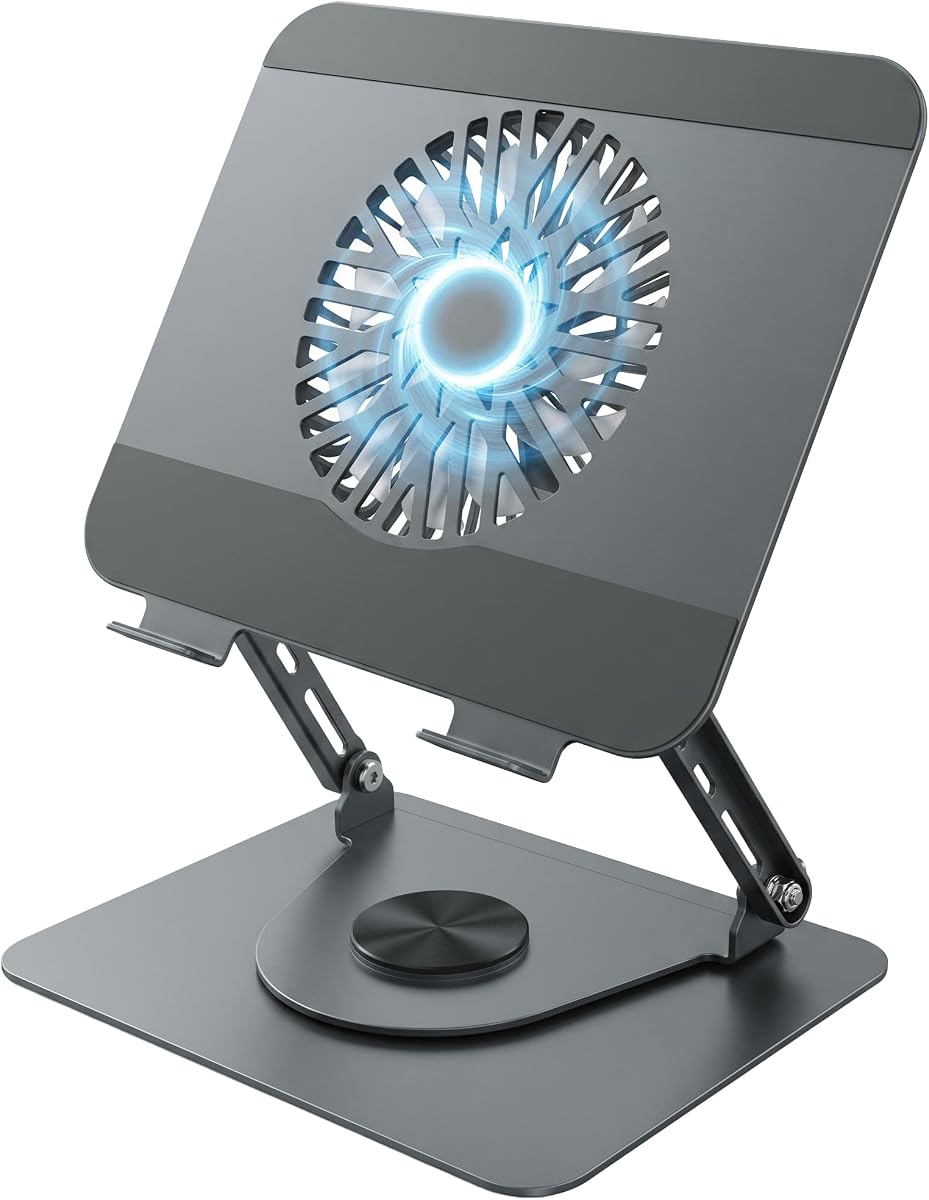
The Laptop Stand with Cooling Fan offers exceptional ergonomics with a smooth 360-degree rotating base. With a high rating, it is built to reduce strain during long work or gaming sessions. The integrated fan helps keep the device cool while the stand elevates it for better posture.
We may earn a commission when you buy through this link, at no additional cost to you.
Its standout feature is the ability to swivel the screen toward clients or colleagues easily. This makes it ideal for collaborative environments. The non-slip silicone pads keep your laptop secure and protect it from scratches during use or adjustment.
One limitation is that the integrated fan provides focused cooling which may not be enough for high-end laptops under heavy load. The price point is also higher than basic stands. These trade-offs are acceptable for users prioritizing ergonomics and desk organization.
Best for professionals who need a versatile and comfortable workspace. It helps maintain a tidy desk and provides essential cooling and ergonomic support for daily tasks.
The swivel base allows you to share your screen effortlessly without moving the entire stand or laptop.
Silicone pads add grip and protect your device from sliding or scratching while you work.
We may earn a commission when you buy through this link, at no additional cost to you.
The Aluminum Multi-Purpose Desk Fan Stand Mount is crafted for users who demand precision and durability. With a solid rating, it is CNC machined for a refined texture and corrosion resistance. It supports a wide range of fan sizes from 120mm to 180mm making it very versatile.
We may earn a commission when you buy through this link, at no additional cost to you.
Its strength is the precision damped pivot hinges that allow smooth multi-angle adjustments. The anti-slip base and hanging holes keep the unit steady. The matte finish adds a sleek look that matches modern desk setups well.
The higher price and more complex assembly can be a barrier for some users. The adjustment process might take time to get exactly right. However, for those who value build quality and finish, these are reasonable trade-offs.
Choose this mount if you need a premium and stable solution for larger or custom fans. It is perfect for enthusiasts who prioritize aesthetics and long-term durability in their setup.
Precision machining delivers a smooth texture and finish that resists corrosion and looks elegant on any desk.
Support for 120mm to 180mm fans lets you use a broader range of cooling hardware for different needs.
We may earn a commission when you buy through this link, at no additional cost to you.
The YAODHAOD Multi-Purpose Desk Fan Stand Mount delivers top-tier performance with a perfect rating. Its solid metal construction ensures the stand stays rock solid even with high RPM fans. This eliminates vibration and noise that often plagues cheaper alternatives.
We may earn a commission when you buy through this link, at no additional cost to you.
Its main strength is the quick assembly using textured thumb tightening knobs which make mounting easy. The vertical 360-degree rotation lets you direct airflow in any direction. This versatility makes it useful for cooling laptops routers or electronics beyond just PC cases.
One limitation is that it focuses solely on mounting without extra features like cable management. Also, like other mounts, the fan is not included. These are minor drawbacks given its robust build and high performance ratings from users.
Best for users who need a stable and reliable mount for various devices. If vibration and stability are your top concerns, this model provides the best premium experience available.
The thick metal frame ensures zero wobbling even when using high-speed fans for intense cooling tasks.
Textured thumb knobs allow you to mount and adjust the stand quickly without any tools.
We may earn a commission when you buy through this link, at no additional cost to you.
Selecting the right computer fan stand requires understanding your specific cooling needs and workspace constraints. This guide outlines key factors to consider to ensure you choose a model that enhances performance and comfort.
Ensure the stand supports your device size or fan dimensions. Laptop stands typically range from 10 to 18 inches while PC mounts often fit 120mm or 140mm case fans. Check specifications carefully to avoid purchasing an incompatible model.
Always verify the dimensions of your laptop or fan against the product specs before buying.
Materials like aluminum alloy offer a balance of strength and lightness while metal or heavy plastic provides stability. Heavier stands are better for high-speed fans to prevent vibration. Consider where you plan to use it to decide on the right material.
Durable materials ensure your stand lasts longer and performs reliably under different conditions.
Look for stands with multiple height or angle settings to improve your posture and reduce strain. Adjustable airflow direction is vital for PC mounts to target specific heat sources. A versatile stand adapts to your changing workspace needs.
Prioritize adjustable features that help you achieve a comfortable and efficient working position.
Cooling fans should operate quietly to avoid distracting you during work or leisure. Check noise ratings in decibels especially if you work in quiet environments. Balance airflow power with noise to find a quiet yet effective solution.
Select a model that offers strong cooling without generating excessive noise.
If you travel often or have limited space choose a foldable or compact design. Portable stands are lighter and easier to pack while still providing essential cooling. Fixed desktop stands are better for permanent setups.
Choose a form factor that fits your mobility and desk space requirements.
Some stands include USB hubs phone holders or RGB lighting. These add value depending on your needs such as needing extra ports or a stylish setup. Decide which extras are useful versus unnecessary for your situation.
Evaluate additional features to ensure they enhance your workflow without adding complexity.
Proper installation is key to getting the best performance. Secure the stand firmly on a level surface and ensure your device sits evenly. If using a fan mount check that all screws are tightened but not over-torqued.
Regular maintenance keeps the stand functioning well. Dust the fan blades and surfaces every few weeks to prevent buildup. This improves airflow and extends the lifespan of the cooling components.
When not in use store portable stands folded to avoid damage. Keep cables organized using ties to prevent tangles. For permanent setups adjust the stand only when necessary to maintain stability.
Most PC case fan mounts sold as standalone accessories do not include a fan. You must provide your own 120mm or 140mm fan. Check the product description to confirm whether a fan is included before ordering.
Adjust the height so the top of your screen is roughly at eye level. This reduces strain on your neck and shoulders. Experiment with a few settings to find the most comfortable position for your daily tasks.
Most stands list a specific size range such as 12 to 17 inches. Always check these limits to ensure your device fits securely. Overloading a stand beyond its recommended capacity can lead to instability.
Yes many laptop stands can support tablets or small monitors within their weight limits. PC mounts are designed for routers and other electronics. Just verify the weight and dimension compatibility before using them.
A well-maintained stand can last several years depending on build quality. Metal models generally outlast plastic ones if handled correctly. Cleaning fans regularly helps prevent premature failure due to dust.
Handle metal mounts carefully during installation as edges can be sharp. Ensure cables are secure to avoid tripping or pulling the stand. Always power off devices before making major adjustments.
We have explored ten top-rated computer fan stands that cater to a variety of cooling needs and budgets. The Kootek Laptop Cooling Pad stands out as the best overall for its balance of features and performance.
Consider your specific use case when making a choice. If you prioritize cooling power look at multi-fan pads. For flexibility and stability in desktop setups a robust mount may be more suitable.
Prices and availability can change so be sure to verify the latest details before purchasing. By choosing the right stand you can protect your devices and improve your daily computing experience significantly.