
SANSUI 24 Inch Curved 160Hz Gaming Monitor
4.4Editor score
160Hz refresh rate for smooth motion
1500R curved panel for immersion
HDMI and DP ports included
Finding the right curved 160Hz gaming monitor can transform your gaming experience by delivering smooth visuals and immersive depth. These displays combine high refresh rates with curvature to reduce eye strain and enhance focus during intense sessions.
We compared ten leading models based on panel quality, response times, connectivity options, and user feedback. Each product offers unique strengths whether you prioritize budget value, ultrawide immersion, or premium color accuracy for competitive play.
Every pick includes detailed specs and honest pros and cons to help you decide quickly. Keep in mind that availability and pricing may shift frequently so always verify current details before finalizing your purchase decision today.
4.4Editor score
4.5Editor score

4.6Editor score
As an Amazon Associate we earn from qualifying purchases.
This side-by-side comparison highlights key differences across screen size, resolution, refresh rate, and special features. Use it to quickly identify which monitor aligns with your gaming needs and setup constraints.






This 24-inch SANSUI monitor delivers smooth 160Hz performance at a budget-friendly price point. Users appreciate its curved design and fast response times for competitive gaming. The VA panel offers good contrast and color accuracy suitable for mixed use.
We may earn a commission when you buy through this link, at no additional cost to you.
The 1500R curve wraps your view naturally while the 160Hz refresh rate reduces motion blur significantly. Game modes like FPS and RTS help tailor visuals to specific titles. Connectivity includes HDMI and DP for versatile setups with PC or console.
Trade-offs include a basic stand with tilt only and no integrated speakers. While acceptable for tight budgets, external audio may be needed. These compromises keep costs low without sacrificing core gaming performance or visual fidelity.
Buyers seeking an entry-level curved 160Hz monitor will find this model compelling. It balances affordability and speed well. For those prioritizing value over premium features, this SANSUI pick remains a strong starting point for any gaming setup.
The 1500R curvature draws you into the action reducing distractions from peripheral distractions during gameplay.
At 160Hz this monitor ensures fluid frame transitions essential for fast-paced shooters and racing games.
We may earn a commission when you buy through this link, at no additional cost to you.
This SANSUI model expands the 24-inch version to 27 inches while keeping the 160Hz speed. It suits gamers wanting more screen real estate without breaking the bank. The curved panel and adjustable refresh rates offer solid versatility for various tasks.
We may earn a commission when you buy through this link, at no additional cost to you.
Features like the Game Assistant provide crosshair overlays and timers useful in competitive play. HDR mode enhances contrast via HDMI connections. The 1080P resolution works well for general use though pixel density drops slightly compared to smaller screens.
The lack of speakers means you will need external audio which adds setup steps. FHD on 27 inches may show some softness in text or high-res games. These factors are typical at this price tier but worth noting for detail-oriented users.
Choose this if you prioritize screen size and gaming tools over pixel sharpness. It delivers strong value for casual and semi-competitive players. The extra inch of height improves multitasking while retaining immersive curved visuals.
Built-in overlays like crosshairs and timers give tactical advantages during matches without extra software.
Support for 160Hz down to 120Hz lets you match performance to your system or console output.
We may earn a commission when you buy through this link, at no additional cost to you.
This SANSUI 24-inch monitor earns strong ratings for reliable 160Hz gaming and curved immersion. It matches the first pick closely but with slight tweaks in included accessories. The VA panel ensures deep blacks and rich colors for media consumption.
We may earn a commission when you buy through this link, at no additional cost to you.
Features like flicker-free and blue light reduction support longer sessions without eye fatigue. VESA compatibility lets you swap the stand for a monitor arm easily. Connectivity covers HDMI and DP for most modern setups including PCs and consoles.
The stand offers only tilt adjustment which may limit ergonomics for some users. Absence of a USB hub means fewer connection options for peripherals. These omissions help keep the price competitive while focusing on core display performance.
This unit fits well in compact dorms or small desks where space is tight. It delivers smooth gameplay and decent visuals at a fair price. Ideal for budget-conscious gamers who value screen quality over extra connectivity features.
Anti-flicker and blue light modes reduce strain during late-night gaming marathons effectively.
VESA compatibility allows custom mounting solutions for cleaner cable management and better posture.
We may earn a commission when you buy through this link, at no additional cost to you.
CRUA combines a massive 32-inch screen with 4K resolution and 160Hz speed for a premium feel. This mix appeals to users who want sharp details and smooth motion in one package. The curved design wraps around your view effectively.
We may earn a commission when you buy through this link, at no additional cost to you.
Built-in speakers save desk space while HDMI 2.1 and DP 1.4 ensure broad connectivity. Color reproduction is strong at 120 percent sRGB making it suitable for creative work too. AMD FreeSync reduces tearing during intense gaming sessions.
Driving 4K at high refresh rates demands a powerful graphics card which increases total cost. Speaker quality is decent but external audio remains preferable for immersion. These trade-offs reflect the ambitious specs packed into this mid-range model.
Opt for this if you prioritize resolution and size over extreme budget savings. It brings console-quality visuals to PC gaming with a cinematic curve. Best suited for setups with high-end hardware capable of driving 4K smoothly.
At 32 inches the 4K panel delivers razor-sharp textures and fine details in modern titles.
Integrated speakers reduce cable clutter while offering acceptable sound for casual media playback.
We may earn a commission when you buy through this link, at no additional cost to you.
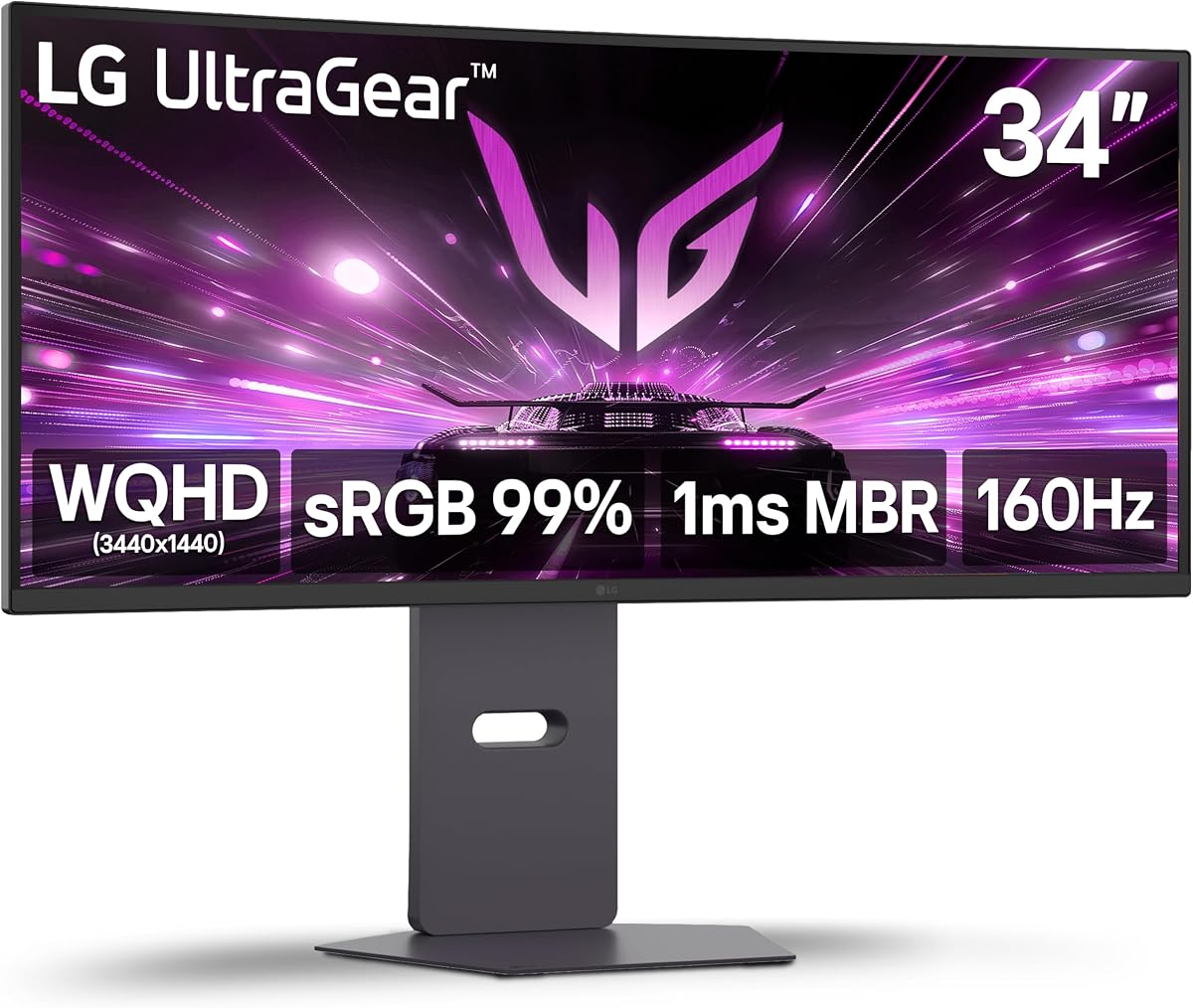
LG's 34-inch WQHD monitor stands out with premium ultrawide immersion and reliable 160Hz performance. Its adjustable stand and built-in audio add convenience often missing in budget models. The curved screen expands field of view for deeper engagement.
We may earn a commission when you buy through this link, at no additional cost to you.
AMD FreeSync Premium ensures tear-free gameplay across varying frame rates. HDR10 support enriches contrast for vivid scenes in supported titles. WQHD resolution offers crisp text and images without demanding 4K GPU power making it versatile for most users.
Costs more than smaller options and needs substantial desk depth for comfortable viewing. The wide aspect ratio can confuse apps not optimized for ultrawide formats. These issues are minor compared to the immersion and productivity gains it provides.
This monitor earns top marks for balancing performance features and usability. It suits competitive gamers and multitaskers who need extra screen space. For those ready to invest in quality LG delivers a robust ultrawide experience with strong support.
21:9 aspect ratio provides extra workspace for timelines spreadsheets and game maps simultaneously.
Height swivel and tilt adjustments help achieve optimal ergonomics for long gaming or work sessions.
We may earn a commission when you buy through this link, at no additional cost to you.
This renewed LG model offers the same ultrawide specs as the new unit at a reduced cost. Buyers report excellent condition and full functionality on arrival. It provides a smart way to access premium LG features without paying full retail price.
We may earn a commission when you buy through this link, at no additional cost to you.
The 1800R curve and 160Hz refresh rate deliver immersive smooth gaming identical to new stock. HDMI 2.1 and DP 1.4 ensure future-proof connectivity. Built-in speakers and adjustable stands remain intact for complete desktop integration.
Refurbished units carry slight risk of cosmetic imperfections though testing mitigates this. Stock levels may fluctuate so availability isn't guaranteed like new items. These factors are acceptable trade-offs for significant savings on a high-quality panel.
Consider this if you want premium specs but need to stay within budget. It brings the LG experience to more users while maintaining performance. Ideal for savvy shoppers comfortable with certified refurbished tech.
Renewed pricing lets you access ultrawide premium monitors at a fraction of new retail costs.
Certified units undergo testing to ensure full function and acceptable cosmetic condition before shipping.
We may earn a commission when you buy through this link, at no additional cost to you.
Samsung delivers a deeply curved 1000R panel that maximizes immersion on a 32-inch screen. The 165Hz refresh rate and QHD resolution ensure smooth sharp visuals across games and media. Eye Saver Mode helps maintain comfort during extended use.
We may earn a commission when you buy through this link, at no additional cost to you.
AMD FreeSync keeps frame rates synchronized for fluid action. HDR10 adds dynamic contrast to scenes. The aggressive curve draws peripheral vision effectively though some users may find it too pronounced for non-gaming tasks.
Limited connectivity lacks USB ports for quick peripheral docking. The curve can cause image distortion for wide-angle content like spreadsheets. These constraints focus the unit on entertainment rather than general office work.
Buy this if you prioritize pure gaming immersion and comfort features. It excels in action titles and streaming media. The deep curve and eye care tools make it a strong pick for dedicated gaming setups.
The 1000R curvature mimics human vision wrapping the screen around your field of view tightly.
Blue light reduction and flicker-free tech help maintain comfort during long sessions comfortably.
We may earn a commission when you buy through this link, at no additional cost to you.
Sceptre blends ultrawide performance with unique luminous backcover lights that add style to your setup. The 180Hz rate and WQHD resolution offer competitive edge for fast games. Dual DP inputs allow easy multi-source switching.
We may earn a commission when you buy through this link, at no additional cost to you.
Built-in speakers deliver acceptable sound for casual media. The 1500R curve balances immersion and usability better than extreme bends. Color coverage reaches 99 percent sRGB for vibrant visuals suitable for both work and play.
Stand only tilts without height or swivel which limits ergonomic tuning. Lighting effects may distract in dark rooms if not dimmed. These trade-offs keep costs down while delivering solid core performance.
This model fits style-focused gamers wanting premium features at a lower cost. It delivers speed and immersion effectively. Ideal for those who value aesthetics and performance in equal measure.
Backcover lights create ambient glow that enhances room atmosphere during late-night gaming.
Two DisplayPort connections let you switch between multiple PCs without unplugging cables.
We may earn a commission when you buy through this link, at no additional cost to you.
Alienware delivers a premium ultrawide with 180Hz speed and iconic design that stands out on any desk. It brings console-quality features to PC gaming with adaptive sync and HDR certification. The curved panel ensures deep immersion without sacrificing clarity.
We may earn a commission when you buy through this link, at no additional cost to you.
Hardware low blue light and console mode preserve color and comfort during long play. VESA DisplayHDR 400 ensures reliable contrast and brightness for HDR content. AMD FreeSync Premium prevents tearing for fluid visual output.
It costs more than budget options and may lack adjustable stands for specific setups. Some users prefer higher HDR tiers but 400 suits most titles well. These limitations are minor given the brand quality and performance.
Buy this if you seek top-tier speed and prestige without compromise. It suits enthusiasts who value design and responsiveness. The console mode and fast refresh make it a future-proof investment for serious gamers.
Dedicated console settings optimize input lag and color for Xbox and PlayStation gaming seamlessly.
Durable construction and signature design ensure the monitor looks as good as it performs.
We may earn a commission when you buy through this link, at no additional cost to you.
AOC pushes speed with a 200Hz refresh rate and 0.3ms MPRT response on a 34-inch ultrawide. This model targets competitive gamers needing minimal motion blur and high frame throughput. WQHD resolution delivers sharpness without 4K overhead.
We may earn a commission when you buy through this link, at no additional cost to you.
Height adjustable stand and swivel ensure ergonomic comfort during marathon sessions. HDR Ready and Adaptive-Sync reduce tearing and enhance contrast. Connectivity includes DP 1.4 for full speed and HDMI 2.0 for general use.
HDMI caps at 100Hz which limits console use to lower refresh rates. Some may prefer larger brands for resale value though performance is competitive. These constraints fit the unit's focus on raw speed for PC gaming.
Pick this if you want maximum refresh rates in a ultrawide format. It excels in fast-paced shooters and simulation games. For pure speed and value AOC offers a strong contender in this category.
200Hz and 0.3ms response virtually eliminate motion blur for precise aiming and tracking.
Height tilt and swivel adjustments help maintain healthy posture during extended use.
We may earn a commission when you buy through this link, at no additional cost to you.
Selecting the right curved 160Hz gaming monitor depends on balancing refresh rate, resolution, size, and ergonomics. This guide covers key factors to help you find a display that fits your needs and budget.
Refresh rate determines how many frames appear per second while response time measures pixel transitions. Aim for 160Hz or higher with 1ms or lower MPRT to minimize motion blur and input lag during fast action.
Prioritize 160Hz refresh and sub-1ms response for competitive gaming to ensure smooth fluid visuals.
Larger screens like 32 to 34 inches offer immersive views but need adequate desk depth. Curvature around 1500R wraps your view naturally whereas extreme curves like 1000R suit pure gaming setups better.
Choose 1500R for balanced use or 1000R for maximum immersion based on your room setup.
Resolution impacts sharpness with FHD suitable for 24 inches but WQHD or 4K better for 32 plus. Higher resolution demands stronger GPU power so match your system to avoid bottlenecks.
Pick WQHD for 34-inch ultrawide to balance clarity and performance effectively.
VA panels provide deep blacks and high contrast ideal for dark scenes while IPS offers wider viewing angles. Check sRGB or DCI-P3 coverage for vibrant colors if you also edit media or design.
Opt for high sRGB coverage to ensure vivid accurate colors across games and content.
Ensure HDMI and DisplayPort versions support desired refresh rates for your source device. Adaptive sync tech like FreeSync or G-Sync prevents screen tearing by matching refresh to frame rate output.
Verify HDMI 2.0 or DP 1.4 ports for full 160Hz+ performance on PC or console.
A stand with height tilt and swivel adjustments promotes healthy posture during long sessions. VESA mount compatibility allows swapping to an arm for flexible positioning and cleaner desk layouts.
Look for height and tilt adjustments or VESA mounts to optimize comfort and flexibility.
Built-in speakers reduce cable clutter though quality varies. HDR support improves contrast while game modes tailor visuals to specific genres. Eye care tech like blue light filters helps during extended use.
Weigh extras like audio and HDR against your actual needs to avoid paying for unused features.
Prices vary widely by size and specs so determine your maximum spend first. Check warranty terms for replacement or repair coverage and consider renewed options to save on proven models.
Balance upfront cost with long-term support and warranty coverage when comparing models.
Connect using DisplayPort for best refresh rates since HDMI may limit speed on some ports. Enable adaptive sync in your graphics settings to reduce tearing and ensure smooth frame delivery.
Adjust brightness and contrast to your room lighting while using blue light filters during night sessions. Calibrate colors with built-in presets or software tools for consistent visuals across media.
Clean the screen with a soft dry microfiber cloth and avoid harsh chemicals. Keep vents clear of dust to prevent overheating and extend the monitor's lifespan safely.
Yes for competitive gaming 160Hz provides smoother motion and marginally lower input lag than 144Hz. If your PC can output frames at that rate you will notice cleaner visuals in fast shooters. Casual users may see less difference but still enjoy smoother UI transitions.
Curved screens enhance immersion by wrapping your peripheral vision around the display. This can reduce eye strain and help you track objects better in open worlds. However they suit gaming and media better than productivity work that needs straight lines.
For 1080P gaming mid-range cards often handle 160Hz easily. Higher resolutions like WQHD or 4K require stronger GPUs to maintain high refresh rates. Match your graphics card to the resolution and target frame rate for optimal performance.
Many models support consoles via HDMI but verify port limits since some HDMI versions cap at lower refresh rates. Check if the monitor supports 4K and 120Hz for next-gen consoles to get full benefit.
Built-in speakers save space and work for casual media but lack depth for immersive audio. Serious gamers usually prefer headphones or external speakers for better directional sound. Use them for menus and notifications when audio peripherals aren't ready.
Check for dead pixels upon arrival using a solid color screen test. Most brands allow returns or replacements within warranty so document issues immediately. Using the monitor daily helps detect early defects before warranty windows close.
Renewed units offer significant savings and often come with warranty coverage similar to new. Inspect condition ratings and return policies before buying. If you prefer guaranteed perfection new models provide full confidence at higher cost.
Quality curved monitors last five to seven years with normal care. Avoid prolonged static images to prevent burn-in and keep firmware updated. Proper cleaning and heat management extend component life significantly.
We reviewed ten curved 160Hz monitors ranging from budget SANSUI picks to premium LG and Alienware models. Each brings unique strengths in immersion speed and features to suit different gaming setups.
Prioritize refresh rate and response time for competitive play or resolution for visual fidelity. Balance these with ergonomics and budget to find the perfect fit for your space.
Always verify current availability and specs before buying since models update frequently. Use this guide to narrow your options and make a confident choice for your next display.