
Eyoyo 3.5 Portable Digital Video Magnifier
4.6Editor score
2X to 25X zoom range
8 adjustable color modes
Foldable bracket design
This guide compares the top digital magnifiers for low vision, evaluating zoom, color modes, and portability to help users find the right visual aid.
Finding the right digital magnifier for low vision can transform daily tasks like reading and writing. These devices use cameras and screens to enlarge text and objects clearly.
We analyzed ten top-rated models based on magnification power, screen quality, and ease of use. Each product offers unique features tailored to different visual needs and preferences.
Our picks highlight key strengths and trade-offs to guide your decision. Remember that availability and pricing may vary, so verify details before purchasing.
4.6Editor score

4.3Editor score
4.0Editor score
This side-by-side comparison highlights key specifications across all ten models to help you quickly identify which device meets your specific needs.


The Eyoyo 3.5 Portable Digital Video Magnifier is a strong entry-level option for those needing quick visual assistance. It holds a solid rating and delivers reliable magnification for daily reading tasks.
We may earn a commission when you buy through this link, at no additional cost to you.
Its 2X to 25X zoom range and 8 adjustable color modes allow users to find comfortable contrast settings. The snapshot function and AV output add versatility for saving images or viewing on larger screens.
While the 3.5 inch screen is compact, it keeps the device portable. Users may need to adjust for smaller text or complex documents, but this is acceptable for the price point.
Ideal for budget-conscious users seeking a simple magnifier, this device balances cost and functionality. It is a practical choice for short-term reading aid and casual use.
This model offers essential magnification features at a lower cost, making it accessible to a wider audience needing basic visual support.
Its lightweight and foldable design ensures easy transport, allowing users to carry it conveniently for use in various environments.
We may earn a commission when you buy through this link, at no additional cost to you.
This 5-inch digital magnifier focuses on ease of use with simplified buttons and a large display. It aims to reduce complexity for elderly users or those new to assistive technology.
We may earn a commission when you buy through this link, at no additional cost to you.
The 2X to 32X zoom and 26 color modes provide flexibility for different vision needs. Memory settings remember preferred configurations, avoiding repetitive adjustments during use.
The lower rating suggests potential variability in build quality or customer support. However, the ergonomic design and TV connection options remain appealing for extended viewing sessions.
Best suited for users prioritizing simplicity over advanced features, this magnifier offers a straightforward interface. It is a viable choice for basic daily reading and shopping tasks.
Simplified buttons reduce confusion, making operation intuitive for users with limited dexterity or experience with electronics.
With 26 color modes, users can tailor contrast and brightness to their specific comfort levels for prolonged reading.
We may earn a commission when you buy through this link, at no additional cost to you.
This portable digital video magnifier delivers a balanced mix of performance and usability. With a 5-inch LCD screen and 2X to 32X zoom, it handles varied reading needs effectively.
We may earn a commission when you buy through this link, at no additional cost to you.
The 26 color modes and memory function allow quick access to preferred settings. Its foldable handle and TV output enhance flexibility for home or travel use.
While not the cheapest, its reliable rating and feature set justify the investment. Users appreciate the ergonomic handle and clear display for long sessions.
Ideal for those seeking a reliable mid-range magnifier, this device offers strong performance. It is recommended for regular use across books, menus, and documents.
The integrated handle and bracket design allow comfortable positioning, reducing strain during extended reading periods.
HD resolution ensures text remains sharp and clear even at higher magnification levels, improving readability significantly.
We may earn a commission when you buy through this link, at no additional cost to you.
Designed specifically for low vision conditions, this 5-inch magnifier offers practical assistance. It provides essential tools like zoom and color modes for improved text visibility.
We may earn a commission when you buy through this link, at no additional cost to you.
The simplified button layout and memory function reduce operational complexity. Users can rely on consistent settings for daily activities without constant recalibration.
Its performance is adequate for standard reading, though advanced features may be limited. The foldable bracket supports comfortable desktop positioning.
Best for users with specific low vision needs, this model offers essential functionality. It is a solid option for those prioritizing ease of use over premium features.
This device is tailored for macular degeneration and similar conditions, providing focused support for visual challenges.
Memory capabilities ensure settings remain unchanged, offering a predictable experience for daily tasks.
We may earn a commission when you buy through this link, at no additional cost to you.
The VEVOR Portable Digital Magnifier stands out with its extensive 2X to 48X zoom range. It also features a dual lens system for both near and far viewing.
We may earn a commission when you buy through this link, at no additional cost to you.
The HD screen and HDMI output support high-quality display options. This makes it versatile for detailed document work or connecting to larger monitors.
While the zoom capability is impressive, user feedback suggests potential setup or usability challenges. The battery life and build may not match higher-rated models.
Ideal for users needing extreme magnification, this model offers powerful optics. It is best suited for specialized tasks where maximum zoom is essential.
Separate near and far lenses allow flexibility for reading text and viewing distant signs or objects.
With up to 48X zoom, this device handles very small text or detailed visuals better than standard models.
We may earn a commission when you buy through this link, at no additional cost to you.
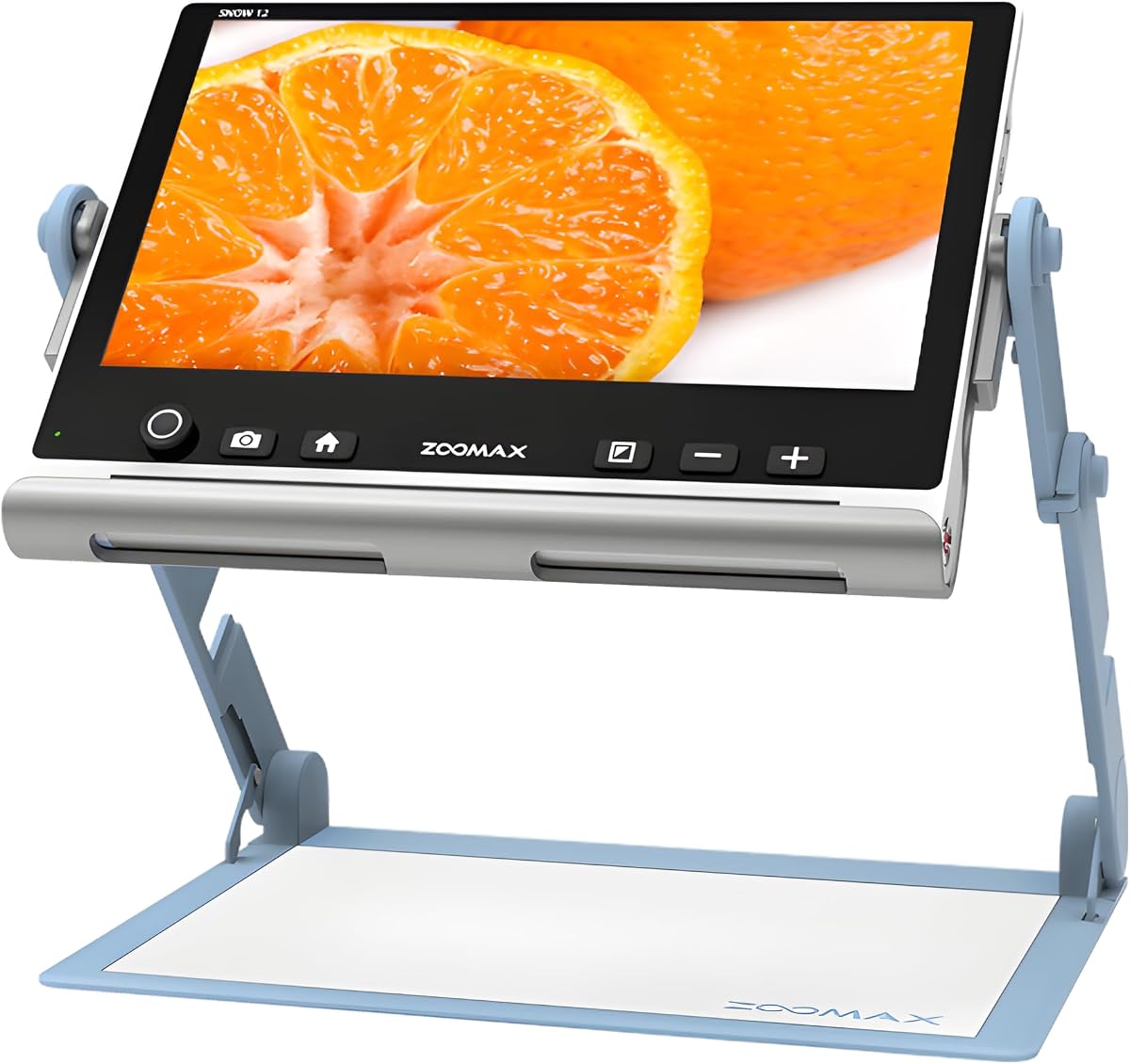
The Snow 12 Inch Foldable Portable Video Magnifier delivers a premium experience with its large display and advanced OCR features. It bridges visual and audio access for text.
We may earn a commission when you buy through this link, at no additional cost to you.
With support for over 20 languages and text-to-speech conversion, it enhances accessibility. The HD camera ensures clear images for reading and writing tasks.
Though costly, its features justify the investment for users needing comprehensive assistance. The foldable stand ensures stability in various environments.
Best for users seeking top-tier accessibility, this device combines size and intelligence. It is highly recommended for professional or extensive daily use.
Optical character recognition converts text to speech, allowing auditory reading for greater independence.
A 12-inch screen provides ample viewing space, reducing eye strain during long reading sessions.
We may earn a commission when you buy through this link, at no additional cost to you.
The Eyoyo 5 Portable Digital Video Magnifier offers a robust 4500mAh battery for over 4 hours of use. It provides reliable magnification for daily reading sessions.
We may earn a commission when you buy through this link, at no additional cost to you.
With 4X to 32X zoom and 17 color modes, users have flexibility in viewing settings. The foldable handle ensures comfort during extended periods.
While features are standard, the battery life is a standout advantage. It ensures uninterrupted use without frequent recharging during tasks.
Best for users needing reliable power, this magnifier balances performance and endurance. It is a solid choice for regular reading and document review.
A high-capacity battery ensures long operation, reducing interruptions during important reading or work.
The lightweight handle design allows comfortable grip, reducing fatigue during prolonged use.
We may earn a commission when you buy through this link, at no additional cost to you.
This portable digital video magnifier excels in color customization with 26 modes and a high-resolution screen. It ensures clear and comfortable viewing for different vision needs.
We may earn a commission when you buy through this link, at no additional cost to you.
Memory functions save preferred settings, simplifying daily use. The foldable handle and TV output provide flexible positioning options for various environments.
While slightly more expensive, its features support long-term usability. Users appreciate the clarity and customization available for reading.
Ideal for those needing precise contrast settings, this model offers strong performance. It is recommended for regular reading and document review.
High resolution and color modes ensure text remains sharp and comfortable for extended viewing periods.
Memory capabilities reduce repeated adjustments, making daily operations smoother and faster.
We may earn a commission when you buy through this link, at no additional cost to you.
The Eschenbach SmartLux Digital Portable Magnifier is designed for lightweight, handheld use. It offers HD quality and essential magnification for quick tasks.
We may earn a commission when you buy through this link, at no additional cost to you.
Image capture features allow users to save documents for later review. Its simple modes ensure ease of operation without complex navigation.
While zoom is limited compared to desktop models, its portability is superior. It is excellent for travel or quick reading checks.
Best for users prioritizing portability, this magnifier offers reliable quality. It is a great choice for on-the-go visual assistance.
Lightweight construction allows users to carry it easily for use in various locations without strain.
Image capture enables saving text or visuals for reference, enhancing study or note-taking.
We may earn a commission when you buy through this link, at no additional cost to you.
This digital magnifier offers an extreme 3X to 48X zoom range for detailed text viewing. It simplifies operation with large buttons and memory settings.
We may earn a commission when you buy through this link, at no additional cost to you.
The 5-inch screen and 26 color modes support comfortable reading. Users can enjoy clear views of small text or labels easily.
While noted as not ideal for long novels, it excels for short tasks and labels. The foldable handle adds convenience for portable use.
Best for users needing high magnification for specific tasks, this model is practical. It is ideal for shopping, recipes, or prescription reading.
High zoom allows clear viewing of extremely small text, beneficial for detailed labels or tiny print.
Simplified buttons and memory settings reduce user effort, enabling quick access to reading tasks.
We may earn a commission when you buy through this link, at no additional cost to you.
Selecting the right digital magnifier requires understanding your specific visual needs and usage environment. Here are key factors to consider.
The zoom power determines how much text can be enlarged. Look for devices that offer sufficient power for your daily reading tasks without distorting text quality.
Higher magnification is useful for very small print, but balance it with screen size to ensure comfortable viewing.
Larger screens provide a wider field of view, reducing eye strain. Resolution affects clarity, so HD screens are preferred for sharp text.
Choose a screen size that fits your reading environment, whether portable or desktop-based.
Color contrast options like black on white or yellow on blue help users with specific vision conditions. Many devices offer multiple presets for customization.
Test different modes to find the most comfortable combination for your eyes.
If you need to move the magnifier frequently, a lightweight handheld design is essential. Foldable handles and compact bodies improve transportability.
Consider how often you travel with the device to determine the best form factor.
For portable use, long battery life ensures uninterrupted reading sessions. Rechargeable batteries are standard, but check capacity and expected hours.
Adequate battery life prevents interruptions during important tasks or outings.
Some models support AV or HDMI outputs for connecting to larger TVs or monitors. This is beneficial for shared viewing or stationary use.
Check compatibility with existing displays if you plan to use external screens.
Simplified buttons and intuitive interfaces are crucial for elderly users or those with limited technical experience. Memory functions save preferred settings.
Look for designs that minimize complex navigation steps for daily convenience.
Advanced models may include OCR for text-to-speech or dual lenses for different distances. These can enhance independence and accessibility.
Evaluate if these features align with your needs before choosing a higher-tier model.
Position the magnifier directly over the text or object you wish to enlarge. Adjust the distance and zoom level until the image is clear and comfortable to read.
Utilize color modes and brightness settings to reduce glare and eye strain. Remember to save your preferred configurations so they are ready for future use.
Keep the lens and screen clean with a soft cloth to prevent dust and scratches. Store the device in a protective case when not in use to maintain its condition.
A digital magnifier uses a camera and screen to enlarge text and objects, providing a clearer view for users with vision impairments. It offers adjustable zoom and contrast for comfort.
Many models feature AV or HDMI outputs that allow connection to larger screens like TVs or monitors. This expands viewing space for easier reading and collaboration.
Color modes adjust contrast and background colors to improve text visibility. High contrast settings like white on black reduce eye strain and enhance clarity.
For most reading tasks, a range between 2X and 32X is sufficient. Higher zoom may be needed for very small print or specialized details.
Battery life varies by model, typically lasting several hours on a single charge. Portable devices usually offer around 4 to 6 hours of active use.
Yes, simplified models with easy buttons and memory settings are suitable for children. They help young students access books and learning materials independently.
Many digital magnifiers include snapshot functions that save images to memory cards. This allows users to review documents or text later.
Most handheld models are ambidextrous or include adjustable handles. Users can position the device comfortably regardless of hand preference.
Our top picks highlight the Eyoyo 3.5 for budget, the Portable Video Magnifier for value, and the Snow 12 for premium features.
Prioritize factors like screen size, zoom range, and portability based on your specific daily tasks and environment.
Always verify current availability and compatibility before purchasing to ensure the device meets your evolving needs.