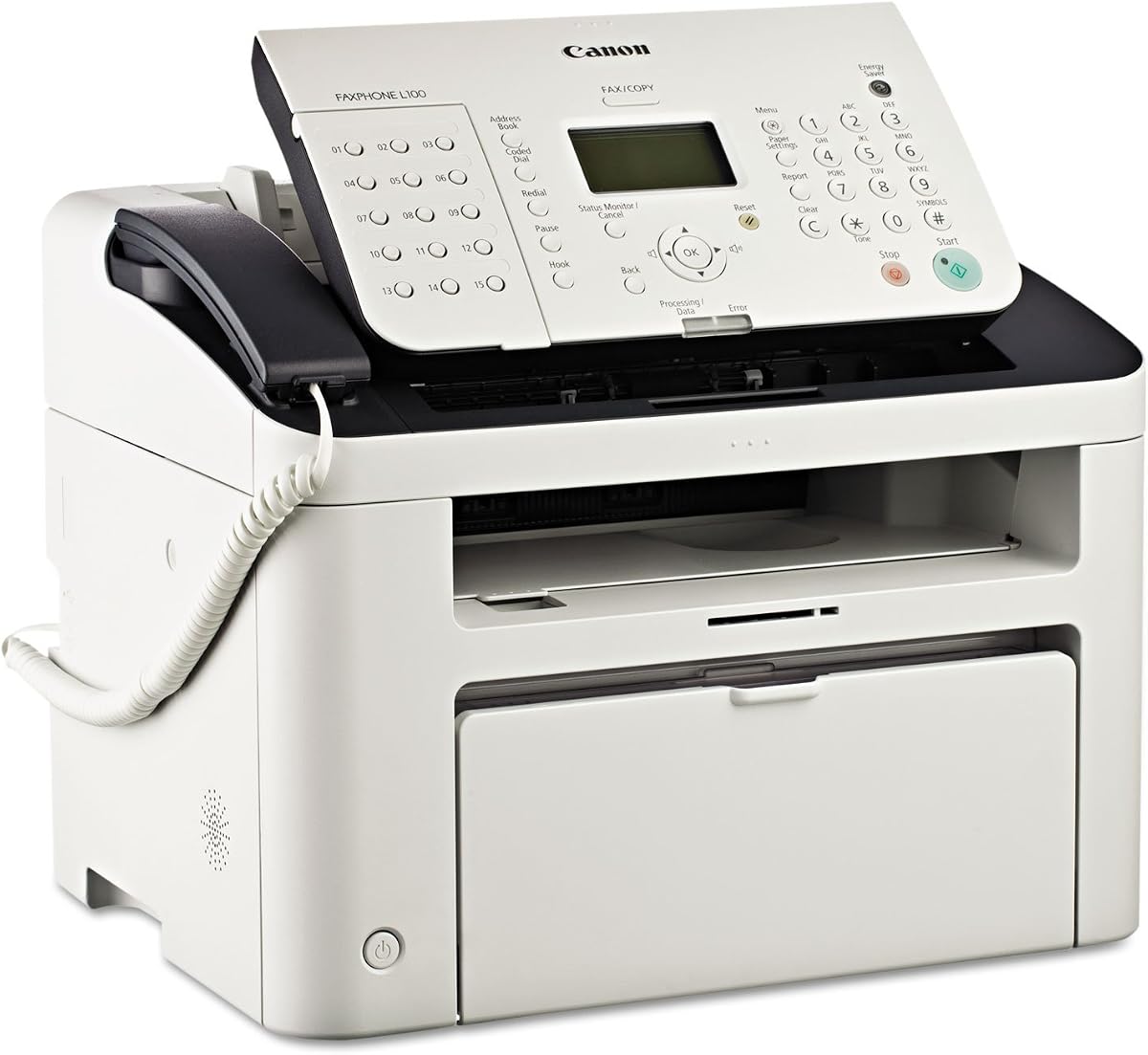
Canon FAXPHONE L100
4.1Editor score
Includes telephone handset for calls
Three hundred sheet auto document feeder
Up to one hundred fifty sheet paper capacity
Finding a reliable fax machine with a phone function remains essential for many businesses. These devices combine traditional communication with modern convenience. You need a unit that handles documents efficiently while keeping voice calls clear and accessible for your team.
We compared ten top-rated models based on performance, ease of use, and core capabilities. Our analysis covers laser and thermal options alongside paperless solutions. Each product offers unique strengths for different office environments and specific communication needs.
Every pick highlights key specs like modem speed, paper capacity, and memory storage. Prices fluctuate regularly so verify current listings before purchasing. We focus on durable designs that support daily faxing without frequent paper jams or connectivity issues.
4.1Editor score

4.4Editor score

4.0Editor score
As an Amazon Associate we earn from qualifying purchases.
This table provides a side by side look at every model we reviewed. Compare specs like resolution, memory, and feeder capacity to find the right fit for your office workflow and communication volume.


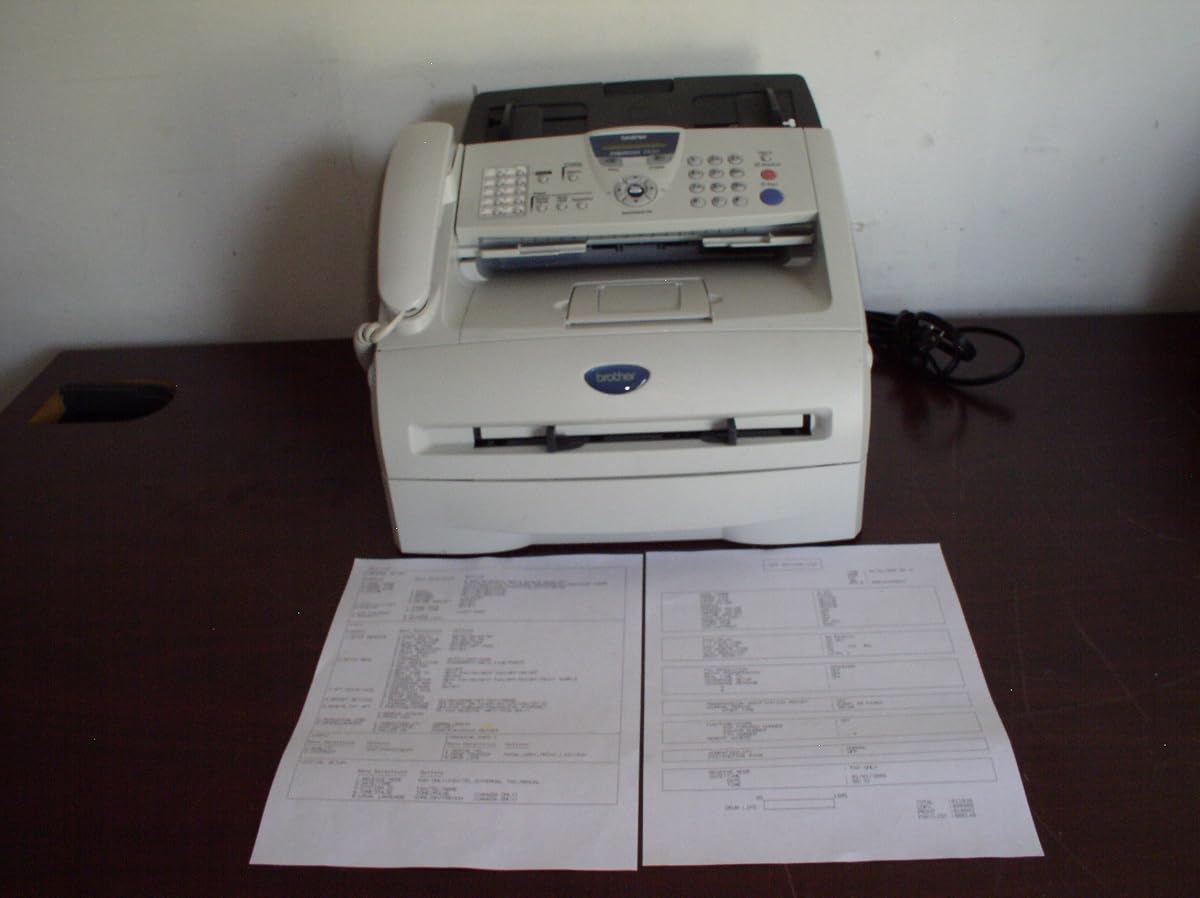

This Brother IntelliFax model stands out as a top choice for businesses needing reliable faxing. It receives strong user feedback for consistent performance and clean output quality. The laser technology ensures sharp text even after multiple copies of the same document.
We may earn a commission when you buy through this link, at no additional cost to you.
Its speed is a major advantage for offices handling high volumes of daily faxes. You can copy and print up to fifteen pages per minute which reduces wait times significantly. The plain paper design means you do not need special thermal paper rolls.
While it lacks a built-in phone handset some users may find this limiting for direct voice calls. The model focuses purely on fax efficiency which is acceptable if you have separate phones. You should verify compatibility with your existing phone lines before setup.
Businesses prioritizing speed and document clarity should consider this unit highly. It balances performance with cost effectively for daily office workflows. We recommend it for users who need a dedicated fax machine without multi-function complexity.
Laser printing ensures crisp text and graphics on every fax page. This helps maintain professional document quality for important client communications.
Using standard plain paper simplifies sourcing supplies and reduces ongoing costs. You avoid the heat sensitive paper often required by thermal faxes.
We may earn a commission when you buy through this link, at no additional cost to you.
The Canon FAXPHONE L100 offers exceptional value for small offices needing fax and phone functions. It includes a telephone handset directly with the device so you can handle voice calls easily. Users appreciate the straightforward setup and reliable operation for daily tasks.
We may earn a commission when you buy through this link, at no additional cost to you.
With print speeds reaching nineteen pages per minute this unit handles documents quickly. It features a thirty sheet auto document feeder to manage multiple pages without manual feeding. The generous paper capacity of up to one hundred fifty sheets reduces refill frequency.
The toner cartridge yields around two thousand one hundred pages which is standard for this class. Some users might find replacement costs add up over time for heavy users. The energy saver mode helps keep power consumption low when the device sits idle.
For those seeking an affordable all in one solution this model is a smart pick. It covers fax printing copying and phone needs in a single compact unit. We suggest it for startups or home offices prioritizing budget and functionality.
Having a dedicated handset simplifies voice calls alongside faxing tasks. You avoid the need for a separate landline phone unit.
Energy saver mode reduces power usage significantly during inactivity periods. This contributes to lower electricity costs for long term operation.
We may earn a commission when you buy through this link, at no additional cost to you.
This paperless fax machine redefines traditional faxing by eliminating paper consumption entirely. You send and receive documents directly from your computer or mobile device anytime. It is ideal for modern offices aiming to reduce paper waste and storage needs.
We may earn a commission when you buy through this link, at no additional cost to you.
The interface allows you to right click and drag documents to send a fax in steps. Received faxes are automatically saved as PDF files to your local network folder. This ensures secure storage and easy retrieval without physical paper piles.
While powerful this system relies on your existing computer or mobile infrastructure. If your network goes down fax functionality may be affected. The initial software setup can take longer than plug and play hardware units.
Tech savvy businesses looking for sustainable solutions will find this unit appealing. It saves money on paper and toner while maintaining secure fax transmission. We recommend it for remote teams needing flexible and eco friendly communication tools.
Send faxes from Android or iOS devices seamlessly. This adds flexibility for staff working away from their desks.
All incoming faxes save as PDF files automatically. You can forward these files via email or store them digitally.
We may earn a commission when you buy through this link, at no additional cost to you.
The Brother FAX-575 delivers solid personal faxing with phone functions in one unit. It is designed for easy operation which helps non technical users get started quickly. Faxes transmit in about fifteen seconds per page which speeds up sending process.
We may earn a commission when you buy through this link, at no additional cost to you.
You can copy black and white documents at four hundred dpi resolution for clear text. The internal memory stores up to twenty five pages so you can batch send faxes. This feature is useful when you have a stack of documents to send.
The fifty sheet paper capacity is modest but sufficient for light personal or home office use. Users note the machine can be a bit loud during operation. It may not handle high volume daily faxing as well as newer models.
For personal users needing a straightforward device this model serves well. It combines fax phone and copying without complicated menus or settings. We suggest it for home offices or individuals with moderate faxing demands.
Compact size and simple controls fit well in small spaces. Ideal for home offices or private workstations needing fax functions.
Transmitting faxes in fifteen seconds per page saves time. This keeps workflow moving when you have multiple pages to send.
We may earn a commission when you buy through this link, at no additional cost to you.
This renewed version of the Brother FAX-575 offers similar capabilities at a lower price point. It provides the same fax phone and copy functions as the new model. Buyers get a tested unit that should work reliably for daily personal needs.
We may earn a commission when you buy through this link, at no additional cost to you.
You still get fifteen second per page transmission speed and twenty five page memory storage. The fifty sheet paper capacity remains adequate for small batches of faxes. Copying resolution stays consistent at four hundred dpi for clear output.
As a renewed product the unit may show minor signs of previous use. Warranty coverage typically differs from brand new items so check terms carefully. It is a cost effective choice if you want to minimize upfront spending.
For budget conscious buyers needing reliable basic faxing this renewed model works well. It handles standard tasks without issues and saves money over a new unit. We recommend it for home offices with light to moderate fax volumes.
Renewed units often save significant money versus buying new. You still get tested functionality for personal faxing tasks.
All core features match the original new model exactly. You do not lose functionality by choosing a renewed option.
We may earn a commission when you buy through this link, at no additional cost to you.
The Brother MFC7240 is a versatile all in one device covering print scan copy and fax tasks. It reaches print speeds of twenty one pages per minute which is fast for monochrome work. The twenty five sheet paper tray supports extended printing without refills.
We may earn a commission when you buy through this link, at no additional cost to you.
It includes a twenty page auto document feeder for scanning multiple documents easily. The monochrome scanning offers high resolution up to one hundred ninety two hundred dpi interpolated. This ensures clear fax transmission and copy quality for business documents.
Users note the lack of a telephone handset which might be limiting if you need voice calls. Connectivity relies on wired USB so you cannot print wirelessly from remote devices. Setup requires a computer connection for driver installation.
For offices needing a compact multi function hub this model serves well. It consolidates multiple tasks into one unit to save desk space. We suggest it for small teams prioritizing print speed and scanning accuracy.
Twenty one pages per minute keeps workflows efficient. This speed reduces wait times for large document batches.
Twenty page capacity handles multi page faxes effortlessly. It saves time by feeding documents automatically.
We may earn a commission when you buy through this link, at no additional cost to you.
The Panasonic KX-FHD331 focuses on plain paper faxing with integrated voice call features. It supports caller ID and interface with answering machines for better call management. Users benefit from standard paper usage which makes finding supplies easier.
We may earn a commission when you buy through this link, at no additional cost to you.
With a nine point six Kbps modem speed transmission times are slower than newer models. You should plan for longer durations when sending faxes. It remains a solid choice for environments prioritizing voice call clarity over fax speed.
User feedback indicates mixed experiences regarding overall reliability and ease of use. Some customers report successful operation while others note occasional setup challenges. The exchange program included with the warranty adds value for peace of mind.
For businesses needing both fax and phone functions with caller ID this works. It fits well where voice communication matters as much as fax transmission. We recommend checking reviews thoroughly before purchasing given the mixed ratings.
Caller ID support helps identify incoming calls easily. This adds convenience for managing voice and fax lines.
Using plain paper simplifies refills and reduces thermal paper costs. It also keeps documents legible over time.
We may earn a commission when you buy through this link, at no additional cost to you.
The Brother PPF-2800 offers plain paper faxing with generous memory for stored faxes. It can store up to ninety pages internally which helps when sending multiple pages. The ten pages per minute print speed is moderate but sufficient for light users.
We may earn a commission when you buy through this link, at no additional cost to you.
Auto dialing supports up to one hundred eight stations making it easy to broadcast faxes. You can make up to ninety nine copies which is helpful for document distribution. The auto document feeder accepts up to twenty pages for batch scanning.
Users find the device straightforward to use with minimal learning curve required. However the slower print speed may be a drawback for high volume needs. It remains a reliable option for small offices needing basic fax capabilities.
For environments needing reliable broadcast faxing this model works well. It balances simplicity with necessary storage capacity for daily tasks. We suggest it for users prioritizing memory and ease of use over raw speed.
Stores up to ninety pages internally for batch sending. This reduces the need for manual feeding each time.
Up to one hundred eight station auto dialing simplifies fax broadcasts. You can send faxes to many numbers easily.
We may earn a commission when you buy through this link, at no additional cost to you.
This Brother IntelliFax model uses laser technology for sharp clear fax output. It stores up to five hundred pages in memory which is a standout feature. The twenty page auto document feeder handles multiple pages without manual intervention.
We may earn a commission when you buy through this link, at no additional cost to you.
Broadcast faxing supports up to two hundred seventy locations for easy mass sending. USB 2.0 interface allows for future driver updates and optional connectivity. Users appreciate the reliability and professional quality of printed documents.
The lack of a phone handset may require a separate telephone setup. You focus purely on fax efficiency which works well in data driven offices. Some users might miss wireless capabilities found in newer models.
For high volume faxing needing strong memory this unit excels. It balances speed with storage for consistent daily performance. We recommend it for offices needing reliable fax and copy functions.
Eight MB memory stores up to five hundred pages. This allows you to queue large batches without constant feeding.
Supports broadcasting to up to two hundred seventy locations. This helps with quick distribution of important notices.
We may earn a commission when you buy through this link, at no additional cost to you.
The Canon FAXPHONE L80 combines laser faxing with a telephone handset for voice calls. It offers quality laser output ensuring professional document clarity. The telephone handset allows you to manage calls directly from the device.
We may earn a commission when you buy through this link, at no additional cost to you.
Print speeds are at six pages per minute which is slower than many rivals. This may cause delays during high volume printing periods. The thirty three point six Kbps modem provides stable transmission but is not the fastest available.
USB interface connectivity ensures straightforward setup with most computer systems. Users get a one year warranty with exchange for added protection against defects. However some users report inconsistent performance and lower reliability ratings.
For those needing a basic fax and phone unit this model provides. It covers essential functions without advanced features. We suggest checking recent user feedback before purchasing to ensure it meets your reliability expectations.
Laser technology ensures sharp text and images on fax pages. This helps maintain professional appearance for documents.
Voice calls are handled via included telephone handset. You do not need a separate phone for communication.
We may earn a commission when you buy through this link, at no additional cost to you.
Selecting the right fax machine with phone requires understanding your office needs. We explore key factors that influence performance and usability.
Modem speed determines how fast your faxes send and receive. Look for speeds at least 9600 BPS or higher for efficiency. Faster speeds reduce downtime when handling large volumes.
Prioritize units with higher BPS ratings for professional workflows.
Paper capacity affects how often you refill trays during busy periods. Units with 100+ sheets reduce interruptions for small offices. Auto document feeders save time by scanning multi page batches.
Choose models with adequate paper trays and automatic feeders.
Internal memory allows you to store faxes before printing or sending. Look for at least 25 page storage to handle batches easily. Larger memory helps when phone lines are busy during sending.
Select machines with memory to prevent missed or queued faxes.
Many fax machines with phone functions include a telephone handset. This integrates voice calls directly into the device for convenience. Verify if handset support is included before purchasing.
Ensure the model supports voice calls if you need a combined solution.
Laser machines produce sharper text than thermal paper models. Thermal faxes fade over time which risks document legibility. Choose laser for long term document retention needs.
Opt for laser technology to keep faxes readable for years.
Modern fax machines offer USB or network interfaces for digital integration. Check if you need PC integration for scanning or emailing faxes. Wired connections are standard for stable performance.
Verify compatibility with your office computer network setup.
Toner and paper costs add up over the lifespan of the machine. Consider how much toner is needed per page before buying. Plain paper models avoid expensive thermal paper replacements.
Calculate long term supply costs to ensure affordability.
A good warranty protects your investment against manufacturing defects. Look for at least a one year warranty with exchange options. Manufacturer support matters if you face technical issues after setup.
Ensure you have access to reliable support and warranty terms.
Start by connecting the machine to a working phone line and power outlet. Ensure the telephone handset is connected if your unit includes voice features. Follow the setup wizard to configure your fax ID and date settings.
Load standard paper into the tray and adjust guides to fit the width. Place documents face down in the auto feeder or scan manually from the glass. Press the fax button and dial the recipient number to send your fax.
Keep the machine in a dry and dust free area to avoid jams. Regularly clean the glass scanner and remove any paper debris from trays. Use high quality paper to prevent toner issues and ensure clear copies.
Most fax machines with phone features work on a single line. They handle voice and fax calls automatically. You do not need a dedicated second line for standard usage.
Paperless models like the CimFAX allow direct PC sending. Traditional models require physical documents. Verify if the unit supports PC integration before purchase.
Most machines store incoming faxes in memory until paper is replaced. They resume printing once paper is available. Check memory capacity to ensure no faxes are lost.
Laser faxes produce clearer text that does not fade over time. Thermal paper can darken or fade quickly. Choose laser for better long term document quality.
Traditional fax machines struggle with VoIP due to signal compression issues. You may need a VoIP friendly model or analog telephone adapter. Check compatibility with your specific phone provider.
Toner replacement depends on print volume but typical cartridges last for a few thousand pages. Monitor toner levels to avoid low quality prints. Always keep spares on hand for busy periods.
We reviewed ten top models from Brother Canon and other reliable manufacturers. Our top picks cover budget premium and paperless options to suit every office. The Canon FAXPHONE L100 offers great value while the CimFAX A5 leads for paperless needs.
Prioritize speed memory and paper capacity based on your daily fax volume. Voice call integration matters if you lack separate phones. Ensure the model fits your existing phone infrastructure before buying.
Prices change frequently so verify current listings on Amazon before finalizing your choice. Check stock availability for renewed or refurbished options if you need savings. Trust established brands like Brother for long term reliability.