
SUNLU Filament Dryer Box 2026 New Upgrade S1 Plus
4.3Editor score
Fast drying with built-in fan
Visual LCD display screen
Compatible with multiple filament types
This guide compares the top filament dryer box options for 3D printing, analyzing features like capacity, heating speed, and humidity control to help you
Filament dryer boxes are essential tools for maintaining print quality by preventing moisture absorption in 3D printing materials. They help avoid stringing, bubbling, and poor adhesion caused by damp spools during active printing sessions.
We evaluated ten leading models based on heating efficiency, capacity, user interface, and sealing quality. Our analysis considers real-world performance data, compatibility with various filament types, and overall value for both hobbyists and professionals.
Each pick highlights specific strengths and ideal use cases to match your printing workflow. Please note that product availability and pricing can change frequently, so verify current details before making a purchase decision for your setup.
4.3Editor score

4.6Editor score

4.6Editor score
The following table provides a side-by-side overview of the ten top-rated filament dryer boxes, highlighting key specifications such as capacity, heating technology, and compatibility to assist in quick decision-making.


The Creality Space Pi X4 stands out as a top performer with its ability to hold four standard spools simultaneously. Its dual independent heating chambers allow for efficient moisture removal, making it ideal for users who print with multiple materials frequently.
We may earn a commission when you buy through this link, at no additional cost to you.
With a maximum temperature of 85 degrees Celsius, this unit can handle advanced engineering filaments like PC and PAHT effectively. The touch UI provides precise control, and the silicone-sealed enclosure ensures that dried filament stays dry even when printing is paused.
While the price is higher than basic models, the time saved drying multiple spools at once justifies the investment for serious makers. The only trade-off is the physical size, which requires dedicated space on a workbench or shelf.
This dryer is best suited for professionals or enthusiasts who run long print queues and need reliable storage. It combines speed, capacity, and precision in a way that few other boxes on the market currently offer for diverse workflows.
The dual heating chambers allow users to dry two different filament types at different temperatures simultaneously, maximizing throughput without compromising print quality or material integrity during active sessions.
Capable of reaching 85 degrees Celsius, this dryer unlocks the potential for high-performance materials that require higher heat to remove moisture safely without degrading the polymer structure of the filament.
We may earn a commission when you buy through this link, at no additional cost to you.
The SUNLU S1 Plus offers a cost-effective solution for keeping filament dry without breaking the bank. It features an upgraded fan design that speeds up moisture discharge, addressing common issues like stringing and clogging during standard printing tasks.
We may earn a commission when you buy through this link, at no additional cost to you.
The 2-inch LCD screen provides clear visibility of temperature and humidity levels, making it easy to monitor progress. While the max temperature is limited to 55 degrees Celsius, it is sufficient for popular materials like PLA, PETG, and TPU.
Users might find the single spool capacity limiting if they work with multiple materials, but it is perfect for individual prints. The affordable price makes it an excellent entry point for those new to filament drying needs.
This model is recommended for hobbyists who primarily use standard filaments and need a reliable, budget-friendly dryer. Its simplicity and effectiveness make it a solid choice for maintaining print consistency in home environments.
The integrated fan actively circulates air to expedite water evaporation from the filament, reducing drying time significantly compared to passive heating methods found in cheaper storage boxes.
Simple button controls allow users to adjust temperature and time settings easily, ensuring that even beginners can manage the drying process without confusion or complex setup procedures.
We may earn a commission when you buy through this link, at no additional cost to you.
The Official Creality X4 DB-05 represents a premium approach to filament management with dual independent heating chambers. This allows for simultaneous drying of two different filament types at different temperatures, optimizing efficiency for complex projects.
We may earn a commission when you buy through this link, at no additional cost to you.
With power-saving modes, users can choose single or dual chamber operations to reduce energy consumption without sacrificing performance. The max temperature of 85 degrees Celsius ensures that even demanding engineering materials are dried effectively for reliable printing results.
While it works best with Creality trays, the system offers high reliability and precise control for serious users. The ability to switch modes helps manage costs over time, making it a sustainable choice for daily printing environments.
This dryer is ideal for those who demand high performance and want to avoid manual intervention. Its advanced features justify the premium price for users who value precision and flexibility in their filament storage workflow.
Each chamber operates independently, allowing users to dry different materials simultaneously without cross-contamination or temperature conflicts, streamlining the workflow for multi-material prints.
The option to run in single-chamber mode saves up to 40 percent energy, offering a cost-effective way to dry filament when full capacity is not required for immediate production needs.
We may earn a commission when you buy through this link, at no additional cost to you.
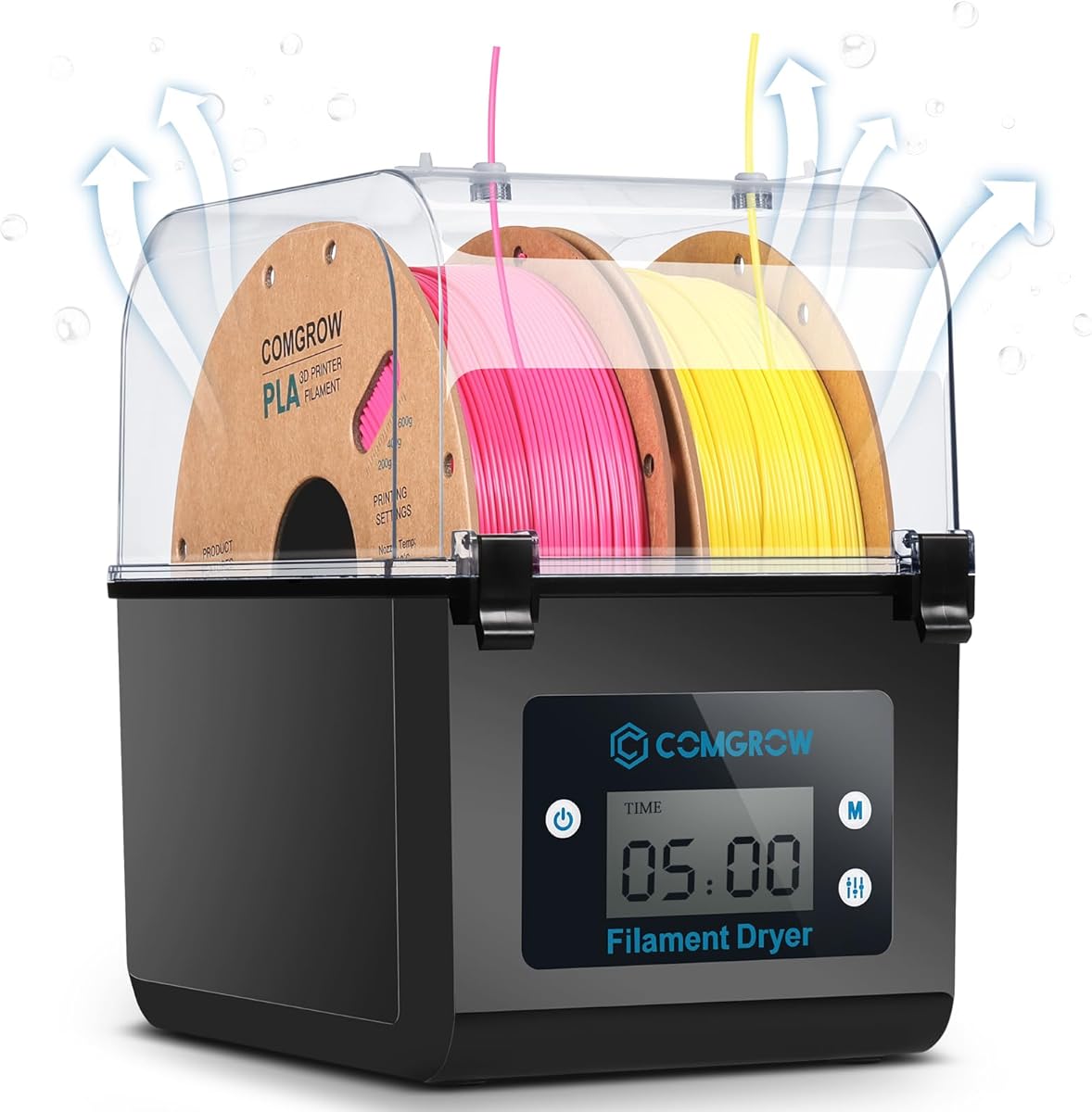
The Comgrow SH01 provides a balance of capacity and functionality for users who need to store two spools at once. It features a clear LCD screen that allows for easy monitoring of temperature and humidity during the drying process.
We may earn a commission when you buy through this link, at no additional cost to you.
Designed with a sealed outlet and Teflon tube, it prevents moisture re-entry while printing. The automatic shutdown feature ensures safety if the work mode is not engaged, adding a layer of security for unattended operation periods.
While the max temperature is capped at 50 degrees Celsius, it works well for standard filaments. Some users may find the drying time slightly longer compared to models with active fans, but the sealed design maintains dryness well.
This dryer is suitable for users who prioritize storage and moderate drying needs. Its user-friendly interface and safety features make it a dependable choice for keeping filaments dry between print jobs effectively.
The outlet structure uses a silicone cable sheath to seal the filament exit, ensuring that moisture does not enter the box from the printer side during active printing sessions.
If the work state is not displayed, the motherboard automatically shuts down after three minutes, preventing overheating and saving energy when the unit is not actively drying filament.
We may earn a commission when you buy through this link, at no additional cost to you.
The Polymaker Polydryer offers a simple approach to filament protection through airtight sealing rather than active heating. It includes a built-in hygrometer, allowing users to monitor humidity levels without relying on guesswork or complex controls.
We may earn a commission when you buy through this link, at no additional cost to you.
Designed to support filament feeding while the spool remains inside, it maintains a dry environment even during printing pauses. This is particularly useful for overnight storage or breaks when active drying is not necessary.
While it lacks a heater, it works well with desiccant packs to absorb moisture passively. Users need to replace desiccants periodically to maintain effectiveness, but the simplicity reduces the risk of electronic failure over time.
This box is best for users who have dry environments or want a backup storage solution. It complements active dryers by providing a safe place to store filament between drying sessions effectively.
The sealed design prevents humid air from entering the box, protecting sensitive filaments like Nylon and PETG from moisture absorption during storage periods without needing power.
A visible humidity reading on the box allows users to track storage conditions, ensuring that the environment remains suitable for maintaining filament quality and print consistency.
We may earn a commission when you buy through this link, at no additional cost to you.
The SUNLU S2 is designed for high-capacity drying with a large internal volume and a built-in spindle that ensures the filament spins continuously for even heat distribution. This helps avoid uneven drying spots often found in static boxes.
We may earn a commission when you buy through this link, at no additional cost to you.
The translucent lid allows users to check on the filament without opening the box, maintaining the internal temperature and humidity levels during the drying process. This feature adds convenience and efficiency to the workflow.
With a max temperature of 70 degrees Celsius, it covers most standard and engineering filaments. The simple touch screen makes setup straightforward, although the unit is slightly heavier due to its larger construction and components.
This dryer is suitable for users who need to dry longer spools or multiple batches efficiently. Its design focuses on uniform drying and convenience, making it a robust choice for home workshops with varied printing needs.
The built-in spindle ensures the filament spins continuously, promoting even drying across the entire spool and preventing hot spots that could potentially damage the material during the drying cycle.
A translucent lid enables visual checks without breaking the seal, allowing users to confirm drying progress while maintaining the optimal internal environment for moisture removal.
We may earn a commission when you buy through this link, at no additional cost to you.
The Comgrow SH02 uses a 150W PTC heater to warm up quickly, reaching target temperatures within minutes. Its 360-degree heating circulation ensures uniform drying, which is critical for consistent filament quality across different spool batches.
We may earn a commission when you buy through this link, at no additional cost to you.
With one-key settings for nine types of filaments, the unit simplifies operation for users who switch materials often. The sealing rings around covers and outlets help prevent moisture from re-entering the chamber during active drying or storage.
While the max temperature is 70 degrees Celsius, it handles most common filaments efficiently. The intelligent safety protection cuts off heating if temperatures exceed safe limits, adding a layer of security against potential overheating issues.
This model is ideal for users who value speed and ease of use. Its preset options and rapid heating make it a practical choice for those who need to dry filament quickly before starting a print session effectively.
Predefined drying temperatures and times for nine filament types allow users to start drying with a single button press, reducing setup time and minimizing the risk of incorrect temperature settings.
Hot air is circulated in all directions by a built-in fan, ensuring that moisture is removed evenly from the entire spool surface without creating cold spots or uneven drying zones.
We may earn a commission when you buy through this link, at no additional cost to you.
The 2026 Creality Space PI features a large 3.7-inch touch screen for easy operation and monitoring. It supports 12 filament presets, including high-performance composites, making it versatile for users with diverse material libraries.
We may earn a commission when you buy through this link, at no additional cost to you.
A power-off memory function ensures that settings are saved even after a power outage, preventing the need to reset parameters manually. This convenience is valuable for long drying sessions where user attention might be limited or unavailable.
With 360-degree hot-air heating, moisture is removed efficiently and uniformly. The dryer can set for up to 48 hours, providing flexibility for different filament types and ensuring thorough drying before printing begins effectively.
This model is recommended for users who value interface quality and versatility. Its extensive presets and memory features make it a reliable companion for managing complex print jobs and maintaining high-quality standards.
The device remembers previous settings after a power loss, allowing it to resume drying without manual reconfiguration and ensuring consistent results even during unexpected interruptions in power supply.
Supporting up to 12 types, including composites like PLA-CF, the dryer simplifies selection with one-key settings that automatically apply correct temperatures and times for different materials.
We may earn a commission when you buy through this link, at no additional cost to you.
The Creality Space PI Plus distinguishes itself with a real-time humidity monitor, allowing users to track moisture levels inside the box actively. Combined with a dual-spool design, it offers a practical solution for small-scale multi-material workflows.
We may earn a commission when you buy through this link, at no additional cost to you.
The touch screen supports temperature switching between Celsius and Fahrenheit, adding flexibility for different regions. With 12 filament presets, users can quickly start drying processes without needing to manually input values for common materials.
Uniform heating via 360-degree air circulation ensures consistent results. The unit is compact enough for most workspaces while still providing the capacity to dry two spools, balancing size and performance well.
This dryer is suitable for users who want to monitor conditions actively. Its features make it a strong choice for those who value visibility and ease of use in their filament drying routine.
Built-in humidity monitoring provides immediate feedback on internal conditions, enabling users to verify dryness before printing and adjusting settings as needed for consistent quality.
Supporting two spools allows for simultaneous drying of common materials, saving time and effort compared to single-spool units and streamlining the prep process for multi-color prints.
We may earn a commission when you buy through this link, at no additional cost to you.
The Creality Space Pi X4L offers a large capacity with four spool storage, ideal for users who print frequently. Its dual independent heating chambers allow for rapid drying, removing moisture 30 percent faster than single-chamber models.
We may earn a commission when you buy through this link, at no additional cost to you.
An illuminated window lets users monitor spools without breaking humidity control, maintaining the sealed environment while checking progress. With a max temperature of 75 degrees Celsius, it supports a wide range of filaments from PLA to PAHT.
The silicone-sealed enclosure prevents moisture re-absorption 24/7, ensuring filament stays dry even during pauses. While the unit consumes more power, the efficiency and capacity make it a solid option for production environments.
This dryer is best for users who need high volume storage and drying capabilities. Its features ensure that filament remains consistent and ready for printing, reducing waste and improving print reliability significantly.
The illuminated window allows users to view spool conditions without opening the box, preserving humidity levels and avoiding unnecessary exposure to ambient air during monitoring.
The sealed design prevents moisture re-absorption 24/7, ensuring that dried filament remains dry during storage and pauses, which is critical for maintaining print quality and consistency.
We may earn a commission when you buy through this link, at no additional cost to you.
Choosing the right filament dryer box depends on your printing habits, budget, and the types of materials you use regularly.
Capacity is a primary consideration. Single-spool boxes are compact and affordable, while dual or four-spool units allow for simultaneous drying. High-volume users benefit from larger capacities to maintain a steady supply of dry filament.
Choose capacity based on how many spools you typically have ready. If you work with multiple materials, a multi-spool model ensures you always have dry options available.
Different materials require different drying temperatures. PLA needs lower heat, while engineering filaments like Nylon and PC require higher temperatures to remove moisture effectively. Check the max temperature to ensure compatibility.
A max of 70 to 85 degrees Celsius covers most needs. Lower limits may restrict use with high-performance materials that need more heat for proper dehydration.
PTC heaters are common for their efficiency and safety. Models with active fans or circulating air dry faster than those relying on passive heat. Faster drying saves time and improves throughput.
Look for features like 360-degree circulation or dual chambers if you need quick turnaround. Active fans help distribute heat evenly for consistent results.
A good seal prevents moisture from entering during printing. Silicone rings, tight latches, and sealed cable outlets keep humidity low inside the box. This is crucial for long prints where pauses occur.
Ensure the outlet design seals well when not in use. Airtight enclosures maintain dryness even when the dryer is not actively heating.
Touch screens and preset buttons simplify operation. Users who switch materials often appreciate presets that handle temperature and time automatically. Clear displays help monitor progress without opening the box.
Choose interfaces that suit your comfort level. Simple buttons may be sufficient for basic use, while detailed controls offer more precision.
Safety mechanisms like auto shut-off or overheat protection prevent damage. Some models monitor fan rotation or temperature spikes. These features reduce risk when running unattended.
Look for certifications or safety warnings on the packaging. Reliable brands often include redundant protections to avoid overheating.
Durable plastic and heat-resistant components ensure longevity. Thin materials might warp over time. Check reviews for mentions of sturdiness and wear after extended use.
Invest in a well-built unit if you use it daily. Quality construction ensures consistent performance over years of service.
Well-known brands often provide better customer support and spare parts. Check warranty terms and availability of accessories like replacement seals or fans.
Research community feedback for specific models. Strong user reviews often indicate reliability and ease of maintenance.
To begin, place your spools inside the dryer ensuring they are not tangled or pinched. Close the lid securely and connect the unit to power. Adjust the temperature and time settings based on the filament manufacturer recommendations.
During operation, monitor the display to ensure the dryer is functioning correctly. If your model has a fan, listen for smooth operation. Avoid opening the lid unnecessarily as this can let moisture back into the chamber.
After use, allow the unit to cool before moving it. Clean the interior occasionally to remove dust or debris. Store the dryer in a dry place when not in use to maintain its own longevity and performance.
Drying time varies based on moisture levels and filament type. Generally, it takes four to six hours for damp filament, but pre-dried spools may need only two hours. Active fans can reduce this time significantly.
Yes, most dryer boxes allow printing while filament stays inside. Ensure the outlet is sealed properly to prevent humidity from entering during pauses. This keeps filament dry throughout long printing sessions.
PLA typically dries well at 45 to 50 degrees Celsius. Higher temperatures can warp the material. Always check manufacturer guidelines to ensure safe drying without damaging the filament properties.
Yes, these materials benefit greatly from drying due to high moisture sensitivity. Ensure the dryer reaches at least 60 to 70 degrees Celsius for effective moisture removal from these polymers.
A good indicator is a reduction in print defects like bubbling or stringing. Some boxes have humidity monitors to confirm dryness. If issues persist, extend the drying time or check for seal leaks.
Most parts are durable, but seals may wear over time. Replace outlet rings if you notice moisture ingress. Fans usually last years, but check for noise or blockage to ensure efficient air flow.
In summary, the top picks offer diverse options for every user. The Creality Space Pi X4 leads with capacity and speed, while the SUNLU S1 Plus provides budget-friendly value. The Official Creality X4 DB-05 stands out for high-performance engineering needs.
When selecting a box, prioritize capacity, max temperature, and sealing quality. Consider your printing habits to decide if one or multiple spools are needed. Features like presets and humidity monitoring add convenience for regular users.
Always check current availability and pricing before purchasing to ensure the best deal. With the right dryer box, you can maintain consistent print quality and reduce waste from moisture-related issues effectively.