
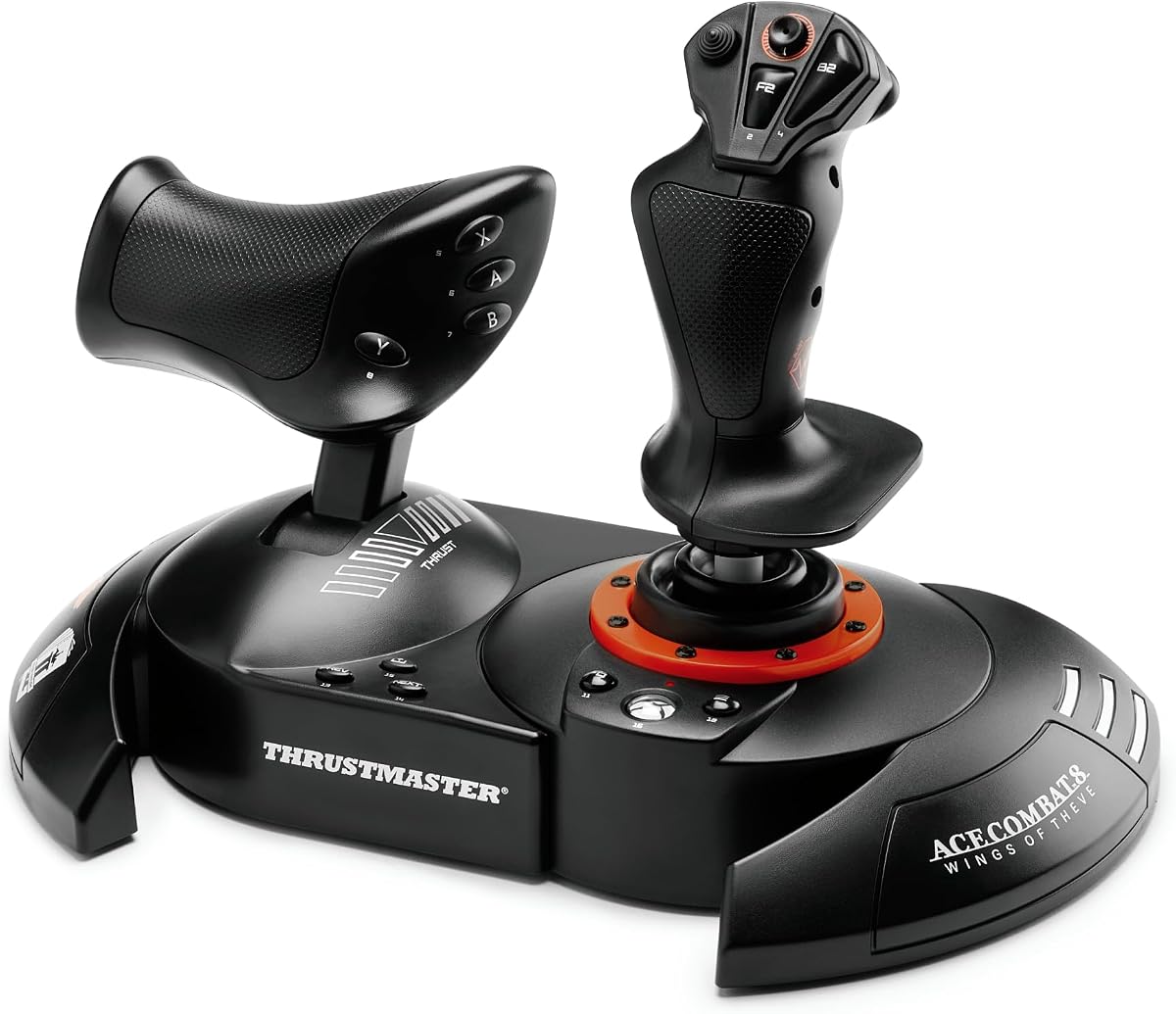
Thrustmaster T-Flight Hotas One Flight Stick & Throttle – XBOX & PC
4.4Editor score
Plug and play USB connection
Detachable throttle design
Adjustable joystick resistance
This guide compares the best flight sticks for the Xbox Series X to help you find the right controller for simulation gaming.
Finding the right flight stick for the Xbox Series X can transform your simulation experience from casual play into a realistic cockpit environment. These controllers offer precise inputs and immersive feedback that standard gamepads simply cannot match for aviation enthusiasts.
We have evaluated ten top-rated flight sticks based on build quality, compatibility, and feature sets. Our comparison looks at ergonomics, button layouts, and integration with popular flight simulator titles to ensure you get the best value.
Each pick in this list highlights specific strengths like affordability or premium features. Prices and availability change often so please check current listings before purchasing to ensure you get the best deal on your chosen controller.
4.4Editor score
4.5Editor score

4.3Editor score
The following table provides a side by side look at the key specifications and features of each flight stick on our list.


The Thrustmaster T-Flight Hotas One stands out as a top budget option for Xbox Series X pilots. It offers a balanced mix of precision and comfort without a high price tag.
We may earn a commission when you buy through this link, at no additional cost to you.
This controller features a realistic flight simulator design with adjustable resistance for tailored control. The detachable throttle allows you to adapt the setup for your space.
While the build is largely plastic it remains durable for casual use. The button layout is straightforward making it easy to learn for new users.
Buyers looking for their first flight stick will find this model an excellent starting point. It delivers a solid experience for the cost.
The throttle can be detached to suit different play styles or desk setups.
Resistance settings let you tweak how the stick responds to your input.
We may earn a commission when you buy through this link, at no additional cost to you.
This edition is tailored for intense combat scenarios with feedback that enhances immersion. It brings advanced Hall Effect technology to the Xbox platform at a mid-range price.
We may earn a commission when you buy through this link, at no additional cost to you.
The vibration motor provides tactile responses to impacts and turbulence. Buttons are designed for rapid access during fast-paced maneuvers in the sky.
Some may find the branding too specific if they prefer generic designs. However the functionality remains top notch for anyone focused on aerial dogfights.
Pilots who prioritize responsiveness and feedback will appreciate this controller. It bridges the gap between entry level and premium hardware effectively.
Hall Effect sensors ensure consistent accuracy even after hours of intense use.
Vibration feedback helps you feel every missile launch or landing impact.
We may earn a commission when you buy through this link, at no additional cost to you.
The Turtle Beach VelocityOne Flightstick brings a unique digital twist to flight control with an onboard display. It aims to provide comprehensive data access directly from the stick.
We may earn a commission when you buy through this link, at no additional cost to you.
With an OLED screen you can view critical flight stats without leaving the cockpit view. The touchpad allows for cursor control which aids in menu navigation during flights.
While feature rich the sheer number of buttons can be overwhelming at first. Users might need time to configure everything to their liking via the software.
This model is ideal for enthusiasts who love customization and data visibility. It offers a modern take on traditional flight stick interfaces for Xbox players.
The integrated OLED provides real-time flight data without needing a secondary screen.
A touchpad sensor enables cursor control for easier in-game menu interaction.
We may earn a commission when you buy through this link, at no additional cost to you.
This unit is designed as a full flight deck replacement offering extensive control over simulation parameters. It aims to deliver high-end features similar to professional aviation hardware.
We may earn a commission when you buy through this link, at no additional cost to you.
The display provides real-time performance tuning and flight data. Swappable throttle detents allow you to set physical reference points for thrust levels.
Some users report mixed experiences with build quality and software connectivity. The price is significantly higher than other options which might deter casual buyers.
Serious simmers looking for maximum input options may still find value here. It serves as a comprehensive solution for those building a serious cockpit setup.
Seventy three programmable inputs ensure every function of your aircraft can be mapped.
Swappable detents give you tactile feedback for critical thrust settings.
We may earn a commission when you buy through this link, at no additional cost to you.
This kit combines a joystick throttle and rudder pedals into one comprehensive package. It removes the need to mix and match components for a full flight setup.
We may earn a commission when you buy through this link, at no additional cost to you.
The pedals feature a slide rail system that enhances steering precision during taxi and landing. This level of integration simplifies the process of starting flight simulation.
The set does require more physical space due to the pedal component. It is best suited for users with room for a dedicated simulation station at home.
If you want a complete experience from day one this kit is a strong choice. It offers the best balance of completeness and ease of use for Xbox Series X.
Included rudder pedals with slide rails provide precise steering for takeoff and landing.
All components work together seamlessly without needing extra configuration or hubs.
We may earn a commission when you buy through this link, at no additional cost to you.
Designed for airliner enthusiasts this sidestick replicates the controls found on iconic Airbus aircraft. It brings a professional touch to commercial flight simulation on the console.
We may earn a commission when you buy through this link, at no additional cost to you.
The button layout mimics real-world aviation panels offering intuitive access to vital functions. Swappable head modules allow you to adjust the button configuration to suit different aircraft.
A major consideration is that this model does not include a throttle unit. You will need to purchase one separately to complete your cockpit setup.
Pilots focused on commercial travel will appreciate the authentic feel. It pairs well with other ecosystem components for a tailored Airbus experience.
The replica design closely matches the sidesticks found in real Airbus airliners.
Swappable modules let you adapt the button layout to your specific needs.
We may earn a commission when you buy through this link, at no additional cost to you.
This version builds on the sidestick concept with an added throttle and rudder controls. It offers a more self-contained solution for those who prefer Airbus layouts.
We may earn a commission when you buy through this link, at no additional cost to you.
Contactless magnetic sensors ensure durability and precision over time. The handle allows for rudder control which simplifies the cockpit setup for many users.
It works seamlessly with Microsoft Flight Simulator for immediate immersion. The design is specific to Airbus which limits versatility for other aircraft types.
Those seeking a complete sidestick solution will find this valuable. It balances authenticity with functionality for a streamlined flight experience.
An enhanced throttle with reverser mechanism provides a complete flight package.
Contactless sensors prevent wear and tear for long-term reliable performance.
We may earn a commission when you buy through this link, at no additional cost to you.
Officially licensed for Microsoft Flight Simulator this stick is tuned for the specific needs of that title. It offers enhanced accuracy and features tailored to flight simulation enthusiasts.
We may earn a commission when you buy through this link, at no additional cost to you.
The 10 bit accuracy ensures smooth and precise movements in the air. Dual rudder systems give you flexibility in how you control yaw during flight.
Visually and functionally it closely resembles the base model with a focus on software integration. It is a great choice if Microsoft Flight Simulator is your primary game.
Aviation fans looking for a polished experience will appreciate the official ties. It simplifies setup and ensures optimal compatibility with the simulator.
Official licensing ensures seamless compatibility with Microsoft Flight Simulator features.
Ten bit accuracy delivers smooth input for realistic aircraft handling.
We may earn a commission when you buy through this link, at no additional cost to you.
This pack offers a true flight deck experience with a yoke and quadrant system inspired by the Boeing 787. It represents the peak of realism for Xbox flight simulation.
We may earn a commission when you buy through this link, at no additional cost to you.
The pendulum mechanism mimics the movement of a real airliner yoke for fluid control. A metal structure ensures durability and a premium weight that feels authentic.
The price and physical size mean this is a serious investment. It is best for dedicated enthusiasts who prioritize authenticity above all else.
For those who dream of flying real airliners this set delivers. It transforms your home into a professional simulation cockpit with unmatched detail.
A unique pendulum system replicates the movement of a real airliner cockpit.
A 100 percent metal internal structure provides a premium professional feel.
We may earn a commission when you buy through this link, at no additional cost to you.
While designed for fighting games this stick offers high precision controls that can be adapted. It is a unique alternative for users seeking a durable hardware option.
We may earn a commission when you buy through this link, at no additional cost to you.
The openable chassis allows for maintenance and customization which appeals to hardware enthusiasts. All buttons are assignable giving you flexibility in how you configure it.
It is not a traditional flight stick and lacks specific features like throttles. However its robust build quality makes it a reliable controller for various uses.
If you value durability and modularity this unit stands out. It is worth considering if you want a controller that can be modified to suit your needs.
The openable chassis allows for easy maintenance and hardware modifications.
Official licensing and robust design ensure a long lifespan for the controller.
We may earn a commission when you buy through this link, at no additional cost to you.
Selecting the right flight stick involves understanding your simulation goals and space constraints. We break down the key factors to help you make an informed decision.
Long flight sessions require a controller that fits comfortably in your hands. Look for adjustable grips and button placements that reduce strain during extended play.
Prioritize models with a design that supports your natural hand position for hours of flying.
The number and arrangement of buttons impact how easily you can access flight controls. A good stick offers enough inputs for all essential commands without clutter.
Ensure the buttons are remappable so you can customize them to your specific aircraft needs.
A separate or detachable throttle allows for more realistic control over aircraft speed. Decide if you need a fixed or modular setup based on your desk space.
Check if the throttle offers enough range and resistance to mimic real flight conditions.
Hall Effect sensors use magnets to detect movement which prevents wear and improves accuracy. Traditional potentiometers can degrade over time leading to drift issues.
Investing in a model with advanced sensor tech ensures your controller lasts longer.
Not all sticks work perfectly with every flight simulation title. Official licensing from the game or console maker often guarantees better integration.
Verify that the device supports Xbox Series X features like fast loading and system audio.
Yaw control is critical for realistic takeoffs and landings. Some sticks have a twist mechanism while others require separate pedals.
Choose a system that matches your preference for foot or hand based rudder control.
Materials like metal or high grade plastic affect how sturdy the unit feels. A solid build can withstand repeated use without breaking or wobbling.
Look for reviews mentioning long term reliability to avoid frequent replacements.
Some brands offer pedals or yoke upgrades that work seamlessly with your stick. An expandable ecosystem lets you grow your setup over time.
Check compatibility with accessories you may want to add in the future.
Connect your flight stick to a USB port on the console and ensure it is detected in the device settings. Most models are plug and play so you can start flying immediately.
Customize your button mappings through the console menu or companion app to match your preferred aircraft controls. Regularly check for firmware updates to maintain compatibility.
Keep the surfaces clean with a dry cloth to avoid dust buildup. Store the unit in a dry place when not in use to protect internal components.
Most flight sticks listed support Microsoft Flight Simulator and other compatible titles like Ace Combat. Always check the specific software compatibility before buying to ensure it works with your favorite games.
Many models come with an integrated or detachable throttle so a separate one is not always needed. However some specialized kits require purchasing the throttle separately for full control.
Hall Effect sensors use magnets to track movement which eliminates wear from physical contact. This leads to smoother inputs and a longer lifespan for the controller compared to older tech.
Some bundles like the Full Kit X include rudder pedals while most do not. Pedals are often sold separately to allow for customized cockpit setups based on your space.
Many models feature adjustable resistance or tension settings to tailor the feel of the stick. This allows you to set the control force to your personal preference for comfort.
No all listed sticks are designed to work directly with Xbox Series X without a PC. They connect via USB and function as native controllers on the console.
We highlighted ten flight sticks that range from budget friendly options to premium decks. The Thrustmaster T-Flight Hotas One and T.Flight HOTAS NEO offer great value for most users.
Consider your primary simulation genre and space available when selecting a model. Aerodynamic realism often requires more complex hardware while casual play may suffice with a basic stick.
Remember that prices fluctuate so verify current listings before purchasing. Choosing the right controller can significantly enhance your flight simulation enjoyment on Xbox.