
ASRock Intel Arc A380 Challenger ITX 6GB OC
4.3Editor score
Compact 2-slot ITX design
AV1 hardware encode support
0dB silent fan operation
This guide compares the top ten GPUs for small form factor builds focusing on size, performance, and efficiency for compact gaming and workstations in October
Building a compact computer requires careful selection of internal components to ensure everything fits without compromising performance. The graphics card is often the most critical piece, especially for gaming or creative workloads that demand significant visual processing power in a tiny chassis.
We have evaluated ten leading graphics cards specifically designed or adapted for small form factor cases. Our analysis considers physical dimensions, power efficiency, thermal performance, and real-world rendering capabilities to help you find the perfect match for your limited space build.
Each pick below highlights specific strengths like low profile design, high clock speeds, or professional capabilities tailored for tight enclosures. Please note that availability and pricing fluctuate frequently so always verify current stock and costs before finalizing your purchase decision for your next project.
4.3Editor score

4.7Editor score

4.8Editor score
The following table provides a side-by-side technical comparison of all ten selected graphics cards. You can quickly review critical specifications like memory size, interface type, and key features to determine which model aligns best with your specific small form factor requirements.




This card stands out as the top choice for enthusiasts building high-end SFF systems. It combines next-gen architecture with a form factor designed specifically for tight enclosures. The 4.7 rating reflects strong user satisfaction with its balance of power and size.
We may earn a commission when you buy through this link, at no additional cost to you.
Powered by the Blackwell architecture it delivers exceptional rasterization and ray tracing performance. The Axial-tech fans utilize a smaller hub to maximize blade length and air pressure ensuring efficient heat dissipation even in restricted airflow environments. The phase-change thermal pad further enhances thermal transfer.
While it offers immense power the 2.5-slot design may still challenge the smallest mini-ITX cases. Additionally the power requirements are significant meaning you must ensure your SFF power supply unit can handle the load. However the performance gain justifies these considerations for serious gamers.
If you need top-tier performance in a compact box this is the ideal solution. It future-proofs your build with PCIe 5.0 and high capacity memory. We recommend it for users prioritizing graphical fidelity and longevity over budget constraints.
The combination of Axial-tech fans and phase-change thermal pads ensures the GPU stays cool under heavy loads without loud noise.
Support for PCIe 5.0 and 12GB of GDDR7 memory means this card will remain relevant for years to come in SFF builds.
We may earn a commission when you buy through this link, at no additional cost to you.
The maxsun GeForce RTX 3050 offers an accessible entry point for SFF gaming builds. Its slim low profile design fits easily into most compact cases while providing modern Ampere architecture features. Users appreciate the balance between physical size and capable gaming performance.
We may earn a commission when you buy through this link, at no additional cost to you.
With 6GB of GDDR6 memory and support for DLSS this card handles many popular esports titles and casual games effectively. The HDMI 2.1 output ensures compatibility with high refresh rate monitors. The dual fan and heatsink design keeps temperatures reasonable during standard gaming sessions.
The 6GB memory limit may restrict performance in heavily textured AAA titles at higher settings. While it is efficient the cooling system is basic and may not handle extreme overclocking. However for standard usage the noise levels remain acceptable.
We recommend this card for budget-conscious builders or those needing a quiet second machine. It is an excellent choice for light gaming and productivity tasks. Just ensure your case supports the low profile bracket and has minimal clearance for the card.
The dimensions are tailored to fit mini-ITX cases without obstructing other components or airflow paths.
Deep Learning Super Sampling allows for higher frame rates without significant loss in image quality during gameplay.
We may earn a commission when you buy through this link, at no additional cost to you.
This Intel Arc card is engineered specifically for silence and compact media builds. The single fan design includes a 0dB silent mode that stops the fan entirely at low temperatures. This makes it perfect for living room PCs or quiet workstations where noise is a priority.
We may earn a commission when you buy through this link, at no additional cost to you.
Powered by Intel Xe architecture it supports AV1 hardware encoding which is a huge benefit for streamers and content creators. The 6GB GDDR6 memory on a 96-bit bus provides decent bandwidth for 1080p gaming. PCIe 4.0 ensures efficient data transfer rates.
While performance in older DirectX titles has improved it still lags behind competitors in some games. The drivers are good but occasionally need updates for specific titles. Also ray tracing capabilities are not as robust as NVIDIA offerings.
Ideal for HTPC builders and casual gamers who value a quiet environment. If you need to edit video or stream AV1 content this is a great choice. Ensure your CPU has quick sync or you can rely on the hardware encoder for smooth playback.
The fan stops spinning when temperatures are low so you experience absolute silence during light tasks like web browsing.
AV1 hardware encoding allows for high-quality video streaming and editing without overtaxing your CPU resources.
We may earn a commission when you buy through this link, at no additional cost to you.
This RTX 5060 Ti brings Blackwell architecture to the mid-range segment with impressive efficiency. The TORX Fan 5.0 technology stabilizes airflow for better cooling. It fits well in SFF cases that can accommodate a dual slot card without issues.
We may earn a commission when you buy through this link, at no additional cost to you.
The 8GB of GDDR7 memory offers significantly faster speeds than previous generations. This helps in modern titles that demand high bandwidth. The display outputs include three DisplayPort 2.1a ports enabling multiple high resolution setups for productivity.
The dual slot size is standard but might be tight in very narrow cases. Power consumption is moderate so a standard SFF PSU should handle it. Performance per watt is excellent making it a great balance for performance seekers.
If you want high performance without the premium price of the 5070 this is the pick. It handles 1440p gaming well and supports the latest rendering features. Check your case width to ensure it clears the card comfortably.
The TORX Fan 5.0 blades are linked by ring arcs to maintain pressure and reduce turbulence for quieter operation.
GDDR7 memory delivers the bandwidth needed for high frame rates and future game engines in small form factor builds.
We may earn a commission when you buy through this link, at no additional cost to you.
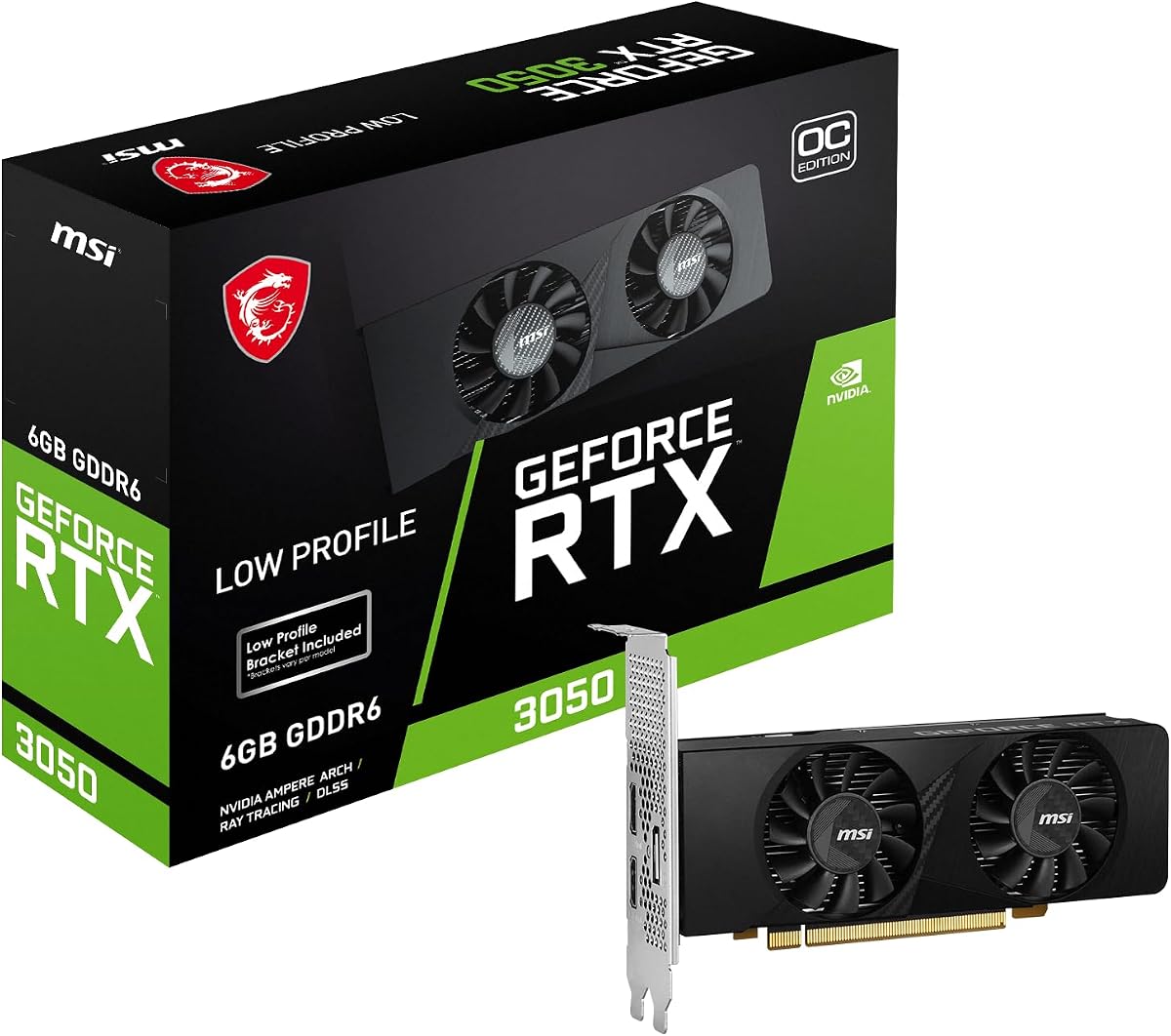
MSI delivers a reliable low profile option that balances size and performance well. The Boost Clock of 1492 MHz provides a nice lift over standard models. Its compact design ensures it fits into tight spaces while maintaining dual HDMI outputs for multi-monitor setups.
We may earn a commission when you buy through this link, at no additional cost to you.
With 6GB GDDR6 memory it manages everyday gaming and media tasks efficiently. The Ampere architecture brings DLSS support which boosts frame rates in supported titles. The dual fan design on the PCB helps maintain reasonable thermal levels.
Single fan cooling may limit peak performance during long sessions in hot environments. The 6GB VRAM is adequate for 1080p but may struggle in high texture scenarios. It is a practical choice for office or entry gaming builds.
We recommend this for users needing a simple upgrade for office PCs. It adds graphical power without the bulk of full size cards. Just verify your PSU wattage to ensure it can support the card properly.
Two HDMI 2.1a ports allow you to connect multiple displays easily for enhanced productivity in a small box.
The architecture ensures low power consumption making it suitable for compact PSUs with limited connector options.
We may earn a commission when you buy through this link, at no additional cost to you.
This Gigabyte model boasts a high 4.8 rating indicating excellent build quality and performance. It is designed specifically for SFF environments with high power needs. The WINDFORCE cooling system ensures the card runs cool even in dense chassis setups.
We may earn a commission when you buy through this link, at no additional cost to you.
Equipped with 12GB of GDDR7 memory it handles demanding tasks with ease. The 192-bit interface balances performance and space requirements effectively. It supports DLSS 4 for top-tier graphical fidelity in supported games. This makes it a future-proof investment.
The slot width might be an issue for the thinnest cases so check clearance carefully. The price reflects its premium positioning but the performance justifies the cost. It is a strong choice for those refusing to compromise on power.
Best suited for advanced SFF builders who need maximum performance. If you want high frame rates at 1440p this card is ready. Ensure your PSU meets the wattage requirements for optimal stability.
12GB of GDDR7 ensures smooth performance in modern games and creative apps without memory bottlenecks.
The WINDFORCE system pushes enough air to keep temperatures low even in enclosed SFF cases.
We may earn a commission when you buy through this link, at no additional cost to you.
MSI offers another strong contender for low profile builds with high user approval. The custom PCB ensures reliable operation under load. It supports 4K output via HDMI 2.1 making it a versatile choice for media centers.
We may earn a commission when you buy through this link, at no additional cost to you.
With a Boost Clock of 1492 MHz it performs well in competitive games. The 6GB GDDR6 memory handles standard textures without issues. The dual fan setup keeps it cool enough for most compact environments.
The low profile design might limit airflow compared to full height cards. While it is great for light gaming it is not meant for heavy rendering workloads. The price makes it an attractive option for budget builders.
We recommend this for users needing a compact GPU for casual use. It brings modern features to older cases without bulk. Verify your chassis clearance before purchase to ensure a snug fit.
Dual HDMI 2.1 ports let you stream 4K content to modern TVs without needing adapters or dongles.
MSI engineers this board for reliability so you avoid electrical issues during long gaming sessions.
We may earn a commission when you buy through this link, at no additional cost to you.
This PNY card is built specifically for professional workflows in tight spaces. It offers certified drivers for CAD and design applications. The single slot low profile design fits into the smallest business chassis without modification.
We may earn a commission when you buy through this link, at no additional cost to you.
With 768 CUDA cores it handles 3D modeling and video processing tasks efficiently. The four Mini DisplayPort outputs support up to four 4K displays for multitasking. Power consumption is low at 50W ensuring silent operation.
It is not designed for gaming so expect lower performance in titles. The 4GB memory may limit complex scene handling. However for office tasks and specialized software it is incredibly reliable and efficient.
Best for enterprise environments needing compact workstations. If you require stability and certified drivers this is the ideal pick. Ensure your power supply provides enough connectors for the mini ports.
Certified drivers ensure maximum stability when running professional design software like AutoCAD or Revit.
50W power draw means this card runs silently and does not stress small power supplies in SFF cases.
We may earn a commission when you buy through this link, at no additional cost to you.
This AMD Radeon card offers reliable performance for professional tasks in a small box. It is a low profile card designed to fit into slim chassis easily. The 4GB of GDDR5 memory provides decent speed for moderate workloads.
We may earn a commission when you buy through this link, at no additional cost to you.
With up to 2.4 TFLOPS of compute power it handles video rendering and signal processing well. PowerTune technology dynamically optimizes power usage to keep consumption low. This makes it perfect for 24/7 workstation operation.
The GDDR5 memory is older than GDDR6 limiting bandwidth compared to newer cards. It is not suitable for modern gaming but excels in CAD and video tasks. The low profile design is a major plus for tight spaces.
Recommended for small office builds needing multiple display outputs. If you need a quiet professional GPU that fits anywhere this is a great choice. Verify your PSU can support the card before purchasing.
AMD PowerTune technology adjusts power consumption dynamically to keep energy use low and stable.
Support for multiple 4K displays allows for efficient multitasking in compact office environments.
We may earn a commission when you buy through this link, at no additional cost to you.
This ASUS card brings a massive 16GB memory to SFF builds for heavy content creation. The dual BIOS switch lets you toggle between Quiet and Performance profiles. This offers flexibility for both work and play in a compact setup.
We may earn a commission when you buy through this link, at no additional cost to you.
Axial-tech fans use a smaller hub to drive more air through the heatsink. 0dB technology stops the fans during light loads for silent operation. The dual ball fan bearings ensure the system lasts longer than standard sleeve bearings.
The 2.5-slot design may not fit the narrowest cases so check clearance. Power requirements are higher so a capable SFF PSU is needed. The memory capacity is perfect for large datasets and texture heavy games.
We recommend this for creators needing high VRAM in a smaller form. It balances performance and silence effectively. Ensure your case has enough width to accommodate the card comfortably.
16GB of GDDR6 allows for handling massive textures and datasets without slowdowns in professional apps.
Switch between Quiet and Performance modes to adapt the card to your current task needs instantly.
We may earn a commission when you buy through this link, at no additional cost to you.
Selecting a graphics card for a small form factor build requires careful evaluation of physical dimensions and power needs. This guide breaks down the key factors you must consider to ensure a successful installation.
The most critical factor is the physical size of the card. Measure your case height length and depth carefully. Low profile cards are essential for slim cases while full height cards need vertical space.
Always check the manual of your chassis to confirm the exact clearance allowed for a graphics card before buying.
Small form factor PSUs often have lower wattage limits. Check the TDP of the GPU to ensure it matches your power supply capacity. High performance cards may need extra connectors that SFF PSUs lack.
Opt for cards with lower wattage draw if you are using a 65W or smaller unit to avoid system instability.
Compact cases restrict airflow so thermal performance is vital. Look for cards with efficient fan designs or passive cooling options. High heat output can lead to thermal throttling in tight spaces.
Consider dual fan designs over single fan if your case allows them to keep temperatures lower during intense workloads.
The number of slots a card occupies affects airflow and clearance. Single slot cards are ideal for very tight builds but often lack cooling power. Dual slot cards are common but require width checks.
Verify if your motherboard allows for adjacent slots if you have multiple expansion cards in your system.
VRAM capacity determines how well a card handles high resolution textures. For 1080p gaming 6GB is often enough but 8GB is safer. Professionals may need 12GB or more for complex rendering tasks.
If you plan on using multiple displays or editing video ensure the card has sufficient memory to avoid bottlenecks.
Check the ports on the card match your monitor inputs. HDMI 2.1 and DisplayPort 2.1a provide better bandwidth for high refresh rates. Mini DisplayPort outputs are common on professional cards.
Ensure the number of outputs matches your multi-monitor setup to avoid needing adapters or splitters.
Some GPUs require 6-pin or 8-pin power connectors. SFF PSUs often use PCIe power adapters or integrated cables. Verify compatibility to prevent installation issues.
If your PSU uses proprietary connectors you may need adapters which can be a safety risk if not rated correctly.
Choosing a newer architecture ensures support for modern features like ray tracing and DLSS. PCIe 5.0 offers better bandwidth but requires a compatible motherboard. Consider long term needs over immediate price savings.
Investing in a card with a higher spec today can save you from upgrading sooner due to technological obsolescence.
Firstly always shut down your PC and unplug it before installing or removing a graphics card. Ground yourself by touching a metal part of the case to avoid static discharge which can damage the components.
Secondly ensure the GPU is fully seated in the PCIe slot and secured with a screw. Check that any power cables are firmly connected to the card and the PSU to prevent intermittent issues.
Thirdly monitor temperatures using software tools after installation to verify cooling is working properly. Clean dust from the GPU fans periodically to maintain airflow and prevent overheating during heavy use.
The ASUS SFF-Ready Prime NVIDIA GeForce RTX 5070 is the top pick for performance. For budget builds the ASRock Intel Arc A380 offers great value. Your best choice depends on your specific case size and performance needs.
Low profile cards often have slightly lower clock speeds due to cooling limits. However they provide nearly identical performance in many daily tasks. High end SFF models now match full size cards closely.
Only if your case supports it. Many SFF cases have length and height limits that exclude full size cards. Always check your case specifications for clearance before attempting to install a larger card.
Most efficient SFF cards draw under 75W requiring no extra power cables. High performance cards may draw up to 150W or more. Ensure your PSU can support the card without stressing the system.
Yes most SFF GPUs are designed for low noise operation. Models like the ASRock Arc A380 feature silent modes that stop the fan completely. This makes them ideal for quiet office environments.
Yes many SFF GPUs support multiple displays via HDMI and DisplayPort. Professional cards like the PNY RTX A400 support up to four 4K screens. Check the outputs on the card for your needs.
It can be tricky due to tight space. You may need to remove side panels or other components first. Take your time and ensure all screws are secure before closing the case.
The system may shut down unexpectedly or fail to boot. It can also damage the PSU or GPU over time. Always ensure your PSU capacity matches the GPU requirements for safety.
We have reviewed the top ten GPUs for small form factor builds ranging from budget options to high performance solutions. The ASUS SFF-Ready Prime NVIDIA GeForce RTX 5070 leads the pack with power and size balance.
Your final choice should depend on your case dimensions and intended use. For gaming look at the RTX 5070 or 3050. For office tasks the PNY RTX A400 is reliable and efficient.
Remember to check current prices and availability before buying. Specifications can change and new models are released frequently. Always verify your case clearance to ensure a perfect fit for your build.