
Bisofice POS Receipt Printer
4.0Editor score
Android 8.1 OS
58mm receipt printing
Low operating cost
Handheld POS systems have revolutionized the way businesses process transactions on the go. These mobile terminals allow merchants to accept payments anywhere, from tables to trade shows, improving customer experience and operational efficiency significantly.
We evaluated ten top-rated handheld POS devices based on connectivity, battery life, printing capabilities, and software compatibility. Our analysis focuses on real-world performance metrics to help you select a device that matches your specific business needs and budget constraints.
Each pick below highlights key strengths and potential limitations found during our review process. Remember that product specifications and pricing can change frequently, so verify current details with the manufacturer before making your final purchasing decision today.
4.0Editor score

4.7Editor score

5.0Editor score
As an Amazon Associate we earn from qualifying purchases.
This comparison table provides a side-by-side overview of the key specifications for each handheld POS system reviewed. Use this data to quickly identify which device offers the specific features your business requires for daily operations.




The Square Handheld is a top-rated mobile point-of-sale system designed for businesses that need flexibility. With a 4.7 rating, it stands out for its slim design and ability to accept payments anywhere your customers are.
We may earn a commission when you buy through this link, at no additional cost to you.
Key strengths include its pocketable form factor and built-in barcode scanner, allowing staff to take tableside orders or scan items without returning to a counter. The offline payment feature ensures you can keep selling even if the internet connection drops unexpectedly.
While the device is durable against water splashes, accidental drops may require an optional protective case. Additionally, the device is optimized for the Square ecosystem, which might limit compatibility with other third-party software platforms you currently use.
This device is ideal for restaurants, retail shops, and service professionals who prioritize mobility. If you need a reliable system that works in any environment without constant connectivity, the Square Handheld is a highly recommended choice.
The slim and lightweight build allows staff to move freely while processing payments, reducing wait times and improving customer satisfaction.
Offline payments let you continue transactions during internet outages, ensuring your business remains operational without interruption.
We may earn a commission when you buy through this link, at no additional cost to you.
The H10 terminal leverages the latest Android 14 operating system to provide a smooth and secure environment for business applications. With a 4.2 rating, it offers a strong balance of hardware capabilities and software flexibility.
We may earn a commission when you buy through this link, at no additional cost to you.
Its integrated 58mm thermal printer eliminates the need for separate receipt devices, while the NFC reader supports modern contactless payments. The 6000mAh battery ensures up to 14 hours of runtime, making it suitable for long shifts without frequent charging.
The device weighs 345 grams, which is manageable but heavier than ultra-light options. While the rating is solid, some users may find the interface or compatibility requires more initial setup compared to pre-configured systems.
Developers and businesses needing custom software integration will appreciate the available SDK. If you require a terminal that supports NFC, thermal printing, and long battery life in a unified Android package, this H10 model is a strong contender.
Android 14 provides enhanced security and compatibility with the latest business apps, ensuring your terminal remains current for years.
The 6000mAh battery supports full-day operations, reducing downtime and keeping your checkout flow uninterrupted during peak hours.
We may earn a commission when you buy through this link, at no additional cost to you.
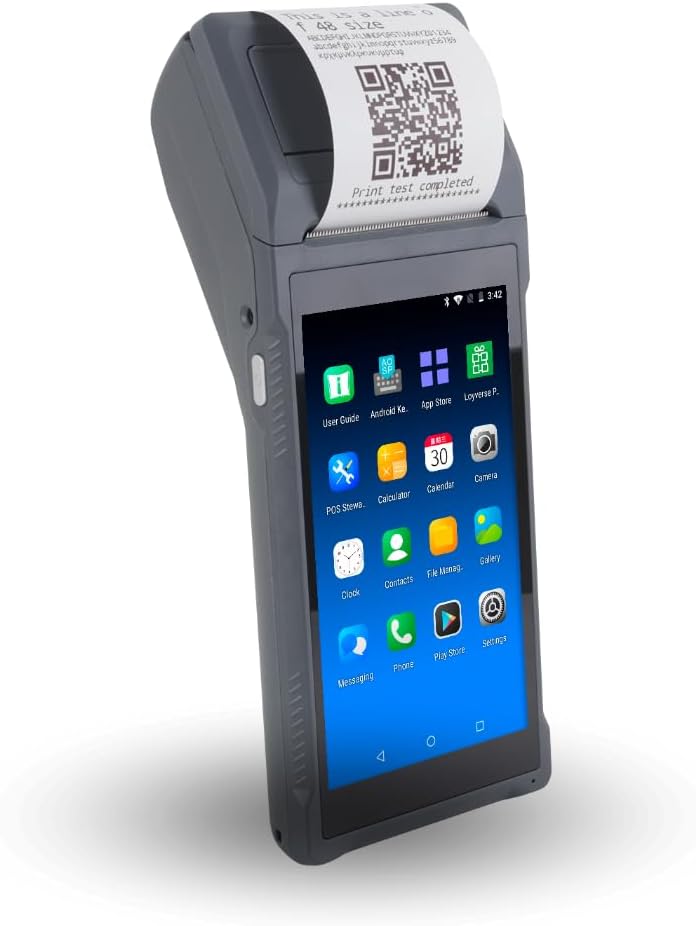
The Bisofice POS Receipt Printer offers an affordable entry point for small businesses needing a mobile solution. With a 4.0 rating, it provides essential functions like printing and wireless connectivity at a competitive price point.
We may earn a commission when you buy through this link, at no additional cost to you.
It runs on Android 8.1, allowing for installation of standard business apps, and features a built-in 58mm printer for receipts. The inclusion of 3G, WiFi, and Bluetooth ensures you can stay connected in various environments without needing extra hardware.
While the Android version is older, it remains stable for basic tasks. The lower price might come with compromises in build quality or software update longevity compared to premium models, but it satisfies immediate needs for many shops.
This device is best suited for budget-conscious owners in boutiques, cafeterias, or warehouses. If you need a functional printer and POS combo without breaking the bank, the Bisofice terminal is a reliable and efficient choice.
The built-in thermal printer uses affordable paper and eliminates ink costs, keeping your operational expenses low.
Multiple connection options like 3G and Bluetooth ensure the device works even in areas with limited modern network infrastructure.
We may earn a commission when you buy through this link, at no additional cost to you.
The Bisofice 4G Handheld PDA brings updated software and robust connectivity to the mobile POS market. With a 4.0 rating, it balances performance and utility for businesses operating in varied network environments.
We may earn a commission when you buy through this link, at no additional cost to you.
It features Android 13.0 for better app support and a full 4G network connection ensuring seamless data access anywhere. The 5MP camera handles both 1D and 2D barcode scanning, making it versatile for inventory and sales tasks.
The 3000mAh battery is adequate for shorter shifts but may require more frequent charging compared to high-capacity models. The device includes thermal label printing, adding value for businesses that need to print labels alongside receipts.
This PDA is ideal for logistics or retail environments needing reliable cellular connectivity. If you prioritize network flexibility and modern Android features, this Bisofice model offers a practical and efficient solution.
Support for 4G, 3G, and 2G ensures the device works in areas with inconsistent cellular coverage.
The 5MP autofocus camera allows quick reading of various barcode types, speeding up inventory and checkout processes.
We may earn a commission when you buy through this link, at no additional cost to you.
The Square Terminal is a robust point-of-sale unit designed for counter use while maintaining mobility. With a 4.5 rating, it is trusted by businesses for its reliability and comprehensive payment acceptance capabilities.
We may earn a commission when you buy through this link, at no additional cost to you.
It accepts all major credit and debit cards and includes a built-in printer for receipts. The device processes chip cards in seconds, and payments settle by the next business day, ensuring quick access to funds.
Though it is cordless with a battery, it is generally larger than slim handhelds, making it better suited for a stationary spot. The simplicity of setup and transparent fees make it an attractive option for small business owners.
If you need a dedicated checkout station that handles all transactions smoothly, the Square Terminal is an excellent choice. It is particularly recommended for cafes and retail stores that value ease of use and speed.
Chip card processing in seconds minimizes wait times at the counter during busy periods.
No hidden fees or long-term contracts allow you to keep more of your revenue without unexpected costs.
We may earn a commission when you buy through this link, at no additional cost to you.
The Q2i Mobile POS Terminal combines hardware essentials into a compact package for daily retail operations. With a 3.2 rating, it offers basic functionality that works for simple transactions and printing tasks.
We may earn a commission when you buy through this link, at no additional cost to you.
It runs Android 11 and is compatible with popular POS apps like Square and Stripe. The 58mm thermal printer works quickly, and the device includes a 5000mAh battery to support extended use during workdays.
The scanner is limited to 1D barcodes, which may not suffice for businesses needing QR code support. Ratings suggest some users have experienced stability issues, so testing in your environment is advisable before full deployment.
This terminal is a straightforward option for small shops needing a basic setup. If you require a simple Android device with standard printing and scanning, the Q2i serves as a functional budget-friendly tool.
Support for major POS apps allows you to use familiar tools without needing specialized hardware.
The monochrome thermal printer eliminates ink cartridges, reducing maintenance costs and improving speed.
We may earn a commission when you buy through this link, at no additional cost to you.
The P1 terminal is a top-rated countertop solution designed for secure and fast transactions. With a 5.0 rating, it stands out for its hybrid connectivity and reliable performance in busy environments.
We may earn a commission when you buy through this link, at no additional cost to you.
It supports Ethernet, WiFi, and 4G connectivity to ensure you never miss a sale due to connection drops. The Android OS provides a user-friendly interface for staff, while the built-in printer reduces counter clutter significantly.
While it is designed for fixed locations, the connectivity options offer flexibility. The onboarding process involves a specific merchant account provider, which simplifies setup but limits payment processing choices compared to open platforms.
This device is ideal for retail stores or salons needing consistent uptime. If you value reliability and a smooth user interface for fixed checkout lanes, the P1 terminal is a highly recommended option.
Hybrid connectivity options ensure stable transaction processing even when one network type fails.
The HD touchscreen and physical keypad combination make navigation intuitive for both staff and customers.
We may earn a commission when you buy through this link, at no additional cost to you.
The Alacrity Handheld POS PDA is a high-performance device equipped with top-tier hardware specifications. With a 5.0 rating, it delivers speed and reliability that surpasses standard handheld models on the market.
We may earn a commission when you buy through this link, at no additional cost to you.
It features Android 14, a 6.5-inch HD screen, and an 80mm thermal printer for flexible label and receipt printing. The 6400mAh battery supports long shifts, while the 3GB RAM ensures smooth application execution even under load.
The large screen and advanced scanner module improve efficiency in complex inventory tasks. However, the device is heavier and more expensive than basic models, which may not suit businesses needing ultra-portability.
This PDA is best for logistics or retail operations needing high speed and large display real estate. If you require premium features like NFC, 4G, and extensive storage, the Alacrity PDA is a powerful solution.
The 8-core 2.0GHz processor minimizes wait times during transactions and application switching.
The 6.5-inch HD+ screen provides clear visuals for quick navigation and error-free user experiences.
We may earn a commission when you buy through this link, at no additional cost to you.
The Alacrity Q50 smart mobile terminal is optimized for order processing and queue management. With a 4.2 rating, it provides robust hardware for handling high volumes of orders efficiently.
We may earn a commission when you buy through this link, at no additional cost to you.
It features a 10-core CPU for fast performance and a large 5.9-inch screen. The thermal printer delivers high-speed output, and the built-in zigzag-edge paper cutter enhances convenience for ticket printing tasks.
Note that this device is not a dedicated payment terminal; it requires pairing with a third-party card reader for encrypted transactions. While excellent for scanning and printing, you must add a reader to accept payments securely.
This terminal is ideal for businesses handling many takeaways or online orders. If you need a powerful PDA for scanning, printing, and queue management, the Q50 is a strong and reliable tool.
The upgraded CPU prevents device slowdowns during peak hours, keeping workflows consistent and productive.
The high-speed print head and cutter ensure smooth ticket output for takeaway and online order management.
We may earn a commission when you buy through this link, at no additional cost to you.
The Clover GO is a mobile accessory designed to turn your smartphone into a point-of-sale system. With a 5.0 rating, it is celebrated for its simplicity and security features for small business owners.
We may earn a commission when you buy through this link, at no additional cost to you.
It pairs via Bluetooth to your mobile device and supports end-to-end encryption for safe transactions. Features like custom tips, tax rates, and electronic receipts provide flexibility and convenience for everyday sales.
To use it, you must sign up with SwyftPAY for processing, which might limit choice for some users. It is also available only for US-based businesses, making it less versatile internationally than some competitors.
This device is best for small shops or solo entrepreneurs needing a simple card reader. If you want to leverage your existing smartphone for sales, the Clover GO offers a secure and easy-to-use solution.
From card acceptance to transaction completion, customer data remains protected throughout the process.
Create custom tax rates and employee permissions to tailor the system to your specific business rules.
We may earn a commission when you buy through this link, at no additional cost to you.
Choosing the right handheld POS involves considering connectivity, operating system, and specific hardware needs like printing or scanning.
The operating system determines which apps your device can run. Android 14 and 13 offer the latest features, while older versions may still support essential business tools but might lack future updates. Check if your preferred software requires a specific OS version before purchasing.
Ensure the OS version supports the apps you need for inventory and sales tracking.
Mobile businesses often operate in areas with unstable Wi-Fi. Devices with 4G, 3G, or Ethernet options ensure uninterrupted service. Hybrid connectivity models provide redundancy if one network fails, keeping your checkout line moving.
Look for devices with multiple connection types to guarantee reliability during peak hours.
Integrated thermal printers eliminate the need for external hardware. Check the print width (58mm vs 80mm) to ensure it matches your receipt or label size. Some models include paper cutters for easier ticket management in busy environments.
Choose a printer width that matches your business receipt or label requirements.
Battery capacity directly impacts how long you can work without charging. Models with 6000mAh or higher are ideal for full-day shifts. Also consider charging speed and the inclusion of a USB-C port for modern charging convenience.
Aim for a battery that lasts your entire shift without needing a top-up.
If you manage inventory, ensure the scanner reads both 1D and 2D codes. Some models use the rear camera, while others have dedicated scanning modules. A dedicated module often scans faster and works better in low light.
Verify that the scanner type meets your inventory tracking needs.
Some terminals are dedicated payment devices, while others require a third-party reader for encrypted cards. Always check if the device supports encrypted credit transactions or if you need to pair it with a separate reader to stay PCI compliant.
Confirm the device supports secure encrypted transactions for your specific card type.
Handhelds are often dropped or exposed to liquids in busy environments. Look for water-resistant designs or optional protective cases. A sturdy build ensures the device survives daily wear and tear without malfunctioning.
Consider ruggedness and protective accessories for long-term reliability.
Larger screens make it easier to navigate complex menus and show customers transaction details. A 5.5-inch to 6.5-inch display is ideal for quick interactions. High resolution ensures text and buttons are readable even in bright light.
Select a screen size that fits your workflow and display needs.
When setting up your device, connect to a secure network and install required POS applications. Ensure your battery is fully charged to avoid interruptions during initial configuration. Review the user manual for specific pairing instructions with card readers if needed.
For daily care, keep the device clean from dust and debris using a soft cloth. Avoid exposing it to extreme temperatures or excessive moisture unless it is rated as water-resistant. Store it in a protective case when not in use to prevent accidental drops.
Regularly update the software and applications to maintain security and performance. Check battery health periodically and replace it if you notice significant drops in runtime. Proper maintenance ensures your terminal lasts longer and operates efficiently over time.
Many modern handheld POS systems allow offline processing or payment capture. This feature ensures you can continue transactions even if the internet goes down. However, syncing may be required later to finalize the transaction.
Devices like the Alacrity PDA and H10 often feature large 6000mAh batteries. These capacities typically support full-day use on a single charge. Always check the estimated hours to match your specific business shifts.
Not all devices are optimized for Square. While Square Terminal and Handheld are native, others may support it via third-party apps. Always verify compatibility with your specific payment processor before buying.
1D scanners read standard linear barcodes like UPC, while 2D scanners read QR codes and complex barcodes. If you need to scan QR codes for payments or marketing, ensure your device supports 2D scanning capabilities.
Some systems like Square provide built-in processing so you do not need a separate account. Others may require you to connect to a specific provider like SwyftPAY. Review the payment setup requirements carefully.
Most devices print 58mm receipts, but some support 80mm for broader labels. Check the print width specifications to ensure it matches your label needs. Some models allow width adjustments for flexibility.
Devices running newer Android versions like 14 generally receive updates for longer. However, check the manufacturer policy for specific support timelines. Regular updates are crucial for security and performance.
We have reviewed ten top options ranging from budget-friendly models to premium powerhouses. Whether you choose the Square Handheld for its simplicity or the Alacrity PDA for its speed, each device offers unique strengths.
Prioritize features that match your daily operations like battery life, connectivity, and printing needs. A device that fits your workflow will save time and improve customer satisfaction significantly.
Prices and availability change often, so always check current details before buying. This guide helps you make an informed decision to keep your business moving forward.