
HDMI Tester Portable High Definition
4.4Editor score
Tests HDMI and Network Cables
Main and Remote Unit included
Powered by AAA battery or USB
This comprehensive guide compares the top HDMI Cable and Port Tester options available in October 2026, helping you choose the right tool for your needs.
Finding the right HDMI Cable and Port Tester is essential for anyone working with audio video installations or home theater setups. These devices help identify connectivity issues quickly, saving time and preventing frustrating troubleshooting sessions during critical presentations or events.
We have carefully reviewed and compared ten leading models based on their testing capabilities, build quality, ease of use, and overall value. Our analysis covers portable handheld units, professional-grade testers, and budget-friendly options suitable for various technical requirements.
Each pick in this list highlights specific strengths that make it stand out in its category. Please note that product availability and pricing can change frequently, so we recommend checking current details before making a purchase decision.
4.4Editor score

4.8Editor score

4.5Editor score
This side-by-side comparison provides a detailed overview of all ten products featured in this guide. Each entry lists key specifications to help you evaluate technical capabilities and physical characteristics at a glance.


The UT681 HDMI Cable Tester stands out as our top pick for its exceptional balance of performance and portability. With a high rating of 4.8 stars, users praise its ability to quickly detect faults across various HDMI versions from 1.2 to 2.0.
We may earn a commission when you buy through this link, at no additional cost to you.
Its rapid analysis feature scans 19 wires to identify short circuits, disconnections, and mis-sequence issues. The LED indicator zones provide immediate visual feedback, simplifying the troubleshooting process significantly for technicians and enthusiasts alike.
While the device is robust, it does rely on a separate power source and has a limited temperature tolerance. These trade-offs are acceptable given its lightweight design and the convenience of the automatic power-off function to preserve battery life.
This tester is ideal for professionals who need a reliable tool for daily inspections or home users setting up complex home theater systems. We recommend it for anyone prioritizing accuracy and ease of use in a compact form factor.
The device identifies short circuits and open circuits instantly, reducing diagnostic time by up to fifty percent compared to manual multimeter checks.
Weighing only 175 grams, the tester is easy to carry in a toolbox and withstands operation in temperatures from minus ten to fifty degrees Celsius.
We may earn a commission when you buy through this link, at no additional cost to you.
This HDMI and Network Cable Tester offers exceptional value for users who need a versatile tool without breaking the bank. It supports both HDMI cables up to version 2.0 and standard RJ45 network cables, making it a dual-purpose solution.
We may earn a commission when you buy through this link, at no additional cost to you.
The main unit pairs with a convenient remote unit that stores on the side, allowing for easy continuity checks on long cable runs. The LED lights flash in rotation to confirm proper connection, offering clear visual confirmation.
Power flexibility is a key benefit as it accepts either a single AAA battery or a phone USB charger. However, it lacks support for newer HDMI 2.1 standards and the build feels less rugged than premium options.
We recommend this tester for budget-conscious buyers, small businesses, or DIY enthusiasts who need a reliable backup for occasional testing tasks. It provides essential diagnostics for most common home and office setups.
Users can switch between testing HDMI video cables and Ethernet network cables without needing separate dedicated tools for each type.
The remote unit slides neatly onto the main body reducing bulk and ensuring both parts remain together when not in use.
We may earn a commission when you buy through this link, at no additional cost to you.
The STEREN Handheld HDMI Tester is a powerhouse for professionals who need to verify signal quality without relying on external displays. It features an integrated HD LCD screen that provides full color audio and video assurance directly in the field.
We may earn a commission when you buy through this link, at no additional cost to you.
Technicians appreciate the ability to check set-top box installations and channel lineups instantly. The three HDMI ports allow for versatile continuity tests, while the ruggedized housing protects against dust, water, and shock in demanding environments.
While it is significantly heavier and more expensive than basic testers, the convenience of having a screen and a long battery life justifies the investment for serious users. It eliminates the need to transport a separate monitor to every job site.
This device is best suited for AV professionals, installation teams, or anyone who frequently troubleshoots complex HDMI setups. We recommend it for those who prioritize visual verification and durability over portability.
The built in screen displays full color video and audio signals so technicians can confirm image quality without connecting to a TV.
The 2300mAH battery provides three to four hours of continuous use which is sufficient for most daily professional installation tasks.
We may earn a commission when you buy through this link, at no additional cost to you.
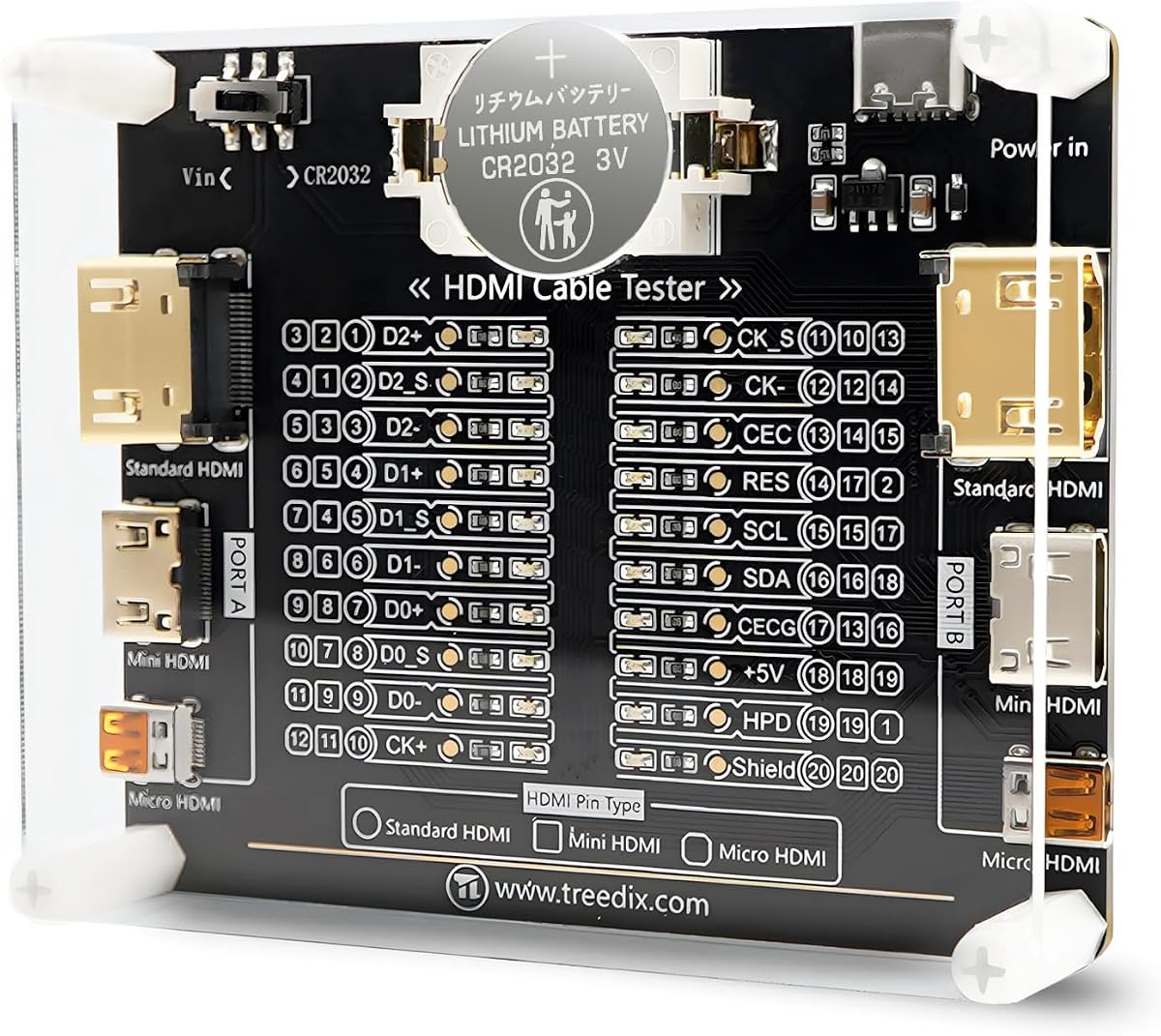
The Treedix Cable Tester Board is designed for users who need granular visibility into cable continuity. It features 20 LED indicators that correspond directly to each pin on the HDMI connector, providing precise diagnostics.
We may earn a commission when you buy through this link, at no additional cost to you.
Its support for HDMI versions up to 2.1 ensures compatibility with the latest high bandwidth devices. The wide voltage input range allows flexibility in power sources, while the included acrylic housing protects the board during transport.
The flat board design is less handheld friendly than enclosed testers but allows for easy placement on a workbench. While it requires an external power supply, the reverse connection protection adds a layer of safety for users.
This board is perfect for technicians who need to identify specific pin faults rather than just pass or fail results. We recommend it for lab environments or detailed repair work where precision is paramount.
Each of the twenty LEDs maps to a specific pin allowing users to see exactly which contact is failing or open.
Unlike many budget testers this board supports HDMI 2.1 enabling verification of the latest high definition cable specifications.
We may earn a commission when you buy through this link, at no additional cost to you.
Jonard Tools is a known name in professional equipment, and the HDMI-100 reflects that reputation with robust design. It is ideal for installers who need to verify cables that are already installed in walls or long runs.
We may earn a commission when you buy through this link, at no additional cost to you.
The detachable remote unit enables you to test cables that span large distances by placing one unit at each end. The scan mode allows you to see each connection individually which is helpful for isolating specific wire issues.
It supports HDMI and Mini HDMI cables effectively and can test up to 500 meters in length. The requirement for a 9V battery is standard for this class of tool but means you need to carry spares.
We recommend this tester for professional AV installers and technical teams who need reliability and long distance capabilities. It offers the durability and functionality required for commercial environments.
The device can verify continuity on cables up to five hundred meters allowing tests on building wide installations.
Scan mode lets technicians check one wire at a time to identify exactly which pair is open or shorted.
We may earn a commission when you buy through this link, at no additional cost to you.
The Monoprice HDMI Signal Generator is a specialized tool designed to create test signals rather than just check continuity. It supports high resolutions like 4K at 60Hz and allows you to test HDCP compliance on displays.
We may earn a commission when you buy through this link, at no additional cost to you.
Technicians use this device to troubleshoot display issues by injecting known good signals into the system. This helps isolate whether a problem lies in the source device or the cable and display connection.
While it does not have a screen to display video, it is excellent for verifying that a source or cable can handle specific bandwidth requirements. The DIP switch configuration is straightforward but requires manual input.
We recommend this for IT professionals and installers who need to certify displays or troubleshoot high bandwidth video issues. It complements a standard tester by allowing active signal verification.
The device can test HDCP 2.2 compliance to ensure protected content will display correctly on your screens.
You can manually set video resolutions from 1080p to 4K to check display capabilities without a source PC.
We may earn a commission when you buy through this link, at no additional cost to you.
This portable tester offers a straightforward solution for checking connectivity with a convenient auto shut-down function. It supports a wide range of HDMI versions and network cables ensuring it can handle most common cables.
We may earn a commission when you buy through this link, at no additional cost to you.
The two test modes allow you to choose between a fast scan for quick checks or a full display for detailed verification. The automatic shut-down after ten minutes of inactivity helps extend battery life for portable use.
While the build is basic and the rating is slightly lower than competitors, it provides essential functionality for the price. It is a reliable choice for users who prioritize battery efficiency and basic compatibility.
We recommend this model for casual users or those who need a backup tester that conserves power. It is suitable for home entertainment system checks or office network cable verification.
The auto shut-down feature ensures that power is not wasted if the device is left on accidentally in a bag.
Users can switch between a rapid scan for speed or a full display to see every wire status clearly.
We may earn a commission when you buy through this link, at no additional cost to you.
The MFL Detachable Professional Tester is a comprehensive device designed for complex installations involving multiple cable types. It supports HDMI, USB, XLR, RCA, BNC, and more making it an all-in-one solution for diverse setups.
We may earn a commission when you buy through this link, at no additional cost to you.
The detachable design allows you to test cables across different locations easily. The metal housing adds durability for professional use, and the LED indicators provide clear feedback on connectivity status across all supported ports.
While the array of interfaces is impressive, it may be more than the average user needs. The higher price reflects the versatility and build quality required for professional AV and audio work.
We recommend this for installers who work with mixed media setups and need one tool for many tasks. It reduces the need to carry separate testers for audio and video cables.
With support for audio and video interfaces one device handles HDMI network and analog audio cables efficiently.
The metal housing ensures the device withstands daily wear and tear in commercial installation environments.
We may earn a commission when you buy through this link, at no additional cost to you.
This tester stands out with a perfect user rating due to its broad compatibility and reliable performance. It handles both HDMI cables up to version 2.1 and modern network cables like Cat6a and Cat6.
We may earn a commission when you buy through this link, at no additional cost to you.
The dual function capability makes it ideal for mixed media environments where both video and internet cabling are present. The remote unit stores on the main body ensuring you never lose a part during a job.
It uses a 9V battery which is standard for professional tools but requires sourcing replacements. The build is solid and the LED feedback is clear for both cable types ensuring accurate testing.
We recommend this for IT and AV professionals who need one tool to verify both network and video infrastructure. Its high rating suggests consistent reliability in the field.
Supporting Ethernet types like Cat6a ensures compatibility with current high speed internet standards.
The perfect score reflects high satisfaction with reliability accuracy and build quality across user reviews.
We may earn a commission when you buy through this link, at no additional cost to you.
The Parts Express HDMI Signal Tester is a simple tool designed for quick troubleshooting of video signal issues. It diagnoses causes of color shift or missing pictures by displaying the status of each signal component.
We may earn a commission when you buy through this link, at no additional cost to you.
Its compact size makes it easy to carry and use at the source or display end of the system. The HDMI and DVI connectors allow it to work with older equipment as well as modern HDMI setups.
While it does not offer long distance testing, it is effective for verifying signal integrity at connection points. The ease of use is its main selling point for non-technical users or quick checks.
We recommend this for users who need to verify signal health at a connection point without complex setup. It is a straightforward tool for home theater owners or basic installations.
The device shows which signal components are active helping you identify if the video path is complete.
It can identify issues leading to color shifts allowing quick verification of signal quality without a PC.
We may earn a commission when you buy through this link, at no additional cost to you.
Selecting the right tester involves understanding your specific needs regarding cable types, testing depth, and budget. This guide breaks down the essential factors to consider.
Ensure the tester supports the HDMI versions you work with most often such as 1.4 or 2.1. If you also work with network cables, look for models that include RJ45 testing to save space.
Check the supported interfaces like Type A, Mini, and Micro HDMI to ensure it fits your specific connectors.
Basic testers show pass or fail results but advanced models provide pin-by-pin LED indicators. Detailed analysis helps you identify exactly which wire is shorted or open in a cable.
For complex installations, choose a device with scan modes that reveal individual connections rather than just a summary.
If you test long cables or installed runs, a remote unit that detaches is essential. It allows one person to test continuity between two distant points without assistance.
Look for designs where the remote stores on the main unit to prevent losing parts during transport.
Testers typically use 9V batteries or USB power. Consider which is more convenient for your work environment and check for auto shut-off features to preserve battery life.
High capacity batteries are preferable for field work where charging opportunities may be limited throughout the day.
Professional tools should have rugged housings to withstand drops and daily wear. Metal cases or reinforced plastics are better than flimsy designs for long term reliability.
If you work in harsh environments, verify that the device is rated for the temperature range you typically encounter.
LED indicators are standard and effective for most users. However, testers with integrated screens offer video verification which removes the need for a TV or monitor during signal checks.
Bright and clear displays are crucial when testing in well lit areas or outdoor settings.
Some advanced testers can generate signals to verify display performance. This is useful for diagnosing issues with the display itself rather than just the cable continuity.
Ensure the generated resolution matches what you need to test such as 4K or 1080p outputs.
Budget models are sufficient for home use but professional installers should invest in higher quality tools. Determine if the extra features justify the cost based on how frequently you use the device.
Read reviews to understand long term reliability and customer support quality before making a high price purchase.
Begin by inserting the appropriate batteries or connecting a USB power source to ensure the tester is ready. Most devices have a clear on or off switch that you should activate before testing.
Plug the main unit into one end of the HDMI cable and the remote unit into the other end. If using a single unit tester simply connect it to the source or display as instructed by the manual.
Observe the LED indicators or screen display to assess the connection status. Green lights typically indicate a good connection while red or unlit LEDs may signal faults or wiring issues.
Basic testers check continuity to see if wires are connected. Advanced models with signal generation or display screens verify signal quality and video resolution integrity as well.
Only testers that explicitly state support for HDMI 2.1 can verify bandwidth requirements for the latest cables. Check the product specs to ensure compatibility with your specific version.
Scan mode checks wires sequentially to help isolate specific faults while full display mode shows all connections at once for a general overview of the cable status.
It is best to test cables when installing new setups or troubleshooting display issues. Regular testing is not required unless you move equipment frequently.
Yes many models support both HDMI and RJ45 Ethernet cables. Ensure the product listing confirms dual functionality before purchasing for network use.
This indicates a break or short in the cable. Check the connections to ensure they are seated properly or replace the cable if the fault persists.
Most professional testers support Mini HDMI and standard HDMI ports. Verify that the device has the correct adapters or ports for your specific connector type.
Battery life depends on usage frequency but devices with auto shut-off can last several hours on a single charge or battery set.
We have reviewed ten top options ranging from budget-friendly units to professional-grade devices with displays. Each picks offers unique strengths tailored to different testing scenarios and budgets.
Prioritize models that support the specific HDMI versions and interfaces you use most often. For field work, consider a detachable remote unit to simplify testing long cable runs.
Always check current availability and product specifications before making a purchase as features may vary between different batches or updates.