
Redragon K512 RGB Membrane Gaming Keyboard, 6 Macro Keys & Easy Media Wheel
4.5Editor score
Six onboard macro keys
Dedicated media controls
True RGB lighting modes
This expert guide compares the top keyboards with macro keys for gaming and productivity, evaluating build quality, customization, and performance features.
Finding the right keyboard with macro keys can transform your gaming and workflow efficiency. These devices allow you to automate complex sequences of commands with a single press, saving time and reducing errors during intense tasks.
We have analyzed ten top-rated models available in the current market. Each product was evaluated based on switch quality, macro programmability, build durability, and additional features like RGB lighting or media controls.
This guide presents detailed reviews and comparisons to help you choose the best fit for your needs. Note that product availability and details may change over time, so verify current specifications before purchasing.
4.5Editor score

4.1Editor score
4.3Editor score
The following comparison table breaks down the key specifications of each model to help you quickly identify the right fit for your setup and usage needs.


The VSD K1 Pro stands out as a highly versatile keyboard designed for users who need deep customization. It features a built-in TFT color display and integrated streaming deck functionality that allows for advanced macro and media control without relying on external software.
We may earn a commission when you buy through this link, at no additional cost to you.
Its standout qualities include the ability to record and edit complex macros via a web-based interface or dedicated software. The hot-swappable design allows you to personalize your typing feel by changing switches without soldering, making it suitable for enthusiasts.
While powerful, the keyboard relies on software installation for certain display features and time calibration. This might be a hurdle for users seeking immediate plug-and-play simplicity without any setup steps.
This model is ideal for gamers and streamers who value detailed control and a unique visual interface. If you want to streamline your workflow and gameplay with visual cues and complex shortcuts, this keyboard delivers exceptional value.
The keyboard allows free assignment of macros to any key, letting you automate multi-step operations efficiently.
LCD keys can display images and animations for easier recognition of functions during fast-paced activities.
We may earn a commission when you buy through this link, at no additional cost to you.
The Redragon K512 is an excellent choice for budget-conscious gamers needing macro functionality. It includes six onboard macro keys that can be recorded on the fly without installing any drivers, making it very accessible for immediate use.
We may earn a commission when you buy through this link, at no additional cost to you.
Its media wheel and dedicated controls allow you to manage audio and tracks effortlessly while gaming. The RGB lighting offers multiple modes to enhance your setup aesthetics without costing a fortune.
The switches are membrane rather than mechanical, which may not appeal to those seeking tactile feedback. However, the anti-ghosting ensures reliable input during intense gaming sessions.
This keyboard is perfect for entry-level users or anyone needing a reliable, affordable option. If you want macro keys and media controls without complexity, this model fits the bill perfectly.
Record and reassign macros directly on the keyboard for instant in-game combos without needing software.
Dedicated controls let you play, pause, or skip tracks directly from the keyboard without leaving your game.
We may earn a commission when you buy through this link, at no additional cost to you.
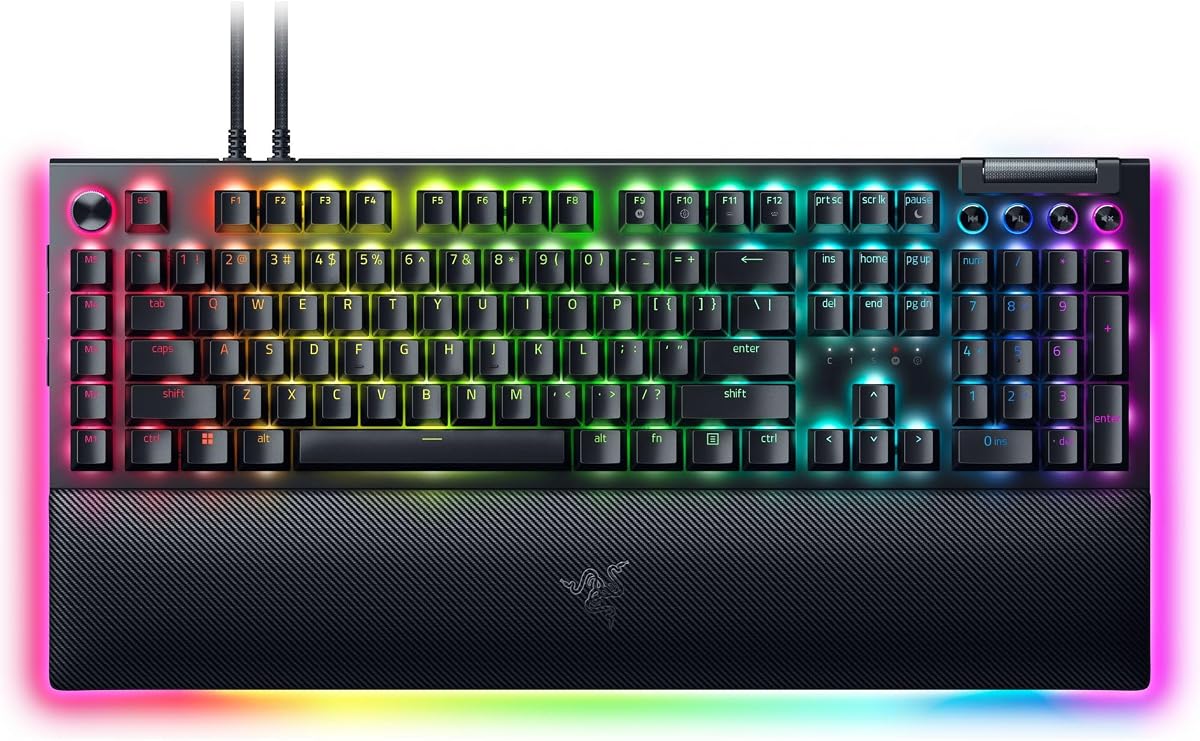
The Razer BlackWidow V4 Pro offers a premium mechanical experience with robust macro capabilities. It features a programmable command dial that provides precise control over volume or brightness, enhancing user convenience significantly.
We may earn a commission when you buy through this link, at no additional cost to you.
Eight dedicated macro keys allow for extensive customization of your gaming or productivity workflow. The keyboard includes a magnetic plush leatherette wrist rest that adds comfort during long sessions.
While powerful, this keyboard comes at a higher price point. Additionally, accessing the full range of RGB and macro features requires the Razer Synapse software.
This model is best for enthusiasts who prioritize build quality and immersive aesthetics. If you want top-tier mechanical switches and a complete streaming setup, this keyboard is a worthy investment.
The programmable dial lets you assign custom functions for greater command over essential keybinds.
Striking underglow lighting syncs with your battlestation for greater immersion while gaming.
We may earn a commission when you buy through this link, at no additional cost to you.
The Redragon K580 is a strong contender for those wanting mechanical precision with macro features. Its hot-swappable design lets you swap switches without soldering, offering great flexibility for customization.
We may earn a commission when you buy through this link, at no additional cost to you.
Five dedicated macro keys allow you to save complex combos directly on the keyboard. The media wheel provides easy control over audio and tracks, adding to its functional appeal.
Some users might find the five macro keys limiting compared to other models. However, the quiet tactile switches make it suitable for shared spaces where noise is a concern.
This keyboard is ideal for gamers seeking a reliable mechanical board without a heavy price tag. If you want the option to change switches later, this is a solid starting point.
The upgraded socket accepts almost any switch, allowing you to swap without soldering for custom feel.
Record combos on the fly with five dedicated macro keys to save complex shortcuts directly on the board.
We may earn a commission when you buy through this link, at no additional cost to you.
The Redragon K550 is designed for users who need a high number of macro keys. It features 12 programmable macro keys that work on the fly without additional software, making it excellent for complex workflows.
We may earn a commission when you buy through this link, at no additional cost to you.
Its aluminum top plate adds durability and a premium aesthetic. The extra USB pass-through port helps keep your setup clutter-free by allowing you to connect other devices directly.
The custom purple switches are clicky, which may be too loud for some environments. Additionally, the keyboard is slightly heavier due to the metal construction.
This model is great for professionals or streamers needing extensive macro control. If you need 12 distinct macro inputs and a sturdy build, this keyboard is a practical choice.
Onboard macro keys work without additional software to perform a variety of different macros for gaming needs.
A solid aluminum metal top board material keeps the keyboard steady and elegant on the desk.
We may earn a commission when you buy through this link, at no additional cost to you.
The Razer BlackWidow V4 X offers high performance with a focus on speed and aesthetics. Its linear yellow switches provide instant inputs with zero distance between actuation and reset points for rapid-fire gaming.
We may earn a commission when you buy through this link, at no additional cost to you.
Six dedicated macro keys allow you to expand your command arsenal easily. The per-key RGB lighting offers over 16.8 million colors to customize your setup style.
While it lacks a command dial, the multimedia keys are sufficient for basic control. The acoustic improvements ensure a quiet typing experience that minimizes noise during long sessions.
This keyboard is perfect for gamers valuing speed and style. If you want a reliable mechanical board with excellent lighting and macro features, this model is a strong pick.
Enjoy instant rapid-fire inputs with a switch construction that promotes brighter even lighting.
A layer of special foam under the circuit board and lubricated stabilizers minimize noise.
We may earn a commission when you buy through this link, at no additional cost to you.
The Redragon K618 PRO brings macro functionality to a wireless ultra-thin design. It features 20 on-the-fly macro keys and media controls that let you record combos without installing software.
We may earn a commission when you buy through this link, at no additional cost to you.
Tri-mode connectivity allows you to switch between USB-C, Bluetooth, and 2.4GHz wireless seamlessly. This makes it ideal for users working across multiple devices like laptops and tablets.
The low-profile switches offer lighter typing, which might lack the tactile satisfaction some mechanical users prefer. Charging is required periodically to maintain wireless operation.
This model is best for those needing a clean, wireless setup. If you want extensive macro access and the freedom to move between devices, this keyboard is highly effective.
Tri-mode connectivity jumps between USB-C Bluetooth and 2.4GHz wireless to move from PC to laptop without sacrificing speed.
A dedicated 4×5 macro zone plus media controls let you record combos or adjust volume and tracks instantly.
We may earn a commission when you buy through this link, at no additional cost to you.
The Logitech G213 Prodigy is a durable full-sized keyboard designed for gaming and productivity. It features customizable lighting zones that can be personalized with over 16.8 million colors.
We may earn a commission when you buy through this link, at no additional cost to you.
It includes dedicated media controls for easy music playback and volume adjustment. The integrated palm rest provides comfort during long gaming sessions.
The membrane switches may not satisfy those seeking mechanical feedback. Additionally, the customization is limited to five lighting zones compared to per-key RGB models.
This keyboard is a solid choice for general users needing reliability. If you want a simple RGB keyboard with comfortable typing, this model is a good fit.
Personalize 5 customizable lighting zones with over 16.8M colors to match your setup or game.
Durable construction repels liquids, crumbs, and dirt for easy cleanup.
We may earn a commission when you buy through this link, at no additional cost to you.
The Razer BlackWidow V4 provides a balanced mix of features for gaming. It features linear yellow switches for rapid-fire inputs and 2-side underglow that highlights the keyboard from multiple angles.
We may earn a commission when you buy through this link, at no additional cost to you.
Six dedicated macro keys help expand your arsenal of commands. The magnetic plush leatherette wrist rest ensures lasting comfort during intense gaming marathons.
While it includes great aesthetics, it lacks the command dial found on higher-end models. Customization relies on software for advanced lighting and macro effects.
This keyboard is perfect for users seeking a premium feel without the highest price point. If you want robust lighting and comfortable typing, this is a worthy option.
Featuring Razer Chroma RGB per-key lighting and a striking underglow that highlights the keyboard from more angles.
With a soft cushioned wrist rest that securely snaps to the keyboard enjoy long-lasting comfort.
We may earn a commission when you buy through this link, at no additional cost to you.
The Corsair K55 RGB PRO is a durable keyboard designed for reliable daily use. It features six dedicated macro keys that can be set up through software to activate functions with one stroke.
We may earn a commission when you buy through this link, at no additional cost to you.
Its IP42-rated protection guards against dust and spills, ensuring gameplay continues uninterrupted. Dedicated volume and media keys add convenience for on-the-fly control.
The membrane switches are quieter but may lack precision compared to mechanical options. Advanced macro features require software installation.
This model is ideal for users prioritizing durability and simple controls. If you need a spill-resistant keyboard with easy macro access, this is a solid choice.
IP42-rated protection guards against accidents so your gameplay never has to stop.
Activate functions or keypresses in just one stroke with six dedicated macro keys.
We may earn a commission when you buy through this link, at no additional cost to you.
Selecting a keyboard with macro keys involves understanding your needs and matching them to the right features and build quality.
Consider the number of macro keys and whether they are dedicated or programmable via software. Some models offer onboard storage for macros without needing drivers, which is essential for gaming or quick setups.
Look for keyboards that support complex macro recording and easy editing to ensure efficient workflow automation.
Mechanical switches offer distinct tactile feedback and durability but may be louder. Membrane switches are quieter and softer, often preferred for office environments.
Choose mechanical if you want precision and longevity, or membrane for quiet and budget-friendly use.
Durability depends on materials such as aluminum plates and reinforced keycaps. High-quality keyboards withstand heavy use over years without fading or loosening.
Opt for models with spill resistance or sturdy construction if you plan to use the keyboard daily.
Advanced users often require software support for RGB lighting and complex macro programming. Check if the keyboard requires a companion app for full functionality.
Ensure the software is intuitive and supports the level of customization you need for your tasks.
Wireless models offer flexibility with tri-mode connectivity, while wired options ensure zero latency and consistent power.
Decide between wireless for mobility or wired for reliability based on your setup constraints.
Comfortable wrist rests and adjustable stands help reduce strain during long sessions. Ergonomic design is crucial for preventing fatigue over time.
Look for keyboards with detachable palm rests to maintain comfort during extended typing or gaming.
Dedicated media keys allow you to control audio and volume without interrupting your workflow. This feature is particularly useful for streamers and multitaskers.
Prioritize keyboards that integrate volume wheels or dedicated media buttons for convenience.
RGB lighting and unique designs can enhance your setup visual appeal. Ensure lighting customization meets your expectations for brightness and patterns.
Choose a model that aligns with your personal style and desk environment for a cohesive look.
Start by connecting the keyboard to your device and installing necessary software if provided. Explore the macro recording feature to set up your custom commands.
Regularly clean your keyboard with compressed air to remove dust and debris. Keep liquid spills away to prevent damage to electronic components.
Update firmware occasionally to ensure compatibility and access new features. Store the keyboard in a cool, dry place when not in use.
No, many models support onboard macro storage allowing you to record keys without installation. However, some advanced features may require companion software for full customization.
Mechanical switches provide faster response and tactile feedback which can be beneficial for precise macro execution. Membrane switches are quieter but may lack this precision.
Most keyboards work across Windows and Mac but functionality may vary. Always check product specifications for OS compatibility before purchase.
It depends on your workflow and number of shortcuts. Streamers may need more keys while casual users might find five to ten sufficient.
Modern wireless technology offers low latency suitable for most tasks. For competitive gaming wired models still provide absolute reliability.
Some models support hot-swappable switches allowing you to customize the typing experience. Check if the keyboard includes a PCB that supports this feature.
The VSD K1 Pro, Redragon K512, and Razer BlackWidow V4 Pro stand out as top choices for different user needs. Each offers unique features that enhance macro efficiency and comfort.
Prioritize the switch type and number of macro keys based on your specific requirements. Build quality and software support should also guide your final decision.
Always check current product details before purchasing as features and availability can change. We hope this guide helps you find the perfect keyboard with macro keys.