
LaCie Rugged Mini USB 3.0 2TB External Hard Drive + Case Logic Portable Hard Drive Case
4.6Editor score
Shock and dust resistant
USB 3.0 speed
Includes protective case
Finding reliable storage for your critical data is essential for professionals and creatives who work in demanding environments. The Lacie Rugged External Hard Drive series has long been a benchmark for durability and performance in the portable storage market, offering protection against drops, dust, and water while delivering fast transfer speeds for large files like videos and high-resolution photos.
We have carefully analyzed the current lineup of Lacie Rugged drives to help you choose the right model for your specific workflow and budget. Our comparison considers factors such as interface speed, storage capacity, physical resilience, and additional software features to ensure you get the best value and reliability for your investment in external storage technology.
Each product in this list highlights key specifications, pros, and cons to give you a clear understanding of what to expect from every option. Please note that pricing and availability can change frequently, so we recommend checking the current listings before making your final purchase decision to ensure you get the most up-to-date deal.
4.6Editor score

4.4Editor score

4.5Editor score
As an Amazon Associate we earn from qualifying purchases.
The following table provides a side-by-side overview of all ten Lacie Rugged External Hard Drive models, highlighting their key specifications and features to help you quickly identify the best fit for your storage requirements and connectivity needs.


This LaCie Rugged USB-C drive is a top choice for users needing reliable storage on the go. With a 4TB capacity and robust protection against drops and dust, it ensures your data remains safe in various environments. Its USB-C interface provides fast transfer speeds suitable for modern laptops and desktops.
We may earn a commission when you buy through this link, at no additional cost to you.
The drive stands out for its massive storage space, making it ideal for backing up large photo and video projects. The rugged design is built to withstand tough conditions, giving you peace of mind when traveling. It works seamlessly with both Mac and PC systems, offering broad compatibility.
While the drive is highly durable, it does not include additional software for data management. Users may need to purchase software separately if they require advanced features. Despite this, the physical build quality and performance make it a strong contender in its class.
If you need a portable drive with significant capacity and durability, this model is an excellent recommendation. It suits professionals who frequently move between locations and need reliable storage. Checking current prices and availability is advised before purchasing to ensure you get the best deal.
The rugged design protects against drops, shocks, dust, and rain, ensuring data safety in tough conditions.
USB-C connectivity allows for fast and reliable data transfers with modern laptops and desktops.
We may earn a commission when you buy through this link, at no additional cost to you.
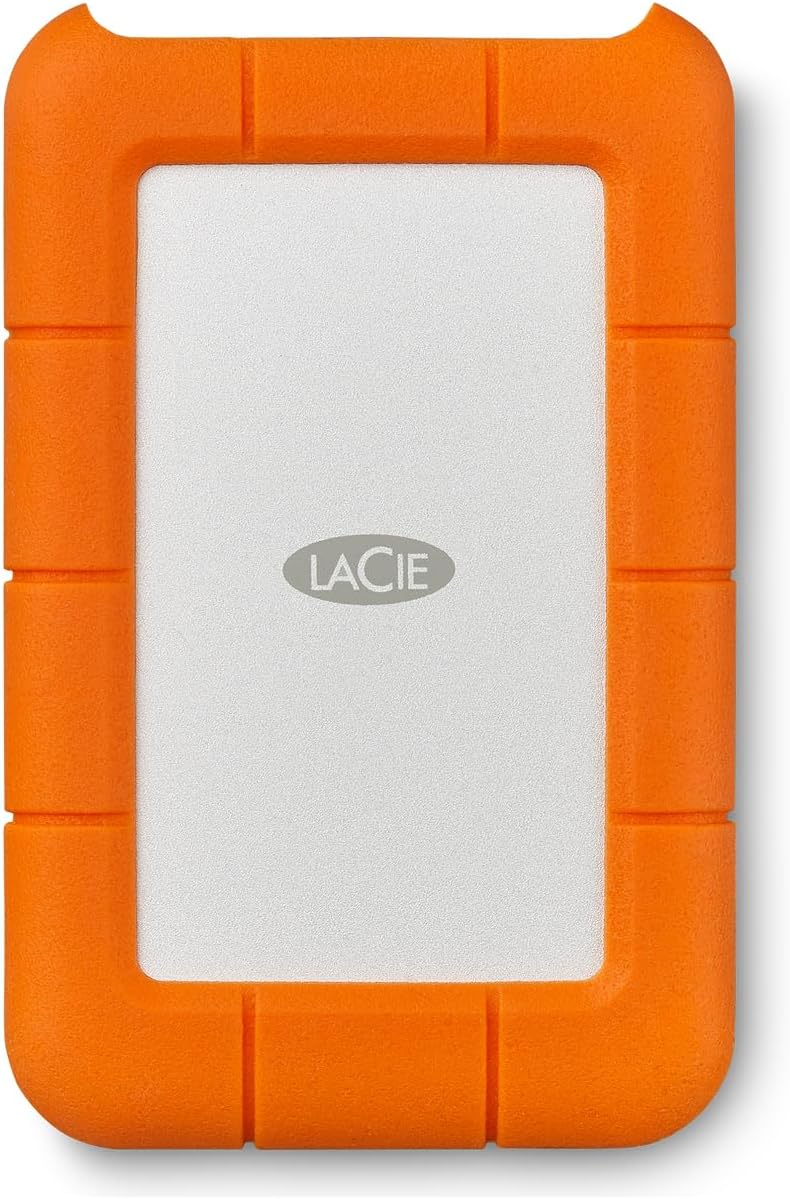
This bundle offers a cost-effective solution for those needing reliable storage with added protection. The drive itself features shock resistance and USB 3.0 speed, while the included case provides extra safety during transport. It is well-suited for personal use and basic backup needs.
We may earn a commission when you buy through this link, at no additional cost to you.
The inclusion of a portable hard drive case is a significant value add for budget-conscious buyers. It helps prevent physical damage when the drive is stored in a bag. The drive supports USB 3.0, which is faster than older USB 2.0 connections, improving transfer times.
Users should note that Mac compatibility may require reformatting the drive. This is a common consideration for external drives but can be an extra step for some. Additionally, it does not support the newest USB-C ports without an adapter.
For those looking for a budget-friendly option with essential protection features, this bundle is a solid choice. It provides good value with the added case and reliable performance for everyday tasks. Verifying compatibility with your devices before purchase is recommended.
The package includes a durable hard drive along with a portable case for enhanced protection and value.
USB 3.0 connectivity ensures data transfers are up to four times faster than USB 2.0.
We may earn a commission when you buy through this link, at no additional cost to you.
This drive is designed for professionals who need extreme speed and large storage capacity. With Thunderbolt connectivity and 5TB of space, it handles large files efficiently. The inclusion of a one-month Adobe Creative Cloud membership adds value for creative professionals.
We may earn a commission when you buy through this link, at no additional cost to you.
Its rugged design ensures durability in demanding environments, protecting data from drops and water. The integrated Thunderbolt cable wraps around the enclosure for convenience. This feature helps prevent loss and keeps the cable organized when not in use.
The price is higher than other models, reflecting its premium features and performance. Some users may find the cable wrapping mechanism less durable over time. However, the overall build and speed justify the investment for those with heavy workflow demands.
If you prioritize speed and capacity in your workflow, this drive is highly recommended. It suits video editors and designers who need reliable, fast storage. Ensuring your computer has Thunderbolt ports is essential for full performance benefits.
Thunderbolt technology delivers high-speed file transfers suitable for demanding creative workflows.
Includes a one-month membership to Adobe Creative Cloud for access to popular editing apps.
We may earn a commission when you buy through this link, at no additional cost to you.
This portable drive combines large capacity with a compact form factor. The 4TB storage allows for extensive backups of photos and videos. Its Data Rescue Service plan provides an extra layer of security for recovering lost or corrupted files.
We may earn a commission when you buy through this link, at no additional cost to you.
The drive is compatible with a wide range of devices including iPad and iPhone. This versatility makes it useful for users with multiple Apple products. The rugged design ensures it can withstand drops and rain during travel.
While it offers great capacity, it relies on USB 3.0 which may not be the fastest option available. Users should be aware of potential compatibility needs with older systems. Overall, it balances portability with substantial storage space effectively.
It is a good choice for users needing mobile storage with data protection features. The Data Rescue Service adds significant value for peace of mind. Checking current prices helps ensure you get the best value for this high-capacity drive.
Includes a Data Rescue Service plan to help recover lost or corrupted files when needed most.
Works seamlessly with PC, Mac, iPad, and iPhone for versatile device support.
We may earn a commission when you buy through this link, at no additional cost to you.
This model offers a substantial 5TB of storage for users needing extensive capacity. The USB-C interface ensures fast data transfers with modern devices. Its rugged design protects against shock and dust, making it reliable for outdoor or travel use.
We may earn a commission when you buy through this link, at no additional cost to you.
The compact and lightweight build makes it easy to carry in a bag. This portability is ideal for professionals who move between work locations. It works seamlessly with both Mac and PC systems, offering broad compatibility.
As a newer option, specific performance ratings may vary or not be fully available. Users should check current reviews for the latest feedback on reliability. The high capacity makes it a strong contender for large file storage.
It is recommended for those prioritizing storage space and durability. The USB-C connectivity ensures future-proofing for newer laptops. Verifying current specifications ensures it meets your specific workflow requirements.
The 5TB storage capacity provides plenty of room for large files, photos, videos, and backups.
Works seamlessly with both Mac and PC, making it a versatile solution for a wide range of users.
We may earn a commission when you buy through this link, at no additional cost to you.
This drive is built for professionals who need to store and send out large amounts of content. With 8TB of capacity, it supports extensive projects. The ability to configure RAID 0/1 allows for optimizing performance or redundancy based on needs.
We may earn a commission when you buy through this link, at no additional cost to you.
Its flat design is unique and makes it easier to pack in gear bags or shipping envelopes. This feature is practical for those who travel often or need to mail drives. Self-encrypting password protection adds a layer of security for sensitive data.
The price is higher reflecting its advanced RAID capabilities and capacity. Setting up RAID may require some technical knowledge for optimal configuration. However, the versatility and storage space make it a valuable tool for demanding workflows.
It is ideal for teams or individuals managing large project files. The flat design offers practical portability in tough environments. Ensuring you understand the RAID features helps maximize its utility for your specific use case.
Easily configure RAID 0/1 to optimize the system for performance or redundancy based on your needs.
Protect projects from unauthorized access with the self-encrypting password system.
We may earn a commission when you buy through this link, at no additional cost to you.
This drive is perfect for connecting to computers with FireWire 800 ports as well as USB 3.0. It offers flexibility for systems that still rely on older interfaces. The daisy chaining feature allows connecting multiple devices efficiently without extra hubs.
We may earn a commission when you buy through this link, at no additional cost to you.
The rugged design ensures all-terrain durability against drops and water. This makes it reliable for use in various environments. The included Adobe Creative Cloud membership adds value for creative professionals looking for software access.
However, FireWire is an older standard which may not be present on newer machines. Users may need adapters if they plan to connect it to modern laptops. It is best suited for specific legacy setups requiring dual connectivity options.
It is a niche choice for those with older workstations. The dual port design provides significant flexibility. Ensuring your system supports these ports before purchase is essential for proper functionality.
The drive features dual FireWire ports and a USB 3.0 port for broad compatibility with older and newer systems.
Daisy chaining capabilities allow for connecting multiple devices in a single chain for efficient setup.
We may earn a commission when you buy through this link, at no additional cost to you.
This drive provides high-speed file transfers and extreme durability for field use. The Thunderbolt interface ensures fast performance for demanding tasks. The integrated Thunderbolt cable wraps around the enclosure for convenient storage when not in use.
We may earn a commission when you buy through this link, at no additional cost to you.
The rugged design protects against drops, dust, and water, ensuring reliability in tough conditions. It includes a three-year limited warranty for long-term peace of mind. The Adobe Creative Cloud membership offers access to popular editing apps for creatives.
While it offers fast speeds, the 1TB capacity may be limited for large projects. The price point is higher due to the Thunderbolt technology. It suits users who prioritize speed and warranty over maximum storage space.
It is ideal for professionals needing quick data access on the go. The warranty coverage adds significant value for long-term use. Verifying your computer has Thunderbolt ports ensures you can utilize its full speed capabilities.
The integrated Thunderbolt cable seamlessly wraps around the enclosure for convenient storage and use.
Enjoy long-term peace of mind with the included three-year limited warranty protection plan.
We may earn a commission when you buy through this link, at no additional cost to you.
This drive offers high capacity with RAID capabilities for data management and performance. It supports Thunderbolt and USB 3.0 for versatile connectivity. The available storage capacity may vary based on configuration and formatting.
We may earn a commission when you buy through this link, at no additional cost to you.
It is suitable for computer systems with Thunderbolt or USB 3.0 ports. The design supports professional workflows requiring reliable external storage. It allows users to optimize for redundancy or speed through RAID settings.
Setting up RAID may require understanding technical concepts which can be a hurdle for some. Ensure your computer has the necessary ports before purchasing. The drive is designed for those needing advanced features in external storage.
It is a strong option for advanced users managing large projects. The RAID functionality adds flexibility to data storage. Verifying current specifications ensures it meets your specific performance requirements.
The drive supports RAID configuration for optimized performance or redundancy based on your workflow needs.
Designed to work with Thunderbolt and USB 3.0 ports for broad professional system support.
We may earn a commission when you buy through this link, at no additional cost to you.
This SSD delivers high-speed data transfer with read speeds of 950 MB/s for fast workflow. The rugged design withstands water and 3m drop resistance for extreme durability. It works with Mac and PC desktop devices for broad usability.
We may earn a commission when you buy through this link, at no additional cost to you.
Data Rescue Service is included to help recover lost data when needed. The portable design makes it easy to carry for on-the-go work. The 1TB capacity is sufficient for many users who need quick access to files.
As an SSD, it is faster but more expensive per TB than traditional hard drives. The 1TB limit may not suit users needing massive bulk storage. The speed and durability make it a premium choice for professional creatives.
It is recommended for users prioritizing speed and reliability over maximum capacity. The build quality ensures safety in harsh conditions. Checking current prices ensures you get the best value for this high-performance drive.
Rugged SSD provides a read speed of 950 MB/s for fast data transfer in demanding workflows.
Includes Data Rescue Service to help recover lost or corrupted files when you need it most.
We may earn a commission when you buy through this link, at no additional cost to you.
Selecting the right storage solution involves considering several key factors to ensure it meets your workflow needs and budget.
Storage capacity is one of the most important factors when choosing an external hard drive. Depending on whether you work with large 4K video files or standard documents, you may need anywhere from 1TB to 8TB. Larger capacities provide more space for backups but often come at a higher price point. Consider your current needs and future growth when deciding on the right size.
For most professionals, a 4TB drive offers a good balance of space and cost. However, if you work with extremely large datasets or multiple projects, an 8TB option might be necessary. Always account for file overhead and system formatting when estimating usable space.
The interface determines how fast data transfers between your computer and the drive. Modern drives use USB-C or Thunderbolt which offer significantly faster speeds than older USB 3.0 or FireWire connections. Check your computer's available ports to ensure compatibility before purchasing.
Thunderbolt drives provide the highest speed for demanding tasks like video editing. USB-C is more widely available on newer laptops and offers fast performance for most users. Older interfaces like FireWire are only suitable for legacy systems.
LaCie Rugged drives are known for their ability to withstand drops, dust, and water. Look for specific ratings regarding drop height and water resistance to understand how well the drive will survive tough conditions. The rubber sleeve design is standard across many models and provides shock absorption.
If you work outdoors or travel frequently, prioritizing a model with high drop and water resistance is essential. These features ensure your data remains safe even in unpredictable environments. The physical build quality directly impacts the longevity of the drive.
Some advanced models offer RAID capabilities which allow you to configure multiple drives for performance or data redundancy. RAID 0 improves speed by splitting data across drives while RAID 1 mirrors data for backup. This feature is useful for professional workflows requiring high reliability.
Setting up RAID requires technical knowledge and may be complex for casual users. Ensure you understand the implications of data loss in RAID 0 before configuring it. This option is typically found in higher-end models designed for professional use.
Certain models include Data Rescue Service plans which assist in recovering lost or corrupted files. This added layer of protection can be invaluable for critical data that cannot be easily recreated. Check if your selected drive comes with this service included.
While no drive is completely immune to failure, having a recovery plan adds peace of mind. These services often require activation and may have specific terms. Consider this feature if your work involves highly important files.
Many drives come bundled with software such as Adobe Creative Cloud memberships or backup tools. These can add significant value to your purchase by providing access to useful applications. Verify the duration and scope of these offers before buying.
Subscriptions are usually time-limited so plan accordingly if you rely on them. The value of included software should be weighed against the drive's performance and capacity. Sometimes the hardware alone is the priority over the bundled extras.
If you need to carry the drive frequently, consider the physical size and weight of the model. 2.5-inch drives are more compact and easier to fit in bags compared to larger desktop models. Look for designs that include cable storage to keep things organized.
A flat or slim profile makes it easier to pack in tight spaces. Portability is a key factor for field work or travel. Ensure the model you choose fits comfortably with your carrying gear.
Warranty terms vary across models with some offering two years and others offering three years. Longer warranties provide better protection against manufacturing defects and failures. Check the specific terms to understand what is covered.
A longer warranty period often reflects confidence in the product quality. This is especially important for drives used in demanding environments where wear and tear is common. Prioritize models with solid support for long-term reliability.
Always safely eject the drive from your computer before unplugging it to prevent data corruption. This ensures all read and write operations are completed before disconnecting the USB or Thunderbolt cable.
Keep the drive in a protective case when transporting it to minimize the risk of physical damage. Even though it is rugged, additional protection helps maintain its integrity over time.
Regularly update your firmware and backup your data to a secondary location. This practice ensures you have a copy of your files in case the primary drive fails.
Most Lacie Rugged drives are compatible with both Mac and PC systems out of the box. However, Mac may require reformatting depending on the default format. Always check the specifications before purchase to confirm compatibility with your OS.
Yes, most Lacie drives are backward compatible with USB 2.0 ports but will operate at slower speeds. For optimal performance, use a USB 3.0 or USB-C port if available on your computer.
If the drive fails, you can use the included Data Rescue Service if applicable. For more severe issues, professional data recovery services may be required to retrieve your files safely.
For video editing, drives with Thunderbolt or USB-C connectivity like the Rugged Thunderbolt models offer the best speed. High capacity options such as 4TB or 5TB are also recommended for large video files.
Yes, LaCie offers the Rugged SSD model which provides faster read speeds and durability. It is ideal for users who prioritize speed over maximum storage capacity.
These drives can be used with consoles that support USB external storage. Ensure the drive is formatted correctly for the console to recognize it for games or media.
Choosing the right Lacie Rugged drive depends on balancing speed, capacity, and budget. Our top picks highlight the best options for different needs from budget bundles to high-speed Thunderbolt models.
Prioritize durability and connectivity based on your workflow. If you work in the field, drop resistance is key. If you edit video, fast interfaces are essential.
Always verify current prices and compatibility before purchasing to ensure you get the best value. Technology changes quickly so checking the latest specs ensures your drive will work with your current setup.