
WALI Computer Monitor Stand for Desk
4.7Editor score
Large metal shelf for devices
Height adjustable ergonomic lifting
Vented holes for airflow
Finding the right laptop rack for desk setups can transform your daily workflow and protect your valuable equipment from heat and clutter. A good stand provides essential elevation for better posture while keeping your workspace tidy and efficient for extended work sessions.
We have carefully evaluated ten top rated models based on stability, material quality, compatibility with various devices, and overall value for money. Each product offers unique features designed to meet different needs ranging from vertical storage to ergonomic lifting solutions for modern professionals.
This guide highlights the standout qualities of each option so you can choose the perfect fit for your specific setup. Please note that pricing and availability may fluctuate over time so always check the latest offers before making your final purchase decision online.
4.7Editor score

4.8Editor score

4.6Editor score
As an Amazon Associate we earn from qualifying purchases.
The following comparison table outlines the key specifications and capabilities of each top rated laptop rack option to help you quickly identify the model that best suits your specific workspace requirements and budget constraints.





The OMOTON Dual Vertical Desk Laptop Stand Holder stands out as the top choice for users needing versatile storage. With an impressive rating of 4.8 stars, it offers a dual dock capable of supporting two laptops simultaneously. This feature is ideal for professionals managing multiple devices like MacBooks or Surface notebooks.
We may earn a commission when you buy through this link, at no additional cost to you.
Its adjustable width ensures compatibility with various laptop thicknesses ranging from 0.55 inches to 1.65 inches. The anodized aluminum build provides a durable and scratch-resistant surface that matches the aesthetic of modern tech. Non-toxic silicone mats protect your devices from scratches while non-slip pads on the base ensure stability.
While the stand requires some desk surface area, the trade-off is worth the enhanced organization and stability it provides. The sandblasted and brushed finish adds a premium touch that complements any workspace environment effectively. This makes it a reliable long-term investment for daily use.
If you frequently work with multiple laptops or need a sturdy solution to keep devices secure, this is the perfect pick. It combines functionality with style to ensure your workspace remains efficient and clutter-free throughout your workday.
Holding two devices at once allows seamless switching between work and personal projects without cluttering your desk surface.
The anodized aluminum construction ensures longevity and resistance to daily wear while maintaining a sleek professional appearance.
We may earn a commission when you buy through this link, at no additional cost to you.
The NODOCA 2-Slot Laptop Storage offers a unique side-mounted design that frees up valuable desktop real estate. Rated at 4.6 stars, it is perfect for those who want to keep their main work area clear. The storage can be adjusted to fit various laptops including MacBook and Surface models.
We may earn a commission when you buy through this link, at no additional cost to you.
Constructed from high-strength carbon steel, this stand provides absolute durability and stability. A standout feature is the built-in hook at the bottom for hanging headphones or controllers. This multifunctional approach helps maintain a tidy workspace without sacrificing accessibility to your accessories.
Installation requires a desk depth greater than 5cm and thickness less than 6cm so check your setup first. However the space-saving benefits are significant for small desks or shared workstations. The silicone protective pad ensures your laptop remains scratch-free during storage.
Ideal for users needing to maximize every inch of desk space, this rack offers practical organization. It keeps devices off the surface while ensuring they are secure and ready for quick access whenever needed.
Mounting on the side of the desk eliminates the footprint usually taken by traditional stands and creating more room for work.
The dedicated hook for headphones adds convenience by keeping cables manageable and preventing tangles on the desk surface.
We may earn a commission when you buy through this link, at no additional cost to you.
The BYMECOST No Drill Under Desk Laptop Mount provides extra storage space without cluttering your top surface. Rated at 4.5 stars, it is ideal for standing desks or standard tables needing more organization. The tray measures 16.7 by 10.1 inches and clips directly to the desktop frame.
We may earn a commission when you buy through this link, at no additional cost to you.
Made of high-quality metal with a powder-coated body, this mount is sturdy and can hold up to 44 pounds. Three openings help route charging cables and keep cords organized for a clean look. The hollow structure maintains good air permeability and heat dissipation for devices stored inside.
Installation is simple with no drilling required making it easy to remove or adjust as needed. Ensure your installation area is at least 20 inches wide and free of crossbars to avoid fit issues. This option is perfect for hiding tech accessories neatly out of sight.
If you want to reclaim your desk space completely, this under-desk solution offers a practical and strong alternative. It keeps essential items secure and hidden while maintaining the aesthetic of your workspace throughout daily use.
Storing items under the desk frees up the main surface for active work and reduces visual clutter significantly.
Integrated openings allow charging cables to pass through easily so wires do not tangle or hang awkwardly.
We may earn a commission when you buy through this link, at no additional cost to you.
The Adjustable Laptop Stand for Desk offers excellent value for users seeking ergonomic benefits without a high cost. Rated at 4.6 stars, it adjusts to a comfortable height and angle to reduce neck fatigue and eye strain. It supports laptops from 10 to 15.6 inches securely.
We may earn a commission when you buy through this link, at no additional cost to you.
Made of sturdy metal, it can support up to 17.6 lbs ensuring reliable performance for most devices. The top features multiple ventilation holes that promote airflow to cool your laptop during operation. Smooth edges and rubber mats protect your device from scratches and sliding effectively.
The foldable design makes it easy to slip into a backpack for business travel or remote work. While the finish may be simpler than premium models, the functionality and durability remain strong. This makes it a practical choice for students or frequent travelers.
For those on a budget who still need reliable ergonomics and cooling, this stand delivers great performance. It ensures your device stays cool and comfortable while keeping your workspace organized and efficient.
Open ventilation holes prevent overheating by allowing air to circulate around the laptop bottom better than flat surfaces.
The foldable design allows you to pack the stand easily in a bag so you maintain ergonomics anywhere.
We may earn a commission when you buy through this link, at no additional cost to you.
The LOXP Adjustable Laptop Stand introduces a 360-degree rotating base that offers exceptional flexibility for viewing angles. With a rating of 4.6 stars, it combines the convenience of a market bracket with the portability needed for travel. The rotating base allows you to orient the laptop to any angle.
We may earn a commission when you buy through this link, at no additional cost to you.
Constructed from one-piece fiber metal material, this stand is durable and stable compared to standard aluminum models. You can freely adjust the height and angle to keep the screen at eye level which reduces body pressure. Non-slip silicone protects the laptop from sliding during use.
It supports laptops up to 16 inches making it versatile for most modern notebooks. The foldable design ensures you can slip it into a backpack easily when traveling for work or leisure. This makes it an ideal companion for people who need ergonomic setups on the go.
If you need a stand that adapts to different seating positions or sharing screens with colleagues, this rotation feature is key. It maintains stability while providing the freedom to adjust your device exactly where you need it.
The rotating base lets you share your screen or turn the laptop easily without moving the entire stand.
One-piece fiber metal construction ensures the stand remains stable even when the base is rotated fully.
We may earn a commission when you buy through this link, at no additional cost to you.
The BESIGN LS03 Aluminum Laptop Stand is designed to elevate your laptop to a perfect viewing level improving your posture. Rated at 4.8 stars, it raises your device by 6 inches helping to reduce neck and shoulder pain. It supports laptops from 10 to 15.6 inches securely.
We may earn a commission when you buy through this link, at no additional cost to you.
Made of premium aluminum alloy, this stand is sturdy and supports up to 8.8 lbs without wobbling. The rubber on the holder hands ensures your laptop stays stable on the stand. Its open design provides good ventilation and airflow to prevent overheating while in use.
The detachable design allows you to assemble it very easily in just three steps. If you need to store it, it folds flat to create extra space on your desk. This feature is ideal for users who prioritize organization and clean workspace aesthetics daily.
For those seeking to improve ergonomics and reduce strain during long work hours, this stand is a top recommendation. It combines simplicity with effective design to keep your device cool and at a comfortable viewing angle.
Elevating the screen by six inches aligns your eyes with the top of the laptop reducing neck strain.
Folding flat when not in use lets you hide the stand away and save valuable desk surface.
We may earn a commission when you buy through this link, at no additional cost to you.
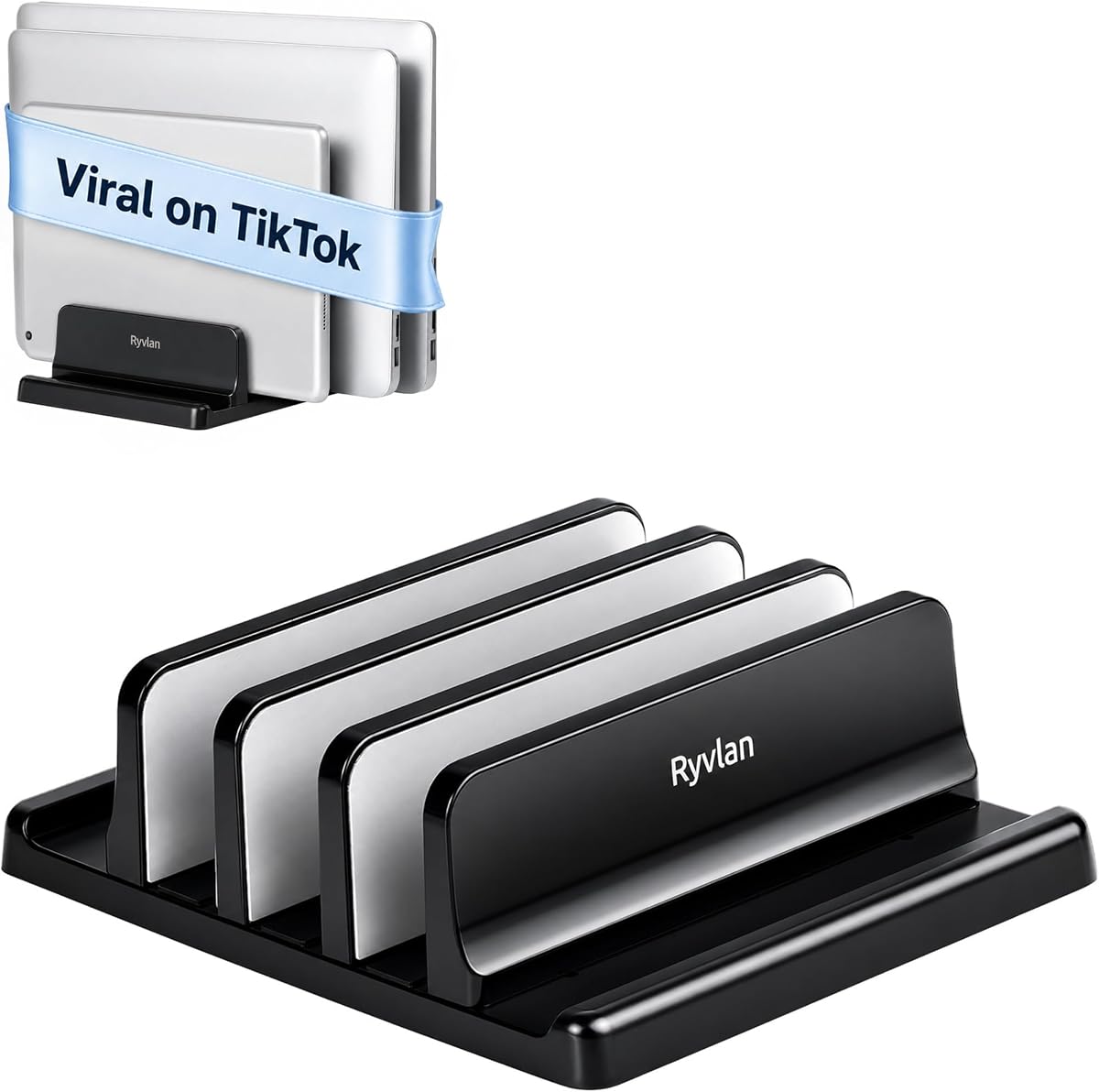
The Ryvlan Vertical Laptop Stand offers a 3-slot design that holds up to 3 laptops plus 2 tablets at once. Rated at 4.6 stars, it clears the whole desk with a single stand making it a true all-in-one organizer. The adjustable width ensures devices from 11 to 17 inches fit snugly.
We may earn a commission when you buy through this link, at no additional cost to you.
Each slot adjusts from 0.47 inches to 1.2 inches allowing both thin and thick gaming machines to sit without wobble. The stand is moulded in impact-resistant ABS with silicone padding across all walls to protect devices. The finish is polished black with minimalist lines that fit modern offices.
Weighing light enough to move but heavy enough to stay put, this stand balances portability with stability. It is perfect for shared workstations where desk space is limited and organization is critical. The small footprint of roughly 7.3 by 5.9 inches keeps clutter low.
If you manage multiple devices including phones or readers alongside your laptop, this organizer simplifies your workspace. It provides a neat and secure place for all your tech within a compact design.
Holding three laptops and two tablets means you can organize your entire tech stack on one small stand.
Silicone padding on all walls prevents scratches and keeps devices stable even when the stand is moved.
We may earn a commission when you buy through this link, at no additional cost to you.
The Vaydeer Vertical Laptop Stand is a 3-in-1 solution that cradles one laptop and phone vertically at the same time. With a rating of 4.6 stars, it builds a neat and organized space for the desk. The adjustable width fits laptops with thickness from 0.55 to 1.69 inches.
We may earn a commission when you buy through this link, at no additional cost to you.
Made of high-quality ABS plastic, it is light but stable enough to prevent your laptop from falling down. The surface is polished repeatedly with a smooth feel and soft silicone mats cover the groove. This setup keeps your devices protected from scratches while saving space.
Its compatibility covers most popular brands like MacBook HP and Dell. The polished finish adds a touch of elegance to your workspace environment. This makes it a thoughtful and practical gift for anyone seeking to reduce clutter effectively.
For those looking for a simple affordable way to store their laptop and accessories vertically, this stand works well. It keeps your tech tidy and accessible without taking up too much room.
Vertical stacking allows you to save desk area while keeping devices easy to access when needed.
The repeated polishing gives the stand a smooth and refined look that blends with office decor.
We may earn a commission when you buy through this link, at no additional cost to you.
The Elestoria 5-Slot Vertical Laptop Stand is a premium option designed to hold up to 4 laptops and one tablet. Rated at 4.6 stars, it elevates your workspace experience with a high grade aluminum finish. It saves valuable desk space while protecting your device from spills effectively.
We may earn a commission when you buy through this link, at no additional cost to you.
You can dock up to four laptops including gaming ones up to 17.3 inches using three sliding brackets. The adjustable width fits most laptops from 0.5 to 1.5 inches. Use the screws on the bottom to adjust for the perfect fit for all four slots separately.
Crafted from solid aluminum alloy with a heavy and stable base, this stand holds laptops upright without tipping. Polished edges and soft silicone padding protect devices from scratches and slipping. The 360-degree airflow keeps devices cool while docked for extended periods.
If you need a robust and stylish solution for organizing multiple devices in a professional setting, this is the choice. It streamlines your tech ecosystem and ensures every laptop is secured securely.
Solid aluminum construction ensures stability even with multiple heavy laptops docked simultaneously on the stand.
Open vertical design allows 360 degree airflow to keep laptops cool without needing extra cooling fans.
We may earn a commission when you buy through this link, at no additional cost to you.
The WALI Computer Monitor Stand provides a large metal shelf that fits most flat screen displays and printers. With a rating of 4.7 stars, it can support up to 44 lbs making it very versatile. The stand raises devices by 3.9 or 5.5 inches for a comfortable viewing position.
We may earn a commission when you buy through this link, at no additional cost to you.
The platform features vented holes to prevent overheating and keep the device running cool. Open space beneath the stand allows storing keyboards and other desk accessories to reduce clutter. Rubber pads prevent slipping or damage to your work surface effectively.
This stand works for single or dual monitor arrangements making it great for home and office desks. The height adjustable design helps reduce stress on the neck and back. It is a practical solution for those needing to elevate larger tech items securely.
If you need a sturdy riser that can handle heavy devices and add storage space below, this model is ideal. It improves ergonomics while maximizing your available workspace efficiently.
Supporting up to 44 lbs allows you to place printers or heavy monitors securely on the shelf.
Open space beneath the shelf lets you slide in keyboards or books to keep the desk surface clear.
We may earn a commission when you buy through this link, at no additional cost to you.
Selecting the right laptop rack for desk setups requires considering several factors including material stability and compatibility.
The material of your rack determines how long it will last and how well it protects your device. Aluminum stands offer a premium look and strong durability while plastic options are lighter and more affordable. Consider the weight of your laptop and choose a material that supports it without wobbling.
Always check reviews for mentions of stability and build quality over time.
Ensure the rack fits your specific laptop dimensions including width and thickness. Some models offer adjustable slots to accommodate different devices while others are fixed. Measuring your laptop before purchase prevents returns and ensures a secure fit.
Look for adjustable width options if you plan to switch devices frequently.
The height and angle of the rack should allow you to view your screen at eye level. This reduces neck strain and improves posture during long work sessions. Adjustable stands offer more flexibility for finding the perfect viewing position.
Prioritize stands that elevate your device by at least 6 inches for best ergonomics.
If you travel for work or move between rooms often a foldable design is essential. Look for lightweight materials that can slip into a backpack easily. Some stands include carrying cases or features that make them easier to transport.
Foldable designs offer the best balance of stability and travel convenience.
Laptops generate heat during operation so a stand with good airflow is crucial. Open designs with ventilation holes help dissipate heat better than solid platforms. This prevents overheating and extends the lifespan of your device battery.
Choose stands with open or vented surfaces for optimal thermal performance.
Non-slip pads and silicone mats protect your laptop from scratches and sliding. Check that the rack includes these protective features to avoid accidental damage. Smooth edges on the stand also prevent cuts or injury during handling.
Always confirm the presence of rubber or silicone padding before buying.
The look of your rack should match your workspace style and personal preference. Sleek aluminum finishes look modern while black plastic fits minimalist setups. A clean design helps reduce visual clutter and improves focus while working.
Pick a color and texture that blends well with your desk and other equipment.
Price varies widely based on material and features so set a budget before shopping. Higher priced stands often offer better durability and more adjustment options. However budget models can still provide good stability and protection if selected carefully.
Compare features across different price points to find the best overall value.
Start by ensuring the rack is placed on a flat stable surface to prevent tipping. If the stand has adjustable parts loosen them to fit your laptop width and tighten them securely.
Clean the stand regularly with a soft dry cloth to remove dust and debris. Avoid harsh chemicals that might damage the finish or protective padding on the slots.
Check the rubber pads and silicone mats periodically for wear and replace them if they lose grip. This ensures your device remains safe from sliding or scratches throughout its lifespan.
Yes many racks are designed to support heavier and thicker gaming laptops. Look for models with high weight capacity and adjustable slots to ensure a secure fit for your specific device.
Most stands allow cables to pass through or have openings for charging cords. Ensure your model includes cable management features to keep wires organized and prevent damage.
Vertical stands save space on your desk but may not be ideal for clamshell mode. Horizontal risers elevate the screen for better ergonomics and are better if you use an external monitor.
Yes stands with open designs and ventilation holes allow air to circulate around the device. This helps dissipate heat more effectively than placing the laptop flat on a surface.
Most models come with simple assembly instructions and require minimal tools. Some stands are detachable or foldable allowing for easy setup and storage in just a few steps.
Only stands with high weight capacity like monitor risers are suitable for this. Check the weight limit of your rack to ensure it can safely support the weight of a monitor.
Many multi-slot stands are designed to hold tablets and phones along with laptops. Look for models with multiple slots or adjustable widths to accommodate different device sizes.
We have explored ten excellent laptop rack for desk options ranging from budget-friendly risers to premium multi-device organizers. Each model offers unique benefits to help you organize your workspace and improve ergonomics effectively.
When choosing prioritize factors like material stability and compatibility to ensure the rack meets your daily needs. Whether you need to save space or improve cooling the right stand will enhance your workflow significantly.
Remember that prices and availability may change so check the latest offers before making your purchase. With the right rack your desk will be tidier more efficient and better suited for long work sessions.