
LGA 1155 Motherboard H61
5.0Editor score
Supports Intel 2nd 3rd Gen
M.2 SSD Interface Included
Dual Channel DDR3 Slots
Discover the top Lga 1155 Motherboard options for 2026. This guide compares features, performance, and compatibility to help you find the perfect board.
Selecting the right Lga 1155 Motherboard is crucial for building a reliable system. You need a board that supports your CPU and offers the necessary slots for your hardware needs.
We evaluated ten top options based on user feedback and technical specifications. Our analysis covers compatibility, expansion slots, and overall build quality for your next build.
Each pick highlights key strengths and potential limitations. Prices may vary, so check current listings before making your final decision on this hardware component.
5.0Editor score

4.0Editor score
4.2Editor score
This table provides a side-by-side view of all ten boards. It highlights key specs like chipset, memory support, and expansion slots for quick comparison.


This H61 motherboard offers a budget-friendly entry into the Lga 1155 platform. It supports Intel Core and Xeon processors effectively. The board includes essential features for basic builds. Users appreciate its straightforward design. It handles DDR3 memory well for daily tasks. This model is ideal for cost-conscious builders looking for reliability.
We may earn a commission when you buy through this link, at no additional cost to you.
The dual-channel DDR3 slots allow up to 16GB of memory. This is sufficient for most general computing needs. The M.2 interface provides modern storage options. It supports both NVME and NGFF standards. This adds flexibility for SSD upgrades. Video output is supported via HDMI and VGA ports. Integrated graphics work well with compatible CPUs.
One trade-off is the lack of a user manual. You may need to search online for guidance. The battery is also not included in the package. You will need to purchase a CR2032 separately. However, these minor issues do not affect performance. The board functions as expected for its price range. Drivers may require manual installation on some systems.
Buyers seeking an affordable upgrade for older systems should consider this. It works well for office PCs or media centers. The compatibility with Xeon CPUs is a major plus. This makes it versatile for specific server-like tasks. If you need a simple reliable board, this is a strong choice. Check compatibility with your specific CPU model before purchasing.
The M.2 slot supports both NVME and NGFF SSDs for faster boot times.
Works with 2nd and 3rd Gen Intel Core as well as Xeon E3 series.
We may earn a commission when you buy through this link, at no additional cost to you.
The MACHINIST H61 is designed for smaller cases with its Flex-ATX form factor. It offers gaming-oriented features despite its budget price. The board supports modern storage via M.2. Users find the troubleshooting tips helpful. It works with various Intel generations effectively. This makes it a flexible choice for mini builds.
We may earn a commission when you buy through this link, at no additional cost to you.
Its M.2 interface allows for high-speed NVME SSDs. This improves system responsiveness significantly. The DDR3 slots support up to 16GB. This is adequate for gaming and multitasking. The 100M LAN is standard for this price tier. Video output supports 1080P without a dedicated GPU. It is suitable for casual gaming setups.
The LAN speed is limited to 100M which might lag behind gigabit needs. Also the battery is not included with the unit. You need to source this separately. These factors are acceptable given the low cost. The board remains stable under normal loads. Driver installation may require some patience.
This board suits those building compact systems on a budget. The support for Xeon CPUs expands its utility. If you need a small form factor board this fits. The included tips help with initial setup issues. It is a practical option for entry-level enthusiasts. Verify your case dimensions before buying to ensure fit.
The Flex-ATX layout fits into smaller cases than standard ATX boards.
Supports 1080P HDMI output for basic display needs without a GPU.
We may earn a commission when you buy through this link, at no additional cost to you.
The Gigabyte Z77-DS3H brings the Z77 chipset to the table. This offers better performance and features than H61 boards. It supports overclocking with compatible processors. The Gigabit LAN ensures fast network speeds. Users appreciate the RAID support for data safety. It is a robust choice for mid-range builds.
We may earn a commission when you buy through this link, at no additional cost to you.
RAID support allows you to combine drives for speed or safety. This is a feature often missing on budget boards. The ATX size fits most standard cases easily. Connectivity includes necessary ports for most peripherals. The Z77 chipset handles multiple graphics cards well. It remains a solid platform for older Intel CPUs.
Modern USB 3.0 availability might be limited compared to newer boards. Some ports may rely on SATA speeds for data transfer. This does not impact general system usage significantly. The board remains stable for daily tasks. Compatibility with 3rd Gen CPUs is excellent. It is a great find for collectors or upgraders.
Consider this if you need RAID or overclocking features. The Gigabit LAN is a key advantage for network users. It offers a balance of features and price. The brand reputation adds confidence in durability. This board is well-suited for custom PC builds. Ensure your CPU supports the features you need.
Gigabit LAN provides faster internet speeds than older 100M standards.
RAID support allows for redundant storage configurations.
We may earn a commission when you buy through this link, at no additional cost to you.
The ASUS P8Z77-V stands out with its Wi-Fi GO! features. This allows remote control and media management. The USB BIOS Flashback simplifies updates significantly. Users benefit from the SMART DIGI+ Power Control. It ensures stability and efficiency. This board is a top choice for tech enthusiasts.
We may earn a commission when you buy through this link, at no additional cost to you.
Remote management lets you control your PC from afar. This is useful for media centers or servers. The BIOS Flashback avoids needing a CPU for updates. It saves time during troubleshooting. RAM support goes up to 2400MHz for performance. The TPM header adds security layers for your data.
Some features like Wi-Fi GO! may not be needed by everyone. The price is higher than standard H61 boards. However the utility of these features justifies the cost. The build quality is durable and long-lasting. Drivers are easy to find online. It offers a polished user experience overall.
Choose this if you want advanced features and convenience. The remote control aspect is unique for this era. It is perfect for home theater or office setups. The security features are a bonus for business users. This board provides a premium experience. Verify your case supports the ATX size before buying.
Wi-Fi GO! allows you to manage your system from another device.
USB BIOS Flashback lets you update firmware without a CPU.
We may earn a commission when you buy through this link, at no additional cost to you.
This H61 Gaming ATX board offers solid performance for the price. It uses all solid-state capacitors for stability. The M.2 NVMe slot adds modern storage speed. Users find the USB port count generous. It supports common Intel CPUs effectively. This makes it a reliable pick for everyday tasks.
We may earn a commission when you buy through this link, at no additional cost to you.
The 3-phase power supply ensures consistent voltage delivery. This helps maintain system stability during long sessions. Six USB 2.0 ports accommodate many peripherals. The PCIe 3.0 x16 slot supports graphics cards well. M.2 support bridges the gap for older boards. It is a practical choice for budget gamers.
USB 3.0 support might be limited to specific ports. You may need to use adapters for newer drives. The lack of a manual requires online research. These are minor issues for the value provided. The board is stable and performs well. Installation is straightforward with standard components.
Buyers looking for a balance of price and features will like this. The NVMe support is a standout for a H61 board. It works well for office PCs or gaming. The ATX size fits most cases easily. Check your CPU compatibility before purchasing. It is a strong contender for budget builds.
3 phase power design ensures consistent voltage for stable operation.
M.2 NVMe slot allows for faster SSD speeds.
We may earn a commission when you buy through this link, at no additional cost to you.
The P8H77-V LE focuses on efficiency and stability. DIGI+ VRM technology ensures precise power delivery. The EPU saves energy during low load. Users enjoy the USB 3.0 Boost speeds. It is a good choice for quiet systems. The board delivers reliable performance daily.
We may earn a commission when you buy through this link, at no additional cost to you.
Energy saving features help reduce power bills. This is great for systems running 24/7. The USB 3.0 Boost improves transfer rates. Fan Xpert adjusts speeds for noise control. HDMI support adds video versatility. It is well-suited for office environments.
The LE version may lack some premium features of the standard model. It is not ideal for extreme overclocking. However for standard use it is excellent. The board remains cool under normal loads. Connectivity is sufficient for most needs. It is a solid pick for efficiency seekers.
Choose this if you value low power consumption. The fan control is useful for noise-sensitive areas. It works well for home or office PCs. The brand reliability adds to its appeal. Ensure you need the specific features it offers. It is a practical option for general computing.
EPU technology automatically reduces power use when load is low.
USB 3.0 Boost maximizes read write performance instantly.
We may earn a commission when you buy through this link, at no additional cost to you.
This model offers a mix of SATA3 and SATA2 ports. This flexibility helps connect various drives easily. RAID support is included for data management. Users like the PCIe 3.0 slot for GPUs. It is a robust board for multi-drive setups. The HDMI output supports video well.
We may earn a commission when you buy through this link, at no additional cost to you.
The combination of SATA speeds allows optimization. You can place OS on SATA3 for speed. The RAID options add redundancy for safety. PCIe 3.0 ensures graphics cards perform well. It is a strong contender for storage-focused builds. The board supports standard CPU ranges.
The price is higher than H61 options. Older architecture may limit future compatibility. However for current needs it works well. The build quality is consistent with the brand. It is a reliable choice for office PCs. Ensure your case supports the ATX dimensions.
Consider this if you need multiple storage drives. The RAID support is valuable for data safety. It is good for home servers or media centers. Connectivity options are plentiful for peripherals. It is a solid investment for specific needs. Check current availability before deciding.
Mix of SATA3 and SATA2 ports allows optimized drive placement.
RAID support protects data against drive failures.
We may earn a commission when you buy through this link, at no additional cost to you.
The P8Z77-V LK supports dual PCIe 3.0 x16 slots. This allows for multi-GPU configurations easily. The RAM capacity goes up to 32GB. Users appreciate the Z77 chipset features. It is a strong choice for power users. The board handles high loads effectively.
We may earn a commission when you buy through this link, at no additional cost to you.
Dual GPU support is rare for this price tier. You can use multiple cards for rendering or gaming. The high RAM limit supports heavy workloads. SATA3 ports ensure fast storage speeds. It is a great option for custom rigs. The board remains stable under stress.
Setting up dual GPUs can be complex. Older tech may not support new standards. However for existing builds it is powerful. The brand ensures quality construction. It is a solid pick for enthusiasts. Check case width for GPU clearance.
Buyers wanting GPU flexibility should look here. The RAM support is excellent for editing tasks. It is a great choice for advanced setups. The Z77 features are fully utilized. Ensure you have compatible components before buying. It is a versatile board for demanding users.
Dual PCIe 3.0 slots allow for two graphics cards simultaneously.
Supports up to 32GB of RAM for heavy multitasking.
We may earn a commission when you buy through this link, at no additional cost to you.
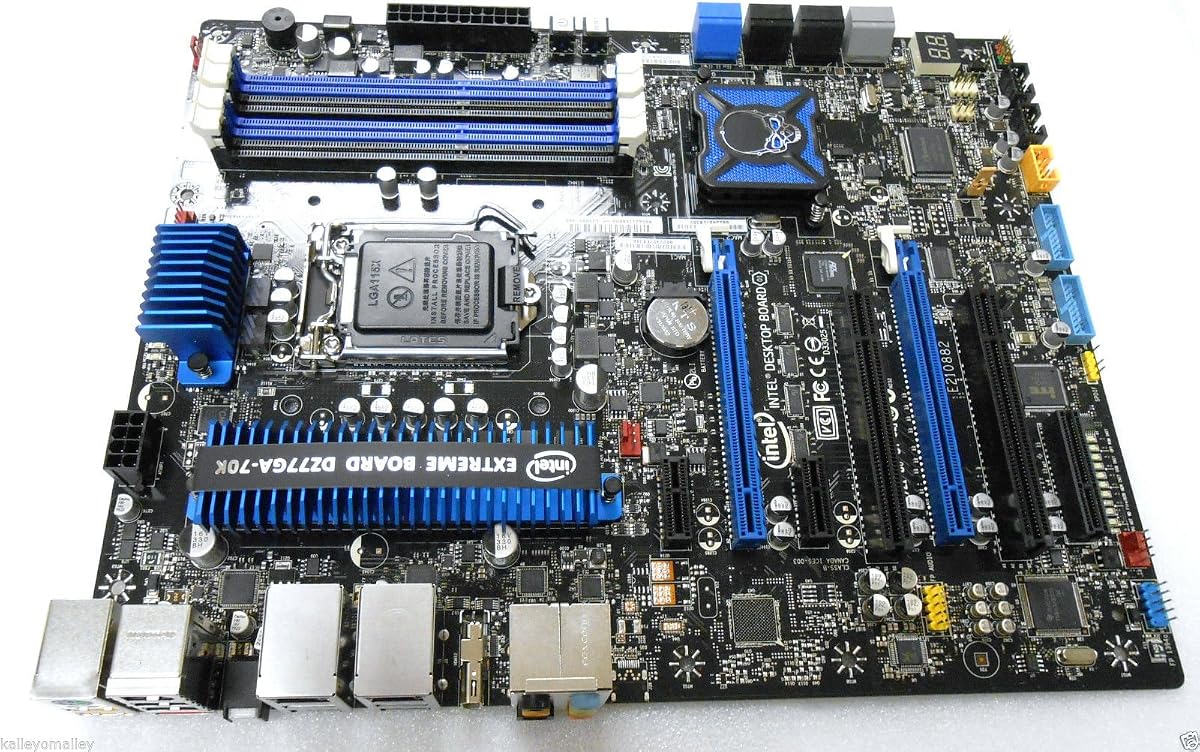
The Intel Z77 Extreme Series stands as a premium option. It features dual Gigabit LAN ports for networking. Firewire and e-SATA add legacy connectivity. Users value the SATA 6Gb/s support. This is a high-end choice for professionals. The build quality is exceptional.
We may earn a commission when you buy through this link, at no additional cost to you.
Dual LAN allows for better network throughput. This is useful for server-like applications. Firewire support caters to specific media workflows. The SATA speed ensures fast data access. It is a robust board for specialized tasks. The Z77 chipset handles overclocking well.
Availability is limited and prices may be higher. Some ports are legacy and may need adapters. However for specific needs it is unmatched. The brand reliability is a plus. It is a great choice for enthusiasts. Check component availability before buying.
Choose this for professional or specialized builds. The connectivity options are superior to standard boards. It is a great find for legacy systems. Ensure your case supports the ATX size. It is a top choice for specific connectivity needs.
Dual Gigabit LAN provides backup network paths.
Firewire and e-SATA support specialized old peripherals.
We may earn a commission when you buy through this link, at no additional cost to you.
The P8B75-M/CSM is designed with business features. It uses UEFI BIOS for easier management. Energy saving features keep costs low. Users appreciate the GPU Boost tech. It supports USB 3.0 for speed. This is a stable choice for offices.
We may earn a commission when you buy through this link, at no additional cost to you.
UEFI GUI makes BIOS changes intuitive. The EPU saves energy effectively. GPU Boost enhances graphics performance. USB 3.0 Boost improves data transfer. The board is durable for long use. It is a reliable pick for daily tasks.
MicroATX size limits expansion card slots. This may not suit large rigs. However for standard PCs it is ideal. The brand ensures quality and support. It is a solid option for business use. Check case compatibility for the form factor.
Consider this for professional office deployments. The management features simplify IT tasks. It works well for standard workstations. Ensure your case fits MicroATX boards. It is a practical choice for small businesses.
UEFI BIOS GUI simplifies system setup and changes.
Energy saving features reduce operational costs over time.
We may earn a commission when you buy through this link, at no additional cost to you.
Selecting the right board depends on your specific needs and budget. Consider these factors carefully before making a purchase.
The chipset determines features like overclocking and RAID support. Z77 boards offer the most features while H61 boards are budget-friendly. Choose based on your need for advanced capabilities.
Select Z77 for performance and H61 for basic tasks.
Standard ATX boards fit most cases but take more space. Flex-ATX or MicroATX options save space but may have fewer ports. Match the size to your case dimensions.
Ensure your case supports the board size for proper fit.
All boards support DDR3 memory but capacities vary. Look for boards supporting 16GB or more for future-proofing. Check max speed compatibility with your CPU.
Prioritize 16GB capacity and compatible speeds for performance.
Modern needs may require M.2 slots for fast SSDs. Not all older boards have this feature. If you need NVMe storage check for M.2 support on the board.
Look for M.2 slots if you plan to use high-speed SSDs.
Count the USB ports and SATA slots you need. Some boards have fewer ports which may limit expansion. Check for HDMI or VGA based on your display needs.
Verify you have enough USB and video ports for your setup.
Higher-end boards have better power delivery for stable performance. Look for solid capacitors and phase design. This ensures longevity and system stability.
Choose boards with quality components for long-term reliability.
Ensure the board supports your specific generation. Some boards may need BIOS updates for newer CPUs. Check the manufacturer list for supported processors.
Verify CPU compatibility list before purchasing the board.
Prices vary widely from basic to premium boards. Decide how much you need to spend on performance features. Balance cost with necessary capabilities for your build.
Set a budget that covers necessary features without overspending.
Install the motherboard in a static-free environment. Use the provided standoffs to secure it to the case. Ensure all power cables are connected correctly.
Update the BIOS if needed for CPU compatibility. Use the USB Flashback feature if available on your model. This prevents boot issues with newer processors.
Keep the system clean to prevent dust buildup. Use compressed air to clean fans and ports regularly. Proper airflow extends the lifespan of all components.
Most Lga 1155 boards support 3rd Gen CPUs. Some may require a BIOS update for full compatibility. Check the product page for specific CPU support lists before purchasing.
No, all Lga 1155 boards support DDR3 memory only. You cannot install DDR4 RAM as the slots are different. Ensure you buy compatible DDR3 modules for your system.
Z77 boards allow overclocking and offer more features. H61 boards are basic budget options without overclocking. Choose Z77 if you need advanced performance features.
Some models include M.2 slots that support NVMe drives. Check the product specifications for M.2 support. Not all older boards have this modern storage feature.
Most digital listings do not include a physical manual. You can usually download the guide online. Check the product details for support resources.
Yes, Z77 boards are suitable for gaming setups. You can pair them with dedicated graphics cards. Ensure your power supply meets your GPU needs.
Most boards support up to 16GB of DDR3 RAM. Some models like P8B75 support up to 32GB. Check your board model for exact limits.
We reviewed ten top options for the Lga 1155 platform. The P8Z77-V leads for features while H61 boards offer budget value. Choose based on your specific performance needs.
Prioritize features like M.2 support and USB 3.0. Consider the chipset for overclocking if you need performance. Ensure your case matches the form factor.
Prices may fluctuate on the open market. Check current listings before finalizing your purchase. Verify compatibility with your CPU for a smooth build.