
TP-Link ER605
4.4Editor score
Five Gigabit Ports
USB WAN Backup Support
Advanced Security Features
Discover the top load balancing routers for 2026. We compare features, performance, and security to help you choose the best network solution for your needs.
Finding the right load balancing router ensures your network stays online even if one internet connection fails. These devices distribute traffic across multiple WAN links to maximize bandwidth and reliability for businesses and advanced users.
We evaluated ten top models based on port flexibility, security features, VPN support, and ease of management. Our analysis covers everything from budget-friendly options to high-performance enterprise gateways designed for demanding environments.
Each pick highlights key strengths and ideal use cases so you can match hardware to your specific network demands. Note that pricing and availability change frequently, so check current listings before making your final purchase decision today.
4.4Editor score

4.7Editor score

4.0Editor score
This side-by-side comparison breaks down the technical specifications and unique capabilities of each router. Use this table to quickly identify which model offers the right mix of ports, speed, and features for your setup.


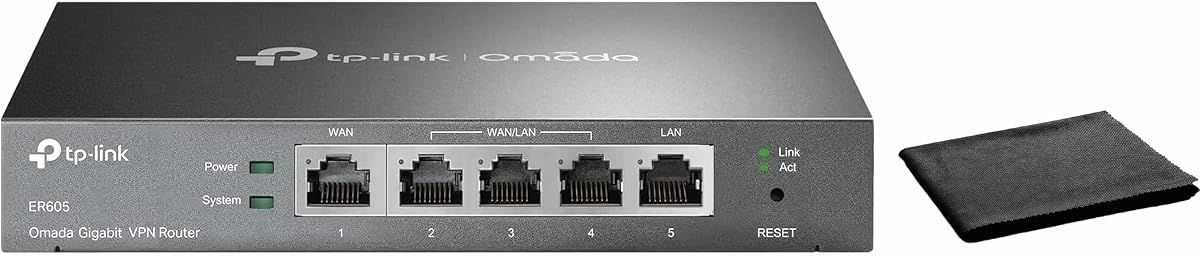

The TP-Link ER605 stands out as an affordable entry point into load balancing routing. With a 4.4 star rating, it delivers reliable performance for small offices needing redundant internet connections without breaking the bank.
We may earn a commission when you buy through this link, at no additional cost to you.
Its five Gigabit ports allow flexible WAN/LAN configuration while supporting USB broadband for failover. Advanced security features like DoS defense and IPsec VPNs protect data without requiring additional hardware investments.
While it lacks newer 2.5G speeds, the Gigabit throughput suits most standard business applications. The web interface is intuitive, though power users may find advanced customization limited compared to open-source alternatives.
This router is ideal for small businesses prioritizing cost-effective redundancy. If you need stable load balancing with basic security features, the ER605 offers excellent value for the price.
Connect up to three WAN ports simultaneously to maximize bandwidth usage across multiple ISPs for better reliability.
Built-in SPI firewall and VPN support ensure secure remote access without needing third-party security appliances.
We may earn a commission when you buy through this link, at no additional cost to you.
The ER7206 offers professional-grade features for growing networks. Its 4.5 star rating reflects robust performance in handling large client counts and seamless integration with the Omada SDN platform.
We may earn a commission when you buy through this link, at no additional cost to you.
Up to four WAN ports enable complex load balancing scenarios while cloud access simplifies multi-site management. The hardware supports up to 700 clients simultaneously, making it suitable for mid-sized enterprises.
Users should note that full SDN benefits require compatible controllers, which adds cost. Standalone mode works but limits centralized management capabilities compared to managed ecosystems.
Choose this model if you plan to expand your network with Omada access points. The scalability and centralized control make it a solid investment for businesses anticipating growth.
Integrate seamlessly with Omada hardware for centralized control across multiple sites via cloud or local controllers.
Advanced firewall policies and DoS defense protect your network perimeter against common threats and attacks.
We may earn a commission when you buy through this link, at no additional cost to you.
The Cudy R700 appeals to tech-savvy users wanting open-source flexibility. Its 4.4 rating highlights successful implementation of load balancing with automatic failover to keep networks online during outages.
We may earn a commission when you buy through this link, at no additional cost to you.
OpenWRT support enables custom QoS and firewall rules unavailable on stock firmware. The device includes WireGuard and IPsec, allowing flexible site-to-site connections without extra gateways.
While the community packages offer power, they require technical knowledge to configure properly. Users unfamiliar with Linux-based networking might find the default interface more limiting than proprietary systems.
This router is perfect for home labs or small offices needing granular control. If you value customization over plug-and-play simplicity, the R700 delivers enterprise-grade features at an accessible price.
Unlock VLAN segmentation and custom firewall rules through full OpenWRT compatibility for professional management.
Built-in WireGuard and IPsec support allows secure remote access without purchasing additional security hardware.
We may earn a commission when you buy through this link, at no additional cost to you.
The Alta Labs Route10 targets advanced users needing extreme bandwidth. Despite a 4.0 rating, its 10G capabilities and Qualcomm hardware acceleration deliver consistent performance for heavy workloads and virtualization.
We may earn a commission when you buy through this link, at no additional cost to you.
Two SFP+ ports and 2.5G Ethernet connections future-proof your network. Integrated PoE+ allows powering access points directly, reducing clutter while real-time stats provide deep visibility into traffic patterns.
The lack of Wi-Fi means you must pair it with separate access points. This design choice prioritizes wired performance but adds complexity for those wanting an all-in-one solution.
Ideal for power users or small data centers, this router maximizes wired throughput. If you require enterprise-grade reliability and speed without wireless distractions, the Route10 is a top contender.
Quad-Core Qualcomm hardware ensures low latency and fast packet processing for multi-gigabit workloads.
Select ports provide PoE+ output to power network devices directly through Ethernet cables without extra adapters.
We may earn a commission when you buy through this link, at no additional cost to you.
The ER7412-M2 bridges multi-gigabit needs with enterprise security. Its 4.5 star rating reflects high customer satisfaction with its capacity to handle up to 11 WAN connections for optimized bandwidth.
We may earn a commission when you buy through this link, at no additional cost to you.
Integrated IPS and DPI protect against sophisticated threats while WireGuard offers fast encrypted tunnels. The SDN compatibility ensures centralized control across your entire network infrastructure seamlessly.
Users outside the Omada ecosystem may find limited benefits compared to standalone devices. Configuration can be complex for beginners relying on the controller-based management approach.
Best for mid-to-large businesses already using Omada APs, this router delivers speed and security. If you prioritize multi-gigabit performance with strong threat protection, this model fits well.
Two 2.5G ports enable faster wired throughput for modern high-speed internet and local network demands.
DPI and IPS/IDS features defend against intrusions while maintaining high-speed network performance.
We may earn a commission when you buy through this link, at no additional cost to you.
The TL-R470T+ is a budget-friendly option for small internet cafes or offices. With a 4.2 rating, it handles basic multi-WAN tasks efficiently despite older 10/100M hardware limitations.
We may earn a commission when you buy through this link, at no additional cost to you.
Features like PPPoE server support and bandwidth allocation help manage multiple clients effectively. The small case saves desk space making it ideal for compact setups with limited traffic needs.
Gigabit speeds are not available which limits future-proofing for modern high-speed connections. DoS protection exists but is basic compared to newer models with advanced threat detection.
This router suits very small businesses needing simple redundancy. If cost is the main concern and Gigabit speeds are not critical, this model provides essential load balancing capabilities.
Extensive client accounts and network management help administrators control access and resources easily.
Smaller case and lower price make this an ideal solution for budget constrained small office networks.
We may earn a commission when you buy through this link, at no additional cost to you.
The TL-R480T+ remains a popular choice for basic broadband balancing. Its 4.2 rating suggests solid reliability for users needing straightforward WAN failover without complex configurations.
We may earn a commission when you buy through this link, at no additional cost to you.
Three configurable ports allow flexible network topology adaptation. The hardware is stable and requires minimal maintenance over time making it ideal for static environments.
Compared to newer models, it lacks Gigabit speeds and modern security features. It serves well as a secondary router where advanced traffic shaping or deep packet inspection is unnecessary.
This device is best for simple home labs or tiny offices. If you just need to combine two connections reliably without frills, this model delivers consistent performance.
Three configurable WAN/LAN ports allow you to adapt the router to various network layouts easily.
Reliable load balance function ensures traffic distribution across available broadband links for better uptime.
We may earn a commission when you buy through this link, at no additional cost to you.
The ER-605 simplifies dual-WAN setups with a user-friendly interface. With a 4.3 rating, it offers solid performance for small businesses needing reliable load balancing and secure remote access.
We may earn a commission when you buy through this link, at no additional cost to you.
Bandwidth management tools ensure critical apps get priority during congestion. Cloud monitoring lets you check status remotely without needing constant physical access to the device.
Unlike ER605, this version restricts WAN count to two which may limit redundancy options. Setup is intuitive but power users might want more customization over traffic rules.
Choose this for straightforward dual-ISP connections. If you value easy management and cloud oversight over maximum WAN flexibility, this router meets small office needs well.
Intelligent QoS settings ensure critical applications receive optimal performance during high traffic periods.
Centralized cloud monitoring provides real-time status checks and configuration from anywhere at any time.
We may earn a commission when you buy through this link, at no additional cost to you.
The EdgeRouter 4 is renowned for its powerful Ubiquiti software. Its 4.6 rating reflects satisfaction among professionals who value granular control and silent operation without fans.
We may earn a commission when you buy through this link, at no additional cost to you.
Three Gigabit ports plus SFP allow flexible WAN/LAN configurations. The compact design mounts easily on walls or racks making it suitable for server rooms or clean office environments.
Configuration requires familiarity with Ubiquiti's interface or UniFi adoption. Users seeking simple plug-and-play might find the learning curve steep compared to consumer-grade routers.
This router is ideal for IT professionals needing control. If you want silent performance and professional tools without unnecessary bloat, the EdgeRouter 4 is a strong choice.
Fanless design ensures quiet operation making it perfect for noise-sensitive environments like offices.
Three Gigabit ports plus SFP enable versatile fiber or copper WAN connections for reliability.
We may earn a commission when you buy through this link, at no additional cost to you.
The Omada Fusion 2.5G leads the list with a 4.7 rating. It combines modern 2.5G ports with a touchscreen for on-site insights making it ideal for contemporary business environments.
We may earn a commission when you buy through this link, at no additional cost to you.
Bluetooth adoption and batch device discovery simplify deployment significantly. The quad-core CPU handles heavy traffic without lag ensuring smooth performance during peak usage times.
The touchscreen offers health scores and alerts without needing a laptop. While Omada APs are needed for full features, the standalone router is robust for wired traffic management.
This is our top pick for modern scalability. If you need fast wired performance with intuitive monitoring, this router delivers the best overall value for businesses.
The 2.51 touchscreen provides instant health scores and traffic insights without needing a laptop.
Bluetooth discovery allows quick deployment and batch adoption of other Omada devices seamlessly.
We may earn a commission when you buy through this link, at no additional cost to you.
Selecting the right load balancing router involves evaluating port speed, WAN count, and management features. Here are key factors to consider before making your purchase.
Ensure the router supports enough WAN ports to connect multiple ISPs simultaneously. Look for models offering flexible WAN/LAN configurations to adapt to changing network needs.
More WAN ports provide better redundancy and load balancing capabilities for critical business uptime.
Check if the router supports Gigabit or Multi-Gigabit speeds like 2.5G or 10G. Higher throughput ensures your network won't bottleneck even when load balancing multiple high-speed connections.
Choose speed tiers that match your ISP plan to maximize internet performance and internal transfer rates.
Look for integrated firewalls, intrusion prevention, and VPN protocols like WireGuard or IPsec. Secure remote access is essential for maintaining productivity outside the office.
A robust security stack protects sensitive data without requiring additional security appliances or costs.
Evaluate whether you prefer web interfaces, mobile apps, or cloud-based controllers. Centralized management simplifies monitoring across multiple sites or users.
Choose a management style that fits your technical expertise and administrative workflow requirements.
Automatic failover ensures traffic shifts instantly if one ISP drops. This feature is critical for businesses that cannot afford downtime during internet outages.
Reliable failover logic keeps your network accessible 24/7 without manual intervention from staff.
Consider future growth when choosing a router. Models compatible with ecosystem products like APs allow you to expand seamlessly without replacing the gateway later.
Scalable designs protect your investment by adapting as your organization grows over time.
Balance features against price to find the best value. Entry-level models offer basic redundancy while premium routers provide advanced traffic shaping and high throughput.
Set a realistic budget that covers necessary features without overspending on unused enterprise capabilities.
Begin by connecting your ISP modems to the designated WAN ports on the router. Configure each WAN connection with your provider's settings such as static IP, PPPoE, or DHCP.
Once WAN links are active, set up load balancing rules to distribute traffic evenly. Enable failover settings so the router automatically switches traffic if a link fails unexpectedly.
Regularly update firmware to ensure security patches and new features are applied. Monitor traffic stats through the interface to identify bottlenecks or anomalies early.
A load balancing router distributes internet traffic across multiple broadband connections. This ensures better speed and reliability since if one connection drops, traffic reroutes automatically to others.
Yes, advanced users can use load balancing at home. It requires multiple ISP subscriptions and a router supporting multi-WAN configurations to distribute traffic effectively.
Most routers use standard Ethernet cables for WAN/LAN connections. Ensure cables support your speed tier like Cat5e for Gigabit or Cat6 for higher speeds to prevent bottlenecks.
Load balancing splits traffic across active connections simultaneously while failover waits for one to drop before switching. Many routers offer both features for redundancy and speed.
Setup varies by model. Some offer guided wizards while others need manual configuration. Familiarity with networking concepts helps streamline the process significantly for users.
Yes but you usually need separate accounts or modems for each. Providers often assign unique IPs per line which the router uses to distinguish and balance traffic effectively.
Cloud management allows remote control from anywhere while local interfaces offer privacy. Choose based on whether you need to manage multiple sites or prefer on-premise control.
Update firmware when manufacturers release security patches. Check monthly for updates or enable auto-updates if available to protect against vulnerabilities and ensure stability.
We highlighted top options like the ER605 for budget and the Fusion 2.5G for modern performance. Each model serves different needs ranging from small offices to advanced enterprise environments.
Prioritize features like WAN count, port speed, and security based on your specific network goals. The right router ensures uninterrupted service and optimized bandwidth for all connected devices.
Always check current pricing and availability as they change frequently. Verify that the chosen model supports your ISP hardware before finalizing your purchase decision today.